I've been stuck trying to find...

tpod

New member
Local time
7:02 AM
Messages
18
Location
Rockford, IL
the user icon image folder on my computer. I'm wondering where to find the pictures where I can set my account picture to. sure I can change it and just print screen the pic to save the one I want, but I'd like to know where to find it. I run Windows 7 on a HP laptop. can anyone help me with this?
 

My Computer My Computer

OS
n/a
C:\ProgramData\Microsoft\User Account Pictures\Default Pictures
 

My Computer My Computer

Computer Manufacturer/Model Number
HP dv6519tx
OS
Windows 7 Ultimate x64
CPU
1.80 GHz Intel Core 2 Duo processor T7100
Memory
3 gig ddr2
Graphics Card(s)
NVIDIA GeForce 8400M GS
Sound Card
Realtek High Definition Audio
Monitor(s) Displays
15.4” WXGA High Definition BrightView Widescreen
Screen Resolution
1280 x 800
Hard Drives
Hitachi 320 GB (5400 rpm)
PSU
90 W AC Power Adapter
Cooling
Kitchen plate under the lappy
Keyboard
101 key compatible
Mouse
Touch Pad with On/Off button and dedicated vertical Scroll
Internet Speed
Three Wireless internet prepaid using E160G USB dongle
Goto control panel - user accounts and click change picture OR
Click Start - Click on the user pic

A snip for u..
 

Attachments

  • user.PNG
    user.PNG
    17.7 KB · Views: 4

My Computer My Computer

Computer Manufacturer/Model Number
MacBook Pro
OS
Lion
CPU
i5
Memory
4GB
Graphics Card(s)
Intel
Screen Resolution
1200x800
Hard Drives
Seagate FreeAgent GO 250GB Ext. HDD
C:\ProgramData\Microsoft\User Account Pictures\Default Pictures

thank you, it helped but I still couldn't find the picture I was looking for.

Goto control panel - user accounts and click change picture OR
Click Start - Click on the user pic

A snip for u..

I know how to change the account pic. I was just wondering where I could find the one I was using which by the way is this:

hpimage.jpg


I was wondering where I could find that in the computer. but I can't seem to find it, not even in the default picture folder.
 

My Computer My Computer

OS
n/a
That icon is not a standard "Microsoft" icon, so if it's not in this folder....

C:\ProgramData\Microsoft\User Account Pictures\Default Pictures

It could be anywhere. So if you downloaded it, you'll need to remember where you put it, or where it is the system builder put it.

BTW have you checked you "Documents" folder? Or your "Picture" folder? It could be there.

The other thing you could do is a generic search for jpg or bmp in the "Start" then "Search programs and files" box.

Good luck.
 

My Computer My Computer

Computer type
PC/Desktop
Computer Manufacturer/Model Number
Custom built by me.
OS
Windows 10 Pro
CPU
Intel Core i7-4770K (3.5Ghz)
Motherboard
Gigabyte G1 Sniper 5 (F10 Bios)
Memory
32 gig Corsair Dominator Platinum (4x8Gig)
Graphics Card(s)
Sapphire Tri-X R9 Fury
Sound Card
Soundblaster ZXR
Monitor(s) Displays
NEC PA242W 24" LCD Monitor
Screen Resolution
1920 x 1200
Hard Drives
Primary - Samsung 850 Pro (512gig), Samsung 840 Pro (256gig), 2TB WD Caviar Black.
PSU
EVGA Supernova 1000 G2
Case
Cooler Master HAF X
Cooling
Corsair H100i with Corsair Air Series SP120 Quiet Fans
Keyboard
Logitech Wireless Wave
Mouse
Logitech Performance MX
Internet Speed
High Speed Cable
Antivirus
Norton Security
Browser
IE11
Other Info
Memory Timings - 1866MHz @ 9-9-9-27-1T @ 1.5 volts
Is it available in this location named as user.bmp??

C:\ProgramData\Microsoft
 

My Computer My Computer

Computer Manufacturer/Model Number
MacBook Pro
OS
Lion
CPU
i5
Memory
4GB
Graphics Card(s)
Intel
Screen Resolution
1200x800
Hard Drives
Seagate FreeAgent GO 250GB Ext. HDD
That icon is not a standard "Microsoft" icon, so if it's not in this folder....

C:\ProgramData\Microsoft\User Account Pictures\Default Pictures

It could be anywhere. So if you downloaded it, you'll need to remember where you put it, or where it is the system builder put it.

BTW have you checked you "Documents" folder? Or your "Picture" folder? It could be there.

The other thing you could do is a generic search for jpg or bmp in the "Start" then "Search programs and files" box.

Good luck.

It was a preprogramed image. Since I have an HP laptop, the HP image was the default image. I tried putting in the jpg, bmp, png, and gif in the search box but none of the pictures for the default gallery for the user image even showed up.

Is it available in this location named as user.bmp??

C:\ProgramData\Microsoft

Said for the quote above yours, it shouldn't be a microsoft image since it was the default image for the HP laptop I have. and I had to try "user" in the search. I sort of found the picture but it was just from my contact info, no direct file. I may have to ask HP for help with this....
 

My Computer My Computer

OS
n/a
I may have to ask HP for help with this....

???? Why not just search for an icon on the net?

BTW how did you lose it?
 

My Computer My Computer

Computer type
PC/Desktop
Computer Manufacturer/Model Number
Custom built by me.
OS
Windows 10 Pro
CPU
Intel Core i7-4770K (3.5Ghz)
Motherboard
Gigabyte G1 Sniper 5 (F10 Bios)
Memory
32 gig Corsair Dominator Platinum (4x8Gig)
Graphics Card(s)
Sapphire Tri-X R9 Fury
Sound Card
Soundblaster ZXR
Monitor(s) Displays
NEC PA242W 24" LCD Monitor
Screen Resolution
1920 x 1200
Hard Drives
Primary - Samsung 850 Pro (512gig), Samsung 840 Pro (256gig), 2TB WD Caviar Black.
PSU
EVGA Supernova 1000 G2
Case
Cooler Master HAF X
Cooling
Corsair H100i with Corsair Air Series SP120 Quiet Fans
Keyboard
Logitech Wireless Wave
Mouse
Logitech Performance MX
Internet Speed
High Speed Cable
Antivirus
Norton Security
Browser
IE11
Other Info
Memory Timings - 1866MHz @ 9-9-9-27-1T @ 1.5 volts
what about here?
C:\Windows\System32\oobe\info

EDIT: and btw, the location i first supplied IS the location for the question you originally asked!
 

My Computer My Computer

Computer Manufacturer/Model Number
HP dv6519tx
OS
Windows 7 Ultimate x64
CPU
1.80 GHz Intel Core 2 Duo processor T7100
Memory
3 gig ddr2
Graphics Card(s)
NVIDIA GeForce 8400M GS
Sound Card
Realtek High Definition Audio
Monitor(s) Displays
15.4” WXGA High Definition BrightView Widescreen
Screen Resolution
1280 x 800
Hard Drives
Hitachi 320 GB (5400 rpm)
PSU
90 W AC Power Adapter
Cooling
Kitchen plate under the lappy
Keyboard
101 key compatible
Mouse
Touch Pad with On/Off button and dedicated vertical Scroll
Internet Speed
Three Wireless internet prepaid using E160G USB dongle
EDIT: and btw, the location i first supplied IS the location for the question you originally asked!
Yes that is the default location for those pictures.... however his answer is that it's not there. Not surprising since It's not a "standard" Microsoft icon/picture.

C:\ProgramData\Microsoft\User Account Pictures\Default Pictures

thank you, it helped but I still couldn't find the picture I was looking for.

Any, good luck on your search tpod.
 

My Computer My Computer

Computer type
PC/Desktop
Computer Manufacturer/Model Number
Custom built by me.
OS
Windows 10 Pro
CPU
Intel Core i7-4770K (3.5Ghz)
Motherboard
Gigabyte G1 Sniper 5 (F10 Bios)
Memory
32 gig Corsair Dominator Platinum (4x8Gig)
Graphics Card(s)
Sapphire Tri-X R9 Fury
Sound Card
Soundblaster ZXR
Monitor(s) Displays
NEC PA242W 24" LCD Monitor
Screen Resolution
1920 x 1200
Hard Drives
Primary - Samsung 850 Pro (512gig), Samsung 840 Pro (256gig), 2TB WD Caviar Black.
PSU
EVGA Supernova 1000 G2
Case
Cooler Master HAF X
Cooling
Corsair H100i with Corsair Air Series SP120 Quiet Fans
Keyboard
Logitech Wireless Wave
Mouse
Logitech Performance MX
Internet Speed
High Speed Cable
Antivirus
Norton Security
Browser
IE11
Other Info
Memory Timings - 1866MHz @ 9-9-9-27-1T @ 1.5 volts
Hi! tpod, welcome to W7F :)

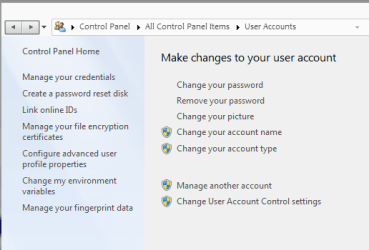
This may be relevant. I searched my gateway, and found this file.
See path in first attachment.

Then opened the "changethecomputericon" folder, and found the icon. I haven't found the icon for the cow skin though. :D

You would have to search for HP folders, and when the icons for the files stop building check to see if you do have one of these:


In lieu of that you could install an icon extractor to scrub your files to find it. This one has a good rating from Cnet:IcoFX - The Free Icon Editor

It's main job is editing, but it will extract 32bit icons, and tell you the location.
If extractors can't find them they usually don't exist.
 

Attachments

  • win7 icon thread.JPG
    win7 icon thread.JPG
    11.8 KB · Views: 2
  • win7 icon thread2.JPG
    win7 icon thread2.JPG
    8.2 KB · Views: 155

My Computer My Computer

Computer type
PC/Desktop
Computer Manufacturer/Model Number
Gateway DX4831-01e (Mid-Tower Desktop)
OS
Originally Win 7 Hm Prem x64 Ver 6.1.7600 Build 7601-SP1 | Upgraded to Windows 10 December 14, 2019
CPU
Intel i3 530 2.93GHz, 2933MHz 2 Cores 4 Logical Processors
Motherboard
Gateway H57M01 133 megahertz
Memory
6GB of 1,333MHz DDR3 SDRAM
Graphics Card(s)
32MB Intel Graphics Media Accelerator HD IGChip
Sound Card
Realtek High Definition Audio
Monitor(s) Displays
Gateway HX2000 20inch TFT active matrix TN
Screen Resolution
1600 x 900 x 59 hertz
Hard Drives
WDC WD10EADS-00M2B0 [HDD] (1000.20 GB) -- drive 0,
HL-DT-ST DVDRAM GH41N [CD-ROM dr]
Four card readers, and Four USB 2.0
PSU
300watts.
Case
Mid-Tower Desktop
Cooling
Stock from Gateway
Keyboard
Natural Ergonomic Keyboard 4000, see Other Info
Mouse
Orig. Gateway wore out now using Insignia USB wired optical
Internet Speed
Vz FIOS 10ms png 57.64Mbps down 65.53Mbps up Speedtest.org
Antivirus
Zamana Anti-logger with Anti-malware, MSE, Windows Firewall,
Browser
IE11.0.9600.19399-Upd ver11.0.135, Firefox 68.0.1 x64
Other Info
System Specs by Belarc.

BIOS: American Megatrends Inc. P01-A0 11/17/2009

Replaced the MS 'Natural' Standard PS/2 Enhanced 101-102 Keyboard with a new Natural Ergonomic Keyboard 4000 on August 1st 2014.

Canon Pixma MG3222 Printer.

Updated to IE11 on 12102015 | Fios Quantum Router g1100

Additional AV: SpywareBlaster, manual Mbam, SAS
I may have to ask HP for help with this....

???? Why not just search for an icon on the net?

BTW how did you lose it?

I didn't loose it, I just want to find it. and no, that doesn't work either. I tried multiple search engines to find the picture but I couldn't.

EDIT: and btw, the location i first supplied IS the location for the question you originally asked!
Yes that is the default location for those pictures.... however his answer is that it's not there. Not surprising since It's not a "standard" Microsoft icon/picture.

C:\ProgramData\Microsoft\User Account Pictures\Default Pictures

thank you, it helped but I still couldn't find the picture I was looking for.

Any, good luck on your search tpod.

Strange though, for the picture I'm looking for, there is one more that shows up on the default gallery choosing on the nxt row after it, but it doesn't show in that folder either yet it should be a "standard" Micosoft icon/picture...

@Anak: umm there may be a problem since my computer hold both 32bit and 64bit items. and I'm starting to think that the image may be a 64 bit type. I evn tried looking up icons in the search but I didn't get anything.
 

My Computer My Computer

OS
n/a
If you search _ 64 bit icon extractors _ you can find them, but they mostly look like share/trialware.
 

My Computer My Computer

Computer type
PC/Desktop
Computer Manufacturer/Model Number
Gateway DX4831-01e (Mid-Tower Desktop)
OS
Originally Win 7 Hm Prem x64 Ver 6.1.7600 Build 7601-SP1 | Upgraded to Windows 10 December 14, 2019
CPU
Intel i3 530 2.93GHz, 2933MHz 2 Cores 4 Logical Processors
Motherboard
Gateway H57M01 133 megahertz
Memory
6GB of 1,333MHz DDR3 SDRAM
Graphics Card(s)
32MB Intel Graphics Media Accelerator HD IGChip
Sound Card
Realtek High Definition Audio
Monitor(s) Displays
Gateway HX2000 20inch TFT active matrix TN
Screen Resolution
1600 x 900 x 59 hertz
Hard Drives
WDC WD10EADS-00M2B0 [HDD] (1000.20 GB) -- drive 0,
HL-DT-ST DVDRAM GH41N [CD-ROM dr]
Four card readers, and Four USB 2.0
PSU
300watts.
Case
Mid-Tower Desktop
Cooling
Stock from Gateway
Keyboard
Natural Ergonomic Keyboard 4000, see Other Info
Mouse
Orig. Gateway wore out now using Insignia USB wired optical
Internet Speed
Vz FIOS 10ms png 57.64Mbps down 65.53Mbps up Speedtest.org
Antivirus
Zamana Anti-logger with Anti-malware, MSE, Windows Firewall,
Browser
IE11.0.9600.19399-Upd ver11.0.135, Firefox 68.0.1 x64
Other Info
System Specs by Belarc.

BIOS: American Megatrends Inc. P01-A0 11/17/2009

Replaced the MS 'Natural' Standard PS/2 Enhanced 101-102 Keyboard with a new Natural Ergonomic Keyboard 4000 on August 1st 2014.

Canon Pixma MG3222 Printer.

Updated to IE11 on 12102015 | Fios Quantum Router g1100

Additional AV: SpywareBlaster, manual Mbam, SAS
Is it available under C:\WINDOWS\SYSTEM32 under the name OEMLOGO.BMP
 

My Computer My Computer

Computer Manufacturer/Model Number
MacBook Pro
OS
Lion
CPU
i5
Memory
4GB
Graphics Card(s)
Intel
Screen Resolution
1200x800
Hard Drives
Seagate FreeAgent GO 250GB Ext. HDD
Is it available under C:\WINDOWS\SYSTEM32 under the name OEMLOGO.BMP
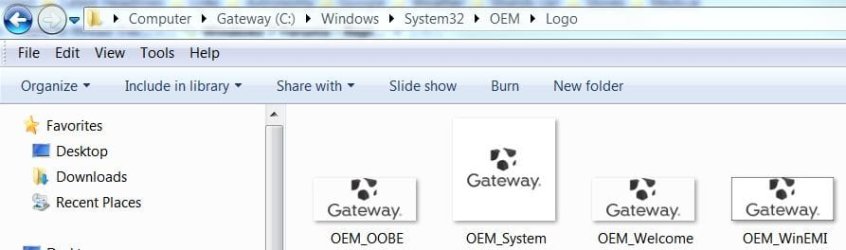
Works for me. I had to go a couple of extra folders.

C:\WINDOWS\SYSTEM32\OEM\Logo
 

Attachments

  • Logo.JPG
    Logo.JPG
    34.9 KB · Views: 6

My Computer My Computer

Computer type
PC/Desktop
Computer Manufacturer/Model Number
Gateway DX4831-01e (Mid-Tower Desktop)
OS
Originally Win 7 Hm Prem x64 Ver 6.1.7600 Build 7601-SP1 | Upgraded to Windows 10 December 14, 2019
CPU
Intel i3 530 2.93GHz, 2933MHz 2 Cores 4 Logical Processors
Motherboard
Gateway H57M01 133 megahertz
Memory
6GB of 1,333MHz DDR3 SDRAM
Graphics Card(s)
32MB Intel Graphics Media Accelerator HD IGChip
Sound Card
Realtek High Definition Audio
Monitor(s) Displays
Gateway HX2000 20inch TFT active matrix TN
Screen Resolution
1600 x 900 x 59 hertz
Hard Drives
WDC WD10EADS-00M2B0 [HDD] (1000.20 GB) -- drive 0,
HL-DT-ST DVDRAM GH41N [CD-ROM dr]
Four card readers, and Four USB 2.0
PSU
300watts.
Case
Mid-Tower Desktop
Cooling
Stock from Gateway
Keyboard
Natural Ergonomic Keyboard 4000, see Other Info
Mouse
Orig. Gateway wore out now using Insignia USB wired optical
Internet Speed
Vz FIOS 10ms png 57.64Mbps down 65.53Mbps up Speedtest.org
Antivirus
Zamana Anti-logger with Anti-malware, MSE, Windows Firewall,
Browser
IE11.0.9600.19399-Upd ver11.0.135, Firefox 68.0.1 x64
Other Info
System Specs by Belarc.

BIOS: American Megatrends Inc. P01-A0 11/17/2009

Replaced the MS 'Natural' Standard PS/2 Enhanced 101-102 Keyboard with a new Natural Ergonomic Keyboard 4000 on August 1st 2014.

Canon Pixma MG3222 Printer.

Updated to IE11 on 12102015 | Fios Quantum Router g1100

Additional AV: SpywareBlaster, manual Mbam, SAS
Thanks for the heads up pal..
 

My Computer My Computer

Computer Manufacturer/Model Number
MacBook Pro
OS
Lion
CPU
i5
Memory
4GB
Graphics Card(s)
Intel
Screen Resolution
1200x800
Hard Drives
Seagate FreeAgent GO 250GB Ext. HDD
Works for me. I had to go a couple of extra folders.

C:\WINDOWS\SYSTEM32\OEM\Logo
Did you tried this location?
 

My Computer My Computer

Computer Manufacturer/Model Number
MacBook Pro
OS
Lion
CPU
i5
Memory
4GB
Graphics Card(s)
Intel
Screen Resolution
1200x800
Hard Drives
Seagate FreeAgent GO 250GB Ext. HDD
yes, I have. I don't have a OEM folder in my computer.

And no offence, but as far as I can tell, none of you use an HP laptop...
 

My Computer My Computer

OS
n/a
yes, I have. I don't have a OEM folder in my computer.

And no offence, but as far as I can tell, none of you use an HP laptop...
No offense taken........

Its gotta be there somewhere.

If your machine is displaying it, there has to be a file.

Check the bottom of TheSchaft's post #9 here:
http://www.sevenforums.com/customization/27788-how-change-recycle-bin-desktop-icon.html

There is a link for a little utility (free) called Icon viewer Download IconViewer, but be sure to read up on it here: About IconViewer

I may have missed it, but have you un-hidden all your folders, and files?
Not sure if iconviewer can check hidden folders/files.
 

My Computer My Computer

Computer type
PC/Desktop
Computer Manufacturer/Model Number
Gateway DX4831-01e (Mid-Tower Desktop)
OS
Originally Win 7 Hm Prem x64 Ver 6.1.7600 Build 7601-SP1 | Upgraded to Windows 10 December 14, 2019
CPU
Intel i3 530 2.93GHz, 2933MHz 2 Cores 4 Logical Processors
Motherboard
Gateway H57M01 133 megahertz
Memory
6GB of 1,333MHz DDR3 SDRAM
Graphics Card(s)
32MB Intel Graphics Media Accelerator HD IGChip
Sound Card
Realtek High Definition Audio
Monitor(s) Displays
Gateway HX2000 20inch TFT active matrix TN
Screen Resolution
1600 x 900 x 59 hertz
Hard Drives
WDC WD10EADS-00M2B0 [HDD] (1000.20 GB) -- drive 0,
HL-DT-ST DVDRAM GH41N [CD-ROM dr]
Four card readers, and Four USB 2.0
PSU
300watts.
Case
Mid-Tower Desktop
Cooling
Stock from Gateway
Keyboard
Natural Ergonomic Keyboard 4000, see Other Info
Mouse
Orig. Gateway wore out now using Insignia USB wired optical
Internet Speed
Vz FIOS 10ms png 57.64Mbps down 65.53Mbps up Speedtest.org
Antivirus
Zamana Anti-logger with Anti-malware, MSE, Windows Firewall,
Browser
IE11.0.9600.19399-Upd ver11.0.135, Firefox 68.0.1 x64
Other Info
System Specs by Belarc.

BIOS: American Megatrends Inc. P01-A0 11/17/2009

Replaced the MS 'Natural' Standard PS/2 Enhanced 101-102 Keyboard with a new Natural Ergonomic Keyboard 4000 on August 1st 2014.

Canon Pixma MG3222 Printer.

Updated to IE11 on 12102015 | Fios Quantum Router g1100

Additional AV: SpywareBlaster, manual Mbam, SAS
Back
Top