What don't you like about Windows 7?

Status
Not open for further replies.
oh another thing. the stubborn side panel of the windows...why must i chose from only two options...i really don't want this new "library" thing there...and i certainly don't want to open my pin-up of "my computer" only to find the damn library again...i don't use that thing...why are they trying to annoy the hell out of me......
If you took the time to give the libraries a chance, you might just like it. I was skeptical at first, but I definitely appreciate them now.;)
 

My Computer My Computer

At a glance

Win 7 Ultimate 64-bit SP1 (desktop)Intel Core 2 Duo E84002x 2GB OCZ DDR II SDRAM PC2-6400NVIDIA GeForce 9400GT
Computer type
PC/Desktop
Computer Manufacturer/Model Number
Gigabyte Technology Co., Ltd.
OS
Win 7 Ultimate 64-bit SP1 (desktop)
CPU
Intel Core 2 Duo E8400
Motherboard
Gigabyte GA-EP35-DS3R
Memory
2x 2GB OCZ DDR II SDRAM PC2-6400
Graphics Card(s)
NVIDIA GeForce 9400GT
Monitor(s) Displays
HP 2009m(primary), Acer P191W
Screen Resolution
1600x900, 1440x900
Hard Drives
Internal:WD Caviar Black 640GB 32MB cache 7200RPM
External:Samsung Story Station 1TB HDD desktop drive
500GB Toshiba portable drive
PSU
Antec Earthwatts EA500D
Case
Antec Sonata III
Cooling
4 fans
Keyboard
Logitech Wave
Mouse
Logitech M-SBF90
Internet Speed
Slow due to home Wireless-G router
Antivirus
MSE, Hitman Pro, Malwarebytes
Browser
Chrome and Palemoon
Other Info
Laptop....Acer 5750Z-4835
15.6" HD Widescreen CineCrystal™ LED-backlit LCD Display: (1366x768 resolution, 16:9 aspect ratio)
Intel® Pentium® Processor B940 (2.0GHz, 2MB L3 cache)
Windows® 7 Home Premium,500GB Hard Drive,4GB DDR3 RAM, Intel® HD Graphics,8X DVD-Super Multi Double-Layer Drive
Multi-in-1 Digital Media Card Reader,802.11b/g/n Wi-Fi
Chrome and Palemoon, MSE, Hitman Pro
for one, 7 eliminates many useless things that hog up system resources. two, vista is of the past, and any new program i get is mostly suited for 7. worthless things become obsolete, i cannot dwindle in the past. three, just because i complain about certain things doesn't mean it's all bad. four, this forum is about what i don't like about windows 7. not, if you found so many things you don't like about it, why do you have it. five, if you can inform me why we are using w7 or wV or have stopped using w93, w95, w98, w2000, and wM then perhaps my usage of 7 along with my dislikes of it isn't invalid.

P.S. you're an idiot for thinking someone cannot complain about things they've learned. it is precisely the fact that they've learned it that warrants their right to complain. there is a quote that follows this: "do not complain about things you don't know".
Please, Please calm down and take a bit of time to look a little more closely at Windows 7 then after careful consideration if you still don't like it then uninstall it and put Windows 95 or 98 back on.
Sure Windows 7 is very different from the previous OS's by MS but really like anything new if you are either not prepared or not capable of accepting new ideas then we cannot help you with that!
Finally I don't know who you were accusing of being an "idiot" but that sort of language is not acceptable in this most civilised of Forums. We all try to show due respect for one another and expect nay demand that all new comers are made welcome on that understanding.
So draw a line and politely ask for help and I'm sure it will be given in good faith as it always is here!
Rant over:zip:
 

My Computer My Computer

At a glance

Microsoft Windows 7 Home Premium 64-bit 7601 ...Intel(R) Core(TM) i7-3770 CPU @ 3.40GHz8.00 GBIntel(R) HD Graphics 4000
Computer type
PC/Desktop
OS
Microsoft Windows 7 Home Premium 64-bit 7601 Multiprocessor Free Service Pack 1
CPU
Intel(R) Core(TM) i7-3770 CPU @ 3.40GHz
Motherboard
ASUSTeK COMPUTER INC. P8H77-M
Memory
8.00 GB
Graphics Card(s)
Intel(R) HD Graphics 4000
Sound Card
On Board
Monitor(s) Displays
Dell 24"
Screen Resolution
1920 x 1080
Hard Drives
(1) INTEL SSDSC2CT180A3 ATA Device (2) ST500DM002-1BD142 ATA Device (3) WDC WD3200AAKS-75L9A0 ATA Device (4) Generic- Compact Flash USB Device (5) Generic- MS/MS-Pro USB Device (6) Generic- SD/MMC USB Device (7) Generic- SM/xD-Picture USB
PSU
500w Corsair
Case
Cooler Master
Cooling
3 Fans
Keyboard
Logitech MK300
Mouse
Logitech WOM
Internet Speed
75Mb
Antivirus
Norton 360
Browser
Firefox, Opera, IE
...noobvious: i don't do the whole put your files where windows "suggests" you put them, i prefer everything on the desktop, that way, when i have to move from computer to computer or reinstall the system, all my things are not only in one place but i can easily see them without having to go through one extra step to find it.

...mitchell65: with all due respect, this section is solely for stating the dislikes of 7 which means no one can deny the basic principle of this section. also, to state "Really learn the system before you complain." is an insult and a display of incompetence. every logical being knows that no such being has the right to complain about something they don't know.

to the both of you: this is just me, but i've used 7 long enough to learn enough about to know most of what i'm referring to. if something doesn't go efficiently enough with my computer i will find ways to make it faster, now, so far i have yet to find a solution for all of my previous statements. i am one of high adaptability, this means i can keep up, and if the first party cannot supply me with beneficial means, then i will search for third party programs that will.

mitchell65: when i ask for help, i will be calm. but when i feel someone is looking for a battle, calm will be the last thing on my mind. and don't you ever tell someone to revert back incapable systems. i'm an industrial designer, and i do not wish even the dumbest of those to use primitive equipment.

...but thank you for your concern.
 

My Computer My Computer

At a glance

windows 7 | VistaAMD Turion x24GB | 2GB
OS
windows 7 | Vista
CPU
AMD Turion x2
Memory
4GB | 2GB
Screen Resolution
above 1000 ^2
Hard Drives
6?... about 4TB, all full
Keyboard
external (mac standard wired) | built-in
Mouse
Mighty Mouse | Touch Pad
Internet Speed
DSL 3mbps
Other Info
webcam
microphone
keypad
dvd-rw lightscribe
extended battery
Personal:: Files: 21,953+ Folders: 1829+
Here type9, check this out: http://www.sevenforums.com/tutorials/35627-libraries-folder-add-remove-navigation-pane.html

That tut is a little tricky, but it can remove the libraries. You also will need to look at the remove from pinned Windows Explorer to keep it from defaulting to Libraries location when opened.

I personally like the libraries for organizing all the folders of specific types and you can easily remove a folder from the library or add folders to the library. But, If you don't like it, then there is a way to remove.
 
Last edited:

My Computer My Computer

At a glance

Win7 Home Premium 64xIntel Core 2 Duo P7450 / 2.13 GHz (2.29 with ...4 GB PC-6400 Hyundai (2X2) at 800MhzNVIDIA GeForce GTX 260M 1GB DDR3 VRAM
Computer type
Laptop
Computer Manufacturer/Model Number
ASUS G60-RBBX05
OS
Win7 Home Premium 64x
CPU
Intel Core 2 Duo P7450 / 2.13 GHz (2.29 with Extreme Turbo)
Memory
4 GB PC-6400 Hyundai (2X2) at 800Mhz
Graphics Card(s)
NVIDIA GeForce GTX 260M 1GB DDR3 VRAM
Monitor(s) Displays
16" LED Backlit
Screen Resolution
1366 x 768 on laptop 1600x1050 max res on 22" external mon
Hard Drives
OCZ Agility 3 60GB SSD / 320 GB - Serial ATA-150 - 7200 rpm
PSU
6-cell Lithium ion { lasts 1.5 hours }
Case
ASUS G60 Laptop
Keyboard
Chicklet type back-lit (white light) keyboard
Mouse
Logitech G9 Laser Mouse 3200dpi and 1000 reports per minute
Internet Speed
Comcast 8.60mb/s up - 3.11mb/s down
Antivirus
MSE
Browser
Firefox
Other Info
General mid-budget gaming Comp. Low batterylife - High FrameRates - currently overheating problems :(

2nd Rig: Case: Rosewill BLACKHAWK Gaming ATX Mid Tower Computer Case

Mobo: GIGABYTE GA-990FXA-UD3
CPU: AMD FX-6200 Zambezi 3.8GHz (4.1GHz Turbo)
Heatsink: COOLER MASTER V8 CPU Cooler
RAM: Patriot Viper 3 8GB (2 x 4GB) 240-Pin DDR3 SDRAM 1866 (PC3 15000)
GPU: SAPPHIRE Radeon HD 6850 1GB 2
All right everyone ... let's play nice! ;)
 

My Computer My Computer

At a glance

64-bit Windows 8.1 ProCore(TM) i5 CPU 4330 Haswell @ 3.20GHz12.00 GBIntel(R) HD Graphics
Computer type
PC/Desktop
Computer Manufacturer/Model Number
LENOVO K450 @3.0GHZ
OS
64-bit Windows 8.1 Pro
CPU
Core(TM) i5 CPU 4330 Haswell @ 3.20GHz
Motherboard
LENOVO
Memory
12.00 GB
Graphics Card(s)
Intel(R) HD Graphics
Sound Card
Intel HD integtrated
Monitor(s) Displays
HP 25' ISP Monitor
Screen Resolution
1900/1020
Hard Drives
(1) ST1000DM003-1CH162 (2) Generic STORAGE DEVICE USB Device (3) Generic STORAGE DEVICE USB Device
Internet Speed
100mb down/10mb up
Ok so I found some more stuff for you so I will chop up your quote so I can post solutions.

1) the feature for a folder toolbar is gone. the one that allows you to drag and drop a folder to the edge of the screen and a new toolbar appears. that saved me a lot of time, any folder i opened constantly could be there along with any shortcuts, it becomes something like the mac toolbar. 7 has this "pin" here crap that's just a glorified version of quicklaunch. and even then it's retarded, it takes up a fingers-worth of space and there's a limit to the amount of shortcuts you can have on it. some people find it annoying when they accidentally drag a folder to the side and let go, well, for one, get some skills, and two, if there are options in turning things on and off/active or inactive, then why can't it apply here, i mean the screens sides aren't doing anything...

http://www.sevenforums.com/tutorials/888-quick-launch-enable-disable.html

You might be able to restore quick launch and do without the "pinning" . And yes I agree this should be an option somewhere instead of a complicated fix


2) this power plan option display is fixed to displaying only two plans. what's their problem? is three too much? i swear, either there are way too many laymens being surveyed or they never surveyed computer usage and just threw 7 out there...
http://www.sevenforums.com/tutorials/21990-power-plan-create-shortcut-change-power-plan.html

Again I agree. I don't know why they choose 2 power plans. You could create a shortcut to each plan and save them in a folder. Run each one to change the power plan and maybe create shortcut keys like Crtl+Alt+1, 2, etc.


3) the safely remove section. what's the deal with newly plugged in devices being randomly placed in the middle of everything when in the previous versions of windows it's the first one (on top). is this microsofts way of playing with us?

I have no idea why they did this. maybe it slipped through or had issues with the build on dedicating to first spot on list.


4) even though it's not a lot of space, and it's a good idea, why couldn't they just leave the "peek" feature to the corners like every successful program that's done this. ...bottom corner-peek | bottom corner click-show desktop ....top corner-peek windows | top corner click-select specific windows

i recently used aim mail and pressed cntrl+shft+tab and this crazy subwindow showed up. (i type crazy because i had like 70 tabs open..lol) and it revealed all my tabs/webpages. this was interesting but i only know how to get to it by being on aim mails page.

I think this is the same as WindowsKey and Tab. it shows all windows staggered diagonally across the screen as an alternate to Alt+Tab. you can hold WinKey and press Tab to tab through the screens.


Hope all that helps.... I know Win7 is awesome and if you see something wrong with it that wasn't there in XP or Vista it is a little disheartening. I also don't think your wrong to complain. but maybe we can fix some of these issues as well. :) Let me know if you need anything.
 

My Computer My Computer

At a glance

Win7 Home Premium 64xIntel Core 2 Duo P7450 / 2.13 GHz (2.29 with ...4 GB PC-6400 Hyundai (2X2) at 800MhzNVIDIA GeForce GTX 260M 1GB DDR3 VRAM
Computer type
Laptop
Computer Manufacturer/Model Number
ASUS G60-RBBX05
OS
Win7 Home Premium 64x
CPU
Intel Core 2 Duo P7450 / 2.13 GHz (2.29 with Extreme Turbo)
Memory
4 GB PC-6400 Hyundai (2X2) at 800Mhz
Graphics Card(s)
NVIDIA GeForce GTX 260M 1GB DDR3 VRAM
Monitor(s) Displays
16" LED Backlit
Screen Resolution
1366 x 768 on laptop 1600x1050 max res on 22" external mon
Hard Drives
OCZ Agility 3 60GB SSD / 320 GB - Serial ATA-150 - 7200 rpm
PSU
6-cell Lithium ion { lasts 1.5 hours }
Case
ASUS G60 Laptop
Keyboard
Chicklet type back-lit (white light) keyboard
Mouse
Logitech G9 Laser Mouse 3200dpi and 1000 reports per minute
Internet Speed
Comcast 8.60mb/s up - 3.11mb/s down
Antivirus
MSE
Browser
Firefox
Other Info
General mid-budget gaming Comp. Low batterylife - High FrameRates - currently overheating problems :(

2nd Rig: Case: Rosewill BLACKHAWK Gaming ATX Mid Tower Computer Case

Mobo: GIGABYTE GA-990FXA-UD3
CPU: AMD FX-6200 Zambezi 3.8GHz (4.1GHz Turbo)
Heatsink: COOLER MASTER V8 CPU Cooler
RAM: Patriot Viper 3 8GB (2 x 4GB) 240-Pin DDR3 SDRAM 1866 (PC3 15000)
GPU: SAPPHIRE Radeon HD 6850 1GB 2
Also what Tews said.

I know there were threads like this in the past that have been closed due to people arguing. There are valid points here and this thread serves as a place for people to express what they don't like about Windows 7. I don't want to see this thread closed.
 

My Computer My Computer

At a glance

Win7 Home Premium 64xIntel Core 2 Duo P7450 / 2.13 GHz (2.29 with ...4 GB PC-6400 Hyundai (2X2) at 800MhzNVIDIA GeForce GTX 260M 1GB DDR3 VRAM
Computer type
Laptop
Computer Manufacturer/Model Number
ASUS G60-RBBX05
OS
Win7 Home Premium 64x
CPU
Intel Core 2 Duo P7450 / 2.13 GHz (2.29 with Extreme Turbo)
Memory
4 GB PC-6400 Hyundai (2X2) at 800Mhz
Graphics Card(s)
NVIDIA GeForce GTX 260M 1GB DDR3 VRAM
Monitor(s) Displays
16" LED Backlit
Screen Resolution
1366 x 768 on laptop 1600x1050 max res on 22" external mon
Hard Drives
OCZ Agility 3 60GB SSD / 320 GB - Serial ATA-150 - 7200 rpm
PSU
6-cell Lithium ion { lasts 1.5 hours }
Case
ASUS G60 Laptop
Keyboard
Chicklet type back-lit (white light) keyboard
Mouse
Logitech G9 Laser Mouse 3200dpi and 1000 reports per minute
Internet Speed
Comcast 8.60mb/s up - 3.11mb/s down
Antivirus
MSE
Browser
Firefox
Other Info
General mid-budget gaming Comp. Low batterylife - High FrameRates - currently overheating problems :(

2nd Rig: Case: Rosewill BLACKHAWK Gaming ATX Mid Tower Computer Case

Mobo: GIGABYTE GA-990FXA-UD3
CPU: AMD FX-6200 Zambezi 3.8GHz (4.1GHz Turbo)
Heatsink: COOLER MASTER V8 CPU Cooler
RAM: Patriot Viper 3 8GB (2 x 4GB) 240-Pin DDR3 SDRAM 1866 (PC3 15000)
GPU: SAPPHIRE Radeon HD 6850 1GB 2
Followup: July 21

Last week, we were able to download the latest version of the HP Universal Print Driver {64-bit version 5.1.0.1}, and it seems to work on both standalone mode, and it was able to integrate into Novell iPrint. --JB


I'm a dyed-in-the-wool Mac user, and I've upgraded to Win 7 on my work computer. I have to say, I don't find much wrong with the OS. (I know, all my Mac friends just gasped in amazement!).

We are having problems with print driver compatibility, but that's the printer manufacturers' issue, not MS's. --JB
 

My Computer My Computer

At a glance

Windows 7
Computer Manufacturer/Model Number
Dell Optiplex 745
OS
Windows 7
Internet Speed
SuperDuper Speed!
I think this is the same as WindowsKey and Tab. it shows all windows staggered diagonally across the screen as an alternate to Alt+Tab. you can hold WinKey and press Tab to tab through the screens.

I hate windows 7 because I did not know this until now. I had seen screen shots of windows placed diagonally across the screen but never knew how to do it. It's definitely not advertised on the MS website.
 

My Computer My Computer

At a glance

Windows 7 Professional SP1 64-bitIntel Core i5-2450M @2.5 GHz6 GB DDR3 1333MHzIntel HD 3000
Computer type
Laptop
Computer Manufacturer/Model Number
Toshiba P775-S7100
OS
Windows 7 Professional SP1 64-bit
CPU
Intel Core i5-2450M @2.5 GHz
Memory
6 GB DDR3 1333MHz
Graphics Card(s)
Intel HD 3000
Monitor(s) Displays
Built-in 17.3" LED; 22" Insignia NS-L22Q-10A
Screen Resolution
1600x900; 1360x768
Hard Drives
750 GB Hitachi
1TB Seagate FreeAgent External
Internet Speed
Verizon DSL Speed(Down/Up): 3360 Kbps / 800 Kbps
Antivirus
MSE and MBAM Pro
Browser
IE10
I think this is the same as WindowsKey and Tab. it shows all windows staggered diagonally across the screen as an alternate to Alt+Tab. you can hold WinKey and press Tab to tab through the screens.

I hate windows 7 because I did not know this until now. I had seen screen shots of windows placed diagonally across the screen but never knew how to do it. It's definitely not advertised on the MS website.


This is why I am on this forum. I would not have known about that. I saw it here. I don't know if you should hate them though. It is in the system so it is a good thing..... Maybe praise is the word you were looking for..... :roflmao:


edit: im just kidding about the praise thing.
 

My Computer My Computer

At a glance

Win7 Home Premium 64xIntel Core 2 Duo P7450 / 2.13 GHz (2.29 with ...4 GB PC-6400 Hyundai (2X2) at 800MhzNVIDIA GeForce GTX 260M 1GB DDR3 VRAM
Computer type
Laptop
Computer Manufacturer/Model Number
ASUS G60-RBBX05
OS
Win7 Home Premium 64x
CPU
Intel Core 2 Duo P7450 / 2.13 GHz (2.29 with Extreme Turbo)
Memory
4 GB PC-6400 Hyundai (2X2) at 800Mhz
Graphics Card(s)
NVIDIA GeForce GTX 260M 1GB DDR3 VRAM
Monitor(s) Displays
16" LED Backlit
Screen Resolution
1366 x 768 on laptop 1600x1050 max res on 22" external mon
Hard Drives
OCZ Agility 3 60GB SSD / 320 GB - Serial ATA-150 - 7200 rpm
PSU
6-cell Lithium ion { lasts 1.5 hours }
Case
ASUS G60 Laptop
Keyboard
Chicklet type back-lit (white light) keyboard
Mouse
Logitech G9 Laser Mouse 3200dpi and 1000 reports per minute
Internet Speed
Comcast 8.60mb/s up - 3.11mb/s down
Antivirus
MSE
Browser
Firefox
Other Info
General mid-budget gaming Comp. Low batterylife - High FrameRates - currently overheating problems :(

2nd Rig: Case: Rosewill BLACKHAWK Gaming ATX Mid Tower Computer Case

Mobo: GIGABYTE GA-990FXA-UD3
CPU: AMD FX-6200 Zambezi 3.8GHz (4.1GHz Turbo)
Heatsink: COOLER MASTER V8 CPU Cooler
RAM: Patriot Viper 3 8GB (2 x 4GB) 240-Pin DDR3 SDRAM 1866 (PC3 15000)
GPU: SAPPHIRE Radeon HD 6850 1GB 2
I think this is the same as WindowsKey and Tab. it shows all windows staggered diagonally across the screen as an alternate to Alt+Tab. you can hold WinKey and press Tab to tab through the screens.

I hate windows 7 because I did not know this until now. I had seen screen shots of windows placed diagonally across the screen but never knew how to do it. It's definitely not advertised on the MS website.


This is why I am on this forum. I would not have known about that. I saw it here. I don't know if you should hate them though. It is in the system so it is a good thing..... Maybe praise is the word you were looking for..... :roflmao:


edit: im just kidding about the praise thing.
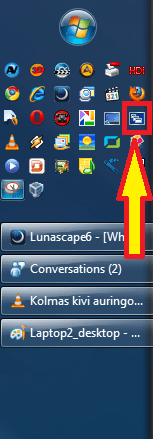
For Quick Launch users it's just a mouse click away:

QuickLaunch2.png

You can then just scroll and choose the window you need.

Additionally, most Logitech mice with extra thumb buttons have this feature assigned by default to the middle one.
 

My Computer My Computer

At a glance

Windows 10 Pro x64 EN-GB1.6 GHz Intel Core i7-720QM Processor6 GBATI Mobility Radeon HD 5850 Graphics
Computer type
Laptop
Computer Manufacturer/Model Number
HP ENVY 17-1150eg
OS
Windows 10 Pro x64 EN-GB
CPU
1.6 GHz Intel Core i7-720QM Processor
Memory
6 GB
Graphics Card(s)
ATI Mobility Radeon HD 5850 Graphics
Sound Card
Beats sound system with integrated subwoofer
Monitor(s) Displays
17" laptop display, 22" LED and 32" Full HD TV through HDMI
Screen Resolution
1600*900 (1), 1920*1080 (2&3)
Hard Drives
Internal: 2 x 500 GB SATA Hard Disk Drive 7200 rpm
External: 2TB for backups, 3TB USB3 network drive for media
Cooling
As Envy runs a bit warm, I have it on a Cooler Master pad
Keyboard
Logitech diNovo Media Desktop Laser (bluetooth)
Mouse
Logitech Performance Mouse MX
Internet Speed
50/10 Mbps VDSL
Antivirus
Windows Defender 4.3.9431.0
Browser
Maxthon 3.5.2., IE11
The last few posts have just reminded me that there are many new users of win7 that did not share in the adventure we called Vista, where this feature first appeared and was one of the flagship UI features at it's launch
 

My Computers My Computers

  • At a glance

    Windows 11 Pro x64 [Latest Release and Releas...Ryzen 9 5950X, 3.8 - 5.2 MHz64GB [2 x 32GB] DDR4 3200MHz4GB NVIDIA GEFORCE GTX 1650 Ti
    Computer type
    PC/Desktop
    Computer Manufacturer/Model Number
    ChillBlast - Custom to my design
    OS
    Windows 11 Pro x64 [Latest Release and Release Preview]
    CPU
    Ryzen 9 5950X, 3.8 - 5.2 MHz
    Motherboard
    Asus Prime X570-Pro
    Memory
    64GB [2 x 32GB] DDR4 3200MHz
    Graphics Card(s)
    4GB NVIDIA GEFORCE GTX 1650 Ti
    Sound Card
    On-board SPDIF to 5.1 System + HDMI [5.1 system]
    Monitor(s) Displays
    32" UHD 32 Bit HDR Monitor + 43" UHD 4K 32Bit HDR TV
    Screen Resolution
    2 x 3840 x 2160 @60Hz
    Hard Drives
    1TB M2 SSD OS, 500GB Fast Access SSD, 2 x 8TB Data + Various Externals from 1TB to 4TB, 10TB NAS
    PSU
    NZXT C750 80 PLUS Gold 750W Modular PSU
    Case
    Workstation Case [Matt Black]
    Cooling
    NZXT Kraken X63 280mm CPU Cooler +2x Quiet Case fans
    Keyboard
    Logitech Wireless MX Keys & K400 + others
    Mouse
    Logitech Wireless MX Master 3S
    Internet Speed
    920 MB Down 50 MB Up
    Antivirus
    BitDefender Total Security Pro
    Browser
    Chrome (always run latest Non-Beta)
    Other Info
    Also run ...
    Laptop - Quad 8GB - Windows 10 Pro x64
    Nexus 7 Android tablet x2
    Samsung 10.2" tablet
    Blackview TAB 8 4G Android Tablet c/w Keyboard
    Wacom Intuos Pro Medium Pen Pad
    Wacom Intuos Pro Small Pen Pad
    Wacom Expresskeys Remote
    Loopdeck+ Graphics Controller
    Shuttle Pro v2 Control
  • At a glance

    Windows 11 Pro x64 Latest RPIntel I7 10750H 5.0GHz32GB [2x16GB] DDR4 2933 MHznVidia GTX1650Ti 4 GB GDDR6
    Computer type
    Laptop
    System Manufacturer/Model Number
    Dell XPS 17 10750H
    OS
    Windows 11 Pro x64 Latest RP
    CPU
    Intel I7 10750H 5.0GHz
    Motherboard
    Dell XPS
    Memory
    32GB [2x16GB] DDR4 2933 MHz
    Graphics Card(s)
    nVidia GTX1650Ti 4 GB GDDR6
    Sound Card
    Stock [Realtek] 4 Speaker
    Monitor(s) Displays
    17" IPS UHD+ Infinity Edge Touchscreen
    Screen Resolution
    3840 x 2400
    Hard Drives
    2TB M2 NVMe, 4TB External + various 500GB & 1TB External NVMe (also have access to spinner HDD from
    PSU
    Stock
    Case
    Stock XPS Aluminium & Carbon Fibre
    Cooling
    Stock - Active Fan Control
    Keyboard
    Backlit + Various Logitech
    Mouse
    Stock Track Pad + Logitech MX Trackball
    Internet Speed
    72 MB Down 18MB Up
    Browser
    Chrome
    Other Info
    Also run ...
    Laptop - Quad 8GB - Windows 10 Pro x64
    Nexus 7 Android tablet x2
    10.2" tablet
    Sony Z3 Android Smartphone
    Wacom Intuos Pro Medium Pen Pad
    Wacom Intuos Pro Small Pen Pad
    Wacom Expresskeys Remote
    Loopdeck+ Graphics Controller
    Shuttle Pro v2 Control Pad
    10TB NAS
The last few posts have just reminded me that there are many new users of win7 that did not share in the adventure we called Vista, where this feature first appeared and was one of the flagship UI features at it's launch

I remember fondly being hooked into those features on Vista...only to be disappointed in its performance in a few areas.
 

My Computer My Computer

At a glance

Windows 7 x64 / SameIntel Core 2 Duo T7250 / Intel Core i7 9304GB / 6GBNVIDIA GeForce 8400M GS / ASUS 1GB
Computer Manufacturer/Model Number
Dell Inspiron 1520 (Laptop)/ Home (Desktop)
OS
Windows 7 x64 / Same
CPU
Intel Core 2 Duo T7250 / Intel Core i7 930
Motherboard
Intel 945 / Asus P6X58D-E
Memory
4GB / 6GB
Graphics Card(s)
NVIDIA GeForce 8400M GS / ASUS 1GB
Sound Card
Whatever Dell gave me :-( / Onboard
Monitor(s) Displays
15.4" LCD / Crappy CRT
Hard Drives
Seagate 500GB SATA; 7200 RPM / Seagate 1TB SATA; 7200 RPM
PSU
N/A / OCZ Fatal1ty 550W Modular
Case
N/A / Antec 900
Cooling
Air
Mouse
Microsoft Presenter (Bluetooth)
thorsen, you're great help, but i'm going to have to disappoint you in some parts. also, i dont' know how you divided my qoute, but trying to do so confused me a bit, so i'm just going to rely on your memory...:D :p

part 1. the quick launch: tried that before reading your msg, but no go. though, doing it again made me realize that it can solve another problem, limiting the space given to each pin-up icon, now i can fit 1.5 more icons in the same given space....how retarded...going forward in what is known to be advances just to find yourself going back a few steps... what should this be called..."move one step forward and two steps back" ??... if this continues i'll have to revert back to painting in caves.

part 2. power plan display: i've already done that, though for some reason the hotkey thing didn't work... shortcut properties > hotkey > ctrl+blah blah... i tried it a few times, didn't work.

part 4. all windows/tabs display: i've known about the windows thing...all three versions (bar in center of screen, diagonal, and a window that covers nearly the whole screen). one, what you gave me was not it. two, i do apologize, it seems i am missing some information for this one. what is missing is the fact that the display of the "firefox" tabs were "all presented" instead of what normally happens (you can only go forward one tab or backwards one tab). so, instead of seeing a few thumbnails of the webpages and having to scroll through some thumbnails to find what you're looking for, all of them were visible. since i had about 70 pages open, the thumbnails nearly took up the whole screen.

though you were not successful, i'm glad you tried. atleast you inadvertently succeeded in something, the "1.5 space" thing.

thanks.
 

My Computer My Computer

At a glance

windows 7 | VistaAMD Turion x24GB | 2GB
OS
windows 7 | Vista
CPU
AMD Turion x2
Memory
4GB | 2GB
Screen Resolution
above 1000 ^2
Hard Drives
6?... about 4TB, all full
Keyboard
external (mac standard wired) | built-in
Mouse
Mighty Mouse | Touch Pad
Internet Speed
DSL 3mbps
Other Info
webcam
microphone
keypad
dvd-rw lightscribe
extended battery
Personal:: Files: 21,953+ Folders: 1829+
...here's something i find rather humorous. for a person that explores more than any typical person, i am part of the many few that actually likes vista (even though it's the first sad rip off of mac). but even though i like it, it isn't without it's problems, but the problem is, whether the problems were big enough to acknowledge.

(my .5 cents)
 

My Computer My Computer

At a glance

windows 7 | VistaAMD Turion x24GB | 2GB
OS
windows 7 | Vista
CPU
AMD Turion x2
Memory
4GB | 2GB
Screen Resolution
above 1000 ^2
Hard Drives
6?... about 4TB, all full
Keyboard
external (mac standard wired) | built-in
Mouse
Mighty Mouse | Touch Pad
Internet Speed
DSL 3mbps
Other Info
webcam
microphone
keypad
dvd-rw lightscribe
extended battery
Personal:: Files: 21,953+ Folders: 1829+
I've loved it since I loaded the Beta. I never looked back since then.

No issues with programs or drivers for me; other than waiting for the OEMs to catch up to things.

Thumbs Up from me!!


Greg
 

My Computer My Computer

At a glance

Windows 7 Professional (64bit)Core i7 Extreme 975 @ 3.33GHz overclocked to ...12 GB DDR3 1333MHzNVIDIA GeForce GTX 295 1.8 GB RAM
Computer Manufacturer/Model Number
Alienware Aurora
OS
Windows 7 Professional (64bit)
CPU
Core i7 Extreme 975 @ 3.33GHz overclocked to 3.6 GHz
Motherboard
Alienware 0H869M
Memory
12 GB DDR3 1333MHz
Graphics Card(s)
NVIDIA GeForce GTX 295 1.8 GB RAM
Sound Card
Creative SB X-Fi Titanium
Monitor(s) Displays
Dell 2407WFP
Screen Resolution
1920 x 1200
Hard Drives
OCZ Vertex 2 100GB SSD - Primary Drive, Western Digital 300GB SATA-II 3GB/X, 10,000 RPM, 16MB Cache - Secondary Drive
PSU
875 Watt
Case
Cosmic Black
Cooling
Alienware High-Performance Liquid Cooling
Keyboard
Logitech
Mouse
Logitech
Internet Speed
60/3MB Service
Other Info
Logitech Z-5500 THX-Certified 505-Watt 5.1 Digital Surround Sound Speaker System
typ911411and718 - "you'd think the term PC would be closer to it's true meaning. a computer that can be fully personalized" I totally agree! Even though, to Microsoft, Personal Computer doesn't mean a 'personalized computer' it damn well should!!!!! I bring up that very fact in my previous post.

And continuing in that vein, I'm also getting very much 'over' all the security precautions that stop, or get in the way of, me doing so much. Again, it's my computer and I should able to expose it to every virus known to man if I want to (not that I do but you get my point).

All these advances in the OS and msconfig is still in a window the size of a matchboxx and can't be resized? Sigh! :rolleyes:

Why is Task Manager not activated by Ctrl + Alt + Del anymore? Something else happens when I press that key combination and Task Manager has been given a new one Ctrl + Shift + Esc. Now who thinks it makes more sense to do that than keep the old Task Manager combination and give the new combination to the new feature? Dumb!!!!
 

My Computer My Computer

At a glance

windows 7 Home PremiumIntel Core i5 @ 2.27GHz 32nm TechnologyDDR3 4.0GBIntel(R) Graphics Media Accelerator HD
Computer Manufacturer/Model Number
Acer Aspire 5741
OS
windows 7 Home Premium
CPU
Intel Core i5 @ 2.27GHz 32nm Technology
Motherboard
Acer Aspire 5741 (CPU)
Memory
DDR3 4.0GB
Graphics Card(s)
Intel(R) Graphics Media Accelerator HD
Sound Card
Realtek High Definition Audio Intel(R) Display Audio
Monitor(s) Displays
Generic PnP Monitor on Intel Graphics Media Accelerator HD
Screen Resolution
1366x768
Hard Drives
Seagate 2.5" SATA 500GB
Keyboard
Synaptics PS/2 Port TouchPad
Mouse
Microsoft Comfort Mouse 4500 (IntelliPoint)
LOLz....

...oh how interesting... wait, no...not interesting anymore, mine doesn't work. there are four possibilities...1, your computer is altered to have that ability. 2, there's something wrong with my computer. 3, you typed it wrong. 4, it's along the lines of 1 but i forgot.

but yea, again with my "one step forwards and two steps back" statement, i agree, it's stupid to change something so simple and basic and add other features that, i believe, no normal person would ever care to use it there...like who the hell needs to change their stupid password so fast...or lock there computer with the pressing of three buttons and one click???.....you'd probably get it done faster moving your mouse and cursor to start > shut down triangle > lock.

...but, thinking about things, either way poses a problem, if anyone wanting to lock their computer [quick], they might accidentally select something else because everything is so close to each other.

...

sometimes i have this fantastical thought where i'd force myself into a company/project by all means necessary and hostage the people until i get the project/company just right. how intriguing this thought is...just like the "What If" machine the Professor created in Futurama.... LOL....
 

My Computer My Computer

At a glance

windows 7 | VistaAMD Turion x24GB | 2GB
OS
windows 7 | Vista
CPU
AMD Turion x2
Memory
4GB | 2GB
Screen Resolution
above 1000 ^2
Hard Drives
6?... about 4TB, all full
Keyboard
external (mac standard wired) | built-in
Mouse
Mighty Mouse | Touch Pad
Internet Speed
DSL 3mbps
Other Info
webcam
microphone
keypad
dvd-rw lightscribe
extended battery
Personal:: Files: 21,953+ Folders: 1829+
Windows Logo Key Shortcuts

... or lock there computer with the pressing of three buttons and one click???.....you'd probably get it done faster moving your mouse and cursor to start > shut down triangle > lock.

You might want to look at the "Windows Logo" key shortcuts.
I find them handy. :D

[FONT=&quot]Logo Key Combinations[/FONT]
[FONT=&quot]Logo key [/FONT]
[FONT=&quot]Open or close the Start menu[/FONT]
[FONT=&quot]Logo key [/FONT][FONT=&quot]+ Pause/Break[/FONT]
[FONT=&quot]Opens the System properties window[/FONT]
[FONT=&quot]Logo key [/FONT][FONT=&quot]+ B[/FONT]
[FONT=&quot]Moves focus to Notification Area on the taskbar[/FONT]
[FONT=&quot]Ctrl + Logo key [/FONT][FONT=&quot]+ B[/FONT]
[FONT=&quot]Switch focus to the program that displayed a message in the notification area[/FONT]
[FONT=&quot]Logo key [/FONT][FONT=&quot]+ D[/FONT]
[FONT=&quot]Toggles to Show Desktop and restore desktop[/FONT]
[FONT=&quot]Logo key [/FONT][FONT=&quot]+ M[/FONT]
[FONT=&quot]Minimize all opened windows[/FONT]
[FONT=&quot]Logo key [/FONT][FONT=&quot]+ Shift + M[/FONT]
[FONT=&quot]Restore minimized windows to the desktop[/FONT]
[FONT=&quot]Logo key [/FONT][FONT=&quot]+ E[/FONT]
[FONT=&quot]Open Window Explorer to [/FONT][FONT="][B][COLOR=red]Libraries[/COLOR][/B][/FONT][/DEL] Computer
[B][FONT=&quot]Logo key [/FONT][/B][B][FONT=&quot]+ F[/FONT][/B]
[FONT=&quot]Open Search window[/FONT]
[B][FONT=&quot]Ctrl + Logo key [/FONT][/B][B][FONT=&quot]+ F[/FONT][/B]
[FONT=&quot]Search for computers (if you are on a network)[/FONT]
[B][COLOR=red][FONT=&quot]Logo key [/FONT][/COLOR][/B][B][COLOR=red][FONT=&quot]+ G[/FONT][/COLOR][/B]
[FONT=&quot]Displays [URL="http://www.sevenforums.com/tutorials/286-gadgets-add-remove-desktop.html"]desktop gadgets[/URL][/FONT]
[FONT=&quot]Logo key [/FONT][FONT=&quot]+ L[/FONT]
[FONT=&quot]Lock your computer or switch users[/FONT]
[FONT=&quot]Logo key [/FONT][FONT=&quot]+ P[/FONT]
[FONT=&quot]Displays desktop to projector display presentation switch window.[/FONT]
[FONT=&quot]Logo key [/FONT][FONT=&quot]+ R[/FONT]
[FONT=&quot]Open Run command window[/FONT]
[FONT=&quot]Logo key [/FONT][FONT=&quot]+ T[/FONT]
[FONT=&quot]Cycle through programs on the taskbar. Press Enter to open the one selected.[/FONT]
[FONT=&quot]Logo key [/FONT][FONT=&quot]+ Shift + T[/FONT]
[FONT=&quot]Cycle backwards through programs on the taskbar. Press Enter to open the one selected.[/FONT]
[FONT=&quot]Logo key [/FONT][FONT=&quot]+ Tab[/FONT]
[FONT=&quot]Cycle through open windows by using Flip 3D[/FONT]
[FONT=&quot]Ctrl+Logo key [/FONT][FONT=&quot]+ Tab[/FONT]
[FONT=&quot]Use the tab or arrow keys to cycle through open windows by using Flip 3D. Press enter or click on the first window to open the window in the front.[/FONT]
[FONT=&quot]Logo key [/FONT][FONT=&quot]+ U[/FONT]
[FONT=&quot]Open Ease of Access Center[/FONT]
[FONT=&quot]Logo key [/FONT][FONT=&quot]+ X[/FONT]
[FONT=&quot]Open Windows Mobility Center[/FONT]
[FONT=&quot]Logo key [/FONT][FONT=&quot]+ Spacebar[/FONT]
[FONT=&quot]Press and hold for a Desktop Preview. Also known as Aero Peak.[/FONT]
[FONT=&quot]Logo key [/FONT][FONT=&quot]+ 1 to 0[/FONT]
[FONT=&quot]Opens the program pinned to the taskbar that corresponds to the order that they are in from left (1) to right (0) on the taskbar. 0 is for 10.[/FONT]
[FONT=&quot]Ctrl+Logo key [/FONT][FONT=&quot]+ 1 to 0[/FONT]
[FONT=&quot]Switch to the last active window of the program pinned to the taskbar that corresponds to the order that they are in from left (1) to right (0) on the taskbar. 0 is for 10.[/FONT]
[FONT=&quot]Shift + Logo key [/FONT][FONT=&quot]+ 1 to 0[/FONT]
[FONT=&quot]Start a new instance of the program pinned to the taskbar that corresponds to the order that they are in from left (1) to right (0) on the taskbar. 0 is for 10. [/FONT][FONT="]If the program is already running, switch to that program.[/FONT]
[FONT=&quot]Logo key [/FONT][FONT=&quot]+ ←[/FONT]
[FONT=&quot]Docks and undocks current active window to the left side of the screen.[/FONT]
[FONT=&quot]Logo key [/FONT][FONT=&quot]+ Shift+ [/FONT][FONT=&quot]←[/FONT]
[FONT=&quot]Moves the current active window over one monitor to the left.[/FONT]
[FONT=&quot]Logo key [/FONT][FONT=&quot]+ →[/FONT]
[FONT=&quot]Docks and undocks current active window to the right side of the screen.[/FONT]
[FONT=&quot]Logo key [/FONT][FONT=&quot], →, Enter[/FONT]
[FONT=&quot]Shutdown[/FONT] (only if the default setting hasn't been changed)
[FONT=&quot]Logo key [/FONT][FONT=&quot], →, →, R [/FONT]
[FONT=&quot]Restart[/FONT]
[FONT=&quot]Logo key [/FONT][FONT=&quot], →, →, S[/FONT]
[FONT=&quot]Sleep[/FONT]
[FONT=&quot]Logo key [/FONT][FONT=&quot], →, →, W[/FONT]
[FONT=&quot]Switch Users[/FONT]
[FONT=&quot]Logo key [/FONT][FONT=&quot]+ Shift+ →[/FONT]
[FONT=&quot]Moves the current active window over one monitor to the right.[/FONT]
[FONT=&quot]Logo key [/FONT][FONT=&quot]+ ↑[/FONT]
[FONT=&quot]Maximizes current active window to full screen.[/FONT]
[FONT=&quot]Logo key [/FONT][FONT=&quot]+ Shift + ↑[/FONT]
[FONT=&quot]Maximizes current active window vertically.[/FONT]
[FONT=&quot]Logo key [/FONT][FONT=&quot]+ Shift + ↓[/FONT]
[FONT=&quot]Restores vertically maximized current active window back to the way it was before maximized vertically.[/FONT]
[FONT=&quot]Logo key [/FONT][FONT=&quot]+ ↓[/FONT]
[FONT=&quot]Minimizes current active window to taskbar.[/FONT]
[FONT=&quot]Logo key [/FONT][FONT=&quot]+ Home[/FONT]
[FONT=&quot]Toggles minimize and restore not active open windows.[/FONT]
[FONT=&quot]Logo key [/FONT][FONT=&quot]+ +[/FONT]
[FONT=&quot]Zoom in[/FONT]
[FONT=&quot]Logo key [/FONT][FONT=&quot]+ -[/FONT]
[FONT=&quot]Zoom out[/FONT]
[FONT=&quot]Logo key [/FONT][FONT=&quot]+ =[/FONT]
[FONT=&quot]Open Magnifier[/FONT]

[FONT=&quot]Red indicates a Windows 7 shortcut[/FONT]
 
Last edited:

My Computer My Computer

At a glance

W7 Ultimate SP1, LM19.2 MATE, W10 Home 1703, ...AMD Phenom II x6 1100T, 3.3 GHz12GB DDR3 1333 G-Skill (4GB x 2), G-Skill (2G...NVIDIA GeForce GTX 660
Computer type
PC/Desktop
Computer Manufacturer/Model Number
n/a
OS
W7 Ultimate SP1, LM19.2 MATE, W10 Home 1703, W10 Pro 1703 VM, #All 64 bit
CPU
AMD Phenom II x6 1100T, 3.3 GHz
Motherboard
ASUS M4A88T-M/USB3 (AM3)
Memory
12GB DDR3 1333 G-Skill (4GB x 2), G-Skill (2GB x 2)
Graphics Card(s)
NVIDIA GeForce GTX 660
Sound Card
Realtek?
Monitor(s) Displays
Samsung S23B350
Screen Resolution
1920x1080
Hard Drives
WD Green 2TB (SATA), WD Green 3TB (SATA), WD Blue 4TB (SATA), WD Blue 6TB (SATA)
PSU
Cooler Master
Case
Antec GX300 Tower
Cooling
3x Antec TRICOOL 120mm Fans
Mouse
Wired Optical
Internet Speed
DSL
Antivirus
Avast
Browser
Pale Moon (64 bit)
Other Info
2018-12-27 Upgraded HDDs
2015-12-10 Upgraded case, graphics card, storage
2015-08-15 Upgraded motherboard & RAM
2015-07-15 Upgraded LM17.1 to LM17.2
Why is Task Manager not activated by Ctrl + Alt + Del anymore? Something else happens when I press that key combination and Task Manager has been given a new one Ctrl + Shift + Esc. Now who thinks it makes more sense to do that than keep the old Task Manager combination and give the new combination to the new feature? Dumb!!!!

Task Manager was always CTRL + SHIFT + ESC, Only in Windows XP was the default action for CTRL + ALT + DELETE (client systems) was it to open Task Manager. Otherwise it would open a Windows Security dialog like it does in Window 2000, Server 2003/2008, Vista, 7.
 

My Computer My Computer

At a glance

Windows 10 Pro (x64)Intel Core i7-3930K (3.2GHz - 4.5GHz)4x Samsung 4GB PC3-12800 DDR3 (16GB 1600MHz)Nvidia Geforce GTX 690
Computer type
PC/Desktop
Computer Manufacturer/Model Number
Alienware Aurora ALX R4
OS
Windows 10 Pro (x64)
CPU
Intel Core i7-3930K (3.2GHz - 4.5GHz)
Motherboard
Alienware Aurora-R4 x79
Memory
4x Samsung 4GB PC3-12800 DDR3 (16GB 1600MHz)
Graphics Card(s)
Nvidia Geforce GTX 690
Sound Card
SteelSeries Siberia Elite
Monitor(s) Displays
Dell UltraSharp U3011
Screen Resolution
2560x1600
Hard Drives
Samsung 850 Pro 256 GB, Seagate 1TB Desktop Hybrid HDD, 2x Western Digital 4TB Green HDD
PSU
875W Some Dell PSU <.<
Case
Alienware Aurora ALX
Cooling
Custom Liquid Cooling (EK CPU & GPU blocks) dual EK 480RAD
Keyboard
Logitech G710+ Mechanical
Mouse
Logitech G700s
Internet Speed
Verizon Fios (50 mbps average)
Other Info
Server: Intel NUC D54250WYK: i5-4250U, 16GB, 256 GB mSATA, Windows Server 2012 R2
Status
Not open for further replies.
Back
Top