XFX Radeon 5770 - Blurry

b00134n

New member
Local time
6:14 AM
Messages
3
I recently built a new computer and am having an incredibly difficult time getting the graphics card (XFX Radeon 5770) to function properly with Windows 7, 64-bit (via HDMI).

Everything looks a bit blurry, especially the text. HDMI, DVI, and VGA connections all look bad. VGA looks a little better, but not as clear as HDMI wiith my Windows XP machine, and I also want to output sound.

A few notes:
* Running the the most recent ATI drivers (10.6)
* Pixel ratio set to 1:1 on the TV
* Using native resolution (1080p/60hz, also tried 59hz without improvement)
* Overscan set to 0%
* ClearType text has been adjusted
* Tried older drivers: 10.5, 10.4, 9.8, and 9.1 without success

My 5 year old Windows XP Dell, with a $40 Radeon 4350 card, has no problem producing crisp text via HDMI on this same HDTV. I tried the same 4350 card in my new Windows 7 computer and experienced the same problem as with the 5770.

The only progress that I've been able to make in narrowing down the problem is that although the output settings are set to be identical in both my XP and W7 computers (1080p/60hz, 32-bit color), my HDTV (Sony Bravia KDL-46w5100) is receiving different signals. I know the signals are different because the TV is treating them differently, interpreting the XP signal as a PC signal and the W7 signal as a video signal. Further evidence that the signals are being output differently: XP display info, W7 display info.

According to Sony's tech support agent, the TV is actually intended to treat 1080p/60hz computer signals via HDMI as "Video Signals," so technically the TV is treating the XP signal incorrectly, even though the picture quality in XP is outstanding and poor within W7.

Does anyone have any idea why a 1080p/60hz signal would be output differently in XP vs. Windows 7? Or more generally how to fix my problem? :cry:
 

My Computer My Computer

OS
Windows 7, 64-bit
CPU
Intel i5-750
Motherboard
EVGA P55 SLI
Memory
8GB OCZ DD3 Gold
Graphics Card(s)
XFX Radeon 5770
Monitor(s) Displays
Sony Bravia KDL-46w5100
Hard Drives
OCZ Vertex 2 60GB SSD, Samsung EcoGreen 1.5 TB
PSU
XFX 750w Black Edition, 80+ Silver
Case
LianLi LanCool K62
It seems like it would be entirely under the control of either the ATI driver or the sony firmware as it is a direct hardware to hardware connection.

THere must be some subtle difference bwtween the signal output that is tripping the TV to go into TV mode now :/

Is there maybe a menu setting on the TV for the HDMI input to select between "TV" and "Computer" modes? Also, "for fun" have you tried maybe a 720P mode and see if that makes things look any different (other than just "larger" of course) :)

I ended up ising the RGB outputs on my slightly older ATI and slightly older HDTV and got by far the best signal strangely.
 

My Computer My Computer

Computer Manufacturer/Model Number
Scratch built
OS
Windows 7 x64 Ultimate
CPU
i7 960
Motherboard
Asus P6X58D
Memory
12 Gig Corsair Dominator
Graphics Card(s)
Nvidia 480
Sound Card
Maudio Delta 44 + breakout box
Monitor(s) Displays
Dell UltraSharp U2410 24in and Samsung 21 dual monitors
Screen Resolution
1920x1200 and 1280x1024
Hard Drives
Primary: Intel X-25M G2 160G SSD
Secondary: Segate baracuda 1.0 TB
HDs in AHCI mode.
PSU
Corasair TX850
Case
Cooler Master HAF
Cooling
Corsair H50
Keyboard
Logitech G15 + N52 game pad
Mouse
Logitech MX518
Internet Speed
15kbs down 4.5kbps up
Other Info
WEI 7.6
CPU & RAM 7.6
Graphics 7.9
Hard disk 7.7
It seems like it would be entirely under the control of either the ATI driver or the sony firmware as it is a direct hardware to hardware connection.

THere must be some subtle difference bwtween the signal output that is tripping the TV to go into TV mode now :/

Is there maybe a menu setting on the TV for the HDMI input to select between "TV" and "Computer" modes? Also, "for fun" have you tried maybe a 720P mode and see if that makes things look any different (other than just "larger" of course) :)

I ended up ising the RGB outputs on my slightly older ATI and slightly older HDTV and got by far the best signal strangely.

I agree, there must be a subtle difference between the signal outputs of my XP and W7 machines, despite identical output configurations.

Unfortunately there is no way to manually select whether the signal is put into TV/Computer mode on the TV.

I did try adjusting the screen resolutions, on both the XP and W7 machines, and regardless of the resolution the XP box was crisp (remaining to be received by the TV as a PC signal) and the W7 box was blurry (remaining to be received by the TV as a video signal).

It's so frustrating/infuriating to spend a bunch of money building a new high-end computer and have it not be able to do something as basic as displaying clear text, which my old computer had no problem accomplishing.
 

My Computer My Computer

OS
Windows 7, 64-bit
CPU
Intel i5-750
Motherboard
EVGA P55 SLI
Memory
8GB OCZ DD3 Gold
Graphics Card(s)
XFX Radeon 5770
Monitor(s) Displays
Sony Bravia KDL-46w5100
Hard Drives
OCZ Vertex 2 60GB SSD, Samsung EcoGreen 1.5 TB
PSU
XFX 750w Black Edition, 80+ Silver
Case
LianLi LanCool K62
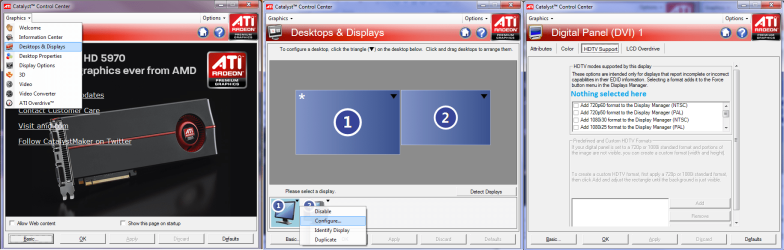
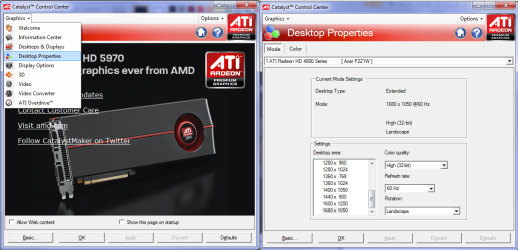
Instead of setting it to 1080/60p, have you tried setting it to just plain old 1920x1080 (Desktop properties section of the CCC)?

Start here,

settings1.png

and set it to 1920x1080 here,

settings2.png
 

My Computer My Computer

Computer type
PC/Desktop
Computer Manufacturer/Model Number
Me
OS
Win 7 Ultimate x64
CPU
FX-8350 @ 4.6 GHz so far
Motherboard
Asus M5A97 EVO
Memory
ADATA XPG V1 Series Black 8GB DDR3 1600
Graphics Card(s)
Sapphire R9 270x Dual-X
Sound Card
Xonar DGX w/ Corsair Vengence 1300
Monitor(s) Displays
Acer S232HL Abid
Screen Resolution
1920x1080
Hard Drives
120 GB OCZ Vertex 3
500 GB Seagate 7200.12
PSU
Antec Earthwatts 650W Green
Case
Antec Three Hundred
Cooling
Cooler Master 212 EVO
Keyboard
Logitech G510
Mouse
Logitech G500s
Internet Speed
35000/3000
Instead of setting it to 1080/60p, have you tried setting it to just plain old 1920x1080 (Desktop properties section of the CCC)?
No such setting exists. If you look at your screenshot, the highest resolution is 1680x1050; the same is true for me under the "Basic" resolutions node in "Desktop Properties." After 1680x1050, there is an "HDTV" node with 1000i, 1000p, 1080i, 1080p, 648p, and 720p.

One new curious thing... I just adjusted my resolution to 1360x768, restarted my computer, turned my screen off and on, and while the resolution on my computer definitely changed, the screen input info displays a 1080p signal. I'm not sure what, if anything, this means...
 

My Computer My Computer

OS
Windows 7, 64-bit
CPU
Intel i5-750
Motherboard
EVGA P55 SLI
Memory
8GB OCZ DD3 Gold
Graphics Card(s)
XFX Radeon 5770
Monitor(s) Displays
Sony Bravia KDL-46w5100
Hard Drives
OCZ Vertex 2 60GB SSD, Samsung EcoGreen 1.5 TB
PSU
XFX 750w Black Edition, 80+ Silver
Case
LianLi LanCool K62
I guess that makes sense. The resolution of your desktop and the HDMI signal don't need to be the same. I don't know if HDMI has required default signalling or not but the card is outputting standard TV resolutions it sounds like. Thaough maybe that is the actual problem. W7 aggressively adheres to resolutions that the monitor reports as being accepatable. So with the HDMI cable in either the TV is telling W7 what resolution to use or it's built in to use "TV" resolutions for output on HDMI. Wherease XP you could set any output on any interface even if it would blow up your monitor :)

I'm using the RGB outputs which means there is no feedback from the TV so am allowed to select any output resolution I want. The only problem there is, if the TV is off when I reboot, It DOES detect that and actually removes the monitor from my setup and I have to re-add it every time.

I sure as hell wish there was a "lock" function for video setup :(

I have read that there is a way of forcing resolutions, may be in the tutorials section but it may not apply to the HDMI output since it seems like you can already select the resolution but the card is converting it to a standard TV resolution.

If you have the option of connecting up the RGB output to your tv you may have better luck.
 

My Computer My Computer

Computer Manufacturer/Model Number
Scratch built
OS
Windows 7 x64 Ultimate
CPU
i7 960
Motherboard
Asus P6X58D
Memory
12 Gig Corsair Dominator
Graphics Card(s)
Nvidia 480
Sound Card
Maudio Delta 44 + breakout box
Monitor(s) Displays
Dell UltraSharp U2410 24in and Samsung 21 dual monitors
Screen Resolution
1920x1200 and 1280x1024
Hard Drives
Primary: Intel X-25M G2 160G SSD
Secondary: Segate baracuda 1.0 TB
HDs in AHCI mode.
PSU
Corasair TX850
Case
Cooler Master HAF
Cooling
Corsair H50
Keyboard
Logitech G15 + N52 game pad
Mouse
Logitech MX518
Internet Speed
15kbs down 4.5kbps up
Other Info
WEI 7.6
CPU & RAM 7.6
Graphics 7.9
Hard disk 7.7
Instead of setting it to 1080/60p, have you tried setting it to just plain old 1920x1080 (Desktop properties section of the CCC)?
No such setting exists. If you look at your screenshot, the highest resolution is 1680x1050; the same is true for me under the "Basic" resolutions node in "Desktop Properties." After 1680x1050, there is an "HDTV" node with 1000i, 1000p, 1080i, 1080p, 648p, and 720p.

Hmmm.... reading your statement and out of curiosity I checked my panel and found this...

Capture.JPG

Under HDTV there is a 1920x1080 setting. Make sure you scroll all the way down.
 

My Computer My Computer

Computer type
PC/Desktop
Computer Manufacturer/Model Number
Custom built by me.
OS
Windows 10 Pro
CPU
Intel Core i7-4770K (3.5Ghz)
Motherboard
Gigabyte G1 Sniper 5 (F10 Bios)
Memory
32 gig Corsair Dominator Platinum (4x8Gig)
Graphics Card(s)
Sapphire Tri-X R9 Fury
Sound Card
Soundblaster ZXR
Monitor(s) Displays
NEC PA242W 24" LCD Monitor
Screen Resolution
1920 x 1200
Hard Drives
Primary - Samsung 850 Pro (512gig), Samsung 840 Pro (256gig), 2TB WD Caviar Black.
PSU
EVGA Supernova 1000 G2
Case
Cooler Master HAF X
Cooling
Corsair H100i with Corsair Air Series SP120 Quiet Fans
Keyboard
Logitech Wireless Wave
Mouse
Logitech Performance MX
Internet Speed
High Speed Cable
Antivirus
Norton Security
Browser
IE11
Other Info
Memory Timings - 1866MHz @ 9-9-9-27-1T @ 1.5 volts
Back
Top