New Win 7 install on machine with Vista

thewolfe

New member
Power User
Local time
5:42 AM
Messages
203
New Win 7 install on machine with Vista - clean install
Dell 1525 Inspiron
It's asking where do you want to install.

Disk 0 Part 1 OEM (Reserved)
Disk 0 Part 2 Recovery Primary
Disk 0 Part 3 OS System
Disk 0 Part 4 Mediadirect Logical

What do I want to "Delete" or "Format"?
 

My Computer My Computer

Computer Manufacturer/Model Number
Dell Inspiron 1525
OS
Windows 7
CPU
Intel Core(TM)2 Duo T5750 2.00 GHz
Memory
3GB
Hard Drives
232 GB
Hello thewolfe, welcome to Seven Forums!


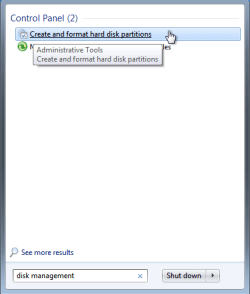
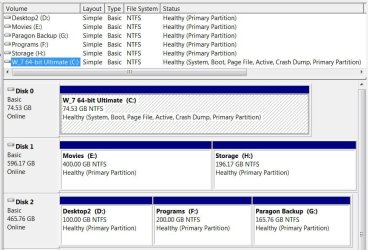
It would not be advisable to delete any of that; post a snip/screen-shot of disk management so we can better advise you on the next step. What is "Disk 0 Part 4 "Mediadirect" Logical?


How to Post a Screenshot in Seven Forums


Start Menu.PNGDisk Management.JPG
 

My Computer My Computer

Computer Manufacturer/Model Number
* BFK Customs *
OS
W 7 64-bit Ultimate
CPU
Intel Q9550 Yorkfield
Motherboard
ASUS P5Q Pro
Memory
8GB Dominator 8500C5D
Graphics Card(s)
ATI : XFX 5870
Sound Card
Realtek HD Audio 7-1
Monitor(s) Displays
1x 47" LCD HDMI & 3x 26" LCD HDMI
Screen Resolution
1920x1080P & 1920x1200
Hard Drives
1x 80GB Intel X25-M G2 SSD : 1x 500GB & 1x 640GB WD Caviar Black(s)
PSU
Corsair 620HX
Case
Cooler Master RC-690
Cooling
Tuniq Tower 120, 2x 140mm and 3x 120mm case fans
Keyboard
Microsoft 500
Mouse
Razer Diamondback 3G
Internet Speed
14 Mb/s
Other Info
1x Koutech 3Gb/s SATA HDD Hot Swap Rack
MediaDirect is a small embedded linux distro that you can boot into by pressing a button on your dell laptop, its for viewing media quickly without windows booting up. Install on the "OS System" partiton.
 

My Computer My Computer

Computer Manufacturer/Model Number
Black_Box (homebuilt)
OS
windows 7 RTM x64
CPU
Phenom II 965 Quad Core 3.4Ghz
Motherboard
Asus M4A79T Deluxe
Memory
Mushkin Blackline 8GB (4x2gb)
Graphics Card(s)
XFX Radeon 5970 Black Edition
Sound Card
onboard
Monitor(s) Displays
Dell 2408WPF-main Dell E248WFP-secondary
Screen Resolution
1920x1200-main 1920x1200-secondary
Hard Drives
OCZ Vertex Limited Edition 100GB (OS)
x1 WD Black Edition 500GB drive (Storage)
PSU
XFX 850w Black Edition (Modular)
Case
Mountian Mods H2go
Cooling
CoolITSystems ECO A.L.C.
Keyboard
Logitech MX 5500 wireless keyboard
Mouse
Razor Copperhead
Internet Speed
16Mb down/2Mb up Wowway Cable Internet
Have made the Dell Recovery DVD's?
 

My Computer My Computer

OS
ME/XP/Vista/Win7
MediaDirect is a small embedded linux distro that you can boot into by pressing a button on your dell laptop, its for viewing media quickly without windows booting up. Install on the "OS System" partiton.


Thank you! ;)
 

My Computer My Computer

Computer Manufacturer/Model Number
* BFK Customs *
OS
W 7 64-bit Ultimate
CPU
Intel Q9550 Yorkfield
Motherboard
ASUS P5Q Pro
Memory
8GB Dominator 8500C5D
Graphics Card(s)
ATI : XFX 5870
Sound Card
Realtek HD Audio 7-1
Monitor(s) Displays
1x 47" LCD HDMI & 3x 26" LCD HDMI
Screen Resolution
1920x1080P & 1920x1200
Hard Drives
1x 80GB Intel X25-M G2 SSD : 1x 500GB & 1x 640GB WD Caviar Black(s)
PSU
Corsair 620HX
Case
Cooler Master RC-690
Cooling
Tuniq Tower 120, 2x 140mm and 3x 120mm case fans
Keyboard
Microsoft 500
Mouse
Razer Diamondback 3G
Internet Speed
14 Mb/s
Other Info
1x Koutech 3Gb/s SATA HDD Hot Swap Rack
It would really help if you posted a picture of your Disk Management. From your list, there are not many options. You will probably have to create a new partition first.
Further, are you aware of all the possible pains with double booting. In other words, do you want to keep Vista on that system.
 

My Computer My Computer

Computer Manufacturer/Model Number
HP, Dell, Gateway, Toshiba - 4 laptops and 2 desktops
OS
Vista, Windows7, Mint Mate, Zorin, Windows 8
CPU
from 1.6GHz Duo to i7
Monitor(s) Displays
2x HP w2207
Hard Drives
5x HDD, 7x SSD, 12x Externals
Keyboard
with trackball - no mices
Mouse
Trackball mice
Internet Speed
DSL 6000
On my Dell 1520, I deleted all of the partitions then installed Win 7. If you leave the MediaDirect partition and install Win 7 on the OS partition, I've heard (but can't verify) that it can cause problems. Supposedly, if the MediaDirect button is pushed when the power is off the machine will load MediaDirect from that partition but it will mess up the Win 7 partition.

Since I deleted the MD partition, if I press the MD button with the machine powered off, it will display a "Dell Media Direct" splash screen for 1-2 secs then, since it can't find the MD partition, it boots Win 7. If the machine is booted and I press the MD button, nothing happens. You can use a program such as AutoHotkey to reassign the MD key to do something else if you want.

Edit: Just for the heck of it, I installed AutoHotkey and used it to reassign the MD key to bring up WMP when pressed. Works fine, now when the machine is powered off the MD key acts like the Power button, once the machine is booted pressing the MD button brings up WMP.
 
Last edited:

My Computer My Computer

Computer type
PC/Desktop
Computer Manufacturer/Model Number
Home Built desktop, Dell G15 5511 Gaming laptop,MS Surface Pro 7 tablet
OS
W10 Pro desktop, W11 laptop, W11 Pro tablet (all 64-bit)
CPU
3.7Ghz 8700K i7, i7-11800H, i7-1065G7
Motherboard
ASUS TUF Z370-Pro Gaming in desktop
Memory
16G desktop, 16G laptop, 4G tablet
Graphics Card(s)
AMD Radeon RX580, RTX 3060, Intel Iris Plus
Sound Card
High Definition Audio (Built-in to mobo)
Monitor(s) Displays
Samsung U32J59 32" (2x), 15.6", 12"
Screen Resolution
3840x2160, 3840x2160, 1920x1080, 2160x1440
Hard Drives
500G SSD for OS; 2T, 10T & 15T HDDs for Data on Desktop, 1TB SSD laptop, 128G SSD tablet.
PSU
Corsair CX 750M
Case
Antec 100
Cooling
CM 212+
Keyboard
IBM Model M - used continuously since 1986
Mouse
Microsoft Pro IntelliMouse
Internet Speed
400M down 8M up
Antivirus
Windows Defender
Browser
FireFox
Other Info
Built my first computer (8Mhz 8088cpu, 640K RAM, 20MB HDD, 2 360K floppy drives) in 1985 and have been building them for myself, relatives and friends ever since.
When I get back to the machine, I'll see if I can get on so I can show disk management.
Haven't made a recovery disk, don't plan to go back to Vista.
Media direct doesn't seem to be a problem.
I want to delete VIsta permanently, no double booting
 

My Computer My Computer

Computer Manufacturer/Model Number
Dell Inspiron 1525
OS
Windows 7
CPU
Intel Core(TM)2 Duo T5750 2.00 GHz
Memory
3GB
Hard Drives
232 GB
So you have a Windows 7 install disk and you want to do-away with everything currently on the PC and just have Windows 7 installed? If the answer to these questions is yes, then have a look at the tutorials below.

Be advised: using the info in the first tutorial will over-write everything, all the data on the entire Hard Disk Drive (HDD) so make any backups of any data you don't want to lose before you get started.


SSD / HDD : Optimize for Windows Reinstallation

How to Do a Clean Installation with Windows 7
 

My Computer My Computer

Computer Manufacturer/Model Number
* BFK Customs *
OS
W 7 64-bit Ultimate
CPU
Intel Q9550 Yorkfield
Motherboard
ASUS P5Q Pro
Memory
8GB Dominator 8500C5D
Graphics Card(s)
ATI : XFX 5870
Sound Card
Realtek HD Audio 7-1
Monitor(s) Displays
1x 47" LCD HDMI & 3x 26" LCD HDMI
Screen Resolution
1920x1080P & 1920x1200
Hard Drives
1x 80GB Intel X25-M G2 SSD : 1x 500GB & 1x 640GB WD Caviar Black(s)
PSU
Corsair 620HX
Case
Cooler Master RC-690
Cooling
Tuniq Tower 120, 2x 140mm and 3x 120mm case fans
Keyboard
Microsoft 500
Mouse
Razer Diamondback 3G
Internet Speed
14 Mb/s
Other Info
1x Koutech 3Gb/s SATA HDD Hot Swap Rack
Bare foot Kid I'll ck out the links when I get back to that computer.

And yes I have nothing on the machine I want to save. I'm going for brand new.

Thanks for the posts, everyone. I'm sure I'll be back with more questions after I read the tutorials.
 

My Computer My Computer

Computer Manufacturer/Model Number
Dell Inspiron 1525
OS
Windows 7
CPU
Intel Core(TM)2 Duo T5750 2.00 GHz
Memory
3GB
Hard Drives
232 GB

My Computer My Computer

Computer Manufacturer/Model Number
* BFK Customs *
OS
W 7 64-bit Ultimate
CPU
Intel Q9550 Yorkfield
Motherboard
ASUS P5Q Pro
Memory
8GB Dominator 8500C5D
Graphics Card(s)
ATI : XFX 5870
Sound Card
Realtek HD Audio 7-1
Monitor(s) Displays
1x 47" LCD HDMI & 3x 26" LCD HDMI
Screen Resolution
1920x1080P & 1920x1200
Hard Drives
1x 80GB Intel X25-M G2 SSD : 1x 500GB & 1x 640GB WD Caviar Black(s)
PSU
Corsair 620HX
Case
Cooler Master RC-690
Cooling
Tuniq Tower 120, 2x 140mm and 3x 120mm case fans
Keyboard
Microsoft 500
Mouse
Razer Diamondback 3G
Internet Speed
14 Mb/s
Other Info
1x Koutech 3Gb/s SATA HDD Hot Swap Rack
Here is shot of Disk Mgt, I think.
 

Attachments

  • Disk mgt.jpg
    Disk mgt.jpg
    85.4 KB · Views: 15

My Computer My Computer

Computer Manufacturer/Model Number
Dell Inspiron 1525
OS
Windows 7
CPU
Intel Core(TM)2 Duo T5750 2.00 GHz
Memory
3GB
Hard Drives
232 GB
If a Windows 7 clean install is what you want then you should have no issues at all, just take your time and follow the tutorials linked earlier and be sure to keep us informed as to your progress. ;)
 

My Computer My Computer

Computer Manufacturer/Model Number
* BFK Customs *
OS
W 7 64-bit Ultimate
CPU
Intel Q9550 Yorkfield
Motherboard
ASUS P5Q Pro
Memory
8GB Dominator 8500C5D
Graphics Card(s)
ATI : XFX 5870
Sound Card
Realtek HD Audio 7-1
Monitor(s) Displays
1x 47" LCD HDMI & 3x 26" LCD HDMI
Screen Resolution
1920x1080P & 1920x1200
Hard Drives
1x 80GB Intel X25-M G2 SSD : 1x 500GB & 1x 640GB WD Caviar Black(s)
PSU
Corsair 620HX
Case
Cooler Master RC-690
Cooling
Tuniq Tower 120, 2x 140mm and 3x 120mm case fans
Keyboard
Microsoft 500
Mouse
Razer Diamondback 3G
Internet Speed
14 Mb/s
Other Info
1x Koutech 3Gb/s SATA HDD Hot Swap Rack
The OEM partition enables Dell utilities which may or may not work when you clean reinstall. Most of these utilities have better options built into Win7.

The REcovery partition works quite well in Dell to restore to factory condition from boot, which you might want to do if you should decide to sell the computer but keep Win7 for yourself. Hence it would be wise to at least make the Recovery disks, although they can always be ordered from Dell, or a Vista installer for your version can be located to clean reinstall your version with Product Key on COA.

With these things in mind, decide if you want to delete those partitions. If so the best method is to wipe the HD using the tutorial BarefootKid wrote and linked. This gives you the cleanest possible slate for new install: http://www.sevenforums.com/tutorials/91339-ssd-hdd-optimize-windows-reinstallation.html
 
OK, I understand you to say delete every partition. Then will it auto format C or will I have to do that? I'm also going to follow the tutorials that hopefully won't leave any gaps in the re-install process.

Thanks for your posts. I'm about to begin.
 

My Computer My Computer

Computer Manufacturer/Model Number
Dell Inspiron 1525
OS
Windows 7
CPU
Intel Core(TM)2 Duo T5750 2.00 GHz
Memory
3GB
Hard Drives
232 GB
Be advised: using the info in the first tutorial will over-write everything, all the data on the entire Hard Disk Drive (HDD) so make any backups of any data you don't want to lose before you get started.


SSD / HDD : Optimize for Windows Reinstallation

How to Do a Clean Installation with Windows 7


Just follow these tutorials, they work in unison and will show you every step you need to take to have a clean fresh install of Windows 7 on the PC; take your time and study the tutorials well before you get started and you should have no problems, if you have further questions or need help someone here will be glad to assist you, just post back in this same thread.
 

My Computer My Computer

Computer Manufacturer/Model Number
* BFK Customs *
OS
W 7 64-bit Ultimate
CPU
Intel Q9550 Yorkfield
Motherboard
ASUS P5Q Pro
Memory
8GB Dominator 8500C5D
Graphics Card(s)
ATI : XFX 5870
Sound Card
Realtek HD Audio 7-1
Monitor(s) Displays
1x 47" LCD HDMI & 3x 26" LCD HDMI
Screen Resolution
1920x1080P & 1920x1200
Hard Drives
1x 80GB Intel X25-M G2 SSD : 1x 500GB & 1x 640GB WD Caviar Black(s)
PSU
Corsair 620HX
Case
Cooler Master RC-690
Cooling
Tuniq Tower 120, 2x 140mm and 3x 120mm case fans
Keyboard
Microsoft 500
Mouse
Razer Diamondback 3G
Internet Speed
14 Mb/s
Other Info
1x Koutech 3Gb/s SATA HDD Hot Swap Rack
OK, I understand you to say delete every partition. Then will it auto format C or will I have to do that? I'm also going to follow the tutorials that hopefully won't leave any gaps in the re-install process.

No, actually I said that you need to make that decision based on the information we provided, after asking any questions to be sure.

And if you are going to do away with those partitions, the best and cleanest method is to use the tutorials provided by BareFootKid.
 
Well, I'm up and running on Win7. Just finished the install so questions will be forth coming, I'm sure.
Ops! That didn't take long.

On Disk 0 I have 9.80 Unallocated, (C) 220.58 Healthy..., and 2.50 Unallocated.

Can I add the unallocated to the (C) partition?


Thanks to all.
 

My Computer My Computer

Computer Manufacturer/Model Number
Dell Inspiron 1525
OS
Windows 7
CPU
Intel Core(TM)2 Duo T5750 2.00 GHz
Memory
3GB
Hard Drives
232 GB
Back
Top