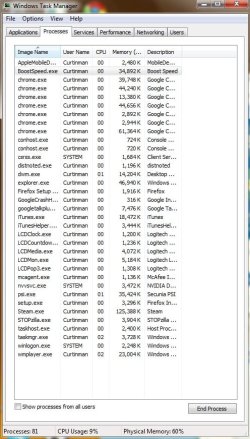
Windows 7 has slowed to a crawl

I can't believe no one in here did a simple Google search for wmpnetwk.exe.

To the original poster - Do you have an XBox or a Media Center Extender and have you tried to share music or movies from your PC with it? If so, or even if not, you need to disable media sharing within Windows Media Player. This will eliminate the issue with wmpnetwk.exe.

Having a process that runs constantly above 50 CPU and 900K RAM is a HUGE red flag that something is wrong regarding that process.
 

My Computer My Computer

At a glance

Windows 7 Ultimate RTM (Technet)3.00 gigahertz Intel Core2 Duo E84004GBATI Radeon X1950 Pro
Computer Manufacturer/Model Number
Custom
OS
Windows 7 Ultimate RTM (Technet)
CPU
3.00 gigahertz Intel Core2 Duo E8400
Motherboard
ASUSTeK Computer INC. P5K/EPU Rev 1.xx
Memory
4GB
Graphics Card(s)
ATI Radeon X1950 Pro
Sound Card
Built in HD Audio
Monitor(s) Displays
22" Gateway LCD
Screen Resolution
1920 x 1200
Hard Drives
ST3160023A [Hard drive] (160.04 GB) -- drive 0, rev 8.01, ST3500630AS [Hard drive] (500.11 GB) -- drive 2, rev 3.AAK
ST3500630AS [Hard drive] (500.11 GB) -- drive 1, rev 3.AAK
Keyboard
Logitech G11
Mouse
Microsoft Wireless Laser Mouse 5000
Internet Speed
13.44 Mbps
I can't believe no one in here did a simple Google search for wmpnetwk.exe.

To the original poster - Do you have an XBox or a Media Center Extender and have you tried to share music or movies from your PC with it? If so, or even if not, you need to disable media sharing within Windows Media Player. This will eliminate the issue with wmpnetwk.exe.

Having a process that runs constantly above 50 CPU and 900K RAM is a HUGE red flag that something is wrong regarding that process.

Thank you. It didn't seem right. I have tried going to WMP > Library, but I do not see anything about file sharing.

As far as media center extender or xbox, no. My setup here at the house is one wireless laptop run off the modem sitting in the den. I have no gaming systems or other computers ever used here at the house. Now, sometimes when I go to a friend's house I may get on his network, but that is like every couple of months.

I am going to try to attach a printscreen of my windows task manager on my next post and maybe you could tell me what else I could get rid of.

Thank you!!
 

My Computer My Computer

At a glance

Windows 7 Home Premium (64)Pentium Dual-Core CPU T4400 @2.20 GHz, 220 MH...3.00 GB
Computer Manufacturer/Model Number
ASUS K50IJ
OS
Windows 7 Home Premium (64)
CPU
Pentium Dual-Core CPU T4400 @2.20 GHz, 220 MHz, 2 Core(s), 2
Memory
3.00 GB
Sound Card
VIA High Definition Audio Device
Screen Resolution
1366 x 768 x 60 hertz
Hard Drives
283 GB, free space 183 GB
I can't believe no one in here did a simple Google search for wmpnetwk.exe.

To the original poster - Do you have an XBox or a Media Center Extender and have you tried to share music or movies from your PC with it? If so, or even if not, you need to disable media sharing within Windows Media Player. This will eliminate the issue with wmpnetwk.exe.

Having a process that runs constantly above 50 CPU and 900K RAM is a HUGE red flag that something is wrong regarding that process.

It worked! It worked! My RAM while just being here on IE is at 36% instead of 85-90% like it was. I learned that it helps to use the CPU meter gadget so that I would know the problem was with my RAM and not with some other mysterious phenomenon.

Good call on seeing that the issue was with the wmpnetwk.exe. I didn't know that that was a problem, but thank you.

Mearkat's suggestion of turning off my add-ons and plug-ins did help some, but now I can turn back on the ones I know I need and are safe.

To everyone on here. You guys/girls are awesome! Thanks! I will be on here many more times just to add to your reps (but hopefully with no new problems) Thanks!!:party::party:
 

My Computer My Computer

At a glance

Windows 7 Home Premium (64)Pentium Dual-Core CPU T4400 @2.20 GHz, 220 MH...3.00 GB
Computer Manufacturer/Model Number
ASUS K50IJ
OS
Windows 7 Home Premium (64)
CPU
Pentium Dual-Core CPU T4400 @2.20 GHz, 220 MHz, 2 Core(s), 2
Memory
3.00 GB
Sound Card
VIA High Definition Audio Device
Screen Resolution
1366 x 768 x 60 hertz
Hard Drives
283 GB, free space 183 GB
Hmm, I dont have very many processes with high cpu usage, but right now im using 59% ram of 4gb and 5% cpu.....strange?
 

Attachments

  • task manager screeny.jpg
    task manager screeny.jpg
    82.9 KB · Views: 21

My Computer My Computer

At a glance

Windows 7 Home Premium 64 bitAMD Phenom 995012gb ddr2, 2gbx2+4gbx2Zotac nvidia gt 730
Computer type
PC/Desktop
Computer Manufacturer/Model Number
custom
OS
Windows 7 Home Premium 64 bit
CPU
AMD Phenom 9950
Motherboard
ASUS m3a32-mvp deluxe
Memory
12gb ddr2, 2gbx2+4gbx2
Graphics Card(s)
Zotac nvidia gt 730
Sound Card
integrated
Monitor(s) Displays
Samsung syncmaster 213t, dell 13 in
Screen Resolution
1600x1200
Hard Drives
Seagate 750 gb 7200 rpm harddrive, Seagate 7200 rpm120 gb harddrive, samsung 1TB 5400rpm
Case
Alienware Aurora
Cooling
fans yo
Keyboard
Logitech G15
Mouse
microsoft intellimouse explorer 3.0
Internet Speed
10mbps
Antivirus
microsoft security suite
Browser
chrome
I thought everything was fixed when I turned off wmpnetwk.exe, but it keeps turning itself back on and running at 900,000 to 1,000,000K.

I ended it under services.msc, by selecting stop, then manual, then restart, then going back to it and hitting automatic. This did the job temporarily (I found this on google)

I also tried Task Manager, riht-clicked on wmpnetwk.exe and clicked end process. Again, this is just another temporary as wmpnetwk.exe turns itself back on.

Any suggestions of what to do or maybe I'm doing something wrong.

Thanks. you will be repped.
 

My Computer My Computer

At a glance

Windows 7 Home Premium (64)Pentium Dual-Core CPU T4400 @2.20 GHz, 220 MH...3.00 GB
Computer Manufacturer/Model Number
ASUS K50IJ
OS
Windows 7 Home Premium (64)
CPU
Pentium Dual-Core CPU T4400 @2.20 GHz, 220 MHz, 2 Core(s), 2
Memory
3.00 GB
Sound Card
VIA High Definition Audio Device
Screen Resolution
1366 x 768 x 60 hertz
Hard Drives
283 GB, free space 183 GB
Hi, makeshiftpat.

According to this article, Fix wmpnetwk.exe In Windows 7, this is a known issue but is not expected to be fixed in SP1.
So I asked a friend to get Windows 7 and the first complaint was that wmpnetwk.exe is taking too much system resources. In some cases the resource consumption goes up to 90%. According to Microsoft, this was a small bug in RTM release but should not happen in the official public release.

In addition to stopping the service, you need to change it to Manual. See the above-linked article.
 

My Computer My Computer

At a glance

Windows 7 & Windows Vista Ultimate
OS
Windows 7 & Windows Vista Ultimate
Hi, makeshiftpat.

According to this article, Fix wmpnetwk.exe In Windows 7, this is a known issue but is not expected to be fixed in SP1.
So I asked a friend to get Windows 7 and the first complaint was that wmpnetwk.exe is taking too much system resources. In some cases the resource consumption goes up to 90%. According to Microsoft, this was a small bug in RTM release but should not happen in the official public release.

In addition to stopping the service, you need to change it to Manual. See the above-linked article.

Thank you. I did what it said in the article, where you go to services.msc, stop it and then go to manual, but it just turns itself back on. I just disabled it and stopped it instead of doing what the article said so that it will not cut back on anymore.

Thank you for the help.
 

My Computer My Computer

At a glance

Windows 7 Home Premium (64)Pentium Dual-Core CPU T4400 @2.20 GHz, 220 MH...3.00 GB
Computer Manufacturer/Model Number
ASUS K50IJ
OS
Windows 7 Home Premium (64)
CPU
Pentium Dual-Core CPU T4400 @2.20 GHz, 220 MHz, 2 Core(s), 2
Memory
3.00 GB
Sound Card
VIA High Definition Audio Device
Screen Resolution
1366 x 768 x 60 hertz
Hard Drives
283 GB, free space 183 GB
You're welcome. Fingers crossed that this solves the problem.
 

My Computer My Computer

At a glance

Windows 7 & Windows Vista Ultimate
OS
Windows 7 & Windows Vista Ultimate
Here might be a solution to programs starting unwanted.

Soluto – Anti-Frustration Software

I don't use it for Windows 7 just because it has never been needed. I do use it with Win XP and it helped tremedously. It found things starting up that msconfig does NOT find. It reduced my boot time for XP by 30-40%.

I was also able to totally stop some programs from running on boot and delay others. Over all it is a neat little program.
 

My Computer My Computer

At a glance

Windows 7 ProIntel(R) Pentium(R) Duel CPU E2200 2.20 Ghz4 gb 2.96 UsableOnboard
OS
Windows 7 Pro
CPU
Intel(R) Pentium(R) Duel CPU E2200 2.20 Ghz
Motherboard
GA-G41M-ES2L
Memory
4 gb 2.96 Usable
Graphics Card(s)
Onboard
Sound Card
Onboard
Hard Drives
2 - 1TB WD Sata Drives
Back
Top