Can't play movies

Gregg C

New member
Local time
11:23 AM
Messages
10
Good morning Guys,
I just purchased a new HP DM4T laptop (Windows 7) I moved several movies from my old laptop a Compaq Presario CQ60 (Vista) These movies are all about 700 megs, Face Off, Executive Decision, Rambo 8...ect and are AVI files.
My Compaq Presario CQ60 (Vista) played these movies just fine, the HP with 7 wont.
I tried downloading K-lite codec pack, some sort of a microsoft codec download, nothing has worked.
Any ideas ??
Because there movies are digital files and not DVD's is there some sort of copyright
blocking ??
I'm pretty frustrated that my new hightech $800 Hp wont play a simple movie file.

Gregg
 

My Computer My Computer

At a glance

Windows 7
OS
Windows 7
Where did you get the digital files from? Download VLC Player and see if it will open the files
 

My Computer My Computer

At a glance

Windows 7 UltimateAMD Athlon II X2 245 2.90Ghz3.00 GB8800GTS 512MB
Computer Manufacturer/Model Number
Custom Built
OS
Windows 7 Ultimate
CPU
AMD Athlon II X2 245 2.90Ghz
Motherboard
Some Gigabyte one, dont remember model
Memory
3.00 GB
Graphics Card(s)
8800GTS 512MB
Sound Card
Sound Blaster X-Fi Titanium Fatal1ty
Monitor(s) Displays
Dual 22" widescreen
Hard Drives
250GB internal, 500GB internal
PSU
CORSAIR CMPSU-850TX 850W Power Supply
Case
Thermalkake Tsunami Dream
Cooling
Thermaltake Golden Orb II
Keyboard
Saitek Eclipse 2
Mouse
Logitech MX518
Try playing them using VLC player .

if it works, uninstall all the codec packs and players . and then only install K-LITE (the latest edition) .
 

My Computer My Computer

At a glance

Win 7 Ultimate 64bit
OS
Win 7 Ultimate 64bit
Gregg, try the VLC player. This player comes with all codecs built-in and plays most of the video files.

The possible reason for your problem could be that you are missing a particular codec for your video. Avi can be xvid or divx or something else. As far as I know, Windows does not play xvid or divx files natively. If you install codecs properly, then it will, but in my opinion it's way easier to use VLC. That is, assuming all you want to do is to play those movies.
 

My Computer My Computer

At a glance

Windows 7 Ultimate (x64)Q66008 GBATI Radeon HD 2600 XT
Computer Manufacturer/Model Number
Dell Inspiron 530
OS
Windows 7 Ultimate (x64)
CPU
Q6600
Memory
8 GB
Graphics Card(s)
ATI Radeon HD 2600 XT
Monitor(s) Displays
Samsung Syncmaster P2450
Screen Resolution
1920x1080
Hard Drives
Samsung HD103UJ
Samsung HD501LJ
Internet Speed
25 Mb/s
Wow, we all suggested VLC Player, haha

The possible reason for your problem could be that you are missing a particular codec for your video. Avi can be xvid or divx or something else. As far as I know, Windows does not play xvid or divx files natively. If you install codecs properly, then it will, but in my opinion it's way easier to use VLC.

OP stated he installed the K-Lite codec pack, which includes xvid and divx
 

My Computer My Computer

At a glance

Windows 7 UltimateAMD Athlon II X2 245 2.90Ghz3.00 GB8800GTS 512MB
Computer Manufacturer/Model Number
Custom Built
OS
Windows 7 Ultimate
CPU
AMD Athlon II X2 245 2.90Ghz
Motherboard
Some Gigabyte one, dont remember model
Memory
3.00 GB
Graphics Card(s)
8800GTS 512MB
Sound Card
Sound Blaster X-Fi Titanium Fatal1ty
Monitor(s) Displays
Dual 22" widescreen
Hard Drives
250GB internal, 500GB internal
PSU
CORSAIR CMPSU-850TX 850W Power Supply
Case
Thermalkake Tsunami Dream
Cooling
Thermaltake Golden Orb II
Keyboard
Saitek Eclipse 2
Mouse
Logitech MX518
AVI (xvid or divx) plays well out of the box. Probably the files are mkv , which is not played automatically. Either VLC, or Shark007's wmp 12 codecs are the best choices to play all audio or video files with Win7 .
 

My Computer My Computer

At a glance

Microsoft Windows 10 Pro Insider Preview 64-bitIntel(R) Core(TM) i3-4130 CPU @ 3.40GHzCorsair Vengence 4GB x2 (8.00GB Dual-Channel ...2047MB GeForce GTS 450 (ZOTAC International)
Computer type
PC/Desktop
Computer Manufacturer/Model Number
Self Assembled
OS
Microsoft Windows 10 Pro Insider Preview 64-bit
CPU
Intel(R) Core(TM) i3-4130 CPU @ 3.40GHz
Motherboard
Gigabyte Technology Co., Ltd. B85M-D3H
Memory
Corsair Vengence 4GB x2 (8.00GB Dual-Channel DDR3 @ 798MHz)
Graphics Card(s)
2047MB GeForce GTS 450 (ZOTAC International)
Sound Card
Onboard (Realtek High Definition Audio)
Monitor(s) Displays
LG Flatron E2040T
Screen Resolution
1600x900
Hard Drives
Western Digital 1 TB
Seagate 500 GB
PSU
Corsair VS550
Case
Cooler Master K380
Cooling
Cooler Master Seidon 120V Plus
Keyboard
Logitech MK260r
Mouse
Logitech MK260r
Internet Speed
PMPL Broadband
Antivirus
Windows Defender + MBAM
Browser
Firefox
Other Info
Dell Studio 15" Laptop

My Computer My Computer

At a glance

Windows 7 Ultimate 64 - OEM Service Pack 1Intel Core i7 930 2.80Ghz Bloomfield Socket L...Patriot Viper 6GB 3x2GB DDR3 PC3-1200C9 1600M...Asus ATI Radeon HD 5770 CuCore 1024MB GDDR5 P...
Computer Manufacturer/Model Number
Over Clockers Ultima Viper 2.80Ghz
OS
Windows 7 Ultimate 64 - OEM Service Pack 1
CPU
Intel Core i7 930 2.80Ghz Bloomfield Socket LGA 1366
Motherboard
Gigabyte GA-X58A-UD3R Intel X58 Socket 1366 DDR3
Memory
Patriot Viper 6GB 3x2GB DDR3 PC3-1200C9 1600Mhz Tri Channel
Graphics Card(s)
Asus ATI Radeon HD 5770 CuCore 1024MB GDDR5 PCI Express
Sound Card
Realtek ALC889 @ Intel 82801JB ICH10 - High Definition Audio
Monitor(s) Displays
Samsung SyncMaster 920N 19"
Screen Resolution
1280*1024
Hard Drives
1 x OCZ Vertex2 Series 120GB 2.5" SATA-II SSD
1 x Seagate Barracuda 7200.12 1TB SATA-II 32MB Cache
1 x Western Digital Caviar Green 2TB SATA-II 64 MB Cache
PSU
Corsair TX 650W ATX SLi
Case
Antec 902 Ultimate Gaming Case Black
Cooling
Prolimatech Megahalems Rev B CPU Cooler Socket 775/1156/1366
Keyboard
Microsoft Comfort Curve Keyboard
Mouse
Microsoft Optical USB
Internet Speed
ADSL24 FTTC 34.2 Mbps Down 7.1Mbps Up
Other Info
OcUK 22x DVDSATA ReWriter Black
Akasa AK-FN058 Apache Black Super Silent 120mm Fan
Printer Epson Stylus Photo R300
Scanner Canon Canoscan 8000F
Thanks Guys !!
I'll let you know.
 

My Computer My Computer

At a glance

Windows 7
OS
Windows 7

My Computer My Computer

At a glance

Windows 7 Ultimate x641.80 GHz Intel Core 2 Duo processor T71003 gig ddr2NVIDIA GeForce 8400M GS
Computer Manufacturer/Model Number
HP dv6519tx
OS
Windows 7 Ultimate x64
CPU
1.80 GHz Intel Core 2 Duo processor T7100
Memory
3 gig ddr2
Graphics Card(s)
NVIDIA GeForce 8400M GS
Sound Card
Realtek High Definition Audio
Monitor(s) Displays
15.4” WXGA High Definition BrightView Widescreen
Screen Resolution
1280 x 800
Hard Drives
Hitachi 320 GB (5400 rpm)
PSU
90 W AC Power Adapter
Cooling
Kitchen plate under the lappy
Keyboard
101 key compatible
Mouse
Touch Pad with On/Off button and dedicated vertical Scroll
Internet Speed
Three Wireless internet prepaid using E160G USB dongle
Hey guys, I installed VLC..no can do, I got a this error msg..."VLC does not support the audio or video format "undf". Unfortunately there is no way for you to fix this".
Any ideas ??
The download said 32 bit, I think Windows 7 is 64, did I dowload the wrong one ??
Gregg
 

My Computer My Computer

At a glance

Windows 7
OS
Windows 7
undf means its a undetermined format.
So basically VLC does not know what it is to decode it.


FFDshow should work however. It may be a splitter issue as well.

Have you tried Sharks package?

Enabling FFDshow with it should allow you to play anything inside WMP12.
 

My Computer My Computer

At a glance

Windows 7 Home Premium 64bitIntel Core i7 2700k8GB Mushkin Redline Ridgebacks @1866EVGA GTX570 SC
Computer Manufacturer/Model Number
Custom (Self Build)
OS
Windows 7 Home Premium 64bit
CPU
Intel Core i7 2700k
Motherboard
eVGA P67 SLI
Memory
8GB Mushkin Redline Ridgebacks @1866
Graphics Card(s)
EVGA GTX570 SC
Sound Card
XiFi Titanium HD
Monitor(s) Displays
LG W2453V
Screen Resolution
1920x1080
Hard Drives
Intel 320 80GB -- Intel X25-V 40GB --WD Black 1TB x2 -- WD Blue 640GB
PSU
Seasonic x750
Case
Corsair 600T SE White
Cooling
eVGA Superclocked CPU Cooler
Keyboard
Saitek Cyborg
Antivirus
Kaspersky
Browser
IE
Other Info
LG BD/DVD
I downloaded Sharks PKG and FFDSHOW was nstalled, now I'm not sure what to do...should't theses movie files play ??
This is over my head, so frustrating.
 

My Computer My Computer

At a glance

Windows 7
OS
Windows 7
the cause of your problem seems deep . the only solution might be a format .
 

My Computer My Computer

At a glance

Win 7 Ultimate 64bit
OS
Win 7 Ultimate 64bit
!

This is unbelievable, a three day old HP, $800 !! I have spent hours on this, sooo frustrating !! I should have listened to my Daughter and bought a Mac !!
I'll call HP in the morning, if this isn't fixed in 30 minutes I guarantee you, I'll have a refund and then march straight to the Apple store !!
Sorry guys I'm pissed !!
 

My Computer My Computer

At a glance

Windows 7
OS
Windows 7
Gregg, if you wish to use Shark007's codecs (which i highly reccomend) please make sure to do the following:

Uninstall any codec packages you may have installed prior.
This includes FFDshow or AC3 filter for example if you installed them as a stand alone install.

Also, any splitters you may have installed such as Haali or Gabest.

You will not need anything, as Sharks package will include all of these and more if you ever need them.

Many use the suggested settings tab once it is installed and works nicely for them.

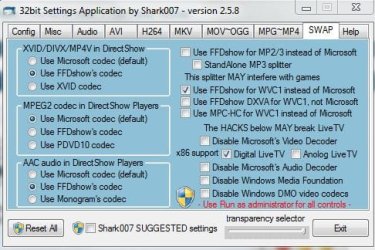
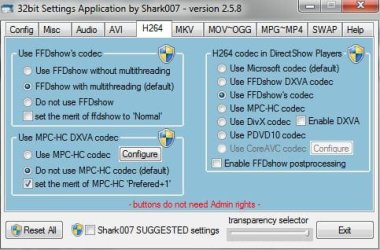
My personal preferences are as shown below, as it enables FFDshow for Video and Audio. For my personal needs this is all thats needed.
However, depending what type of video files you have you may need additional options enabled or disabled.

If these settings do not work for you, please try the Suggested settings.
Also, please keep in mind, Sharks application MUST be opened as Administrator to allow any changes.
Also, there are 2 versions of the package.
The 32bit version should be all you need for most everything. Unless you use the 64bit version of WMP (by default it uses the 32bit player) OR, if you use Media Center.
In this case you'll need to DL and install the 64bit add on as well. Install it after the 32bit version is installed.
 

Attachments

  • swap.JPG
    swap.JPG
    49.4 KB · Views: 9
  • h264.JPG
    h264.JPG
    42.3 KB · Views: 6

My Computer My Computer

At a glance

Windows 7 Home Premium 64bitIntel Core i7 2700k8GB Mushkin Redline Ridgebacks @1866EVGA GTX570 SC
Computer Manufacturer/Model Number
Custom (Self Build)
OS
Windows 7 Home Premium 64bit
CPU
Intel Core i7 2700k
Motherboard
eVGA P67 SLI
Memory
8GB Mushkin Redline Ridgebacks @1866
Graphics Card(s)
EVGA GTX570 SC
Sound Card
XiFi Titanium HD
Monitor(s) Displays
LG W2453V
Screen Resolution
1920x1080
Hard Drives
Intel 320 80GB -- Intel X25-V 40GB --WD Black 1TB x2 -- WD Blue 640GB
PSU
Seasonic x750
Case
Corsair 600T SE White
Cooling
eVGA Superclocked CPU Cooler
Keyboard
Saitek Cyborg
Antivirus
Kaspersky
Browser
IE
Other Info
LG BD/DVD
When I downloaded Shark007's codecs I got the FFDshow, is that correct ??
 

My Computer My Computer

At a glance

Windows 7
OS
Windows 7
When I downloaded Shark007's codecs I got the FFDshow, is that correct ??

Yes.
Sharks package will include FFDshow, AC3 filter (if you choose to use it -- disabled by default) as well as Haali and Gabest splitters. Among others.
 

My Computer My Computer

At a glance

Windows 7 Home Premium 64bitIntel Core i7 2700k8GB Mushkin Redline Ridgebacks @1866EVGA GTX570 SC
Computer Manufacturer/Model Number
Custom (Self Build)
OS
Windows 7 Home Premium 64bit
CPU
Intel Core i7 2700k
Motherboard
eVGA P67 SLI
Memory
8GB Mushkin Redline Ridgebacks @1866
Graphics Card(s)
EVGA GTX570 SC
Sound Card
XiFi Titanium HD
Monitor(s) Displays
LG W2453V
Screen Resolution
1920x1080
Hard Drives
Intel 320 80GB -- Intel X25-V 40GB --WD Black 1TB x2 -- WD Blue 640GB
PSU
Seasonic x750
Case
Corsair 600T SE White
Cooling
eVGA Superclocked CPU Cooler
Keyboard
Saitek Cyborg
Antivirus
Kaspersky
Browser
IE
Other Info
LG BD/DVD
What will Shark pkg look like after I download it ?
 

My Computer My Computer

At a glance

Windows 7
OS
Windows 7
When I click on the "Download Free Codec Pack" it takes me to a new window that is FFDSHOW, am I clicking on the correct link ??
 

My Computer My Computer

At a glance

Windows 7
OS
Windows 7
No, wrong link.

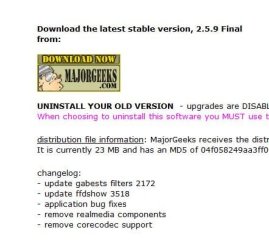
For future reference, Sharks codec package officially will come from Major Geeks.
Anywhere else it may not be the "official" release.

Shark007.net - Windows 7 Codecs - WMP12 Codecs

Click the Win7 Codec tab and Browse to the bottom of that page.

Look for the Major Geeks Icon and click it. As shown in the 1st snip below.

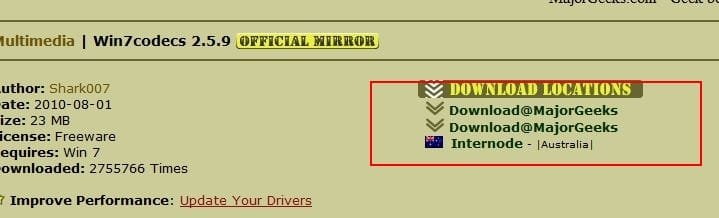
Then choose the location as shown in snip 2.

If the links do not look like these, you are in the wrong place.
 

Attachments

  • MG.JPG
    MG.JPG
    32.7 KB · Views: 2
  • cap2(1).jpg
    cap2(1).jpg
    19.1 KB · Views: 4

My Computer My Computer

At a glance

Windows 7 Home Premium 64bitIntel Core i7 2700k8GB Mushkin Redline Ridgebacks @1866EVGA GTX570 SC
Computer Manufacturer/Model Number
Custom (Self Build)
OS
Windows 7 Home Premium 64bit
CPU
Intel Core i7 2700k
Motherboard
eVGA P67 SLI
Memory
8GB Mushkin Redline Ridgebacks @1866
Graphics Card(s)
EVGA GTX570 SC
Sound Card
XiFi Titanium HD
Monitor(s) Displays
LG W2453V
Screen Resolution
1920x1080
Hard Drives
Intel 320 80GB -- Intel X25-V 40GB --WD Black 1TB x2 -- WD Blue 640GB
PSU
Seasonic x750
Case
Corsair 600T SE White
Cooling
eVGA Superclocked CPU Cooler
Keyboard
Saitek Cyborg
Antivirus
Kaspersky
Browser
IE
Other Info
LG BD/DVD
Back
Top