Only 2.93Gb usable of my 4Gb RAM?

kseh

New member
Local time
9:50 AM
Messages
12
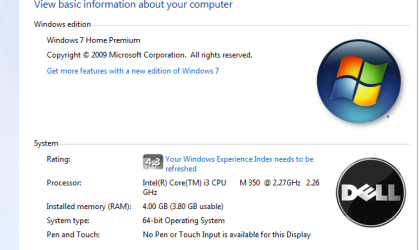
I have Windows 7 Home Premium 64-bit on a Dell n5010 laptop. I purchased this laptop and everything was fine until I formatted it, and for some reason it now shows that only 2.93 of the installed 4Gb are usable. I checked the BIOS and it in fact shows that I have installed 4096mb of RAM as well as in the "System" tab. Is there any way to revert this and get the full amount of RAM working without having to re-format the computer or do anything drastic like that?
I have attached a picture. Any help will be GREATLY appreciated, Thanks.
 

Attachments

  • RAm.PNG
    RAm.PNG
    15.6 KB · Views: 83

My Computer

OS
Windows 7
I have Windows 7 Home Premium 64-bit on a Dell n5010 laptop. I purchased this laptop and everything was fine until I formatted it, and for some reason it now shows that only 2.93 of the installed 4Gb are usable. I checked the BIOS and it in fact shows that I have installed 4096mb of RAM as well as in the "System" tab. Is there any way to revert this and get the full amount of RAM working without having to re-format the computer or do anything drastic like that?
I have attached a picture. Any help will be GREATLY appreciated, Thanks.

Welcome to SF!
This is probably due to the redirection of ram for video memory...
 

My Computer

Computer Manufacturer/Model Number
WALLONN7 / LIN BLACK SERIES II
OS
Windows 7 Ultimate x64 SP1
CPU
AMD PHENOM II X6 1090T 3.2GHz
Motherboard
GIGABYTE GA-890FXA-UD7
Memory
8GB G.SKILL RIPJAWS - F3-10666CL7D
Graphics Card(s)
SAPPHIRE ATI RADEON HD 5870 VAPOR X OC
Sound Card
REALTEK DOLBY HOME THEATER
Monitor(s) Displays
LED LG W2486L
Screen Resolution
1080p
Hard Drives
SEAGATE 1TB -ST31000528AS - AHCI MODE - AS SATA
PSU
ZALMAN ZM1000-HP 1000W
Case
THERMALTAKE XASER VI VG4000SWA
Cooling
140MM x3 / 120MM x1 AIR COOLING - THERMALTAKE
Keyboard
MICROSOFT DIGITAL MEDIA KEYBOARD 3000 - USB
Mouse
MICROSOFT BASIC OPTICAL MOUSE 2.0 - USB
Internet Speed
600KBPS
Other Info
MICROSOFT XBOX 360 CONTROLLER
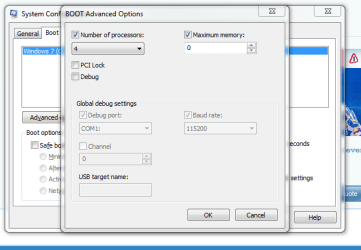
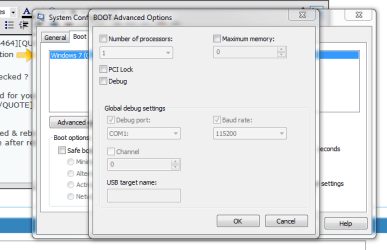
Start :ar: System Configuration :ar: Boot

Maximum Memory unchecked ?

Plus some probably used for your Laptop video memory on MB.
 

Attachments

  • Maximum_memory.JPG
    Maximum_memory.JPG
    66.1 KB · Views: 1,434

My Computer

Computer type
PC/Desktop
Computer Manufacturer/Model Number
Built them myself, Science Experiments !
OS
Win7 Enterprise, Win7 x86 (Ult 7600), Win7 x64 Ult 7600, TechNet RTM on AMD x64 (2.8Ghz)
CPU
AMD fx8350 4ghz, AMD-32 2400mhz, AMD-64 3200mhz, AMDx64 2.8G
Motherboard
SIS 755, ECS-K8M890M-M (Ult 7600), GigaByte & others
Memory
2gb, 4gb on the Ult 7600, 4gb on Technet RTM, 32gb on FX8350
Graphics Card(s)
Draw my own Graphics, several nVidia cards
Sound Card
on motherboard
Monitor(s) Displays
19" flat scr, 28" I-Inc widescr,22" Emprex Widescr, 23" Acer
Screen Resolution
1280 x 1024, 1440 x 900, 1920 x 1080
Hard Drives
6 pata Ide HD's & 2 Sata HD's
added 80gb external on Ult 7600 computer,
numerous extra 1tb, 2TB, 3Tb SATA HD's
A collection of ext HD Docks w/ HDs
PSU
430w, 550w, 600w, 700, 800, etc
Case
All Generic Full Towers
Cooling
Open Air & a few fans, some w/ colored LEDs
Keyboard
Compaq & Dell recycled from GoodWill
Mouse
Made in China Optical Wired Mouse
Internet Speed
Fast Cable InterNet
Antivirus
AVG Free on 24 different Desktops, NO Problems!
Browser
IE 8 is preferred, but use FireFox sometimes
Other Info
Linksys Routers, switches, & Hubs
Too Many USB Flash Drives to count, Biggest is 64GB !
Eight computers in my home network.
Sixteen computers at my business network.
Linked via TeamViewer !
Lots of old used spare computer parts everywhere!
Start :ar: System Configuration :ar: Boot

Maximum Memory unchecked ?

Plus some probably used for your Laptop video memory on MB.
This is what its set as
 

Attachments

  • 111.PNG
    111.PNG
    58 KB · Views: 455

My Computer

OS
Windows 7

My Computer

Computer type
PC/Desktop
Computer Manufacturer/Model Number
Built them myself, Science Experiments !
OS
Win7 Enterprise, Win7 x86 (Ult 7600), Win7 x64 Ult 7600, TechNet RTM on AMD x64 (2.8Ghz)
CPU
AMD fx8350 4ghz, AMD-32 2400mhz, AMD-64 3200mhz, AMDx64 2.8G
Motherboard
SIS 755, ECS-K8M890M-M (Ult 7600), GigaByte & others
Memory
2gb, 4gb on the Ult 7600, 4gb on Technet RTM, 32gb on FX8350
Graphics Card(s)
Draw my own Graphics, several nVidia cards
Sound Card
on motherboard
Monitor(s) Displays
19" flat scr, 28" I-Inc widescr,22" Emprex Widescr, 23" Acer
Screen Resolution
1280 x 1024, 1440 x 900, 1920 x 1080
Hard Drives
6 pata Ide HD's & 2 Sata HD's
added 80gb external on Ult 7600 computer,
numerous extra 1tb, 2TB, 3Tb SATA HD's
A collection of ext HD Docks w/ HDs
PSU
430w, 550w, 600w, 700, 800, etc
Case
All Generic Full Towers
Cooling
Open Air & a few fans, some w/ colored LEDs
Keyboard
Compaq & Dell recycled from GoodWill
Mouse
Made in China Optical Wired Mouse
Internet Speed
Fast Cable InterNet
Antivirus
AVG Free on 24 different Desktops, NO Problems!
Browser
IE 8 is preferred, but use FireFox sometimes
Other Info
Linksys Routers, switches, & Hubs
Too Many USB Flash Drives to count, Biggest is 64GB !
Eight computers in my home network.
Sixteen computers at my business network.
Linked via TeamViewer !
Lots of old used spare computer parts everywhere!
Uncheck both boxes. The number of CPU box does nothing if it set to the same number of threads as you have (4 for the i3).
 

My Computer

Computer type
Laptop
Computer Manufacturer/Model Number
Toshiba P775-S7100
OS
Windows 7 Professional SP1 64-bit
CPU
Intel Core i5-2450M @2.5 GHz
Memory
6 GB DDR3 1333MHz
Graphics Card(s)
Intel HD 3000
Monitor(s) Displays
Built-in 17.3" LED; 22" Insignia NS-L22Q-10A
Screen Resolution
1600x900; 1360x768
Hard Drives
750 GB Hitachi
1TB Seagate FreeAgent External
Internet Speed
Verizon DSL Speed(Down/Up): 3360 Kbps / 800 Kbps
Antivirus
MSE and MBAM Pro
Browser
IE10
Now what does it say when you look at it in system, like your first snip ?
 

My Computer

Computer type
PC/Desktop
Computer Manufacturer/Model Number
Built them myself, Science Experiments !
OS
Win7 Enterprise, Win7 x86 (Ult 7600), Win7 x64 Ult 7600, TechNet RTM on AMD x64 (2.8Ghz)
CPU
AMD fx8350 4ghz, AMD-32 2400mhz, AMD-64 3200mhz, AMDx64 2.8G
Motherboard
SIS 755, ECS-K8M890M-M (Ult 7600), GigaByte & others
Memory
2gb, 4gb on the Ult 7600, 4gb on Technet RTM, 32gb on FX8350
Graphics Card(s)
Draw my own Graphics, several nVidia cards
Sound Card
on motherboard
Monitor(s) Displays
19" flat scr, 28" I-Inc widescr,22" Emprex Widescr, 23" Acer
Screen Resolution
1280 x 1024, 1440 x 900, 1920 x 1080
Hard Drives
6 pata Ide HD's & 2 Sata HD's
added 80gb external on Ult 7600 computer,
numerous extra 1tb, 2TB, 3Tb SATA HD's
A collection of ext HD Docks w/ HDs
PSU
430w, 550w, 600w, 700, 800, etc
Case
All Generic Full Towers
Cooling
Open Air & a few fans, some w/ colored LEDs
Keyboard
Compaq & Dell recycled from GoodWill
Mouse
Made in China Optical Wired Mouse
Internet Speed
Fast Cable InterNet
Antivirus
AVG Free on 24 different Desktops, NO Problems!
Browser
IE 8 is preferred, but use FireFox sometimes
Other Info
Linksys Routers, switches, & Hubs
Too Many USB Flash Drives to count, Biggest is 64GB !
Eight computers in my home network.
Sixteen computers at my business network.
Linked via TeamViewer !
Lots of old used spare computer parts everywhere!

Attachments

  • ooo.PNG
    ooo.PNG
    73.2 KB · Views: 1,380

My Computer

OS
Windows 7
Now your getting the maximum memory except what is allocated for the onboard laptop video card.
 

My Computer

Computer type
PC/Desktop
Computer Manufacturer/Model Number
Built them myself, Science Experiments !
OS
Win7 Enterprise, Win7 x86 (Ult 7600), Win7 x64 Ult 7600, TechNet RTM on AMD x64 (2.8Ghz)
CPU
AMD fx8350 4ghz, AMD-32 2400mhz, AMD-64 3200mhz, AMDx64 2.8G
Motherboard
SIS 755, ECS-K8M890M-M (Ult 7600), GigaByte & others
Memory
2gb, 4gb on the Ult 7600, 4gb on Technet RTM, 32gb on FX8350
Graphics Card(s)
Draw my own Graphics, several nVidia cards
Sound Card
on motherboard
Monitor(s) Displays
19" flat scr, 28" I-Inc widescr,22" Emprex Widescr, 23" Acer
Screen Resolution
1280 x 1024, 1440 x 900, 1920 x 1080
Hard Drives
6 pata Ide HD's & 2 Sata HD's
added 80gb external on Ult 7600 computer,
numerous extra 1tb, 2TB, 3Tb SATA HD's
A collection of ext HD Docks w/ HDs
PSU
430w, 550w, 600w, 700, 800, etc
Case
All Generic Full Towers
Cooling
Open Air & a few fans, some w/ colored LEDs
Keyboard
Compaq & Dell recycled from GoodWill
Mouse
Made in China Optical Wired Mouse
Internet Speed
Fast Cable InterNet
Antivirus
AVG Free on 24 different Desktops, NO Problems!
Browser
IE 8 is preferred, but use FireFox sometimes
Other Info
Linksys Routers, switches, & Hubs
Too Many USB Flash Drives to count, Biggest is 64GB !
Eight computers in my home network.
Sixteen computers at my business network.
Linked via TeamViewer !
Lots of old used spare computer parts everywhere!
Cool. Thats an improvement. The other 0.2 GHz in probably being used by hardware still. Now I think you should rerun the WEI test. You might see an improvement.
 

My Computer

Computer type
Laptop
Computer Manufacturer/Model Number
Toshiba P775-S7100
OS
Windows 7 Professional SP1 64-bit
CPU
Intel Core i5-2450M @2.5 GHz
Memory
6 GB DDR3 1333MHz
Graphics Card(s)
Intel HD 3000
Monitor(s) Displays
Built-in 17.3" LED; 22" Insignia NS-L22Q-10A
Screen Resolution
1600x900; 1360x768
Hard Drives
750 GB Hitachi
1TB Seagate FreeAgent External
Internet Speed
Verizon DSL Speed(Down/Up): 3360 Kbps / 800 Kbps
Antivirus
MSE and MBAM Pro
Browser
IE10
Now your getting the maximum memory except what is allocated for the onboard laptop video card.
Is it possible to get those 200mb back or is it a no go
 

My Computer

OS
Windows 7
Well, they're still being used technically, and I doubt you will need it. If you took it away from you graphics card or whatever hardware is using it, you will see a general decreases in performance.
 

My Computer

Computer type
Laptop
Computer Manufacturer/Model Number
Toshiba P775-S7100
OS
Windows 7 Professional SP1 64-bit
CPU
Intel Core i5-2450M @2.5 GHz
Memory
6 GB DDR3 1333MHz
Graphics Card(s)
Intel HD 3000
Monitor(s) Displays
Built-in 17.3" LED; 22" Insignia NS-L22Q-10A
Screen Resolution
1600x900; 1360x768
Hard Drives
750 GB Hitachi
1TB Seagate FreeAgent External
Internet Speed
Verizon DSL Speed(Down/Up): 3360 Kbps / 800 Kbps
Antivirus
MSE and MBAM Pro
Browser
IE10
Cool. Thats an improvement. The other 0.2 GHz in probably being used by hardware still. Now I think you should rerun the WEI test. You might see an improvement.
:O whats WEI
 

My Computer

OS
Windows 7
The score you see above your system specs. Its grayed out because you need to rerun it. Click the number, then click re-run assessment.

EDIT: click the link beside the number, not the number itself. Sorry bout that.
 

My Computer

Computer type
Laptop
Computer Manufacturer/Model Number
Toshiba P775-S7100
OS
Windows 7 Professional SP1 64-bit
CPU
Intel Core i5-2450M @2.5 GHz
Memory
6 GB DDR3 1333MHz
Graphics Card(s)
Intel HD 3000
Monitor(s) Displays
Built-in 17.3" LED; 22" Insignia NS-L22Q-10A
Screen Resolution
1600x900; 1360x768
Hard Drives
750 GB Hitachi
1TB Seagate FreeAgent External
Internet Speed
Verizon DSL Speed(Down/Up): 3360 Kbps / 800 Kbps
Antivirus
MSE and MBAM Pro
Browser
IE10
The score you see above your system specs. Its grayed out because you need to rerun it. Click the number, then click re-run assessment.

EDIT: click the link beside the number, not the number itself. Sorry bout that.
Ohhh gotcha, so if i checked those two boxes again the (number of processor and the maximum memory) would my RAM drop again? I thought having those boxes checked helped the performance as well as startup, i might be wrong:eek:
 

My Computer

OS
Windows 7
That is a common mis-perception that I believed at one time as well. I found it was actually better to leave both unchecked. Most people say it doesn't matter at all. Either way, the best think to do is leave them alone. They are only meant to be used for debugging purposes, which you aren't trying to do.
 

My Computer

Computer type
Laptop
Computer Manufacturer/Model Number
Toshiba P775-S7100
OS
Windows 7 Professional SP1 64-bit
CPU
Intel Core i5-2450M @2.5 GHz
Memory
6 GB DDR3 1333MHz
Graphics Card(s)
Intel HD 3000
Monitor(s) Displays
Built-in 17.3" LED; 22" Insignia NS-L22Q-10A
Screen Resolution
1600x900; 1360x768
Hard Drives
750 GB Hitachi
1TB Seagate FreeAgent External
Internet Speed
Verizon DSL Speed(Down/Up): 3360 Kbps / 800 Kbps
Antivirus
MSE and MBAM Pro
Browser
IE10
That is a common mis-perception that I believed at one time as well. I found it was actually better to leave both unchecked. Most people say it doesn't matter at all. Either way, the best think to do is leave them alone. They are only meant to be used for debugging purposes, which you aren't trying to do.
Well that I didn't know. I always tried to get into msconfig and uncheck all unnecessary startup applications, then go into the Boot option and check those 2 boxes, hoping my computer would run or even start any faster.
 

My Computer

OS
Windows 7
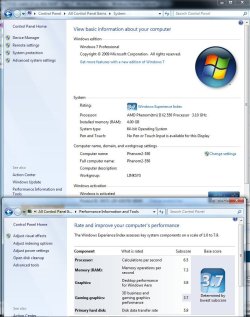
Windows Experience Index ;)
 

Attachments

  • WEI_Phenom_550.JPG
    WEI_Phenom_550.JPG
    134.2 KB · Views: 446

My Computer

Computer type
PC/Desktop
Computer Manufacturer/Model Number
Built them myself, Science Experiments !
OS
Win7 Enterprise, Win7 x86 (Ult 7600), Win7 x64 Ult 7600, TechNet RTM on AMD x64 (2.8Ghz)
CPU
AMD fx8350 4ghz, AMD-32 2400mhz, AMD-64 3200mhz, AMDx64 2.8G
Motherboard
SIS 755, ECS-K8M890M-M (Ult 7600), GigaByte & others
Memory
2gb, 4gb on the Ult 7600, 4gb on Technet RTM, 32gb on FX8350
Graphics Card(s)
Draw my own Graphics, several nVidia cards
Sound Card
on motherboard
Monitor(s) Displays
19" flat scr, 28" I-Inc widescr,22" Emprex Widescr, 23" Acer
Screen Resolution
1280 x 1024, 1440 x 900, 1920 x 1080
Hard Drives
6 pata Ide HD's & 2 Sata HD's
added 80gb external on Ult 7600 computer,
numerous extra 1tb, 2TB, 3Tb SATA HD's
A collection of ext HD Docks w/ HDs
PSU
430w, 550w, 600w, 700, 800, etc
Case
All Generic Full Towers
Cooling
Open Air & a few fans, some w/ colored LEDs
Keyboard
Compaq & Dell recycled from GoodWill
Mouse
Made in China Optical Wired Mouse
Internet Speed
Fast Cable InterNet
Antivirus
AVG Free on 24 different Desktops, NO Problems!
Browser
IE 8 is preferred, but use FireFox sometimes
Other Info
Linksys Routers, switches, & Hubs
Too Many USB Flash Drives to count, Biggest is 64GB !
Eight computers in my home network.
Sixteen computers at my business network.
Linked via TeamViewer !
Lots of old used spare computer parts everywhere!
Thanks for all the Help!! Any tips on how i can make win 7 a bit faster?
 

My Computer

OS
Windows 7
Back
Top