Win7(64bit) shows 3gb RAM usable but Vista (32bit) shows full 4gb Ram

fjansma

New member
Local time
5:57 PM
Messages
7
I own an old Packard Bell Easynote MX37 laptop which was running Windows Vista Basic (32bit !!). I only use it now and then and decided to get a few more years life out of it and do some upgrades. It has an Intel T2390 Pentium 1.86ghz CPU (it’s a dual core).

It used to have 3gb RAM (1x 1gb and 1x 2gb). I replaced the 1gb stick with a 2gb stick identical to the other 2gb stick. In my American Megatrends BIOS it shows 4gb RAM and in Windows Vista Basic (32 bit) it shows 4gb RAM as well (I know, unexpected).

I did a compatibility test for Windows 7 64 bit and it turned out positive so I then swapped the old hard drive for a Western Digital SSD drive and did a clean Windows 7 Pro 64 bit installation. Windows 7 still shows 4gb RAM.

The basic VGA driver showed horizontal lines on my laptop screen so I installed the latest available driver for my onboard SIS Mirage 3 graphics (I know this is a crappy card but I’m stuck with it). After reboot the lines dissapeared and I experience an overall increase on the video performance. However after the installation of this driver Windows now shows 4gb RAM (3GB usable). To verify it was caused by the graphics driver I uninstalled the driver and was then back to 4gb RAM but horrible graphics performance again.

What I tried; the AMI BIOS is the latest available version so there is no upgrade available for this system. Also it is a very limited BIOS, there are no onboard graphics settings or any memory remapping functions. Just basic boot order, date and time settings. But I figured this cannot be the problem as it shows full available memory and Windows Vista as well.

I opened MSCONFIG -> boot -> advanced options -> and see ‘maximum memory’ is ticked and set to 0. According to various internet sources this box needs to be unticked. So when I untick it I need to do a reboot but after the first Windows logo my screen goes black. I then have to do a hard reset and boot into safe mode to undo this setting.

Noteworthy might be that in safe mode there is 4gb RAM available (probably because the graphics drivers are disabled in safe mode?).

I’ve tried several other older versions of the driver as well as the version I had installed in Windows Vista but they won’t solve the RAM issue.

I’ve tried Porteus (bootable linux) and this showed 4GB of RAM as well.

I guess my question is: how can my 4gb of RAM show up in Windows Vista Basic (32bit) but in Windows 7 Pro (64bit) I can only have 3gb RAM usable? And is there any solution to this or am I just stuck with this situation?
(I’ve seen lots of other forum post stating similar issues but none really seem to describe my situation).
 

My Computer My Computer

At a glance

Windows 7 Pro 64 BitIntel Pentium T2390 1.86ghz4gbSIS Mirage 3
Computer type
Laptop
Computer Manufacturer/Model Number
Packard Bell Easynote MX37
OS
Windows 7 Pro 64 Bit
CPU
Intel Pentium T2390 1.86ghz
Memory
4gb
Graphics Card(s)
SIS Mirage 3
One thing is the amount of physical memory = 4G that is shown on BIOS.
Win 32 bits can only manage 3.2G but with Win 64 bits the sky is the limit.
Even with 4G of physical memory some memory is reserved to the graphics card. That is why you have experience an overall increase on the video performance and you have only 3G usable memory.

With 4G of memory I would have installed a 32 bits Win 7. You will still have 1G for the graphics card and 3G usable memory, but Win 7 32 will run better with 3G usable memory than Win 7 64.

As your Laptop is running for years, your heat sink must be full of dust. Install a temperature monitor.
I use Open hardware monitor. Open Hardware Monitor - Core temp, fan speed and voltages in a free software gadget
To install just unpack the zip archive on C:\Program Files (x86) and run OpenHardwareMonitor.exe with Administrator rights. Without Administrator rights most hardware sensors are not accessible.
Under options, set Start Minimized, Minimize to Tray, Minimize on close, run on Windows Startup.
Select a core temperature, right click and set to show in tray.
 

My Computers My Computers

  • At a glance

    Windows 7 HP 64i5 6600K - 800MHz to 4200MHz4+4G GSkill DDR4 3000IG - Intel 530
    Computer type
    PC/Desktop
    Computer Manufacturer/Model Number
    custom build
    OS
    Windows 7 HP 64
    CPU
    i5 6600K - 800MHz to 4200MHz
    Motherboard
    GA-Z170-HD3P
    Memory
    4+4G GSkill DDR4 3000
    Graphics Card(s)
    IG - Intel 530
    Monitor(s) Displays
    Samsung 226BW
    Screen Resolution
    1680x1050
    Hard Drives
    (1) -1 SM951 – 128GB M.2 AHCI PCIe SSD drive for Windows 7 and Lubuntu
    (2) -1 WD SATA 3 - 1T for Data
    (3) -1 WD SATA 3 - 1T for backup
    PSU
    Thermaltake 450W TR2 gold
    Keyboard
    Old and good Chicony mechanical keyboard
    Mouse
    Logitech mX performance - 9 buttons (had to disable some)
    Internet Speed
    500Mb/s
    Browser
    Firefox 64
    Other Info
    TinyWall firewall
  • At a glance

    Windows 7 Proi7-4500U 800MHz to 3.0GHz(4+4)G DDR3 1600IG intel 4400 + NVIDIA GeForce GT 745M
    Computer type
    Laptop
    System Manufacturer/Model Number
    Asus Q550LF
    OS
    Windows 7 Pro
    CPU
    i7-4500U 800MHz to 3.0GHz
    Motherboard
    Asus Q550LF
    Memory
    (4+4)G DDR3 1600
    Graphics Card(s)
    IG intel 4400 + NVIDIA GeForce GT 745M
    Sound Card
    Realtek
    Monitor(s) Displays
    LG Display LP156WF4-SPH1
    Screen Resolution
    1920 x 1080
    Hard Drives
    BX500 120G SSD for Windows and programs +
    1T HDD for data
    Internet Speed
    500 Mb/s
    Browser
    Firefox
    Other Info
    TinyWall firewall
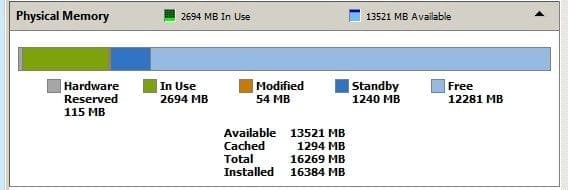
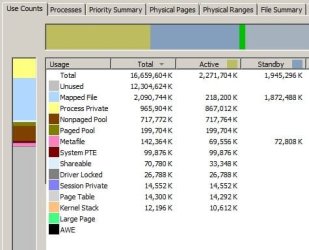
can you post a screenshot of the resmon memory tab for your win7 system? Here''s what mine looks like as an example. If convenient, go ahead and post the same for vista...
 

Attachments

  • 1.jpg
    1.jpg
    13.8 KB · Views: 51

My Computer My Computer

At a glance

Win7 pro x64stock i7 7700kCorsair Vengeance LPX 16GB (2x8GB) DDR4 @ 320...integrated Intel HD 630
Computer type
PC/Desktop
Computer Manufacturer/Model Number
diy
OS
Win7 pro x64
CPU
stock i7 7700k
Motherboard
Gigabyte Z270N-WIFI mini-ITX
Memory
Corsair Vengeance LPX 16GB (2x8GB) DDR4 @ 3200MHz
Graphics Card(s)
integrated Intel HD 630
Sound Card
onboard Realtek ALC1220
Monitor(s) Displays
two vertically mounted samsung 55" 4k un55mu8000
Screen Resolution
1920x1280
Hard Drives
256GB Samsung EVO 960 M.2 pci-e NVMe SSD
PSU
SilverStone Nightjar ST45NF 450Watt Fanless
Case
No case. Motherboard is mounted directly onto power supply
Cooling
Evercool low profile 815EP with Panaflow 12L fan at 7v
Keyboard
Ortek MCK-86 mini
Mouse
Belkin 5-button USB
Internet Speed
spectrum 400mbps
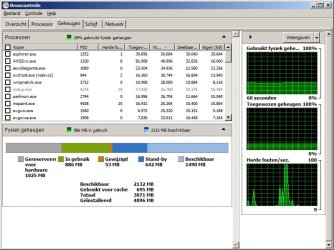
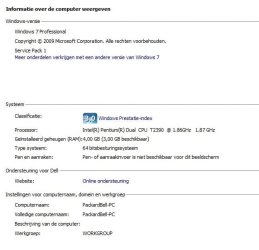
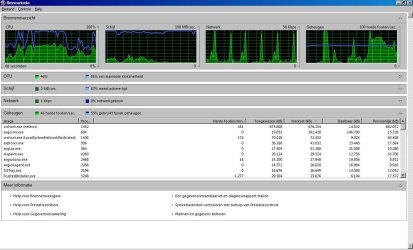
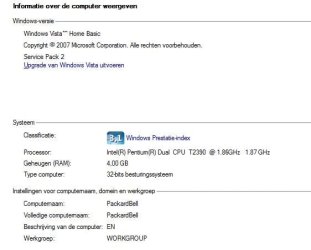
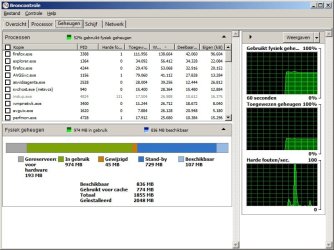
Thanks for the replies. I've attached both the resource monitor screenshots in this post (although the one with Vista is less clear about the situation). I've also attached screenshots of the system properties (I thought that would maybe better indicate my problem).
 

Attachments

  • resmon_w7_64bit.jpg
    resmon_w7_64bit.jpg
    72.7 KB · Views: 2
  • win7_specram.jpg
    win7_specram.jpg
    28.3 KB · Views: 52
  • resmon_vista_32bit.jpg
    resmon_vista_32bit.jpg
    116.5 KB · Views: 5
  • vista_specram.jpg
    vista_specram.jpg
    21.1 KB · Views: 53

My Computer My Computer

At a glance

Windows 7 Pro 64 BitIntel Pentium T2390 1.86ghz4gbSIS Mirage 3
Computer type
Laptop
Computer Manufacturer/Model Number
Packard Bell Easynote MX37
OS
Windows 7 Pro 64 Bit
CPU
Intel Pentium T2390 1.86ghz
Memory
4gb
Graphics Card(s)
SIS Mirage 3
Its possible that the driver is determining how much memory to reserve for graphics and since 32-bit systems are memory-constrained they designed the 32-but driver to use a small amount of memory and they designed the 64-bit driver to use 1gb.

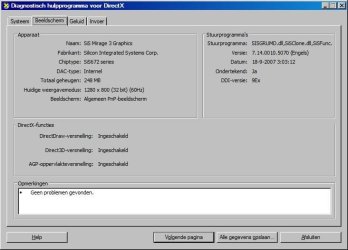
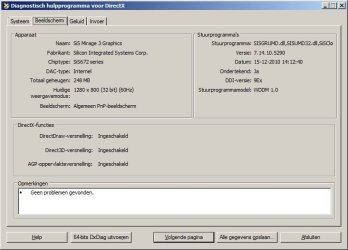
Try running start > run > desk.cpl > advanced and post a screenshot in vista and 7. You can also do start > run > dxdiag > display
 

My Computer My Computer

At a glance

Win7 pro x64stock i7 7700kCorsair Vengeance LPX 16GB (2x8GB) DDR4 @ 320...integrated Intel HD 630
Computer type
PC/Desktop
Computer Manufacturer/Model Number
diy
OS
Win7 pro x64
CPU
stock i7 7700k
Motherboard
Gigabyte Z270N-WIFI mini-ITX
Memory
Corsair Vengeance LPX 16GB (2x8GB) DDR4 @ 3200MHz
Graphics Card(s)
integrated Intel HD 630
Sound Card
onboard Realtek ALC1220
Monitor(s) Displays
two vertically mounted samsung 55" 4k un55mu8000
Screen Resolution
1920x1280
Hard Drives
256GB Samsung EVO 960 M.2 pci-e NVMe SSD
PSU
SilverStone Nightjar ST45NF 450Watt Fanless
Case
No case. Motherboard is mounted directly onto power supply
Cooling
Evercool low profile 815EP with Panaflow 12L fan at 7v
Keyboard
Ortek MCK-86 mini
Mouse
Belkin 5-button USB
Internet Speed
spectrum 400mbps
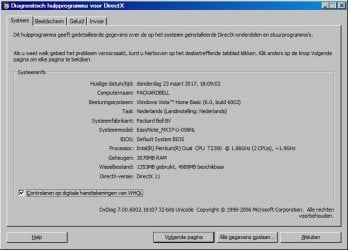
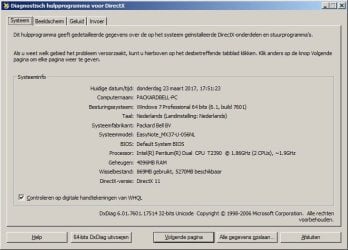
Please find the screenshots of DXDIAG attached.
 

Attachments

  • dxdiag_vista_display.jpg
    dxdiag_vista_display.jpg
    40.4 KB · Views: 42
  • dxdiag_vista_system.jpg
    dxdiag_vista_system.jpg
    48.4 KB · Views: 42
  • dxdiag_win7_display.jpg
    dxdiag_win7_display.jpg
    43.4 KB · Views: 42
  • dxdiag_win7_system.jpg
    dxdiag_win7_system.jpg
    49.1 KB · Views: 42

My Computer My Computer

At a glance

Windows 7 Pro 64 BitIntel Pentium T2390 1.86ghz4gbSIS Mirage 3
Computer type
Laptop
Computer Manufacturer/Model Number
Packard Bell Easynote MX37
OS
Windows 7 Pro 64 Bit
CPU
Intel Pentium T2390 1.86ghz
Memory
4gb
Graphics Card(s)
SIS Mirage 3
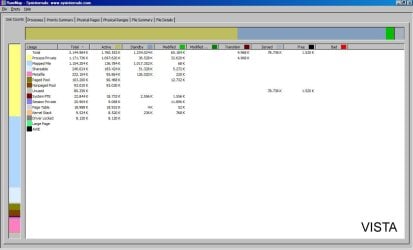
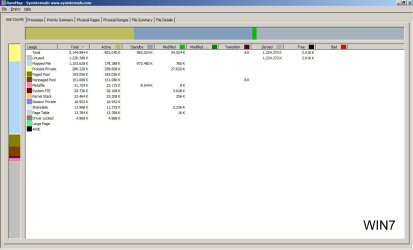
okay there goes that theory - both systems are using the same amount of graphics memory. Time for a little more digging. Here's an idea - what if you downloaded sysinternals rammap on each system, ran it, sorted it by Total, and post a screen shot of each. Maybe that would tell us something. Do not need the entire screen though - Make sure to tell us which is vista and which is win7 since the program may not say so. The goal here is to figure out why you have 1GB of hardware reserved on win7. Here's what mine looks like as an example...

RAMMap

Having said all that, a large hardware reserve usually points to a memory incompatibility. Before Dual Channel came out memory compatibility was rarely an issue. But for a motherboard's memory controller to successfully run dual channel it has to perfectly join together the bits as they stream from two different dimms, which is a difficult timing task, and is why motherboards always have a QVL list of memory that is approved, and require that you not mix and match dimms. The fact that you reported vista as addressing 4GB made me think you did not have this problem, however on your dxdiag vista screenshot it only says 3GB, so maybe the reason for your win7 issue is indeed memory compatibility. I would try the following: start > run > msconfig > boot > advanced options and clear the maximum memory box. Shut down. Physically switch the slots the dimms are in, then do a cmos reset of your bios, then reboot.
 

Attachments

  • 1.jpg
    1.jpg
    27.9 KB · Views: 41

My Computer My Computer

At a glance

Win7 pro x64stock i7 7700kCorsair Vengeance LPX 16GB (2x8GB) DDR4 @ 320...integrated Intel HD 630
Computer type
PC/Desktop
Computer Manufacturer/Model Number
diy
OS
Win7 pro x64
CPU
stock i7 7700k
Motherboard
Gigabyte Z270N-WIFI mini-ITX
Memory
Corsair Vengeance LPX 16GB (2x8GB) DDR4 @ 3200MHz
Graphics Card(s)
integrated Intel HD 630
Sound Card
onboard Realtek ALC1220
Monitor(s) Displays
two vertically mounted samsung 55" 4k un55mu8000
Screen Resolution
1920x1280
Hard Drives
256GB Samsung EVO 960 M.2 pci-e NVMe SSD
PSU
SilverStone Nightjar ST45NF 450Watt Fanless
Case
No case. Motherboard is mounted directly onto power supply
Cooling
Evercool low profile 815EP with Panaflow 12L fan at 7v
Keyboard
Ortek MCK-86 mini
Mouse
Belkin 5-button USB
Internet Speed
spectrum 400mbps
Sorry for the late reply. I had to switch out the hard drives to boot from Vista. Please find the Ram map screenshots attached to this post.

I'm not sure it's a compatibility issue..? There used to be two different make RAM modules (1x1gb and 1x2gb) in this machine. That's the way the manufacturer sold it. I bought an identical 2gb RAM module from eBay and replaced the 1gb module with that one. So now there's matched modules in there (2x2gb Samsung). I did run memtest to make sure there aren't any errors. I'm pretty sure it doesn't run in dual channel though since I've used Speccy on both Vista and Win7 and it's stating it's running single channel (I'm not sure this is a problem?). So maybe it's a possibility we have to accept that the motherboard/chipset won't accept anything over 3GB?

I will try your suggestion to switch the modules and clear cmos later today. But I'm affraid the machine would go black again because that's what happens if I untick the maximum memory box. :(
 

Attachments

  • rammap_vista.jpg
    rammap_vista.jpg
    72 KB · Views: 1
  • rammap-win7.jpg
    rammap-win7.jpg
    70 KB · Views: 1

My Computer My Computer

At a glance

Windows 7 Pro 64 BitIntel Pentium T2390 1.86ghz4gbSIS Mirage 3
Computer type
Laptop
Computer Manufacturer/Model Number
Packard Bell Easynote MX37
OS
Windows 7 Pro 64 Bit
CPU
Intel Pentium T2390 1.86ghz
Memory
4gb
Graphics Card(s)
SIS Mirage 3
I've tried unticking max memory and switching the modules. As expected the screen goes black after the first Windows logo on boot. So I had to tick the box again. I now says max memory 0. It won't save to 4096.
 

My Computer My Computer

At a glance

Windows 7 Pro 64 BitIntel Pentium T2390 1.86ghz4gbSIS Mirage 3
Computer type
Laptop
Computer Manufacturer/Model Number
Packard Bell Easynote MX37
OS
Windows 7 Pro 64 Bit
CPU
Intel Pentium T2390 1.86ghz
Memory
4gb
Graphics Card(s)
SIS Mirage 3
note that both vista and win7 are showing 3.1GB of total memory, so I'm still leaning toward a memory incompatibility. Bios is handing over the same 3.1GB useable memory to each operating system. Also note your motherboard is supposed to automatically run dual channel with two identical sticks.

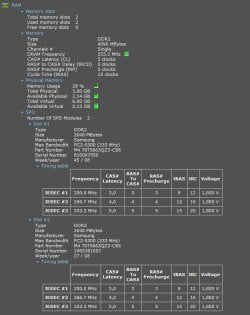
can you post screenshots of the RAM portion of speccy with each subsection expanded ? It will probably take two screenshots to include all the detail including slot details with timing tables..
 

My Computer My Computer

At a glance

Win7 pro x64stock i7 7700kCorsair Vengeance LPX 16GB (2x8GB) DDR4 @ 320...integrated Intel HD 630
Computer type
PC/Desktop
Computer Manufacturer/Model Number
diy
OS
Win7 pro x64
CPU
stock i7 7700k
Motherboard
Gigabyte Z270N-WIFI mini-ITX
Memory
Corsair Vengeance LPX 16GB (2x8GB) DDR4 @ 3200MHz
Graphics Card(s)
integrated Intel HD 630
Sound Card
onboard Realtek ALC1220
Monitor(s) Displays
two vertically mounted samsung 55" 4k un55mu8000
Screen Resolution
1920x1280
Hard Drives
256GB Samsung EVO 960 M.2 pci-e NVMe SSD
PSU
SilverStone Nightjar ST45NF 450Watt Fanless
Case
No case. Motherboard is mounted directly onto power supply
Cooling
Evercool low profile 815EP with Panaflow 12L fan at 7v
Keyboard
Ortek MCK-86 mini
Mouse
Belkin 5-button USB
Internet Speed
spectrum 400mbps
I've managed to combine both screenshots.

Thanks for all the help so far :)
 

Attachments

  • speccy_ram_win7.jpg
    speccy_ram_win7.jpg
    63.7 KB · Views: 1

My Computer My Computer

At a glance

Windows 7 Pro 64 BitIntel Pentium T2390 1.86ghz4gbSIS Mirage 3
Computer type
Laptop
Computer Manufacturer/Model Number
Packard Bell Easynote MX37
OS
Windows 7 Pro 64 Bit
CPU
Intel Pentium T2390 1.86ghz
Memory
4gb
Graphics Card(s)
SIS Mirage 3
given the above I've got two more guesses. No need to involve vista for these.

1) Its possible your graphics driver is using 1GB of memory. While dxdiag already said this was not the case, lets get a second opinion from cpu-z, on the graphics tab. I'm curious because on my own machine I have 256MB selected in bios as the graphics memory, and yet cpu-z is saying I've got 1GB, and dxdiag says I'm using 1.8GB of graphics memory, so I'm not sure dxdiag is reliable for this.

CPU-Z | Softwares | CPUID

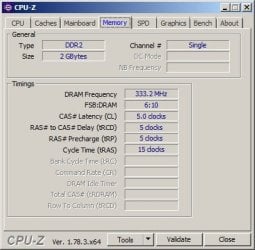
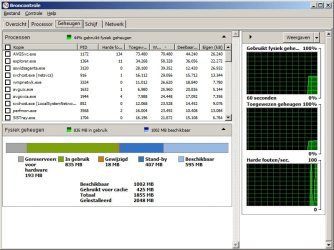
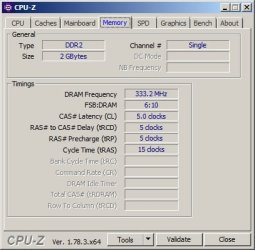
2) Your motherboard should be defaulting to dual channel so the fact that its running in single channel mode is of note, and perhaps its having trouble with one of those dimms. The way to know is to boot with only one dimm installed then see what is the total memory using the resmon memory tab, then repeat by booting with just the other dimm. Might as well check cpu-z > memory while you're at it. Hopefully resmon and cpu-z show the same total, lol. If while using one of the dimms you get a total memory of only 1GB total memory, then that's your bad dimm. If it says 2GB for each dimm, then we move on from there.
 

My Computer My Computer

At a glance

Win7 pro x64stock i7 7700kCorsair Vengeance LPX 16GB (2x8GB) DDR4 @ 320...integrated Intel HD 630
Computer type
PC/Desktop
Computer Manufacturer/Model Number
diy
OS
Win7 pro x64
CPU
stock i7 7700k
Motherboard
Gigabyte Z270N-WIFI mini-ITX
Memory
Corsair Vengeance LPX 16GB (2x8GB) DDR4 @ 3200MHz
Graphics Card(s)
integrated Intel HD 630
Sound Card
onboard Realtek ALC1220
Monitor(s) Displays
two vertically mounted samsung 55" 4k un55mu8000
Screen Resolution
1920x1280
Hard Drives
256GB Samsung EVO 960 M.2 pci-e NVMe SSD
PSU
SilverStone Nightjar ST45NF 450Watt Fanless
Case
No case. Motherboard is mounted directly onto power supply
Cooling
Evercool low profile 815EP with Panaflow 12L fan at 7v
Keyboard
Ortek MCK-86 mini
Mouse
Belkin 5-button USB
Internet Speed
spectrum 400mbps
For your suggestion on point 1 cpu-z shows 128mb for graphics (screenshot attached).

If also tried suggestion 2 and attached all screenshots for that as well (I can find no difference). After booting with just 2gb RAM the SIS graphics software does note on start up there is a memory change and it needs to reboot.
 

Attachments

  • 4gb_graphics_cpuz.jpg
    4gb_graphics_cpuz.jpg
    22.6 KB · Views: 18
  • 2gb_cpuz_827.jpg
    2gb_cpuz_827.jpg
    25.7 KB · Views: 18
  • 2gb_resmon_827.jpg
    2gb_resmon_827.jpg
    73.4 KB · Views: 1
  • 2gb_cpuz_845.jpg
    2gb_cpuz_845.jpg
    25.7 KB · Views: 18
  • 2gb_resmon_845.jpg
    2gb_resmon_845.jpg
    73.6 KB · Views: 1

My Computer My Computer

At a glance

Windows 7 Pro 64 BitIntel Pentium T2390 1.86ghz4gbSIS Mirage 3
Computer type
Laptop
Computer Manufacturer/Model Number
Packard Bell Easynote MX37
OS
Windows 7 Pro 64 Bit
CPU
Intel Pentium T2390 1.86ghz
Memory
4gb
Graphics Card(s)
SIS Mirage 3
Back
Top