Locked computer dual monitor

For some reason this change was made with Vista. I know it has nothing to do with performance nor does it affect how Windows 7 works, but I too wish MS would provide a way to turn this back on. Windows XP did do it right in some cases, I have noticed if you have Themes turned on XP will act like Windows 7 at the logon screen and the second monitor will be dark, but if you turn Themes off then XP will display both screens at logon.
 

My Computer My Computer

At a glance

Windows 7 Enterprise (x64); Windows Server 20...16GB
Computer type
PC/Desktop
Computer Manufacturer/Model Number
Dell OP7010
OS
Windows 7 Enterprise (x64); Windows Server 2008 R2 (x64)
Memory
16GB
Monitor(s) Displays
4 Dell 24" LCD
Screen Resolution
1280x1024
Keyboard
Dell
Mouse
Dell Optical
Internet Speed
40meg
I have daul monitors as well, but it has never bothered me simply because I am not there to look at it when it is locked.
I never understood why it was that they did that though. Would be cool to have a fix.

~Lordbob
 

My Computer My Computer

At a glance

Windows 7 Ultimate x64, Mint 9Intel i5-2500k2x 4Gb Corsair VENGEANCE DDR3-1600NVidia GeForce N260GTX Twin Frozr
Computer Manufacturer/Model Number
Hera
OS
Windows 7 Ultimate x64, Mint 9
CPU
Intel i5-2500k
Motherboard
ASUS P8P67 Pro
Memory
2x 4Gb Corsair VENGEANCE DDR3-1600
Graphics Card(s)
NVidia GeForce N260GTX Twin Frozr
Sound Card
Realtek HD OnBoard Audio
Monitor(s) Displays
ASUS 24" Monitor
Screen Resolution
1920x1080
Hard Drives
G.SKILL Phoenix Series 60GB SATA II MLC Internal Solid State Drive (SSD)
SAMSUNG Spinpoint F3R 1TB 7200 RPM 32MB Cache SATA II
PSU
Cooler Master Real Power Pro 750W
Case
Cooler Master Haf 932
Cooling
Fans
Keyboard
Razer Tarantula
Mouse
Razer Lachesis
Internet Speed
not fast enough
So just to sum up ... Windows 7 isn't XP (I know this comes as a shock to many of you), 'locked' on W7 means 'LOCKED', and I was right all along. Gee, who knew?

Now if only I could prove that MS changed this behaviour because they detected a potential security problem in allowing the wallpaper display to remain active I'd be home free ... !!!!
 

My Computer My Computer

At a glance

Windows 7
OS
Windows 7
So just to sum up ... Windows 7 isn't XP (I know this comes as a shock to many of you), 'locked' on W7 means 'LOCKED', and I was right all along. Gee, who knew?

Now if only I could prove that MS changed this behaviour because they detected a potential security problem in allowing the wallpaper display to remain active I'd be home free ... !!!!

what are you talking about, Locked on XP was locked as well. stop patting yourself on your back.
 

My Computer My Computer

At a glance

Windows 7 Ultimate 64bitIntel i7 3770K16GB DDR3 1333 Corsair XMS3XFX HD6950 2GB EyeFinity
Computer Manufacturer/Model Number
HAL-9000
OS
Windows 7 Ultimate 64bit
CPU
Intel i7 3770K
Motherboard
Asus Sabertooth Z77
Memory
16GB DDR3 1333 Corsair XMS3
Graphics Card(s)
XFX HD6950 2GB EyeFinity
Sound Card
Logitech G35 & Sennheiser PC135 & VIA HD
Monitor(s) Displays
23" HP 2310e, 23" Samsung B2230, 21.5" Viewsonic
Screen Resolution
5760x1080
Hard Drives
16TB of Storage
128GB & 256GB Crucial M4 SSD's, 2X 1TB WD Black, 3x 2TB WD, 3x 2TB Samsung F4, 1.5TB Seagate, WD 500GB,
PSU
Antec True Power New 650watt
Case
Cooler Master HAF-932
Cooling
Corsair H60 Hydro Cooler, 3x 230mm Fans, 2x120mm Fan
Keyboard
Logitech G15 and G13
Mouse
Logitech G700 Gaming Mouse
Internet Speed
50/10 Mbit
Other Info
Speakers : Alesis M1 Active Mk2 Studio Monitors , APC RS 1200 UPS, HP 4500DN Color Laser, HP P1006 mono Laser, Kodak 8500 Dye-Sub, Epson 1280 inkjet, Epson Worforce 610 MFC
So just to sum up ... Windows 7 isn't XP (I know this comes as a shock to many of you), 'locked' on W7 means 'LOCKED', and I was right all along. Gee, who knew?

Now if only I could prove that MS changed this behaviour because they detected a potential security problem in allowing the wallpaper display to remain active I'd be home free ... !!!!

what are you talking about, Locked on XP was locked as well. stop patting yourself on your back.
+1 I agree.

~Lordbob
 

My Computer My Computer

At a glance

Windows 7 Ultimate x64, Mint 9Intel i5-2500k2x 4Gb Corsair VENGEANCE DDR3-1600NVidia GeForce N260GTX Twin Frozr
Computer Manufacturer/Model Number
Hera
OS
Windows 7 Ultimate x64, Mint 9
CPU
Intel i5-2500k
Motherboard
ASUS P8P67 Pro
Memory
2x 4Gb Corsair VENGEANCE DDR3-1600
Graphics Card(s)
NVidia GeForce N260GTX Twin Frozr
Sound Card
Realtek HD OnBoard Audio
Monitor(s) Displays
ASUS 24" Monitor
Screen Resolution
1920x1080
Hard Drives
G.SKILL Phoenix Series 60GB SATA II MLC Internal Solid State Drive (SSD)
SAMSUNG Spinpoint F3R 1TB 7200 RPM 32MB Cache SATA II
PSU
Cooler Master Real Power Pro 750W
Case
Cooler Master Haf 932
Cooling
Fans
Keyboard
Razer Tarantula
Mouse
Razer Lachesis
Internet Speed
not fast enough
Hi Kirsch,

Try MonitorES for a 3rd party solution. It's Win 7 Compatible.

Timo
 

My Computer My Computer

At a glance

Windows 7 Ultimate 64 bitIntel(R) Core(TM)2 Quad CPU Q8200 @ 2.33GHz8 GB KingstonNvidia GeForce 9600GT
Computer Manufacturer/Model Number
Custom Hack job
OS
Windows 7 Ultimate 64 bit
CPU
Intel(R) Core(TM)2 Quad CPU Q8200 @ 2.33GHz
Motherboard
GigaByte EP45-UD3
Memory
8 GB Kingston
Graphics Card(s)
Nvidia GeForce 9600GT
Sound Card
Soundblaster Audigy
Monitor(s) Displays
AOC x2 22"
Hard Drives
2 x Samsung 500GB (RAID)
2 x Samsung 2TB
1 x WD Green 2TB
1 x Seagate 1TB
1 x Samsung 500GB
PSU
Thermaltake QFan 750W
Case
CM Scout Gaming
Cooling
Coolermaster V10
Keyboard
Microsoft Wireless Keyboard 1000
Mouse
Microsoft Wireless Optical 2000
Internet Speed
320
Other Info
Winfast PVR2000CP
LG DVD-RAM DVD/RW/DL Super Multi
Linksys WMP300Nx2 Wireless Adapter
I have given this further thought and have three more workarounds for you. However, I'm not sure not sure if two of them will work on Windows 7 systems other than Professional and Ultimate as they all use the projector settings and I don't think that the DisplaySwitch.exe is available in other versions. If it doesn't work, I'll post the
DisplaySwitch.exe and see if that's all we need to get it going.

METHOD 1: Projector Settings
Definately Will Only Work With Professional and Ultimate
After you press Win + L to lock your PC, Press Win + P and select the duplicate settings option

METHOD 2: Scheduled Triggers
This workaround involves changing the display to duplicate screens when you lock your computer and changing it back to 2 screens when you unlock it.

To do this, we'll use task scheduler to run some command lines on a trigger. The triggers will be either unlock or locking of the computer.
%windir%\System32\DisplaySwitch.exe /extend to use two screens
%windir%\System32\DisplaySwitch.exe /clone to clone the screens
or we could also use
%windir%\System32\DisplaySwitch.exe /internal to use just one screen


So lets set this up
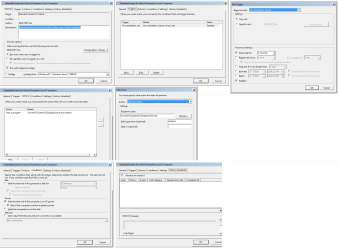
Create the First Task
  1. Open the task scheduler by typing taskschd.msc into RUN or SEARCH and pressing ENTER
  2. Right Click on Task Scheduler (Local) and select 'Create Task'
  3. In the Create Task Window Type a Name for first the task (e.g. Single Display Lock)
  4. Type in a description (E.g. This task is triggered when Windows is locked and changes the display to a single display)
  5. Tick the 'Run with Highest Privilages' Box
  6. Change the 'Configure for' drop down box to "Windows 7, Windows Server 2008 R2"
  7. Select the TRIGGERS tab
  8. Click NEW
  9. In the Begin the Task Dropdown select "On workstation lock"
  10. in The Advanced Settings Select the "Delay Task for" box and type 3 Seconds in the box beside it. NOTE: you may need to increase this if it doesn't work for you.
  11. Click OK
  12. Select the ACTIONS tab
  13. Click NEW
  14. In the Program/Script box type the following %windir%\System32\DisplaySwitch.exe
  15. In the Add Arguments box type /clone
  16. Click OK
  17. Select the CONDITIONS tab
  18. Click OK to save and exit the new task

Create the Second Task
  1. Open the task scheduler by typing taskschd.msc into RUN or SEARCH and pressing ENTER
  2. Right Click on Task Scheduler (Local) and select 'Create Task'
  3. In the Create Task Window Type a Name for first the task (e.g. Extended Screen for Unlock)
  4. Type in a description (E.g. This task is triggered when Windows is unlocked and extends the screen to two monitors)
  5. Tick the 'Run with Highest Privilages' Box
  6. Change the 'Configure for' drop down box to "Windows 7, Windows Server 2008 R2"
  7. Select the TRIGGERS tab
  8. Click NEW
  9. In the Begin the Task Dropdown select "On workstation unlock"
  10. in The Advanced Settings Select the "Delay Task for" box and type 3 Seconds in the box beside it. NOTE: you may need to increase this if it doesn't work for you.
  11. Click OK
  12. Select the ACTIONS tab
  13. Click NEW
  14. In the Program/Script box type the following %windir%\System32\DisplaySwitch.exe
  15. In the Add Arguments box type /extend
  16. Click OK
  17. Select the CONDITIONS tab
  18. Click OK to save exit the new task

It takes a few seconds to come up but it should work a-ok.

Method 3: Batch Files
An alternate workaround would be to write two batch files one, for lock and one for dual screen display. In the batch files we sould need to include the command rundll32.exe user32.dll, LockWorkStation to lock the workstation.

To create a Batch file, open notepad and paste the Grey text in, then save it as a *.bat extension

Batch 1
:: LOCK ME
%windir%\System32\DisplaySwitch.exe /clone
rundll32.exe user32.dll, LockWorkStation


Batch 2
:: DUAL SCREEN
%windir%\System32\DisplaySwitch.exe /extend


References:
Brink - How to Create a Display Switch Shortcut in Windows 7


EDIT:
@Kirsch - Kari just let me know that you were after a duplicate screen when you locked the computer. I'm sorry that I missed this when I originally wrote it, I've fixed that and updated it above. If this is the first time that you've read this message then please disregard it (and thank Kari :) ). - Timo
 

Attachments

  • Extend Screen for Unlock Task.png
    Extend Screen for Unlock Task.png
    58.2 KB · Views: 210
Last edited:

My Computer My Computer

At a glance

Windows 7 Ultimate 64 bitIntel(R) Core(TM)2 Quad CPU Q8200 @ 2.33GHz8 GB KingstonNvidia GeForce 9600GT
Computer Manufacturer/Model Number
Custom Hack job
OS
Windows 7 Ultimate 64 bit
CPU
Intel(R) Core(TM)2 Quad CPU Q8200 @ 2.33GHz
Motherboard
GigaByte EP45-UD3
Memory
8 GB Kingston
Graphics Card(s)
Nvidia GeForce 9600GT
Sound Card
Soundblaster Audigy
Monitor(s) Displays
AOC x2 22"
Hard Drives
2 x Samsung 500GB (RAID)
2 x Samsung 2TB
1 x WD Green 2TB
1 x Seagate 1TB
1 x Samsung 500GB
PSU
Thermaltake QFan 750W
Case
CM Scout Gaming
Cooling
Coolermaster V10
Keyboard
Microsoft Wireless Keyboard 1000
Mouse
Microsoft Wireless Optical 2000
Internet Speed
320
Other Info
Winfast PVR2000CP
LG DVD-RAM DVD/RW/DL Super Multi
Linksys WMP300Nx2 Wireless Adapter
Cool Idea, however when you use %windir%\System32\DisplaySwitch.exe /clone and %windir%\System32\DisplaySwitch.exe /extend to put the monitor back every window that was open on the second monitor is moved to the first monitor. So now all your windows are on the first monitor, using the %windir%\System32\DisplaySwitch.exe /extend does not put the windows back on the second mointor. Awesome idea and it sure was fun to play with.
 

My Computer My Computer

At a glance

Windows 7 Enterprise (x64); Windows Server 20...16GB
Computer type
PC/Desktop
Computer Manufacturer/Model Number
Dell OP7010
OS
Windows 7 Enterprise (x64); Windows Server 2008 R2 (x64)
Memory
16GB
Monitor(s) Displays
4 Dell 24" LCD
Screen Resolution
1280x1024
Keyboard
Dell
Mouse
Dell Optical
Internet Speed
40meg
Hi Kirsch,

Try MonitorES for a 3rd party solution. It's Win 7 Compatible.

Timo


Looks like that program turns off the monitors when I lock the screen, pretty much the opposite of what I am trying to do ahha thanks tho! :)
 

My Computer My Computer

At a glance

Windows 7 UltimateAMD Athlon II X2 245 2.90Ghz3.00 GB8800GTS 512MB
Computer Manufacturer/Model Number
Custom Built
OS
Windows 7 Ultimate
CPU
AMD Athlon II X2 245 2.90Ghz
Motherboard
Some Gigabyte one, dont remember model
Memory
3.00 GB
Graphics Card(s)
8800GTS 512MB
Sound Card
Sound Blaster X-Fi Titanium Fatal1ty
Monitor(s) Displays
Dual 22" widescreen
Hard Drives
250GB internal, 500GB internal
PSU
CORSAIR CMPSU-850TX 850W Power Supply
Case
Thermalkake Tsunami Dream
Cooling
Thermaltake Golden Orb II
Keyboard
Saitek Eclipse 2
Mouse
Logitech MX518
Looks like that program turns off the monitors when I lock the screen, pretty much the opposite of what I am trying to do ahha thanks tho! :)

Yeah I know, :( I originally misread the post and offered that as a solution. After Kari let me know and I wrote the EDIT on the second post I decided to leave this one there as it might be acceptable to another future reader. I thought you'd realize that both posts were from me and work and out. I probably should have edited both of them to be certain.

Try the other solution, given that you have windows Ultimate the only caveat so far is the moving of the open Windows to a single screen as WindowsStar noted. Perhaps with time I can script a way around that... if so you'll be the first to know. ;)
 

My Computer My Computer

At a glance

Windows 7 Ultimate 64 bitIntel(R) Core(TM)2 Quad CPU Q8200 @ 2.33GHz8 GB KingstonNvidia GeForce 9600GT
Computer Manufacturer/Model Number
Custom Hack job
OS
Windows 7 Ultimate 64 bit
CPU
Intel(R) Core(TM)2 Quad CPU Q8200 @ 2.33GHz
Motherboard
GigaByte EP45-UD3
Memory
8 GB Kingston
Graphics Card(s)
Nvidia GeForce 9600GT
Sound Card
Soundblaster Audigy
Monitor(s) Displays
AOC x2 22"
Hard Drives
2 x Samsung 500GB (RAID)
2 x Samsung 2TB
1 x WD Green 2TB
1 x Seagate 1TB
1 x Samsung 500GB
PSU
Thermaltake QFan 750W
Case
CM Scout Gaming
Cooling
Coolermaster V10
Keyboard
Microsoft Wireless Keyboard 1000
Mouse
Microsoft Wireless Optical 2000
Internet Speed
320
Other Info
Winfast PVR2000CP
LG DVD-RAM DVD/RW/DL Super Multi
Linksys WMP300Nx2 Wireless Adapter
Cool Idea, however when you use %windir%\System32\DisplaySwitch.exe /clone and %windir%\System32\DisplaySwitch.exe /extend to put the monitor back every window that was open on the second monitor is moved to the first monitor. So now all your windows are on the first monitor, using the %windir%\System32\DisplaySwitch.exe /extend does not put the windows back on the second mointor. Awesome idea and it sure was fun to play with.

Well of course!. I say with a grin becuase that never occured to me yesterday :). That's kind of annoying isn't it? but it makes perfect sense.

So there's now one caveat for my cunning plan; otherwise it works for me (pending further caveat's of course :)).

When I have more time later in the week I try to think of a workaround for this too... hmm.

Thanks WS
- Timo
 

My Computer My Computer

At a glance

Windows 7 Ultimate 64 bitIntel(R) Core(TM)2 Quad CPU Q8200 @ 2.33GHz8 GB KingstonNvidia GeForce 9600GT
Computer Manufacturer/Model Number
Custom Hack job
OS
Windows 7 Ultimate 64 bit
CPU
Intel(R) Core(TM)2 Quad CPU Q8200 @ 2.33GHz
Motherboard
GigaByte EP45-UD3
Memory
8 GB Kingston
Graphics Card(s)
Nvidia GeForce 9600GT
Sound Card
Soundblaster Audigy
Monitor(s) Displays
AOC x2 22"
Hard Drives
2 x Samsung 500GB (RAID)
2 x Samsung 2TB
1 x WD Green 2TB
1 x Seagate 1TB
1 x Samsung 500GB
PSU
Thermaltake QFan 750W
Case
CM Scout Gaming
Cooling
Coolermaster V10
Keyboard
Microsoft Wireless Keyboard 1000
Mouse
Microsoft Wireless Optical 2000
Internet Speed
320
Other Info
Winfast PVR2000CP
LG DVD-RAM DVD/RW/DL Super Multi
Linksys WMP300Nx2 Wireless Adapter
Timo,

I know there is software to remember your icons on your desktop, mostly for gamers; when you change the resolution for the game and then back to normal after the game you can click run the software and it will put all the icons back in the correct place. Is there some software like this for your open windows???

-WS
 

My Computer My Computer

At a glance

Windows 7 Enterprise (x64); Windows Server 20...16GB
Computer type
PC/Desktop
Computer Manufacturer/Model Number
Dell OP7010
OS
Windows 7 Enterprise (x64); Windows Server 2008 R2 (x64)
Memory
16GB
Monitor(s) Displays
4 Dell 24" LCD
Screen Resolution
1280x1024
Keyboard
Dell
Mouse
Dell Optical
Internet Speed
40meg
Timo,

I know there is software to remember your icons on your desktop, mostly for gamers; when you change the resolution for the game and then back to normal after the game you can click run the software and it will put all the icons back in the correct place. Is there some software like this for your open windows???

-WS

Yes and I've had it; but I can't remember if it was part of a previous Graphics card install or a separate program.
 

My Computer My Computer

At a glance

Windows 7 Ultimate 64 bitIntel(R) Core(TM)2 Quad CPU Q8200 @ 2.33GHz8 GB KingstonNvidia GeForce 9600GT
Computer Manufacturer/Model Number
Custom Hack job
OS
Windows 7 Ultimate 64 bit
CPU
Intel(R) Core(TM)2 Quad CPU Q8200 @ 2.33GHz
Motherboard
GigaByte EP45-UD3
Memory
8 GB Kingston
Graphics Card(s)
Nvidia GeForce 9600GT
Sound Card
Soundblaster Audigy
Monitor(s) Displays
AOC x2 22"
Hard Drives
2 x Samsung 500GB (RAID)
2 x Samsung 2TB
1 x WD Green 2TB
1 x Seagate 1TB
1 x Samsung 500GB
PSU
Thermaltake QFan 750W
Case
CM Scout Gaming
Cooling
Coolermaster V10
Keyboard
Microsoft Wireless Keyboard 1000
Mouse
Microsoft Wireless Optical 2000
Internet Speed
320
Other Info
Winfast PVR2000CP
LG DVD-RAM DVD/RW/DL Super Multi
Linksys WMP300Nx2 Wireless Adapter
Desktop Icon Restore

Timo,

I know there is software to remember your icons on your desktop, mostly for gamers; when you change the resolution for the game and then back to normal after the game you can click run the software and it will put all the icons back in the correct place. Is there some software like this for your open windows???

-WS

Oops,

It is here actually, sorry for the bad link.... It works with Vista and Windows 7

Save and Restore Desktop Icon Layout in Windows Vista - How-To Geek
 

My Computer My Computer

At a glance

Windows 7 X64i7 Quad16 gb
OS
Windows 7 X64
CPU
i7 Quad
Memory
16 gb
Monitor(s) Displays
Dual 22 LCD
Hard Drives
4 - 1 TB
Internet Speed
Optical - OC3 155.52 Mbit/s (Blazingingly Unlimited) ;)
Timo,

I know there is software to remember your icons on your desktop, mostly for gamers; when you change the resolution for the game and then back to normal after the game you can click run the software and it will put all the icons back in the correct place. Is there some software like this for your open windows???

-WS

Oops,

It is here actually, sorry for the bad link.... It works with Vista and Windows 7

Save and Restore Desktop Icon Layout in Windows Vista - How-To Geek

Thank you for the link, I have never seen that one before, here is the one I was thinking about:

Software DesktopOK 2.05 Save and restore the desktop icon positions.
 

My Computer My Computer

At a glance

Windows 7 Enterprise (x64); Windows Server 20...16GB
Computer type
PC/Desktop
Computer Manufacturer/Model Number
Dell OP7010
OS
Windows 7 Enterprise (x64); Windows Server 2008 R2 (x64)
Memory
16GB
Monitor(s) Displays
4 Dell 24" LCD
Screen Resolution
1280x1024
Keyboard
Dell
Mouse
Dell Optical
Internet Speed
40meg
Timo,

I know there is software to remember your icons on your desktop, mostly for gamers; when you change the resolution for the game and then back to normal after the game you can click run the software and it will put all the icons back in the correct place. Is there some software like this for your open windows???

-WS

Oops,

It is here actually, sorry for the bad link.... It works with Vista and Windows 7

Save and Restore Desktop Icon Layout in Windows Vista - How-To Geek

Thank you for the link, I have never seen that one before, here is the one I was thinking about:

Software DesktopOK 2.05 Save and restore the desktop icon positions.

Thanks very much WS. I've not had time to look further into this and I hope to come back to it shortly. You may have the final piece to our puzzle. :)
 

My Computer My Computer

At a glance

Windows 7 Ultimate 64 bitIntel(R) Core(TM)2 Quad CPU Q8200 @ 2.33GHz8 GB KingstonNvidia GeForce 9600GT
Computer Manufacturer/Model Number
Custom Hack job
OS
Windows 7 Ultimate 64 bit
CPU
Intel(R) Core(TM)2 Quad CPU Q8200 @ 2.33GHz
Motherboard
GigaByte EP45-UD3
Memory
8 GB Kingston
Graphics Card(s)
Nvidia GeForce 9600GT
Sound Card
Soundblaster Audigy
Monitor(s) Displays
AOC x2 22"
Hard Drives
2 x Samsung 500GB (RAID)
2 x Samsung 2TB
1 x WD Green 2TB
1 x Seagate 1TB
1 x Samsung 500GB
PSU
Thermaltake QFan 750W
Case
CM Scout Gaming
Cooling
Coolermaster V10
Keyboard
Microsoft Wireless Keyboard 1000
Mouse
Microsoft Wireless Optical 2000
Internet Speed
320
Other Info
Winfast PVR2000CP
LG DVD-RAM DVD/RW/DL Super Multi
Linksys WMP300Nx2 Wireless Adapter
Oops,

It is here actually, sorry for the bad link.... It works with Vista and Windows 7

Save and Restore Desktop Icon Layout in Windows Vista - How-To Geek

Thank you for the link, I have never seen that one before, here is the one I was thinking about:

Software DesktopOK 2.05 Save and restore the desktop icon positions.

Thanks very much WS. I've not had time to look further into this and I hope to come back to it shortly. You may have the final piece to our puzzle. :)

Im confused.. do these posts have anything to do with what I originally asked? lol
 

My Computer My Computer

At a glance

Windows 7 UltimateAMD Athlon II X2 245 2.90Ghz3.00 GB8800GTS 512MB
Computer Manufacturer/Model Number
Custom Built
OS
Windows 7 Ultimate
CPU
AMD Athlon II X2 245 2.90Ghz
Motherboard
Some Gigabyte one, dont remember model
Memory
3.00 GB
Graphics Card(s)
8800GTS 512MB
Sound Card
Sound Blaster X-Fi Titanium Fatal1ty
Monitor(s) Displays
Dual 22" widescreen
Hard Drives
250GB internal, 500GB internal
PSU
CORSAIR CMPSU-850TX 850W Power Supply
Case
Thermalkake Tsunami Dream
Cooling
Thermaltake Golden Orb II
Keyboard
Saitek Eclipse 2
Mouse
Logitech MX518
Thank you for the link, I have never seen that one before, here is the one I was thinking about:

Software DesktopOK 2.05 Save and restore the desktop icon positions.

Thanks very much WS. I've not had time to look further into this and I hope to come back to it shortly. You may have the final piece to our puzzle. :)

Im confused.. do these posts have anything to do with what I originally asked? lol

Hi Kirsh,

I had the solution almost worked out for you with the batch file that I wrote, Well technically my solution works; however WS found that it messed up the desktop icons. So we weren't happy with it. Both WS and mayanman had some ideas to get around this and they've posted them (that's the new stuff above). It's up to me now to test their ideas and combine the whole lot together in an easily distributable package with steps for setting it up.

So... If I can do that and it all works fine, you'll have a workaround solution. :)
I need about a week as I've been away and I'm catching up on other commitments at the moment. Hang in there, WS and I like a good puzzle and we've almost got this one ironed out. :)
 

My Computer My Computer

At a glance

Windows 7 Ultimate 64 bitIntel(R) Core(TM)2 Quad CPU Q8200 @ 2.33GHz8 GB KingstonNvidia GeForce 9600GT
Computer Manufacturer/Model Number
Custom Hack job
OS
Windows 7 Ultimate 64 bit
CPU
Intel(R) Core(TM)2 Quad CPU Q8200 @ 2.33GHz
Motherboard
GigaByte EP45-UD3
Memory
8 GB Kingston
Graphics Card(s)
Nvidia GeForce 9600GT
Sound Card
Soundblaster Audigy
Monitor(s) Displays
AOC x2 22"
Hard Drives
2 x Samsung 500GB (RAID)
2 x Samsung 2TB
1 x WD Green 2TB
1 x Seagate 1TB
1 x Samsung 500GB
PSU
Thermaltake QFan 750W
Case
CM Scout Gaming
Cooling
Coolermaster V10
Keyboard
Microsoft Wireless Keyboard 1000
Mouse
Microsoft Wireless Optical 2000
Internet Speed
320
Other Info
Winfast PVR2000CP
LG DVD-RAM DVD/RW/DL Super Multi
Linksys WMP300Nx2 Wireless Adapter
Kirsh,

TimSitt is good he will get it worked out if he can. I will be glad to test whatever comes out. And make suggestions or offer any help I can.

Fingers crossed we will have this one worked out.

WS
 

My Computer My Computer

At a glance

Windows 7 Enterprise (x64); Windows Server 20...16GB
Computer type
PC/Desktop
Computer Manufacturer/Model Number
Dell OP7010
OS
Windows 7 Enterprise (x64); Windows Server 2008 R2 (x64)
Memory
16GB
Monitor(s) Displays
4 Dell 24" LCD
Screen Resolution
1280x1024
Keyboard
Dell
Mouse
Dell Optical
Internet Speed
40meg
Hi WindowsStar, mayanman, and Kirsch,

This afternoon I researched and tested the links that you guys sent me to keep the icons in the same place. They all work, thank you.

However the open windows move to the primary display and stay there after the user unlocks the computer.

Example: If I have Word open on display 1 and Excel open on Display 2. I Lock my PC and use the projector workaround to clone the displays giving the login screen on both displays. I log in again and the screens change back to extended display; but both Word and Excel and now on my Primary Display.

This is the final design hurdle before I start scripting. Any Ideas?

Timo
 

My Computer My Computer

At a glance

Windows 7 Ultimate 64 bitIntel(R) Core(TM)2 Quad CPU Q8200 @ 2.33GHz8 GB KingstonNvidia GeForce 9600GT
Computer Manufacturer/Model Number
Custom Hack job
OS
Windows 7 Ultimate 64 bit
CPU
Intel(R) Core(TM)2 Quad CPU Q8200 @ 2.33GHz
Motherboard
GigaByte EP45-UD3
Memory
8 GB Kingston
Graphics Card(s)
Nvidia GeForce 9600GT
Sound Card
Soundblaster Audigy
Monitor(s) Displays
AOC x2 22"
Hard Drives
2 x Samsung 500GB (RAID)
2 x Samsung 2TB
1 x WD Green 2TB
1 x Seagate 1TB
1 x Samsung 500GB
PSU
Thermaltake QFan 750W
Case
CM Scout Gaming
Cooling
Coolermaster V10
Keyboard
Microsoft Wireless Keyboard 1000
Mouse
Microsoft Wireless Optical 2000
Internet Speed
320
Other Info
Winfast PVR2000CP
LG DVD-RAM DVD/RW/DL Super Multi
Linksys WMP300Nx2 Wireless Adapter
Back
Top