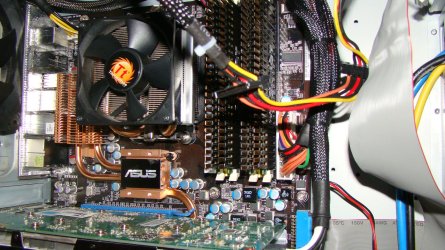
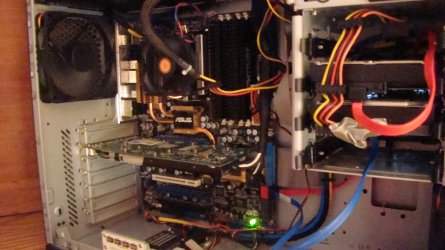
Show Us Your Rig

Status
Not open for further replies.
Hello Janno.


You'd better remove the part about 3 years before your gf sees it, it may come back to bite you.


:roflmao:

BFKid,

you wouldnt believe the trouble im facing at the moment for buying the parts without asking permission:devil:...

thats life!

but for a serious question, do you think that in about 5 years this rig wouldnt be sufficient for almost everyting MS or EA can throw at it?

music software i`m using i can still use in 40 years if i wanted, so that wont be a issue...
 
Last edited:

My Computer

Computer Manufacturer/Model Number
me, myself and i
OS
windows 7 Ultimate 64-bit
CPU
Intel Core I7 930 2.80 GHz
Motherboard
GigaByte GA-X58A-UD5
Memory
Corsair Dominator GT 12 GB, PC3-14900, 1866 MHz
Graphics Card(s)
Asus Radeon HD 5750 Formula 1024 MB
Sound Card
integrated
Monitor(s) Displays
samsung 82cm lcd 1080p
Screen Resolution
1920 x 1080
Hard Drives
1 x Crucial RealSSD C300 64 GB, S-ATA 600, 70 Mb's, 355 MB/s
1 x WD Caviar Black 1 TB, 7200 Rpm, 64 MB, Sata III/600
4 x WD Caviar Green 1 TB, 5400 Rpm, 64 MB, S-ATA II/300
PSU
Zalman ZM1000
Case
Thermaltake Element V
Cooling
Noctua NH-C12P SE14
Keyboard
Logitech G19
Mouse
Logitech MX Revolution
Internet Speed
Cable
but for a serious question, do you think that in about 5 years this rig wouldnt be sufficient for almost everyting MS or EA can throw at it?

music software i`m using i can still use in 40 years if i wanted, so that wont be a issue...


In a couple years, or less, there's going to be this little thing called Windows 8, be prepared.
 

My Computer

Computer Manufacturer/Model Number
* BFK Customs *
OS
W 7 64-bit Ultimate
CPU
Intel Q9550 Yorkfield
Motherboard
ASUS P5Q Pro
Memory
8GB Dominator 8500C5D
Graphics Card(s)
ATI : XFX 5870
Sound Card
Realtek HD Audio 7-1
Monitor(s) Displays
1x 47" LCD HDMI & 3x 26" LCD HDMI
Screen Resolution
1920x1080P & 1920x1200
Hard Drives
1x 80GB Intel X25-M G2 SSD : 1x 500GB & 1x 640GB WD Caviar Black(s)
PSU
Corsair 620HX
Case
Cooler Master RC-690
Cooling
Tuniq Tower 120, 2x 140mm and 3x 120mm case fans
Keyboard
Microsoft 500
Mouse
Razer Diamondback 3G
Internet Speed
14 Mb/s
Other Info
1x Koutech 3Gb/s SATA HDD Hot Swap Rack
but for a serious question, do you think that in about 5 years this rig wouldnt be sufficient for almost everyting MS or EA can throw at it?

music software i`m using i can still use in 40 years if i wanted, so that wont be a issue...


In a couple years, or less, there's going to be this little thing called Windows 8, be prepared.

win 8 will support 128 bits, but my guess is that even in windows 9 64 bit will be supported, so with this rig i can easely run at least for 6, 7 years without worrying if i need to upgrade everything.

then theres the fact that with windows 7 ultimate (64 on my main rig, 32 on all of the other (compaq 700ED, acer aoa 150bp, my dell optilpex 740, even my pentium III dell latitude c400 with 512MB RAM:devil:) run smoother then ever, and there is no need for me to upgrade to windows 8 or 9 to be able to run the software i`m using now.

as soon as there is a windows 8 beta release, i`ll probably build a 128bit rig just for the fun of it (ssssst, don`t tell my girlfriend;))
 

My Computer

Computer Manufacturer/Model Number
me, myself and i
OS
windows 7 Ultimate 64-bit
CPU
Intel Core I7 930 2.80 GHz
Motherboard
GigaByte GA-X58A-UD5
Memory
Corsair Dominator GT 12 GB, PC3-14900, 1866 MHz
Graphics Card(s)
Asus Radeon HD 5750 Formula 1024 MB
Sound Card
integrated
Monitor(s) Displays
samsung 82cm lcd 1080p
Screen Resolution
1920 x 1080
Hard Drives
1 x Crucial RealSSD C300 64 GB, S-ATA 600, 70 Mb's, 355 MB/s
1 x WD Caviar Black 1 TB, 7200 Rpm, 64 MB, Sata III/600
4 x WD Caviar Green 1 TB, 5400 Rpm, 64 MB, S-ATA II/300
PSU
Zalman ZM1000
Case
Thermaltake Element V
Cooling
Noctua NH-C12P SE14
Keyboard
Logitech G19
Mouse
Logitech MX Revolution
Internet Speed
Cable
my current RAM at 800Mhz is compared to my new RAM at 1866Mhz is a great improvement, the new CPU has a greater speed, and of course the SATAIII will hlp quite a bit.

this all adds to a much impoved throughput of data...

Well, in my opinion your are basing these assumptions on the specs and what common sense might say.

For example, you are getting an Intel Core i7-930 CPU that is designed to run on DDR3 800/1066 RAM. So, while you are going to install 1866RAM..you won't be able to approach those kind of speeds without overclocking your box. And even at core clocks, DDR3 can move about 25GB/s through...which is far and above more than your hard drives and such would ever be able to supply it data anyway.

Same thing goes for SATA III interfaces. Technically, a SATA 3.0Gbps interface can move close to 300MB/s...however with the exception of about 2 SSD drives...there isn't anything on the market which even comes close to maxing out SATA II...let alone SATA III. So, while it looks great on paper, the end world real result won't be as dramatic.

The big question is, why not??? why not go for the 12GB, instead of the 6 or 8 GB???
Why not??? Well if you don't ever make use of it...it's somewhat of a waste. That money could instead be put towards a faster CPU, different motherboard, another SSD drive, improving your network infrastructure, etc....all of which could actually improve your overall performance.

as soon as there is a windows 8 beta release, i`ll probably build a 128bit rig just for the fun of it (ssssst, don`t tell my girlfriend;))
Ummm....not likely unless somebody develops a 128bit capable CPU and hardware to go along with it. Windows 7 is the first time that 64-bit is coming more commonplace. We are going to be on 64-bit for some time to come. I'd almost be willing to bet that Windows 8 will still have a 32-bit version.


but for a serious question, do you think that in about 5 years this rig wouldnt be sufficient for almost everyting MS or EA can throw at it?
No, i truly believe a box of that caliber would be able to run any mainstream OS that MS produces for 5 years easily. Probably closer to 10. We are techies and like to be on the bleeding edge and have big fancy computers....there is a difference between what we want and can afford to do...versus what we would need to simply be able to do something. That fact is often lost in these parts.
 

My Computer

Computer Manufacturer/Model Number
Self-Built in July 2009
OS
Windows 7 Ultimate x64
CPU
Intel Q9550 2.83Ghz OC'd to 3.40Ghz
Motherboard
Gigabyte GA-EP45-UD3R rev. 1.1, F12 BIOS
Memory
8GB G.Skill PI DDR2-800, 4-4-4-12 timings
Graphics Card(s)
EVGA 1280MB Nvidia GeForce GTX570
Sound Card
Realtek ALC899A 8 channel onboard audio
Monitor(s) Displays
23" Acer x233H
Screen Resolution
1920x1080
Hard Drives
Intel X25-M 80GB Gen 2 SSD
Western Digital 1TB Caviar Black, 32MB cache. WD1001FALS
PSU
Corsair 620HX modular
Case
Antec P182
Cooling
stock
Keyboard
ABS M1 Mechanical
Mouse
Logitech G9 Laser Mouse
Internet Speed
15/2 cable modem
Other Info
Windows and Linux enthusiast. Logitech G35 Headset.
Well, in my opinion your are basing these assumptions on the specs and what common sense might say.

For example, you are getting an Intel Core i7-930 CPU that is designed to run on DDR3 800/1066 RAM. So, while you are going to install 1866RAM..you won't be able to approach those kind of speeds without overclocking your box. And even at core clocks, DDR3 can move about 25GB/s through...which is far and above more than your hard drives and such would ever be able to supply it data anyway.

Same thing goes for SATA III interfaces. Technically, a SATA 3.0Gbps interface can move close to 300MB/s...however with the exception of about 2 SSD drives...there isn't anything on the market which even comes close to maxing out SATA II...let alone SATA III. So, while it looks great on paper, the end world real result won't be as dramatic.

all that you say is true, and yet were talking about the same...

if the CPU is my Bottleneck, and my SSD doesnt have enough read speed, all i have to replace in about 4 to 6 years is the SSD, an maybe the CPU, and again i`m done for a few years.

for now i`ve got all that i need, and there can always be some improvements when theres the need for it, but for a great time to come, i`ve got it made...


Why not...well if you don't ever make use of it...it's somewhat of a waste. That money could instead be put towards a faster CPU, different motherboard, another SSD drive, improving your network infrastructure, etc....all of which could actually improve your overall performance.

i dont think that with this setup i can make a lot of performance improvements for the same money...

if you knew that i only spend about €200,- more on ram, and know that the next step in CPU costs me about €300,- (thats only a step up in speed, a step up in cores costs a whopping €600,-), a step that i really do not need to take), plus the other options you presented, i would be spending about €600,- or more to take it to yet another level...


Ummm....not likely unless somebody develops a 128bit capable CPU and hardware to go along with it. Windows 7 is the first time that 64-bit is coming more commonplace. We are going to be on 64-bit for some time to come.

look here

if there`s a option to use it, there will be hardware to use it on...

thats evolution for ya...
 

My Computer

Computer Manufacturer/Model Number
me, myself and i
OS
windows 7 Ultimate 64-bit
CPU
Intel Core I7 930 2.80 GHz
Motherboard
GigaByte GA-X58A-UD5
Memory
Corsair Dominator GT 12 GB, PC3-14900, 1866 MHz
Graphics Card(s)
Asus Radeon HD 5750 Formula 1024 MB
Sound Card
integrated
Monitor(s) Displays
samsung 82cm lcd 1080p
Screen Resolution
1920 x 1080
Hard Drives
1 x Crucial RealSSD C300 64 GB, S-ATA 600, 70 Mb's, 355 MB/s
1 x WD Caviar Black 1 TB, 7200 Rpm, 64 MB, Sata III/600
4 x WD Caviar Green 1 TB, 5400 Rpm, 64 MB, S-ATA II/300
PSU
Zalman ZM1000
Case
Thermaltake Element V
Cooling
Noctua NH-C12P SE14
Keyboard
Logitech G19
Mouse
Logitech MX Revolution
Internet Speed
Cable
look here

if there`s a option to use it, there will be hardware to use it on...

thats evolution...

Interesting link. Now google search for IA-128 and see what you turn up.

if the CPU is my Bottleneck, and my SSD doesnt have enough read speed, all i have to replace in about 4 to 6 years is the SSD, an maybe the CPU, and again i`m done for a few years.
If only it were that simple. In 4 to 6 years...when it comes time to replace that CPU...it's undoubtedly going to be a new socket and that new socket would require a new motherboard and most likely that new motherboard will require a new RAM standard as DDR3 probably won't be the bomb in 4-6 years. Therefore, you would be replacing the RAM as well in 4-6 years....so investing in it now, doesn't exactly future-proof you.

I'm not trying to be a negative nancy, I've just been in this field and working with computers for 20+ years. I've seen it happen, I've built a lot of the years. I get a little passionate when I see people who are really trying to go the extra mile in hopes that it really pans out....but down the road...in a few years....we are all left with all dinosaurs that we want to replace as something new and shiny has come along and we aren't king of the hill anymore.
 

My Computer

Computer Manufacturer/Model Number
Self-Built in July 2009
OS
Windows 7 Ultimate x64
CPU
Intel Q9550 2.83Ghz OC'd to 3.40Ghz
Motherboard
Gigabyte GA-EP45-UD3R rev. 1.1, F12 BIOS
Memory
8GB G.Skill PI DDR2-800, 4-4-4-12 timings
Graphics Card(s)
EVGA 1280MB Nvidia GeForce GTX570
Sound Card
Realtek ALC899A 8 channel onboard audio
Monitor(s) Displays
23" Acer x233H
Screen Resolution
1920x1080
Hard Drives
Intel X25-M 80GB Gen 2 SSD
Western Digital 1TB Caviar Black, 32MB cache. WD1001FALS
PSU
Corsair 620HX modular
Case
Antec P182
Cooling
stock
Keyboard
ABS M1 Mechanical
Mouse
Logitech G9 Laser Mouse
Internet Speed
15/2 cable modem
Other Info
Windows and Linux enthusiast. Logitech G35 Headset.
Interesting link. Now google search for IA-128 and see what you turn up.


so that`s the same way 64 bits came on to the market (main stream that is, it excisted for much longer ofcourse), say 8 years ago...

and what are we all using now?:eek:
 

My Computer

Computer Manufacturer/Model Number
me, myself and i
OS
windows 7 Ultimate 64-bit
CPU
Intel Core I7 930 2.80 GHz
Motherboard
GigaByte GA-X58A-UD5
Memory
Corsair Dominator GT 12 GB, PC3-14900, 1866 MHz
Graphics Card(s)
Asus Radeon HD 5750 Formula 1024 MB
Sound Card
integrated
Monitor(s) Displays
samsung 82cm lcd 1080p
Screen Resolution
1920 x 1080
Hard Drives
1 x Crucial RealSSD C300 64 GB, S-ATA 600, 70 Mb's, 355 MB/s
1 x WD Caviar Black 1 TB, 7200 Rpm, 64 MB, Sata III/600
4 x WD Caviar Green 1 TB, 5400 Rpm, 64 MB, S-ATA II/300
PSU
Zalman ZM1000
Case
Thermaltake Element V
Cooling
Noctua NH-C12P SE14
Keyboard
Logitech G19
Mouse
Logitech MX Revolution
Internet Speed
Cable
so that`s the same way 64 bits came on to the market (main stream that is, it excisted for much longer ofcourse), say 8 years ago...

and what are we all using now?:eek:

64 bit support has been around since the days of XP. AMD and Intel came to market with products that supported 64-bit in 2003 and 2004 respectively. It took 6-7 years for the market space to transition over once the architecture existed. With Windows 8 around 2 years away...and the fact that we don't have the 128bit hardware yet...I'm quite confident that we won't all be on 128 bit when Windows 8 comes out.... It's going to take some time...of course....if Windows 8 is delayed by 5 years or more...who knows.
 

My Computer

Computer Manufacturer/Model Number
Self-Built in July 2009
OS
Windows 7 Ultimate x64
CPU
Intel Q9550 2.83Ghz OC'd to 3.40Ghz
Motherboard
Gigabyte GA-EP45-UD3R rev. 1.1, F12 BIOS
Memory
8GB G.Skill PI DDR2-800, 4-4-4-12 timings
Graphics Card(s)
EVGA 1280MB Nvidia GeForce GTX570
Sound Card
Realtek ALC899A 8 channel onboard audio
Monitor(s) Displays
23" Acer x233H
Screen Resolution
1920x1080
Hard Drives
Intel X25-M 80GB Gen 2 SSD
Western Digital 1TB Caviar Black, 32MB cache. WD1001FALS
PSU
Corsair 620HX modular
Case
Antec P182
Cooling
stock
Keyboard
ABS M1 Mechanical
Mouse
Logitech G9 Laser Mouse
Internet Speed
15/2 cable modem
Other Info
Windows and Linux enthusiast. Logitech G35 Headset.
If only it were that simple. In 4 to 6 years...when it comes time to replace that CPU...it's undoubtedly going to be a new socket and that new socket would require a new motherboard and most likely that new motherboard will require a new RAM standard as DDR3 probably won't be the bomb in 4-6 years. Therefore, you would be replacing the RAM as well in 4-6 years....so investing in it now, doesn't exactly future-proof you.

I'm not trying to be a negative nancy, I've just been in this field and working with computers for 20+ years. I've seen it happen, I've built a lot of the years. I get a little passionate when I see people who are really trying to go the extra mile in hopes that it really pans out....but down the road...in a few years....we are all left with all dinosaurs that we want to replace as something new and shiny has come along and we aren't king of the hill anymore.

yes... and, no....

take for example my Dell Latitude C400 PIII laptop with 512MB RAM an 40 gb HD.

it runs W7 easily, with 8 years of age that`s not bad.

ofcourse it has no 3d support, but Office, AdobeCS3, it all runs...

so this is a machine that 8 years ago didnt have the highest specs, and just being a simple laptop, can still run W7 with no problems.

I`m not saying W8 or W9 will bann 64 machines, but i`m guessing my other specs can easily take whatever MS has in store for the coming 2 or even 3 editions of windows, supporting 64 bits a long time to come...

so yes, there will be issues, and no, i dont think i will have to upgrade because of them, for the simple reason that if it runs now, it will run al long as the parts dont fail. dont forget, im using it as a music production rig, and i dont have to upgrade to new versions of windows to produce music...
 

My Computer

Computer Manufacturer/Model Number
me, myself and i
OS
windows 7 Ultimate 64-bit
CPU
Intel Core I7 930 2.80 GHz
Motherboard
GigaByte GA-X58A-UD5
Memory
Corsair Dominator GT 12 GB, PC3-14900, 1866 MHz
Graphics Card(s)
Asus Radeon HD 5750 Formula 1024 MB
Sound Card
integrated
Monitor(s) Displays
samsung 82cm lcd 1080p
Screen Resolution
1920 x 1080
Hard Drives
1 x Crucial RealSSD C300 64 GB, S-ATA 600, 70 Mb's, 355 MB/s
1 x WD Caviar Black 1 TB, 7200 Rpm, 64 MB, Sata III/600
4 x WD Caviar Green 1 TB, 5400 Rpm, 64 MB, S-ATA II/300
PSU
Zalman ZM1000
Case
Thermaltake Element V
Cooling
Noctua NH-C12P SE14
Keyboard
Logitech G19
Mouse
Logitech MX Revolution
Internet Speed
Cable
so that`s the same way 64 bits came on to the market (main stream that is, it excisted for much longer ofcourse), say 8 years ago...

and what are we all using now?:eek:

64 bit support has been around since the days of XP. AMD and Intel came to market with products that supported 64-bit in 2003 and 2004 respectively. It took 6-7 years for the market space to transition over once the architecture existed. With Windows 8 around 2 years away...and the fact that we don't have the 128bit hardware yet...I'm quite confident that we won't all be on 128 bit when Windows 8 comes out.... It's going to take some time...of course....if Windows 8 is delayed by 5 years or more...who knows.

:Din ten years, we`ll have a chip mounted inside our craniums, and be linked to the World Wide Web, without even an need for any device to interact with it.
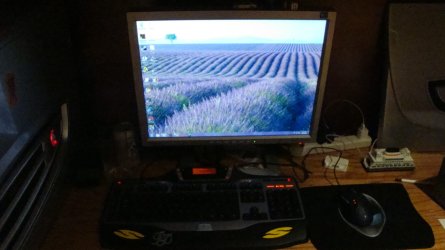
then ill pass my new rig to my kid, and show them how the old man used his computer before the revolution.:D

i`m willing to bet that within 5 years we`ll have a rig that is not only capable of 128 bit, but implementing it on a greater scale that 64 bit is implemented now in current systems (don`t forget, 64 bit is not even being fully used today)
 

My Computer

Computer Manufacturer/Model Number
me, myself and i
OS
windows 7 Ultimate 64-bit
CPU
Intel Core I7 930 2.80 GHz
Motherboard
GigaByte GA-X58A-UD5
Memory
Corsair Dominator GT 12 GB, PC3-14900, 1866 MHz
Graphics Card(s)
Asus Radeon HD 5750 Formula 1024 MB
Sound Card
integrated
Monitor(s) Displays
samsung 82cm lcd 1080p
Screen Resolution
1920 x 1080
Hard Drives
1 x Crucial RealSSD C300 64 GB, S-ATA 600, 70 Mb's, 355 MB/s
1 x WD Caviar Black 1 TB, 7200 Rpm, 64 MB, Sata III/600
4 x WD Caviar Green 1 TB, 5400 Rpm, 64 MB, S-ATA II/300
PSU
Zalman ZM1000
Case
Thermaltake Element V
Cooling
Noctua NH-C12P SE14
Keyboard
Logitech G19
Mouse
Logitech MX Revolution
Internet Speed
Cable
My aurora from 2 years ago. I added another harddrive and got a new fan thats it. when my dads old antec from ten years ago (well built machine..) fail's, he will give me the case and im going to make a new one.
 

Attachments

  • DSC06024.JPG
    DSC06024.JPG
    831.5 KB · Views: 11
  • DSC06025.JPG
    DSC06025.JPG
    832.3 KB · Views: 13
  • DSC06027.JPG
    DSC06027.JPG
    866.9 KB · Views: 16
  • DSC06030.JPG
    DSC06030.JPG
    831.5 KB · Views: 15

My Computer

Computer type
PC/Desktop
Computer Manufacturer/Model Number
custom
OS
Windows 7 Home Premium 64 bit
CPU
AMD Phenom 9950
Motherboard
ASUS m3a32-mvp deluxe
Memory
12gb ddr2, 2gbx2+4gbx2
Graphics Card(s)
Zotac nvidia gt 730
Sound Card
integrated
Monitor(s) Displays
Samsung syncmaster 213t, dell 13 in
Screen Resolution
1600x1200
Hard Drives
Seagate 750 gb 7200 rpm harddrive, Seagate 7200 rpm120 gb harddrive, samsung 1TB 5400rpm
Case
Alienware Aurora
Cooling
fans yo
Keyboard
Logitech G15
Mouse
microsoft intellimouse explorer 3.0
Internet Speed
10mbps
Antivirus
microsoft security suite
Browser
chrome
my current RAM at 800Mhz is compared to my new RAM at 1866Mhz is a great improvement, the new CPU has a greater speed, and of course the SATAIII will hlp quite a bit.

Janno,

You need to be aware that pparks is right when he says....

For example, you are getting an Intel Core i7-930 CPU that is designed to run on DDR3 800/1066 RAM. So, while you are going to install 1866RAM..you won't be able to approach those kind of speeds without overclocking your box.

Seeing that the price seems to be about the same for 12gig of either the 1866 Dominator GT or the 1600 Dominator, I'd say get the GT's, as they are more of a performance module.

Personally I would save myself some money by going with either of these these....

CORSAIR CMG6GX3M3A1600C7 6GB PC3-12800 (DDR3-1600) Triple Channel Memory Retail at ZipZoomfly

Amazon.com: Corsair TR3X6G1600C7D Dominator 6 GB PC3-12800 1600 MHz 240-pin Triple Channel Core i7 DDR3 Memory Kit:…

You'll get more performance due to the lower CAS speed. 7-7-7 vs 8-8-8.

If you have 12gig of 8-8-8 or 6gig of 7-7-7, I think the 7's win out. Even If the 12gig of 8's win, it's not something you're going to notice over the 6gig of 7's.

Again, my two cents :)
 

My Computer

Computer type
PC/Desktop
Computer Manufacturer/Model Number
Custom built by me.
OS
Windows 10 Pro
CPU
Intel Core i7-4770K (3.5Ghz)
Motherboard
Gigabyte G1 Sniper 5 (F10 Bios)
Memory
32 gig Corsair Dominator Platinum (4x8Gig)
Graphics Card(s)
Sapphire Tri-X R9 Fury
Sound Card
Soundblaster ZXR
Monitor(s) Displays
NEC PA242W 24" LCD Monitor
Screen Resolution
1920 x 1200
Hard Drives
Primary - Samsung 850 Pro (512gig), Samsung 840 Pro (256gig), 2TB WD Caviar Black.
PSU
EVGA Supernova 1000 G2
Case
Cooler Master HAF X
Cooling
Corsair H100i with Corsair Air Series SP120 Quiet Fans
Keyboard
Logitech Wireless Wave
Mouse
Logitech Performance MX
Internet Speed
High Speed Cable
Antivirus
Norton Security
Browser
IE11
Other Info
Memory Timings - 1866MHz @ 9-9-9-27-1T @ 1.5 volts
i`m willing to bet that within 5 years we`ll have a rig that is not only capable of 128 bit, but implementing it on a greater scale that 64 bit is implemented now in current systems (don`t forget, 64 bit is not even being fully used today)
Well, just mark it on your calendar and 5 years from now we can come back and discuss. I do not believe that within 5 years we will have a base of 128bit that greatly exceeds where we are with 64-bit today (which is only really in it's infancy still). I'd actually be surprised if we even had a consumer grade 128bit CPU available in the market.

take for example my Dell Latitude C400 PIII laptop with 512MB RAM an 40 gb HD.

it runs W7 easily, with 8 years of age that`s not bad.

ofcourse it has no 3d support, but Office, AdobeCS3, it all runs...

so this is a machine that 8 years ago didnt have the highest specs, and just being a simple laptop, can still run W7 with no problems.

I`m not saying W8 or W9 will bann 64 machines, but i`m guessing my other specs can easily take whatever MS has in store for the coming 2 or even 3 editions of windows, supporting 64 bits a long time to come...

I never indicated that your current build would have any issues in the coming versions of Windows. In fact, I said you would probably be just fine for nearly 10 years in an earlier post. As you indicate here, even a modest spec machine from 8 years ago is workable in today's world. And even if you would have doubled the RAM back then and spent the money on an 80GB hard drive....by todays' standards both would be antiquated....although you would have spent a lot more. That's the point that I am making here, you hint that you considered 24GB of RAM and that seems just downright silly. I fell that even 12GB of RAM is probably 2x what you really need. And I'm certain that 5 years from now, even with 6GB of RAM, the box would be just fine and dandy.
 

My Computer

Computer Manufacturer/Model Number
Self-Built in July 2009
OS
Windows 7 Ultimate x64
CPU
Intel Q9550 2.83Ghz OC'd to 3.40Ghz
Motherboard
Gigabyte GA-EP45-UD3R rev. 1.1, F12 BIOS
Memory
8GB G.Skill PI DDR2-800, 4-4-4-12 timings
Graphics Card(s)
EVGA 1280MB Nvidia GeForce GTX570
Sound Card
Realtek ALC899A 8 channel onboard audio
Monitor(s) Displays
23" Acer x233H
Screen Resolution
1920x1080
Hard Drives
Intel X25-M 80GB Gen 2 SSD
Western Digital 1TB Caviar Black, 32MB cache. WD1001FALS
PSU
Corsair 620HX modular
Case
Antec P182
Cooling
stock
Keyboard
ABS M1 Mechanical
Mouse
Logitech G9 Laser Mouse
Internet Speed
15/2 cable modem
Other Info
Windows and Linux enthusiast. Logitech G35 Headset.
anybody have a link to 6gb ram on a single stick?
 

My Computer

Computer type
PC/Desktop
Computer Manufacturer/Model Number
custom
OS
Windows 7 Home Premium 64 bit
CPU
AMD Phenom 9950
Motherboard
ASUS m3a32-mvp deluxe
Memory
12gb ddr2, 2gbx2+4gbx2
Graphics Card(s)
Zotac nvidia gt 730
Sound Card
integrated
Monitor(s) Displays
Samsung syncmaster 213t, dell 13 in
Screen Resolution
1600x1200
Hard Drives
Seagate 750 gb 7200 rpm harddrive, Seagate 7200 rpm120 gb harddrive, samsung 1TB 5400rpm
Case
Alienware Aurora
Cooling
fans yo
Keyboard
Logitech G15
Mouse
microsoft intellimouse explorer 3.0
Internet Speed
10mbps
Antivirus
microsoft security suite
Browser
chrome
anybody have a link to 6gb ram on a single stick?
No, computers do everything in binary...so you get 0, 1mb, 2mb, 4mb, 8mb, 16mb, 32mb, 64mb, 128mb, 256mb, 512mb, 1024mb, 2048mb, 4096mb, 8194mb, 16,384, 32,678 and so on.
 

My Computer

Computer Manufacturer/Model Number
Self-Built in July 2009
OS
Windows 7 Ultimate x64
CPU
Intel Q9550 2.83Ghz OC'd to 3.40Ghz
Motherboard
Gigabyte GA-EP45-UD3R rev. 1.1, F12 BIOS
Memory
8GB G.Skill PI DDR2-800, 4-4-4-12 timings
Graphics Card(s)
EVGA 1280MB Nvidia GeForce GTX570
Sound Card
Realtek ALC899A 8 channel onboard audio
Monitor(s) Displays
23" Acer x233H
Screen Resolution
1920x1080
Hard Drives
Intel X25-M 80GB Gen 2 SSD
Western Digital 1TB Caviar Black, 32MB cache. WD1001FALS
PSU
Corsair 620HX modular
Case
Antec P182
Cooling
stock
Keyboard
ABS M1 Mechanical
Mouse
Logitech G9 Laser Mouse
Internet Speed
15/2 cable modem
Other Info
Windows and Linux enthusiast. Logitech G35 Headset.
Someone send me 3000 bucks i need to get a good comp
 

My Computer

Computer Manufacturer/Model Number
Emachines 1331G
OS
MS Windows 7 Home Premium 64-bit
CPU
AMD Athlon II X2 235 Regor 45nm Technology 2.7 Ghz
Motherboard
eMachines MCP61PM-GM (CPU 1)
Memory
6.0GB Dual-Channel DDR2 @ 401MHz (5-5-5-18)
Graphics Card(s)
1024MB GeForce 9800 GT (Pny) overclocked at 662
Sound Card
Speakers (Realtek High Definition Audio)
Monitor(s) Displays
Generic Non-PnP Monitor @ 1280x1024
Screen Resolution
1280x1024
Hard Drives
733GB Seagate ST375052 8AS SCSI Disk Device (IDE)
PSU
450W
Case
not sure
Cooling
fan/air
Keyboard
Standard PS/2 Keyboard
Mouse
Microsoft PS/2 Mouse
Internet Speed
26mbps

My Computer

Computer type
PC/Desktop
Computer Manufacturer/Model Number
Self Built
OS
Win 10 Pro x64
CPU
Intel I5-2500K @3.3GHz
Motherboard
Asrock P67 Extreme4
Memory
16GB G.Skill Ripjaws X (4x4GB)
Graphics Card(s)
EVGA GeForce 750 Ti SC 2GB
Sound Card
ASUS Xonar DG 5.1 Channels 24-bit 96KHz PCI Interface Sound
Monitor(s) Displays
auria eq2367
Screen Resolution
1920 x 1080
Hard Drives
250GB Samsung 850 EVO SSD
1TB WD Blue
1TB Hitachi
PSU
SeaSonic X 650W 80 Plus Gold
Case
Corsair Obsidian 750D
Cooling
Corsair H60, Three 140mm case fans
Keyboard
Logitech Wireless Keyboard K520
Mouse
Logitech Wireless Mouse M310
Internet Speed
Wave Broadband ~ 100 dn 5 up
Antivirus
Windows Defender, Malwarebytes Premium
Browser
Edge, IE11, Chrome
Other Info
Laptop specs: HP g7-1365dx /
CPU: AMD A6-3420M APU with Radeon(tm) HD Graphics /
RAM: Crucial 8Gb (2x4Gb) /
SSD: Crucial M4-CT128M4SSD2 ATA Device/ FW 000F /
GFX: AMD Radeon HD 6520G /
OS: Windows 10 Pro x64
well im a kid and i dont think i can get as good pc for 150 bucks
 

My Computer

Computer Manufacturer/Model Number
Emachines 1331G
OS
MS Windows 7 Home Premium 64-bit
CPU
AMD Athlon II X2 235 Regor 45nm Technology 2.7 Ghz
Motherboard
eMachines MCP61PM-GM (CPU 1)
Memory
6.0GB Dual-Channel DDR2 @ 401MHz (5-5-5-18)
Graphics Card(s)
1024MB GeForce 9800 GT (Pny) overclocked at 662
Sound Card
Speakers (Realtek High Definition Audio)
Monitor(s) Displays
Generic Non-PnP Monitor @ 1280x1024
Screen Resolution
1280x1024
Hard Drives
733GB Seagate ST375052 8AS SCSI Disk Device (IDE)
PSU
450W
Case
not sure
Cooling
fan/air
Keyboard
Standard PS/2 Keyboard
Mouse
Microsoft PS/2 Mouse
Internet Speed
26mbps

My Computer

Computer type
PC/Desktop
Computer Manufacturer/Model Number
Self Built
OS
Win 10 Pro x64
CPU
Intel I5-2500K @3.3GHz
Motherboard
Asrock P67 Extreme4
Memory
16GB G.Skill Ripjaws X (4x4GB)
Graphics Card(s)
EVGA GeForce 750 Ti SC 2GB
Sound Card
ASUS Xonar DG 5.1 Channels 24-bit 96KHz PCI Interface Sound
Monitor(s) Displays
auria eq2367
Screen Resolution
1920 x 1080
Hard Drives
250GB Samsung 850 EVO SSD
1TB WD Blue
1TB Hitachi
PSU
SeaSonic X 650W 80 Plus Gold
Case
Corsair Obsidian 750D
Cooling
Corsair H60, Three 140mm case fans
Keyboard
Logitech Wireless Keyboard K520
Mouse
Logitech Wireless Mouse M310
Internet Speed
Wave Broadband ~ 100 dn 5 up
Antivirus
Windows Defender, Malwarebytes Premium
Browser
Edge, IE11, Chrome
Other Info
Laptop specs: HP g7-1365dx /
CPU: AMD A6-3420M APU with Radeon(tm) HD Graphics /
RAM: Crucial 8Gb (2x4Gb) /
SSD: Crucial M4-CT128M4SSD2 ATA Device/ FW 000F /
GFX: AMD Radeon HD 6520G /
OS: Windows 10 Pro x64
i wish i could just get a 5970 and never buy a gfx card the next 3 years :cry:
 

My Computer

Computer Manufacturer/Model Number
Emachines 1331G
OS
MS Windows 7 Home Premium 64-bit
CPU
AMD Athlon II X2 235 Regor 45nm Technology 2.7 Ghz
Motherboard
eMachines MCP61PM-GM (CPU 1)
Memory
6.0GB Dual-Channel DDR2 @ 401MHz (5-5-5-18)
Graphics Card(s)
1024MB GeForce 9800 GT (Pny) overclocked at 662
Sound Card
Speakers (Realtek High Definition Audio)
Monitor(s) Displays
Generic Non-PnP Monitor @ 1280x1024
Screen Resolution
1280x1024
Hard Drives
733GB Seagate ST375052 8AS SCSI Disk Device (IDE)
PSU
450W
Case
not sure
Cooling
fan/air
Keyboard
Standard PS/2 Keyboard
Mouse
Microsoft PS/2 Mouse
Internet Speed
26mbps
Status
Not open for further replies.
Back
Top