WORD Documents unable to open anymore - NEED HELP!

Can you snip a shot of the window that pops up when "I have word open, a virtual drive pops up, with WINWORD inside"?
 

My Computer My Computer

At a glance

Main - Windows 7 Pro SP1 64-Bit; 2nd - Window...Main - Core i7 2600K; 2nd - Core i7 920Main - 16GB Corsair Vengeance; 2nd - 12GB Cor...Main - XFX Radeon 6870 1GB; 2nd - XFX Radeon ...
Computer Manufacturer/Model Number
Self
OS
Main - Windows 7 Pro SP1 64-Bit; 2nd - Windows Server 2008 R2
CPU
Main - Core i7 2600K; 2nd - Core i7 920
Motherboard
Main - Asus P8Z68-V Pro/Gen3; 2nd - Gigabyte GA-EX58-UDR3
Memory
Main - 16GB Corsair Vengeance; 2nd - 12GB Corsair Vengeance
Graphics Card(s)
Main - XFX Radeon 6870 1GB; 2nd - XFX Radeon 4870 1GB
Sound Card
Both: Onboard Realtek Azalia
Monitor(s) Displays
Main - Hann 25" + I-INC 25" + Acer 23"; 2nd - Upgrading Soon
Screen Resolution
Main - 1920x1080 (All Three Monitors); 2nd - Upgrading Soon
Hard Drives
Main - (1) Crucial M4 128GB (Boot)
Main - (1) Seagate 2TB 64MB Cache (Data)
Main - (1) Seagate 2TB 64MB Cache (Data Backup)
2nd - (1) Intel X25-M SSD 80GB (Boot)
2nd - (3) Seagate 1TB 32MB Cache (Data Backup)
2nd - (1) Seagate 320GB (Because)
PSU
Main - OCZ 600W Modular; 2nd - OCZ 600W
Case
Main - Thermaltake Element G; 2nd - NZXT something or other
Cooling
Main - Corsair H80; 2nd - Prolimatech Megahalems
Keyboard
Main - Razer Reclusa; 2nd - Old MS Keyboard
Mouse
Main - Logitech MX Revolution; 2nd - Old MS Mouse
Internet Speed
20Mbps Time-Warner Cable
it depend on what operating system your running if it 64bit you have to directories program file which is the 64bit programs and program file (86) that the standard 32bit................ just a quick tip
 

My Computer My Computer

At a glance

windows 7 ultimate 64bit6gb
OS
windows 7 ultimate 64bit
Motherboard
crosshair
Memory
6gb
Can you snip a shot of the window that pops up when "I have word open, a virtual drive pops up, with WINWORD inside"?

Here ya go.
(I re-formatted my computer, and re-installed office, and it works now. No clue why it didn't before.)

it depend on what operating system your running if it 64bit you have to directories program file which is the 64bit programs and program file (86) that the standard 32bit................ just a quick tip

I have checked both Program Files folders on my computer. The only program in either is OneNote.
 

Attachments

  • Capture.PNG
    Capture.PNG
    80.9 KB · Views: 49
Last edited:

My Computer My Computer

At a glance

Windows 7 Home Premium x64AMD 9850 Black Edition4GB DDR2 (Showing 3GB)PNY 8800GT
Computer Manufacturer/Model Number
Custom
OS
Windows 7 Home Premium x64
CPU
AMD 9850 Black Edition
Motherboard
Gigabyte MA78G - DS3H
Memory
4GB DDR2 (Showing 3GB)
Graphics Card(s)
PNY 8800GT
Sound Card
Intigrated
Monitor(s) Displays
Samsung 22" monitor, model#2233 and some **** Sony monitor.
Screen Resolution
1860x1050 | 1024x768
Hard Drives
80GB - OS HDD | 500GB - Backups/Media
PSU
600W CoolerMaster
Case
Off-brand Alienware look-a-like
Cooling
Stock plus extra fans
Keyboard
Microsoft Wired Keyboard
Mouse
Off-brand
Internet Speed
2.95 mb/s down | 0.26mb/s up
Guys, I still haven't been able to do it. Any other tips? Maybe someone could answer my last reply above.
 

My Computer My Computer

At a glance

Windows 7
OS
Windows 7
...
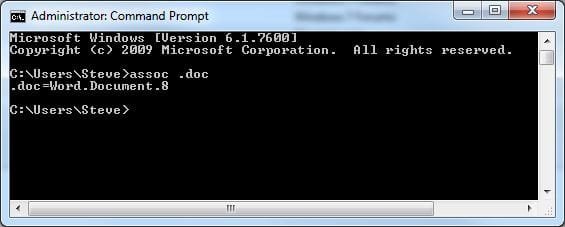
C:\Windows\System32\assoc .doc
See pic for what it should look like, depending on your version of Word.

Sorry if you've already tried this, but have you gone to Control Panel>>Default Programs and then "Associate a file type..." and set .doc to Word like recommended in posts #8-#11?
 

Attachments

  • assoc doc.JPG
    assoc doc.JPG
    22.6 KB · Views: 42

My Computer My Computer

At a glance

Main - Windows 7 Pro SP1 64-Bit; 2nd - Window...Main - Core i7 2600K; 2nd - Core i7 920Main - 16GB Corsair Vengeance; 2nd - 12GB Cor...Main - XFX Radeon 6870 1GB; 2nd - XFX Radeon ...
Computer Manufacturer/Model Number
Self
OS
Main - Windows 7 Pro SP1 64-Bit; 2nd - Windows Server 2008 R2
CPU
Main - Core i7 2600K; 2nd - Core i7 920
Motherboard
Main - Asus P8Z68-V Pro/Gen3; 2nd - Gigabyte GA-EX58-UDR3
Memory
Main - 16GB Corsair Vengeance; 2nd - 12GB Corsair Vengeance
Graphics Card(s)
Main - XFX Radeon 6870 1GB; 2nd - XFX Radeon 4870 1GB
Sound Card
Both: Onboard Realtek Azalia
Monitor(s) Displays
Main - Hann 25" + I-INC 25" + Acer 23"; 2nd - Upgrading Soon
Screen Resolution
Main - 1920x1080 (All Three Monitors); 2nd - Upgrading Soon
Hard Drives
Main - (1) Crucial M4 128GB (Boot)
Main - (1) Seagate 2TB 64MB Cache (Data)
Main - (1) Seagate 2TB 64MB Cache (Data Backup)
2nd - (1) Intel X25-M SSD 80GB (Boot)
2nd - (3) Seagate 1TB 32MB Cache (Data Backup)
2nd - (1) Seagate 320GB (Because)
PSU
Main - OCZ 600W Modular; 2nd - OCZ 600W
Case
Main - Thermaltake Element G; 2nd - NZXT something or other
Cooling
Main - Corsair H80; 2nd - Prolimatech Megahalems
Keyboard
Main - Razer Reclusa; 2nd - Old MS Keyboard
Mouse
Main - Logitech MX Revolution; 2nd - Old MS Mouse
Internet Speed
20Mbps Time-Warner Cable
I'm not going to read the whole thing to see if this has been said or not.

Right click the document, click "open with", make sure "always use the selected program..." is ticked, and then click browse. Go to C:\program files\Office12. Pick WINWORD. If you are using 64-bit it might take you to c:\program files by default. You need to go to program files (x86) as Office 2007 is a 32-bit program.
 

My Computer My Computer

At a glance

Windows 7 Professional SP1 64-bitIntel Core i5-2450M @2.5 GHz6 GB DDR3 1333MHzIntel HD 3000
Computer type
Laptop
Computer Manufacturer/Model Number
Toshiba P775-S7100
OS
Windows 7 Professional SP1 64-bit
CPU
Intel Core i5-2450M @2.5 GHz
Memory
6 GB DDR3 1333MHz
Graphics Card(s)
Intel HD 3000
Monitor(s) Displays
Built-in 17.3" LED; 22" Insignia NS-L22Q-10A
Screen Resolution
1600x900; 1360x768
Hard Drives
750 GB Hitachi
1TB Seagate FreeAgent External
Internet Speed
Verizon DSL Speed(Down/Up): 3360 Kbps / 800 Kbps
Antivirus
MSE and MBAM Pro
Browser
IE10
...
C:\Windows\System32\assoc .doc
See pic for what it should look like, depending on your version of Word.

Sorry if you've already tried this, but have you gone to Control Panel>>Default Programs and then "Associate a file type..." and set .doc to Word like recommended in posts #8-#11?

Finally! This definitely helped, Profdlp! It's working now, thanks a lot! Also wanted to say that I tested it out and Petey7's tip helped as well. Thanks guys.
 

My Computer My Computer

At a glance

Windows 7
OS
Windows 7
Glad you got it. :D:party:
 

My Computer My Computer

At a glance

Main - Windows 7 Pro SP1 64-Bit; 2nd - Window...Main - Core i7 2600K; 2nd - Core i7 920Main - 16GB Corsair Vengeance; 2nd - 12GB Cor...Main - XFX Radeon 6870 1GB; 2nd - XFX Radeon ...
Computer Manufacturer/Model Number
Self
OS
Main - Windows 7 Pro SP1 64-Bit; 2nd - Windows Server 2008 R2
CPU
Main - Core i7 2600K; 2nd - Core i7 920
Motherboard
Main - Asus P8Z68-V Pro/Gen3; 2nd - Gigabyte GA-EX58-UDR3
Memory
Main - 16GB Corsair Vengeance; 2nd - 12GB Corsair Vengeance
Graphics Card(s)
Main - XFX Radeon 6870 1GB; 2nd - XFX Radeon 4870 1GB
Sound Card
Both: Onboard Realtek Azalia
Monitor(s) Displays
Main - Hann 25" + I-INC 25" + Acer 23"; 2nd - Upgrading Soon
Screen Resolution
Main - 1920x1080 (All Three Monitors); 2nd - Upgrading Soon
Hard Drives
Main - (1) Crucial M4 128GB (Boot)
Main - (1) Seagate 2TB 64MB Cache (Data)
Main - (1) Seagate 2TB 64MB Cache (Data Backup)
2nd - (1) Intel X25-M SSD 80GB (Boot)
2nd - (3) Seagate 1TB 32MB Cache (Data Backup)
2nd - (1) Seagate 320GB (Because)
PSU
Main - OCZ 600W Modular; 2nd - OCZ 600W
Case
Main - Thermaltake Element G; 2nd - NZXT something or other
Cooling
Main - Corsair H80; 2nd - Prolimatech Megahalems
Keyboard
Main - Razer Reclusa; 2nd - Old MS Keyboard
Mouse
Main - Logitech MX Revolution; 2nd - Old MS Mouse
Internet Speed
20Mbps Time-Warner Cable
Back
Top