Memory - Do we need more than 6 gig?

but someone told me (i think it was Sygnus) that this speeds are not reached by the MoBO, and therefor not neccesary. and with a cache of 8-8-8 it`s not neccesary better/faster than 6GB RAM with a cache of 7-7-7.

That was me that told you that tidbit of information. It's not necessarily that your motherboard won't reach that speed....it's that your CPU is not designed by default to reach that kind of speed....overclocking would be necessary to get up to that area.

Let me try to explain and I'll use my computer as an example. I have an Intel Q9550 quad core CPU which runs natively at 2.83Ghz. The Q9550 has a front side bus speed of 1333Mhz.....and because the Intel chips's are quad pumped..if you take 1333 and divide by 4, you get the true speed of 333Mhz. Now, looking at the specs of an Intel Q9550 shows that it has an 8.5x multiplier...so when you multiply 333 x 8.5 = 2.830Ghz.

So, for my computer, my motherboard takes DDR2 RAM. And remember, DDR means double data rate RAM. So, if you take my Q9550 native bus speed of 333mhz and multiply that by 2 (for double data rate), you end up with an effective speed of 667mhz. So, with a 1,333Mhz FSB motherboard and a Q9550 at stock clock speeds (333Mhz x 8.5), the RAM will run at 667Mhz. Therefore, buying DDR2-800 or DDR2-1000, or DDR2-1200...means that while the RAM "could" run that fast, it's going to continue running at 667Mhz. Thus, unless you plan to overclock and manipulate the machine, being able to run at 800, 1000 or 1200 provides no benefit whatsoever....as the RAM speeds are determined by your FSB speeds.

So, when I built my machine DDR2-667 would have provided the maximum speed that my board and CPU would use by default. However, knowing I wanted to overclock my box a bit, I instead went with DDR2-800 to provide some room before my RAM couldn't handle it.

Now, I started to experiment a bit with overclocking of my CPU. First thing I did was increase the FSB speed to 360 (from 333). With an 8.5 multiplier, that means my overall speed became (360 x 8.5) 3.060Ghz of my CPU. And with the RAM, it went to (360 x 2) 720Mhz. And things were fine here and everything ran fine.

So, I wanted to push things a bit more, so I set my FSB speed to 400 and set my mutiplier from 8.5 simply to 8.0. Thererefore, my CPU was running at 400 x 8 = 3,200Mhz and my RAM was running at it's true native speed of 400 x 2 = 800Mhz.

So, had I done what lots of others did and bought DDR2-1066 simply because I thought it would be so much faster than DDR2-800...I would have had to have overclocked my CPU to 4.264Ghz to actually get the performance of 1066 out of it.
(1066 / 2 = 533). And 533 x 8.0 (lowest multiplier I could use) = 4,264Ghz

So, while DDR2 1066 seems faster than DDR2 800..it totally depends on other factors to determine how fast it would actually be.


ok, maybe you can take al look at my specs, and tell me what DDR3 ram i need?

i`m now going for 1866Mhz...
 

My Computer My Computer

Computer Manufacturer/Model Number
me, myself and i
OS
windows 7 Ultimate 64-bit
CPU
Intel Core I7 930 2.80 GHz
Motherboard
GigaByte GA-X58A-UD5
Memory
Corsair Dominator GT 12 GB, PC3-14900, 1866 MHz
Graphics Card(s)
Asus Radeon HD 5750 Formula 1024 MB
Sound Card
integrated
Monitor(s) Displays
samsung 82cm lcd 1080p
Screen Resolution
1920 x 1080
Hard Drives
1 x Crucial RealSSD C300 64 GB, S-ATA 600, 70 Mb's, 355 MB/s
1 x WD Caviar Black 1 TB, 7200 Rpm, 64 MB, Sata III/600
4 x WD Caviar Green 1 TB, 5400 Rpm, 64 MB, S-ATA II/300
PSU
Zalman ZM1000
Case
Thermaltake Element V
Cooling
Noctua NH-C12P SE14
Keyboard
Logitech G19
Mouse
Logitech MX Revolution
Internet Speed
Cable
Well your memory bus is 1333 so in reality you only need to buy 1333 ram if you don't plan on overclocking.

However in the more is always better world even if it isn't (I say that with 12 gig of ram :D) you may be hard pressed to find any quality ram company selling 1333 ram because NOONE would buy it when 1600 and higher are being sold by everyone else.

So that ram is fine, but as I said before, if the 1600 version of that same ram is a better price I'd get it because you'll be running at 1333 not 1600 or 1866 or 2000 or anything else... (Well unless your into liquid nitrogen overclocking)

A good thing to do is DL the PDF for the motherboard manual and check the lists of verified ram modules too...
 

My Computer My Computer

Computer Manufacturer/Model Number
Scratch built
OS
Windows 7 x64 Ultimate
CPU
i7 960
Motherboard
Asus P6X58D
Memory
12 Gig Corsair Dominator
Graphics Card(s)
Nvidia 480
Sound Card
Maudio Delta 44 + breakout box
Monitor(s) Displays
Dell UltraSharp U2410 24in and Samsung 21 dual monitors
Screen Resolution
1920x1200 and 1280x1024
Hard Drives
Primary: Intel X-25M G2 160G SSD
Secondary: Segate baracuda 1.0 TB
HDs in AHCI mode.
PSU
Corasair TX850
Case
Cooler Master HAF
Cooling
Corsair H50
Keyboard
Logitech G15 + N52 game pad
Mouse
Logitech MX518
Internet Speed
15kbs down 4.5kbps up
Other Info
WEI 7.6
CPU & RAM 7.6
Graphics 7.9
Hard disk 7.7
I use 4 gigs and I don't recall exceeding 50% very often. Only when running Chrome, WLMM, WMP, WLPG, Ares (P2P program), and Audacity all at the same time. It probably hits 50% without all of them open, but when using WLMM, I usually have all of them going at the same time. Right now I have a few tabs open in Chrome and WMP going and it's at 31%. So I would say at the this point in time more than 6GB probably isn't necessary for the home user.

Just for fun I'm going to try opening every program I currently have installed and see what results are on ram usage :p

EDIT: 36 programs in use and 54% RAM usage. I'm guessing the programs built in to windows not using much would be the reason why.
View attachment 91061

With fallout 3 and ten mods, I usually hit around 70-80%
 

My Computer My Computer

Computer type
PC/Desktop
Computer Manufacturer/Model Number
custom
OS
Windows 7 Home Premium 64 bit
CPU
AMD Phenom 9950
Motherboard
ASUS m3a32-mvp deluxe
Memory
12gb ddr2, 2gbx2+4gbx2
Graphics Card(s)
Zotac nvidia gt 730
Sound Card
integrated
Monitor(s) Displays
Samsung syncmaster 213t, dell 13 in
Screen Resolution
1600x1200
Hard Drives
Seagate 750 gb 7200 rpm harddrive, Seagate 7200 rpm120 gb harddrive, samsung 1TB 5400rpm
Case
Alienware Aurora
Cooling
fans yo
Keyboard
Logitech G15
Mouse
microsoft intellimouse explorer 3.0
Internet Speed
10mbps
Antivirus
microsoft security suite
Browser
chrome
ok, maybe you can take al look at my specs, and tell me what DDR3 ram i need?

i`m now going for 1866Mhz...

janno,

Simply put, 12gig of 1866MHz RAM is a waste of money if you’re not planning on overclocking your system. The RAM will not run at those speeds on a stock system.

As to whether you should get 12gig, that’s been answered and debated starting here… http://www.sevenforums.com/overclocking-case-mods/347-show-us-your-rig-190.html#post892292. In the end it comes down to funds and (and the clearence issue of your CPU cooler) You just need to decide if it’s worth it.

With that said, I created this thread as not to hijack the "Show Us Your Rig" thread and would like to keep this thread on the topic of whether we need more than 6gig of RAM.

Thanks.
 

My Computer My Computer

Computer type
PC/Desktop
Computer Manufacturer/Model Number
Custom built by me.
OS
Windows 10 Pro
CPU
Intel Core i7-4770K (3.5Ghz)
Motherboard
Gigabyte G1 Sniper 5 (F10 Bios)
Memory
32 gig Corsair Dominator Platinum (4x8Gig)
Graphics Card(s)
Sapphire Tri-X R9 Fury
Sound Card
Soundblaster ZXR
Monitor(s) Displays
NEC PA242W 24" LCD Monitor
Screen Resolution
1920 x 1200
Hard Drives
Primary - Samsung 850 Pro (512gig), Samsung 840 Pro (256gig), 2TB WD Caviar Black.
PSU
EVGA Supernova 1000 G2
Case
Cooler Master HAF X
Cooling
Corsair H100i with Corsair Air Series SP120 Quiet Fans
Keyboard
Logitech Wireless Wave
Mouse
Logitech Performance MX
Internet Speed
High Speed Cable
Antivirus
Norton Security
Browser
IE11
Other Info
Memory Timings - 1866MHz @ 9-9-9-27-1T @ 1.5 volts
8 gig 1066 here and I do have a Win 7 64 bit install on another HD but prefer to use my 32 bit bit install.

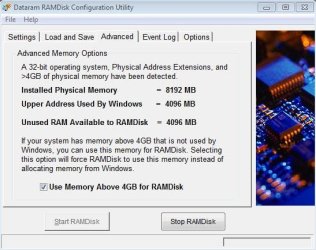
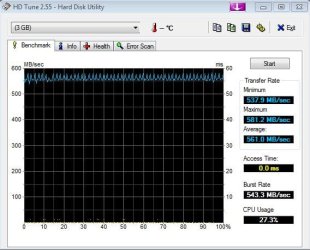
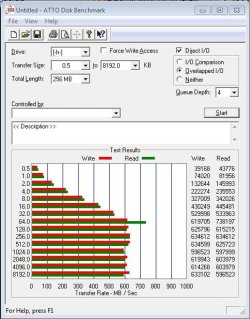
So what to do with that extra ram that Windows 32 bit can't use? For starters I create a ramdrive of around 3.6 gig using that unusable ram.

Besides setting Sandboxie's storage folder to the ramdrive I also copy/paste an nLited XP VM over there.

Want to see speed then give a go. (and up to you if you wanna)

Data Ram.JPG

hd.JPG

RD.JPG
 

My Computer My Computer

OS
7
ok, maybe you can take al look at my specs, and tell me what DDR3 ram i need?

i`m now going for 1866Mhz...


Somebody else already said it but 1333 will be your native speed. And 1600 will give you some room to increase your FSB speed. That's what I would go with and save some dollars.
 

My Computer My Computer

Computer Manufacturer/Model Number
Self-Built in July 2009
OS
Windows 7 Ultimate x64
CPU
Intel Q9550 2.83Ghz OC'd to 3.40Ghz
Motherboard
Gigabyte GA-EP45-UD3R rev. 1.1, F12 BIOS
Memory
8GB G.Skill PI DDR2-800, 4-4-4-12 timings
Graphics Card(s)
EVGA 1280MB Nvidia GeForce GTX570
Sound Card
Realtek ALC899A 8 channel onboard audio
Monitor(s) Displays
23" Acer x233H
Screen Resolution
1920x1080
Hard Drives
Intel X25-M 80GB Gen 2 SSD
Western Digital 1TB Caviar Black, 32MB cache. WD1001FALS
PSU
Corsair 620HX modular
Case
Antec P182
Cooling
stock
Keyboard
ABS M1 Mechanical
Mouse
Logitech G9 Laser Mouse
Internet Speed
15/2 cable modem
Other Info
Windows and Linux enthusiast. Logitech G35 Headset.
With a Core i7 triple-channel system, 6GB was the sweet spot for me. 3GB wasn't going to cut it and 12GB would only have meant that I spent another $200 for bragging rights.

I built my current system a year ago and at that same time built a nearly identical system for my housemate. Her MB has six memory slots and mine has only three. When I built them I wondered if I was going to regret not having a cheaper upgrade path should I want 12GB down the road, since it would cost less to add three more 2GB sticks (like she could with her board), than it would to yank my three sticks out and replace them with a trio of 4GB sticks. I shouldn't have worried since neither one of us has ever felt limited by the 6Gb we currently have.

...In the end it comes down to funds...
I think that's the key point.

If you are fabulously wealthy, why not go for it? If you need the extra RAM for a specific purpose, then the key word there is "need". If you don't have a specific need for outrageous amounts of RAM and don't have outrageous amounts of money, spending your dough elsewhere makes more sense.
 

My Computer My Computer

Computer Manufacturer/Model Number
Self
OS
Main - Windows 7 Pro SP1 64-Bit; 2nd - Windows Server 2008 R2
CPU
Main - Core i7 2600K; 2nd - Core i7 920
Motherboard
Main - Asus P8Z68-V Pro/Gen3; 2nd - Gigabyte GA-EX58-UDR3
Memory
Main - 16GB Corsair Vengeance; 2nd - 12GB Corsair Vengeance
Graphics Card(s)
Main - XFX Radeon 6870 1GB; 2nd - XFX Radeon 4870 1GB
Sound Card
Both: Onboard Realtek Azalia
Monitor(s) Displays
Main - Hann 25" + I-INC 25" + Acer 23"; 2nd - Upgrading Soon
Screen Resolution
Main - 1920x1080 (All Three Monitors); 2nd - Upgrading Soon
Hard Drives
Main - (1) Crucial M4 128GB (Boot)
Main - (1) Seagate 2TB 64MB Cache (Data)
Main - (1) Seagate 2TB 64MB Cache (Data Backup)
2nd - (1) Intel X25-M SSD 80GB (Boot)
2nd - (3) Seagate 1TB 32MB Cache (Data Backup)
2nd - (1) Seagate 320GB (Because)
PSU
Main - OCZ 600W Modular; 2nd - OCZ 600W
Case
Main - Thermaltake Element G; 2nd - NZXT something or other
Cooling
Main - Corsair H80; 2nd - Prolimatech Megahalems
Keyboard
Main - Razer Reclusa; 2nd - Old MS Keyboard
Mouse
Main - Logitech MX Revolution; 2nd - Old MS Mouse
Internet Speed
20Mbps Time-Warner Cable
If you are fabulously wealthy, why not go for it? If you need the extra RAM for a specific purpose, then the key word there is "need". If you don't have a specific need for outrageous amounts of RAM and don't have outrageous amounts of money, spending your dough elsewhere makes more sense.
Even if you are wealthy, if you really don't need it...why not keep your extra funds for something that you do have a need for?
 

My Computer My Computer

Computer Manufacturer/Model Number
Self-Built in July 2009
OS
Windows 7 Ultimate x64
CPU
Intel Q9550 2.83Ghz OC'd to 3.40Ghz
Motherboard
Gigabyte GA-EP45-UD3R rev. 1.1, F12 BIOS
Memory
8GB G.Skill PI DDR2-800, 4-4-4-12 timings
Graphics Card(s)
EVGA 1280MB Nvidia GeForce GTX570
Sound Card
Realtek ALC899A 8 channel onboard audio
Monitor(s) Displays
23" Acer x233H
Screen Resolution
1920x1080
Hard Drives
Intel X25-M 80GB Gen 2 SSD
Western Digital 1TB Caviar Black, 32MB cache. WD1001FALS
PSU
Corsair 620HX modular
Case
Antec P182
Cooling
stock
Keyboard
ABS M1 Mechanical
Mouse
Logitech G9 Laser Mouse
Internet Speed
15/2 cable modem
Other Info
Windows and Linux enthusiast. Logitech G35 Headset.
If you are fabulously wealthy, why not go for it? If you need the extra RAM for a specific purpose, then the key word there is "need". If you don't have a specific need for outrageous amounts of RAM and don't have outrageous amounts of money, spending your dough elsewhere makes more sense.
Even if you are wealthy, if you really don't need it...why not keep your extra funds for something that you do have a need for?
I do not think you understand the meaning of "fabulously wealthy". :sarc:

Do you think Bill Gates is sitting around peeing his pants worrying about the extra couple hundred bucks he dropped on RAM? :(
 

My Computer My Computer

Computer Manufacturer/Model Number
Self
OS
Main - Windows 7 Pro SP1 64-Bit; 2nd - Windows Server 2008 R2
CPU
Main - Core i7 2600K; 2nd - Core i7 920
Motherboard
Main - Asus P8Z68-V Pro/Gen3; 2nd - Gigabyte GA-EX58-UDR3
Memory
Main - 16GB Corsair Vengeance; 2nd - 12GB Corsair Vengeance
Graphics Card(s)
Main - XFX Radeon 6870 1GB; 2nd - XFX Radeon 4870 1GB
Sound Card
Both: Onboard Realtek Azalia
Monitor(s) Displays
Main - Hann 25" + I-INC 25" + Acer 23"; 2nd - Upgrading Soon
Screen Resolution
Main - 1920x1080 (All Three Monitors); 2nd - Upgrading Soon
Hard Drives
Main - (1) Crucial M4 128GB (Boot)
Main - (1) Seagate 2TB 64MB Cache (Data)
Main - (1) Seagate 2TB 64MB Cache (Data Backup)
2nd - (1) Intel X25-M SSD 80GB (Boot)
2nd - (3) Seagate 1TB 32MB Cache (Data Backup)
2nd - (1) Seagate 320GB (Because)
PSU
Main - OCZ 600W Modular; 2nd - OCZ 600W
Case
Main - Thermaltake Element G; 2nd - NZXT something or other
Cooling
Main - Corsair H80; 2nd - Prolimatech Megahalems
Keyboard
Main - Razer Reclusa; 2nd - Old MS Keyboard
Mouse
Main - Logitech MX Revolution; 2nd - Old MS Mouse
Internet Speed
20Mbps Time-Warner Cable
I do not think you understand the meaning of "fabulously wealthy". :sarc:

Do you think Bill Gates is sitting around peeing his pants worrying about the extra couple hundred bucks he dropped on RAM? :(

No, but why not put that few hundred bucks into racing fuel for your european sports car and then take it out to the local drive and wind it out. Even when fabulously wealthy if you don't need X amount of RAM...it doesn't make great sense to simply buy it.
 

My Computer My Computer

Computer Manufacturer/Model Number
Self-Built in July 2009
OS
Windows 7 Ultimate x64
CPU
Intel Q9550 2.83Ghz OC'd to 3.40Ghz
Motherboard
Gigabyte GA-EP45-UD3R rev. 1.1, F12 BIOS
Memory
8GB G.Skill PI DDR2-800, 4-4-4-12 timings
Graphics Card(s)
EVGA 1280MB Nvidia GeForce GTX570
Sound Card
Realtek ALC899A 8 channel onboard audio
Monitor(s) Displays
23" Acer x233H
Screen Resolution
1920x1080
Hard Drives
Intel X25-M 80GB Gen 2 SSD
Western Digital 1TB Caviar Black, 32MB cache. WD1001FALS
PSU
Corsair 620HX modular
Case
Antec P182
Cooling
stock
Keyboard
ABS M1 Mechanical
Mouse
Logitech G9 Laser Mouse
Internet Speed
15/2 cable modem
Other Info
Windows and Linux enthusiast. Logitech G35 Headset.
With that said, I created this thread as not to hijack the "Show Us Your Rig" thread and would like to keep this thread on the topic of whether we need more than 6gig of RAM.

Thanks.
In that spirit, I do believe it is nice to have more than 4 GB. My board is dual channel, so I usually run with 8 GB. There is no "real" benefit from using more than 4 GB for me, as almost nothing I run uses that much, but I find that my system is a little snappier with 8 GB because of Win 7's prefetching feature.

If you can easily afford more than 6 GB, then by all means do it, but it should be the last system component that you buy. Get all of the nice important goodies first, then add those extra GB of RAM.
 

My Computer My Computer

Computer type
PC/Desktop
Computer Manufacturer/Model Number
Mellon Labs (custom build)
OS
Win 7 Pro x64/Win 10 Pro x64 dual boot
CPU
AMD FX 8350 Vishera @ 4200
Motherboard
ASUS M5A97 R2.0
Memory
16 GB Mushkin Blackline DDR3-2400 @ 1866 (9-10-10-10-31)
Graphics Card(s)
XFX Radeon R9 280 Double D Black Edition
Sound Card
Realtek HD Audio on MB. Sounds great.
Monitor(s) Displays
Acer 24", Acer 22"
Screen Resolution
3840 x 1080
Hard Drives
1 x Mushkin Chronos 120 GB SSD (Win 10)
1 x Samsung 850 EVO 250 GB SSD (Win 7)
1 x WD 1TB SATA Blue
1 x WD 1TB SATA Green
PSU
Corsair TX-750
Case
CoolerMaster HAF 912+
Cooling
Coolermaster Seidon 240M Liquid AIO. 6 case fans
Keyboard
Logitech G710+
Mouse
Logitech G500s
Internet Speed
Much better since I got fiber, but still way overpriced.
Antivirus
MSE, Malware Bytes for scanning
Browser
Firefox
Other Info
Corsair VOID USB headphones.

A Mellon Labs X-1 - LCD Smartie driven system status display.

Brought to you by the letter E
i got 4 gigs,and its more than enough 4 me...
 

My Computer My Computer

OS
Windows 7
... Even when fabulously wealthy if you don't need X amount of RAM...it doesn't make great sense to simply buy it.
I was right. You do not understand what it means to be fabulously wealthy. Or even moderately rich. :rolleyes:

People spend what 12GB of RAM costs on a lousy wallet:

Burberry Wallets & Small Leather Goods

Let me put it another way. Some people have lots of dough and never part with a penny. They live on macaroni and cheese and die with millions of dollars in the bank. Some people are really into spending money and always get the best, even if they don't need it.

Since this is a tech forum and there are lots of serious computer enthusiasts here, I would be willing to bet that if we had the money a lot of us would build a far better rig than we need. I would also bet that a lot of us have already spent the money for a rig which greatly exceeds our needs. If some rich old geek died and left us all ten million bucks a lot of us would probably get something like this:

Dream Machine 2010 | Maximum PC

The original point I made was that if you have the money, why not go for it. I remember going down to the store and buying four 16MB sticks of RAM in the day when 8MB was standard and 16MB was considered great. It cost me $400. 4GB seems enough for most people these days, but the next "big deal" game or app may require much more.

Finally, try as I might, I can't see Bill Gates looking over his checkbook balance and saying to himself "Well, it's either the RAM or the racing fuel. Decisions, decisions..."
 

My Computer My Computer

Computer Manufacturer/Model Number
Self
OS
Main - Windows 7 Pro SP1 64-Bit; 2nd - Windows Server 2008 R2
CPU
Main - Core i7 2600K; 2nd - Core i7 920
Motherboard
Main - Asus P8Z68-V Pro/Gen3; 2nd - Gigabyte GA-EX58-UDR3
Memory
Main - 16GB Corsair Vengeance; 2nd - 12GB Corsair Vengeance
Graphics Card(s)
Main - XFX Radeon 6870 1GB; 2nd - XFX Radeon 4870 1GB
Sound Card
Both: Onboard Realtek Azalia
Monitor(s) Displays
Main - Hann 25" + I-INC 25" + Acer 23"; 2nd - Upgrading Soon
Screen Resolution
Main - 1920x1080 (All Three Monitors); 2nd - Upgrading Soon
Hard Drives
Main - (1) Crucial M4 128GB (Boot)
Main - (1) Seagate 2TB 64MB Cache (Data)
Main - (1) Seagate 2TB 64MB Cache (Data Backup)
2nd - (1) Intel X25-M SSD 80GB (Boot)
2nd - (3) Seagate 1TB 32MB Cache (Data Backup)
2nd - (1) Seagate 320GB (Because)
PSU
Main - OCZ 600W Modular; 2nd - OCZ 600W
Case
Main - Thermaltake Element G; 2nd - NZXT something or other
Cooling
Main - Corsair H80; 2nd - Prolimatech Megahalems
Keyboard
Main - Razer Reclusa; 2nd - Old MS Keyboard
Mouse
Main - Logitech MX Revolution; 2nd - Old MS Mouse
Internet Speed
20Mbps Time-Warner Cable
... Even when fabulously wealthy if you don't need X amount of RAM...it doesn't make great sense to simply buy it.
I was right. You do not understand what it means to be fabulously wealthy. Or even moderately rich. :rolleyes:
That's right as neither of those terms describe me today....nor are they likely to ever be accurate in the future.
 

My Computer My Computer

Computer Manufacturer/Model Number
Self-Built in July 2009
OS
Windows 7 Ultimate x64
CPU
Intel Q9550 2.83Ghz OC'd to 3.40Ghz
Motherboard
Gigabyte GA-EP45-UD3R rev. 1.1, F12 BIOS
Memory
8GB G.Skill PI DDR2-800, 4-4-4-12 timings
Graphics Card(s)
EVGA 1280MB Nvidia GeForce GTX570
Sound Card
Realtek ALC899A 8 channel onboard audio
Monitor(s) Displays
23" Acer x233H
Screen Resolution
1920x1080
Hard Drives
Intel X25-M 80GB Gen 2 SSD
Western Digital 1TB Caviar Black, 32MB cache. WD1001FALS
PSU
Corsair 620HX modular
Case
Antec P182
Cooling
stock
Keyboard
ABS M1 Mechanical
Mouse
Logitech G9 Laser Mouse
Internet Speed
15/2 cable modem
Other Info
Windows and Linux enthusiast. Logitech G35 Headset.
Although RAM can be an important factor for certain applications, I think that the average user is still well served with 4GBs (even 3GBs for a 32bit OS). I have both (4GB for 64bit and 3GB for 32bit) and I hardly ever notice a page fault. That leads me to believe that there is enough RAM for what I am doing (which is bread and butter stuff). Even during heavy video editing which keeps all my 4 cores running at about 75%, there are no page faults.


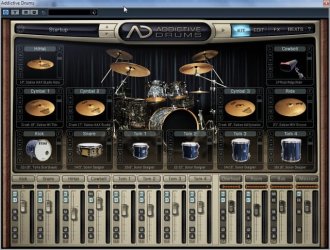
While the following concerns very few users it's an interesting side note as to how memory is being used in the music recording/sequencing world these days.

Over the past decade there's been a development called "virtual instruments", these range from software recreations of Classic synthesizers to full sampled orchestras and grand pianos. Multi-sampling takes each note of a grand piano and samples it played at different velocities, that's each note on a grand piano...each multi-sampled note averages 30 or 35MB, to get maximum real time response the whole instrument is loaded into RAM. Full orchestra sampled instruments can be loaded individually. I have one of the older sampled orchestra libraries and it's folder reads 14.2GB. I can load any part of the orchestra needed.

Anyway... If you have a 32-bit system with 12GB memory... each virtual instrument can load into it's own 3GB memory space, the instruments are played from the main recording program by virtual MIDI ports. The recording program, (Cubase, Sonar, Pro Tools...etc) resides along with the OS in the base 3GB memory.

Virtual instruments are being ported to 64-bit and and will soon be able to run within the recording program and not need the virtual MIDI ports.

In the near future 32GB memory will be standard on machines being used for studio use.

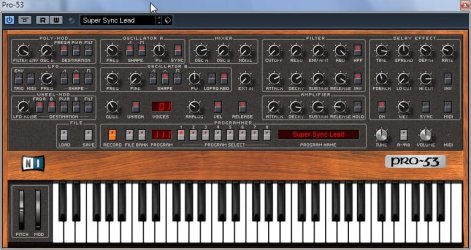
Here's some virtual instruments.

Native Instruments Classic recreation of the Prophet 5 synth.

Pro53.jpg


Addictive Drums, full studio set with adjustable mics, 24-bit samples.

AddictiveDrums.jpg


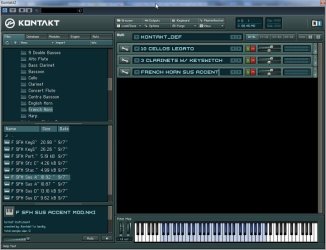
Native Instruments Kontakt, a virtual instruments rack.
It has three instruments from the East-West Gold symphonic library loaded.

KontaktOrchestra.jpg


Ap
 

My Computer My Computer

Computer Manufacturer/Model Number
Assembled in my workshop
OS
Windows 7 Home Premium
CPU
Intel Core 2 Duo @ 3.00gHz
Motherboard
Gigabyte GA-P35-S3G
Memory
4 GB
Graphics Card(s)
ATI Radeon HD 2600 XT
Sound Card
RME 24/96 Card, Realtek Internal Audio PreSonus FireStudio
Monitor(s) Displays
Acer 1917 (x2)
Screen Resolution
1280 x 1024 on both monitors
Hard Drives
Three 250GB Seagate SATA Barracuda 7200rpm
PSU
Rosewill 500-watt
Case
Rosewill mid-tower
Cooling
Noctua NH-U9B (CPU), PwrSupply fan + single large case Fan
Keyboard
Macally w/2/USB ports.
Mouse
Trackman Wheel
Other Info
Event 20/20 bas studio monitors, Yamaha sub.
Rackmount Korg/Roland/Yamaha synthesizers,
Cubase MIDI/audio recording. Sony Soundforge audio/mastering software. CD Architect Mastering. RME & Presonus audio interfaces.
... Even when fabulously wealthy if you don't need X amount of RAM...it doesn't make great sense to simply buy it.
I was right. You do not understand what it means to be fabulously wealthy. Or even moderately rich. :rolleyes:
That's right as neither of those terms describe me today....nor are they likely to ever be accurate in the future.
Then we have something in common. :)
 

My Computer My Computer

Computer Manufacturer/Model Number
Self
OS
Main - Windows 7 Pro SP1 64-Bit; 2nd - Windows Server 2008 R2
CPU
Main - Core i7 2600K; 2nd - Core i7 920
Motherboard
Main - Asus P8Z68-V Pro/Gen3; 2nd - Gigabyte GA-EX58-UDR3
Memory
Main - 16GB Corsair Vengeance; 2nd - 12GB Corsair Vengeance
Graphics Card(s)
Main - XFX Radeon 6870 1GB; 2nd - XFX Radeon 4870 1GB
Sound Card
Both: Onboard Realtek Azalia
Monitor(s) Displays
Main - Hann 25" + I-INC 25" + Acer 23"; 2nd - Upgrading Soon
Screen Resolution
Main - 1920x1080 (All Three Monitors); 2nd - Upgrading Soon
Hard Drives
Main - (1) Crucial M4 128GB (Boot)
Main - (1) Seagate 2TB 64MB Cache (Data)
Main - (1) Seagate 2TB 64MB Cache (Data Backup)
2nd - (1) Intel X25-M SSD 80GB (Boot)
2nd - (3) Seagate 1TB 32MB Cache (Data Backup)
2nd - (1) Seagate 320GB (Because)
PSU
Main - OCZ 600W Modular; 2nd - OCZ 600W
Case
Main - Thermaltake Element G; 2nd - NZXT something or other
Cooling
Main - Corsair H80; 2nd - Prolimatech Megahalems
Keyboard
Main - Razer Reclusa; 2nd - Old MS Keyboard
Mouse
Main - Logitech MX Revolution; 2nd - Old MS Mouse
Internet Speed
20Mbps Time-Warner Cable
Although RAM can be an important factor for certain applications, I think that the average user is still well served with 4GBs (even 3GBs for a 32bit OS). I have both (4GB for 64bit and 3GB for 32bit) and I hardly ever notice a page fault. That leads me to believe that there is enough RAM for what I am doing (which is bread and butter stuff). Even during heavy video editing which keeps all my 4 cores running at about 75%, there are no page faults.


While the following concerns very few users it's an interesting side note as to how memory is being used in the music recording/sequencing world these days.

Over the past decade there's been a development called "virtual instruments", these range from software recreations of Classic synthesizers to full sampled orchestras and grand pianos. Multi-sampling takes each note of a grand piano and samples it played at different velocities, that's each note on a grand piano...each multi-sampled note averages 30 or 35MB, to get maximum real time response the whole instrument is loaded into RAM. Full orchestra sampled instruments can be loaded individually. I have one of the older sampled orchestra libraries and it's folder reads 14.2GB. I can load any part of the orchestra needed.

Anyway... If you have a 32-bit system with 12GB memory... each virtual instrument can load into it's own 3GB memory space, the instruments are played from the main recording program by virtual MIDI ports. The recording program, (Cubase, Sonar, Pro Tools...etc) resides along with the OS in the base 3GB memory.

Virtual instruments are being ported to 64-bit and and will soon be able to run within the recording program and not need the virtual MIDI ports.

In the near future 32GB memory will be standard on machines being used for studio use.

Here's some virtual instruments.

Native Instruments Classic recreation of the Prophet 5 synth.

View attachment 91200


Addictive Drums, full studio set with adjustable mics, 24-bit samples.

View attachment 91198


Native Instruments Kontakt, a virtual instruments rack.
It has three instruments from the East-West Gold symphonic library loaded.

View attachment 91199


Ap

finally someone that has the answer to my original questions (http://www.sevenforums.com/overclocking-case-mods/347-show-us-your-rig-189.html#post891559 and http://www.sevenforums.com/overclocking-case-mods/347-show-us-your-rig-191.html#post892959).

and yet everyone said that 12GB would be a waste of money:confused:...

i`m glad you replied, so now i know i`m not buying unnassecary RAM i (according to most here) dont need.

so i`m now definitely going for the 12GB, just like i originaly planned...

Thanx!:D
 
Last edited:

My Computer My Computer

Computer Manufacturer/Model Number
me, myself and i
OS
windows 7 Ultimate 64-bit
CPU
Intel Core I7 930 2.80 GHz
Motherboard
GigaByte GA-X58A-UD5
Memory
Corsair Dominator GT 12 GB, PC3-14900, 1866 MHz
Graphics Card(s)
Asus Radeon HD 5750 Formula 1024 MB
Sound Card
integrated
Monitor(s) Displays
samsung 82cm lcd 1080p
Screen Resolution
1920 x 1080
Hard Drives
1 x Crucial RealSSD C300 64 GB, S-ATA 600, 70 Mb's, 355 MB/s
1 x WD Caviar Black 1 TB, 7200 Rpm, 64 MB, Sata III/600
4 x WD Caviar Green 1 TB, 5400 Rpm, 64 MB, S-ATA II/300
PSU
Zalman ZM1000
Case
Thermaltake Element V
Cooling
Noctua NH-C12P SE14
Keyboard
Logitech G19
Mouse
Logitech MX Revolution
Internet Speed
Cable
Although RAM can be an important factor for certain applications, I think that the average user is still well served with 4GBs (even 3GBs for a 32bit OS). I have both (4GB for 64bit and 3GB for 32bit) and I hardly ever notice a page fault. That leads me to believe that there is enough RAM for what I am doing (which is bread and butter stuff). Even during heavy video editing which keeps all my 4 cores running at about 75%, there are no page faults.


While the following concerns very few users it's an interesting side note as to how memory is being used in the music recording/sequencing world these days.

Over the past decade there's been a development called "virtual instruments", these range from software recreations of Classic synthesizers to full sampled orchestras and grand pianos. Multi-sampling takes each note of a grand piano and samples it played at different velocities, that's each note on a grand piano...each multi-sampled note averages 30 or 35MB, to get maximum real time response the whole instrument is loaded into RAM. Full orchestra sampled instruments can be loaded individually. I have one of the older sampled orchestra libraries and it's folder reads 14.2GB. I can load any part of the orchestra needed.

Anyway... If you have a 32-bit system with 12GB memory... each virtual instrument can load into it's own 3GB memory space, the instruments are played from the main recording program by virtual MIDI ports. The recording program, (Cubase, Sonar, Pro Tools...etc) resides along with the OS in the base 3GB memory.

Virtual instruments are being ported to 64-bit and and will soon be able to run within the recording program and not need the virtual MIDI ports.

In the near future 32GB memory will be standard on machines being used for studio use.

Here's some virtual instruments.

Native Instruments Classic recreation of the Prophet 5 synth.

View attachment 91200


Addictive Drums, full studio set with adjustable mics, 24-bit samples.

View attachment 91198


Native Instruments Kontakt, a virtual instruments rack.
It has three instruments from the East-West Gold symphonic library loaded.

View attachment 91199


Ap

could you explain to me how i can put each VST in its own Ram module?

Thnx!
 

My Computer My Computer

Computer Manufacturer/Model Number
me, myself and i
OS
windows 7 Ultimate 64-bit
CPU
Intel Core I7 930 2.80 GHz
Motherboard
GigaByte GA-X58A-UD5
Memory
Corsair Dominator GT 12 GB, PC3-14900, 1866 MHz
Graphics Card(s)
Asus Radeon HD 5750 Formula 1024 MB
Sound Card
integrated
Monitor(s) Displays
samsung 82cm lcd 1080p
Screen Resolution
1920 x 1080
Hard Drives
1 x Crucial RealSSD C300 64 GB, S-ATA 600, 70 Mb's, 355 MB/s
1 x WD Caviar Black 1 TB, 7200 Rpm, 64 MB, Sata III/600
4 x WD Caviar Green 1 TB, 5400 Rpm, 64 MB, S-ATA II/300
PSU
Zalman ZM1000
Case
Thermaltake Element V
Cooling
Noctua NH-C12P SE14
Keyboard
Logitech G19
Mouse
Logitech MX Revolution
Internet Speed
Cable
[/QUOTE]the 12 GB Corsair Dominator GT (1866Mhz) still sounds great, but someone told me (i think it was Sygnus) that this speeds are not reached by the MoBO, and therefor not neccesary.[/QUOTE]

Your Core I7 930 uses the Intel Quickpath Interconnect at 4.8 GT/s which is Quad pumped and has a bandwidth of 19200 MB per second or 19.2 GB per second. It is listed under computer buses and QPI in the link below.

Even DDR3-1066 MHz triple channel RAM has a bandwidth of 25.6 GB per second so their is no benefit with going any higher.

All the bandwidths are listed here.

List of device bit rates - Wikipedia, the free encyclopedia
 

My Computer My Computer

OS
Windows 7 Home Premium 64 Bit
CPU
Intel I7 920
Motherboard
ASUS P6T
Memory
6 GB CORSAIR DOMINATOR DDR3-1333
Graphics Card(s)
Nvidia GT 9800
Sound Card
Prodigy 7.1
Monitor(s) Displays
Vizio 25.5 inch 1920 X 1200 FULL HIGH DEFINITION
Screen Resolution
1920 X 1200
Hard Drives
OCZ 100 GB VERTEX SSD and 1 TERABYTE SEAGATE BARRACUDA
PSU
580 Watt
Case
Coolermaster
Cooling
Coolermaster V8 and 3 120 mm case fans.
Keyboard
LogiTech G11
Mouse
Microsoft Track Ball
Internet Speed
15 Megabits/s down - 2 Megabits/s up
the 12 GB Corsair Dominator GT (1866Mhz) still sounds great, but someone told me (i think it was Sygnus) that this speeds are not reached by the MoBO, and therefor not neccesary.[/QUOTE]

Your Core I7 930 uses the Intel Quickpath Interconnect at 4.8 GT/s which is Quad pumped and has a bandwidth of 19200 MB per second or 19.2 GB per second. It is listed under computer buses and QPI in the link below.

Even DDR3-1066 MHz triple channel RAM has a bandwidth of 25.6 GB per second so their is no benefit with going any higher.

All the bandwidths are listed here.

List of device bit rates - Wikipedia, the free encyclopedia[/QUOTE]


i`m now going for 12GB of 1600Mhz, with a 7 cache.

this should be sufficient...
 

My Computer My Computer

Computer Manufacturer/Model Number
me, myself and i
OS
windows 7 Ultimate 64-bit
CPU
Intel Core I7 930 2.80 GHz
Motherboard
GigaByte GA-X58A-UD5
Memory
Corsair Dominator GT 12 GB, PC3-14900, 1866 MHz
Graphics Card(s)
Asus Radeon HD 5750 Formula 1024 MB
Sound Card
integrated
Monitor(s) Displays
samsung 82cm lcd 1080p
Screen Resolution
1920 x 1080
Hard Drives
1 x Crucial RealSSD C300 64 GB, S-ATA 600, 70 Mb's, 355 MB/s
1 x WD Caviar Black 1 TB, 7200 Rpm, 64 MB, Sata III/600
4 x WD Caviar Green 1 TB, 5400 Rpm, 64 MB, S-ATA II/300
PSU
Zalman ZM1000
Case
Thermaltake Element V
Cooling
Noctua NH-C12P SE14
Keyboard
Logitech G19
Mouse
Logitech MX Revolution
Internet Speed
Cable
Back
Top