Stereo Mix Enabled, but no sound?

michaelqt

New member
Local time
3:56 PM
Messages
7
Okay, I tried everything from enabling mobo sound from bios, updating drivers, reinstalling drivers, and enable stereo mix from sound control panel. Whatever I do, I can't seem to get my stereo mix to work, it's there and enabled. It also says that the device is working properly, but when I play a song or any sound that I hear from my speakers/headphones from the "playback" tab.. it does not relay to the stereo mix from the "recording" tab. So the stereo mix isn't catching "what i hear", but IT IS enabled. Does anyone have a clue why this would happen? or any suggestions to fixing this problem?

I am running on a HP Pavilion P6510f
AMD Athlon II X4 630 2.80Ghz
Windows 7 Home Premium (64 bit OS)
Realtek High Definition Audio

Any help will be much appreciated.
 

My Computer My Computer

OS
windows 7
Is it set as the Default Recording Device?


Ap
 

My Computer My Computer

Computer Manufacturer/Model Number
Assembled in my workshop
OS
Windows 7 Home Premium
CPU
Intel Core 2 Duo @ 3.00gHz
Motherboard
Gigabyte GA-P35-S3G
Memory
4 GB
Graphics Card(s)
ATI Radeon HD 2600 XT
Sound Card
RME 24/96 Card, Realtek Internal Audio PreSonus FireStudio
Monitor(s) Displays
Acer 1917 (x2)
Screen Resolution
1280 x 1024 on both monitors
Hard Drives
Three 250GB Seagate SATA Barracuda 7200rpm
PSU
Rosewill 500-watt
Case
Rosewill mid-tower
Cooling
Noctua NH-U9B (CPU), PwrSupply fan + single large case Fan
Keyboard
Macally w/2/USB ports.
Mouse
Trackman Wheel
Other Info
Event 20/20 bas studio monitors, Yamaha sub.
Rackmount Korg/Roland/Yamaha synthesizers,
Cubase MIDI/audio recording. Sony Soundforge audio/mastering software. CD Architect Mastering. RME & Presonus audio interfaces.
yes its set as default recording device. but the volume bar doesnt move at all, it's not picking up anything from my speakers.
 

My Computer My Computer

OS
windows 7
yes its set as default recording device. but the volume bar doesnt move at all, it's not picking up anything from my speakers.

"I can't seem to get my stereo mix to work, it's there and enabled."

Just so we're clear, enabled is not the same as Default (green check mark)

Onward-

Have you set the recording level?
Select Stereo Mix (single left click) then the "Properties" button in the lower right.

There should be a "Levels" tab. I have mine set at about 12.

Also

Listen to this Device should be disabled
Advance Tab should be 2 channel 16-bit 44.1kHz.

Ap
 

My Computer My Computer

Computer Manufacturer/Model Number
Assembled in my workshop
OS
Windows 7 Home Premium
CPU
Intel Core 2 Duo @ 3.00gHz
Motherboard
Gigabyte GA-P35-S3G
Memory
4 GB
Graphics Card(s)
ATI Radeon HD 2600 XT
Sound Card
RME 24/96 Card, Realtek Internal Audio PreSonus FireStudio
Monitor(s) Displays
Acer 1917 (x2)
Screen Resolution
1280 x 1024 on both monitors
Hard Drives
Three 250GB Seagate SATA Barracuda 7200rpm
PSU
Rosewill 500-watt
Case
Rosewill mid-tower
Cooling
Noctua NH-U9B (CPU), PwrSupply fan + single large case Fan
Keyboard
Macally w/2/USB ports.
Mouse
Trackman Wheel
Other Info
Event 20/20 bas studio monitors, Yamaha sub.
Rackmount Korg/Roland/Yamaha synthesizers,
Cubase MIDI/audio recording. Sony Soundforge audio/mastering software. CD Architect Mastering. RME & Presonus audio interfaces.
Everything is set the way you said. My volume is actually at 100 in the Levels tab.
 

My Computer My Computer

OS
windows 7
Everything is set the way you said. My volume is actually at 100 in the Levels tab.


Could you post a picture of your output and input devices?

If you select Speaker then Properties (playback devices) there should be another levels tab, have you tried experimenting with these.

You're getting output through your speakers... correct?

Ap
 

My Computer My Computer

Computer Manufacturer/Model Number
Assembled in my workshop
OS
Windows 7 Home Premium
CPU
Intel Core 2 Duo @ 3.00gHz
Motherboard
Gigabyte GA-P35-S3G
Memory
4 GB
Graphics Card(s)
ATI Radeon HD 2600 XT
Sound Card
RME 24/96 Card, Realtek Internal Audio PreSonus FireStudio
Monitor(s) Displays
Acer 1917 (x2)
Screen Resolution
1280 x 1024 on both monitors
Hard Drives
Three 250GB Seagate SATA Barracuda 7200rpm
PSU
Rosewill 500-watt
Case
Rosewill mid-tower
Cooling
Noctua NH-U9B (CPU), PwrSupply fan + single large case Fan
Keyboard
Macally w/2/USB ports.
Mouse
Trackman Wheel
Other Info
Event 20/20 bas studio monitors, Yamaha sub.
Rackmount Korg/Roland/Yamaha synthesizers,
Cubase MIDI/audio recording. Sony Soundforge audio/mastering software. CD Architect Mastering. RME & Presonus audio interfaces.
Here are the screens, let me know if you need any other screens.

And I am getting output from my headphones not speakers.


Michael... whaty a mystery.

Two things to try, with the "Stereo Mix" you don't need to disable enhancements.
(The DC Offset) so uncheck that and reboot.


Also, do you have a set of speakers? If not, do you have an old set of headphones (or turn the master volume way down) you can plug into the light green speaker jack in the back of the computer. Then make the speakers the default output device. Be sure and unplug the headphones now in use.

Just want to see if making the speaker the default playback device gets Stereo Mix working.


Ap
 

My Computer My Computer

Computer Manufacturer/Model Number
Assembled in my workshop
OS
Windows 7 Home Premium
CPU
Intel Core 2 Duo @ 3.00gHz
Motherboard
Gigabyte GA-P35-S3G
Memory
4 GB
Graphics Card(s)
ATI Radeon HD 2600 XT
Sound Card
RME 24/96 Card, Realtek Internal Audio PreSonus FireStudio
Monitor(s) Displays
Acer 1917 (x2)
Screen Resolution
1280 x 1024 on both monitors
Hard Drives
Three 250GB Seagate SATA Barracuda 7200rpm
PSU
Rosewill 500-watt
Case
Rosewill mid-tower
Cooling
Noctua NH-U9B (CPU), PwrSupply fan + single large case Fan
Keyboard
Macally w/2/USB ports.
Mouse
Trackman Wheel
Other Info
Event 20/20 bas studio monitors, Yamaha sub.
Rackmount Korg/Roland/Yamaha synthesizers,
Cubase MIDI/audio recording. Sony Soundforge audio/mastering software. CD Architect Mastering. RME & Presonus audio interfaces.
well it seems like that worked! switching to speakers instead of headphones, the stereo mix picks up from the green speaker jack behind the tower. Is there a way to make it work on the front headphone jack?
 

My Computer My Computer

OS
windows 7
well it seems like that worked! switching to speakers instead of headphones, the stereo mix picks up from the green speaker jack behind the tower. Is there a way to make it work on the front headphone jack?

Doubtful, I think the headphone output incorporates a mechanical switch and it probably shunts the audio out before Stereo Mix picks up from the speaker output.

One long shot you can try:

With your phones plugged into the front, go to Stereo Mix, select it, then open the properties button, selct the "Listen" tab. Go to the Drop down "Playback Through This Device" and see if your Headphones show up as a selection.

If so select them, select "Apply" and exit, now see if Stereo Mix is picking up anything. I don't think this will work as it's not the base function of the "Listen" section.

Ap
 

My Computer My Computer

Computer Manufacturer/Model Number
Assembled in my workshop
OS
Windows 7 Home Premium
CPU
Intel Core 2 Duo @ 3.00gHz
Motherboard
Gigabyte GA-P35-S3G
Memory
4 GB
Graphics Card(s)
ATI Radeon HD 2600 XT
Sound Card
RME 24/96 Card, Realtek Internal Audio PreSonus FireStudio
Monitor(s) Displays
Acer 1917 (x2)
Screen Resolution
1280 x 1024 on both monitors
Hard Drives
Three 250GB Seagate SATA Barracuda 7200rpm
PSU
Rosewill 500-watt
Case
Rosewill mid-tower
Cooling
Noctua NH-U9B (CPU), PwrSupply fan + single large case Fan
Keyboard
Macally w/2/USB ports.
Mouse
Trackman Wheel
Other Info
Event 20/20 bas studio monitors, Yamaha sub.
Rackmount Korg/Roland/Yamaha synthesizers,
Cubase MIDI/audio recording. Sony Soundforge audio/mastering software. CD Architect Mastering. RME & Presonus audio interfaces.
it does show up, i actually tried that way before but nothing picks up. All good though, I just need an extension wire and I am set. Thanks alot!
 

My Computer My Computer

OS
windows 7
I have same problem with this, but im on speakers... (it is a laptop so i dont think i can change speakers..)
 

My Computer My Computer

OS
windows 7 home premium
michaelqt can you please post screenshots of the working system now ?
I have exactly the same problem ...
 

My Computer My Computer

OS
Windows 7 64bit
i have the same problem i need help my speakers worked fine , but after 10 mins didnt't (before few days when i had ultimate)
 

My Computer My Computer

Computer Manufacturer/Model Number
Enclosure Type: Desktop
OS
Windows 7 Ultimate x32
Memory
1408 Megabytes
Graphics Card(s)
NVIDIA GeForce 6100 nForce 405
Sound Card
Realtek High Definition Audio
Monitor(s) Displays
NVIDIA GeForce 6100 nForce 405
Screen Resolution
1152 x 864
Hard Drives
164,69 Gigabytes Usable Hard Drive Capacity
126,82 Gigabytes Hard Drive Free Space

HL-DT-ST DVDRAM GSA-4167B ATA Device [Optical drive]
3.5" format removeable media [Floppy drive]

HDT722516DLAT80 ATA Device [Hard drive] (164,69 GB) -- drive 0
Internet Speed
100.0 mbps
Other Info
Standard PS/2 Keyboard
Microsoft PS/2 Mouse
USB Root Hub (2x)
Generic volume shadow copy
Old thread, but I have lots of experience messing with Stereo Mix and wanted to share.

Basically Stereo Mix will pick up your default output device, and you will be able to output it to a device of your choosing using "Listen to". This requires having speakers plugged in, whether it be headphones, a TV, or the speakers on the computer's sound card. As soon as you have two connected Stereo Mix should kick in, as long as it is enabled of course (show disabled devices). If you only had one sound source and recently plugged in another, your apps may not switch over to being able to output on that device. You can remedy this by running Services (Run prompt, or control panel administrative tools) and restarting the Windows Audio Service.

Now, the problem that brought me to this thread is the same as everybody else's. I have a computer with only a Speaker output, and I think the reason Stereo Mix isn't picking up is because I don't have a second output device.
 

My Computer My Computer

OS
Windows 7, Mac OSX
I am having the same problem with my sound card. Its enabled on recording and says its working properly but the bars do not move nor can anyone else hear my music. My speakers do not show up in the playback either. I have checked for them and can't get the speaker icon to come up. It was working fine before i moved and set it back up. I use windows 7 on emachine. I also use Bose speaker system. Nothing is different before the move other than the speakers not showing up. Any suggestions?
 

My Computer My Computer

OS
windows 7
I had much the same problem as the original poster. Its now solved at last -- and it had nothing to do with bad drivers...

My screenshots are in German, but the layout is the same as for the English dialogs, so that should be no problem.

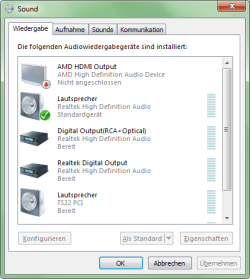
In my case, there's a TS22 PCI sound card plugged into my computer, and there is a physical cable connecting it to the amplifier/loudspeakers/headphones I actually hear. This is the Playback/Lautsprecher (TS22 PCI) device. So there are two Loudspeaker devices in the Sound/Playback tab.

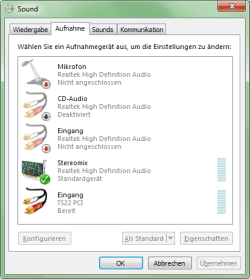
Recording/Stereomix (Realtek) gets its input from Playback/Lautsprecher (Realtek), but only if that device is set to be the standard device in in the Playback tab.

My biggest problem was that I couldn't set Playback/Lautsprecher (Realtek) to be the standard device, because it was "not connected". To solve this, I plugged an old set of earphones into the green audio plug on the back of my computer (as suggested in one of the posts above).

Okay, so now I've set both Playback/Lautsprecher (Realtek) and Recording/Stereomix to be the standard devices. (And Stereomix is getting input.)

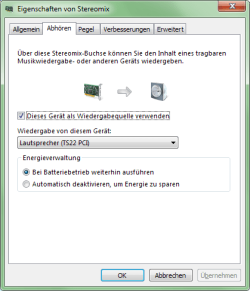
The next problem is that I'm not hearing anything. To solve that, I set Stereomix to echo its input to Lautsprecher (TS22 PCI).

I record, using Audacity, with its audio output set to Lautsprecher (TS22 PCI), and input set to Stereomix (Realtek), but I can hear the TS22 PCI loudpeakers even if Audacity is not running.

If I plug a microphone into the pink audio input on the back of my computer (next to the green plug with the unused headphones), its input is sent to Stereomix, overriding Playback/Lautsprecher (Realtek).
[Edit] Careful, there's a danger of feedback!! Don't plug a microphone in if it is going to hear the TS22 PCI loudspeakers! That means turn the loudspeakers off (at the amplifier) before pluging a microphone into the computer. The microphone's input (=Stereomix) can still be heard on headphones plugged into the amplifier.[/Edit]

Easy, if you know how!

All the best.

 

Attachments

  • Playback.png
    Playback.png
    15.7 KB · Views: 14
  • Recording.png
    Recording.png
    15.1 KB · Views: 15
  • Stereomix properties.png
    Stereomix properties.png
    12.7 KB · Views: 15
Last edited:

My Computer My Computer

Computer type
PC/Desktop
Computer Manufacturer/Model Number
Silentmaxx
OS
Windows 7 Professional 64bit
CPU
Intel(R) Core(TM) i7 CPU 920 @ 2.67GHz
Motherboard
ASUS PT6 SE
Memory
6 GB
Further to the above posting:
This thread also brought up the question of why the audio plugs on the front of the computer were not working.

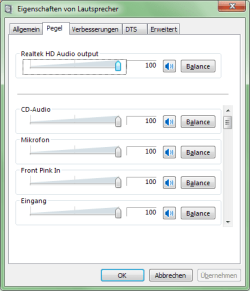
I've just discovered that the Realtek Loudspeaker properties dialog has a "Levels" tab (called "Pegel" in German), in which the levels of all the inputs and outputs associated with the Realtek Loudspeaker device can be set. Just scroll down the list in the Levels tab.

I've now set all of mine to 100% (they weren't before), and a microphone plugged into the front of the computer now works in the same way as one plugged into the back. :)

Here are screeshots of my Realtek Loudspeaker's General and Levels tabs:
 

Attachments

  • Realtek Lautsprecher General Tab.png
    Realtek Lautsprecher General Tab.png
    13.1 KB · Views: 14
  • Realtek Lautsprecher Levels Tab.png
    Realtek Lautsprecher Levels Tab.png
    10.8 KB · Views: 14

My Computer My Computer

Computer type
PC/Desktop
Computer Manufacturer/Model Number
Silentmaxx
OS
Windows 7 Professional 64bit
CPU
Intel(R) Core(TM) i7 CPU 920 @ 2.67GHz
Motherboard
ASUS PT6 SE
Memory
6 GB
Hello,

I am having the exact same problems as outlined in this issue. For the last eight hours I've been trying to diagnose why what has worked with other people hasn't resolved my problem. I have downloaded the Vista version of the drivers and that didn't resolve this problem, I have downloaded HP's current version of the Realtek driver, no luck and now as of this writing I am running the latest device drivers downloaded from Realtek and again no luck.

If someone needs copy of screen prints please let me know - I'd really like to get this resolved.

Thanks in advance for your time & assistance.
 

My Computer My Computer

Computer type
PC/Desktop
Computer Manufacturer/Model Number
HP Pavillion P6330F
OS
Microsoft Windows 7 Home Premium 64-bit
CPU
Intel(R) Core(TM) i3 CPU 530 @ 2.93GHz
Motherboard
MSI
Memory
6.0 GB
Graphics Card(s)
Intel(R) HD Graphics (Core i3)
Sound Card
Realtek High Definition Audio
Hard Drives
WDC WD10EADS-65M2B1
Antivirus
Norton 360 Premier Edition
Browser
Google Chrome 35.0.1916.153 m
Back
Top