
[Help] Two intel express chipsets show up in device manager.

Ree7

New member
Local time
6:25 PM
Messages
7
My laptop is a Vaio VGN-SZ38GP/C.
It was loaded with XP when I bought it, but has been clean installed with Windows 7 without any problems for the past year. I used a graphic driver with a modified inf to install the video card driver (the laptop came with nVidia Geforce Go 7400). All was fine.

Now here's the problem.
Two days ago, when I turned on the laptop, the display went small (it doesn't cover the entire screen). After it entered into Windows, a message pops up: 'new device has been detected', it was then installed etc. The new device turns out to be an Intel Express Chipset. After that, it required me to reboot the system. After the system was rebooted, all seems well, the display once again covered the entire screen.

However, I found out that the laptop is currently not utilizing the video card (it doesn't even shows up under device manager). There's not even a 'standard vga adapter' entry in it. None under display adapters. None under other devices. Couldn't find it.

And turns out the STAMINA-SPEED switch on my laptop isn't working (Vaio SZ has a STAMINA mode that preserves the battery by switching off the video card). I put the switch on SPEED, but the led indicator stays on STAMINA. Windows doesn't even seem to recognize any changes I made in switching between the modes back and forth.

Also, another weird thing right now is that the device manager shows that I have two Intel Express Chipsets when I turned on the 'show hidden devices' option. Both with identical hardware IDs.
PCI\VEN_8086&DEV_27A2&SUBSYS_81E6104D&REV_03

  • I've tried to do a system restore to no avail.
  • Updated the bios to no avail.
  • Look for ways to switch off the onboard video card via bios, but seems like there's no apparent setting for it. Its a Phoenix Technologies'.
  • Uninstalled both Intel Express Chipsets and then reboot. The laptop simply turns back to the small screen not covering the entire display.
  • Downloaded and installed another 189.79 nVidia driver with modded inf. It says no supported hardware has been detected, even after uninstalling both Intel Expres Chipset drivers.

I didn't make any changes in programs/softwares whatsoever before the problem occurred. Right now I am beginning to think that either a Windows Automatic Update has installed something or the video card has simply died.

Helps and suggestions are greatly appreciated.
 

Attachments
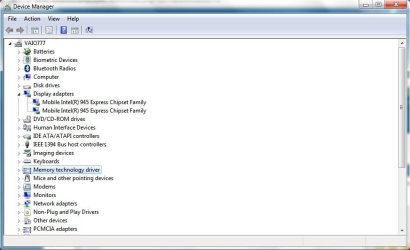
  • Two Intel Express Chipsets.jpg
    Two Intel Express Chipsets.jpg
    41.2 KB · Views: 152

My Computer My Computer

Computer Manufacturer/Model Number
Sony Vaio VGN-SZ38GP/C
OS
Windows 7 Ultimate
CPU
Intel Core 2 Duo T7200 @ 2GHz
Memory
3.0 GB
Graphics Card(s)
nVidia Geforce Go 7400
Hard Drives
Internal 120GB
Welcome to the Seven Forums!

Firstly, just so we can make sure it wasn't Windows Update, do you have Windows Update set to automatically install Recommended/Optional updates, or only Important updates?
 

My Computer My Computer

Computer Manufacturer/Model Number
Alienware X51
OS
Windows 7 Home Premium x64
CPU
Intel Core i7-2600 @3.40GHz
Memory
8.00GB DDR3
Graphics Card(s)
NVIDIA GeForce GTX 555 w/1.0GB RAM
Monitor(s) Displays
BenQ XL2420TX
Screen Resolution
1920x1080@120Hz
Hard Drives
1TB
PSU
330-watt
Keyboard
Logitech Wireless Illuminated Keyboard K800
Mouse
Razer Orochi
Internet Speed
Campus Internet

My Computer My Computer

Computer Manufacturer/Model Number
Dell and Custom
OS
Systems 1 and 2: Windows 7 Enterprise x64, Win 8 Developer
CPU
System 1: i7 [email protected], System 2: AMD FX-4100 Zambezi 3.6G
Motherboard
System 1:Dell 06NWYK System 2: ASUS M5A97 AM3+
Memory
System 1: 8GB System 2: 8GB
Graphics Card(s)
System 1: ATI FirePro V4800 System 2: Radeon HD 6850
Sound Card
System 1: onboard System 2: onboard
Monitor(s) Displays
System1: Viewsonic HDMI 24"
Screen Resolution
System 1: 1920x1080 System 2: 1920x1080
Hard Drives
System 1: Mirrored .5B drives System 2: Seagate Barracuda ST1000DM003 1TB 7200 RPM 64MB Cache SATA 6.0Gb/s
Case
System 1: Dell System 2: Cooler Master
Internet Speed
10 MBPS
Welcome to the Seven Forums!

Firstly, just so we can make sure it wasn't Windows Update, do you have Windows Update set to automatically install Recommended/Optional updates, or only Important updates?

I chose the option for windows updates not to download and install updates automatically. But almost everytime I installed every available important updates while leaving the optional updates untouched (currently I think the optional updates list is filled with language packs).


Thanks for the link! I'll try it out once I get home later tonight and let you know how it goes.
 

My Computer My Computer

Computer Manufacturer/Model Number
Sony Vaio VGN-SZ38GP/C
OS
Windows 7 Ultimate
CPU
Intel Core 2 Duo T7200 @ 2GHz
Memory
3.0 GB
Graphics Card(s)
nVidia Geforce Go 7400
Hard Drives
Internal 120GB
It sounds like you have two GPUs, integrated intel graphics and the NVIDIA graphics card, and something has happened to the NVIDIA GPU.

I found this and this which supports that theory.

Note the part about the hybrid graphics system.
 

My Computer My Computer

Computer type
Laptop
Computer Manufacturer/Model Number
Toshiba P775-S7100
OS
Windows 7 Professional SP1 64-bit
CPU
Intel Core i5-2450M @2.5 GHz
Memory
6 GB DDR3 1333MHz
Graphics Card(s)
Intel HD 3000
Monitor(s) Displays
Built-in 17.3" LED; 22" Insignia NS-L22Q-10A
Screen Resolution
1600x900; 1360x768
Hard Drives
750 GB Hitachi
1TB Seagate FreeAgent External
Internet Speed
Verizon DSL Speed(Down/Up): 3360 Kbps / 800 Kbps
Antivirus
MSE and MBAM Pro
Browser
IE10
It sounds like you have two GPUs, integrated intel graphics and the NVIDIA graphics card, and something has happened to the NVIDIA GPU.

I found this and this which supports that theory.

Note the part about the hybrid graphics system.

Yes you're correct. It has an integrated intel graphics plus an NVIDIA graphics card. But since that day, the NVIDIA cannot be detected. Instead, it showed up in device manager as two intel graphics with the same hardware IDs.

And as you can also see from the website, there's a switch with led that determines the GPU its using. I've always been using the SPEED mode, but somehow that day the STAMINA led lights up even though the switch was still on SPEED.
 

My Computer My Computer

Computer Manufacturer/Model Number
Sony Vaio VGN-SZ38GP/C
OS
Windows 7 Ultimate
CPU
Intel Core 2 Duo T7200 @ 2GHz
Memory
3.0 GB
Graphics Card(s)
nVidia Geforce Go 7400
Hard Drives
Internal 120GB
It sounds the NVIDIA GPU is burnt out. If this is the case, it will have to be replaced, or you will have to live with Intel graphics.

Is the laptop still under warranty?
 

My Computer My Computer

Computer type
Laptop
Computer Manufacturer/Model Number
Toshiba P775-S7100
OS
Windows 7 Professional SP1 64-bit
CPU
Intel Core i5-2450M @2.5 GHz
Memory
6 GB DDR3 1333MHz
Graphics Card(s)
Intel HD 3000
Monitor(s) Displays
Built-in 17.3" LED; 22" Insignia NS-L22Q-10A
Screen Resolution
1600x900; 1360x768
Hard Drives
750 GB Hitachi
1TB Seagate FreeAgent External
Internet Speed
Verizon DSL Speed(Down/Up): 3360 Kbps / 800 Kbps
Antivirus
MSE and MBAM Pro
Browser
IE10

The latest driver from the link you gave is the same version as the one that windows installed during device detection. Still, I gave it a shot by reinstalling it and the NVIDIA GPU still doesn't show up anywhere.

It sounds the NVIDIA GPU is burnt out. If this is the case, it will have to be replaced, or you will have to live with Intel graphics.

Is the laptop still under warranty?

That's the worst case I am afraid of. Its no longer under warranty either (+- 4 year-old laptop).

Any chance to upgrade such GPU to some newer ones?
 

My Computer My Computer

Computer Manufacturer/Model Number
Sony Vaio VGN-SZ38GP/C
OS
Windows 7 Ultimate
CPU
Intel Core 2 Duo T7200 @ 2GHz
Memory
3.0 GB
Graphics Card(s)
nVidia Geforce Go 7400
Hard Drives
Internal 120GB
It's not common for you to be able to do it in a laptop, but there are some exceptions. Looking online, I can't find one. I can't even find a motherboard for it. Laptops are only expected to last +/- five years. Have you noticed anything else not working on the laptop?
 

My Computer My Computer

Computer type
Laptop
Computer Manufacturer/Model Number
Toshiba P775-S7100
OS
Windows 7 Professional SP1 64-bit
CPU
Intel Core i5-2450M @2.5 GHz
Memory
6 GB DDR3 1333MHz
Graphics Card(s)
Intel HD 3000
Monitor(s) Displays
Built-in 17.3" LED; 22" Insignia NS-L22Q-10A
Screen Resolution
1600x900; 1360x768
Hard Drives
750 GB Hitachi
1TB Seagate FreeAgent External
Internet Speed
Verizon DSL Speed(Down/Up): 3360 Kbps / 800 Kbps
Antivirus
MSE and MBAM Pro
Browser
IE10
It's not common for you to be able to do it in a laptop, but there are some exceptions. Looking online, I can't find one. I can't even find a motherboard for it. Laptops are only expected to last +/- five years. Have you noticed anything else not working on the laptop?

Is there anyway for me to check what type of motherboard its using?
So far everything else is working fine, except for 4 bluetooth peripherals showing up under other devices in device manager missing their appropriate drivers. Couldn't find any drivers for those, but otherwise the bluetooth functionality still works fine (able to sync with my phone, send files etc).
 

My Computer My Computer

Computer Manufacturer/Model Number
Sony Vaio VGN-SZ38GP/C
OS
Windows 7 Ultimate
CPU
Intel Core 2 Duo T7200 @ 2GHz
Memory
3.0 GB
Graphics Card(s)
nVidia Geforce Go 7400
Hard Drives
Internal 120GB
With laptop mother boards each one is made specifically by the OEM for that laptop. It's very different from a desktop

The Vaio series seems to be all pretty rock solid. My brother has one that is at least eight years old, which just started to have problems (the screen died on it), but he is still able to use it on a daily basis. The only problem with that is, when people do have problems, it's hard to find parts. If it were a HP, parts would be easy to come by.

Your still able to use the Intel graphics, so unless you use it for playing newer games, I'd continue to use that laptop until it absolutely had to be replaced.
 

My Computer My Computer

Computer type
Laptop
Computer Manufacturer/Model Number
Toshiba P775-S7100
OS
Windows 7 Professional SP1 64-bit
CPU
Intel Core i5-2450M @2.5 GHz
Memory
6 GB DDR3 1333MHz
Graphics Card(s)
Intel HD 3000
Monitor(s) Displays
Built-in 17.3" LED; 22" Insignia NS-L22Q-10A
Screen Resolution
1600x900; 1360x768
Hard Drives
750 GB Hitachi
1TB Seagate FreeAgent External
Internet Speed
Verizon DSL Speed(Down/Up): 3360 Kbps / 800 Kbps
Antivirus
MSE and MBAM Pro
Browser
IE10
With laptop mother boards each one is made specifically by the OEM for that laptop. It's very different from a desktop

The Vaio series seems to be all pretty rock solid. My brother has one that is at least eight years old, which just started to have problems (the screen died on it), but he is still able to use it on a daily basis. The only problem with that is, when people do have problems, it's hard to find parts. If it were a HP, parts would be easy to come by.

Your still able to use the Intel graphics, so unless you use it for playing newer games, I'd continue to use that laptop until it absolutely had to be replaced.

The Intel graphics is OK for most of the time and I haven't been installing games since the XP to 7 upgrade either. I've been trying to minimize the number of programs installed. But I do frequently use Adobe softwares like Photoshop, which doesn't perform as good without a dedicated GPU :(
 

My Computer My Computer

Computer Manufacturer/Model Number
Sony Vaio VGN-SZ38GP/C
OS
Windows 7 Ultimate
CPU
Intel Core 2 Duo T7200 @ 2GHz
Memory
3.0 GB
Graphics Card(s)
nVidia Geforce Go 7400
Hard Drives
Internal 120GB
Unfortunately, there doesn't seem to be much else you can do in this situation. You can try Googling the problem to see if someone else has had it, or try contacting HP tech support to see if they can offer any other explanation.
 

My Computer My Computer

Computer type
Laptop
Computer Manufacturer/Model Number
Toshiba P775-S7100
OS
Windows 7 Professional SP1 64-bit
CPU
Intel Core i5-2450M @2.5 GHz
Memory
6 GB DDR3 1333MHz
Graphics Card(s)
Intel HD 3000
Monitor(s) Displays
Built-in 17.3" LED; 22" Insignia NS-L22Q-10A
Screen Resolution
1600x900; 1360x768
Hard Drives
750 GB Hitachi
1TB Seagate FreeAgent External
Internet Speed
Verizon DSL Speed(Down/Up): 3360 Kbps / 800 Kbps
Antivirus
MSE and MBAM Pro
Browser
IE10
Unfortunately, there doesn't seem to be much else you can do in this situation. You can try Googling the problem to see if someone else has had it, or try contacting HP tech support to see if they can offer any other explanation.

I've googled quite a lot before posting here :D seems like quite a few people have had the problem and yet to find the solution. I guess I'll just have to live with the internal graphics and wait for the right time to buy a new pc.
 

My Computer My Computer

Computer Manufacturer/Model Number
Sony Vaio VGN-SZ38GP/C
OS
Windows 7 Ultimate
CPU
Intel Core 2 Duo T7200 @ 2GHz
Memory
3.0 GB
Graphics Card(s)
nVidia Geforce Go 7400
Hard Drives
Internal 120GB
Back
Top