adobe photoshop

jaypels

New member
Power User
Local time
1:25 PM
Messages
162
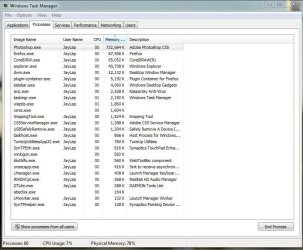
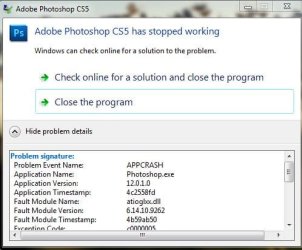
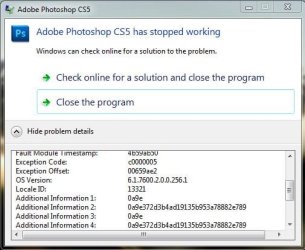
to all adobe photoshop users: have you noticed that photoshop uses more resources lately than usual? i've noticed mine do so. even if it is just opened with no files open, here is my task manager snip. coreldraw and photoshop is just running with no files opened while firefox has 3 tabs. notice the resource usage of photoshop. and also, when i close it, it gives me an error.

snips are attached.
 

Attachments

  • taskmanager.JPG
    taskmanager.JPG
    84.1 KB · Views: 11
  • error snip.JPG
    error snip.JPG
    38.5 KB · Views: 4
  • crashsnip.JPG
    crashsnip.JPG
    40.5 KB · Views: 4

My Computer

Computer Manufacturer/Model Number
Desktop is a DIY and laptop is an Acer Aspire 4745
OS
7 all the way!
CPU
core 2 duo (desktop) i5 (laptop)
Motherboard
asus for desktop
Memory
2gb for both machines
Graphics Card(s)
nvidia 512mb GS for desktop; hd 5470 for laptop
Monitor(s) Displays
19" AOC 913fw
Hi jaypels,

The error may have been from a faulty installation or if you closed it by ending the task. Adobe Photoshop is always going to use a lot of resources because of the sheer velocity it packs; there's nothing you can ethically do about it. If you're experiencing prolonged problems such as slowness or lag, then there's system optimization, but I don't think that's necessary.

Is there anything you'd like to ask about this problem?

Thanks,
Harvey Meale
 

My Computer

Computer Manufacturer/Model Number
Dell Inspiron 1545
OS
Windows 7 Home Premium 32-bit, BackTrack 4, Ubuntu
its just because it did not behave the same way before atleast 2 months ago. when i close adobe photoshop, it closes the normal way - no error messages after. i just noticed it lately. and also the resource usage. it is not that way before.. sometimes when i have a lot to do at corel, my laptop sometimes lags and i need to close photoshop just to have the extra resource. not that im complaining but it is sometimes a hassle to close photoshop to gain some resource and reopen it again at later when i need to export my jpeg files from corel. :cry:
 

My Computer

Computer Manufacturer/Model Number
Desktop is a DIY and laptop is an Acer Aspire 4745
OS
7 all the way!
CPU
core 2 duo (desktop) i5 (laptop)
Motherboard
asus for desktop
Memory
2gb for both machines
Graphics Card(s)
nvidia 512mb GS for desktop; hd 5470 for laptop
Monitor(s) Displays
19" AOC 913fw
Hi jaypels,

Well, I'm not sure why Adobe Photoshop would be more resourceful now, but it's possible that if you've introduced any fonts or brushes or plugins that they could be weighing it down.

Thanks,
Harvey Meale
 

My Computer

Computer Manufacturer/Model Number
Dell Inspiron 1545
OS
Windows 7 Home Premium 32-bit, BackTrack 4, Ubuntu
Hi jaypels,

Well, I'm not sure why Adobe Photoshop would be more resourceful now, but it's possible that if you've introduced any fonts or brushes or plugins that they could be weighing it down.

Thanks,
Harvey Meale


oh! i forgot i installed atleast 300 brushes a month ago:doh::doh::doh:.. i did not exactly think it would be that big of a resource since all of them were just kilobytes :o. thank you!

+1 rep
 

My Computer

Computer Manufacturer/Model Number
Desktop is a DIY and laptop is an Acer Aspire 4745
OS
7 all the way!
CPU
core 2 duo (desktop) i5 (laptop)
Motherboard
asus for desktop
Memory
2gb for both machines
Graphics Card(s)
nvidia 512mb GS for desktop; hd 5470 for laptop
Monitor(s) Displays
19" AOC 913fw
Hi jaypels,

You'd be surprised. I put a few hundred fonts on my copy of Photoshop and the thing can barely run now. Glad I could help.

Thanks,
Harvey Meale
 

My Computer

Computer Manufacturer/Model Number
Dell Inspiron 1545
OS
Windows 7 Home Premium 32-bit, BackTrack 4, Ubuntu
Back
Top