
This device cannot be used for ReadyBoost

OppfinnarJocke

New member
Member
Local time
1:55 AM
Messages
69
I just got a Flash Voyager GTR, supposedly one of the fastest USB flash drives currently available (Corsair Flash Voyager GTR 32GB Review - Overclockers Club). However, when I measure it, using PC Wizard 2010, I get read/write measures in the order 600-900 kB/s, which is far from the advertised 24 MB/s. Also, when I put the flash disk into my laptop (Dell Precision M4400) I get told that "This device cannot be used for ReadyBoost" since it "does not have the required performance characteristics". ReadyBoost requires min 2.5 MB/s read speed.

Strange thing is, when I put the flash drive into a stationary Dell GX960, I immediately get asked if I want to speed up my system by using the flash drive for ReadyBoost. I simply don't understand what's going on here.

Both comps run W7x64 Pro.

Any ideas, anyone?
 

My Computer My Computer

At a glance

Win 7
OS
Win 7
Is the drive formated for NTFS? If not, try formating to NTFS, see if that doesn't fix it.

A Guy
 

My Computer My Computer

At a glance

Windows 10 Home x64INTEL Core i5-750 Quad-Core 3.37GHzHyperX Fury Black Series 8GB (2 x 4GB) 1866MhzEVGA GeForce GTX 750 Superclocked 1GB 128-Bit...
Computer type
PC/Desktop
OS
Windows 10 Home x64
CPU
INTEL Core i5-750 Quad-Core 3.37GHz
Motherboard
ASUS P7P55D
Memory
HyperX Fury Black Series 8GB (2 x 4GB) 1866Mhz
Graphics Card(s)
EVGA GeForce GTX 750 Superclocked 1GB 128-Bit GDDR5
Monitor(s) Displays
LG 32MA68HY 32" IPS
Screen Resolution
1920 x 1080
Hard Drives
Samsung 840 Evo 120GB, SEAGATE 500GB Barracuda® 7200.12, SATA 3 Gb/s, 7200 RPM, 16MB cache
PSU
ANTEC TruePower New TP-550, 80 PLUS, 550W
Case
ANTEC Three Hundred Illusion
Cooling
COOLER MASTER Hyper 212 Plus, 4 x 120mm 1 x 140mm Noctua's
Internet Speed
85 + Mbps
Antivirus
Avast
Browser
Vivaldi
Is the drive formated for NTFS? If not, try formating to NTFS, see if that doesn't fix it.

A Guy

OK, thanks, will try.
However, still wouldn't tell me why the flash drive is ok on one computer but not the other...
 

My Computer My Computer

At a glance

Win 7
OS
Win 7
Check for the windows update for 32GB support for removable storage. its an optional update so will need manually ticking.
 

My Computer My Computer

At a glance

Windows 7 Ultimate 64-BitIntel(R) Pentium(R) Dual CPU T3400 @ 2.16GHz2GB DDR2Mobile Intel(R) 4 Series Express Chipset
Computer Manufacturer/Model Number
Packard Bell MH36-U300
OS
Windows 7 Ultimate 64-Bit
CPU
Intel(R) Pentium(R) Dual CPU T3400 @ 2.16GHz
Memory
2GB DDR2
Graphics Card(s)
Mobile Intel(R) 4 Series Express Chipset
Sound Card
Realtek High Definition Audio
Monitor(s) Displays
15" LCD
Screen Resolution
1280 x 800
Hard Drives
320GB Western Digital
Case
Notebook
Internet Speed
10Mbps
Is the drive formated for NTFS? If not, try formating to NTFS, see if that doesn't fix it.

A Guy

OK, thanks, will try.
However, still wouldn't tell me why the flash drive is ok on one computer but not the other...
Sorry, but you are going down the wrong path. For Ready Boost, flash drives have to be in Fat32.
As for the speed problem, I suggest you measure it with HD Tune and post the results here. Then we will see.
 

My Computer My Computer

At a glance

Vista, Windows7, Mint Mate, Zorin, Windows 8from 1.6GHz Duo to i7
Computer Manufacturer/Model Number
HP, Dell, Gateway, Toshiba - 4 laptops and 2 desktops
OS
Vista, Windows7, Mint Mate, Zorin, Windows 8
CPU
from 1.6GHz Duo to i7
Monitor(s) Displays
2x HP w2207
Hard Drives
5x HDD, 7x SSD, 12x Externals
Keyboard
with trackball - no mices
Mouse
Trackball mice
Internet Speed
DSL 6000
Is the drive formated for NTFS? If not, try formating to NTFS, see if that doesn't fix it.

A Guy

OK, thanks, will try.
However, still wouldn't tell me why the flash drive is ok on one computer but not the other...
Sorry, but you are going down the wrong path. For Ready Boost, flash drives have to be in Fat32.
As for the speed problem, I suggest you measure it with HD Tune and post the results here. Then we will see.

Sorry to disagree WHS, but Windows 7 supports NTFS, FAT16 and FAT32, and exFAT.

Alternatively, you can configure ReadyBoost by right-clicking the device in Windows Explorer, clicking Properties, and then clicking the ReadyBoost tab. The only configuration option is to configure the space reserved for the cache. You must reserve at least 256 MB. Larger caches can improve performance, but the ReadyBoost cache cannot be greater than 4 GB on a FAT32 file system or greater than 32 GB on an NTFS file system.

Understand ReadyBoost and whether it will Speed Up your System

While I would agree to use Fat32 under normal circumstances, it was Corsair that suggests trying NTFS if the error message happens with FAT32 format. I'm not saying it would fix it, but it was a suggestion. The drive he has is actually the one most recommended for Ready Boost, so I am hoping that tezlewis has the correct fix.

A Guy
 

My Computer My Computer

At a glance

Windows 10 Home x64INTEL Core i5-750 Quad-Core 3.37GHzHyperX Fury Black Series 8GB (2 x 4GB) 1866MhzEVGA GeForce GTX 750 Superclocked 1GB 128-Bit...
Computer type
PC/Desktop
OS
Windows 10 Home x64
CPU
INTEL Core i5-750 Quad-Core 3.37GHz
Motherboard
ASUS P7P55D
Memory
HyperX Fury Black Series 8GB (2 x 4GB) 1866Mhz
Graphics Card(s)
EVGA GeForce GTX 750 Superclocked 1GB 128-Bit GDDR5
Monitor(s) Displays
LG 32MA68HY 32" IPS
Screen Resolution
1920 x 1080
Hard Drives
Samsung 840 Evo 120GB, SEAGATE 500GB Barracuda® 7200.12, SATA 3 Gb/s, 7200 RPM, 16MB cache
PSU
ANTEC TruePower New TP-550, 80 PLUS, 550W
Case
ANTEC Three Hundred Illusion
Cooling
COOLER MASTER Hyper 212 Plus, 4 x 120mm 1 x 140mm Noctua's
Internet Speed
85 + Mbps
Antivirus
Avast
Browser
Vivaldi
I'm confused. I was under the impression that the ready boost cache is stored as a file. Therefore, you would have to format the media as NTFS or exFAT (kinda like a FAT64 for lack of a better description) if you want to use more than 4 GB of space for caching. I thought FAT16 and FAT32 impose file size limits of 2 and 4 GB respectively, and the OP said his USB is 32GB.

EDIT: Sorry A Guy. Guess I was still typing while you were posting.
 

My Computer My Computer

At a glance

Win 7 Pro 64-bitIntel i5 2.4 Ghz8GB DDR3Intel HD 3000
Computer type
Laptop
Computer Manufacturer/Model Number
Sony Vaio VPCEB47GM Laptop
OS
Win 7 Pro 64-bit
CPU
Intel i5 2.4 Ghz
Memory
8GB DDR3
Graphics Card(s)
Intel HD 3000
Sound Card
IDT High Definition
Monitor(s) Displays
15.6 WGXA Anti-Glare LED
Screen Resolution
1280x800
Hard Drives
640Gb 7200rpm
Antivirus
MSE
Browser
Opera (primary) with IE9 backup
A Guy, I don't want to argue the formatting because NTFS is possible. But since the pages are written in 4KB blocks, Fat32 is optimal. At least that's what I think because those are the Fat32 blocksizes: 4KB 500MB-8GB, 8KB 8GB-16GB, 16KB 16GB-32GB, 32KB over 32GB
 

My Computer My Computer

At a glance

Vista, Windows7, Mint Mate, Zorin, Windows 8from 1.6GHz Duo to i7
Computer Manufacturer/Model Number
HP, Dell, Gateway, Toshiba - 4 laptops and 2 desktops
OS
Vista, Windows7, Mint Mate, Zorin, Windows 8
CPU
from 1.6GHz Duo to i7
Monitor(s) Displays
2x HP w2207
Hard Drives
5x HDD, 7x SSD, 12x Externals
Keyboard
with trackball - no mices
Mouse
Trackball mice
Internet Speed
DSL 6000
A Guy, I don't want to argue the formatting because NTFS is possible. But since the pages are written in 4KB blocks, Fat32 is optimal. At least that's what I think because those are the Fat32 blocksizes: 4KB 500MB-8GB, 8KB 8GB-16GB, 16KB 16GB-32GB, 32KB over 32GB

I wasn't arguing :). I was replying to your post where you said "For Ready Boost, flash drives have to be in Fat32". The suggestion from the Corsair forum for a user with this exact drive that was showing that error was to format it as NTFS, which fixed the posters problem. Further research suggests the preferred option would be NTFS or exFAT. FAT32 is limited to a 4GB cache, whereas NTFS or exFAT can use 32GB. These are not my assumptions, but what I was able to glean from researching. In any case, I don't want to diverge from the original topic, so I will bow out. A Guy
 

My Computer My Computer

At a glance

Windows 10 Home x64INTEL Core i5-750 Quad-Core 3.37GHzHyperX Fury Black Series 8GB (2 x 4GB) 1866MhzEVGA GeForce GTX 750 Superclocked 1GB 128-Bit...
Computer type
PC/Desktop
OS
Windows 10 Home x64
CPU
INTEL Core i5-750 Quad-Core 3.37GHz
Motherboard
ASUS P7P55D
Memory
HyperX Fury Black Series 8GB (2 x 4GB) 1866Mhz
Graphics Card(s)
EVGA GeForce GTX 750 Superclocked 1GB 128-Bit GDDR5
Monitor(s) Displays
LG 32MA68HY 32" IPS
Screen Resolution
1920 x 1080
Hard Drives
Samsung 840 Evo 120GB, SEAGATE 500GB Barracuda® 7200.12, SATA 3 Gb/s, 7200 RPM, 16MB cache
PSU
ANTEC TruePower New TP-550, 80 PLUS, 550W
Case
ANTEC Three Hundred Illusion
Cooling
COOLER MASTER Hyper 212 Plus, 4 x 120mm 1 x 140mm Noctua's
Internet Speed
85 + Mbps
Antivirus
Avast
Browser
Vivaldi
A Guy, fair enough. Sorry, I did not want to confuse the issue at hand.
 

My Computer My Computer

At a glance

Vista, Windows7, Mint Mate, Zorin, Windows 8from 1.6GHz Duo to i7
Computer Manufacturer/Model Number
HP, Dell, Gateway, Toshiba - 4 laptops and 2 desktops
OS
Vista, Windows7, Mint Mate, Zorin, Windows 8
CPU
from 1.6GHz Duo to i7
Monitor(s) Displays
2x HP w2207
Hard Drives
5x HDD, 7x SSD, 12x Externals
Keyboard
with trackball - no mices
Mouse
Trackball mice
Internet Speed
DSL 6000
Thanks all.

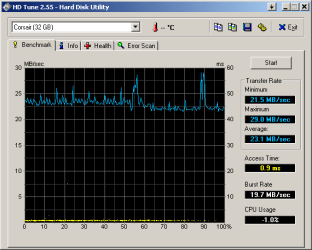
HD Tune agrees with Corsair, http://www.sevenforums.com/attachment.php?attachmentid=95241&stc=1&d=1283546929 but W7x64 pro on the laptop still says that the drive does not have the required specs.

EDIT: Ooops... clicking "Test Again" did the trick. Now W7x64 on the Dell laptop agrees to use the drive for ReadyBoosty. Strange W7x64 glitch, probably. I guess problem solved, sort of...

Thanks again
 

Attachments

  • HDTune_Benchmark_Corsair.png
    HDTune_Benchmark_Corsair.png
    7.4 KB · Views: 263

My Computer My Computer

At a glance

Win 7
OS
Win 7
Windows strikes again :) Glad you apparently have it sorted.

A Guy
 

My Computer My Computer

At a glance

Windows 10 Home x64INTEL Core i5-750 Quad-Core 3.37GHzHyperX Fury Black Series 8GB (2 x 4GB) 1866MhzEVGA GeForce GTX 750 Superclocked 1GB 128-Bit...
Computer type
PC/Desktop
OS
Windows 10 Home x64
CPU
INTEL Core i5-750 Quad-Core 3.37GHz
Motherboard
ASUS P7P55D
Memory
HyperX Fury Black Series 8GB (2 x 4GB) 1866Mhz
Graphics Card(s)
EVGA GeForce GTX 750 Superclocked 1GB 128-Bit GDDR5
Monitor(s) Displays
LG 32MA68HY 32" IPS
Screen Resolution
1920 x 1080
Hard Drives
Samsung 840 Evo 120GB, SEAGATE 500GB Barracuda® 7200.12, SATA 3 Gb/s, 7200 RPM, 16MB cache
PSU
ANTEC TruePower New TP-550, 80 PLUS, 550W
Case
ANTEC Three Hundred Illusion
Cooling
COOLER MASTER Hyper 212 Plus, 4 x 120mm 1 x 140mm Noctua's
Internet Speed
85 + Mbps
Antivirus
Avast
Browser
Vivaldi
ReadyBoost is no substitute for simply upgrading RAM - it's a page file.

Has anyone come across a situation where ReadyBoost has noticeably improved performance?

Just askin.
 
Has anyone come across a situation where ReadyBoost has noticeably improved performance?

Just askin.

I experimented with using Ready Boost on my Vista Laptop on several different occasions and I could never measure or even feel even a slight increase in performance or speed.

~Maxx~
.
938af360.png
 

My Computer My Computer

At a glance

Windows 7 x64 Home PremiumIntel Core i7 930 @ 2.8 Ghz Socket 1366 LGA8 GB 1366 Mhz DDR3 (PC3-10700) RAMATI Radeon 5770 1 GB DDR5 RAM
Computer Manufacturer/Model Number
HP HPE 270f
OS
Windows 7 x64 Home Premium
CPU
Intel Core i7 930 @ 2.8 Ghz Socket 1366 LGA
Motherboard
Pegatron Truckee v1.04E41
Memory
8 GB 1366 Mhz DDR3 (PC3-10700) RAM
Graphics Card(s)
ATI Radeon 5770 1 GB DDR5 RAM
Sound Card
Realtech High Definition
Monitor(s) Displays
32" Sony Bravia
Screen Resolution
1366 X 768
Hard Drives
Intel 25nm 120 GB Series 320 SSD HD Tune- 265 MBps Read/ 130 MBps Write

LaCie 1TB + 1TB RAID 0 eSATA Drive HD Tune- 160 MBps Read/ 90 MBps Write
Keyboard
Logitech Illuminated
Mouse
Logitech MX Revolution
Internet Speed
36.4 Mbps Maximum on a 37 Mbps Motorola SB501 Modem
So, just because I eventually could try ReadyBoost, I did...
No, I couldn't detect any increased performance. I even tried to benchmark my system with and without the GTR USB stick ReadyBoosting, but nothing came out of it. No improvement whatsoever...
 

My Computer My Computer

At a glance

Win 7
OS
Win 7
I tried it with my laptop a couple of years ago. It did help a bit with a game I was playing at the time, but not dramatically. The memory increase gregrocker recommends worked out much better.
 

My Computer My Computer

At a glance

Win 7 Pro x64/Win 10 Pro x64 dual bootAMD FX 8350 Vishera @ 420016 GB Mushkin Blackline DDR3-2400 @ 1866 (9-1...XFX Radeon R9 280 Double D Black Edition
Computer type
PC/Desktop
Computer Manufacturer/Model Number
Mellon Labs (custom build)
OS
Win 7 Pro x64/Win 10 Pro x64 dual boot
CPU
AMD FX 8350 Vishera @ 4200
Motherboard
ASUS M5A97 R2.0
Memory
16 GB Mushkin Blackline DDR3-2400 @ 1866 (9-10-10-10-31)
Graphics Card(s)
XFX Radeon R9 280 Double D Black Edition
Sound Card
Realtek HD Audio on MB. Sounds great.
Monitor(s) Displays
Acer 24", Acer 22"
Screen Resolution
3840 x 1080
Hard Drives
1 x Mushkin Chronos 120 GB SSD (Win 10)
1 x Samsung 850 EVO 250 GB SSD (Win 7)
1 x WD 1TB SATA Blue
1 x WD 1TB SATA Green
PSU
Corsair TX-750
Case
CoolerMaster HAF 912+
Cooling
Coolermaster Seidon 240M Liquid AIO. 6 case fans
Keyboard
Logitech G710+
Mouse
Logitech G500s
Internet Speed
Much better since I got fiber, but still way overpriced.
Antivirus
MSE, Malware Bytes for scanning
Browser
Firefox
Other Info
Corsair VOID USB headphones.

A Mellon Labs X-1 - LCD Smartie driven system status display.

Brought to you by the letter E
I even tried to benchmark my system with and without the GTR USB stick ReadyBoosting, but nothing came out of it. No improvement whatsoever...

If memory serves ReadyBoost was developed to enhance the performance of computers that lacked an adequate set of on board resources to run Win Vista for which 1GB of RAM was recommended when it was first released.

~Maxx~
.
da59fa57.png
 

My Computer My Computer

At a glance

Windows 7 x64 Home PremiumIntel Core i7 930 @ 2.8 Ghz Socket 1366 LGA8 GB 1366 Mhz DDR3 (PC3-10700) RAMATI Radeon 5770 1 GB DDR5 RAM
Computer Manufacturer/Model Number
HP HPE 270f
OS
Windows 7 x64 Home Premium
CPU
Intel Core i7 930 @ 2.8 Ghz Socket 1366 LGA
Motherboard
Pegatron Truckee v1.04E41
Memory
8 GB 1366 Mhz DDR3 (PC3-10700) RAM
Graphics Card(s)
ATI Radeon 5770 1 GB DDR5 RAM
Sound Card
Realtech High Definition
Monitor(s) Displays
32" Sony Bravia
Screen Resolution
1366 X 768
Hard Drives
Intel 25nm 120 GB Series 320 SSD HD Tune- 265 MBps Read/ 130 MBps Write

LaCie 1TB + 1TB RAID 0 eSATA Drive HD Tune- 160 MBps Read/ 90 MBps Write
Keyboard
Logitech Illuminated
Mouse
Logitech MX Revolution
Internet Speed
36.4 Mbps Maximum on a 37 Mbps Motorola SB501 Modem
Back
Top