Backup Constantly Fails

I liked that comment. By lost each other I meant we were one on one, until a few others came by.
 

My Computer My Computer

At a glance

Windows 10, Home Clean InstallIntel Core2 processsor Q8200(2.33Ghz 1333FSB)...6 gbATI Radeon 256MB HD3650
Computer type
PC/Desktop
Computer Manufacturer/Model Number
Dell XPS 420
OS
Windows 10, Home Clean Install
CPU
Intel Core2 processsor Q8200(2.33Ghz 1333FSB) Quad Core Tech
Motherboard
Dell
Memory
6 gb
Graphics Card(s)
ATI Radeon 256MB HD3650
Sound Card
Intergrated 7.1 Channel Audio
Monitor(s) Displays
Dell SP2009W 20"
Hard Drives
640 GB Serial ATA Hard drive
Cooling
Fan
Keyboard
Dell USB Keyboard
Mouse
Dell Premium Optical USB
Internet Speed
DSL 2.85
Question your disk management screen shot only shows one disk and one optical drive?

Do you have another screen shot that shows something else?

You trying to backup the C-drive (OS) and save the backup to your D-drive, bad idea!

I also use Macrium and find it more user friendly. You will still need a second physical drive.

Good luck!
 

Attachments

  • backup fails.jpg
    backup fails.jpg
    66.2 KB · Views: 8

My Computers My Computers

  • At a glance

    WIN10AMD Ryzen 5 3600 6-Core Processor 3.59 GHz16.0 GB
    Computer type
    PC/Desktop
    Computer Manufacturer/Model Number
    PowerSpec G164
    OS
    WIN10
    CPU
    AMD Ryzen 5 3600 6-Core Processor 3.59 GHz
    Memory
    16.0 GB
    Internet Speed
    VERY FAST>>>!!!
  • Antivirus
    ESET Security Premium
I use MS imaging and file/folder backup as well as Macrium (as a backup- excuse pun). Irrespective of the virtues of putting images/backups on a seperate partition of the same drive the fact is that you should be able to. If it was me, I wouldn't be happy until I found out why MS backup wasn't working.
Given that you seem to tried most things I guess you've scanned your HDD for bad sectors?
 

My Computer My Computer

At a glance

Windows 7x64 Home Premium SP1Intel i7 2600kG.Skill Ripjaws (DDR3-1600) 2x4GBNvidia GeForce GTS 450; Intel HD Graphics 300...
Computer type
PC/Desktop
Computer Manufacturer/Model Number
Own build
OS
Windows 7x64 Home Premium SP1
CPU
Intel i7 2600k
Motherboard
ASUS P8Z68 Deluxe
Memory
G.Skill Ripjaws (DDR3-1600) 2x4GB
Graphics Card(s)
Nvidia GeForce GTS 450; Intel HD Graphics 3000(GT2+)
Monitor(s) Displays
Dell Ultrasharp IPS panel U2311H, Samsung SyncMaster P2350
Screen Resolution
1920x1080
Hard Drives
Samsung 850 Pro SSD 256GB, Samsung SSD 840 120GB, Seagates 1TB Barracuda ST31000528AS x2
PSU
Seasonic M12II 520W
Case
Lian Li Lancool PC-K60
Cooling
Case: 1x120mm, 3x140mm CPU: Hyper 212+
Keyboard
Logitech MK520 (wireless)
Mouse
Logitech MK520
Internet Speed
6-7 Mbps
Antivirus
Norton Security Premium, Malwarebytes on 2 (MSE on 3rd PC)
Browser
FireFox
Other Info
Audio: Logitech Z523 2.1
This is what you do. Make a back up and put it away and forget about it.

Make weekly backups in a separate location

Right on! Doing this has saved me 100's of hours of manual restoration.

~Maxx~
 

My Computer My Computer

At a glance

Windows 7 x64 Home PremiumIntel Core i7 930 @ 2.8 Ghz Socket 1366 LGA8 GB 1366 Mhz DDR3 (PC3-10700) RAMATI Radeon 5770 1 GB DDR5 RAM
Computer Manufacturer/Model Number
HP HPE 270f
OS
Windows 7 x64 Home Premium
CPU
Intel Core i7 930 @ 2.8 Ghz Socket 1366 LGA
Motherboard
Pegatron Truckee v1.04E41
Memory
8 GB 1366 Mhz DDR3 (PC3-10700) RAM
Graphics Card(s)
ATI Radeon 5770 1 GB DDR5 RAM
Sound Card
Realtech High Definition
Monitor(s) Displays
32" Sony Bravia
Screen Resolution
1366 X 768
Hard Drives
Intel 25nm 120 GB Series 320 SSD HD Tune- 265 MBps Read/ 130 MBps Write

LaCie 1TB + 1TB RAID 0 eSATA Drive HD Tune- 160 MBps Read/ 90 MBps Write
Keyboard
Logitech Illuminated
Mouse
Logitech MX Revolution
Internet Speed
36.4 Mbps Maximum on a 37 Mbps Motorola SB501 Modem
I liked that comment. By lost each other I meant we were one on one, until a few others came by.

Oh right! Sorry about confusion!


I use MS imaging and file/folder backup as well as Macrium (as a backup- excuse pun). Irrespective of the virtues of putting images/backups on a seperate partition of the same drive the fact is that you should be able to. If it was me, I wouldn't be happy until I found out why MS backup wasn't working.
Given that you seem to tried most things I guess you've scanned your HDD for bad sectors?

You're right: I really want to find out why it isn't working, when it should. Did scan for bad sectors in all drives, and no errors found.


Question your disk management screen shot only shows one disk and one optical drive?

Do you have another screen shot that shows something else?

You trying to backup the C-drive (OS) and save the backup to your D-drive, bad idea!

I also use Macrium and find it more user friendly. You will still need a second physical drive.

Good luck!

That's all there is on my computer. Screenshots are all there. One disk partitioned. Please read my earlier posts! I explained why I'm only doing this temporarily and explained how aware I am of my temporary decision!
 

My Computer My Computer

At a glance

Windows 7 Ultimate 32bitIntel Core Duo Processor T83003072MB Dual ChannelNVIDIA GeForce 8600M GT
Computer Manufacturer/Model Number
Dell Inspiron 1720 (Laptop)
OS
Windows 7 Ultimate 32bit
CPU
Intel Core Duo Processor T8300
Memory
3072MB Dual Channel
Graphics Card(s)
NVIDIA GeForce 8600M GT
One final long shot...
under services.msc my "Volume Shadow Copy" has startup type as "Manual" and I vaguely recall this setting being suggested somewhere.
 

My Computer My Computer

At a glance

Windows 7x64 Home Premium SP1Intel i7 2600kG.Skill Ripjaws (DDR3-1600) 2x4GBNvidia GeForce GTS 450; Intel HD Graphics 300...
Computer type
PC/Desktop
Computer Manufacturer/Model Number
Own build
OS
Windows 7x64 Home Premium SP1
CPU
Intel i7 2600k
Motherboard
ASUS P8Z68 Deluxe
Memory
G.Skill Ripjaws (DDR3-1600) 2x4GB
Graphics Card(s)
Nvidia GeForce GTS 450; Intel HD Graphics 3000(GT2+)
Monitor(s) Displays
Dell Ultrasharp IPS panel U2311H, Samsung SyncMaster P2350
Screen Resolution
1920x1080
Hard Drives
Samsung 850 Pro SSD 256GB, Samsung SSD 840 120GB, Seagates 1TB Barracuda ST31000528AS x2
PSU
Seasonic M12II 520W
Case
Lian Li Lancool PC-K60
Cooling
Case: 1x120mm, 3x140mm CPU: Hyper 212+
Keyboard
Logitech MK520 (wireless)
Mouse
Logitech MK520
Internet Speed
6-7 Mbps
Antivirus
Norton Security Premium, Malwarebytes on 2 (MSE on 3rd PC)
Browser
FireFox
Other Info
Audio: Logitech Z523 2.1
One final long shot...
under services.msc my "Volume Shadow Copy" has startup type as "Manual" and I vaguely recall this setting being suggested somewhere.

No luck here! It was set to 'Manual' when I initially used it. I then changed it to 'Automatic' to see if it was any help - and it was of no help! So, I now have it switched back to 'Manual' - same disappointing result. :(

Thanks anyway mjf!

I will try Macrium Reflect later and report back on results.
 

My Computer My Computer

At a glance

Windows 7 Ultimate 32bitIntel Core Duo Processor T83003072MB Dual ChannelNVIDIA GeForce 8600M GT
Computer Manufacturer/Model Number
Dell Inspiron 1720 (Laptop)
OS
Windows 7 Ultimate 32bit
CPU
Intel Core Duo Processor T8300
Memory
3072MB Dual Channel
Graphics Card(s)
NVIDIA GeForce 8600M GT
Well, I tried Macrium Reflect and was happy with the result.

A 19.2GB of space used on C: was created into an image of 11.8GB (using default settings of free version).

I finally got my backup via other means of those which I had hoped, but the problem still lingers with Windows 7 Backup.

If there is a solution out there, come find me - I will be waiting! Maybe a solution will materialise in SP1 (whenever that may be). I hope it won't be rushed! "All good things come to those who can wait".


Thanks very much to everyone who helped! I really appreciate everyone's input. :thumbsup:
 

My Computer My Computer

At a glance

Windows 7 Ultimate 32bitIntel Core Duo Processor T83003072MB Dual ChannelNVIDIA GeForce 8600M GT
Computer Manufacturer/Model Number
Dell Inspiron 1720 (Laptop)
OS
Windows 7 Ultimate 32bit
CPU
Intel Core Duo Processor T8300
Memory
3072MB Dual Channel
Graphics Card(s)
NVIDIA GeForce 8600M GT
Its great to hear that your Macrium Reflect backup went well. As far as the problem with the Windows 7 System Image goes I was having some problems a while back myself until I restored the registry after getting a little zealous with Revo Pro and now it works just fine.

~Maxx~
 

My Computer My Computer

At a glance

Windows 7 x64 Home PremiumIntel Core i7 930 @ 2.8 Ghz Socket 1366 LGA8 GB 1366 Mhz DDR3 (PC3-10700) RAMATI Radeon 5770 1 GB DDR5 RAM
Computer Manufacturer/Model Number
HP HPE 270f
OS
Windows 7 x64 Home Premium
CPU
Intel Core i7 930 @ 2.8 Ghz Socket 1366 LGA
Motherboard
Pegatron Truckee v1.04E41
Memory
8 GB 1366 Mhz DDR3 (PC3-10700) RAM
Graphics Card(s)
ATI Radeon 5770 1 GB DDR5 RAM
Sound Card
Realtech High Definition
Monitor(s) Displays
32" Sony Bravia
Screen Resolution
1366 X 768
Hard Drives
Intel 25nm 120 GB Series 320 SSD HD Tune- 265 MBps Read/ 130 MBps Write

LaCie 1TB + 1TB RAID 0 eSATA Drive HD Tune- 160 MBps Read/ 90 MBps Write
Keyboard
Logitech Illuminated
Mouse
Logitech MX Revolution
Internet Speed
36.4 Mbps Maximum on a 37 Mbps Motorola SB501 Modem
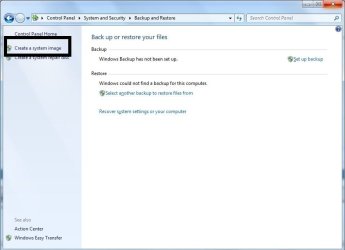
One question does it also fail if you just choose to Create System Image, by itself?
 

Attachments

  • system image.jpg
    system image.jpg
    40.2 KB · Views: 2

My Computers My Computers

  • At a glance

    WIN10AMD Ryzen 5 3600 6-Core Processor 3.59 GHz16.0 GB
    Computer type
    PC/Desktop
    Computer Manufacturer/Model Number
    PowerSpec G164
    OS
    WIN10
    CPU
    AMD Ryzen 5 3600 6-Core Processor 3.59 GHz
    Memory
    16.0 GB
    Internet Speed
    VERY FAST>>>!!!
  • Antivirus
    ESET Security Premium
One question does it also fail if you just choose to Create System Image, by itself?

It fails. Miserably. See third picture in 1st post ("Create a Backup Image / The backup failed"). Well, I don't know about anyone else, but I'm exhausted of ideas...
 

My Computer My Computer

At a glance

Windows 7 Ultimate 32bitIntel Core Duo Processor T83003072MB Dual ChannelNVIDIA GeForce 8600M GT
Computer Manufacturer/Model Number
Dell Inspiron 1720 (Laptop)
OS
Windows 7 Ultimate 32bit
CPU
Intel Core Duo Processor T8300
Memory
3072MB Dual Channel
Graphics Card(s)
NVIDIA GeForce 8600M GT
WitchKing,
No matter what backup program you use, the only wise decision is to backup to another physical drive, be the drive internal or external.

Get yourself an external USB drive-they are quite cheap-and use that as the destination for your backups.

The problem is that each external USB drive may be cheap, but in my experience they are not only slow, but they stop working after a relatively short period of time. These are the external USB drives that I have purchased and used over the last 2 1/2 years...

Western Digital 160 GB- Failed after 9 months

Western Digital 250 GB- Failed after 1 year

Western Digital 1 TB- Failed after 2 years

Seagate 1.5 TB- Failed after 3 months

This is just how things went for me keeping 3 backups of all my Data and Macrium Reflect System Images. There is nothing wrong with buying one of these $100-$200 USB drives all I'm trying to point out is that it very well could turn out to be a short term investment.

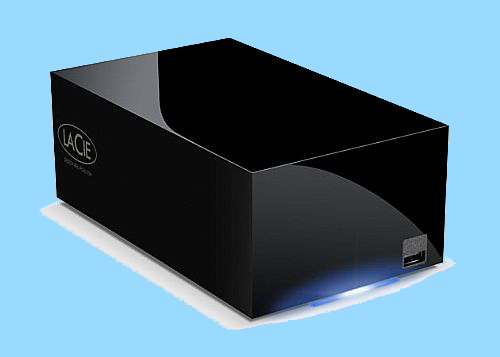
Having spent well over $500 on these USB drives that failed so soon after I bought them I took the advise of a friend of mine who sells high end Mac Pro desktops at Pro Photo here in town and purchased a LaCie Hard Disk MAX 2TB Quadra eSATA/FireWire800/FireWire400/USB 2.0 RAID Portable External Hard Drive from Amazon for $234 shipped and the price has gone down since then.

LaCie.png


I connected the LaCie Raid 0 drive to my desktop using 3Gbps eSATA wire and its 3X faster than using USB when making a backup Image...

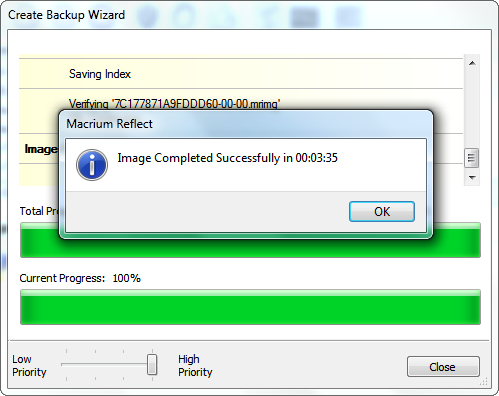
73191b4f.png


Images that used to take 10 minutes using USB now only take 3:35 minutes using the LaCie Raid 0 drive over eSATA. Just this morning I did a full 7.9 GB Reflect Image restore of the 22.6 GB on the C Drive and it took only 4:40:38 minutes using the LaCie Raid 0 Drive using eSATA.

Another thing that the LaCie has is an onboard cooling fan which extends its longevity. I've heard other LaCie owners say that they have had their Drives for over 4 years without a single incident. I would gladly have taken 2 of these LaCie Drives over the 4 USB drives which I listed above that failed so quickly. It would have saved me many hours of backup and restore time.

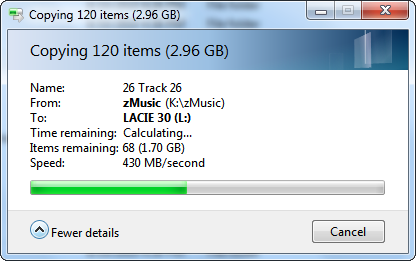
BTW- The LaCie also does well with file transfers over eSATA...

430MBps.png


~Maxx~
 

My Computer My Computer

At a glance

Windows 7 x64 Home PremiumIntel Core i7 930 @ 2.8 Ghz Socket 1366 LGA8 GB 1366 Mhz DDR3 (PC3-10700) RAMATI Radeon 5770 1 GB DDR5 RAM
Computer Manufacturer/Model Number
HP HPE 270f
OS
Windows 7 x64 Home Premium
CPU
Intel Core i7 930 @ 2.8 Ghz Socket 1366 LGA
Motherboard
Pegatron Truckee v1.04E41
Memory
8 GB 1366 Mhz DDR3 (PC3-10700) RAM
Graphics Card(s)
ATI Radeon 5770 1 GB DDR5 RAM
Sound Card
Realtech High Definition
Monitor(s) Displays
32" Sony Bravia
Screen Resolution
1366 X 768
Hard Drives
Intel 25nm 120 GB Series 320 SSD HD Tune- 265 MBps Read/ 130 MBps Write

LaCie 1TB + 1TB RAID 0 eSATA Drive HD Tune- 160 MBps Read/ 90 MBps Write
Keyboard
Logitech Illuminated
Mouse
Logitech MX Revolution
Internet Speed
36.4 Mbps Maximum on a 37 Mbps Motorola SB501 Modem
This looks like a good device - although a little pricey. But not all systems have an eSata facility. For those I suggest to install an extra internal disk (no good for laptops though) which is cheaper and gives you the same speed - plus it is also being cooled and will probably live longer than a normal external disk.
I make my daily images to an internal drive and backup once a week and once a month to 2 different external drives. The speed is the same as with the LaCie.
 

Attachments

  • 2010-08-25_144413.png
    2010-08-25_144413.png
    20.4 KB · Views: 0

My Computer My Computer

At a glance

Vista, Windows7, Mint Mate, Zorin, Windows 8from 1.6GHz Duo to i7
Computer Manufacturer/Model Number
HP, Dell, Gateway, Toshiba - 4 laptops and 2 desktops
OS
Vista, Windows7, Mint Mate, Zorin, Windows 8
CPU
from 1.6GHz Duo to i7
Monitor(s) Displays
2x HP w2207
Hard Drives
5x HDD, 7x SSD, 12x Externals
Keyboard
with trackball - no mices
Mouse
Trackball mice
Internet Speed
DSL 6000
whs- It is a great compliment to the LaCie that it could keep up with your internal HDD! The size of the partition which I back up regularly with Reflect on the LaCie which contains Win 7 is 22.7 GB and the Reflect Image is 7.9 GB. It takes up a lot less HD space than the 24 GB Windows System Image.

I did want to mention that the LaCie Hard Disk MAX 2TB RAID 0 Portable External Hard Drive Quadra has just that 4 inputs which are eSATA/FireWire800/FireWire400/USB. It also has its own temperature regulated cooling fan which as you pointed out will give it a longer life than other non-cooled external HDD's. Concerning using the eSATA interface with laptops there are eSATA/PCI adaptor cards available which make it the fastest alternative for an external HDD.

~Maxx~
 

My Computer My Computer

At a glance

Windows 7 x64 Home PremiumIntel Core i7 930 @ 2.8 Ghz Socket 1366 LGA8 GB 1366 Mhz DDR3 (PC3-10700) RAMATI Radeon 5770 1 GB DDR5 RAM
Computer Manufacturer/Model Number
HP HPE 270f
OS
Windows 7 x64 Home Premium
CPU
Intel Core i7 930 @ 2.8 Ghz Socket 1366 LGA
Motherboard
Pegatron Truckee v1.04E41
Memory
8 GB 1366 Mhz DDR3 (PC3-10700) RAM
Graphics Card(s)
ATI Radeon 5770 1 GB DDR5 RAM
Sound Card
Realtech High Definition
Monitor(s) Displays
32" Sony Bravia
Screen Resolution
1366 X 768
Hard Drives
Intel 25nm 120 GB Series 320 SSD HD Tune- 265 MBps Read/ 130 MBps Write

LaCie 1TB + 1TB RAID 0 eSATA Drive HD Tune- 160 MBps Read/ 90 MBps Write
Keyboard
Logitech Illuminated
Mouse
Logitech MX Revolution
Internet Speed
36.4 Mbps Maximum on a 37 Mbps Motorola SB501 Modem
Maxxwire, you are right. The LaCie disk is a great device. But you also have to consider the price. I did not think of the eSata/PCI adaptor for a laptop. But that is a very good option for a laptop (although still more money). For a desktop, I would just stuff an extra HDD into the box (provided there is room and an open port on the mobe). That is the cheapest solution.
 

My Computer My Computer

At a glance

Vista, Windows7, Mint Mate, Zorin, Windows 8from 1.6GHz Duo to i7
Computer Manufacturer/Model Number
HP, Dell, Gateway, Toshiba - 4 laptops and 2 desktops
OS
Vista, Windows7, Mint Mate, Zorin, Windows 8
CPU
from 1.6GHz Duo to i7
Monitor(s) Displays
2x HP w2207
Hard Drives
5x HDD, 7x SSD, 12x Externals
Keyboard
with trackball - no mices
Mouse
Trackball mice
Internet Speed
DSL 6000
Installing a pair if SSD Raid 0 drives can prove to be blazing fast...

d375408b.png


~Maxx~
 

My Computer My Computer

At a glance

Windows 7 x64 Home PremiumIntel Core i7 930 @ 2.8 Ghz Socket 1366 LGA8 GB 1366 Mhz DDR3 (PC3-10700) RAMATI Radeon 5770 1 GB DDR5 RAM
Computer Manufacturer/Model Number
HP HPE 270f
OS
Windows 7 x64 Home Premium
CPU
Intel Core i7 930 @ 2.8 Ghz Socket 1366 LGA
Motherboard
Pegatron Truckee v1.04E41
Memory
8 GB 1366 Mhz DDR3 (PC3-10700) RAM
Graphics Card(s)
ATI Radeon 5770 1 GB DDR5 RAM
Sound Card
Realtech High Definition
Monitor(s) Displays
32" Sony Bravia
Screen Resolution
1366 X 768
Hard Drives
Intel 25nm 120 GB Series 320 SSD HD Tune- 265 MBps Read/ 130 MBps Write

LaCie 1TB + 1TB RAID 0 eSATA Drive HD Tune- 160 MBps Read/ 90 MBps Write
Keyboard
Logitech Illuminated
Mouse
Logitech MX Revolution
Internet Speed
36.4 Mbps Maximum on a 37 Mbps Motorola SB501 Modem
If your goal is to keep your backup as recent as possible then I would Move my data into a data partition which will act as a vault should Win7 fail irreparably: http://www.sevenforums.com/tutorials/18629-user-folders-change-default-location.html

Then you only need to reimage from a Backup Image to the OS partition so your OS will be back up and running working drawing data the same data partition where you left off.

As far as keeping an image in your own Recovery partition on the same HD, I do so on all of our computers here. But they need to be copied to another HD - over the network, external, or secondary HD - as soon as you are able in case of HD failure, as was noted.

Back your data up separately. If you are waiting to get another HD or external, it is easier to back up data alone to a DVD for the time being.
 
Back
Top