
PCI Analog AverTV Super 007 (M135A)

SpawNerGR

New member
Local time
1:51 AM
Messages
9
Location
Thessaloniki
Hello all...

so i've got my Windows Seven 64-bit up 'n' running (legit), with all my hardware and software setup, but i can't see any TV anymore, because i dont have a driver for my card...

My TV Card model is:

PCI - Analog - AverTV Super 007 (M135A)

well the thing is, that i did tried all the drivers they give in their website "avermedia.com" both 32-bits + 64 bits and it seems only windows update can find a suitable driver, but when it updates, finds it and trying to play with Windows Media Center - AverTv - AVer Media Center or any other software there is, the sound is great, but the screen is grey...

Thinked to do a dual-boot, but wanna stuck with seven, and won't bother (only for a tv-card) switching to an earlier MS OS, don't wanna buy a different card yet (maybe in final version, they will do a driver for it) also googled Virtual Machines and people saying that a USB could emulate the hardware, but not the PCI's and i think the scenario is familiar, for the alternative people trying OS, like when i have a Linux distro and my hardware dont work, what solution do i have? Or With a Hackintosh the same question...


Any ideas-suggestions? :geek:
 

My Computer My Computer

Computer Manufacturer/Model Number
Plaisio
OS
Windows 7 build 7000
CPU
Quad Q6600
Motherboard
Gigabyte DS3-R
Memory
Geil 4-4-12 800Mhz 4GB
Graphics Card(s)
Nvidia 8800 GTS
Sound Card
On-board
Monitor(s) Displays
Hanns 19"
Screen Resolution
1280*1240 - 75Hz
Hard Drives
- 120 OS
- 250 Programms
- 500 Muzik

- 1TB planning
PSU
L&C 600W
Case
NZXT Red Edition
Cooling
CoolerMaster Sphere
Keyboard
MS Curve Keys 2000
Mouse
MS Optical Mouse
Internet Speed
3 Mbps
re

I found a solution on some russian blog. I am not good in russian, so it may be some missinterpretation... anyway, it worked for me:
Go to C:\Users\[user name]\Documents\AverTV\ and delete [user name].ini (make a backup in case...)
Start AverTV #New [user name].ini file will be generated
Close AverTV
Edit [user name].ini - just change lines like follows:

VIDEO_RENDERER=1
[AVerMedia M15H PCI Analog]
AP_VOLUME=100
Analog_TimeshiftParam_AudioBitRate=224
Analog_TimeshiftParam_AudioSampleRate=48000
Analog_TimeshiftParam_VideoBitRate=5000
Analog_TimeshiftParam_VideoSize=4
Brightness=128
BrightnessVMR=128
COUNTRY=380
ColorPeak=0
Composite_DefaultFormat=1
Composite_Format=SECAM
Contrast=68
ContrastVMR=68
EnableBrightness=1
EnableContrast=1
EnableGain=1
EnableSaturation=1
Gain=144
OPEN_SUBTITLE=0
PREVIEW_DIGITAL_SOURCETYPE=1
PREVIEW_INPUT_SOURCE=2
PREVIEW_INPUT_SOURCE_NUM=1
REC_BUFFER_SIZE=4000
REC_FORMAT_1_1=REC_DVD
REC_TIMESHIFT_KEEP=0
REGION=
SVideo_DefaultFormat=1
SVideo_Format=SECAM_D
Sample_Rate=4
Saturation=64
SaturationVMR=64
Source_Resolution=64
TURN_ON_EQ=0

Save the file and start AverTV again.
After rescaning channels everything works perfectly.
 

My Computer My Computer

OS
Windows 7
sorry, but that fix did not work for me. i have an Avermedia Super 007 (M135) aswell.
i tried multiple ways to put these settings into the ini-file but nothing helped. the video stays grey. right now, i am writing a support-request to avermedia in the hope that they will tell me how to fix the problem properly.
 

My Computer My Computer

OS
Windows 7
CPU
Core2Quad q9450
Motherboard
Gigabyte EP45 Extreme
Memory
4 GB Corsair Dominator
Graphics Card(s)
GTX 280
Sound Card
Onboard Realtek
Monitor(s) Displays
Primary: HP w2207h (22"); Secondary: LG Flatron L1710B (17")
Screen Resolution
Primary: 1680x1050; Secondary: 1280x1024
Hard Drives
2x Samsung 500GB, 115GB in RAID1, remaining in RAID0, OS on RAID0 (very silent)
1x WD something, 200GB, noisy.
PSU
750W PC Power and Cooling Silencer
Case
Some no-name Case
Cooling
Water-Cooled everything, plus 9 fans on 5V
Keyboard
Razer Lycosa
Mouse
Razer Lachesis
Internet Speed
dsl 8000+
I have the exact same problem with my Avermedia A700 Hybrid DVB-S card.
 

My Computer My Computer

OS
Windows 7
CPU
Intel E6420 @ 3.2GHz
Motherboard
Gigabye P35DQ6 Rev 1.0
Memory
4x 1GB OCZ DDR800 Spec Ops Edition
Graphics Card(s)
Zotac 512MB 8800GT Amp! Edition
Sound Card
Creative Audigy 2 ZS
Monitor(s) Displays
Samsung T220
Screen Resolution
1680x1050
PSU
Antec NeoPower 480W
Case
Coolermaster Stacker
Mouse
Logitech MX518
i have usb 2.0 tv tuner i had to install updated drivers for xp from honest tech site then usb audio driver that came with the box i don't know if this helps i know that they are different tuners but maybe that will help
 

My Computer My Computer

Computer Manufacturer/Model Number
MSI M662 duo core lappy ,MDG p4 3.3 gig
OS
windows 7 build 7600 385x86
CPU
intel t2350 duo core
Motherboard
ms1034
Memory
3 gb
Graphics Card(s)
intel 945 chipset
Sound Card
realtek HD audio
Monitor(s) Displays
15.4 LCD
Screen Resolution
1280X800
Hard Drives
Western digital 160 GB
Case
Laptop
Keyboard
us keyboard with separate numeric key pad
Mouse
touchpad
Internet Speed
5000 KBs AVG
I just got a reply from the AVerMedia-Support:

For your information, none of our devices are currently supported under Windows 7. As you know Windows 7 is still under testing state and it is not very stable. We advise you to kindly use the device under those system that have been tested and meant to work under. As for Windows 7 driver, we will let our engineers know and hope the driver will be available by the time Windows 7 has been officially released.


to me, it sounds like they were not even really working on a driver yet. kind of weird that there is no working driver yet eventhough there is some update under windows update that includes something from avermedia. (but that actually makes the device not work at all) so i guess we have to wait a little bit more unless somebody who knows how that stuff works programs some special driver to use the card properly.
 

My Computer My Computer

OS
Windows 7
CPU
Core2Quad q9450
Motherboard
Gigabyte EP45 Extreme
Memory
4 GB Corsair Dominator
Graphics Card(s)
GTX 280
Sound Card
Onboard Realtek
Monitor(s) Displays
Primary: HP w2207h (22"); Secondary: LG Flatron L1710B (17")
Screen Resolution
Primary: 1680x1050; Secondary: 1280x1024
Hard Drives
2x Samsung 500GB, 115GB in RAID1, remaining in RAID0, OS on RAID0 (very silent)
1x WD something, 200GB, noisy.
PSU
750W PC Power and Cooling Silencer
Case
Some no-name Case
Cooling
Water-Cooled everything, plus 9 fans on 5V
Keyboard
Razer Lycosa
Mouse
Razer Lachesis
Internet Speed
dsl 8000+
I just got a reply from the AVerMedia-Support:


to me, it sounds like they were not even really working on a driver yet. kind of weird that there is no working driver yet eventhough there is some update under windows update that includes something from avermedia. (but that actually makes the device not work at all) so i guess we have to wait a little bit more unless somebody who knows how that stuff works programs some special driver to use the card properly.
[/font]
I doubt that any one of them even boot their computer with Windows 7...
"..it is not very stable.." ???, it's even more stable than final releases.
 

My Computer My Computer

OS
Windows 7 RTM x64
CPU
Intel Core 2 Duo E6750 @ 3.2Ghz
Motherboard
Gigabyte P35-DQ6
Memory
4 x 1GB OCZ Flexxx CL3
Graphics Card(s)
nVIDIA GeForce 8800GT
Sound Card
Creative Audigy ZS Platinium Pro
Monitor(s) Displays
22" Samsung 2232BW
Screen Resolution
1680*1050
Hard Drives
2 x 320GB Seagate 7200.11 (RAID0)
1TB Western Digital 7200rpm
PSU
Tagan 380Watt
Case
Thermaltake VA3000SWA
Cooling
Stock + 12cm Case Fans
Keyboard
Logitech S510
Mouse
Logitech G5
Internet Speed
4mbits/1mbits
Configuration steps

The solution given by Meslius worked for me.

This was done in Windows 7 RC1 (build 7100) with AVerTV6 downloaded from AVerMedia MPD Global - TV tuner, HDTV tuner card, PCTV,PCTV tuners, TVtuner, TVBox, TV box, Vista TV Tuner, HDTV, Hybrid TV Tuner, USB Stick TV Tuner, PC TV Tuners, Media Center TV Tuner, MCE TV Tuners, USB TV Tuner, Dual Tuner, TV Tuner card - Suppo [AVerTV GO 007 FM Plus (Pro)(M15C) Application and Driver - 26.53 MB)


Follow these steps:

Go to C:\Users\[user name]\Documents\AverTV\ and delete [user name].ini
Start AverTV (New [user name].ini file will be generated)
Close AverTV
Edit [user name].ini as follows:

add this line before the line containing "[AVerMedia M15H PCI Analog]":
VIDEO_RENDERER=1

add these lines before the line containing "[UI_SECTION]":
AP_VOLUME=100
Analog_TimeshiftParam_AudioBitRate=224
Analog_TimeshiftParam_AudioSampleRate=48000
Analog_TimeshiftParam_VideoBitRate=5000
Analog_TimeshiftParam_VideoSize=4
Brightness=128
BrightnessVMR=128
COUNTRY=380
ColorPeak=0
Composite_DefaultFormat=1
Composite_Format=SECAM
Contrast=68
ContrastVMR=68
EnableBrightness=1
EnableContrast=1
EnableGain=1
EnableSaturation=1
Gain=144
OPEN_SUBTITLE=0
PREVIEW_DIGITAL_SOURCETYPE=1
PREVIEW_INPUT_SOURCE=2
PREVIEW_INPUT_SOURCE_NUM=1
REC_BUFFER_SIZE=4000
REC_FORMAT_1_1=REC_DVD
REC_TIMESHIFT_KEEP=0
REGION=
SVideo_DefaultFormat=1
SVideo_Format=SECAM_D
Sample_Rate=4
Saturation=64
SaturationVMR=64
Source_Resolution=64
TURN_ON_EQ=0

Save and close the file, reopen AVerTV, go to setup, change the country and video format to your region (NTSC/PAL/SECAM etc.) and rescan the channels.

It should work now.
 

My Computer My Computer

OS
windows seven rc1
The solution given by Meslius worked for me.

This was done in Windows 7 RC1 (build 7100) with AVerTV6 downloaded from AVerMedia MPD Global - TV tuner, HDTV tuner card, PCTV,PCTV tuners, TVtuner, TVBox, TV box, Vista TV Tuner, HDTV, Hybrid TV Tuner, USB Stick TV Tuner, PC TV Tuners, Media Center TV Tuner, MCE TV Tuners, USB TV Tuner, Dual Tuner, TV Tuner card - Suppo [AVerTV GO 007 FM Plus (Pro)(M15C) Application and Driver - 26.53 MB)


Follow these steps:

Go to C:\Users\[user name]\Documents\AverTV\ and delete [user name].ini
Start AverTV (New [user name].ini file will be generated)
Close AverTV
Edit [user name].ini as follows:

add this line before the line containing "[AVerMedia M15H PCI Analog]":
VIDEO_RENDERER=1

add these lines before the line containing "[UI_SECTION]":
AP_VOLUME=100
Analog_TimeshiftParam_AudioBitRate=224
Analog_TimeshiftParam_AudioSampleRate=48000
Analog_TimeshiftParam_VideoBitRate=5000
Analog_TimeshiftParam_VideoSize=4
Brightness=128
BrightnessVMR=128
COUNTRY=380
ColorPeak=0
Composite_DefaultFormat=1
Composite_Format=SECAM
Contrast=68
ContrastVMR=68
EnableBrightness=1
EnableContrast=1
EnableGain=1
EnableSaturation=1
Gain=144
OPEN_SUBTITLE=0
PREVIEW_DIGITAL_SOURCETYPE=1
PREVIEW_INPUT_SOURCE=2
PREVIEW_INPUT_SOURCE_NUM=1
REC_BUFFER_SIZE=4000
REC_FORMAT_1_1=REC_DVD
REC_TIMESHIFT_KEEP=0
REGION=
SVideo_DefaultFormat=1
SVideo_Format=SECAM_D
Sample_Rate=4
Saturation=64
SaturationVMR=64
Source_Resolution=64
TURN_ON_EQ=0

Save and close the file, reopen AVerTV, go to setup, change the country and video format to your region (NTSC/PAL/SECAM etc.) and rescan the channels.

It should work now.

Thank you. This solved my issue with Avermedia A700 Hybrid card.
 

My Computer My Computer

OS
Windows 7
CPU
Intel E6420 @ 3.2GHz
Motherboard
Gigabye P35DQ6 Rev 1.0
Memory
4x 1GB OCZ DDR800 Spec Ops Edition
Graphics Card(s)
Zotac 512MB 8800GT Amp! Edition
Sound Card
Creative Audigy 2 ZS
Monitor(s) Displays
Samsung T220
Screen Resolution
1680x1050
PSU
Antec NeoPower 480W
Case
Coolermaster Stacker
Mouse
Logitech MX518
The solution given by Meslius worked for me.

This was done in Windows 7 RC1 (build 7100) with AVerTV6 downloaded from AVerMedia MPD Global - TV tuner, HDTV tuner card, PCTV,PCTV tuners, TVtuner, TVBox, TV box, Vista TV Tuner, HDTV, Hybrid TV Tuner, USB Stick TV Tuner, PC TV Tuners, Media Center TV Tuner, MCE TV Tuners, USB TV Tuner, Dual Tuner, TV Tuner card - Suppo [AVerTV GO 007 FM Plus (Pro)(M15C) Application and Driver - 26.53 MB)


Follow these steps:

Go to C:\Users\[user name]\Documents\AverTV\ and delete [user name].ini
Start AverTV (New [user name].ini file will be generated)
Close AverTV
Edit [user name].ini as follows:

add this line before the line containing "[AVerMedia M15H PCI Analog]":
VIDEO_RENDERER=1

add these lines before the line containing "[UI_SECTION]":
AP_VOLUME=100
Analog_TimeshiftParam_AudioBitRate=224
Analog_TimeshiftParam_AudioSampleRate=48000
Analog_TimeshiftParam_VideoBitRate=5000
Analog_TimeshiftParam_VideoSize=4
Brightness=128
BrightnessVMR=128
COUNTRY=380
ColorPeak=0
Composite_DefaultFormat=1
Composite_Format=SECAM
Contrast=68
ContrastVMR=68
EnableBrightness=1
EnableContrast=1
EnableGain=1
EnableSaturation=1
Gain=144
OPEN_SUBTITLE=0
PREVIEW_DIGITAL_SOURCETYPE=1
PREVIEW_INPUT_SOURCE=2
PREVIEW_INPUT_SOURCE_NUM=1
REC_BUFFER_SIZE=4000
REC_FORMAT_1_1=REC_DVD
REC_TIMESHIFT_KEEP=0
REGION=
SVideo_DefaultFormat=1
SVideo_Format=SECAM_D
Sample_Rate=4
Saturation=64
SaturationVMR=64
Source_Resolution=64
TURN_ON_EQ=0

Save and close the file, reopen AVerTV, go to setup, change the country and video format to your region (NTSC/PAL/SECAM etc.) and rescan the channels.

It should work now.
Thank you buddy, worked like a charm for my AVerMedia Super 007 M135A PCI card.
 

My Computer My Computer

Computer Manufacturer/Model Number
Custom
OS
Microsoft Windows 7 Ultimate x64
CPU
Intel Core i7 920 @ 3 GHz
Motherboard
Gigabyte GA-EX58-UD3R
Memory
Twinmos aXe RAM @ 1800 MHz, 2x3 GB DDR III
Graphics Card(s)
nVidia GeForce 8600 GT with 1 GB DDR II
Sound Card
Built in high definition audio device with Azaila codec
Monitor(s) Displays
BenQ T22IW, 22" LCD
Screen Resolution
1680 x 1050
Hard Drives
MAXTOR STM3160813AS ATA
SAMSUNG HD102UJ ATA
SAMSUNG HD322HJ ATA
Maxtor 6 V160E0 USB
PSU
ThermalTake 750 Watt
Case
ThermalTake Aguila Black
Cooling
Stock
Keyboard
A4Tech RF Wireless
Mouse
A4Tech RF Wireless
Internet Speed
DL: 1 Mbps, UL: 1 Mbps
Other Info
Sony DVD RW DRU-830A ATA, Bluetooth, WiFi, Lenovo Q350 Webcam with 6 LED flash, AverMedia M135-A TV Tuner with FM receiver, Creative 2:1 with XBase woofer, Online UPS 2000 VA with data communication.
I found a solution on some russian blog. I am not good in russian, so it may be some missinterpretation... anyway, it worked for me:
Go to C:\Users\[user name]\Documents\AverTV\ and delete [user name].ini (make a backup in case...)
Start AverTV #New [user name].ini file will be generated
Close AverTV
Edit [user name].ini - just change lines like follows:

VIDEO_RENDERER=1
[AVerMedia M15H PCI Analog]
AP_VOLUME=100
Analog_TimeshiftParam_AudioBitRate=224
Analog_TimeshiftParam_AudioSampleRate=48000
Analog_TimeshiftParam_VideoBitRate=5000
Analog_TimeshiftParam_VideoSize=4
Brightness=128
BrightnessVMR=128
COUNTRY=380
ColorPeak=0
Composite_DefaultFormat=1
Composite_Format=SECAM
Contrast=68
ContrastVMR=68
EnableBrightness=1
EnableContrast=1
EnableGain=1
EnableSaturation=1
Gain=144
OPEN_SUBTITLE=0
PREVIEW_DIGITAL_SOURCETYPE=1
PREVIEW_INPUT_SOURCE=2
PREVIEW_INPUT_SOURCE_NUM=1
REC_BUFFER_SIZE=4000
REC_FORMAT_1_1=REC_DVD
REC_TIMESHIFT_KEEP=0
REGION=
SVideo_DefaultFormat=1
SVideo_Format=SECAM_D
Sample_Rate=4
Saturation=64
SaturationVMR=64
Source_Resolution=64
TURN_ON_EQ=0

Save the file and start AverTV again.
After rescaning channels everything works perfectly.

Thank you so much mate :D
 

My Computer My Computer

OS
Windows 7
CPU
Intel Core 2 Duo 4500
Motherboard
Asus P5K
Memory
2*2 GB @667MHz
Graphics Card(s)
Ati Sapphire 3850 256MB
Monitor(s) Displays
Samsung SM 2032
Screen Resolution
1680*1050
PSU
450W
Case
Coolermaster Elite 330
Keyboard
Logitech G15
Mouse
Logitech MX510
Worked perfectly on my desktop system but failed to work on my Compaq Preserio CQ45 with no selection activity on the boot options screen during startup process.
 

My Computer My Computer

Computer Manufacturer/Model Number
Custom
OS
Microsoft Windows 7 Ultimate x64
CPU
Intel Core i7 920 @ 3 GHz
Motherboard
Gigabyte GA-EX58-UD3R
Memory
Twinmos aXe RAM @ 1800 MHz, 2x3 GB DDR III
Graphics Card(s)
nVidia GeForce 8600 GT with 1 GB DDR II
Sound Card
Built in high definition audio device with Azaila codec
Monitor(s) Displays
BenQ T22IW, 22" LCD
Screen Resolution
1680 x 1050
Hard Drives
MAXTOR STM3160813AS ATA
SAMSUNG HD102UJ ATA
SAMSUNG HD322HJ ATA
Maxtor 6 V160E0 USB
PSU
ThermalTake 750 Watt
Case
ThermalTake Aguila Black
Cooling
Stock
Keyboard
A4Tech RF Wireless
Mouse
A4Tech RF Wireless
Internet Speed
DL: 1 Mbps, UL: 1 Mbps
Other Info
Sony DVD RW DRU-830A ATA, Bluetooth, WiFi, Lenovo Q350 Webcam with 6 LED flash, AverMedia M135-A TV Tuner with FM receiver, Creative 2:1 with XBase woofer, Online UPS 2000 VA with data communication.
I found a solution on some russian blog. I am not good in russian, so it may be some missinterpretation... anyway, it worked for me:
Go to C:\Users\[user name]\Documents\AverTV\ and delete [user name].ini (make a backup in case...)
Start AverTV #New [user name].ini file will be generated
Close AverTV
Edit [user name].ini - just change lines like follows:

VIDEO_RENDERER=1
[AVerMedia M15H PCI Analog]
AP_VOLUME=100
Analog_TimeshiftParam_AudioBitRate=224
Analog_TimeshiftParam_AudioSampleRate=48000
Analog_TimeshiftParam_VideoBitRate=5000
Analog_TimeshiftParam_VideoSize=4
Brightness=128
BrightnessVMR=128
COUNTRY=380
ColorPeak=0
Composite_DefaultFormat=1
Composite_Format=SECAM
Contrast=68
ContrastVMR=68
EnableBrightness=1
EnableContrast=1
EnableGain=1
EnableSaturation=1
Gain=144
OPEN_SUBTITLE=0
PREVIEW_DIGITAL_SOURCETYPE=1
PREVIEW_INPUT_SOURCE=2
PREVIEW_INPUT_SOURCE_NUM=1
REC_BUFFER_SIZE=4000
REC_FORMAT_1_1=REC_DVD
REC_TIMESHIFT_KEEP=0
REGION=
SVideo_DefaultFormat=1
SVideo_Format=SECAM_D
Sample_Rate=4
Saturation=64
SaturationVMR=64
Source_Resolution=64
TURN_ON_EQ=0

Save the file and start AverTV again.
After rescaning channels everything works perfectly.

The solution given by Meslius worked for me.

This was done in Windows 7 RC1 (build 7100) with AVerTV6 downloaded from AVerMedia MPD Global - TV tuner, HDTV tuner card, PCTV,PCTV tuners, TVtuner, TVBox, TV box, Vista TV Tuner, HDTV, Hybrid TV Tuner, USB Stick TV Tuner, PC TV Tuners, Media Center TV Tuner, MCE TV Tuners, USB TV Tuner, Dual Tuner, TV Tuner card - Suppo [AVerTV GO 007 FM Plus (Pro)(M15C) Application and Driver - 26.53 MB)


Follow these steps:

Go to C:\Users\[user name]\Documents\AverTV\ and delete [user name].ini
Start AverTV (New [user name].ini file will be generated)
Close AverTV
Edit [user name].ini as follows:

add this line before the line containing "[AVerMedia M15H PCI Analog]":
VIDEO_RENDERER=1

add these lines before the line containing "[UI_SECTION]":
AP_VOLUME=100
Analog_TimeshiftParam_AudioBitRate=224
Analog_TimeshiftParam_AudioSampleRate=48000
Analog_TimeshiftParam_VideoBitRate=5000
Analog_TimeshiftParam_VideoSize=4
Brightness=128
BrightnessVMR=128
COUNTRY=380
ColorPeak=0
Composite_DefaultFormat=1
Composite_Format=SECAM
Contrast=68
ContrastVMR=68
EnableBrightness=1
EnableContrast=1
EnableGain=1
EnableSaturation=1
Gain=144
OPEN_SUBTITLE=0
PREVIEW_DIGITAL_SOURCETYPE=1
PREVIEW_INPUT_SOURCE=2
PREVIEW_INPUT_SOURCE_NUM=1
REC_BUFFER_SIZE=4000
REC_FORMAT_1_1=REC_DVD
REC_TIMESHIFT_KEEP=0
REGION=
SVideo_DefaultFormat=1
SVideo_Format=SECAM_D
Sample_Rate=4
Saturation=64
SaturationVMR=64
Source_Resolution=64
TURN_ON_EQ=0

Save and close the file, reopen AVerTV, go to setup, change the country and video format to your region (NTSC/PAL/SECAM etc.) and rescan the channels.

It should work now.
Thank you so much. This method is working with awermedia A700 Hybrit cart.
 

My Computer My Computer

OS
Windows Seven RC1
I am using TV Tuner Avermedia Super 007. I did what you said above, the image was corrected, but sound is gone. Can you give me?
Sorry for the error sentences. I do not know English, I'm using google translate.
 

My Computer My Computer

OS
google
Hey you guys,
I'm glad that you've found a solution for the AverTV 007 pci card, but it actually doesn't work for me (@ Win7 RC1 Build 7100). I do especially missing the line
[AVerMedia M15H PCI Analog]
So would you please be so kind and sent me your whole [users].ini?
Mine (without any changes) looks like that:

[]
AP_VOLUME=0
[ACTIVE]
ACTIVE_ASPECT_RATIO=0
ACTIVE_DEVICE=0
ALWAYSONTOP=0
AudioChannel=1974435575
CHANNEL_DIR=C:\Users\Panther_24\Documents\AVerTV\
DIALOG_BG=$APPPATH$\skin\bg.bmp
PLAYBACK_FILES=C:\Users\Panther_24\Documents\AVerTV\Panther_24.dat
PLAYBACK_SUPPORT_EXT=*.mpg#*.mpeg#*.mp3#*.wmv#*.wma#*.avi#*.asf#*.mp4#*.divx#*.wav#*.dvr-ms#*.m4v
[UI_SECTION]
IS_FADE=0
PIP_ENABLE=0
PIP_MOVEABLE=1
PIP_POSITION=0
REPEAT=0
SETTINGBYCHANNEL=0
SHAPE=0
THEME=0
VIDEO_FRAME=1
VIDEO_FRAME_RATIO=0

Maybe it's because my AverTV software (I'm using the one from the link mentioned) is in German??
Regards
Panther24
 

My Computer My Computer

OS
Win 7
nope, its not because its german. im german, too, and its working fine for me after all.

take a look at
konfiguration -> AverTV -> Form
and there:
Bevorzugten Video-Renderer auswählen
try Video Mixing Renderer. it should work just fine. ;)

also, you would only need the two lines SaturationVMR=64 and ContrastVMR=80 in the ini-file under your cards name.

but maybe you can try mine:

Code:
[ACTIVE]
ACTIVE_ASPECT_RATIO=0
ACTIVE_DEVICE=0
ALWAYSONTOP=0
AudioChannel=0
CHANNEL_DIR={place the directory of your ini-file/channel-files here}
LastMute=0
LastSettingPage=AVerMedia M135 PCI TV Tuner
PLAYBACK_FILES= {you can probably leave this empty}
PLAYBACK_SUPPORT_EXT=*.mpg#*.mpeg#*.mp3#*.wmv#*.wma#*.avi#*.asf#*.mp4#*.divx#*.wav#*.dvr-ms#*.m4v#*.aac#*.mpa
SUPPORT_PARENTALCONTROL=0
VIDEO_RENDERER=3
[AVerMedia M135 PCI TV Tuner] {<< Replace with the name of your tv-card that should be written in your ini-file}
AP_VOLUME=100
Analog_TimeshiftParam_AudioBitRate=224
Analog_TimeshiftParam_AudioSampleRate=48000
Analog_TimeshiftParam_VideoBitRate=6000
Analog_TimeshiftParam_VideoSize=64
ContrastVMR=80
FM_TimeshiftParam_AudioBitRate=224
FM_TimeshiftParam_AudioSampleRate=48000
NOISE_REDUCTION=1
PREVIEW_1_1_IDX={put the path of your PI-file with the channels here}
PREVIEW_CH_1_1=7
PREVIEW_CH_LAST_1_1=6
PREVIEW_DIGITAL_SOURCETYPE=1
PREVIEW_INPUT_SOURCE=1
PREVIEW_INPUT_SOURCE_NUM=1
REC_FORMAT_1_1=REC_DVD
SUPPORT_PARENTALCONTROL=0
SaturationVMR=64
[UI_SECTION]
AVTERTV_OFILEDLG_FORMAT=80
AVTERTV_OFILEDLG_MOVIESNAME=285
AVTERTV_OFILEDLG_MOVIESSIZE=12
AVTERTV_OFILEDLG_NAME=167
AVTERTV_OFILEDLG_SIZE=70
IS_FADE=0
LCD_SPEED=300
PIP_ENABLE=0
PIP_MOVEABLE=1
PIP_POSITION=0
REPEAT=0
SETTINGBYCHANNEL=0
SHAPE=0
SKIN_INDIVIDUAL_SEETING_MODE=0
SKIN_PROGRAMLIST_OPENSETTING=1
SKIN_PROGRAM_MODE=3
THEME=0
VIDEO_FRAME=1
VIDEO_FRAME_RATIO=0


i added comments in swifty brakets, so change them before you use the file since otherwise the file probably will not work. ;)
 

My Computer My Computer

OS
Windows 7
CPU
Core2Quad q9450
Motherboard
Gigabyte EP45 Extreme
Memory
4 GB Corsair Dominator
Graphics Card(s)
GTX 280
Sound Card
Onboard Realtek
Monitor(s) Displays
Primary: HP w2207h (22"); Secondary: LG Flatron L1710B (17")
Screen Resolution
Primary: 1680x1050; Secondary: 1280x1024
Hard Drives
2x Samsung 500GB, 115GB in RAID1, remaining in RAID0, OS on RAID0 (very silent)
1x WD something, 200GB, noisy.
PSU
750W PC Power and Cooling Silencer
Case
Some no-name Case
Cooling
Water-Cooled everything, plus 9 fans on 5V
Keyboard
Razer Lycosa
Mouse
Razer Lachesis
Internet Speed
dsl 8000+
Hey Locotus,
Unfortunately, it still wont work :-(
Like you can see in my screenie, there's no advanced Video Mixing Renderer Setting.
In fact, my .ini file (I posted the WHOLE one @ #15) seems to be incomplete. Actually, the card name is missing! Furthermore, I dunno where I can get the PI-file-path from!? Im even unsure where AverTV is saving the channel file :( (I couldn't find an advice to such a file nor in the program directory nor in the documents directory)
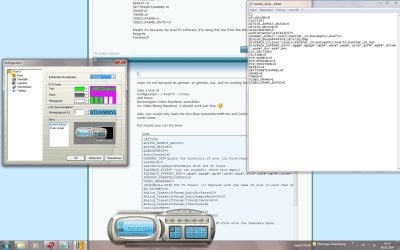
btw: I'm using the 64 bit Vers. of Win 7, hope that wont make a great difference in our case.
I'll try your .ini file (with some changes) tomorrow, now I'm going to have some sleep :-D
Regards
Panther24
 

Attachments

  • My_AverTV_Screen.jpg
    My_AverTV_Screen.jpg
    169.3 KB · Views: 620

My Computer My Computer

OS
Win 7
the channel-list would normaly be located in the same directory as the ini-file.
also, it seems like you are using an older version of avertv. try the 6.18-version (the newest one on their website - but not the hungarian one).

furthermore, you should open the installer-file as it comes from avertv with winrar or something and extract the driver-folder in it to then run the vista-x64-installer seperately if the card is not recognised - which seems to be the case for you.
once the drivers for the card work properly - you can check that by having a look on the tray-icon from the remote, if its yellow, the card is working properly, if its gray, the card is not recognised and you should try reinstalling the drivers.

so all together: try the 6.18-version of AverTV, run the driver-instaler from the file if the card did not get recognised after instalation of 6.18 and then tweak the ini-file - but before tweaking, you can try a channel-search, shouldnt do harm and you would get a complete ini-file to tweak. ;)

and once you did those tweaks and video is still gray, change it on the location mentioned before to Video Mixing Renderer. ;)
 

My Computer My Computer

OS
Windows 7
CPU
Core2Quad q9450
Motherboard
Gigabyte EP45 Extreme
Memory
4 GB Corsair Dominator
Graphics Card(s)
GTX 280
Sound Card
Onboard Realtek
Monitor(s) Displays
Primary: HP w2207h (22"); Secondary: LG Flatron L1710B (17")
Screen Resolution
Primary: 1680x1050; Secondary: 1280x1024
Hard Drives
2x Samsung 500GB, 115GB in RAID1, remaining in RAID0, OS on RAID0 (very silent)
1x WD something, 200GB, noisy.
PSU
750W PC Power and Cooling Silencer
Case
Some no-name Case
Cooling
Water-Cooled everything, plus 9 fans on 5V
Keyboard
Razer Lycosa
Mouse
Razer Lachesis
Internet Speed
dsl 8000+
Hey Locotus,
my problem up to date:
- I got a prob to deinstall vers 6.0.7 so I just keep it, it isn't working that bad :huh: (but I still cant choose Video Renderer)
- I found (at least) a driver (winUpdate) working, now card was found but the screen is grey
- I started a channel search, so I got a great channel file :D
- I'm still experimenting with the tweaking stuff, but actually didn't found a working solution: Nor the two lines contrast and saturation nor your .ini file (with my pathes etc) is working... :( maybe it's because I got a [AVerMedia M135-A PCI Analog]?? :sarc:
I'll continue trying this evening, but if you have an idea what exactly the prob is, I would be really full of grace.
Regards
Panther24
 

My Computer My Computer

OS
Win 7
did you tried to just install the newest version over? i think the older versions gave me some errors, too, when trying to uninstall the drivers. so just try that.

if nothing helps, you could still try to reinstall seven and then start with the 6.18-version of avertv. ;)
other than that i have no idea what could help. of course you could wait until seven is released since avermedia somewhen asured me that they will bring out out-of-the-box-working versions of avertv when seven will officially be released.
or you could get another card, but that probably wouldnt be an option.

(btw, weird fact, avertv is showing of some cards on their pages that state themselves as "seven-ready" yet on the other side, they did not manage to bring out a working version of avertv for endusers of other cards. :rolleyes:)
 

My Computer My Computer

OS
Windows 7
CPU
Core2Quad q9450
Motherboard
Gigabyte EP45 Extreme
Memory
4 GB Corsair Dominator
Graphics Card(s)
GTX 280
Sound Card
Onboard Realtek
Monitor(s) Displays
Primary: HP w2207h (22"); Secondary: LG Flatron L1710B (17")
Screen Resolution
Primary: 1680x1050; Secondary: 1280x1024
Hard Drives
2x Samsung 500GB, 115GB in RAID1, remaining in RAID0, OS on RAID0 (very silent)
1x WD something, 200GB, noisy.
PSU
750W PC Power and Cooling Silencer
Case
Some no-name Case
Cooling
Water-Cooled everything, plus 9 fans on 5V
Keyboard
Razer Lycosa
Mouse
Razer Lachesis
Internet Speed
dsl 8000+
Back
Top