alt f4 not working

yueheng89

New member
Local time
10:53 PM
Messages
3
Hi,
I just bought my hp pavillion dm4 laptop with windows 7
my previous laptop is windows xp.
i realise that my alt f4 shortcut is not working, by pressing alt f4, it does not close program like it could in windows xp.
how can i get it to work again?

thank you in advance.

regards,
yueheng
 

My Computer My Computer

At a glance

windows 7intel core i52gb ram
Computer Manufacturer/Model Number
hp pavillion dm4
OS
windows 7
CPU
intel core i5
Memory
2gb ram
Do the following and post a screen shot please.

start>run> type mskey
opens up a microsoft keyboard diagnostics, which show the input keys settings
 

My Computer My Computer

At a glance

Vista 64 Ultimate, Windows 7 64 Ultimate, Ubu...i7 975 3.3 GHz Extreme (Factory OC'd to 3.6 GHz)18 Gb Tri-Channel 1066ATI 5970 2048 Mb
Computer Manufacturer/Model Number
DELL XPS Studio 435T
OS
Vista 64 Ultimate, Windows 7 64 Ultimate, Ubuntu 9.10
CPU
i7 975 3.3 GHz Extreme (Factory OC'd to 3.6 GHz)
Motherboard
DELL provided
Memory
18 Gb Tri-Channel 1066
Graphics Card(s)
ATI 5970 2048 Mb
Sound Card
X-Fi Extreme Gamer
Monitor(s) Displays
Vizio 37" HD-TV
Screen Resolution
1920 x 1080
Hard Drives
1.5 Tb HDD
1.5 Tb HDD
2.0 Tb Network Drive
512 Gb Crucial SSD
PSU
DELL Provided 475 watts
Case
DELL
Cooling
3 fans
Keyboard
Logitech Performance K350 Wireless
Mouse
Logitech Performance MX Wireless
Internet Speed
3 Mb up 750 Kb down
Other Info
Bamboo Fun Tablet, Belkin N+ Wireless router, Pioneer Dolby System Wireless Headphones, Bose 5.1 Dolby Surround Sound System, LifeCam VX 3000 Webcam, Blu-Ray/Hi Def DVD +RW combo and Blu-ray +RW,l 15 in 1 media card reader, Logitech Rumblepad 2, Hauppauge 2250 DTV Tuner with MS Media Center Remote

Laptop:Alienware M17x, Q9100 CPU, 8Gb RAM, 1920x1200 WUXGA LCD driven by 4870's in CrossFireX, Bl
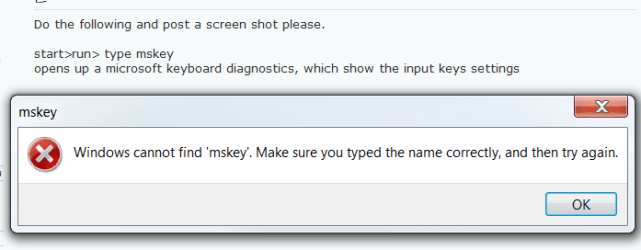
Do the following and post a screen shot please.

start>run> type mskey
opens up a microsoft keyboard diagnostics, which show the input keys settings

When I put that in "Run" I get this.

click image to enlarge
mskey.PNG
 

My Computer My Computer

At a glance

W 7 64-bit UltimateIntel Q9550 Yorkfield8GB Dominator 8500C5DATI : XFX 5870
Computer Manufacturer/Model Number
* BFK Customs *
OS
W 7 64-bit Ultimate
CPU
Intel Q9550 Yorkfield
Motherboard
ASUS P5Q Pro
Memory
8GB Dominator 8500C5D
Graphics Card(s)
ATI : XFX 5870
Sound Card
Realtek HD Audio 7-1
Monitor(s) Displays
1x 47" LCD HDMI & 3x 26" LCD HDMI
Screen Resolution
1920x1080P & 1920x1200
Hard Drives
1x 80GB Intel X25-M G2 SSD : 1x 500GB & 1x 640GB WD Caviar Black(s)
PSU
Corsair 620HX
Case
Cooler Master RC-690
Cooling
Tuniq Tower 120, 2x 140mm and 3x 120mm case fans
Keyboard
Microsoft 500
Mouse
Razer Diamondback 3G
Internet Speed
14 Mb/s
Other Info
1x Koutech 3Gb/s SATA HDD Hot Swap Rack
Im using a HP netbook so i think what caused your problem.
You should hold 'fn' key so that F1 to F12 will work like it does as usual.
 

My Computer My Computer

At a glance

Windows 7 Ultimate 64bitIntel i5 750 2.66Ghz4GB Corsair Dominator 1600mhzSapphire 5770 Ati Radeon
OS
Windows 7 Ultimate 64bit
CPU
Intel i5 750 2.66Ghz
Motherboard
Gigabyte P55A-UD3P
Memory
4GB Corsair Dominator 1600mhz
Graphics Card(s)
Sapphire 5770 Ati Radeon
Monitor(s) Displays
BenQ 22''
Screen Resolution
1920x1080
Hard Drives
Western Digital 1TB Caviar Black
Case
Cooler Master
Keyboard
Normal
Mouse
Logitech MX518
BFK
The solution offered only applies to these keyboards;
  • Microsoft Wireless Laser Desktop 7000
  • Microsoft Comfort Curve Keyboard 2000
  • Microsoft Digital Media Pro Keyboard
  • Microsoft Internet Keyboard
  • Microsoft Internet Keyboard Pro
  • Microsoft IntelliType Pro 1.0
  • Microsoft IntelliType Pro 5.1
  • Microsoft IntelliType Pro 6.1
  • Microsoft IntelliType Pro 6.0
  • Microsoft IntelliType Pro 5.5
  • Microsoft IntelliType Pro 5.4
  • Microsoft IntelliType Pro 5.3
  • Microsoft IntelliType Pro 5.2
  • Microsoft MultiMedia Keyboard
  • Microsoft Natural Keyboard Elite
  • Microsoft Natural Keyboard
  • Microsoft Natural Keyboard Pro
  • Microsoft Natural MultiMedia Keyboard
  • Microsoft Natural Ergonomic Keyboard 4000
  • Microsoft Office Keyboard
  • Microsoft Optical Desktop Elite for Bluetooth
  • Microsoft Windows XP Home Edition
  • Microsoft Windows XP Professional
  • Microsoft Reclusa
  • Microsoft Sidewinder X6 Keyboard
  • Microsoft Wired Desktop 600
  • Microsoft Wired Keyboard 500
 

My Computer My Computer

At a glance

Microsoft Windows 7 Home Premium 64-bit 7601 ...Intel(R) Core(TM) i7-3770 CPU @ 3.40GHz8.00 GBIntel(R) HD Graphics 4000
Computer type
PC/Desktop
OS
Microsoft Windows 7 Home Premium 64-bit 7601 Multiprocessor Free Service Pack 1
CPU
Intel(R) Core(TM) i7-3770 CPU @ 3.40GHz
Motherboard
ASUSTeK COMPUTER INC. P8H77-M
Memory
8.00 GB
Graphics Card(s)
Intel(R) HD Graphics 4000
Sound Card
On Board
Monitor(s) Displays
Dell 24"
Screen Resolution
1920 x 1080
Hard Drives
(1) INTEL SSDSC2CT180A3 ATA Device (2) ST500DM002-1BD142 ATA Device (3) WDC WD3200AAKS-75L9A0 ATA Device (4) Generic- Compact Flash USB Device (5) Generic- MS/MS-Pro USB Device (6) Generic- SD/MMC USB Device (7) Generic- SM/xD-Picture USB
PSU
500w Corsair
Case
Cooler Master
Cooling
3 Fans
Keyboard
Logitech MK300
Mouse
Logitech WOM
Internet Speed
75Mb
Antivirus
Norton 360
Browser
Firefox, Opera, IE
Do the following and post a screen shot please.

start>run> type mskey
opens up a microsoft keyboard diagnostics, which show the input keys settings

When I put that in "Run" I get this.
click image to enlarge
View attachment 78434

Oops, this used to be part of MS Windows and I used it in XP and after you posted I tried it on my M17x and you are correct BFK, sorry about that.

Seems Microsoft began bundling it with their Intellipoint Keyboard and Mouse Software and stripped it from Windows.

I went to the Intellipoint site and downloaded Intellipoint 7 for a Multimedia Keyboard which is what my M17x has only it's Alienware and not Microsofts but it runs correctly and shows what key is being pressed which is what it did as I remembered and was how we tested keyboards in the past.

Software can be downloaded at Software Download

You need to choose keyboard, type of keyboard layout, OS and 32 or 64 and the language, once loaded my instructions will work, sorry for the confusion.
 

My Computer My Computer

At a glance

Vista 64 Ultimate, Windows 7 64 Ultimate, Ubu...i7 975 3.3 GHz Extreme (Factory OC'd to 3.6 GHz)18 Gb Tri-Channel 1066ATI 5970 2048 Mb
Computer Manufacturer/Model Number
DELL XPS Studio 435T
OS
Vista 64 Ultimate, Windows 7 64 Ultimate, Ubuntu 9.10
CPU
i7 975 3.3 GHz Extreme (Factory OC'd to 3.6 GHz)
Motherboard
DELL provided
Memory
18 Gb Tri-Channel 1066
Graphics Card(s)
ATI 5970 2048 Mb
Sound Card
X-Fi Extreme Gamer
Monitor(s) Displays
Vizio 37" HD-TV
Screen Resolution
1920 x 1080
Hard Drives
1.5 Tb HDD
1.5 Tb HDD
2.0 Tb Network Drive
512 Gb Crucial SSD
PSU
DELL Provided 475 watts
Case
DELL
Cooling
3 fans
Keyboard
Logitech Performance K350 Wireless
Mouse
Logitech Performance MX Wireless
Internet Speed
3 Mb up 750 Kb down
Other Info
Bamboo Fun Tablet, Belkin N+ Wireless router, Pioneer Dolby System Wireless Headphones, Bose 5.1 Dolby Surround Sound System, LifeCam VX 3000 Webcam, Blu-Ray/Hi Def DVD +RW combo and Blu-ray +RW,l 15 in 1 media card reader, Logitech Rumblepad 2, Hauppauge 2250 DTV Tuner with MS Media Center Remote

Laptop:Alienware M17x, Q9100 CPU, 8Gb RAM, 1920x1200 WUXGA LCD driven by 4870's in CrossFireX, Bl
BFK


The solution offered only applies to these keyboards;
  • Microsoft Wireless Laser Desktop 7000
  • Microsoft Comfort Curve Keyboard 2000
  • Microsoft Digital Media Pro Keyboard
  • Microsoft Internet Keyboard
  • Microsoft Internet Keyboard Pro
  • Microsoft IntelliType Pro 1.0
  • Microsoft IntelliType Pro 5.1
  • Microsoft IntelliType Pro 6.1
  • Microsoft IntelliType Pro 6.0
  • Microsoft IntelliType Pro 5.5
  • Microsoft IntelliType Pro 5.4
  • Microsoft IntelliType Pro 5.3
  • Microsoft IntelliType Pro 5.2
  • Microsoft MultiMedia Keyboard
  • Microsoft Natural Keyboard Elite
  • Microsoft Natural Keyboard
  • Microsoft Natural Keyboard Pro
  • Microsoft Natural MultiMedia Keyboard
  • Microsoft Natural Ergonomic Keyboard 4000
  • Microsoft Office Keyboard
  • Microsoft Optical Desktop Elite for Bluetooth
  • Microsoft Windows XP Home Edition
  • Microsoft Windows XP Professional
  • Microsoft Reclusa
  • Microsoft Sidewinder X6 Keyboard
  • Microsoft Wired Desktop 600
  • Microsoft Wired Keyboard 500


This is the one I use. ;)
 

My Computer My Computer

At a glance

W 7 64-bit UltimateIntel Q9550 Yorkfield8GB Dominator 8500C5DATI : XFX 5870
Computer Manufacturer/Model Number
* BFK Customs *
OS
W 7 64-bit Ultimate
CPU
Intel Q9550 Yorkfield
Motherboard
ASUS P5Q Pro
Memory
8GB Dominator 8500C5D
Graphics Card(s)
ATI : XFX 5870
Sound Card
Realtek HD Audio 7-1
Monitor(s) Displays
1x 47" LCD HDMI & 3x 26" LCD HDMI
Screen Resolution
1920x1080P & 1920x1200
Hard Drives
1x 80GB Intel X25-M G2 SSD : 1x 500GB & 1x 640GB WD Caviar Black(s)
PSU
Corsair 620HX
Case
Cooler Master RC-690
Cooling
Tuniq Tower 120, 2x 140mm and 3x 120mm case fans
Keyboard
Microsoft 500
Mouse
Razer Diamondback 3G
Internet Speed
14 Mb/s
Other Info
1x Koutech 3Gb/s SATA HDD Hot Swap Rack

My Computer My Computer

At a glance

Microsoft Windows 7 Home Premium 64-bit 7601 ...Intel(R) Core(TM) i7-3770 CPU @ 3.40GHz8.00 GBIntel(R) HD Graphics 4000
Computer type
PC/Desktop
OS
Microsoft Windows 7 Home Premium 64-bit 7601 Multiprocessor Free Service Pack 1
CPU
Intel(R) Core(TM) i7-3770 CPU @ 3.40GHz
Motherboard
ASUSTeK COMPUTER INC. P8H77-M
Memory
8.00 GB
Graphics Card(s)
Intel(R) HD Graphics 4000
Sound Card
On Board
Monitor(s) Displays
Dell 24"
Screen Resolution
1920 x 1080
Hard Drives
(1) INTEL SSDSC2CT180A3 ATA Device (2) ST500DM002-1BD142 ATA Device (3) WDC WD3200AAKS-75L9A0 ATA Device (4) Generic- Compact Flash USB Device (5) Generic- MS/MS-Pro USB Device (6) Generic- SD/MMC USB Device (7) Generic- SM/xD-Picture USB
PSU
500w Corsair
Case
Cooler Master
Cooling
3 Fans
Keyboard
Logitech MK300
Mouse
Logitech WOM
Internet Speed
75Mb
Antivirus
Norton 360
Browser
Firefox, Opera, IE
Do the following and post a screen shot please.

start>run> type mskey
opens up a microsoft keyboard diagnostics, which show the input keys settings

When I put that in "Run" I get this.
click image to enlarge
View attachment 78434

Oops, this used to be part of MS Windows and I used it in XP and after you posted I tried it on my M17x and you are correct BFK, sorry about that.

Seems Microsoft began bundling it with their Intellipoint Keyboard and Mouse Software and stripped it from Windows.

I went to the Intellipoint site and downloaded Intellipoint 7 for a Multimedia Keyboard which is what my M17x has only it's Alienware and not Microsofts but it runs correctly and shows what key is being pressed which is what it did as I remembered and was how we tested keyboards in the past.

Software can be downloaded at Software Download

You need to choose keyboard, type of keyboard layout, OS and 32 or 64 and the language, once loaded my instructions will work, sorry for the confusion.


That's OK mate, it's been explained above.
 

My Computer My Computer

At a glance

W 7 64-bit UltimateIntel Q9550 Yorkfield8GB Dominator 8500C5DATI : XFX 5870
Computer Manufacturer/Model Number
* BFK Customs *
OS
W 7 64-bit Ultimate
CPU
Intel Q9550 Yorkfield
Motherboard
ASUS P5Q Pro
Memory
8GB Dominator 8500C5D
Graphics Card(s)
ATI : XFX 5870
Sound Card
Realtek HD Audio 7-1
Monitor(s) Displays
1x 47" LCD HDMI & 3x 26" LCD HDMI
Screen Resolution
1920x1080P & 1920x1200
Hard Drives
1x 80GB Intel X25-M G2 SSD : 1x 500GB & 1x 640GB WD Caviar Black(s)
PSU
Corsair 620HX
Case
Cooler Master RC-690
Cooling
Tuniq Tower 120, 2x 140mm and 3x 120mm case fans
Keyboard
Microsoft 500
Mouse
Razer Diamondback 3G
Internet Speed
14 Mb/s
Other Info
1x Koutech 3Gb/s SATA HDD Hot Swap Rack
Im using a HP netbook so i think what caused your problem.
You should hold 'fn' key so that F1 to F12 will work like it does as usual.

hi,
i now can use alt f4 by pressing fn + alt + f4
so is this what is suppose to be like in windows 7 or is there a problem with my com.

thank you and regards,
yueheng
 

My Computer My Computer

At a glance

windows 7intel core i52gb ram
Computer Manufacturer/Model Number
hp pavillion dm4
OS
windows 7
CPU
intel core i5
Memory
2gb ram
there is no problem. Im guessing that F4 has another function? like media controls for instance? there isn't a problem here its just the way HP has mapped your keys
 

My Computer My Computer

At a glance

Windows 10 Pro x64Intel Core i5 7400 @ 3.00GHz8GB 2133Mhz DDR4 (OEM supplied)Gygabyte Windforce GTX 1050Ti (Factory Overcl...
Computer type
PC/Desktop
Computer Manufacturer/Model Number
Medion Erazer (note to self: insert model number) - with custom additions
OS
Windows 10 Pro x64
CPU
Intel Core i5 7400 @ 3.00GHz
Motherboard
OEM supllied with PC
Memory
8GB 2133Mhz DDR4 (OEM supplied)
Graphics Card(s)
Gygabyte Windforce GTX 1050Ti (Factory Overclocked)
Sound Card
Realtek
Monitor(s) Displays
Acer Al1980 + HKC
Screen Resolution
1360*768(HKC) / 1280*1024(Acer)
Hard Drives
1TB Toshiba
1TB WD Caviar Green
120GB Samsung Evo 840
PSU
OEM supplied (no power rating on case)
Case
OEM Supplied
Cooling
Stock
Keyboard
Logitech Wireless
Mouse
Logitect Wireless
Internet Speed
40Mb/s Down 10Mb/s Up
Antivirus
Defender
Browser
Firefox
hi, thank you all for your hep, i will just use fn alt and f4 to close things for now.
 

My Computer My Computer

At a glance

windows 7intel core i52gb ram
Computer Manufacturer/Model Number
hp pavillion dm4
OS
windows 7
CPU
intel core i5
Memory
2gb ram
Hello again.


We're glad you found a solution that works for you!
 

My Computer My Computer

At a glance

W 7 64-bit UltimateIntel Q9550 Yorkfield8GB Dominator 8500C5DATI : XFX 5870
Computer Manufacturer/Model Number
* BFK Customs *
OS
W 7 64-bit Ultimate
CPU
Intel Q9550 Yorkfield
Motherboard
ASUS P5Q Pro
Memory
8GB Dominator 8500C5D
Graphics Card(s)
ATI : XFX 5870
Sound Card
Realtek HD Audio 7-1
Monitor(s) Displays
1x 47" LCD HDMI & 3x 26" LCD HDMI
Screen Resolution
1920x1080P & 1920x1200
Hard Drives
1x 80GB Intel X25-M G2 SSD : 1x 500GB & 1x 640GB WD Caviar Black(s)
PSU
Corsair 620HX
Case
Cooler Master RC-690
Cooling
Tuniq Tower 120, 2x 140mm and 3x 120mm case fans
Keyboard
Microsoft 500
Mouse
Razer Diamondback 3G
Internet Speed
14 Mb/s
Other Info
1x Koutech 3Gb/s SATA HDD Hot Swap Rack
i just pulled my new dm4 out of the box and i am having the exact same alt-f4 issue. unfortunately for me, the fn-alt-f4 workaround is unacceptable to me as a permanent solution. if there is a way to make this $2k machine work the way that it is supposed to i would be greatly appreciative.
 

My Computer My Computer

At a glance

windows 7
OS
windows 7
Fix

F10 to go to bios

Look for 'action keys'

default is enabled, you want these disabled to restore the original functionality (eg. Alt-F4 closes window, etc.)
 

My Computer My Computer

At a glance

windows 7
OS
windows 7
thanks again for the reply.

the bios tweak fixes the altF4 issue, but also disables the media keys, which i do find useful. in linux there is a way to configure keys so that they do whatever you want. i know that its possible in windows, its just a matter of figuring out how. if anyone smarter than me can figure it out, i would appreciate being in the loop.

cheers
 

My Computer My Computer

At a glance

windows 7
OS
windows 7
found an actual real fix to this issue

finally, after weeks of searching i stumbled across SharpKeys, a 3rd party application that allowed me to remap my F4 key to its original function without having to disable the handy media key functions.

i am posting this solution here so the next person that stumbles along with this issue will not have to make due with a partial fix

SharpKeys
 

My Computer My Computer

At a glance

windows 7
OS
windows 7
finally, after weeks of searching i stumbled across SharpKeys, a 3rd party application that allowed me to remap my F4 key to its original function without having to disable the handy media key functions.

i am posting this solution here so the next person that stumbles along with this issue will not have to make due with a partial fix

SharpKeys


Hello mss31.

Thanks for the info!
 

My Computer My Computer

At a glance

W 7 64-bit UltimateIntel Q9550 Yorkfield8GB Dominator 8500C5DATI : XFX 5870
Computer Manufacturer/Model Number
* BFK Customs *
OS
W 7 64-bit Ultimate
CPU
Intel Q9550 Yorkfield
Motherboard
ASUS P5Q Pro
Memory
8GB Dominator 8500C5D
Graphics Card(s)
ATI : XFX 5870
Sound Card
Realtek HD Audio 7-1
Monitor(s) Displays
1x 47" LCD HDMI & 3x 26" LCD HDMI
Screen Resolution
1920x1080P & 1920x1200
Hard Drives
1x 80GB Intel X25-M G2 SSD : 1x 500GB & 1x 640GB WD Caviar Black(s)
PSU
Corsair 620HX
Case
Cooler Master RC-690
Cooling
Tuniq Tower 120, 2x 140mm and 3x 120mm case fans
Keyboard
Microsoft 500
Mouse
Razer Diamondback 3G
Internet Speed
14 Mb/s
Other Info
1x Koutech 3Gb/s SATA HDD Hot Swap Rack
On some keyboards that I have used, there is a key combination to toggle the action of the function keys rather than have to resort to BiOS changes, I know it was present on the last Logitec units I used.

There may be a similar function lock option on these keyboards
 

My Computers My Computers

  • At a glance

    Windows 11 Pro x64 [Latest Release and Releas...Ryzen 9 5950X, 3.8 - 5.2 MHz64GB [2 x 32GB] DDR4 3200MHz4GB NVIDIA GEFORCE GTX 1650 Ti
    Computer type
    PC/Desktop
    Computer Manufacturer/Model Number
    ChillBlast - Custom to my design
    OS
    Windows 11 Pro x64 [Latest Release and Release Preview]
    CPU
    Ryzen 9 5950X, 3.8 - 5.2 MHz
    Motherboard
    Asus Prime X570-Pro
    Memory
    64GB [2 x 32GB] DDR4 3200MHz
    Graphics Card(s)
    4GB NVIDIA GEFORCE GTX 1650 Ti
    Sound Card
    On-board SPDIF to 5.1 System + HDMI [5.1 system]
    Monitor(s) Displays
    32" UHD 32 Bit HDR Monitor + 43" UHD 4K 32Bit HDR TV
    Screen Resolution
    2 x 3840 x 2160 @60Hz
    Hard Drives
    1TB M2 SSD OS, 500GB Fast Access SSD, 2 x 8TB Data + Various Externals from 1TB to 4TB, 10TB NAS
    PSU
    NZXT C750 80 PLUS Gold 750W Modular PSU
    Case
    Workstation Case [Matt Black]
    Cooling
    NZXT Kraken X63 280mm CPU Cooler +2x Quiet Case fans
    Keyboard
    Logitech Wireless MX Keys & K400 + others
    Mouse
    Logitech Wireless MX Master 3S
    Internet Speed
    920 MB Down 50 MB Up
    Antivirus
    BitDefender Total Security Pro
    Browser
    Chrome (always run latest Non-Beta)
    Other Info
    Also run ...
    Laptop - Quad 8GB - Windows 10 Pro x64
    Nexus 7 Android tablet x2
    Samsung 10.2" tablet
    Blackview TAB 8 4G Android Tablet c/w Keyboard
    Wacom Intuos Pro Medium Pen Pad
    Wacom Intuos Pro Small Pen Pad
    Wacom Expresskeys Remote
    Loopdeck+ Graphics Controller
    Shuttle Pro v2 Control
  • At a glance

    Windows 11 Pro x64 Latest RPIntel I7 10750H 5.0GHz32GB [2x16GB] DDR4 2933 MHznVidia GTX1650Ti 4 GB GDDR6
    Computer type
    Laptop
    System Manufacturer/Model Number
    Dell XPS 17 10750H
    OS
    Windows 11 Pro x64 Latest RP
    CPU
    Intel I7 10750H 5.0GHz
    Motherboard
    Dell XPS
    Memory
    32GB [2x16GB] DDR4 2933 MHz
    Graphics Card(s)
    nVidia GTX1650Ti 4 GB GDDR6
    Sound Card
    Stock [Realtek] 4 Speaker
    Monitor(s) Displays
    17" IPS UHD+ Infinity Edge Touchscreen
    Screen Resolution
    3840 x 2400
    Hard Drives
    2TB M2 NVMe, 4TB External + various 500GB & 1TB External NVMe (also have access to spinner HDD from
    PSU
    Stock
    Case
    Stock XPS Aluminium & Carbon Fibre
    Cooling
    Stock - Active Fan Control
    Keyboard
    Backlit + Various Logitech
    Mouse
    Stock Track Pad + Logitech MX Trackball
    Internet Speed
    72 MB Down 18MB Up
    Browser
    Chrome
    Other Info
    Also run ...
    Laptop - Quad 8GB - Windows 10 Pro x64
    Nexus 7 Android tablet x2
    10.2" tablet
    Sony Z3 Android Smartphone
    Wacom Intuos Pro Medium Pen Pad
    Wacom Intuos Pro Small Pen Pad
    Wacom Expresskeys Remote
    Loopdeck+ Graphics Controller
    Shuttle Pro v2 Control Pad
    10TB NAS
My Microsoft Wired Keyboard 500 worked OK with W7 Pro 64-bit on another system that was stolen. Now on a new system with no PS2 port (using an adapter) it's just plain weird... Check its hot keys results:

Icon = result
E-mail = nothing
Home = m
Folder = nothing
Play/stop = g
Volume + = b
Volume - = c
Volume off = d
Meida player = nothing
Computer icon = nothing
Calculator = f

Like with my daughter's Acer notebook, I have to use key combinations to type some characters:

Right Alt + Crtl + W = ?
Right Alt + Crtl + Q = /

I don't know if there are other combinations.

I installed Microsoft IntelliType Pro 7.1, but TNA.

Please help me!
- - --
UPDATE

Looks like the problem is that some of MS' keyboards don't work with adapters. I tested mine on another PC with and without the adapter, and it worked OK only in the latter case.
 
Last edited:

My Computer My Computer

At a glance

Windows 7
OS
Windows 7
Back
Top