Icons are changed but i dont see any results

Acidi Borici

New member
Local time
4:32 AM
Messages
10
Hello. I have some problems with changing icons so i will post here step by step whats going on.
Win7 Ultimate 64x
I opened IMAGERES.DLL from SYSTEM32 folder with IconFX and with Restorator.
I find icon number via IconFX and i change icon with Restorator.
On this way i changed many icons ( hdd, my comp, desktop etc etc )
After finishing, i save edited IMAGERES.DLL on safe place.
I went to SYSTEM32 folder, "take ownership" on IMAGERES.DLL and renamed it to some default name.
Back to safe place and copy paste modified IMAGERES.DLL to SYSTEM32.
After that i delete IconCache.db manually and cleaned Thumbnails with "Disk cleanup" tool.
I rebooted PC but there is no any change. All icons are Windows default.
I opened IMAGERES.DLL from SYSTEM32 with IconFX to be sure that file is moded one and it was, i see all changes and new icons.
One more time i cleaned iconcache and thumbnail but without luck.
Next step was to open SHELL32.DLL from SYSTE32 and to repeat all steps like in IMAGERES.DLL.
After icon change, i cleared iconcache, thumbnails, rebooted but nothing happend. There is no any single change with Icons.
I checked one more time IMAGERES and SHELL dll`s from SYSTEM32 folder with IcoFX and both files are moded fine, i see new icons.
One important thing - When i want to open IMAGERES or SHELL32 DLL files with IcoFX, in drop down menu of IcoFX i see NEW icons !?!?1
But when i check icons "via" Win, there is no any single change, all icons are Win defaults!
Any idea wtf is going on and why i cant see any change with icons?
Sorry for my poor English, i will post some pics if it you want.
Thank you in advance, any help appreciated!
 

My Computer My Computer

At a glance

Win7 Ultimate x64
OS
Win7 Ultimate x64

My Computer My Computer

At a glance

Microsoft Windows 10 Pro Insider Preview 64-bitIntel(R) Core(TM) i3-4130 CPU @ 3.40GHzCorsair Vengence 4GB x2 (8.00GB Dual-Channel ...2047MB GeForce GTS 450 (ZOTAC International)
Computer type
PC/Desktop
Computer Manufacturer/Model Number
Self Assembled
OS
Microsoft Windows 10 Pro Insider Preview 64-bit
CPU
Intel(R) Core(TM) i3-4130 CPU @ 3.40GHz
Motherboard
Gigabyte Technology Co., Ltd. B85M-D3H
Memory
Corsair Vengence 4GB x2 (8.00GB Dual-Channel DDR3 @ 798MHz)
Graphics Card(s)
2047MB GeForce GTS 450 (ZOTAC International)
Sound Card
Onboard (Realtek High Definition Audio)
Monitor(s) Displays
LG Flatron E2040T
Screen Resolution
1600x900
Hard Drives
Western Digital 1 TB
Seagate 500 GB
PSU
Corsair VS550
Case
Cooler Master K380
Cooling
Cooler Master Seidon 120V Plus
Keyboard
Logitech MK260r
Mouse
Logitech MK260r
Internet Speed
PMPL Broadband
Antivirus
Windows Defender + MBAM
Browser
Firefox
Other Info
Dell Studio 15" Laptop
One important thing - When i want to open IMAGERES or SHELL32 DLL files with IcoFX, in drop down menu of IcoFX i see NEW icons !?!?1
I might be off here, since I haven't used Restorator in a few years, but I seem to remember that unlike Resource hacker, restorator doesn't replace resources but rather add new ones. What I did down then: add the new ressource, delete the old one, rename the new one to match the original name.

-DG
 

My Computer My Computer

At a glance

Windows 7 Ultimate x86DualCore AMD Athlon 64 X2, 2600 MHz 5200+Samsung 2GB DDR2Onboard NVIDIA GeForce 6150SE nForce 430
Computer Manufacturer/Model Number
HP m8000n
OS
Windows 7 Ultimate x86
CPU
DualCore AMD Athlon 64 X2, 2600 MHz 5200+
Motherboard
Asus M2N68-LA (Narra)
Memory
Samsung 2GB DDR2
Graphics Card(s)
Onboard NVIDIA GeForce 6150SE nForce 430
Sound Card
Onboard nVIDIA nForce 6100-430 (MCP61P)
Monitor(s) Displays
Westinghouse 19" LED
Screen Resolution
1280x1024
Hard Drives
SATA II Seagate Barracuda 500GB
USB II WD Elements 500GB
USB II WD My Book 1TB
USB II WD My Book 2TB
PSU
Stock (HP)
Case
Stock (HP)
Cooling
Stock
Keyboard
Logitech Classic KB 200
Mouse
Standard HP opticle USB mouse
One important thing - When i want to open IMAGERES or SHELL32 DLL files with IcoFX, in drop down menu of IcoFX i see NEW icons !?!?1
I might be off here, since I haven't used Restorator in a few years, but I seem to remember that unlike Resource hacker, restorator doesn't replace resources but rather add new ones. What I did down then: add the new ressource, delete the old one, rename the new one to match the original name.

-DG
Sorry havent notice that part earlier .... yes you can see the new icons there :)
 

Attachments

  • sshot-1.jpg
    sshot-1.jpg
    47.5 KB · Views: 12

My Computer My Computer

At a glance

Microsoft Windows 10 Pro Insider Preview 64-bitIntel(R) Core(TM) i3-4130 CPU @ 3.40GHzCorsair Vengence 4GB x2 (8.00GB Dual-Channel ...2047MB GeForce GTS 450 (ZOTAC International)
Computer type
PC/Desktop
Computer Manufacturer/Model Number
Self Assembled
OS
Microsoft Windows 10 Pro Insider Preview 64-bit
CPU
Intel(R) Core(TM) i3-4130 CPU @ 3.40GHz
Motherboard
Gigabyte Technology Co., Ltd. B85M-D3H
Memory
Corsair Vengence 4GB x2 (8.00GB Dual-Channel DDR3 @ 798MHz)
Graphics Card(s)
2047MB GeForce GTS 450 (ZOTAC International)
Sound Card
Onboard (Realtek High Definition Audio)
Monitor(s) Displays
LG Flatron E2040T
Screen Resolution
1600x900
Hard Drives
Western Digital 1 TB
Seagate 500 GB
PSU
Corsair VS550
Case
Cooler Master K380
Cooling
Cooler Master Seidon 120V Plus
Keyboard
Logitech MK260r
Mouse
Logitech MK260r
Internet Speed
PMPL Broadband
Antivirus
Windows Defender + MBAM
Browser
Firefox
Other Info
Dell Studio 15" Laptop
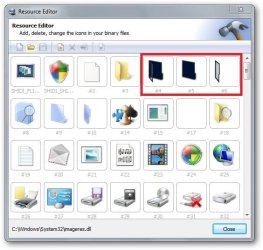
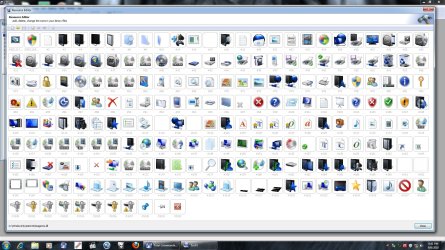
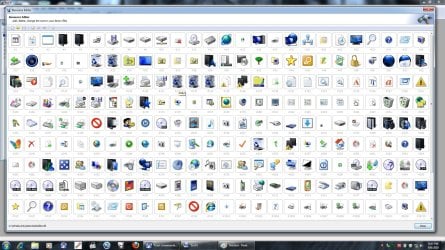
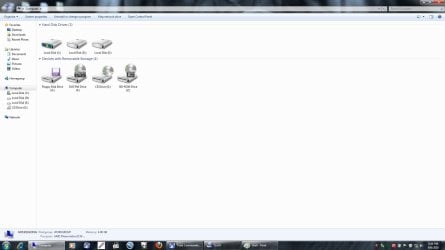
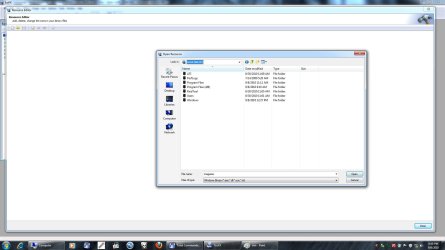
I checked IMAGERES and SHELL in Restorator and there is no new added icons, old ( default ) ones has been replaced with new icon pefrectly. You can see it in screens and you can also see changes are visible through some programs drop down menus.
I followed tut for rebuilding icon`s cache but no luck. Same situation after reboot! :mad:.
I really dont understand wtf is going on and why i cant see icons change.
Anybody have more ideas ?
Thank you
img.php
 

Attachments

  • imageres.jpg
    imageres.jpg
    307.4 KB · Views: 19
  • shell.jpg
    shell.jpg
    316.5 KB · Views: 11
  • win.jpg
    win.jpg
    75.1 KB · Views: 7
  • win2.jpg
    win2.jpg
    107.3 KB · Views: 9

My Computer My Computer

At a glance

Win7 Ultimate x64
OS
Win7 Ultimate x64
NAF is going on .... if rebuilding icon cache does not show the changes , why arenot you letting disk cleanup a go ?

It must work . It works every time for me .
 

My Computer My Computer

At a glance

Microsoft Windows 10 Pro Insider Preview 64-bitIntel(R) Core(TM) i3-4130 CPU @ 3.40GHzCorsair Vengence 4GB x2 (8.00GB Dual-Channel ...2047MB GeForce GTS 450 (ZOTAC International)
Computer type
PC/Desktop
Computer Manufacturer/Model Number
Self Assembled
OS
Microsoft Windows 10 Pro Insider Preview 64-bit
CPU
Intel(R) Core(TM) i3-4130 CPU @ 3.40GHz
Motherboard
Gigabyte Technology Co., Ltd. B85M-D3H
Memory
Corsair Vengence 4GB x2 (8.00GB Dual-Channel DDR3 @ 798MHz)
Graphics Card(s)
2047MB GeForce GTS 450 (ZOTAC International)
Sound Card
Onboard (Realtek High Definition Audio)
Monitor(s) Displays
LG Flatron E2040T
Screen Resolution
1600x900
Hard Drives
Western Digital 1 TB
Seagate 500 GB
PSU
Corsair VS550
Case
Cooler Master K380
Cooling
Cooler Master Seidon 120V Plus
Keyboard
Logitech MK260r
Mouse
Logitech MK260r
Internet Speed
PMPL Broadband
Antivirus
Windows Defender + MBAM
Browser
Firefox
Other Info
Dell Studio 15" Laptop
Icon Cache has been deleted several times, Disk Clean Up has running several times, imageres and shell files has been checketo to be sure they have new icons, everything is correct and fine but i dont see any change! :mad:
Same old boring default Win7 icons!
For god sake, i`m feeling like a HUGE IDIOT!
I work everything very carefully but there is no any single result!
Any more ideas?
 

My Computer My Computer

At a glance

Win7 Ultimate x64
OS
Win7 Ultimate x64
Gont get upset, pal !! It should work within this time . Those are the usual ways to make those things effect.

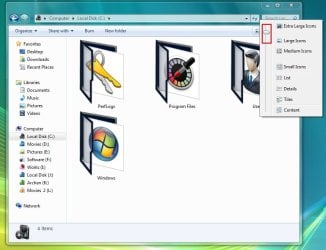
A bifurcation you may try ... push the slider a bit up .
Untitled.jpg

If still not working, make a new folder in a folder and see if the parent folder changes it looks or not . If not, there is something wrong in your process.
 

My Computer My Computer

At a glance

Microsoft Windows 10 Pro Insider Preview 64-bitIntel(R) Core(TM) i3-4130 CPU @ 3.40GHzCorsair Vengence 4GB x2 (8.00GB Dual-Channel ...2047MB GeForce GTS 450 (ZOTAC International)
Computer type
PC/Desktop
Computer Manufacturer/Model Number
Self Assembled
OS
Microsoft Windows 10 Pro Insider Preview 64-bit
CPU
Intel(R) Core(TM) i3-4130 CPU @ 3.40GHz
Motherboard
Gigabyte Technology Co., Ltd. B85M-D3H
Memory
Corsair Vengence 4GB x2 (8.00GB Dual-Channel DDR3 @ 798MHz)
Graphics Card(s)
2047MB GeForce GTS 450 (ZOTAC International)
Sound Card
Onboard (Realtek High Definition Audio)
Monitor(s) Displays
LG Flatron E2040T
Screen Resolution
1600x900
Hard Drives
Western Digital 1 TB
Seagate 500 GB
PSU
Corsair VS550
Case
Cooler Master K380
Cooling
Cooler Master Seidon 120V Plus
Keyboard
Logitech MK260r
Mouse
Logitech MK260r
Internet Speed
PMPL Broadband
Antivirus
Windows Defender + MBAM
Browser
Firefox
Other Info
Dell Studio 15" Laptop
Nope. it doesnt help. :( Moving sliders doesnt help even making new folder in folder too. :(
This is how its done, step by step.
1.Disabled UAC
2.Imageres and Shell dll`s has been copy/paste at secure place ( desktop )
3.Original imageres and shell dll`s from System32 folder has been edited with Restorator.
4. Both files has been saved at secure place ( SAVE AS )
5. "Take ownership" has been applyed to both original imageres and shell dll`s and renamed to some default name.
6. Modified imageres and shell dll`s has been copy/paste from desktop to SYSTEM32 folder.
7. IconCache has been deleted
8. Thumbnails with Disk Clean has been deleted.
9. Restart.
Didi i miss something in process? I think everything is fine?
 

My Computer My Computer

At a glance

Win7 Ultimate x64
OS
Win7 Ultimate x64

My Computer My Computer

At a glance

Microsoft Windows 10 Pro Insider Preview 64-bitIntel(R) Core(TM) i3-4130 CPU @ 3.40GHzCorsair Vengence 4GB x2 (8.00GB Dual-Channel ...2047MB GeForce GTS 450 (ZOTAC International)
Computer type
PC/Desktop
Computer Manufacturer/Model Number
Self Assembled
OS
Microsoft Windows 10 Pro Insider Preview 64-bit
CPU
Intel(R) Core(TM) i3-4130 CPU @ 3.40GHz
Motherboard
Gigabyte Technology Co., Ltd. B85M-D3H
Memory
Corsair Vengence 4GB x2 (8.00GB Dual-Channel DDR3 @ 798MHz)
Graphics Card(s)
2047MB GeForce GTS 450 (ZOTAC International)
Sound Card
Onboard (Realtek High Definition Audio)
Monitor(s) Displays
LG Flatron E2040T
Screen Resolution
1600x900
Hard Drives
Western Digital 1 TB
Seagate 500 GB
PSU
Corsair VS550
Case
Cooler Master K380
Cooling
Cooler Master Seidon 120V Plus
Keyboard
Logitech MK260r
Mouse
Logitech MK260r
Internet Speed
PMPL Broadband
Antivirus
Windows Defender + MBAM
Browser
Firefox
Other Info
Dell Studio 15" Laptop
@ Acidi Borici : did you ever try to set the Folder size under View to medium?
I realized when my folders were set to "small" it wouldn't change here either.

Besides that: if I create a new folder and move movieclips into it, I have to go to customisation first before the new icon shows.

-DG
 

My Computer My Computer

At a glance

Windows 7 Ultimate x86DualCore AMD Athlon 64 X2, 2600 MHz 5200+Samsung 2GB DDR2Onboard NVIDIA GeForce 6150SE nForce 430
Computer Manufacturer/Model Number
HP m8000n
OS
Windows 7 Ultimate x86
CPU
DualCore AMD Athlon 64 X2, 2600 MHz 5200+
Motherboard
Asus M2N68-LA (Narra)
Memory
Samsung 2GB DDR2
Graphics Card(s)
Onboard NVIDIA GeForce 6150SE nForce 430
Sound Card
Onboard nVIDIA nForce 6100-430 (MCP61P)
Monitor(s) Displays
Westinghouse 19" LED
Screen Resolution
1280x1024
Hard Drives
SATA II Seagate Barracuda 500GB
USB II WD Elements 500GB
USB II WD My Book 1TB
USB II WD My Book 2TB
PSU
Stock (HP)
Case
Stock (HP)
Cooling
Stock
Keyboard
Logitech Classic KB 200
Mouse
Standard HP opticle USB mouse
Yea, i tried it too but no luck.
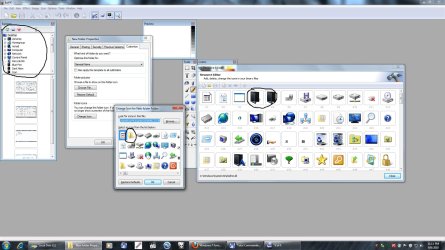
This is crazy! WHen i open imageres and shell in IcoFX, i see new ( custom ) icons BUT when i create new folder and go to customization i see default yellow icon and when i go to "change icon" all icons on list are default Windows one!
This is crazy and i`m really feels like a idiot.
For god sake this is just open file-edit-save-copy/paste operation!
I dont know, i really dont know what else should i do to make this damn thing to work!
I`m frustrated, i have spent couple of hours playing around with icons and didnt make anything! :mad:
 

Attachments

  • slika.jpg
    slika.jpg
    192.5 KB · Views: 16

My Computer My Computer

At a glance

Win7 Ultimate x64
OS
Win7 Ultimate x64
I quit.
Back to default icons.
GFY Win 7 and stupid icons!
I dont have time for this bullshit anymore.
Thx everybody in this thread.
 

My Computer My Computer

At a glance

Win7 Ultimate x64
OS
Win7 Ultimate x64
I quit.
Back to default icons.
GFY Win 7 and stupid icons!
I dont have time for this bullshit anymore.
Thx everybody in this thread.

Have another try . It is really possible to edit imageres.dll , and it takes effect , too !

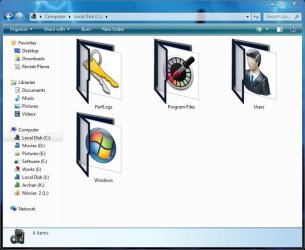
Had I been in place of you, I'd run the system file checker to have the defaults back, and had a second attempt . Acrually I do it off and on ... say 4 times in a week , one of my windows look like this
Capture.JPG

If you want to know, I follow the method similar to you, but I use reshacker .
 

My Computer My Computer

At a glance

Microsoft Windows 10 Pro Insider Preview 64-bitIntel(R) Core(TM) i3-4130 CPU @ 3.40GHzCorsair Vengence 4GB x2 (8.00GB Dual-Channel ...2047MB GeForce GTS 450 (ZOTAC International)
Computer type
PC/Desktop
Computer Manufacturer/Model Number
Self Assembled
OS
Microsoft Windows 10 Pro Insider Preview 64-bit
CPU
Intel(R) Core(TM) i3-4130 CPU @ 3.40GHz
Motherboard
Gigabyte Technology Co., Ltd. B85M-D3H
Memory
Corsair Vengence 4GB x2 (8.00GB Dual-Channel DDR3 @ 798MHz)
Graphics Card(s)
2047MB GeForce GTS 450 (ZOTAC International)
Sound Card
Onboard (Realtek High Definition Audio)
Monitor(s) Displays
LG Flatron E2040T
Screen Resolution
1600x900
Hard Drives
Western Digital 1 TB
Seagate 500 GB
PSU
Corsair VS550
Case
Cooler Master K380
Cooling
Cooler Master Seidon 120V Plus
Keyboard
Logitech MK260r
Mouse
Logitech MK260r
Internet Speed
PMPL Broadband
Antivirus
Windows Defender + MBAM
Browser
Firefox
Other Info
Dell Studio 15" Laptop
I also used reshacker (the last beta V3.5.2.84) even tho it gave me an Out of memory-error for every group I touched, it worked. (i didn't mess with the shell32.dll just with the imageres
To have the new icon show up I had to set the size in explorer\ view to anything bigger than "small".
But I understand the frustration. I would step back, take a deep breath, restore the defaults and take a fresh approach in a few days after getting "some distance". As the people in Germany say "The devil is in the details";)

-DG
 

My Computer My Computer

At a glance

Windows 7 Ultimate x86DualCore AMD Athlon 64 X2, 2600 MHz 5200+Samsung 2GB DDR2Onboard NVIDIA GeForce 6150SE nForce 430
Computer Manufacturer/Model Number
HP m8000n
OS
Windows 7 Ultimate x86
CPU
DualCore AMD Athlon 64 X2, 2600 MHz 5200+
Motherboard
Asus M2N68-LA (Narra)
Memory
Samsung 2GB DDR2
Graphics Card(s)
Onboard NVIDIA GeForce 6150SE nForce 430
Sound Card
Onboard nVIDIA nForce 6100-430 (MCP61P)
Monitor(s) Displays
Westinghouse 19" LED
Screen Resolution
1280x1024
Hard Drives
SATA II Seagate Barracuda 500GB
USB II WD Elements 500GB
USB II WD My Book 1TB
USB II WD My Book 2TB
PSU
Stock (HP)
Case
Stock (HP)
Cooling
Stock
Keyboard
Logitech Classic KB 200
Mouse
Standard HP opticle USB mouse
i see you are trying to use Mr grims icon pack which is available with an installer HERE
 

My Computer My Computer

At a glance

Microsoft Windows 7 Home Premium 64-bit 7600IIx4 amd athelon 635 processor2x2gbati radeon HD 5450
Computer Manufacturer/Model Number
Hewlett packard/p6512uk
OS
Microsoft Windows 7 Home Premium 64-bit 7600
CPU
IIx4 amd athelon 635 processor
Motherboard
FOXCONN 2AA9
Memory
2x2gb
Graphics Card(s)
ati radeon HD 5450
Sound Card
(1) Realtek High Definition Audio (2) AMD High Definition
Monitor(s) Displays
samsung lcd tv 32"
Screen Resolution
1360x 768
Hard Drives
(1) WDC WD10 01FAES-60Z2A0 SATA Disk Device (2) Maxtor OneTouch USB Device (3) ST310003 33AS USB Device (4) WD My Book 1111 USB Device
PSU
?
Cooling
air!
Keyboard
wireless hp
Mouse
wireless Hp,optical
Internet Speed
1.10mb/s
Antivirus
MSE
Browser
Firefox
Sorry for delay, i was without net couple of days
i see you are trying to use Mr grims icon pack which is available with an installer HERE
Yes, i want to use MrGriim`s icons and Alienware icons from same board.
I tried with installer - nothing
without instaler - nothing
tried with restorator/res hacker - nothing
When i open Total Commander i see changes - i see new icons for folders, hdd`s, everything but when i open Win Explorer - i see default win icons.
I realy dont have any more ideas wtf is going on.
 

My Computer My Computer

At a glance

Win7 Ultimate x64
OS
Win7 Ultimate x64
Mr Grim installer should work just fine but readme.txt says:

---
The files required for backing-up are as follows:
(32Bit)
x:\Windows\System32\imageres.dll
x:\Windows\System32\shell32.dll
x:\Windows\System32\imagesp1.dll

(64Bit)
x:\Windows\System32\imageres.dll
x:\Windows\System32\shell32.dll
x:\Windows\System32\imagesp1.dll
x:\Windows\SysWOW64\imageres.dll
x:\Windows\SysWOW64\shell32.dll
x:\Windows\SysWOW64\imagesp1.dll
---

I didn't tested this myself but I'd give it a try manually replacing resources in both folders...
 

My Computer My Computer

At a glance

windows 7
OS
windows 7
Back
Top