Convert FAT or FAT32 Volume to NTFS

How to Convert a FAT or FAT32 Volume to NTFS in Windows 7


   Information
This will show you how to convert a drive or partition volume with a FAT (FAT16) or FAT32 file system to a NTFS file system in Windows 7 without having to format the volume and lose your data on it.
   Note
Before you start to convert a FAT or FAT32 volume to NTFS, please consider the following limitations and requirements:
  • UDF and CDfs file systems are only used with optical media and cannot be converted to NTFS.
  • FAT12 is the only format used on floppy diskettes (as if these are used anymore ;)). This does not apply to a USB flash key though.
  • The conversion to NTFS is a one-way process. After you convert a drive or a partition to NTFS, you cannot convert it back to FAT or to FAT32 unless you format it again as FAT or FAT32.
  • The convert command requires that you have enough free space on the drive or on the partition that you want to convert to be able to convert it. If Convert.exe determines that there is not sufficient free space on the volume, it will not convert the volume.
  • If the files are being used on the volume that you are trying to convert, then you will be prompted with:
    "Convert cannot run because the volume is in use by another process. Convert may run if this volume is dismounted first. ALL OPENED HANDLES TO THIS VOLUME WOULD THEN BE INVALID. Would you like to force a dismount on this volume? <Y/N>"
    • Quit all the programs that are using the files on the drive, and then type Y at the command prompt to convert the drive to NTFS.
  • If the drive or partition volume that you are trying to convert is in use, then you will be prompted with:
    "Convert cannot gain exclusive access to the drive letter drive, so it cannot convert it now. Would you like to schedule it to be converted the next time the system restarts? <Y/N>"
    • To resolve this issue, type Y at the command prompt. The volume or drive will be converted to NTFS the next time that you restart the computer.
   Warning
Although the chance of corruption or data loss during the conversion is minimal, it is recommended that you backup any data that you do not want to lose on the volume that you want to convert before you start the conversion to be extra safe.

The only way to convert a NTFS disk back to a FAT or FAT32 disk is to format the disk.

Before you begin, note that the FAT32 file system has size limitations. In this version of Windows, you cannot create a FAT32 partition greater than 32 GB (32728 MB). In addition, you cannot store a file larger than 4 GB on a FAT32 partition. For more information, see Comparing NTFS and FAT file systems.


Here's How:
1. To Use a Elevated Command Prompt in Windows
A) Open an elevated command prompt.

B) Go to step 3.
2. To Use a Command Prompt at Boot
A) Open a command prompt at boot.

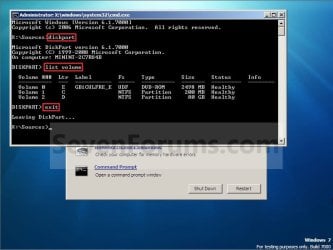
B) In the command prompt, type diskpart and press Enter. (see screenshot below)

C) In the command prompt, type list volume and press Enter. (see screenshot below)
NOTE: This will let you see what the drive letter is for the drive that you want to connvert since it may not always be the same drive letter that it is in Windows.

D) After making note of the drive letter, type exit and press Enter. (see screenshot below)
Command-1.jpg
E) Continue on to step 3 to convert the drive.
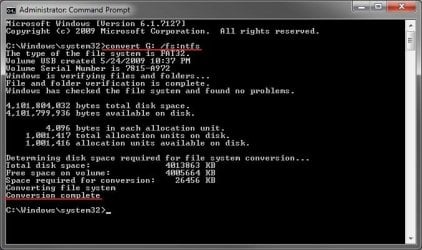
3. In the command prompt, type convert drive letter: /fs:ntfs and press Enter. (See screenshot below)
NOTE: Substitute drive letter for the drive letter of the FAT or FAT32 drive or partition that you want to convert to NTFS. For example, I want to convert my USB flash key with the drive letter G: , so I would type convert g: /fs:ntfs and press enter.
Command.jpg
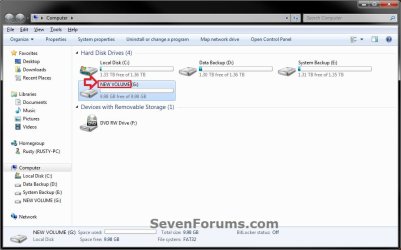
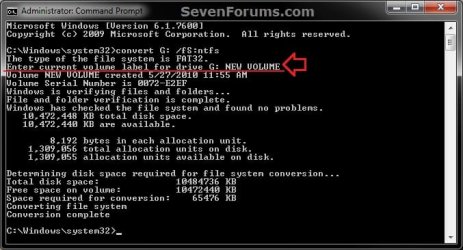
4. If prompted to Enter current volume label for drive (drive letter) (ex: G: ), then enter the name (ex: NEW VOLUME) of this drive letter as it is displayed in the Computer window and press Enter. (see screenshots below)
Current_Volume_Label-1.jpg

Current_Volume_Label-2.jpg
5. When the conversion to NTFS is complete, you receive the Conversion complete message. (See screenshot above)
NOTE: This may take a while to convert depending on full and large the drive is. It may also seem like it has hung at points, but be patient and let it finish.

6. Close the command prompt.
NOTE: If you used a command prompt at boot, then also close the System Recovery Options window and restart the computer.
That's it,
Shawn


Last edited:
Hello Pharaun, and welcome to Seven Forums.

I'm happy to hear that got it sorted. What were you able to do to resolve it?

Oh, so sorry for the delayed response. Was in my junk-mail for some reason. To point, what I had to do in order to solve my issue:

• Right click 'My Computer', click on 'Manage'

• Under the 'Storage' tab, select 'Disk Management'

• There I saw my external hard-drive (and internal ones)

• Selected the external, right clicked and (can't remember exactly what it said, but from there it's quite obvious what you have to do in order to activate/use it again).

• Before it starts the setup/installation of it, you can choose which type you want (FAT32 or NTFS)

And that was that, works perfectly, and finally have it set to NTFS rather than FAT32


Again, sorry for the delay, hope this might help someone with the same kind of problem.

Best regards,
Pharaun
 

My Computer My Computer

At a glance

Windows 7
OS
Windows 7
Thank you Pharaun for posting back with your results and solution to initialize the disk. :)
 

My Computer My Computer

At a glance

64-bit Windows 11 Pro for WorkstationsIntel i7-8700K OC'd to 5 GHz64 GB (4x16GB) G.SKILL TridentZ RGB DDR4 3600...ASUS ROG-STRIX-GTX1080TI-O11G-GAMING
Computer type
PC/Desktop
Computer Manufacturer/Model Number
Self built custom
OS
64-bit Windows 11 Pro for Workstations
CPU
Intel i7-8700K OC'd to 5 GHz
Motherboard
ASUS ROG Maximus XI Formula Z390
Memory
64 GB (4x16GB) G.SKILL TridentZ RGB DDR4 3600 MHz
Graphics Card(s)
ASUS ROG-STRIX-GTX1080TI-O11G-GAMING
Sound Card
Integrated
Monitor(s) Displays
2 x Samsung Odyssey G7 27"
Screen Resolution
2560x1440
Hard Drives
1TB Samsung 990 PRO M.2,
4TB Samsung 990 PRO PRO M.2,
TerraMaster F8 SSD Plus NAS
PSU
Seasonic Prime Titanium 850W
Case
Thermaltake Core P3
Cooling
Corsair Hydro H115i
Keyboard
Logitech wireless K800
Mouse
Logitech MX Master 4
Internet Speed
2 Gb/s Download and 100 Mb/s Upload
Antivirus
Malwarebyte Anti-Malware Premium
Browser
Google Chrome
Other Info
Logitech Z625 speaker system,
Logitech BRIO 4K Pro webcam,
HP Color LaserJet Pro MFP M477fdn,
APC SMART-UPS RT 1000 XL - SURT1000XLI,
Galaxy S23 Plus phone
I can't do this
when i type convert d: /fs:ntfs the systems told me to " Enter current volume label for drive D:"
Plz help :(
 

My Computer My Computer

At a glance

Window 7
OS
Window 7
Hello Gemini, and welcome to Seven Forums. :)

Are you doing this from a elevated command prompt (run as administrator) while logged into Windows 7?

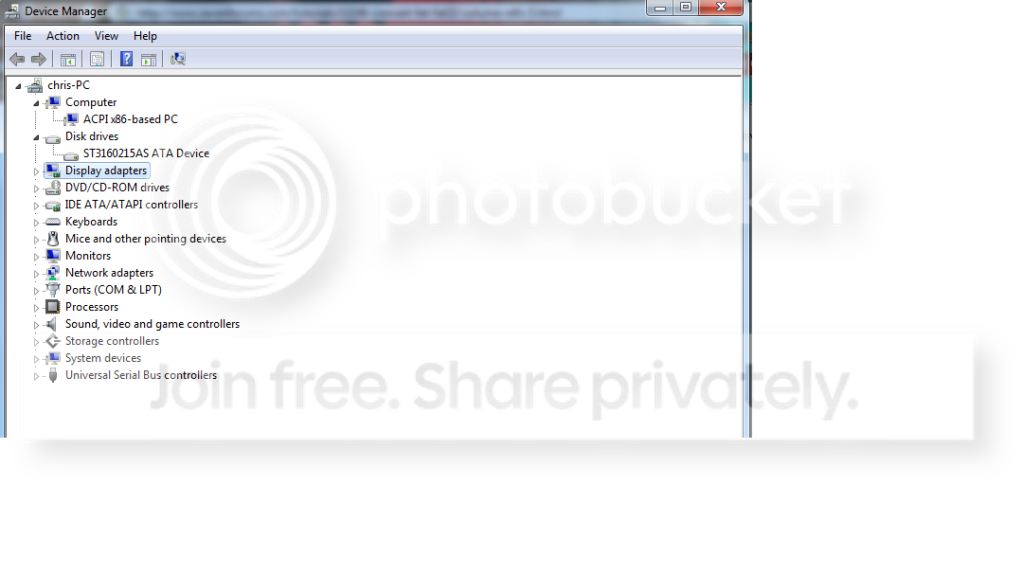
Could you also post a screenshot of Device Manager (devmgmt.msc) showing your drive layout?
 

My Computer My Computer

At a glance

64-bit Windows 11 Pro for WorkstationsIntel i7-8700K OC'd to 5 GHz64 GB (4x16GB) G.SKILL TridentZ RGB DDR4 3600...ASUS ROG-STRIX-GTX1080TI-O11G-GAMING
Computer type
PC/Desktop
Computer Manufacturer/Model Number
Self built custom
OS
64-bit Windows 11 Pro for Workstations
CPU
Intel i7-8700K OC'd to 5 GHz
Motherboard
ASUS ROG Maximus XI Formula Z390
Memory
64 GB (4x16GB) G.SKILL TridentZ RGB DDR4 3600 MHz
Graphics Card(s)
ASUS ROG-STRIX-GTX1080TI-O11G-GAMING
Sound Card
Integrated
Monitor(s) Displays
2 x Samsung Odyssey G7 27"
Screen Resolution
2560x1440
Hard Drives
1TB Samsung 990 PRO M.2,
4TB Samsung 990 PRO PRO M.2,
TerraMaster F8 SSD Plus NAS
PSU
Seasonic Prime Titanium 850W
Case
Thermaltake Core P3
Cooling
Corsair Hydro H115i
Keyboard
Logitech wireless K800
Mouse
Logitech MX Master 4
Internet Speed
2 Gb/s Download and 100 Mb/s Upload
Antivirus
Malwarebyte Anti-Malware Premium
Browser
Google Chrome
Other Info
Logitech Z625 speaker system,
Logitech BRIO 4K Pro webcam,
HP Color LaserJet Pro MFP M477fdn,
APC SMART-UPS RT 1000 XL - SURT1000XLI,
Galaxy S23 Plus phone
Are you doing this from a elevated command prompt (run as administrator) while logged into Windows 7?
Yes , I did just like your tutorial :(
Could you also post a screenshot of Device Manager (devmgmt.msc) showing your drive layout?
You mean this :(
Untit2led.png
 

My Computer My Computer

At a glance

Window 7
OS
Window 7
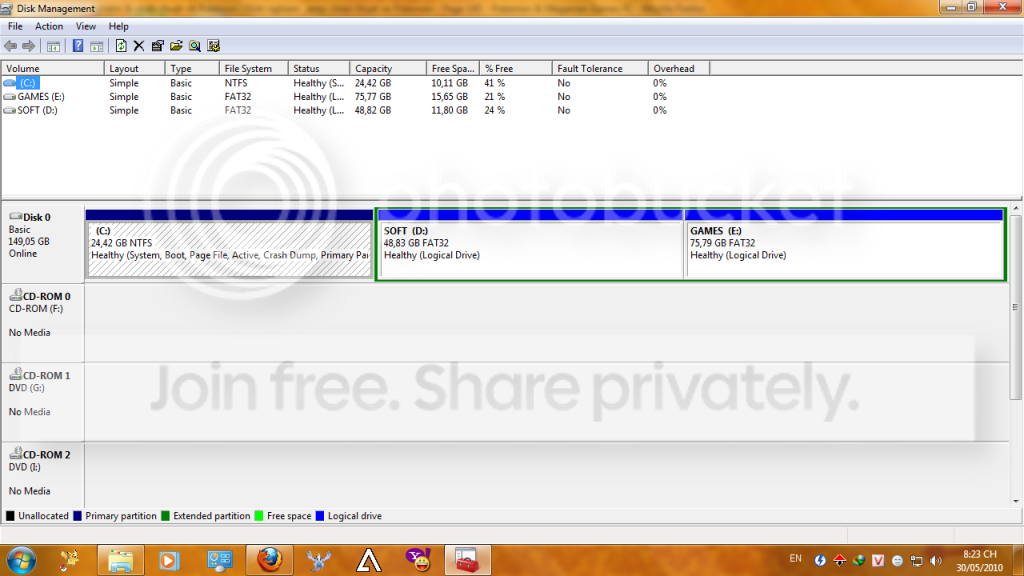
Sorry, I had meant a screenshot of Disk Management (diskmgmt.msc). :o
 

My Computer My Computer

At a glance

64-bit Windows 11 Pro for WorkstationsIntel i7-8700K OC'd to 5 GHz64 GB (4x16GB) G.SKILL TridentZ RGB DDR4 3600...ASUS ROG-STRIX-GTX1080TI-O11G-GAMING
Computer type
PC/Desktop
Computer Manufacturer/Model Number
Self built custom
OS
64-bit Windows 11 Pro for Workstations
CPU
Intel i7-8700K OC'd to 5 GHz
Motherboard
ASUS ROG Maximus XI Formula Z390
Memory
64 GB (4x16GB) G.SKILL TridentZ RGB DDR4 3600 MHz
Graphics Card(s)
ASUS ROG-STRIX-GTX1080TI-O11G-GAMING
Sound Card
Integrated
Monitor(s) Displays
2 x Samsung Odyssey G7 27"
Screen Resolution
2560x1440
Hard Drives
1TB Samsung 990 PRO M.2,
4TB Samsung 990 PRO PRO M.2,
TerraMaster F8 SSD Plus NAS
PSU
Seasonic Prime Titanium 850W
Case
Thermaltake Core P3
Cooling
Corsair Hydro H115i
Keyboard
Logitech wireless K800
Mouse
Logitech MX Master 4
Internet Speed
2 Gb/s Download and 100 Mb/s Upload
Antivirus
Malwarebyte Anti-Malware Premium
Browser
Google Chrome
Other Info
Logitech Z625 speaker system,
Logitech BRIO 4K Pro webcam,
HP Color LaserJet Pro MFP M477fdn,
APC SMART-UPS RT 1000 XL - SURT1000XLI,
Galaxy S23 Plus phone
Ah I see. I have added step 3 to help you with this. It's just wanting you to enter the name of the drive as it is displayed in the Computer window to confirm that it's the correct drive to convert before doing so. In your case, you would enter SOFT and press enter for the d: drive letter. This must have been added in one the Windows update.
 

My Computer My Computer

At a glance

64-bit Windows 11 Pro for WorkstationsIntel i7-8700K OC'd to 5 GHz64 GB (4x16GB) G.SKILL TridentZ RGB DDR4 3600...ASUS ROG-STRIX-GTX1080TI-O11G-GAMING
Computer type
PC/Desktop
Computer Manufacturer/Model Number
Self built custom
OS
64-bit Windows 11 Pro for Workstations
CPU
Intel i7-8700K OC'd to 5 GHz
Motherboard
ASUS ROG Maximus XI Formula Z390
Memory
64 GB (4x16GB) G.SKILL TridentZ RGB DDR4 3600 MHz
Graphics Card(s)
ASUS ROG-STRIX-GTX1080TI-O11G-GAMING
Sound Card
Integrated
Monitor(s) Displays
2 x Samsung Odyssey G7 27"
Screen Resolution
2560x1440
Hard Drives
1TB Samsung 990 PRO M.2,
4TB Samsung 990 PRO PRO M.2,
TerraMaster F8 SSD Plus NAS
PSU
Seasonic Prime Titanium 850W
Case
Thermaltake Core P3
Cooling
Corsair Hydro H115i
Keyboard
Logitech wireless K800
Mouse
Logitech MX Master 4
Internet Speed
2 Gb/s Download and 100 Mb/s Upload
Antivirus
Malwarebyte Anti-Malware Premium
Browser
Google Chrome
Other Info
Logitech Z625 speaker system,
Logitech BRIO 4K Pro webcam,
HP Color LaserJet Pro MFP M477fdn,
APC SMART-UPS RT 1000 XL - SURT1000XLI,
Galaxy S23 Plus phone
converting E drive

I bought a capture card for my xbox 360 and I want to capture video onto a dvd in my E drive but it says I need to convert it to NTFS to be able to use it fully or I only get 20 min of video recorded. When I did the command like you said all that came up was Cannot CONVERT volume on this device. What does this mean?
 

My Computer My Computer

At a glance

Windows 7
OS
Windows 7
Hello Crispy, and welcome to Seven Forums.

Sorry, but a DVD uses a different file system that cannot be converted to NTFS like that.

Are you able to have the captured video saved to a USB stick formated as NTFS instead, then transfer it over later to a DVD?
 

My Computer My Computer

At a glance

64-bit Windows 11 Pro for WorkstationsIntel i7-8700K OC'd to 5 GHz64 GB (4x16GB) G.SKILL TridentZ RGB DDR4 3600...ASUS ROG-STRIX-GTX1080TI-O11G-GAMING
Computer type
PC/Desktop
Computer Manufacturer/Model Number
Self built custom
OS
64-bit Windows 11 Pro for Workstations
CPU
Intel i7-8700K OC'd to 5 GHz
Motherboard
ASUS ROG Maximus XI Formula Z390
Memory
64 GB (4x16GB) G.SKILL TridentZ RGB DDR4 3600 MHz
Graphics Card(s)
ASUS ROG-STRIX-GTX1080TI-O11G-GAMING
Sound Card
Integrated
Monitor(s) Displays
2 x Samsung Odyssey G7 27"
Screen Resolution
2560x1440
Hard Drives
1TB Samsung 990 PRO M.2,
4TB Samsung 990 PRO PRO M.2,
TerraMaster F8 SSD Plus NAS
PSU
Seasonic Prime Titanium 850W
Case
Thermaltake Core P3
Cooling
Corsair Hydro H115i
Keyboard
Logitech wireless K800
Mouse
Logitech MX Master 4
Internet Speed
2 Gb/s Download and 100 Mb/s Upload
Antivirus
Malwarebyte Anti-Malware Premium
Browser
Google Chrome
Other Info
Logitech Z625 speaker system,
Logitech BRIO 4K Pro webcam,
HP Color LaserJet Pro MFP M477fdn,
APC SMART-UPS RT 1000 XL - SURT1000XLI,
Galaxy S23 Plus phone
hey guys i tried to convert my 1tera external from fat32 to ntfs I followed ur instructions but got an error :( heres a pic


ghjm.jpg
 
Last edited by a moderator:

My Computer My Computer

At a glance

windows 7
OS
windows 7
Hello Greak, and welcome to Seven Forums.

It looks like you may have some corruption or a bad sector on the drive. In a elevated command prompt, run a chkdsk J: /F /R command. Afterwards see if you may be able to convert the drive.

If not, then you will need to backup what is on it that you do not want to lose, then will have to format the drive as NTFS instead.

Hope this helps,
Shawn
 

My Computer My Computer

At a glance

64-bit Windows 11 Pro for WorkstationsIntel i7-8700K OC'd to 5 GHz64 GB (4x16GB) G.SKILL TridentZ RGB DDR4 3600...ASUS ROG-STRIX-GTX1080TI-O11G-GAMING
Computer type
PC/Desktop
Computer Manufacturer/Model Number
Self built custom
OS
64-bit Windows 11 Pro for Workstations
CPU
Intel i7-8700K OC'd to 5 GHz
Motherboard
ASUS ROG Maximus XI Formula Z390
Memory
64 GB (4x16GB) G.SKILL TridentZ RGB DDR4 3600 MHz
Graphics Card(s)
ASUS ROG-STRIX-GTX1080TI-O11G-GAMING
Sound Card
Integrated
Monitor(s) Displays
2 x Samsung Odyssey G7 27"
Screen Resolution
2560x1440
Hard Drives
1TB Samsung 990 PRO M.2,
4TB Samsung 990 PRO PRO M.2,
TerraMaster F8 SSD Plus NAS
PSU
Seasonic Prime Titanium 850W
Case
Thermaltake Core P3
Cooling
Corsair Hydro H115i
Keyboard
Logitech wireless K800
Mouse
Logitech MX Master 4
Internet Speed
2 Gb/s Download and 100 Mb/s Upload
Antivirus
Malwarebyte Anti-Malware Premium
Browser
Google Chrome
Other Info
Logitech Z625 speaker system,
Logitech BRIO 4K Pro webcam,
HP Color LaserJet Pro MFP M477fdn,
APC SMART-UPS RT 1000 XL - SURT1000XLI,
Galaxy S23 Plus phone
Fast and simple ... thanks Brink : )
 

My Computer My Computer

At a glance

Windows 7 Ultimate x64intel i7-3770k @3.5GHz8 GBNVIDIA GeForce GTX 670
OS
Windows 7 Ultimate x64
CPU
intel i7-3770k @3.5GHz
Memory
8 GB
Graphics Card(s)
NVIDIA GeForce GTX 670
Screen Resolution
1920x1080
Keyboard
razer
Mouse
razer
Internet Speed
2.4 mb
You're most weclome Abdulrahman. :)
 

My Computer My Computer

At a glance

64-bit Windows 11 Pro for WorkstationsIntel i7-8700K OC'd to 5 GHz64 GB (4x16GB) G.SKILL TridentZ RGB DDR4 3600...ASUS ROG-STRIX-GTX1080TI-O11G-GAMING
Computer type
PC/Desktop
Computer Manufacturer/Model Number
Self built custom
OS
64-bit Windows 11 Pro for Workstations
CPU
Intel i7-8700K OC'd to 5 GHz
Motherboard
ASUS ROG Maximus XI Formula Z390
Memory
64 GB (4x16GB) G.SKILL TridentZ RGB DDR4 3600 MHz
Graphics Card(s)
ASUS ROG-STRIX-GTX1080TI-O11G-GAMING
Sound Card
Integrated
Monitor(s) Displays
2 x Samsung Odyssey G7 27"
Screen Resolution
2560x1440
Hard Drives
1TB Samsung 990 PRO M.2,
4TB Samsung 990 PRO PRO M.2,
TerraMaster F8 SSD Plus NAS
PSU
Seasonic Prime Titanium 850W
Case
Thermaltake Core P3
Cooling
Corsair Hydro H115i
Keyboard
Logitech wireless K800
Mouse
Logitech MX Master 4
Internet Speed
2 Gb/s Download and 100 Mb/s Upload
Antivirus
Malwarebyte Anti-Malware Premium
Browser
Google Chrome
Other Info
Logitech Z625 speaker system,
Logitech BRIO 4K Pro webcam,
HP Color LaserJet Pro MFP M477fdn,
APC SMART-UPS RT 1000 XL - SURT1000XLI,
Galaxy S23 Plus phone
I've tried this and It works perfectly.Thank you
 

My Computer My Computer

At a glance

Windows 7 64 bits Home PremiumAMd3GB
Computer Manufacturer/Model Number
Acer Ferrari One
OS
Windows 7 64 bits Home Premium
CPU
AMd
Memory
3GB
Monitor(s) Displays
23 inch Viewsonic
Hard Drives
500gb
You're most welcome Bhellim. Thank you.
smile.gif
 

My Computer My Computer

At a glance

64-bit Windows 11 Pro for WorkstationsIntel i7-8700K OC'd to 5 GHz64 GB (4x16GB) G.SKILL TridentZ RGB DDR4 3600...ASUS ROG-STRIX-GTX1080TI-O11G-GAMING
Computer type
PC/Desktop
Computer Manufacturer/Model Number
Self built custom
OS
64-bit Windows 11 Pro for Workstations
CPU
Intel i7-8700K OC'd to 5 GHz
Motherboard
ASUS ROG Maximus XI Formula Z390
Memory
64 GB (4x16GB) G.SKILL TridentZ RGB DDR4 3600 MHz
Graphics Card(s)
ASUS ROG-STRIX-GTX1080TI-O11G-GAMING
Sound Card
Integrated
Monitor(s) Displays
2 x Samsung Odyssey G7 27"
Screen Resolution
2560x1440
Hard Drives
1TB Samsung 990 PRO M.2,
4TB Samsung 990 PRO PRO M.2,
TerraMaster F8 SSD Plus NAS
PSU
Seasonic Prime Titanium 850W
Case
Thermaltake Core P3
Cooling
Corsair Hydro H115i
Keyboard
Logitech wireless K800
Mouse
Logitech MX Master 4
Internet Speed
2 Gb/s Download and 100 Mb/s Upload
Antivirus
Malwarebyte Anti-Malware Premium
Browser
Google Chrome
Other Info
Logitech Z625 speaker system,
Logitech BRIO 4K Pro webcam,
HP Color LaserJet Pro MFP M477fdn,
APC SMART-UPS RT 1000 XL - SURT1000XLI,
Galaxy S23 Plus phone
not working

hello sir after doing this all
its say
convert is not avaible for raw device can u help me plx:rolleyes:
 

My Computer My Computer

At a glance

32bitusb flash drive 128gb
OS
32bit
Memory
usb flash drive 128gb
Hello Ramesh, and welcome to Seven Forums.

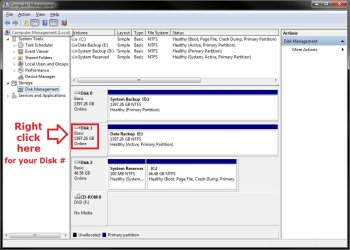
If it's a RAW drive, then it's a unformatted drive. You may need to right click on the disk in Disk Management (diskmgmt.msc) (see example screenshot below) and click on Initialize first, then you will be able to just format the drive as NTFS as normal.

Disk_MGMT.jpg

Hope this helps,
Shawn
 

My Computer My Computer

At a glance

64-bit Windows 11 Pro for WorkstationsIntel i7-8700K OC'd to 5 GHz64 GB (4x16GB) G.SKILL TridentZ RGB DDR4 3600...ASUS ROG-STRIX-GTX1080TI-O11G-GAMING
Computer type
PC/Desktop
Computer Manufacturer/Model Number
Self built custom
OS
64-bit Windows 11 Pro for Workstations
CPU
Intel i7-8700K OC'd to 5 GHz
Motherboard
ASUS ROG Maximus XI Formula Z390
Memory
64 GB (4x16GB) G.SKILL TridentZ RGB DDR4 3600 MHz
Graphics Card(s)
ASUS ROG-STRIX-GTX1080TI-O11G-GAMING
Sound Card
Integrated
Monitor(s) Displays
2 x Samsung Odyssey G7 27"
Screen Resolution
2560x1440
Hard Drives
1TB Samsung 990 PRO M.2,
4TB Samsung 990 PRO PRO M.2,
TerraMaster F8 SSD Plus NAS
PSU
Seasonic Prime Titanium 850W
Case
Thermaltake Core P3
Cooling
Corsair Hydro H115i
Keyboard
Logitech wireless K800
Mouse
Logitech MX Master 4
Internet Speed
2 Gb/s Download and 100 Mb/s Upload
Antivirus
Malwarebyte Anti-Malware Premium
Browser
Google Chrome
Other Info
Logitech Z625 speaker system,
Logitech BRIO 4K Pro webcam,
HP Color LaserJet Pro MFP M477fdn,
APC SMART-UPS RT 1000 XL - SURT1000XLI,
Galaxy S23 Plus phone
hello sir
i have 128 gb kingston usb flash drive
how to conver to NTFS format
help me
 

My Computer My Computer

At a glance

32bitusb flash drive 128gb
OS
32bit
Memory
usb flash drive 128gb
128GB USB are u sure?

Go to disk management and format to NTFS, back what you need first.
 

My Computers My Computers

  • At a glance

    WIN10AMD Ryzen 5 3600 6-Core Processor 3.59 GHz16.0 GB
    Computer type
    PC/Desktop
    Computer Manufacturer/Model Number
    PowerSpec G164
    OS
    WIN10
    CPU
    AMD Ryzen 5 3600 6-Core Processor 3.59 GHz
    Memory
    16.0 GB
    Internet Speed
    VERY FAST>>>!!!
  • Antivirus
    ESET Security Premium
Back
Top