Convert FAT or FAT32 Volume to NTFS

How to Convert a FAT or FAT32 Volume to NTFS in Windows 7


   Information
This will show you how to convert a drive or partition volume with a FAT (FAT16) or FAT32 file system to a NTFS file system in Windows 7 without having to format the volume and lose your data on it.
   Note
Before you start to convert a FAT or FAT32 volume to NTFS, please consider the following limitations and requirements:
  • UDF and CDfs file systems are only used with optical media and cannot be converted to NTFS.
  • FAT12 is the only format used on floppy diskettes (as if these are used anymore ;)). This does not apply to a USB flash key though.
  • The conversion to NTFS is a one-way process. After you convert a drive or a partition to NTFS, you cannot convert it back to FAT or to FAT32 unless you format it again as FAT or FAT32.
  • The convert command requires that you have enough free space on the drive or on the partition that you want to convert to be able to convert it. If Convert.exe determines that there is not sufficient free space on the volume, it will not convert the volume.
  • If the files are being used on the volume that you are trying to convert, then you will be prompted with:
    "Convert cannot run because the volume is in use by another process. Convert may run if this volume is dismounted first. ALL OPENED HANDLES TO THIS VOLUME WOULD THEN BE INVALID. Would you like to force a dismount on this volume? <Y/N>"
    • Quit all the programs that are using the files on the drive, and then type Y at the command prompt to convert the drive to NTFS.
  • If the drive or partition volume that you are trying to convert is in use, then you will be prompted with:
    "Convert cannot gain exclusive access to the drive letter drive, so it cannot convert it now. Would you like to schedule it to be converted the next time the system restarts? <Y/N>"
    • To resolve this issue, type Y at the command prompt. The volume or drive will be converted to NTFS the next time that you restart the computer.
   Warning
Although the chance of corruption or data loss during the conversion is minimal, it is recommended that you backup any data that you do not want to lose on the volume that you want to convert before you start the conversion to be extra safe.

The only way to convert a NTFS disk back to a FAT or FAT32 disk is to format the disk.

Before you begin, note that the FAT32 file system has size limitations. In this version of Windows, you cannot create a FAT32 partition greater than 32 GB (32728 MB). In addition, you cannot store a file larger than 4 GB on a FAT32 partition. For more information, see Comparing NTFS and FAT file systems.


Here's How:
1. To Use a Elevated Command Prompt in Windows
A) Open an elevated command prompt.

B) Go to step 3.
2. To Use a Command Prompt at Boot
A) Open a command prompt at boot.

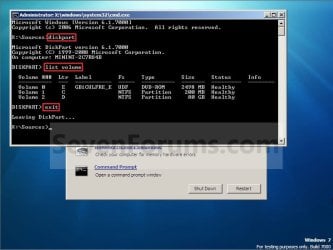
B) In the command prompt, type diskpart and press Enter. (see screenshot below)

C) In the command prompt, type list volume and press Enter. (see screenshot below)
NOTE: This will let you see what the drive letter is for the drive that you want to connvert since it may not always be the same drive letter that it is in Windows.

D) After making note of the drive letter, type exit and press Enter. (see screenshot below)
Command-1.jpg
E) Continue on to step 3 to convert the drive.
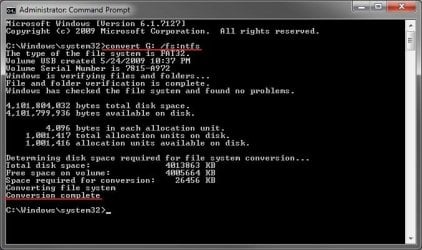
3. In the command prompt, type convert drive letter: /fs:ntfs and press Enter. (See screenshot below)
NOTE: Substitute drive letter for the drive letter of the FAT or FAT32 drive or partition that you want to convert to NTFS. For example, I want to convert my USB flash key with the drive letter G: , so I would type convert g: /fs:ntfs and press enter.
Command.jpg
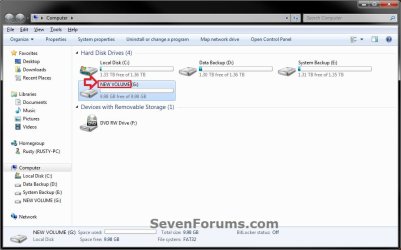
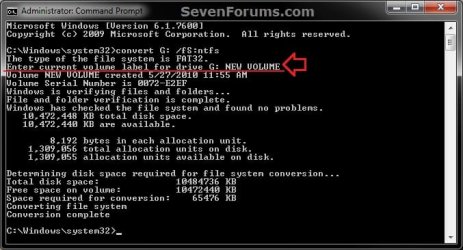
4. If prompted to Enter current volume label for drive (drive letter) (ex: G: ), then enter the name (ex: NEW VOLUME) of this drive letter as it is displayed in the Computer window and press Enter. (see screenshots below)
Current_Volume_Label-1.jpg

Current_Volume_Label-2.jpg
5. When the conversion to NTFS is complete, you receive the Conversion complete message. (See screenshot above)
NOTE: This may take a while to convert depending on full and large the drive is. It may also seem like it has hung at points, but be patient and let it finish.

6. Close the command prompt.
NOTE: If you used a command prompt at boot, then also close the System Recovery Options window and restart the computer.
That's it,
Shawn


Last edited:
hello sir
i have 128 gb kingston usb flash drive
how to conver to NTFS format
help me


Ramesh,

A USB flash drive will normally be formatted as FAT32 instead.

With it plugged in, could you post a screenshot of your Disk Management (diskmgmt.msc) like I posted above showing the layout of that drive?

You should be able to use the tutorial on the 1st page to convert it to NTFS, or you could also format (deletes everything though) the USB flash drive as NTFS.
 

My Computer My Computer

At a glance

64-bit Windows 11 Pro for WorkstationsIntel i7-8700K OC'd to 5 GHz64 GB (4x16GB) G.SKILL TridentZ RGB DDR4 3600...ASUS ROG-STRIX-GTX1080TI-O11G-GAMING
Computer type
PC/Desktop
Computer Manufacturer/Model Number
Self built custom
OS
64-bit Windows 11 Pro for Workstations
CPU
Intel i7-8700K OC'd to 5 GHz
Motherboard
ASUS ROG Maximus XI Formula Z390
Memory
64 GB (4x16GB) G.SKILL TridentZ RGB DDR4 3600 MHz
Graphics Card(s)
ASUS ROG-STRIX-GTX1080TI-O11G-GAMING
Sound Card
Integrated
Monitor(s) Displays
2 x Samsung Odyssey G7 27"
Screen Resolution
2560x1440
Hard Drives
1TB Samsung 990 PRO M.2,
4TB Samsung 990 PRO PRO M.2,
TerraMaster F8 SSD Plus NAS
PSU
Seasonic Prime Titanium 850W
Case
Thermaltake Core P3
Cooling
Corsair Hydro H115i
Keyboard
Logitech wireless K800
Mouse
Logitech MX Master 4
Internet Speed
2 Gb/s Download and 100 Mb/s Upload
Antivirus
Malwarebyte Anti-Malware Premium
Browser
Google Chrome
Other Info
Logitech Z625 speaker system,
Logitech BRIO 4K Pro webcam,
HP Color LaserJet Pro MFP M477fdn,
APC SMART-UPS RT 1000 XL - SURT1000XLI,
Galaxy S23 Plus phone
Hi,

I tried to convert my External drive,
but it din't work, the first time so it gave me this error:
5084688065_e804617299_b.jpg


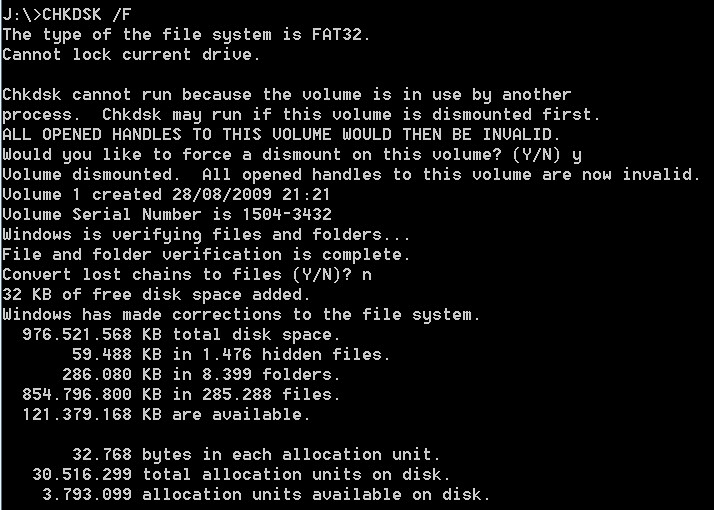
so I did the CHKDSK /F and this was the result:
5084684591_2a69e5959a_b.jpg


Then I redid the convertion but still the error:
5085286376_62910ff38a_b.jpg


Is there any way to convert it without formatting it?
because it has over 800GB of files that I don't wanna lose :(
 

My Computer My Computer

At a glance

WIndows 7 - 64 bit
OS
WIndows 7 - 64 bit
Hello Cskiwi, and welcome to Seven Forums.

You might see if you may be able to convert it using a command prompt at boot instead.
 

My Computer My Computer

At a glance

64-bit Windows 11 Pro for WorkstationsIntel i7-8700K OC'd to 5 GHz64 GB (4x16GB) G.SKILL TridentZ RGB DDR4 3600...ASUS ROG-STRIX-GTX1080TI-O11G-GAMING
Computer type
PC/Desktop
Computer Manufacturer/Model Number
Self built custom
OS
64-bit Windows 11 Pro for Workstations
CPU
Intel i7-8700K OC'd to 5 GHz
Motherboard
ASUS ROG Maximus XI Formula Z390
Memory
64 GB (4x16GB) G.SKILL TridentZ RGB DDR4 3600 MHz
Graphics Card(s)
ASUS ROG-STRIX-GTX1080TI-O11G-GAMING
Sound Card
Integrated
Monitor(s) Displays
2 x Samsung Odyssey G7 27"
Screen Resolution
2560x1440
Hard Drives
1TB Samsung 990 PRO M.2,
4TB Samsung 990 PRO PRO M.2,
TerraMaster F8 SSD Plus NAS
PSU
Seasonic Prime Titanium 850W
Case
Thermaltake Core P3
Cooling
Corsair Hydro H115i
Keyboard
Logitech wireless K800
Mouse
Logitech MX Master 4
Internet Speed
2 Gb/s Download and 100 Mb/s Upload
Antivirus
Malwarebyte Anti-Malware Premium
Browser
Google Chrome
Other Info
Logitech Z625 speaker system,
Logitech BRIO 4K Pro webcam,
HP Color LaserJet Pro MFP M477fdn,
APC SMART-UPS RT 1000 XL - SURT1000XLI,
Galaxy S23 Plus phone
@Brink

Euhm, how can I do that?
or is that the same commands? but how and where must I type them?

already thanks
 

My Computer My Computer

At a glance

WIndows 7 - 64 bit
OS
WIndows 7 - 64 bit

My Computer My Computer

At a glance

64-bit Windows 11 Pro for WorkstationsIntel i7-8700K OC'd to 5 GHz64 GB (4x16GB) G.SKILL TridentZ RGB DDR4 3600...ASUS ROG-STRIX-GTX1080TI-O11G-GAMING
Computer type
PC/Desktop
Computer Manufacturer/Model Number
Self built custom
OS
64-bit Windows 11 Pro for Workstations
CPU
Intel i7-8700K OC'd to 5 GHz
Motherboard
ASUS ROG Maximus XI Formula Z390
Memory
64 GB (4x16GB) G.SKILL TridentZ RGB DDR4 3600 MHz
Graphics Card(s)
ASUS ROG-STRIX-GTX1080TI-O11G-GAMING
Sound Card
Integrated
Monitor(s) Displays
2 x Samsung Odyssey G7 27"
Screen Resolution
2560x1440
Hard Drives
1TB Samsung 990 PRO M.2,
4TB Samsung 990 PRO PRO M.2,
TerraMaster F8 SSD Plus NAS
PSU
Seasonic Prime Titanium 850W
Case
Thermaltake Core P3
Cooling
Corsair Hydro H115i
Keyboard
Logitech wireless K800
Mouse
Logitech MX Master 4
Internet Speed
2 Gb/s Download and 100 Mb/s Upload
Antivirus
Malwarebyte Anti-Malware Premium
Browser
Google Chrome
Other Info
Logitech Z625 speaker system,
Logitech BRIO 4K Pro webcam,
HP Color LaserJet Pro MFP M477fdn,
APC SMART-UPS RT 1000 XL - SURT1000XLI,
Galaxy S23 Plus phone
Hi Brink, this is a great thread and your tutorial is spot on.
It helped originally converting 1TB of data on a Seagate successfully with all my data from FAT32 to NTFS no problem.

Question: I just got a brand new Samsung G3 Station with a 1TB drive in it.
I haven't loaded anything on it yet and it comes with free software (backup etc).
I did the convert in cmd like its been taught here but it got to the end and also told me:

'cyclic redundancy check error'

I read earlier in this thread (2009) that the same thing happened to somebody else but he couldn't pick up any errors afterwards and could still access his drive. Its odd as its brand new. I'm running a CHKDSK now to see if there might be any bad sectors (defective hardrive perhaps as when I first switched it on it did make a clicking sound but then stopped.)

Any suggestions as to why I would get this error converting it to NTFS with practically no data on it?

Thx for the time :)
 

My Computer My Computer

At a glance

Windows 7 64-bit UltimateAMD 64-bit Athlon X21024mb DDR2 800mhz X4ASUS 8800 GT
OS
Windows 7 64-bit Ultimate
CPU
AMD 64-bit Athlon X2
Motherboard
ASUS M3n78-EM
Memory
1024mb DDR2 800mhz X4
Graphics Card(s)
ASUS 8800 GT
Sound Card
onboard
Monitor(s) Displays
19' MAG CRT
Screen Resolution
1280x1024 85hz
Hard Drives
SAMSUNG 160GB SATA II
PSU
DYNAMIC 500 W
Case
COOLERMASTER ELITE
Keyboard
MICROSOFT SIDEWINDER X6
Mouse
LOGITECH G5 GAMING MOUSE
Hello Marcel,

Since you do not have anything loaded on the 1TB drive in the Samsung G3 Station, you should also be able to just right click on it in the "Computer" window and format it using NTFS.
 

My Computer My Computer

At a glance

64-bit Windows 11 Pro for WorkstationsIntel i7-8700K OC'd to 5 GHz64 GB (4x16GB) G.SKILL TridentZ RGB DDR4 3600...ASUS ROG-STRIX-GTX1080TI-O11G-GAMING
Computer type
PC/Desktop
Computer Manufacturer/Model Number
Self built custom
OS
64-bit Windows 11 Pro for Workstations
CPU
Intel i7-8700K OC'd to 5 GHz
Motherboard
ASUS ROG Maximus XI Formula Z390
Memory
64 GB (4x16GB) G.SKILL TridentZ RGB DDR4 3600 MHz
Graphics Card(s)
ASUS ROG-STRIX-GTX1080TI-O11G-GAMING
Sound Card
Integrated
Monitor(s) Displays
2 x Samsung Odyssey G7 27"
Screen Resolution
2560x1440
Hard Drives
1TB Samsung 990 PRO M.2,
4TB Samsung 990 PRO PRO M.2,
TerraMaster F8 SSD Plus NAS
PSU
Seasonic Prime Titanium 850W
Case
Thermaltake Core P3
Cooling
Corsair Hydro H115i
Keyboard
Logitech wireless K800
Mouse
Logitech MX Master 4
Internet Speed
2 Gb/s Download and 100 Mb/s Upload
Antivirus
Malwarebyte Anti-Malware Premium
Browser
Google Chrome
Other Info
Logitech Z625 speaker system,
Logitech BRIO 4K Pro webcam,
HP Color LaserJet Pro MFP M477fdn,
APC SMART-UPS RT 1000 XL - SURT1000XLI,
Galaxy S23 Plus phone
Hey Shawn.
Thanks a lot for this great tutorial and for your GREAT effort in this post.

My cousin bought a kingsone dt310 256GB usb.
It came formated as FAT32.
I tried to convert it to NTFS with "conver h: /fs:ntfs /v" with no success.
Then it became unreadable and unformattable. I was able to format it with HP USB Disk Storage Format Tool v2.1.8 to FAT32 only. I also tried to format it as NTFS with no success.
It seems that it cought 128GB for nothing (can't find any file no matter what attribute I looked for).
I ran chkdsk: "chkdsk h: /f /r /v", and it found a lot of lost chains. After that I was having a FAT32 with 256GB.

Now I'm running "clean all" via diskpart (thanks to your great tutorial about it: http://www.sevenforums.com/tutorials/52129-disk-clean-clean-all-diskpart-command.html)
It seems to take some time (already an hour with no prompt).

I didn't saved any prompt from the previous actions.
I'm trying to start from scratch.
I'll finish cleaning and then I'll try to format as NTFS.
After that I'll keep any valuable prompt and will post back.

However I wonder about what you posted to 1morethanu:

Hello 1morethanu, and welcome to Seven Forums.

What type of drive (ex: USB flash drive, internal HDD, etc..) are you trying to convert? Is the drive encrypted or has any write protection enabled on it.

If USB, then you may only be able to format it as NTFS instead of convert it to NTFS.

Hope this helps,
Shawn

About the last comment, why it is possible only to format as NTFS and not to convert?
 

My Computer My Computer

At a glance

Windows 7 Ultimate 32bitAMD Phenom II x4 965 3.4GHzG.SKILL F3-16000CL8D-4GBPIS (2GBx2)Inno3d GTX480 1.5GB GDDR5
OS
Windows 7 Ultimate 32bit
CPU
AMD Phenom II x4 965 3.4GHz
Motherboard
Gigabyte GA-890FXA-UD5 rev2.0
Memory
G.SKILL F3-16000CL8D-4GBPIS (2GBx2)
Graphics Card(s)
Inno3d GTX480 1.5GB GDDR5
Monitor(s) Displays
LG FLATRON W2486L
Screen Resolution
1920x1080@60Hz
Hard Drives
Western Digital Caviar Black WD1002FAEX 1TB 64MB 7200RPM Sata III x3
PSU
Enermax MODU82+ 625W
Case
Thermaltake Element G Middle Tower
That was a issue specific to his situation below since it failed to convert for him due to some bad sector. That's all.

Hi Brink,

after I followed your instructions for using the command prompt I was received a:

the second NTFS boot sector is unwriteable.
the conversion failed.
F: was not converted to NTFS

Am I out of luck or is this fixable?
 

My Computer My Computer

At a glance

64-bit Windows 11 Pro for WorkstationsIntel i7-8700K OC'd to 5 GHz64 GB (4x16GB) G.SKILL TridentZ RGB DDR4 3600...ASUS ROG-STRIX-GTX1080TI-O11G-GAMING
Computer type
PC/Desktop
Computer Manufacturer/Model Number
Self built custom
OS
64-bit Windows 11 Pro for Workstations
CPU
Intel i7-8700K OC'd to 5 GHz
Motherboard
ASUS ROG Maximus XI Formula Z390
Memory
64 GB (4x16GB) G.SKILL TridentZ RGB DDR4 3600 MHz
Graphics Card(s)
ASUS ROG-STRIX-GTX1080TI-O11G-GAMING
Sound Card
Integrated
Monitor(s) Displays
2 x Samsung Odyssey G7 27"
Screen Resolution
2560x1440
Hard Drives
1TB Samsung 990 PRO M.2,
4TB Samsung 990 PRO PRO M.2,
TerraMaster F8 SSD Plus NAS
PSU
Seasonic Prime Titanium 850W
Case
Thermaltake Core P3
Cooling
Corsair Hydro H115i
Keyboard
Logitech wireless K800
Mouse
Logitech MX Master 4
Internet Speed
2 Gb/s Download and 100 Mb/s Upload
Antivirus
Malwarebyte Anti-Malware Premium
Browser
Google Chrome
Other Info
Logitech Z625 speaker system,
Logitech BRIO 4K Pro webcam,
HP Color LaserJet Pro MFP M477fdn,
APC SMART-UPS RT 1000 XL - SURT1000XLI,
Galaxy S23 Plus phone
The "clean all" option just hang for hours and hours.
What I got from the system event log is this event:
level: error
source: VDS Basic Provider
event id: 1
description: Unexpected failure. Error code: 490@01010004

It's looking like that:
usb-n-1.gif

According to microsoft "This event can be safely ignored.".
VDS Basic Provider event ID 1 is logged on a Hyper-V guest operating system

So I tried "CTRL+C" in order to stop diskpart. After that my computer worked slowly. I tried to run diskpart again, but it ain't loaded for a few minutes.
usb-n-2.gif

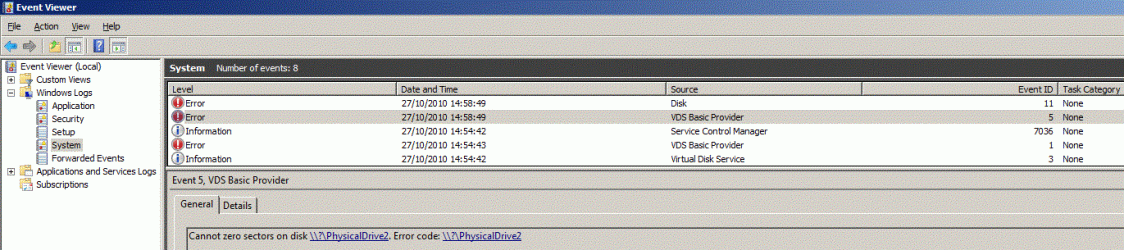
In the system event log I got the 2 following errors:
level: error
source: VDS Basic Provider
event id: 5
description: Cannot zero sectors on disk \\?\PhysicalDrive2. Error code: \\?\PhysicalDrive2
level: error

source: disk
event id: 11
description: The driver detected a controller error on \...\DR6.

usb-n-3.gif

I ejected the usb, reinserted it, and now my computer got back to normal and diskpart loaded well. So I performed "clean" and tried to format to NTFS. It ain't worked. It says it put some details in the system event log but they aren't any. So I formated it to exfat.
usb-n-4.gif

BTW I can't perform full format. It just stuck for hours with event id 1 (as described above).
Just to be on the safe side I ran "chkdsk h: /f /r /v".
So I'm using it as exfat. It's working ok. I just can't get it working on NTFS.
And BTW though it came formatted as fat32, I can't format it to fat32 without 3rd party utility like "HP USB Disk Storage Format Tool v2.1.8".
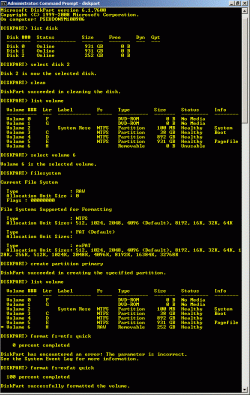
Here is diskpart prompt:
usb-n-5.gif

Brink, thansk a lot for this and for other great tutorials which helped me A LOT through this problem and taught me well. I appreciate your OWESOME effort and concern in this forum.
 

My Computer My Computer

At a glance

Windows 7 Ultimate 32bitAMD Phenom II x4 965 3.4GHzG.SKILL F3-16000CL8D-4GBPIS (2GBx2)Inno3d GTX480 1.5GB GDDR5
OS
Windows 7 Ultimate 32bit
CPU
AMD Phenom II x4 965 3.4GHz
Motherboard
Gigabyte GA-890FXA-UD5 rev2.0
Memory
G.SKILL F3-16000CL8D-4GBPIS (2GBx2)
Graphics Card(s)
Inno3d GTX480 1.5GB GDDR5
Monitor(s) Displays
LG FLATRON W2486L
Screen Resolution
1920x1080@60Hz
Hard Drives
Western Digital Caviar Black WD1002FAEX 1TB 64MB 7200RPM Sata III x3
PSU
Enermax MODU82+ 625W
Case
Thermaltake Element G Middle Tower

My Computer My Computer

At a glance

64-bit Windows 11 Pro for WorkstationsIntel i7-8700K OC'd to 5 GHz64 GB (4x16GB) G.SKILL TridentZ RGB DDR4 3600...ASUS ROG-STRIX-GTX1080TI-O11G-GAMING
Computer type
PC/Desktop
Computer Manufacturer/Model Number
Self built custom
OS
64-bit Windows 11 Pro for Workstations
CPU
Intel i7-8700K OC'd to 5 GHz
Motherboard
ASUS ROG Maximus XI Formula Z390
Memory
64 GB (4x16GB) G.SKILL TridentZ RGB DDR4 3600 MHz
Graphics Card(s)
ASUS ROG-STRIX-GTX1080TI-O11G-GAMING
Sound Card
Integrated
Monitor(s) Displays
2 x Samsung Odyssey G7 27"
Screen Resolution
2560x1440
Hard Drives
1TB Samsung 990 PRO M.2,
4TB Samsung 990 PRO PRO M.2,
TerraMaster F8 SSD Plus NAS
PSU
Seasonic Prime Titanium 850W
Case
Thermaltake Core P3
Cooling
Corsair Hydro H115i
Keyboard
Logitech wireless K800
Mouse
Logitech MX Master 4
Internet Speed
2 Gb/s Download and 100 Mb/s Upload
Antivirus
Malwarebyte Anti-Malware Premium
Browser
Google Chrome
Other Info
Logitech Z625 speaker system,
Logitech BRIO 4K Pro webcam,
HP Color LaserJet Pro MFP M477fdn,
APC SMART-UPS RT 1000 XL - SURT1000XLI,
Galaxy S23 Plus phone
Thanks for your fast response.
Do you think that one or more of my actions should have done in an elevated mode?
If so, don't you think I should have getting some message or indication saying so?
 

My Computer My Computer

At a glance

Windows 7 Ultimate 32bitAMD Phenom II x4 965 3.4GHzG.SKILL F3-16000CL8D-4GBPIS (2GBx2)Inno3d GTX480 1.5GB GDDR5
OS
Windows 7 Ultimate 32bit
CPU
AMD Phenom II x4 965 3.4GHz
Motherboard
Gigabyte GA-890FXA-UD5 rev2.0
Memory
G.SKILL F3-16000CL8D-4GBPIS (2GBx2)
Graphics Card(s)
Inno3d GTX480 1.5GB GDDR5
Monitor(s) Displays
LG FLATRON W2486L
Screen Resolution
1920x1080@60Hz
Hard Drives
Western Digital Caviar Black WD1002FAEX 1TB 64MB 7200RPM Sata III x3
PSU
Enermax MODU82+ 625W
Case
Thermaltake Element G Middle Tower
Well, the problem is that you disabled UAC. Usually it will work perfectly fine running elevated items like this, but every once in a while you may get one that just will not run properly unless UAC is enabled and you have allowed it to run elevated. It would be worth a try to enabled UAC for now, then try again to see how it goes.
 

My Computer My Computer

At a glance

64-bit Windows 11 Pro for WorkstationsIntel i7-8700K OC'd to 5 GHz64 GB (4x16GB) G.SKILL TridentZ RGB DDR4 3600...ASUS ROG-STRIX-GTX1080TI-O11G-GAMING
Computer type
PC/Desktop
Computer Manufacturer/Model Number
Self built custom
OS
64-bit Windows 11 Pro for Workstations
CPU
Intel i7-8700K OC'd to 5 GHz
Motherboard
ASUS ROG Maximus XI Formula Z390
Memory
64 GB (4x16GB) G.SKILL TridentZ RGB DDR4 3600 MHz
Graphics Card(s)
ASUS ROG-STRIX-GTX1080TI-O11G-GAMING
Sound Card
Integrated
Monitor(s) Displays
2 x Samsung Odyssey G7 27"
Screen Resolution
2560x1440
Hard Drives
1TB Samsung 990 PRO M.2,
4TB Samsung 990 PRO PRO M.2,
TerraMaster F8 SSD Plus NAS
PSU
Seasonic Prime Titanium 850W
Case
Thermaltake Core P3
Cooling
Corsair Hydro H115i
Keyboard
Logitech wireless K800
Mouse
Logitech MX Master 4
Internet Speed
2 Gb/s Download and 100 Mb/s Upload
Antivirus
Malwarebyte Anti-Malware Premium
Browser
Google Chrome
Other Info
Logitech Z625 speaker system,
Logitech BRIO 4K Pro webcam,
HP Color LaserJet Pro MFP M477fdn,
APC SMART-UPS RT 1000 XL - SURT1000XLI,
Galaxy S23 Plus phone
Thanks a lot.
I'll try it and will post back.
 

My Computer My Computer

At a glance

Windows 7 Ultimate 32bitAMD Phenom II x4 965 3.4GHzG.SKILL F3-16000CL8D-4GBPIS (2GBx2)Inno3d GTX480 1.5GB GDDR5
OS
Windows 7 Ultimate 32bit
CPU
AMD Phenom II x4 965 3.4GHz
Motherboard
Gigabyte GA-890FXA-UD5 rev2.0
Memory
G.SKILL F3-16000CL8D-4GBPIS (2GBx2)
Graphics Card(s)
Inno3d GTX480 1.5GB GDDR5
Monitor(s) Displays
LG FLATRON W2486L
Screen Resolution
1920x1080@60Hz
Hard Drives
Western Digital Caviar Black WD1002FAEX 1TB 64MB 7200RPM Sata III x3
PSU
Enermax MODU82+ 625W
Case
Thermaltake Element G Middle Tower
Hello Brink! Love this thread, as it has recently become relevant due to a game requiring an NTFS format external over a FAT32 format.

So. I've followed your tutorial exactly, and attempted this both in an elevated command prompt and on a safe mode with command prompt boot. Both times, I reach the following result:

"The conversion failed.
E: was not converted to NTFS."

I'm not sure where to go from here, without any errors given. Any advice on what to check? I can't afford to format my E: completely, as it carries most of my important files.

Edit: I realized my UAC was off and turned it to its highest settings, gave another attempt. No dice there either.
 
Last edited:

My Computer My Computer

At a glance

Windows 7 Ultimate x64Intel Core i5-4670K Haswell16GB DDR3 RAM 1600 MHz G.SKILLNVIDIA GTX760
Computer Manufacturer/Model Number
Custom
OS
Windows 7 Ultimate x64
CPU
Intel Core i5-4670K Haswell
Motherboard
ASUS Z87-PRO
Memory
16GB DDR3 RAM 1600 MHz G.SKILL
Graphics Card(s)
NVIDIA GTX760
PSU
CORSAIR HX SERIES HX850
Case
Cooler Master HAF 922
Cooling
Air
Hello Asura,

You might see if running the chkdsk E: /F /R /X command on the drive may help if it had any bad sectors causing the failure. Afterwards, try converting it to NTFS again.

Hope this helps,
Shawn
 

My Computer My Computer

At a glance

64-bit Windows 11 Pro for WorkstationsIntel i7-8700K OC'd to 5 GHz64 GB (4x16GB) G.SKILL TridentZ RGB DDR4 3600...ASUS ROG-STRIX-GTX1080TI-O11G-GAMING
Computer type
PC/Desktop
Computer Manufacturer/Model Number
Self built custom
OS
64-bit Windows 11 Pro for Workstations
CPU
Intel i7-8700K OC'd to 5 GHz
Motherboard
ASUS ROG Maximus XI Formula Z390
Memory
64 GB (4x16GB) G.SKILL TridentZ RGB DDR4 3600 MHz
Graphics Card(s)
ASUS ROG-STRIX-GTX1080TI-O11G-GAMING
Sound Card
Integrated
Monitor(s) Displays
2 x Samsung Odyssey G7 27"
Screen Resolution
2560x1440
Hard Drives
1TB Samsung 990 PRO M.2,
4TB Samsung 990 PRO PRO M.2,
TerraMaster F8 SSD Plus NAS
PSU
Seasonic Prime Titanium 850W
Case
Thermaltake Core P3
Cooling
Corsair Hydro H115i
Keyboard
Logitech wireless K800
Mouse
Logitech MX Master 4
Internet Speed
2 Gb/s Download and 100 Mb/s Upload
Antivirus
Malwarebyte Anti-Malware Premium
Browser
Google Chrome
Other Info
Logitech Z625 speaker system,
Logitech BRIO 4K Pro webcam,
HP Color LaserJet Pro MFP M477fdn,
APC SMART-UPS RT 1000 XL - SURT1000XLI,
Galaxy S23 Plus phone
Just ran through the command, no problems were found by chkdsk.

Took a LONG time.

Regardless, still receive that the conversion failed and E: was not converted to NTFS.
 

My Computer My Computer

At a glance

Windows 7 Ultimate x64Intel Core i5-4670K Haswell16GB DDR3 RAM 1600 MHz G.SKILLNVIDIA GTX760
Computer Manufacturer/Model Number
Custom
OS
Windows 7 Ultimate x64
CPU
Intel Core i5-4670K Haswell
Motherboard
ASUS Z87-PRO
Memory
16GB DDR3 RAM 1600 MHz G.SKILL
Graphics Card(s)
NVIDIA GTX760
PSU
CORSAIR HX SERIES HX850
Case
Cooler Master HAF 922
Cooling
Air

My Computer My Computer

At a glance

64-bit Windows 11 Pro for WorkstationsIntel i7-8700K OC'd to 5 GHz64 GB (4x16GB) G.SKILL TridentZ RGB DDR4 3600...ASUS ROG-STRIX-GTX1080TI-O11G-GAMING
Computer type
PC/Desktop
Computer Manufacturer/Model Number
Self built custom
OS
64-bit Windows 11 Pro for Workstations
CPU
Intel i7-8700K OC'd to 5 GHz
Motherboard
ASUS ROG Maximus XI Formula Z390
Memory
64 GB (4x16GB) G.SKILL TridentZ RGB DDR4 3600 MHz
Graphics Card(s)
ASUS ROG-STRIX-GTX1080TI-O11G-GAMING
Sound Card
Integrated
Monitor(s) Displays
2 x Samsung Odyssey G7 27"
Screen Resolution
2560x1440
Hard Drives
1TB Samsung 990 PRO M.2,
4TB Samsung 990 PRO PRO M.2,
TerraMaster F8 SSD Plus NAS
PSU
Seasonic Prime Titanium 850W
Case
Thermaltake Core P3
Cooling
Corsair Hydro H115i
Keyboard
Logitech wireless K800
Mouse
Logitech MX Master 4
Internet Speed
2 Gb/s Download and 100 Mb/s Upload
Antivirus
Malwarebyte Anti-Malware Premium
Browser
Google Chrome
Other Info
Logitech Z625 speaker system,
Logitech BRIO 4K Pro webcam,
HP Color LaserJet Pro MFP M477fdn,
APC SMART-UPS RT 1000 XL - SURT1000XLI,
Galaxy S23 Plus phone
Downloaded the program, gave it a run through. I let it run into the option to "close" comes up after converting file system runs for a while, but no actual conversion happens. not sure if I'm using the program wrong in some form, or if it is just failing, though I suspect the latter since it seems to be just running the command prompt lines.
 

My Computer My Computer

At a glance

Windows 7 Ultimate x64Intel Core i5-4670K Haswell16GB DDR3 RAM 1600 MHz G.SKILLNVIDIA GTX760
Computer Manufacturer/Model Number
Custom
OS
Windows 7 Ultimate x64
CPU
Intel Core i5-4670K Haswell
Motherboard
ASUS Z87-PRO
Memory
16GB DDR3 RAM 1600 MHz G.SKILL
Graphics Card(s)
NVIDIA GTX760
PSU
CORSAIR HX SERIES HX850
Case
Cooler Master HAF 922
Cooling
Air
Thanks a lot.
I'll try it and will post back.

Well now that I know that I ran it in elevated mode (note 1) it seems that my DOK is problematic - I cant format it only to exfat unless I'm using a 3'rd party utility.

(note 1) - http://www.sevenforums.com/1037016-post10.html


Downloaded the program, gave it a run through. I let it run into the option to "close" comes up after converting file system runs for a while, but no actual conversion happens. not sure if I'm using the program wrong in some form, or if it is just failing, though I suspect the latter since it seems to be just running the command prompt lines.

I think I would start over with removing all the data on the disk. I'll do so with the "clean all" command via diskpart. Look at this great tutorial, also from Brink - http://www.sevenforums.com/tutorials/52129-disk-clean-clean-all-diskpart-command.html
Please note that if you have any information on volume e: you must backup it before performing the "clean all" command!.

BTW you wrote that this subject became relevant due to a game requiring an NTFS format external over a FAT32 format. How come? Do you want to copy it's installation image which size is larger than 4GB?
 

My Computer My Computer

At a glance

Windows 7 Ultimate 32bitAMD Phenom II x4 965 3.4GHzG.SKILL F3-16000CL8D-4GBPIS (2GBx2)Inno3d GTX480 1.5GB GDDR5
OS
Windows 7 Ultimate 32bit
CPU
AMD Phenom II x4 965 3.4GHz
Motherboard
Gigabyte GA-890FXA-UD5 rev2.0
Memory
G.SKILL F3-16000CL8D-4GBPIS (2GBx2)
Graphics Card(s)
Inno3d GTX480 1.5GB GDDR5
Monitor(s) Displays
LG FLATRON W2486L
Screen Resolution
1920x1080@60Hz
Hard Drives
Western Digital Caviar Black WD1002FAEX 1TB 64MB 7200RPM Sata III x3
PSU
Enermax MODU82+ 625W
Case
Thermaltake Element G Middle Tower
Back
Top