Help: 2 VMplayer images on 2 different NIC cards

jowuor

New member
Local time
10:46 PM
Messages
4
I need some help connecting 2 images running on vmplayer to the an outside network on 2 different independent NICs. Has anyone been able to achieve this?

Bridging: I can bridge 1 image on 1st physical NIC, the system allows me to bridge the 2nd image as well on the 2nd NIC but this defaults back to the network on the first interface card. This is not working for me.

Host networks: This only point to the virtual vmnets and I am unable to have them point to the physical NIC

NAT: I can only have 1 NAT interface which I can point to an IP on the 1st NIC, can't use the second NIC.

Thank you in advance for your ideas
 

My Computer My Computer

At a glance

Windows 7 home premium x64
OS
Windows 7 home premium x64
I tried and unfortunately, it doesn't seem you'd be able to accomplish this with VMware Player. If you get a copy of either VMware Workstation or VMware Server however, you should be able to accomplish this by using the Virtual Network Editor and settings one of the empty VMNets such as VMNet2 or VMNet3 to specifically bridge from the second NIC and set VMNet0, which is the auto-bridging one to specifically bridge from the first NIC.
 

My Computer My Computer

At a glance

Windows 7 Ultimate x64 SP1Intel Core i3 530 2.93 Ghz Clarkdale4 GB OCZ DDR3 1600 (PC12800) Low Voltage Desk...Nvidia GeForce GTX 550 Ti with 1 GB of RAM
OS
Windows 7 Ultimate x64 SP1
CPU
Intel Core i3 530 2.93 Ghz Clarkdale
Motherboard
ASRock P55 PRO/USB3 LGA 1156
Memory
4 GB OCZ DDR3 1600 (PC12800) Low Voltage Desktop Memory
Graphics Card(s)
Nvidia GeForce GTX 550 Ti with 1 GB of RAM
Sound Card
Realtek HD ALC892
Monitor(s) Displays
20'' eMachines E202HDbmd Glare Panel Widescreen
Screen Resolution
1600 x 900
Hard Drives
Western Digital 1 TB Caviar Black Edition (7200 RPM) SATA
Hitachi Deskstar 500 GB (7200 RPM) SATA
Samsung SpinPoint 400 GB (7200 RPM) SATA
PSU
Rosewill Xtreme Series RX750-D-B ATX12V v2.2 & EPS12V (750W)
Case
Cooler Master Centurion 534 RC-534-KKN2-GP Mid-Tower
Cooling
Standard Case Fans and Stock CPU Heatsink
Keyboard
Microsoft Wireless Optical Desktop Elite
Mouse
Microsoft Wireless Optical Desktop Elite
Internet Speed
7.1 Mbps Verizon DSL
Thanks Darician for taking a look.

With the VMplayer, I was able to use vmnetcfg utility to associate the interfaces.

I have VMware workstation and I get similar setting to what I get with vmnetcfg on the VMplayer.

On the VMplayer, I can actually setup a bridge on the 2nd NIC to vmnet 2, but when all is done; I end up with the same IP address of physical NIC 1 (bridged on vmnet0) on physical NIC 2 (bridged on vmnet2) as well (essentially bridging my both physical cards) like short-circuit.

I got similar results with vmware-server as well as vmware-workstation (have tried these as well). Unless I am making an ugly mistake somewhere!!
 

My Computer My Computer

At a glance

Windows 7 home premium x64
OS
Windows 7 home premium x64
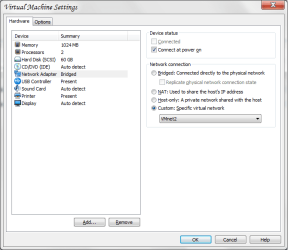
With the player, I didn't see the option but in Workstation, ensure that the one you want to go to the second NIC has the option of vmnet2 set for its network card in the options.
 

Attachments

  • VMware Network Shot.png
    VMware Network Shot.png
    18.3 KB · Views: 79

My Computer My Computer

At a glance

Windows 7 Ultimate x64 SP1Intel Core i3 530 2.93 Ghz Clarkdale4 GB OCZ DDR3 1600 (PC12800) Low Voltage Desk...Nvidia GeForce GTX 550 Ti with 1 GB of RAM
OS
Windows 7 Ultimate x64 SP1
CPU
Intel Core i3 530 2.93 Ghz Clarkdale
Motherboard
ASRock P55 PRO/USB3 LGA 1156
Memory
4 GB OCZ DDR3 1600 (PC12800) Low Voltage Desktop Memory
Graphics Card(s)
Nvidia GeForce GTX 550 Ti with 1 GB of RAM
Sound Card
Realtek HD ALC892
Monitor(s) Displays
20'' eMachines E202HDbmd Glare Panel Widescreen
Screen Resolution
1600 x 900
Hard Drives
Western Digital 1 TB Caviar Black Edition (7200 RPM) SATA
Hitachi Deskstar 500 GB (7200 RPM) SATA
Samsung SpinPoint 400 GB (7200 RPM) SATA
PSU
Rosewill Xtreme Series RX750-D-B ATX12V v2.2 & EPS12V (750W)
Case
Cooler Master Centurion 534 RC-534-KKN2-GP Mid-Tower
Cooling
Standard Case Fans and Stock CPU Heatsink
Keyboard
Microsoft Wireless Optical Desktop Elite
Mouse
Microsoft Wireless Optical Desktop Elite
Internet Speed
7.1 Mbps Verizon DSL
If your nics are usb based you can completely control the hardware from within the vm. You can do pretty much whatever you could do with them on a host..

Joakim
 

My Computer My Computer

At a glance

ubuntu
OS
ubuntu
If your nics are usb based you can completely control the hardware from within the vm. You can do pretty much whatever you could do with them on a host..

Joakim
Oh indeed. I forgot all about that, you can certainly do that.
 

My Computer My Computer

At a glance

Windows 7 Ultimate x64 SP1Intel Core i3 530 2.93 Ghz Clarkdale4 GB OCZ DDR3 1600 (PC12800) Low Voltage Desk...Nvidia GeForce GTX 550 Ti with 1 GB of RAM
OS
Windows 7 Ultimate x64 SP1
CPU
Intel Core i3 530 2.93 Ghz Clarkdale
Motherboard
ASRock P55 PRO/USB3 LGA 1156
Memory
4 GB OCZ DDR3 1600 (PC12800) Low Voltage Desktop Memory
Graphics Card(s)
Nvidia GeForce GTX 550 Ti with 1 GB of RAM
Sound Card
Realtek HD ALC892
Monitor(s) Displays
20'' eMachines E202HDbmd Glare Panel Widescreen
Screen Resolution
1600 x 900
Hard Drives
Western Digital 1 TB Caviar Black Edition (7200 RPM) SATA
Hitachi Deskstar 500 GB (7200 RPM) SATA
Samsung SpinPoint 400 GB (7200 RPM) SATA
PSU
Rosewill Xtreme Series RX750-D-B ATX12V v2.2 & EPS12V (750W)
Case
Cooler Master Centurion 534 RC-534-KKN2-GP Mid-Tower
Cooling
Standard Case Fans and Stock CPU Heatsink
Keyboard
Microsoft Wireless Optical Desktop Elite
Mouse
Microsoft Wireless Optical Desktop Elite
Internet Speed
7.1 Mbps Verizon DSL
Here is the screenshot of the network editor, I am sure someone out there has solved this - thanks
 

Attachments

  • Network editor.png
    Network editor.png
    21.8 KB · Views: 117

My Computer My Computer

At a glance

Windows 7 home premium x64
OS
Windows 7 home premium x64
Problem solved, pls check details on this link:
VMware Communities: Help connect 2 linux clients on windows ...
Thanks everyone who took a look.

In a nutshell, I was unable to have 2 bridged networks on VMplayer, only one worked at a given time.

Vmwareworkstation: I was able to define (correctly) 2 bridged networks and these worked and solved my problem.
 

My Computer My Computer

At a glance

Windows 7 home premium x64
OS
Windows 7 home premium x64
Back
Top