My DVD drive is gone?!!

MadsBP

New member
Local time
7:52 AM
Messages
21
Location
Denmark
HELP!My DVD drive is gone! When i click on Computer it's just not there! ( it was there about 2-3 weeks ago.. And i HAVEN'T toutched my computers inside! ) I have Read on some forums that some programs will work... they didn't.. so please help me you guys! :confused:

Programs Used:
CD-DVD-Fix.exe (don't work)
DVDRepair.exe (don't work)
 

My Computer My Computer

OS
Windows 7 32bit.
CPU
ACPI x86 baseret pc
Memory
4,00 GB
Graphics Card(s)
NVIDIA GeForce 9600 GT
Look at device manager to see if the drive is located there. If so, is there a yellow warning?
 

My Computer My Computer

Computer Manufacturer/Model Number
Dell and Custom
OS
Systems 1 and 2: Windows 7 Enterprise x64, Win 8 Developer
CPU
System 1: i7 [email protected], System 2: AMD FX-4100 Zambezi 3.6G
Motherboard
System 1:Dell 06NWYK System 2: ASUS M5A97 AM3+
Memory
System 1: 8GB System 2: 8GB
Graphics Card(s)
System 1: ATI FirePro V4800 System 2: Radeon HD 6850
Sound Card
System 1: onboard System 2: onboard
Monitor(s) Displays
System1: Viewsonic HDMI 24"
Screen Resolution
System 1: 1920x1080 System 2: 1920x1080
Hard Drives
System 1: Mirrored .5B drives System 2: Seagate Barracuda ST1000DM003 1TB 7200 RPM 64MB Cache SATA 6.0Gb/s
Case
System 1: Dell System 2: Cooler Master
Internet Speed
10 MBPS
Im so sorry but my English iiiiiiiiis a bit bad xD so, is it under...? sorry :/

PS: i have been useing DaemonTool. But i deleted it!
 
Last edited by a moderator:

My Computer My Computer

OS
Windows 7 32bit.
CPU
ACPI x86 baseret pc
Memory
4,00 GB
Graphics Card(s)
NVIDIA GeForce 9600 GT

My Computer My Computer

Computer Manufacturer/Model Number
Dell and Custom
OS
Systems 1 and 2: Windows 7 Enterprise x64, Win 8 Developer
CPU
System 1: i7 [email protected], System 2: AMD FX-4100 Zambezi 3.6G
Motherboard
System 1:Dell 06NWYK System 2: ASUS M5A97 AM3+
Memory
System 1: 8GB System 2: 8GB
Graphics Card(s)
System 1: ATI FirePro V4800 System 2: Radeon HD 6850
Sound Card
System 1: onboard System 2: onboard
Monitor(s) Displays
System1: Viewsonic HDMI 24"
Screen Resolution
System 1: 1920x1080 System 2: 1920x1080
Hard Drives
System 1: Mirrored .5B drives System 2: Seagate Barracuda ST1000DM003 1TB 7200 RPM 64MB Cache SATA 6.0Gb/s
Case
System 1: Dell System 2: Cooler Master
Internet Speed
10 MBPS
There is no yellow dots. ( But there is also no DVD Drive..)

But when i insert a DVD i can hear it working on the DVD.
 
Last edited by a moderator:

My Computer My Computer

OS
Windows 7 32bit.
CPU
ACPI x86 baseret pc
Memory
4,00 GB
Graphics Card(s)
NVIDIA GeForce 9600 GT
i had this problem once and it was a simple case of a loose connection,open youre tower and unplug then reinsert it,follow all wires from it to all connctions ant just check they are all firmly in
 

My Computer My Computer

Computer type
PC/Desktop
OS
Windows 7 X64 Bit
CPU
Intel(R) Core(TM)i7-4771 CPU @ 3.50GH
Motherboard
Asus Sabertooth Z87
Memory
Corsair 4x8 Vengeance (32GB)
Graphics Card(s)
NVIDIA GeForce GTX780
Monitor(s) Displays
LG
Screen Resolution
1920x1080
PSU
Corsair CX750
Case
Corsair 200 series
Cooling
H80i Liquid Cooler
Keyboard
Microsoft
Mouse
Microsoft
Internet Speed
good times-500-850 kbs bad times-50-100 kbs
hmm okay. let me try that :D

Nope! didn't work.. Checked in My Coputer AND Device Manager
 
Last edited by a moderator:

My Computer My Computer

OS
Windows 7 32bit.
CPU
ACPI x86 baseret pc
Memory
4,00 GB
Graphics Card(s)
NVIDIA GeForce 9600 GT
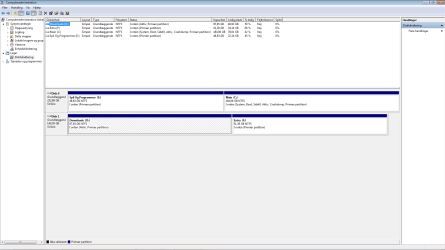
Can you post a screenshot of disk management screen, Type diskmgmt.msc in start menu search.

disk.JPG

What other changes have you done since the last time it worked?
 

My Computer My Computer

Computer type
PC/Desktop
Computer Manufacturer/Model Number
Self Built
OS
Win 10 Pro x64
CPU
Intel I5-2500K @3.3GHz
Motherboard
Asrock P67 Extreme4
Memory
16GB G.Skill Ripjaws X (4x4GB)
Graphics Card(s)
EVGA GeForce 750 Ti SC 2GB
Sound Card
ASUS Xonar DG 5.1 Channels 24-bit 96KHz PCI Interface Sound
Monitor(s) Displays
auria eq2367
Screen Resolution
1920 x 1080
Hard Drives
250GB Samsung 850 EVO SSD
1TB WD Blue
1TB Hitachi
PSU
SeaSonic X 650W 80 Plus Gold
Case
Corsair Obsidian 750D
Cooling
Corsair H60, Three 140mm case fans
Keyboard
Logitech Wireless Keyboard K520
Mouse
Logitech Wireless Mouse M310
Internet Speed
Wave Broadband ~ 100 dn 5 up
Antivirus
Windows Defender, Malwarebytes Premium
Browser
Edge, IE11, Chrome
Other Info
Laptop specs: HP g7-1365dx /
CPU: AMD A6-3420M APU with Radeon(tm) HD Graphics /
RAM: Crucial 8Gb (2x4Gb) /
SSD: Crucial M4-CT128M4SSD2 ATA Device/ FW 000F /
GFX: AMD Radeon HD 6520G /
OS: Windows 10 Pro x64
What make & model is your DVD drive? IDE or Sata Drive ?
 

My Computer My Computer

Computer type
PC/Desktop
Computer Manufacturer/Model Number
Built them myself, Science Experiments !
OS
Win7 Enterprise, Win7 x86 (Ult 7600), Win7 x64 Ult 7600, TechNet RTM on AMD x64 (2.8Ghz)
CPU
AMD fx8350 4ghz, AMD-32 2400mhz, AMD-64 3200mhz, AMDx64 2.8G
Motherboard
SIS 755, ECS-K8M890M-M (Ult 7600), GigaByte & others
Memory
2gb, 4gb on the Ult 7600, 4gb on Technet RTM, 32gb on FX8350
Graphics Card(s)
Draw my own Graphics, several nVidia cards
Sound Card
on motherboard
Monitor(s) Displays
19" flat scr, 28" I-Inc widescr,22" Emprex Widescr, 23" Acer
Screen Resolution
1280 x 1024, 1440 x 900, 1920 x 1080
Hard Drives
6 pata Ide HD's & 2 Sata HD's
added 80gb external on Ult 7600 computer,
numerous extra 1tb, 2TB, 3Tb SATA HD's
A collection of ext HD Docks w/ HDs
PSU
430w, 550w, 600w, 700, 800, etc
Case
All Generic Full Towers
Cooling
Open Air & a few fans, some w/ colored LEDs
Keyboard
Compaq & Dell recycled from GoodWill
Mouse
Made in China Optical Wired Mouse
Internet Speed
Fast Cable InterNet
Antivirus
AVG Free on 24 different Desktops, NO Problems!
Browser
IE 8 is preferred, but use FireFox sometimes
Other Info
Linksys Routers, switches, & Hubs
Too Many USB Flash Drives to count, Biggest is 64GB !
Eight computers in my home network.
Sixteen computers at my business network.
Linked via TeamViewer !
Lots of old used spare computer parts everywhere!
These are the exact types of things that I like to use system restore points for. Can you try restoring back to a point in time where you knew the drive was working?
 

My Computer My Computer

Computer Manufacturer/Model Number
Self-Built in July 2009
OS
Windows 7 Ultimate x64
CPU
Intel Q9550 2.83Ghz OC'd to 3.40Ghz
Motherboard
Gigabyte GA-EP45-UD3R rev. 1.1, F12 BIOS
Memory
8GB G.Skill PI DDR2-800, 4-4-4-12 timings
Graphics Card(s)
EVGA 1280MB Nvidia GeForce GTX570
Sound Card
Realtek ALC899A 8 channel onboard audio
Monitor(s) Displays
23" Acer x233H
Screen Resolution
1920x1080
Hard Drives
Intel X25-M 80GB Gen 2 SSD
Western Digital 1TB Caviar Black, 32MB cache. WD1001FALS
PSU
Corsair 620HX modular
Case
Antec P182
Cooling
stock
Keyboard
ABS M1 Mechanical
Mouse
Logitech G9 Laser Mouse
Internet Speed
15/2 cable modem
Other Info
Windows and Linux enthusiast. Logitech G35 Headset.
yesyes.png

And my DVD drive is... I guess i cant tell. I cant find it on my computer and on the DVD drive it just says: DVD ROM. Campact Disk

Oh, and i did restore it 1-2 days back when i think it did work but still won't work :/

By the way, i havent done eanything than run those two programs..
 
Last edited:

My Computer My Computer

OS
Windows 7 32bit.
CPU
ACPI x86 baseret pc
Memory
4,00 GB
Graphics Card(s)
NVIDIA GeForce 9600 GT
I really BADLY need it to work! So PLEASE respond!
 
Last edited:

My Computer My Computer

OS
Windows 7 32bit.
CPU
ACPI x86 baseret pc
Memory
4,00 GB
Graphics Card(s)
NVIDIA GeForce 9600 GT

My Computer My Computer

Computer type
PC/Desktop
Computer Manufacturer/Model Number
Self Built
OS
Win 10 Pro x64
CPU
Intel I5-2500K @3.3GHz
Motherboard
Asrock P67 Extreme4
Memory
16GB G.Skill Ripjaws X (4x4GB)
Graphics Card(s)
EVGA GeForce 750 Ti SC 2GB
Sound Card
ASUS Xonar DG 5.1 Channels 24-bit 96KHz PCI Interface Sound
Monitor(s) Displays
auria eq2367
Screen Resolution
1920 x 1080
Hard Drives
250GB Samsung 850 EVO SSD
1TB WD Blue
1TB Hitachi
PSU
SeaSonic X 650W 80 Plus Gold
Case
Corsair Obsidian 750D
Cooling
Corsair H60, Three 140mm case fans
Keyboard
Logitech Wireless Keyboard K520
Mouse
Logitech Wireless Mouse M310
Internet Speed
Wave Broadband ~ 100 dn 5 up
Antivirus
Windows Defender, Malwarebytes Premium
Browser
Edge, IE11, Chrome
Other Info
Laptop specs: HP g7-1365dx /
CPU: AMD A6-3420M APU with Radeon(tm) HD Graphics /
RAM: Crucial 8Gb (2x4Gb) /
SSD: Crucial M4-CT128M4SSD2 ATA Device/ FW 000F /
GFX: AMD Radeon HD 6520G /
OS: Windows 10 Pro x64
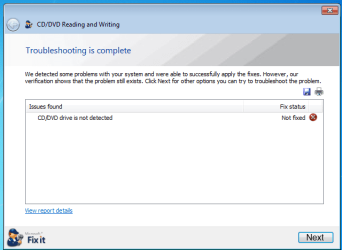
nope.png

The Picture say's it all...
 

My Computer My Computer

OS
Windows 7 32bit.
CPU
ACPI x86 baseret pc
Memory
4,00 GB
Graphics Card(s)
NVIDIA GeForce 9600 GT
Gud Morn MadsBP,

Now let's see if I can find my link to the cure for your problem.

Writeup dates back to the XP days but is still valid. I had to use the procedure once myself after some unruly software messed things up.

1. WIN key (that's the one with the wavy flag)
type regedit in the Start Search box, and then click regedit in the Programs list.

If you are prompted for an administrator password or confirmation, type your password, or click Continue.
2. Locate, and then click the following registry subkey:
HKEY_LOCAL_MACHINE\SYSTEM\CurrentControlSet\Control\Class\{4D36E965-E325-11CE-BFC1-08002BE10318}
Caution There can be many instances of the registry subkey that is mentioned in step 2. You must make sure that you are in the appropriate registry subkey before modifying the UpperFilters and the LowerFilters values. To verify that you are in the appropriate registry subkey, make sure that the Default data value is DVD/CD-ROM and the Class data value is CDROM.
3. In the right pane, right-click UpperFilters, and then click Delete.
4. Click Yes to confirm the removal of the UpperFilters registry entry.
5. In the right pane, right-click LowerFilters, and then click Delete.
6. Click Yes to confirm the removal of the LowerFilters registry entry.
7. Exit Registry Editor, and then restart the computer.

Now that's not the original write-up. Guess I should search my old posts.
But if you find those Upper/lower keys then delete them.

 

My Computer My Computer

Computer Manufacturer/Model Number
Toshiba Satellite S875D-S7239 laptop
OS
MS Windows 7 Ultimate SP1 64-bit
CPU
AMD A10-4600M
Motherboard
AMD Pumori (Socket FT1)
Memory
6.00 GB Dual-Channel DDR3 @ 798MHz (11-11-12-28)
Graphics Card(s)
AMD Radeon HD 7660G
Sound Card
High Definition Audio Device
Monitor(s) Displays
Generic PnP Monitor (1600x900@60Hz)
Screen Resolution
1600x900@60Hz
Hard Drives
SSD 119GB Corsair CSSD-V128GB2 ATA Device
Keyboard
Standard PS/2 Keyboard
Mouse
HP Wireless Optical Mobile Mouse Model FHA-3410
Internet Speed
What the local pub, local coffee shop offers.
Other Info
Optical Drive:MATSHITA BD-CMB UJ160B ATA Device


Also have an Asus ha1002xp netbook with Win 7 Ultimate installed.
Sound like Deamon Tool could be the culprit i've heard it doesn't play well with Win 7, i would first boot into bios and make sure the drives are On
 

My Computer My Computer

Computer Manufacturer/Model Number
Dell XPS 730
OS
Windows 7 Home Premium 64 bit
CPU
Intel Core 2 quad Extreme Q9770 @ 3.2 GHz
Memory
4x2 GB Muskin 1600 MHz ram
Graphics Card(s)
NVidia GTX 250
Sound Card
Soundblaster X-Fi Fatality Champion
Monitor(s) Displays
2 Dell 2007WFP Ultrascans
Screen Resolution
3360 x 1050
Hard Drives
WD Black 1TB sata, 2-WD Black 500 sata, 2-Seagate 500 Go external
PSU
1000 Watt
Cooling
air
Keyboard
MS Natrual Keyboard Pro
Mouse
Logitech Wireless Trackball
Internet Speed
DSL Elite
Gud Morn MadsBP,

Now let's see if I can find my link to the cure for your problem.

Writeup dates back to the XP days but is still valid. I had to use the procedure once myself after some unruly software messed things up.

1. WIN key (that's the one with the wavy flag)
type regedit in the Start Search box, and then click regedit in the Programs list.

If you are prompted for an administrator password or confirmation, type your password, or click Continue.
2. Locate, and then click the following registry subkey:
HKEY_LOCAL_MACHINE\SYSTEM\CurrentControlSet\Control\Class\{4D36E965-E325-11CE-BFC1-08002BE10318}
Caution There can be many instances of the registry subkey that is mentioned in step 2. You must make sure that you are in the appropriate registry subkey before modifying the UpperFilters and the LowerFilters values. To verify that you are in the appropriate registry subkey, make sure that the Default data value is DVD/CD-ROM and the Class data value is CDROM.
3. In the right pane, right-click UpperFilters, and then click Delete.
4. Click Yes to confirm the removal of the UpperFilters registry entry.
5. In the right pane, right-click LowerFilters, and then click Delete.
6. Click Yes to confirm the removal of the LowerFilters registry entry.
7. Exit Registry Editor, and then restart the computer.

Now that's not the original write-up. Guess I should search my old posts.
But if you find those Upper/lower keys then delete them.


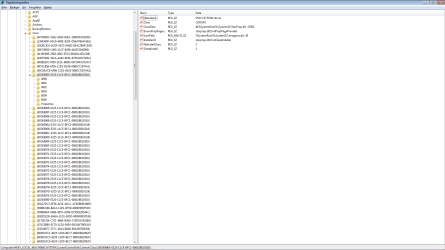
Okaay, i did. there is no UpperFilters or LowerFilters to delete... :confused: Look:

im bored.png
 

My Computer My Computer

OS
Windows 7 32bit.
CPU
ACPI x86 baseret pc
Memory
4,00 GB
Graphics Card(s)
NVIDIA GeForce 9600 GT
Sound like Deamon Tool could be the culprit i've heard it doesn't play well with Win 7, i would first boot into bios and make sure the drives are On


Sorry for the Nooby question but.. How? xD i mean there is different BIOS for different motherboards. so, where? how?
 

My Computer My Computer

OS
Windows 7 32bit.
CPU
ACPI x86 baseret pc
Memory
4,00 GB
Graphics Card(s)
NVIDIA GeForce 9600 GT
Usually when you do a restart as soon as you see the first screen start pressing F2 key, that should take you into bios, then use the arrow keys and the enter key to see if the cdrom drive is set to auto. to get out do esc save changes enter and your done
 

My Computer My Computer

Computer Manufacturer/Model Number
Dell XPS 730
OS
Windows 7 Home Premium 64 bit
CPU
Intel Core 2 quad Extreme Q9770 @ 3.2 GHz
Memory
4x2 GB Muskin 1600 MHz ram
Graphics Card(s)
NVidia GTX 250
Sound Card
Soundblaster X-Fi Fatality Champion
Monitor(s) Displays
2 Dell 2007WFP Ultrascans
Screen Resolution
3360 x 1050
Hard Drives
WD Black 1TB sata, 2-WD Black 500 sata, 2-Seagate 500 Go external
PSU
1000 Watt
Cooling
air
Keyboard
MS Natrual Keyboard Pro
Mouse
Logitech Wireless Trackball
Internet Speed
DSL Elite

My Computer My Computer

Computer Manufacturer/Model Number
Toshiba Satellite S875D-S7239 laptop
OS
MS Windows 7 Ultimate SP1 64-bit
CPU
AMD A10-4600M
Motherboard
AMD Pumori (Socket FT1)
Memory
6.00 GB Dual-Channel DDR3 @ 798MHz (11-11-12-28)
Graphics Card(s)
AMD Radeon HD 7660G
Sound Card
High Definition Audio Device
Monitor(s) Displays
Generic PnP Monitor (1600x900@60Hz)
Screen Resolution
1600x900@60Hz
Hard Drives
SSD 119GB Corsair CSSD-V128GB2 ATA Device
Keyboard
Standard PS/2 Keyboard
Mouse
HP Wireless Optical Mobile Mouse Model FHA-3410
Internet Speed
What the local pub, local coffee shop offers.
Other Info
Optical Drive:MATSHITA BD-CMB UJ160B ATA Device


Also have an Asus ha1002xp netbook with Win 7 Ultimate installed.
Back
Top