replacing my xfx nforce sli 750i mobo: Advices

Keep the CPU voltage at 0.1250 then, to be on the safe side.

The heat from the RAM will just be from the voltage increase. It will be fine as it's at the manufacturers specification.

Do you mean the WEI button doesn't launch the WEI at all when you click it, too?
 

My Computer My Computer

At a glance

Windows 8.1 Pro x64Intel Core i7 4790k8GB Corsair Dominator 1600MHzMSI TwinFrozr GeForce GTX770
Computer type
PC/Desktop
Computer Manufacturer/Model Number
Custom Built
OS
Windows 8.1 Pro x64
CPU
Intel Core i7 4790k
Motherboard
MSI Z97S Krait Edition
Memory
8GB Corsair Dominator 1600MHz
Graphics Card(s)
MSI TwinFrozr GeForce GTX770
Sound Card
ASUS Xonar DX/XD 7.1
Monitor(s) Displays
Dell 24" S2409W + Dell 20" E207WFP
Screen Resolution
1920x1080 + 1680x1050
Hard Drives
1x 120GB OCZ Agility 3, 1x 750GB Western Digital Caviar Black, 1x 1TB Western Digital Caviar Blue
PSU
Corsair HX850 modular
Case
Fractal Design Define R4
Cooling
Corsair H60 w/ twin Corsair SP120 fans
Keyboard
Logitech G510S Keyboard
Mouse
Logitech G500S Laser Mouse
Internet Speed
40Mbps
Antivirus
Microsoft Security Essentials
Browser
Google Chrome
Other Info
LG Blu-Ray player
Keep the CPU voltage at 0.1250 then, to be on the safe side.

The heat from the RAM will just be from the voltage increase. It will be fine as it's at the manufacturers specification.

Do you mean the WEI button doesn't launch the WEI at all when you click it, too?

Well, now I ám goingto change from [0.0875V] to [0.1250].

And to learn a little
, are you willing to explain me a little bit what I am doing here? for my general computer knowledge.
Questions:

I guess the higher the voltage the faster the proscesor, right?Why are the timings that we just set no into my RAM specs??
It says in the specs page that my memory timing is: CL 5-4-4-15 (CAS-TRCD-TRP-TRAS).

Is the cpu voltage open to experimentation?

Is this overclocking, what we are doing?

Oh!! I forgot, yes, when I press the RATE THIS COMPUTER button it doesn't do anything.


Thanks, I am just willing to learn here....
 

My Computer My Computer

At a glance

Windows 7 x64bit Home PremiumIntel Core i5-2500K Quad-Core Processor 3.3 G...8GB G.Skill DDR3 PC3-12800 1600MHz - F3-12800...Sandy Bridge
Computer type
PC/Desktop
Computer Manufacturer/Model Number
Custom Build
OS
Windows 7 x64bit Home Premium
CPU
Intel Core i5-2500K Quad-Core Processor 3.3 GHz 6 MB Cache
Motherboard
Intel Desktop Board Media Series LGA 1155 DDR 1333 Micro-ATX
Memory
8GB G.Skill DDR3 PC3-12800 1600MHz - F3-12800CL9D-8GBRL
Graphics Card(s)
Sandy Bridge
Sound Card
M-Audio Fast Track PRO - Avid digidesign 003 rack factory
Monitor(s) Displays
Acer X233H LCD monitor
Screen Resolution
1920x1080
Hard Drives
OS Drive: Silicon Power 256GB SSD 3D NAND A55 SLC Cache Performance Boost SATA III
PSU
Cooler Master eXtreme Power Plus 500w Power Supply
Other Info
This Computer was built from scratch
Keep the CPU voltage at 0.1250 then, to be on the safe side.

The heat from the RAM will just be from the voltage increase. It will be fine as it's at the manufacturers specification.

Do you mean the WEI button doesn't launch the WEI at all when you click it, too?

Well, now I ám goingto change from [0.0875V] to [0.1250].

And to learn a little
, are you willing to explain me a little bit what I am doing here? for my general computer knowledge.
Questions:

I guess the higher the voltage the faster the proscesor, right?Why are the timings that we just set no into my RAM specs??
It says in the specs page that my memory timing is: CL 5-4-4-15 (CAS-TRCD-TRP-TRAS).

Is the cpu voltage open to experimentation?

Is this overclocking, what we are doing?


Thanks, I am just willing to learn here....

Increasing the voltage doesn't increase the speed of the processor. Before, your processor wouldn't have been getting enough power, which is one of the reasons why you might have been having problems.

I'm not sure where chev found the RAM timings for you to set, but feel free to change them to what they should be if you feel like experimenting, though higher timings are usually safer. The timings are the latency timings for the cycles the RAM does for each part, so a lower latency is better, but the difference to what you've set and to what the manufacturer's specs are will be negligible.

You can experiment with the CPU voltage if you like. You can lower it a bit to a voltage that still allows your computer to work fine and stable.

You're not overclocking the processor. Overclocking the processor would be increasing the speed it runs at. It's up to you if you want to venture in to that area. The overclocking section on this forum has a lot of information on it.


Though it's good to hear your PC booted up without a problem :)
 

My Computer My Computer

At a glance

Windows 8.1 Pro x64Intel Core i7 4790k8GB Corsair Dominator 1600MHzMSI TwinFrozr GeForce GTX770
Computer type
PC/Desktop
Computer Manufacturer/Model Number
Custom Built
OS
Windows 8.1 Pro x64
CPU
Intel Core i7 4790k
Motherboard
MSI Z97S Krait Edition
Memory
8GB Corsair Dominator 1600MHz
Graphics Card(s)
MSI TwinFrozr GeForce GTX770
Sound Card
ASUS Xonar DX/XD 7.1
Monitor(s) Displays
Dell 24" S2409W + Dell 20" E207WFP
Screen Resolution
1920x1080 + 1680x1050
Hard Drives
1x 120GB OCZ Agility 3, 1x 750GB Western Digital Caviar Black, 1x 1TB Western Digital Caviar Blue
PSU
Corsair HX850 modular
Case
Fractal Design Define R4
Cooling
Corsair H60 w/ twin Corsair SP120 fans
Keyboard
Logitech G510S Keyboard
Mouse
Logitech G500S Laser Mouse
Internet Speed
40Mbps
Antivirus
Microsoft Security Essentials
Browser
Google Chrome
Other Info
LG Blu-Ray player
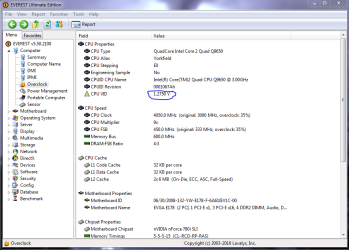
Usually just using the VID of the cpu will work fine for CPU Vcore. You can get that info from Everest "picture below". Intel range for VID on this cpu. http://ark.intel.com/Product.aspx?id=35365&processor=Q9400&spec-codes=SLB6B

Yes I looked up the specs for the memory but I'm not sure if I had all the info about this particular memory to begin with. I was also under the impression that increasing the NB "MCP" voltage caused instablity which is very strange, maybe this has changed because of working with the Vcore?

The 1.5 suggestion was for the regular Nvidia boards, the adjustment range for this board is different than the Nvidia boards which is how I arrived at the 1.3 MCP setting. That is why I asked for the bios pictures. ;)

I looked up typical MCP voltages for this board and the usual is 1.3 for MCP when running 8GB of memory on this particular board. I would need the exact model number of this OCZ memory in order to find accurate info about the timings and voltages.

If the WEI won't run it's usually because the system isn't completely stable but usually it will start and then give an error message.

Sorry been a little busy lately.
 

Attachments

  • Everest CPU VID.PNG
    Everest CPU VID.PNG
    38.9 KB · Views: 44
Last edited:

My Computer My Computer

At a glance

Windows 7 Ult, Windows 8.1 Pro,Q9650-4.275GHz, E8600 4.5GHz, E6750-3.8GHzG.Skill PC2 9600 1200Mhz 5 5 5 15 2TGTX480
Computer type
PC/Desktop
Computer Manufacturer/Model Number
Home built
OS
Windows 7 Ult, Windows 8.1 Pro,
CPU
Q9650-4.275GHz, E8600 4.5GHz, E6750-3.8GHz
Motherboard
Evga 780i FTW
Memory
G.Skill PC2 9600 1200Mhz 5 5 5 15 2T
Graphics Card(s)
GTX480
Sound Card
Asus Xonar D2
Monitor(s) Displays
HannsG
Screen Resolution
1680X1050
Hard Drives
GSkill Phoenix Pro 120GB SSD
PSU
ThermalTake Toughpower 1000Watt modular
Case
ThermalTake XaserV
Cooling
Xigmatek S1283
Keyboard
Logitech G15
Mouse
Logitech G9
Internet Speed
T1
Usually just using the VID of the cpu will work fine for CPU Vcore. You can get that info from Everest "picture below". Intel range for VID on this cpu. Intel® Core

Yes I looked up the specs for the memory but I'm not sure if I had all the info about this particular memory to begin with. I was also under the impression that increasing the NB "MCP" voltage caused instablity which is very strange, maybe this has changed because of working with the Vcore?

The 1.5 suggestion was for the regular Nvidia boards, the adjustment range for this board is different than the Nvidia boards which is how I arrived at the 1.3 MCP setting. That is why I asked for the bios pictures. ;)

I looked up typical MCP voltages for this board and the usual is 1.3 for MCP when running 8GB of memory on this particular board. I would need the exact model number of this OCZ memory in order to find accurate info about the timings and voltages.

If the WEI won't run it's usually because the system isn't completely stable but usually it will start and then give an error message.

Sorry been a little busy lately.

ok problems arised!

Computer is just freezing on me..
I don't think the RAM temperature is normal, it is too hot, after 2 seconds it cannot be touched!

The exact model number of my memor I think is located at SANDRA's, I post it at the beggining of this..

Well, thanks...
 

My Computer My Computer

At a glance

Windows 7 x64bit Home PremiumIntel Core i5-2500K Quad-Core Processor 3.3 G...8GB G.Skill DDR3 PC3-12800 1600MHz - F3-12800...Sandy Bridge
Computer type
PC/Desktop
Computer Manufacturer/Model Number
Custom Build
OS
Windows 7 x64bit Home Premium
CPU
Intel Core i5-2500K Quad-Core Processor 3.3 GHz 6 MB Cache
Motherboard
Intel Desktop Board Media Series LGA 1155 DDR 1333 Micro-ATX
Memory
8GB G.Skill DDR3 PC3-12800 1600MHz - F3-12800CL9D-8GBRL
Graphics Card(s)
Sandy Bridge
Sound Card
M-Audio Fast Track PRO - Avid digidesign 003 rack factory
Monitor(s) Displays
Acer X233H LCD monitor
Screen Resolution
1920x1080
Hard Drives
OS Drive: Silicon Power 256GB SSD 3D NAND A55 SLC Cache Performance Boost SATA III
PSU
Cooler Master eXtreme Power Plus 500w Power Supply
Other Info
This Computer was built from scratch
Usually just using the VID of the cpu will work fine for CPU Vcore. You can get that info from Everest "picture below". Intel range for VID on this cpu. Intel® Core

Yes I looked up the specs for the memory but I'm not sure if I had all the info about this particular memory to begin with. I was also under the impression that increasing the NB "MCP" voltage caused instablity which is very strange, maybe this has changed because of working with the Vcore?

The 1.5 suggestion was for the regular Nvidia boards, the adjustment range for this board is different than the Nvidia boards which is how I arrived at the 1.3 MCP setting. That is why I asked for the bios pictures. ;)

I looked up typical MCP voltages for this board and the usual is 1.3 for MCP when running 8GB of memory on this particular board. I would need the exact model number of this OCZ memory in order to find accurate info about the timings and voltages.

If the WEI won't run it's usually because the system isn't completely stable but usually it will start and then give an error message.

Sorry been a little busy lately.

ok problems arised!

Computer is just freezing on me..
I don't think the RAM temperature is normal, it is too hot, after 2 seconds it cannot be touched!

The exact model number of my memor I think is located at SANDRA's, I post it at the beggining of this..

Well, thanks...

Is the PC just freezing randomly?
 

My Computer My Computer

At a glance

Windows 8.1 Pro x64Intel Core i7 4790k8GB Corsair Dominator 1600MHzMSI TwinFrozr GeForce GTX770
Computer type
PC/Desktop
Computer Manufacturer/Model Number
Custom Built
OS
Windows 8.1 Pro x64
CPU
Intel Core i7 4790k
Motherboard
MSI Z97S Krait Edition
Memory
8GB Corsair Dominator 1600MHz
Graphics Card(s)
MSI TwinFrozr GeForce GTX770
Sound Card
ASUS Xonar DX/XD 7.1
Monitor(s) Displays
Dell 24" S2409W + Dell 20" E207WFP
Screen Resolution
1920x1080 + 1680x1050
Hard Drives
1x 120GB OCZ Agility 3, 1x 750GB Western Digital Caviar Black, 1x 1TB Western Digital Caviar Blue
PSU
Corsair HX850 modular
Case
Fractal Design Define R4
Cooling
Corsair H60 w/ twin Corsair SP120 fans
Keyboard
Logitech G510S Keyboard
Mouse
Logitech G500S Laser Mouse
Internet Speed
40Mbps
Antivirus
Microsoft Security Essentials
Browser
Google Chrome
Other Info
LG Blu-Ray player
Usually just using the VID of the cpu will work fine for CPU Vcore. You can get that info from Everest "picture below". Intel range for VID on this cpu. Intel® Core

Yes I looked up the specs for the memory but I'm not sure if I had all the info about this particular memory to begin with. I was also under the impression that increasing the NB "MCP" voltage caused instablity which is very strange, maybe this has changed because of working with the Vcore?

The 1.5 suggestion was for the regular Nvidia boards, the adjustment range for this board is different than the Nvidia boards which is how I arrived at the 1.3 MCP setting. That is why I asked for the bios pictures. ;)

I looked up typical MCP voltages for this board and the usual is 1.3 for MCP when running 8GB of memory on this particular board. I would need the exact model number of this OCZ memory in order to find accurate info about the timings and voltages.

If the WEI won't run it's usually because the system isn't completely stable but usually it will start and then give an error message.

Sorry been a little busy lately.

ok problems arised!

Computer is just freezing on me..
I don't think the RAM temperature is normal, it is too hot, after 2 seconds it cannot be touched!

The exact model number of my memor I think is located at SANDRA's, I post it at the beggining of this..

Well, thanks...

Is the PC just freezing randomly?

it freezes, I had it copying some files, then it froze, then tried reset it and froze with the black screen, then reset again and froze seconds after launching the desktop.. turn it off
Touched the ram memory and it was burning!

thanks
 

My Computer My Computer

At a glance

Windows 7 x64bit Home PremiumIntel Core i5-2500K Quad-Core Processor 3.3 G...8GB G.Skill DDR3 PC3-12800 1600MHz - F3-12800...Sandy Bridge
Computer type
PC/Desktop
Computer Manufacturer/Model Number
Custom Build
OS
Windows 7 x64bit Home Premium
CPU
Intel Core i5-2500K Quad-Core Processor 3.3 GHz 6 MB Cache
Motherboard
Intel Desktop Board Media Series LGA 1155 DDR 1333 Micro-ATX
Memory
8GB G.Skill DDR3 PC3-12800 1600MHz - F3-12800CL9D-8GBRL
Graphics Card(s)
Sandy Bridge
Sound Card
M-Audio Fast Track PRO - Avid digidesign 003 rack factory
Monitor(s) Displays
Acer X233H LCD monitor
Screen Resolution
1920x1080
Hard Drives
OS Drive: Silicon Power 256GB SSD 3D NAND A55 SLC Cache Performance Boost SATA III
PSU
Cooler Master eXtreme Power Plus 500w Power Supply
Other Info
This Computer was built from scratch
ok problems arised!

Computer is just freezing on me..
I don't think the RAM temperature is normal, it is too hot, after 2 seconds it cannot be touched!

The exact model number of my memor I think is located at SANDRA's, I post it at the beggining of this..

Well, thanks...

Is the PC just freezing randomly?

it freezes, I had it copying some files, then it froze, then tried reset it and froze with the black screen, then reset again and froze seconds after launching the desktop.. turn it off
Touched the ram memory and it was burning!

thanks

I don't think it's your RAM. Your RAM does have heatsinks on, which are designed to take the heat off the actual RAM modules. Your RAM is designed to run at 2.1v, so it will be fine. Try increasing the CPU voltage a couple of more notches.

Have you also had a look at updating your BIOS as well? That might help with problems.
 

My Computer My Computer

At a glance

Windows 8.1 Pro x64Intel Core i7 4790k8GB Corsair Dominator 1600MHzMSI TwinFrozr GeForce GTX770
Computer type
PC/Desktop
Computer Manufacturer/Model Number
Custom Built
OS
Windows 8.1 Pro x64
CPU
Intel Core i7 4790k
Motherboard
MSI Z97S Krait Edition
Memory
8GB Corsair Dominator 1600MHz
Graphics Card(s)
MSI TwinFrozr GeForce GTX770
Sound Card
ASUS Xonar DX/XD 7.1
Monitor(s) Displays
Dell 24" S2409W + Dell 20" E207WFP
Screen Resolution
1920x1080 + 1680x1050
Hard Drives
1x 120GB OCZ Agility 3, 1x 750GB Western Digital Caviar Black, 1x 1TB Western Digital Caviar Blue
PSU
Corsair HX850 modular
Case
Fractal Design Define R4
Cooling
Corsair H60 w/ twin Corsair SP120 fans
Keyboard
Logitech G510S Keyboard
Mouse
Logitech G500S Laser Mouse
Internet Speed
40Mbps
Antivirus
Microsoft Security Essentials
Browser
Google Chrome
Other Info
LG Blu-Ray player
Is the PC just freezing randomly?

it freezes, I had it copying some files, then it froze, then tried reset it and froze with the black screen, then reset again and froze seconds after launching the desktop.. turn it off
Touched the ram memory and it was burning!

thanks

I don't think it's your RAM. Your RAM does have heatsinks on, which are designed to take the heat off the actual RAM modules. Your RAM is designed to run at 2.1v, so it will be fine. Try increasing the CPU voltage a couple of more notches.

Have you also had a look at updating your BIOS as well? That might help with problems.

ok fine,!! I think the problem was a bad HDD that I recently attached, I had it there in my room and decided to use it, but it seems it is damaged, I remove it and no more freezing..
I also updated bios.

THANKS a LOT Man!!, I am not going to worry about how hot my ram is anymore, and no more paranoia while making music, awesome!!!

TCHAU
 

My Computer My Computer

At a glance

Windows 7 x64bit Home PremiumIntel Core i5-2500K Quad-Core Processor 3.3 G...8GB G.Skill DDR3 PC3-12800 1600MHz - F3-12800...Sandy Bridge
Computer type
PC/Desktop
Computer Manufacturer/Model Number
Custom Build
OS
Windows 7 x64bit Home Premium
CPU
Intel Core i5-2500K Quad-Core Processor 3.3 GHz 6 MB Cache
Motherboard
Intel Desktop Board Media Series LGA 1155 DDR 1333 Micro-ATX
Memory
8GB G.Skill DDR3 PC3-12800 1600MHz - F3-12800CL9D-8GBRL
Graphics Card(s)
Sandy Bridge
Sound Card
M-Audio Fast Track PRO - Avid digidesign 003 rack factory
Monitor(s) Displays
Acer X233H LCD monitor
Screen Resolution
1920x1080
Hard Drives
OS Drive: Silicon Power 256GB SSD 3D NAND A55 SLC Cache Performance Boost SATA III
PSU
Cooler Master eXtreme Power Plus 500w Power Supply
Other Info
This Computer was built from scratch
Good to hear it's running well for you now :)

Out of curiosity, which SATA port did you attach that HDD too? If you look at the SATA ports face on, I attached a HDD to the top left one of the 2 "stacks", and the computer would freeze randomly for me as well. I found out that "stack" of SATA ports had come loose from the board so there was a loose connection. The SATA port underneath that port worked fine, but if anything was connected to the top one it would freeze the PC. I thought I might have just damaged it myself from pushing too hard by accident when connecting it, but it's interesting you mention the same problem with a HDD causing freezes.

Though enjoy! Saved yourself from having to fork out for a new motherboard.
 

My Computer My Computer

At a glance

Windows 8.1 Pro x64Intel Core i7 4790k8GB Corsair Dominator 1600MHzMSI TwinFrozr GeForce GTX770
Computer type
PC/Desktop
Computer Manufacturer/Model Number
Custom Built
OS
Windows 8.1 Pro x64
CPU
Intel Core i7 4790k
Motherboard
MSI Z97S Krait Edition
Memory
8GB Corsair Dominator 1600MHz
Graphics Card(s)
MSI TwinFrozr GeForce GTX770
Sound Card
ASUS Xonar DX/XD 7.1
Monitor(s) Displays
Dell 24" S2409W + Dell 20" E207WFP
Screen Resolution
1920x1080 + 1680x1050
Hard Drives
1x 120GB OCZ Agility 3, 1x 750GB Western Digital Caviar Black, 1x 1TB Western Digital Caviar Blue
PSU
Corsair HX850 modular
Case
Fractal Design Define R4
Cooling
Corsair H60 w/ twin Corsair SP120 fans
Keyboard
Logitech G510S Keyboard
Mouse
Logitech G500S Laser Mouse
Internet Speed
40Mbps
Antivirus
Microsoft Security Essentials
Browser
Google Chrome
Other Info
LG Blu-Ray player
Usually just using the VID of the cpu will work fine for CPU Vcore. You can get that info from Everest "picture below". Intel range for VID on this cpu. Intel® Core

Yes I looked up the specs for the memory but I'm not sure if I had all the info about this particular memory to begin with. I was also under the impression that increasing the NB "MCP" voltage caused instablity which is very strange, maybe this has changed because of working with the Vcore?

The 1.5 suggestion was for the regular Nvidia boards, the adjustment range for this board is different than the Nvidia boards which is how I arrived at the 1.3 MCP setting. That is why I asked for the bios pictures. ;)

I looked up typical MCP voltages for this board and the usual is 1.3 for MCP when running 8GB of memory on this particular board. I would need the exact model number of this OCZ memory in order to find accurate info about the timings and voltages.

If the WEI won't run it's usually because the system isn't completely stable but usually it will start and then give an error message.

Sorry been a little busy lately.

It,s ok,,I am sorry I found you guys this late, after so many months of frustration and investigation.
At least I have learned something, actually a lot!

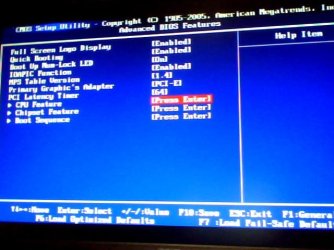
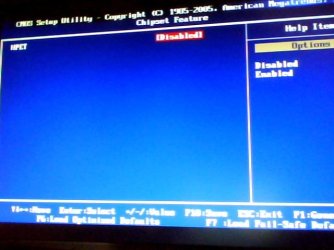
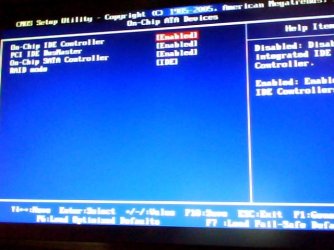
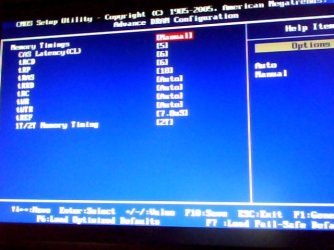
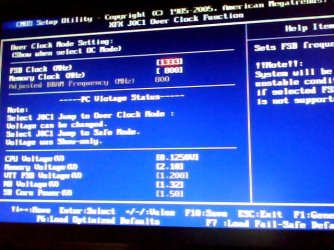
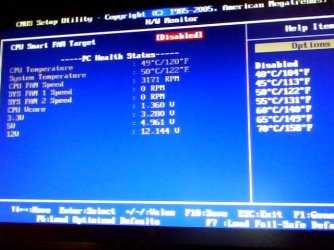
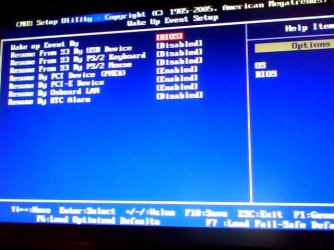
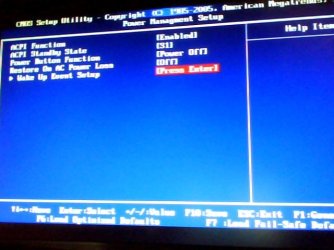
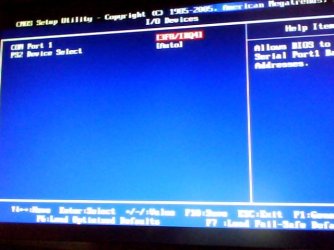
I have attached the latest BIOS settings as it is right now, I have only changed what you told me, everything else is there ny default.

sorry for so many pics, I just wanna make sure I have everything in place because protools is very picky with BIOS settings.

THANKSSSSSS
 

Attachments

  • Imagen 001.jpg
    Imagen 001.jpg
    41.1 KB · Views: 22
  • Imagen 002.jpg
    Imagen 002.jpg
    36 KB · Views: 17
  • Imagen 003.jpg
    Imagen 003.jpg
    32.8 KB · Views: 18
  • Imagen 004.jpg
    Imagen 004.jpg
    39.5 KB · Views: 17
  • Imagen 011.jpg
    Imagen 011.jpg
    39.1 KB · Views: 19
  • Imagen 010.jpg
    Imagen 010.jpg
    57.1 KB · Views: 20
  • Imagen 009.jpg
    Imagen 009.jpg
    46.9 KB · Views: 16
  • Imagen 008.jpg
    Imagen 008.jpg
    46.5 KB · Views: 18
  • Imagen 007.jpg
    Imagen 007.jpg
    43.2 KB · Views: 15
  • Imagen 006.jpg
    Imagen 006.jpg
    37.1 KB · Views: 15
  • Imagen 005.jpg
    Imagen 005.jpg
    34.8 KB · Views: 15

My Computer My Computer

At a glance

Windows 7 x64bit Home PremiumIntel Core i5-2500K Quad-Core Processor 3.3 G...8GB G.Skill DDR3 PC3-12800 1600MHz - F3-12800...Sandy Bridge
Computer type
PC/Desktop
Computer Manufacturer/Model Number
Custom Build
OS
Windows 7 x64bit Home Premium
CPU
Intel Core i5-2500K Quad-Core Processor 3.3 GHz 6 MB Cache
Motherboard
Intel Desktop Board Media Series LGA 1155 DDR 1333 Micro-ATX
Memory
8GB G.Skill DDR3 PC3-12800 1600MHz - F3-12800CL9D-8GBRL
Graphics Card(s)
Sandy Bridge
Sound Card
M-Audio Fast Track PRO - Avid digidesign 003 rack factory
Monitor(s) Displays
Acer X233H LCD monitor
Screen Resolution
1920x1080
Hard Drives
OS Drive: Silicon Power 256GB SSD 3D NAND A55 SLC Cache Performance Boost SATA III
PSU
Cooler Master eXtreme Power Plus 500w Power Supply
Other Info
This Computer was built from scratch
ups, DAMNNN IT!!!!!!!!!!!
the problem ocurred again...............
suuuucks

I turn the computer on 5 minutes ago and the same booting problem happened!!!

god help me
 

My Computer My Computer

At a glance

Windows 7 x64bit Home PremiumIntel Core i5-2500K Quad-Core Processor 3.3 G...8GB G.Skill DDR3 PC3-12800 1600MHz - F3-12800...Sandy Bridge
Computer type
PC/Desktop
Computer Manufacturer/Model Number
Custom Build
OS
Windows 7 x64bit Home Premium
CPU
Intel Core i5-2500K Quad-Core Processor 3.3 GHz 6 MB Cache
Motherboard
Intel Desktop Board Media Series LGA 1155 DDR 1333 Micro-ATX
Memory
8GB G.Skill DDR3 PC3-12800 1600MHz - F3-12800CL9D-8GBRL
Graphics Card(s)
Sandy Bridge
Sound Card
M-Audio Fast Track PRO - Avid digidesign 003 rack factory
Monitor(s) Displays
Acer X233H LCD monitor
Screen Resolution
1920x1080
Hard Drives
OS Drive: Silicon Power 256GB SSD 3D NAND A55 SLC Cache Performance Boost SATA III
PSU
Cooler Master eXtreme Power Plus 500w Power Supply
Other Info
This Computer was built from scratch
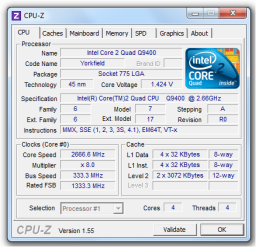
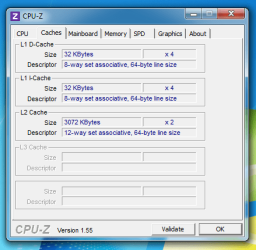
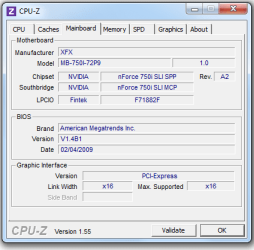
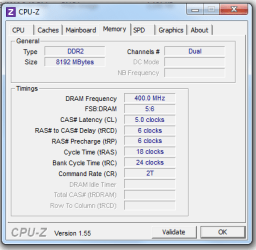
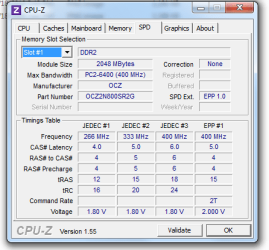
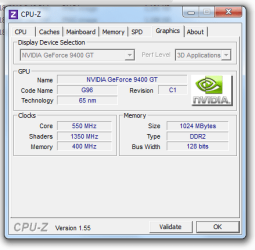
If you manage to get back to your desktop, could you try and get a screenshot of CPU-Z and post it?

Try incrementing the CPU voltage a bit more.
 

My Computer My Computer

At a glance

Windows 8.1 Pro x64Intel Core i7 4790k8GB Corsair Dominator 1600MHzMSI TwinFrozr GeForce GTX770
Computer type
PC/Desktop
Computer Manufacturer/Model Number
Custom Built
OS
Windows 8.1 Pro x64
CPU
Intel Core i7 4790k
Motherboard
MSI Z97S Krait Edition
Memory
8GB Corsair Dominator 1600MHz
Graphics Card(s)
MSI TwinFrozr GeForce GTX770
Sound Card
ASUS Xonar DX/XD 7.1
Monitor(s) Displays
Dell 24" S2409W + Dell 20" E207WFP
Screen Resolution
1920x1080 + 1680x1050
Hard Drives
1x 120GB OCZ Agility 3, 1x 750GB Western Digital Caviar Black, 1x 1TB Western Digital Caviar Blue
PSU
Corsair HX850 modular
Case
Fractal Design Define R4
Cooling
Corsair H60 w/ twin Corsair SP120 fans
Keyboard
Logitech G510S Keyboard
Mouse
Logitech G500S Laser Mouse
Internet Speed
40Mbps
Antivirus
Microsoft Security Essentials
Browser
Google Chrome
Other Info
LG Blu-Ray player
If you manage to get back to your desktop, could you try and get a screenshot of CPU-Z and post it?

Try incrementing the CPU voltage a bit more.


Hi, I have tried increasing and decreasing cpu voltage and nothing..
And tried 5-4-4-15 with my memory too.

Here are the pics!! thanks a lot..

Ah!!, Sandra said this:
Vcore setting higher than rated maximun. Check Vcore voltage!

CPU FSB speed higher than rated FSB! Reduce FSB speed.

Does it have anything to do with all of this??
 

Attachments

  • 1.png
    1.png
    18.2 KB · Views: 7
  • 2.png
    2.png
    16.1 KB · Views: 5
  • 3.png
    3.png
    11.8 KB · Views: 4
  • 4.png
    4.png
    11.9 KB · Views: 4
  • 5.png
    5.png
    14.4 KB · Views: 3
  • 6.png
    6.png
    14.3 KB · Views: 4
Last edited:

My Computer My Computer

At a glance

Windows 7 x64bit Home PremiumIntel Core i5-2500K Quad-Core Processor 3.3 G...8GB G.Skill DDR3 PC3-12800 1600MHz - F3-12800...Sandy Bridge
Computer type
PC/Desktop
Computer Manufacturer/Model Number
Custom Build
OS
Windows 7 x64bit Home Premium
CPU
Intel Core i5-2500K Quad-Core Processor 3.3 GHz 6 MB Cache
Motherboard
Intel Desktop Board Media Series LGA 1155 DDR 1333 Micro-ATX
Memory
8GB G.Skill DDR3 PC3-12800 1600MHz - F3-12800CL9D-8GBRL
Graphics Card(s)
Sandy Bridge
Sound Card
M-Audio Fast Track PRO - Avid digidesign 003 rack factory
Monitor(s) Displays
Acer X233H LCD monitor
Screen Resolution
1920x1080
Hard Drives
OS Drive: Silicon Power 256GB SSD 3D NAND A55 SLC Cache Performance Boost SATA III
PSU
Cooler Master eXtreme Power Plus 500w Power Supply
Other Info
This Computer was built from scratch
wow, no more help?
 

My Computer My Computer

At a glance

Windows 7 x64bit Home PremiumIntel Core i5-2500K Quad-Core Processor 3.3 G...8GB G.Skill DDR3 PC3-12800 1600MHz - F3-12800...Sandy Bridge
Computer type
PC/Desktop
Computer Manufacturer/Model Number
Custom Build
OS
Windows 7 x64bit Home Premium
CPU
Intel Core i5-2500K Quad-Core Processor 3.3 GHz 6 MB Cache
Motherboard
Intel Desktop Board Media Series LGA 1155 DDR 1333 Micro-ATX
Memory
8GB G.Skill DDR3 PC3-12800 1600MHz - F3-12800CL9D-8GBRL
Graphics Card(s)
Sandy Bridge
Sound Card
M-Audio Fast Track PRO - Avid digidesign 003 rack factory
Monitor(s) Displays
Acer X233H LCD monitor
Screen Resolution
1920x1080
Hard Drives
OS Drive: Silicon Power 256GB SSD 3D NAND A55 SLC Cache Performance Boost SATA III
PSU
Cooler Master eXtreme Power Plus 500w Power Supply
Other Info
This Computer was built from scratch
Sorry, I only saw you've replied until you sent the PM.

You've put your voltage up quite high, what have you set it to in BIOS now?

Try RAM settings at 6-6-6-18 with tRC at 24.
 

My Computer My Computer

At a glance

Windows 8.1 Pro x64Intel Core i7 4790k8GB Corsair Dominator 1600MHzMSI TwinFrozr GeForce GTX770
Computer type
PC/Desktop
Computer Manufacturer/Model Number
Custom Built
OS
Windows 8.1 Pro x64
CPU
Intel Core i7 4790k
Motherboard
MSI Z97S Krait Edition
Memory
8GB Corsair Dominator 1600MHz
Graphics Card(s)
MSI TwinFrozr GeForce GTX770
Sound Card
ASUS Xonar DX/XD 7.1
Monitor(s) Displays
Dell 24" S2409W + Dell 20" E207WFP
Screen Resolution
1920x1080 + 1680x1050
Hard Drives
1x 120GB OCZ Agility 3, 1x 750GB Western Digital Caviar Black, 1x 1TB Western Digital Caviar Blue
PSU
Corsair HX850 modular
Case
Fractal Design Define R4
Cooling
Corsair H60 w/ twin Corsair SP120 fans
Keyboard
Logitech G510S Keyboard
Mouse
Logitech G500S Laser Mouse
Internet Speed
40Mbps
Antivirus
Microsoft Security Essentials
Browser
Google Chrome
Other Info
LG Blu-Ray player
Sorry, I only saw you've replied until you sent the PM.

You've put your voltage up quite high, what have you set it to in BIOS now?

Try RAM settings at 6-6-6-18 with tRC at 24.

I set the memory voltage to the specs, 2.10v

And i have tried these timings 5-6-6-18-2T-everything else auto (chev and you) and specs timing 5-4-4-15-everything else in auto.

I have also expimented with cpu voltage, increasing and decreasing it.
 

My Computer My Computer

At a glance

Windows 7 x64bit Home PremiumIntel Core i5-2500K Quad-Core Processor 3.3 G...8GB G.Skill DDR3 PC3-12800 1600MHz - F3-12800...Sandy Bridge
Computer type
PC/Desktop
Computer Manufacturer/Model Number
Custom Build
OS
Windows 7 x64bit Home Premium
CPU
Intel Core i5-2500K Quad-Core Processor 3.3 GHz 6 MB Cache
Motherboard
Intel Desktop Board Media Series LGA 1155 DDR 1333 Micro-ATX
Memory
8GB G.Skill DDR3 PC3-12800 1600MHz - F3-12800CL9D-8GBRL
Graphics Card(s)
Sandy Bridge
Sound Card
M-Audio Fast Track PRO - Avid digidesign 003 rack factory
Monitor(s) Displays
Acer X233H LCD monitor
Screen Resolution
1920x1080
Hard Drives
OS Drive: Silicon Power 256GB SSD 3D NAND A55 SLC Cache Performance Boost SATA III
PSU
Cooler Master eXtreme Power Plus 500w Power Supply
Other Info
This Computer was built from scratch
Well I'm just trying to eliminate problems by trying the RAM timings at a JEDEC Specification that's listed in CPU--Z instead of an EPP profile. CPU-Z lists for 400MHz, which is the speed your RAM is at (400x2 = 800MHz RAM), so try the timings of 6-6-6-18 and tRC at 24.
 

My Computer My Computer

At a glance

Windows 8.1 Pro x64Intel Core i7 4790k8GB Corsair Dominator 1600MHzMSI TwinFrozr GeForce GTX770
Computer type
PC/Desktop
Computer Manufacturer/Model Number
Custom Built
OS
Windows 8.1 Pro x64
CPU
Intel Core i7 4790k
Motherboard
MSI Z97S Krait Edition
Memory
8GB Corsair Dominator 1600MHz
Graphics Card(s)
MSI TwinFrozr GeForce GTX770
Sound Card
ASUS Xonar DX/XD 7.1
Monitor(s) Displays
Dell 24" S2409W + Dell 20" E207WFP
Screen Resolution
1920x1080 + 1680x1050
Hard Drives
1x 120GB OCZ Agility 3, 1x 750GB Western Digital Caviar Black, 1x 1TB Western Digital Caviar Blue
PSU
Corsair HX850 modular
Case
Fractal Design Define R4
Cooling
Corsair H60 w/ twin Corsair SP120 fans
Keyboard
Logitech G510S Keyboard
Mouse
Logitech G500S Laser Mouse
Internet Speed
40Mbps
Antivirus
Microsoft Security Essentials
Browser
Google Chrome
Other Info
LG Blu-Ray player
Well I'm just trying to eliminate problems by trying the RAM timings at a JEDEC Specification that's listed in CPU--Z instead of an EPP profile. CPU-Z lists for 400MHz, which is the speed your RAM is at (400x2 = 800MHz RAM), so try the timings of 6-6-6-18 and tRC at 24.

hi there,
everytime I try a new setting a have to wait a couple of hours, because the problem happens when the computer is turn off several hours, so this morning I turn it on and the problem is there...

Ah!!, Sandra said this:
Vcore setting higher than rated maximun. Check Vcore voltage!

CPU FSB speed higher than rated FSB! Reduce FSB speed.

Should we consider this??

thanks
 

My Computer My Computer

At a glance

Windows 7 x64bit Home PremiumIntel Core i5-2500K Quad-Core Processor 3.3 G...8GB G.Skill DDR3 PC3-12800 1600MHz - F3-12800...Sandy Bridge
Computer type
PC/Desktop
Computer Manufacturer/Model Number
Custom Build
OS
Windows 7 x64bit Home Premium
CPU
Intel Core i5-2500K Quad-Core Processor 3.3 GHz 6 MB Cache
Motherboard
Intel Desktop Board Media Series LGA 1155 DDR 1333 Micro-ATX
Memory
8GB G.Skill DDR3 PC3-12800 1600MHz - F3-12800CL9D-8GBRL
Graphics Card(s)
Sandy Bridge
Sound Card
M-Audio Fast Track PRO - Avid digidesign 003 rack factory
Monitor(s) Displays
Acer X233H LCD monitor
Screen Resolution
1920x1080
Hard Drives
OS Drive: Silicon Power 256GB SSD 3D NAND A55 SLC Cache Performance Boost SATA III
PSU
Cooler Master eXtreme Power Plus 500w Power Supply
Other Info
This Computer was built from scratch
Well I'm just trying to eliminate problems by trying the RAM timings at a JEDEC Specification that's listed in CPU--Z instead of an EPP profile. CPU-Z lists for 400MHz, which is the speed your RAM is at (400x2 = 800MHz RAM), so try the timings of 6-6-6-18 and tRC at 24.

hi there,
everytime I try a new setting a have to wait a couple of hours, because the problem happens when the computer is turn off several hours, so this morning I turn it on and the problem is there...

Ah!!, Sandra said this:
Vcore setting higher than rated maximun. Check Vcore voltage!

CPU FSB speed higher than rated FSB! Reduce FSB speed.

Should we consider this??

thanks

Well I don't know why it's mentioning the FSB being higher because you've not touched the FSB, and CPU-Z shows it's at stock speeds still.

What voltage have you got the CPU set at in BIOS at the moment?
 

My Computer My Computer

At a glance

Windows 8.1 Pro x64Intel Core i7 4790k8GB Corsair Dominator 1600MHzMSI TwinFrozr GeForce GTX770
Computer type
PC/Desktop
Computer Manufacturer/Model Number
Custom Built
OS
Windows 8.1 Pro x64
CPU
Intel Core i7 4790k
Motherboard
MSI Z97S Krait Edition
Memory
8GB Corsair Dominator 1600MHz
Graphics Card(s)
MSI TwinFrozr GeForce GTX770
Sound Card
ASUS Xonar DX/XD 7.1
Monitor(s) Displays
Dell 24" S2409W + Dell 20" E207WFP
Screen Resolution
1920x1080 + 1680x1050
Hard Drives
1x 120GB OCZ Agility 3, 1x 750GB Western Digital Caviar Black, 1x 1TB Western Digital Caviar Blue
PSU
Corsair HX850 modular
Case
Fractal Design Define R4
Cooling
Corsair H60 w/ twin Corsair SP120 fans
Keyboard
Logitech G510S Keyboard
Mouse
Logitech G500S Laser Mouse
Internet Speed
40Mbps
Antivirus
Microsoft Security Essentials
Browser
Google Chrome
Other Info
LG Blu-Ray player
Back
Top