Windows 7 image and restore to a new HDD

Piperapk

New member
Local time
12:17 PM
Messages
5
Hi, I'm currently using Windows 7 x64 with a 250GB HDD divided into two partitions. I'll be moving to a new system with two 250GB drives. Is it possible to make an image of my Windows 7 system and restore each of my two partitions to two of the 250GB drives. Overall I want to move my OS without reinstalling all the programs and stuff. Is it possible this with Acronis 2011? Thanks.
 

My Computer My Computer

At a glance

Windows 7 Ultimate x64
OS
Windows 7 Ultimate x64
If you are moving to new hardware I don't think imaging the old to the new is a good idea, though Windows 7 seems to do a good job of detecting hardware changes and loading the appropriate drivers.

It would be worth trying just to see what happens and let the rest of us know :D

Imaging the old to the new then doing a Repair Install might work though. Can't say for sure as I've not doe it.
 

My Computer My Computer

At a glance

Windows 10 Pro X64Intel Quad Core i7-4770 @ 3.4Ghz16.0GB PC3-12800 DDR3 SDRAM 1600 MHzIntel Integrated HD Graphics
Computer type
PC/Desktop
Computer Manufacturer/Model Number
Lenovo IdeaCenter 450
OS
Windows 10 Pro X64
CPU
Intel Quad Core i7-4770 @ 3.4Ghz
Memory
16.0GB PC3-12800 DDR3 SDRAM 1600 MHz
Graphics Card(s)
Intel Integrated HD Graphics
Sound Card
Realtek HD Audio
Monitor(s) Displays
HP 22" LCD
Screen Resolution
1680 x 1050
Hard Drives
250GB Samsung EVO SATA-3 SSD
2TB Seagate ST2000DM001 SATA-2
1.5TB Seagate ST3150041AS SATA
Keyboard
Dell USB
Mouse
Lenovo USB
Internet Speed
Cable via Road Runner 3MB Upload, 30MB Download
Antivirus
Windows Defender, MBAM Pro, MBAE
Browser
Seamonkey
Other Info
UEFI/GPT
PLDS DVD-RW DH16AERSH
I would like to know how you go as well.
If a straight reimage to a new system (ie. mother board etc) works also let us know what the third party software is.
I expect it will fail and a reimaging would only work on the existing or a new HDD in the same computer.
For a retail OS I believe you can transfer to a new system but it must be removed from the old. An OEM OS will be tied to the original computer.
Bought third party software which cost $$$ (like Photoshop, Office etc) will probably need to be reactivated. Number of copies allowed will depend on the EULA.
 

My Computer My Computer

At a glance

Windows 7x64 Home Premium SP1Intel i7 2600kG.Skill Ripjaws (DDR3-1600) 2x4GBNvidia GeForce GTS 450; Intel HD Graphics 300...
Computer type
PC/Desktop
Computer Manufacturer/Model Number
Own build
OS
Windows 7x64 Home Premium SP1
CPU
Intel i7 2600k
Motherboard
ASUS P8Z68 Deluxe
Memory
G.Skill Ripjaws (DDR3-1600) 2x4GB
Graphics Card(s)
Nvidia GeForce GTS 450; Intel HD Graphics 3000(GT2+)
Monitor(s) Displays
Dell Ultrasharp IPS panel U2311H, Samsung SyncMaster P2350
Screen Resolution
1920x1080
Hard Drives
Samsung 850 Pro SSD 256GB, Samsung SSD 840 120GB, Seagates 1TB Barracuda ST31000528AS x2
PSU
Seasonic M12II 520W
Case
Lian Li Lancool PC-K60
Cooling
Case: 1x120mm, 3x140mm CPU: Hyper 212+
Keyboard
Logitech MK520 (wireless)
Mouse
Logitech MK520
Internet Speed
6-7 Mbps
Antivirus
Norton Security Premium, Malwarebytes on 2 (MSE on 3rd PC)
Browser
FireFox
Other Info
Audio: Logitech Z523 2.1

My Computer My Computer

At a glance

Windows 7 Home Premium 64bitIntel Core i7 2700k8GB Mushkin Redline Ridgebacks @1866EVGA GTX570 SC
Computer Manufacturer/Model Number
Custom (Self Build)
OS
Windows 7 Home Premium 64bit
CPU
Intel Core i7 2700k
Motherboard
eVGA P67 SLI
Memory
8GB Mushkin Redline Ridgebacks @1866
Graphics Card(s)
EVGA GTX570 SC
Sound Card
XiFi Titanium HD
Monitor(s) Displays
LG W2453V
Screen Resolution
1920x1080
Hard Drives
Intel 320 80GB -- Intel X25-V 40GB --WD Black 1TB x2 -- WD Blue 640GB
PSU
Seasonic x750
Case
Corsair 600T SE White
Cooling
eVGA Superclocked CPU Cooler
Keyboard
Saitek Cyborg
Antivirus
Kaspersky
Browser
IE
Other Info
LG BD/DVD
Hi, I'm currently using Windows 7 x64 with a 250GB HDD divided into two partitions. I'll be moving to a new system with two 250GB drives. Is it possible to make an image of my Windows 7 system and restore each of my two partitions to two of the 250GB drives. Overall I want to move my OS without reinstalling all the programs and stuff. Is it possible this with Acronis 2011? Thanks.

Welcome to Seven Forums.

If you use Win 7 Backup and Restore then the answer to your question is YES.

Although I confess that your problem statement is a little confusing.

And the more I look at then the more confused I am.

Let's play safe here.

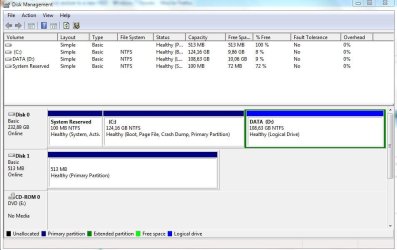
Post a snapshot of the maximized output of DISK MANAGEMENT of your present hard disk.

To run Disk management:
Win | type DISKMGMT.MSC | ENTER

To make a snapshot:
WIN | type SNIPPING | ENTER

Oh yes, don't forget to maximize the output of DiskManagement before making the "snip".

To post the snip:
http://www.sevenforums.com/tutorials/9733-how-post-screenshot-seven-forums.html
 

My Computer My Computer

At a glance

MS Windows 7 Ultimate SP1 64-bitAMD A10-4600M6.00 GB Dual-Channel DDR3 @ 798MHz (11-11-12-28)AMD Radeon HD 7660G
Computer Manufacturer/Model Number
Toshiba Satellite S875D-S7239 laptop
OS
MS Windows 7 Ultimate SP1 64-bit
CPU
AMD A10-4600M
Motherboard
AMD Pumori (Socket FT1)
Memory
6.00 GB Dual-Channel DDR3 @ 798MHz (11-11-12-28)
Graphics Card(s)
AMD Radeon HD 7660G
Sound Card
High Definition Audio Device
Monitor(s) Displays
Generic PnP Monitor (1600x900@60Hz)
Screen Resolution
1600x900@60Hz
Hard Drives
SSD 119GB Corsair CSSD-V128GB2 ATA Device
Keyboard
Standard PS/2 Keyboard
Mouse
HP Wireless Optical Mobile Mouse Model FHA-3410
Internet Speed
What the local pub, local coffee shop offers.
Other Info
Optical Drive:MATSHITA BD-CMB UJ160B ATA Device


Also have an Asus ha1002xp netbook with Win 7 Ultimate installed.
My hardware is pretty similar to the new system Intel motherboard NVIDIA graphics, I should clarify that both of the systems are laptops. Also I don't worry about any reactivations if my software will be running in the same state as of now that's what's important.

Here's the screenshot ofthe DISKMGMT

Capture.JPG
 

My Computer My Computer

At a glance

Windows 7 Ultimate x64
OS
Windows 7 Ultimate x64
Thanks.

Now the easiest approach in my opinion is:
1. Make a system repair disc,
2. Make a system image backup of your present laptop, being sure to include the D: in the system image.
3. Now here I need some more info from you regarding the new laptop.

Is the new laptop 100% identical to the old?
Does the new laptop already have an operating system installed?

Now if your objective is to have two laptops with the same os and same license, then you are in deep trouble.

We do need to clarify point here: MS present policy essential says 1 computer = 1 license. If you try, then you will find that you will need to call MS and clarify that you removed the os from one system and am now using on a different system.

Maybe some else will chime in here with the official statement. I've never worried with the details since I've always played 100% by the book and not tried to bend the rules.
 

My Computer My Computer

At a glance

MS Windows 7 Ultimate SP1 64-bitAMD A10-4600M6.00 GB Dual-Channel DDR3 @ 798MHz (11-11-12-28)AMD Radeon HD 7660G
Computer Manufacturer/Model Number
Toshiba Satellite S875D-S7239 laptop
OS
MS Windows 7 Ultimate SP1 64-bit
CPU
AMD A10-4600M
Motherboard
AMD Pumori (Socket FT1)
Memory
6.00 GB Dual-Channel DDR3 @ 798MHz (11-11-12-28)
Graphics Card(s)
AMD Radeon HD 7660G
Sound Card
High Definition Audio Device
Monitor(s) Displays
Generic PnP Monitor (1600x900@60Hz)
Screen Resolution
1600x900@60Hz
Hard Drives
SSD 119GB Corsair CSSD-V128GB2 ATA Device
Keyboard
Standard PS/2 Keyboard
Mouse
HP Wireless Optical Mobile Mouse Model FHA-3410
Internet Speed
What the local pub, local coffee shop offers.
Other Info
Optical Drive:MATSHITA BD-CMB UJ160B ATA Device


Also have an Asus ha1002xp netbook with Win 7 Ultimate installed.
Now if your objective is to have two laptops with the same os and same license, then you are in deep trouble.

We do need to clarify point here: MS present policy essential says 1 computer = 1 license. If you try, then you will find that you will need to call MS and clarify that you removed the os from one system and am now using on a different system.
QUOTE]

This is my understanding as well.

Only one can can be activated, and the other will require a new key.

After imaging both laptops, if you try to activate the second one the same as the 1st, the 1st will turn non-genuine. (Just like the original system will)

It will only allow 1 system to be activatd with that key.
 

My Computer My Computer

At a glance

Windows 7 Home Premium 64bitIntel Core i7 2700k8GB Mushkin Redline Ridgebacks @1866EVGA GTX570 SC
Computer Manufacturer/Model Number
Custom (Self Build)
OS
Windows 7 Home Premium 64bit
CPU
Intel Core i7 2700k
Motherboard
eVGA P67 SLI
Memory
8GB Mushkin Redline Ridgebacks @1866
Graphics Card(s)
EVGA GTX570 SC
Sound Card
XiFi Titanium HD
Monitor(s) Displays
LG W2453V
Screen Resolution
1920x1080
Hard Drives
Intel 320 80GB -- Intel X25-V 40GB --WD Black 1TB x2 -- WD Blue 640GB
PSU
Seasonic x750
Case
Corsair 600T SE White
Cooling
eVGA Superclocked CPU Cooler
Keyboard
Saitek Cyborg
Antivirus
Kaspersky
Browser
IE
Other Info
LG BD/DVD
The laptop it's not completely identical but it's the same manufacturer and all of the corresponding parts are also from the same. I mean the CPU and Motherboard are Intel, the GPU Nvidia, the sound, wireless and such. Also the new system comes with Windows 7 but I'll format the HDD and want to replace it with an image of my current Windows 7 Ultimate.
 

My Computer My Computer

At a glance

Windows 7 Ultimate x64
OS
Windows 7 Ultimate x64
Due to questions in my mind, I'm going to pull out.
 

My Computer My Computer

At a glance

MS Windows 7 Ultimate SP1 64-bitAMD A10-4600M6.00 GB Dual-Channel DDR3 @ 798MHz (11-11-12-28)AMD Radeon HD 7660G
Computer Manufacturer/Model Number
Toshiba Satellite S875D-S7239 laptop
OS
MS Windows 7 Ultimate SP1 64-bit
CPU
AMD A10-4600M
Motherboard
AMD Pumori (Socket FT1)
Memory
6.00 GB Dual-Channel DDR3 @ 798MHz (11-11-12-28)
Graphics Card(s)
AMD Radeon HD 7660G
Sound Card
High Definition Audio Device
Monitor(s) Displays
Generic PnP Monitor (1600x900@60Hz)
Screen Resolution
1600x900@60Hz
Hard Drives
SSD 119GB Corsair CSSD-V128GB2 ATA Device
Keyboard
Standard PS/2 Keyboard
Mouse
HP Wireless Optical Mobile Mouse Model FHA-3410
Internet Speed
What the local pub, local coffee shop offers.
Other Info
Optical Drive:MATSHITA BD-CMB UJ160B ATA Device


Also have an Asus ha1002xp netbook with Win 7 Ultimate installed.
What? You think that my Windows 7 is illegal? I got it from my university so it's not, if that's what worries you?
 

My Computer My Computer

At a glance

Windows 7 Ultimate x64
OS
Windows 7 Ultimate x64
You will need to separate Windows 7 activation keys to do what you want.

We do not discuss ways to get around this and further discussion may get you and this discussion removed.
 

My Computer My Computer

At a glance

W 7 64-bit UltimateIntel Q9550 Yorkfield8GB Dominator 8500C5DATI : XFX 5870
Computer Manufacturer/Model Number
* BFK Customs *
OS
W 7 64-bit Ultimate
CPU
Intel Q9550 Yorkfield
Motherboard
ASUS P5Q Pro
Memory
8GB Dominator 8500C5D
Graphics Card(s)
ATI : XFX 5870
Sound Card
Realtek HD Audio 7-1
Monitor(s) Displays
1x 47" LCD HDMI & 3x 26" LCD HDMI
Screen Resolution
1920x1080P & 1920x1200
Hard Drives
1x 80GB Intel X25-M G2 SSD : 1x 500GB & 1x 640GB WD Caviar Black(s)
PSU
Corsair 620HX
Case
Cooler Master RC-690
Cooling
Tuniq Tower 120, 2x 140mm and 3x 120mm case fans
Keyboard
Microsoft 500
Mouse
Razer Diamondback 3G
Internet Speed
14 Mb/s
Other Info
1x Koutech 3Gb/s SATA HDD Hot Swap Rack
Refer to my original response to the OP!
If software companies allowed what was wanted to happen they would go out of business.
I stick to the EULA and expect the software Company to do the same.
However, I think it is quite fair to be able to replace your HDD when it fails by cloning or imaging without jumping through hoops.
If you upgrade your complete system then most software vendors will allow this through deactivation / reactivation.
 

My Computer My Computer

At a glance

Windows 7x64 Home Premium SP1Intel i7 2600kG.Skill Ripjaws (DDR3-1600) 2x4GBNvidia GeForce GTS 450; Intel HD Graphics 300...
Computer type
PC/Desktop
Computer Manufacturer/Model Number
Own build
OS
Windows 7x64 Home Premium SP1
CPU
Intel i7 2600k
Motherboard
ASUS P8Z68 Deluxe
Memory
G.Skill Ripjaws (DDR3-1600) 2x4GB
Graphics Card(s)
Nvidia GeForce GTS 450; Intel HD Graphics 3000(GT2+)
Monitor(s) Displays
Dell Ultrasharp IPS panel U2311H, Samsung SyncMaster P2350
Screen Resolution
1920x1080
Hard Drives
Samsung 850 Pro SSD 256GB, Samsung SSD 840 120GB, Seagates 1TB Barracuda ST31000528AS x2
PSU
Seasonic M12II 520W
Case
Lian Li Lancool PC-K60
Cooling
Case: 1x120mm, 3x140mm CPU: Hyper 212+
Keyboard
Logitech MK520 (wireless)
Mouse
Logitech MK520
Internet Speed
6-7 Mbps
Antivirus
Norton Security Premium, Malwarebytes on 2 (MSE on 3rd PC)
Browser
FireFox
Other Info
Audio: Logitech Z523 2.1
So if I try to make the HDD image transfer I may need to reactivate Windows 7?
 

My Computer My Computer

At a glance

Windows 7 Ultimate x64
OS
Windows 7 Ultimate x64
I would remove the Product Key before reimaging as it can cause problems having new hardware. Open an elevated command prompt to type: slmgr -upk Then after reimaging, install new Product Key at Control Panel>System link. You may need to do robocall to update hardware signature.

Using Acronis you can select an adaptive restore which removes all of the old drivers during reimaging so that it will start up easier on the new hardware. You can also change partition sizes during reimaging.

So reimage the 100mb SysReserved and Win7 partitions to the new HD selecting same drive letters, then reimage the data partition separately to its own HD as you wish.
 
another way is to download the trial version of Norton Ghost, which you can then use one time to make a complete, bootable copy of your HDD to another HDD
 
I thought he has Acronis. If not, you can download a free version to clone/image when you have WD HD's: WD Support

I doubt the free WD version has adaptive restore, though. Win7 will start up on new hardware about half the time. Sometimes it requires booting into Safe Mode to install chipset or display drivers, other time Startup Repair run from the DVD.
 
Back
Top