Restore Windows 7 pro from a system image after HDD failure

askic

New member
Member
Local time
12:21 PM
Messages
62
Hallo to all,
I hope you'll be able to help me and to give me advice in right direction.
I have two Dell precision machines. I make regular backups (images) with Acronis Image.
Few days ago, on one machine HDD failed, so I put another HDD same capacity and restore windows from already made backups few months ago.
Restor process went without problems, but during the windows 7 pro 64 bit star I received 0x0000007b error. I have learned a lot about this error and I know that is usually caused by inappropriate driveres etc. This is very strange since I try to restore image on the same computer and only one component is changed and that is HDD (before seagate, now WD), both drives are Sata spo everything should be OK but it's not.
I even try to restore backup from other machine that is 100 % in working condition but received the same error. My idea was to use backup from other machine (in case my backup image of original machine is not OK), then simply change computer name and its IP addresses.

Now I have read somewhere that I probably need to do sysprep before making image.
So I have two questions>
1. Will Sysprep on my working machine remove product key and deactivate windows?
2. Sine both machines have the same HW and were delivered at the same time, is it really needed to use sysprep?

Sysprep is usually necessary when one needs to migrate OS to another hardware.

Should I try some cloning tool such as clonezilla?

Thank you
 

My Computer My Computer

At a glance

Windows 7 64 vir
Computer type
PC/Desktop
Computer Manufacturer/Model Number
Dell T5500
OS
Windows 7 64 vir
Hello and welcome askic mate if you want a good cloning and imaging software this is the one that a lot of us use Macrium Reflect Free this is the tutorial to use as it goes onto list other tutorials to how to use the images Imaging with free Macrium

The 7f error is a hardware issue and I would suggest you update the driver for the hard drive at least. However your specs are a bit thin on the ground so I cannot link you to them you need to look for yourself only get them from the manufacturer's site the Windows feature is not that good.

There is also the possibility that it could be a virus too so run these
SUPERAntiSpyware | Remove Malware | Remove Spyware - AntiMalware, AntiSpyware, AntiAdware!
Malwarebytes | Malwarebytes Premium
AdwCleaner Download
ADW download from bleeping computer delete any rubbish found with the malware scans
(NB If you are running Kaspersky as the main AV then it might need disabling it when trying ADW because it does not like it at times)
 

My Computer My Computer

At a glance

Desk1 7 Home Prem / Desk2 10 Pro / Main lap A...Desk1 i5 3750K / Laptop i7 GTX 860M / Desk2 i...Desk1 8GB (1866) / Desk2 16GB (1333) / Laptop...Desk 1& 2NVidia GTX 650 & Laptops on board Intel
Computer type
PC/Desktop
Computer Manufacturer/Model Number
Own build (new) Desk1 / Asus ROG Win 7 / Desk2 1st build
OS
Desk1 7 Home Prem / Desk2 10 Pro / Main lap Asus ROG 10 Pro 2 laptop Toshiba 7 Pro Asus P2520 7 & 10
CPU
Desk1 i5 3750K / Laptop i7 GTX 860M / Desk2 i5 2500
Motherboard
Desk1 Asus P877-V / Desk2 Gigabyte H67 UD3H / Laptop ?
Memory
Desk1 8GB (1866) / Desk2 16GB (1333) / Laptop 8Gb DDR3
Graphics Card(s)
Desk 1& 2NVidia GTX 650 & Laptops on board Intel
Sound Card
Desk 1 & 2 -XONAR DG Realtek High Def audio Laptop
Monitor(s) Displays
Desk 1 Benq HD 2450 / Desk2 Philips 24" / Laptop 17.5"
Screen Resolution
1920x1080 D1 & D2 & Laptop 1
Hard Drives
Desk1 Samsung 120GB 830 SSD
Asus ROG 256GB 850 Pro SSD
Desk2 Samsung 840 256 SSD
Toshiba 120GB EVO
PSU
Desk 1 Corsair HX 1050/ Laptop ? / Desk 2 Corsair HX 650
Case
Desk 1 Cooler HAF XM ? Toshiba laptop / Desk2 Coolermaster
Cooling
Fans on all Desk1 -2 Desk2 - all Coolermasters 5 Laptop ?
Keyboard
Desk 1 MS Sidewinder X6 Desk 2 MS Sidewinder X 4
Mouse
Desk 1&2 - Gigabyte MS 900 gamer - laptop - Logitec wireless
Internet Speed
ADSL2+
Other Info
One other Desktop (tester) and spare Toshba laptop both with SSD's
Running Kaspersky 2016 ISS on all machines config'd identically
Logitec audio stereo systems on each machine (x3)
Canon MG5250MFC
Router/modem TP-Link running WPA2SK
Hello ICIT2LOL,

The possibility that the computer or image is affected with virus/malware is very very low.
I have tried older backup and all end up with BSOD and 0x0000007B. I then tried with completely different HDDs and the result is the same. Then I have tried with acronis image of the second computer (fully 100% working) and the result is same. Then I begin to suspect that there is a HW problem. But I used win 7 pro installation DVD and installed windows without problems (clean install). Computer works without problems so it is not the question of HW. I inspect the differences between other fully working computer and newly installed and observed that newly installed system has reserved partition 100 MB that other computer doesn't have.
So my conclusion is that reserved partition is deleted and boot manager (BCD) is translated to C:.
This unfortunately doesn't solve my problem since there is a lot of specialized software installed which I don't know how to configure if going from scratch. Therefore with computers backup images are delivered and I also made images every few months.

My next step is going to be to try acronis restore of C,d and E partition on already installed windows system without restoring MBR and track 0. This way hopefully, windows will start and all programs will be there.

The whole situation doesn't explain at all why BSOD is showing up after restoring image of whole disk, actually it doesn't make any sense. The BSOD is so typical when HDD is moved to different computer (different MB, drivers etc.).

Another approach would be to try to use different backup / restore imaging tool such as you suggested. I would make new backup image of working computer and then applied to problematic computer.
 

My Computer My Computer

At a glance

Windows 7 64 vir
Computer type
PC/Desktop
Computer Manufacturer/Model Number
Dell T5500
OS
Windows 7 64 vir
Hi

Your problem is lies on this


I have two Dell precision machines. I make regular backups (images) with Acronis Image.
Few days ago, on one machine HDD failed, so I put another HDD same capacity and restore windows from already made backups few months ago.


Having 2 Dell do not meant that both are really identical.

HDD on work on 1st Dell do not meant it will work on the 2nd Dell.

You need to have to get the correct HDD that is image from, in order to resolve this issue of yours.

Mixing between HDD(s) on both Dell is not the correct way.


There is another possible is the BIOS setting.

Do the comparison on the BIOS setting of both Dell.

From there, you may able to know which setting is not the same.

This is the first step, before going head-on about drivers.

Others things is that you need to remember what changes did you had done prior to this.


Final word.
Try not to use Acronis Image, unless you have paid version as 100%
Acronis Image is available as free for more than a decade, do have limit with certain feature may not be included not informed.
I had plenty of this software, but not a good &or reliable one.
Hence your image &or clone, whatever may failed

If you use as ICIT2LOL mentioned, then this forum will able to resolve for you.


Edit: Next time when you do backup/imaged, do name the HDD as to which Dell.

Eric.
 
Last edited:

My Computer My Computer

At a glance

Windows 7 x64
Computer type
Laptop
Computer Manufacturer/Model Number
Toshiba L630 and L735
OS
Windows 7 x64
Hard Drives
240 GB SSD
Thanks Eric as always I start off with the very obvious stuff but if askic wants to pursue it then I have to leave the thread here because I cannot just jump in as I said without ruling out the basic stuff and my reference to malware was got from various Googles on the issue which stated that it could be an infection problem not that I am adamant it is.
 

My Computer My Computer

At a glance

Desk1 7 Home Prem / Desk2 10 Pro / Main lap A...Desk1 i5 3750K / Laptop i7 GTX 860M / Desk2 i...Desk1 8GB (1866) / Desk2 16GB (1333) / Laptop...Desk 1& 2NVidia GTX 650 & Laptops on board Intel
Computer type
PC/Desktop
Computer Manufacturer/Model Number
Own build (new) Desk1 / Asus ROG Win 7 / Desk2 1st build
OS
Desk1 7 Home Prem / Desk2 10 Pro / Main lap Asus ROG 10 Pro 2 laptop Toshiba 7 Pro Asus P2520 7 & 10
CPU
Desk1 i5 3750K / Laptop i7 GTX 860M / Desk2 i5 2500
Motherboard
Desk1 Asus P877-V / Desk2 Gigabyte H67 UD3H / Laptop ?
Memory
Desk1 8GB (1866) / Desk2 16GB (1333) / Laptop 8Gb DDR3
Graphics Card(s)
Desk 1& 2NVidia GTX 650 & Laptops on board Intel
Sound Card
Desk 1 & 2 -XONAR DG Realtek High Def audio Laptop
Monitor(s) Displays
Desk 1 Benq HD 2450 / Desk2 Philips 24" / Laptop 17.5"
Screen Resolution
1920x1080 D1 & D2 & Laptop 1
Hard Drives
Desk1 Samsung 120GB 830 SSD
Asus ROG 256GB 850 Pro SSD
Desk2 Samsung 840 256 SSD
Toshiba 120GB EVO
PSU
Desk 1 Corsair HX 1050/ Laptop ? / Desk 2 Corsair HX 650
Case
Desk 1 Cooler HAF XM ? Toshiba laptop / Desk2 Coolermaster
Cooling
Fans on all Desk1 -2 Desk2 - all Coolermasters 5 Laptop ?
Keyboard
Desk 1 MS Sidewinder X6 Desk 2 MS Sidewinder X 4
Mouse
Desk 1&2 - Gigabyte MS 900 gamer - laptop - Logitec wireless
Internet Speed
ADSL2+
Other Info
One other Desktop (tester) and spare Toshba laptop both with SSD's
Running Kaspersky 2016 ISS on all machines config'd identically
Logitec audio stereo systems on each machine (x3)
Canon MG5250MFC
Router/modem TP-Link running WPA2SK
Hi

Your problem is lies on this


I have two Dell precision machines. I make regular backups (images) with Acronis Image.
Few days ago, on one machine HDD failed, so I put another HDD same capacity and restore windows from already made backups few months ago.
Having 2 Dell do not meant that both are really identical.

HDD on work on 1st Dell do not meant it will work on the 2nd Dell.

You need to have to get the correct HDD that is image from, in order to resolve this issue of yours.
I'd be ruling this out first. Make sure you are restoring the correct system image to the Dell it was made from. They are probably OEM SLP PCs and not fully identical even if the hardware is.
I'd go along with the others and support Macrium Reflect. The free version is ok for most people.
 

My Computer My Computer

At a glance

Windows 7x64 Home Premium SP1Intel i7 2600kG.Skill Ripjaws (DDR3-1600) 2x4GBNvidia GeForce GTS 450; Intel HD Graphics 300...
Computer type
PC/Desktop
Computer Manufacturer/Model Number
Own build
OS
Windows 7x64 Home Premium SP1
CPU
Intel i7 2600k
Motherboard
ASUS P8Z68 Deluxe
Memory
G.Skill Ripjaws (DDR3-1600) 2x4GB
Graphics Card(s)
Nvidia GeForce GTS 450; Intel HD Graphics 3000(GT2+)
Monitor(s) Displays
Dell Ultrasharp IPS panel U2311H, Samsung SyncMaster P2350
Screen Resolution
1920x1080
Hard Drives
Samsung 850 Pro SSD 256GB, Samsung SSD 840 120GB, Seagates 1TB Barracuda ST31000528AS x2
PSU
Seasonic M12II 520W
Case
Lian Li Lancool PC-K60
Cooling
Case: 1x120mm, 3x140mm CPU: Hyper 212+
Keyboard
Logitech MK520 (wireless)
Mouse
Logitech MK520
Internet Speed
6-7 Mbps
Antivirus
Norton Security Premium, Malwarebytes on 2 (MSE on 3rd PC)
Browser
FireFox
Other Info
Audio: Logitech Z523 2.1
Hallo guys and thank you for your time.

I have used today both Macriuem and Clonezilla disk clone option and in both cases I end up with BSOD.
Like I said HW is not the issue because clean install windows 7 works without problems.
The bios settings on both machines are identical.
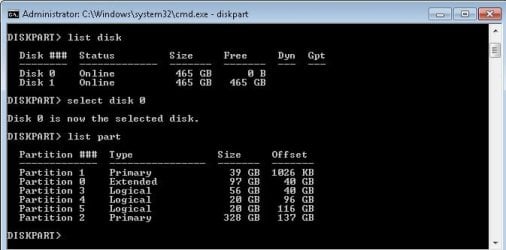
So I investigated a little bit further and discovered how partitions are listed on 100 % working machine.
Please have a look at the attached pic. It is very interesting to see that summing sizes of all partitions are above 465 GB. It is exactly the same on non working machine.
Commands such as bootrec /rebuild all and fixmbr, fixboot didn't solve this either.
I tried of course with WIN7 installation disk to repair the startup but that didn't help.

I think the trick is with this so called extended partition.
I decided to work now with only one drive. I have removed one disk tried ACHI and ATA bio settings with repair startup but the result is the same.

Diskpart give me the same configuration, so I don't understand what's the catch.
I have no ides what confuses windows to start on the probelmatic machine.

Please note, attached is pic from list part on working machine.

All these commands executed sucessfully but that still didn't solve the problem. Very strage problem.

  1. Bcdedit /export C:\BCD_Backup.
  2. c:
  3. cd boot.
  4. Attrib bcd -s -h -r.
  5. ren c:\boot\bcd bcd.old.
  6. bootrec /RebuildBcd.
 

Attachments

  • Partition.jpg
    Partition.jpg
    28.5 KB · Views: 24

My Computer My Computer

At a glance

Windows 7 64 vir
Computer type
PC/Desktop
Computer Manufacturer/Model Number
Dell T5500
OS
Windows 7 64 vir
Hi askic

Pardon me if i said things to you may offend you, but this is a learning point, so bear with it.

Part 1 of 2. Understanding of computer knowledge.

Regarding to

Restor process went without problems, but during the windows 7 pro 64 bit star I received 0x0000007b error. I have learned a lot about this error and I know that is usually caused by inappropriate driveres etc. This is very strange since I try to restore image on the same computer and only one component is changed and that is HDD (before seagate, now WD), both drives are Sata spo everything should be OK but it's not.

Reading from the net, some are very misleading and then you concluded as the problem was the driver!

Reading from the net, you cannot and must not believe in everything people who wrote on the problem.
Knowledge in computer is also from experience, as you may not have.


Regarding to

I have tried older backup and all end up with BSOD and 0x0000007B. I then tried with completely different HDDs and the result is the same. Then I have tried with acronis image of the second computer (fully 100% working) and the result is same. Then I begin to suspect that there is a HW problem. But I used win 7 pro installation DVD and installed windows without problems (clean install). Computer works without problems so it is not the question of HW. I inspect the differences between other fully working computer and newly installed and observed that newly installed system has reserved partition 100 MB that other computer doesn't have.

As in this your post, although you did suspect HW problem, which was your first instinct.
Then later, you suspect other issue as not HW problem.

Again here, you always jump to conclusion as to rule out HW problem.
This is where you cannot decide which is the problem that cause all these to happen.

Most users here, if not all, do not jump to conclusion too fast.
There should have a logic and step by step, in doing troubleshooting.

As in the past, i work in technical dept and reading how technical report analysis problem, in 3 steps.
1. What is the problem. This is from the customer point, not technical point.
2. Cause; how do this problem occur and why. Technically speaking, troubleshooting.
3. Remedy; how to resolve the problem.


In my conclusion on you.
You do not have enough experience and not enough knowledge and failed to do proper troubleshooting.
Hence, not many users understand about your problem &or issues.

For me, i bought/loan tons of books on computer for 3 decade, spending a lot of money investing in hardware, undergo training school, etc; to arm myself in this computer era.

This i will end here, next on your problem.


Eric.
 

My Computer My Computer

At a glance

Windows 7 x64
Computer type
Laptop
Computer Manufacturer/Model Number
Toshiba L630 and L735
OS
Windows 7 x64
Hard Drives
240 GB SSD
Hi askic

Part 2 of 2


NOTICE
Do take note that there is no guarantee on successfully to totally resolve your problems.
As for expert in coming to this thread to assist you or not, it depend on them.


This is to assist you to point the correct direction for you to get resolved if we cannot continue further.
This is due to the fact that we do not know how your Dell computers are built, and by who.
It is them that you may have to approach to find out more on how they built your computers and also up to them to resolve for you or not.


Before i start here, if you want to resolve solution, you need to listen and follow some of the instruction.
Not only from me, but others expert in HW & system, may also come to assist you.

As i am not HW specialist, i will list some of my findings here, with pictures.
It is easy to understand with pictures as there is a saying, a pictures do have thousand of words.

As in my very first post #4 on the first portion (as what mjf did mentioned) is about your computers and HDD(s), which you ignore.


You need to show the disk management of your "good" computer.
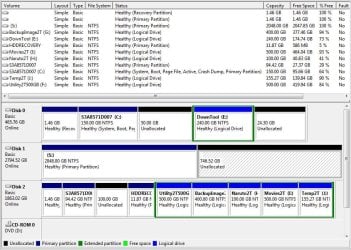
As you have provided the picture on your post #7 with all available HDD(s) relating to Dell computers.


What i provide in the pictures are from my HDD(s).

Disk Management
Disk 0 is SSD 500GB Windows 7
Disk 1 is External HDD USB 3 Samsung 3TB.
Disk 2 is External HDD USB 3 Toshiba 2TB.

As in disk 1, i did use Clean command, and it end in 2TB as MBR is limited.
The other 1TB is unable to access from Disk Management, but i leave it, as already have imaged partitions.

As in disk 2, i also use Clean command, and there is no problem as it stay in the 2TB limit.

From the Disk Management, look right at the bottom, it will show you by color on the type of partition.
Logical partition (dark green) can have many partitions.


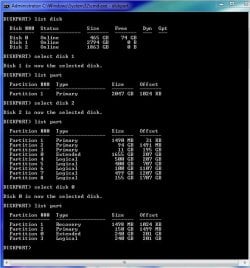
Diskpart in command The "offset" is too technical and i cannot explain.
List Disk.
Disk 0 = there is 74 GB not in use is correct as refer to disk management.

Disk 1 = 2794 GB is the 3TB HDD. It show 0 B free, that is to say it did not report on the 1TB as free.
In the Disk management on this HDD, i cannot even create that portion as a partition.
This problem is created as i use CLEAN command and it end up with only 2TB usable.
That is to say, CLEAN command can only do up to 2TB as the limit.
The 1TB is not reflected under "list part", as it is only 2TB.
Unless it is on GPT then i can fully use all 3TB storage, as under GPT is blank.

Disk 2 = I have to limit to 3 Primary partitions and 1 Logical partition.
This is the limit of the Windows system, as refer to the partition 1, 2, 3 as primary partition.
For Logical partition can have unlimited logical partitions.


Refer to this

I think the trick is with this so called extended partition.

There is nothing wrong with Extended partition, as it is known as Logical partition.
Also Extended partition can contain many logical partition, as you see in my HDD.

Window system can only have up to 4 primary partitions.
Either 4 Primary partition without any Extended partitions; or 3 Primary partition + 1 Extended partition.
Even it can be 2 Primary partitions + 2 Extended partitions, as any combination.


This is where i go no further, as i am trying to let you know that your problem is due to HDD(s) and setup.

As again, do understand what mjf is trying to inform you on first step, which you ignore.

Provide the Disk Management to see how is the setup.

It depend on whether any specialist users to assist you.


Eric.
 

Attachments

  • disk_management.JPG
    disk_management.JPG
    117.8 KB · Views: 0
  • diskpart_listdisk.JPG
    diskpart_listdisk.JPG
    59.6 KB · Views: 21

My Computer My Computer

At a glance

Windows 7 x64
Computer type
Laptop
Computer Manufacturer/Model Number
Toshiba L630 and L735
OS
Windows 7 x64
Hard Drives
240 GB SSD
Hello Eric,

Thank you for your time. I'm not offended, not at all. I do have some limited experience when it comes to installation of OS but it is mostly from home use.

I'll take every opportunity to learn. I have searched for this BSOD stop error and on most web sites and forums it is considered that error is caused by storage drivers or by changing BIOS options AHCI to ATA or similar.

In my case I did not change any BIOS option, just replaced failed HDD and restored backup. The exact Stop error code is: 0x0000007b (0xfffff880009a9928 0xffffffffc00000, rest are 0x000's).

I used win 7 instalaltion disk and did a clean install. There was no error on startup. I even worked a little bit on the machine just to be sure it wouldn't fail. I have restarted couple of times and installed all drivers and it was OK. Therefore I concluded it is not a HW issue.

Booting from rescue disk I have examined disks and partitions with diskpart and they were identical on both machines.

I even tried to clone HDD from working machine (clonezilla) and computer again dd not start from a clone disk.

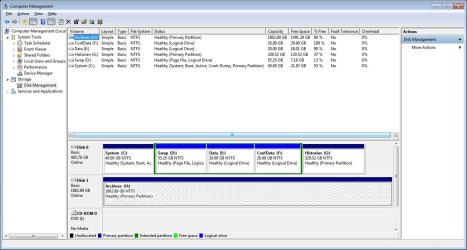
This is how drive management looks like on OK machine (computers were bought together and serve as a redeudancy of one another).

I have tried to modify registry on non starting machine (via Load Hive) and changed Key "start " from 3 to 0 on all Keys containing "SCSI Miniport"
as suggested on one blog, but still machine cannot boot. When I inspect partitions and file structure aftre booting wih Rescue disk, I can se that all partitions and file are there.

Have a look at the attached pic. Pleasebote that I added one more drive 2TB to copy all precious data just in case that other machine also fails.
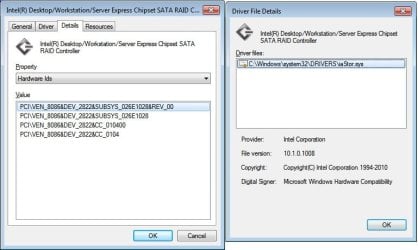
Atached are also driver details for OK machine
 

Attachments

  • DiskManagementOK.jpg
    DiskManagementOK.jpg
    127.3 KB · Views: 4
  • Driversdetail.jpg
    Driversdetail.jpg
    44.8 KB · Views: 0
Last edited:

My Computer My Computer

At a glance

Windows 7 64 vir
Computer type
PC/Desktop
Computer Manufacturer/Model Number
Dell T5500
OS
Windows 7 64 vir
Hello askic

Good.

As i am no expert in HW or system software, this is where i unable to advice you further.

It is very clever that you bought 2 computers instead of 1, as a mean for backup.

Regarding to Backup, do try not to put inside the computer, should the computer components or circuits fried.
Do use External USB for backup, and store separately.
This is a common advice from most users here.
Unless it is the external HDD.

You can buy External HDD casing as it is better in this way.

As when i bought the 3TB i did not expect on CLEAN command would cause the 1TB unusable.


As for research, it is better to at least visit MS website for more info, and several good websites do provide somewhat accurate info.
Try not to rely too much on forum where it is not specific.
For example, here do have separate forums on Windows 7, 8, 10.

If you do want to know more about your problem, and if no other user is assisting you can create another thread.

As you need to describe you problem, as i mentioned before, point to point.
Not like whatever it come into your mind, you write.

As i mentioned about how Technical report method, it can be apply here.

1. Description on the problem, more in details.
Even in the form as non technical person, it is ok but to provide more in details.
Even a single detail as you think it is not necessary, that is not right.
Sometimes that detail would & may is the issue and the cause of the problem.

2. Cause, is that what you know as and how &or which websites provide you that piece of info.
As doing research, if it is windows system, do visit MS; if HW there are few websites you need to visit.
HW is referring to each individual components to visit is the Manufacturer.
Manufacturer normally will provide solution if there is a bug.

Just like Technical dept (i work in Motor industry, as in AfterSales, which include; Customer service, in-charge of Warranty, which is part of Technical, etc.
Visited Manufacturer, as most problems detect by Manufacturer will be inform to Distributors, depend on models.
That is why sometimes it is best to visit Manufacturer /distributors Service center, as solution may be available.

3. Remedy. This is why expert (do not expert it depend on which specific field.)
There is no expert in all field, as to me is like "Jack of all trades".
Expert is more likely to be Master in One field, this is more idealistic.
The expert will able to go thru the procedure to resolve a particular issue.
As most users will handle one specific area, with other providing additional info, if any.


This is how to look at the Big picture and solve it step by step, and to take notes on the step, just in case it have to reverse it back to the original point (beginning, &or which step is overlook) issue.

This is as far as i can go, as i am no expert in HW and drivers.
I, myself also have problem in finding HW and drivers issue, but i take one step at a time.
As meaning to read and understand if it can resolve my issue.

Do note that if a solution work on another user, but may not work on you.

Just ranting and shared what i had gone thru in the past.


Eric.
 

My Computer My Computer

At a glance

Windows 7 x64
Computer type
Laptop
Computer Manufacturer/Model Number
Toshiba L630 and L735
OS
Windows 7 x64
Hard Drives
240 GB SSD
Thank you very much for your posts Eric.

This problem is beyond my capabilities and local IT company is called. They took over the computer as well as Acronis backups.

Like I said earlier. I have made regular backups in form of complete HDD image.
Dell Workstation has two Seagate ST500DM002 drives. They were not in RAID (other HDD was practically unused). I have placed new WD 500 GB and restored backup which caused BSOD on boot. I also tried to put other Seagate 500 GB (just swap SATA connectors) and then restore, but the problem is the same.

I'm very interested to learn what could be the possible cause. Many people on the internet who had such problems had Dell computers (not all but many). It seems that Dell machines are very reliable when working but when there is a problem they are very hard to fix.

Anyway, thank you for the help.

Regards,
Askic
 

My Computer My Computer

At a glance

Windows 7 64 vir
Computer type
PC/Desktop
Computer Manufacturer/Model Number
Dell T5500
OS
Windows 7 64 vir
Back
Top