No AutoCorrect Options for English (Canada, UK or Australia)

erroroperator

New member
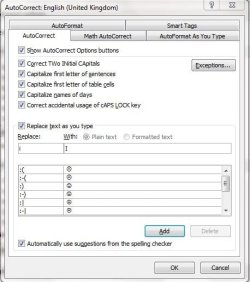
Since updating to Windows 7, I have noticed that there are no AutoCorrect options for English (Canada, UK or Australia) in Microsoft Word 2007. There are only a few emoticons and that is it.

I've looked around and this seems to be a common problem, but I have yet to find a solution.

Suggestions would be wonderful.
 

My Computer

Computer Manufacturer/Model Number
Hewlett-Packard/HP Pavilion dv6 Notebook PC
OS
Windows 7 Home Premium 64-bit
CPU
Intel Core2 Duo T6400 @ 2.00GHz
Memory
4.00GB
Graphics Card(s)
Mobile Intel 4 Express Chipset Family
Sound Card
DIT High Definition Audio Codec; High Definition Audio Devic
Screen Resolution
1366 x 768
Hi,

Is this what you were after?

1. Click the Office button
2. Select Word Options
3. Click Proofing in the left pane
4. Click the AutoCorrect Options button
5. Select the AutoCorrect tab
6. Insert the abbreviation and what you wish to replace with
7. Click Add
8. Click OK

e.g.
Lowercase i to an upper case I
i > I
Capture.JPG

Regards,
JDobbsy1987
 

My Computer

Computer type
PC/Desktop
Computer Manufacturer/Model Number
Self Built
OS
Windows 8.1 Pro x64
CPU
Intel Core i5-2500K @ 3.30GHz - S1155
Motherboard
Asus P8P67 LE Rev3, Intel P67, S115
Memory
8GB Corsair DDR3 XMS3, PC3-12800
Graphics Card(s)
NVIDIA GeForce GTX 650
Sound Card
On-Board
Monitor(s) Displays
3 x 24" {Extended Display}
Screen Resolution
1920 x 1080
Hard Drives
300GB Seagate Barracuda 7200
PSU
550W Coolermaster GX550
Case
Silverstone Precision PS04B
Cooling
Stock
Keyboard
Logitech K120
Mouse
World of Warcraft Cataclysm MMO Gaming Mouse
Internet Speed
80 MB
Antivirus
MSE / Windows Defender
Browser
Chrome
Hi,

Is this what you were after?

1. Click the Office button
2. Select Word Options
3. Click Proofing in the left pane
4. Click the AutoCorrect Options button
5. Select the AutoCorrect tab
6. Insert the abbreviation and what you wish to replace with
7. Click Add
8. Click OK

e.g.
Lowercase i to an upper case I
i > I
View attachment 99091

Regards,
JDobbsy1987

Thanks for your reply! I know how to do it manually, but with English (US) there is already a default list of AutoCorrect option. There have been default lists for English (Canada, UK, etc.) in the past, but they seem to have disappeared.

I'm wondering if there is a way to install this default list, so I do not have to do it all manually.
 

My Computer

Computer Manufacturer/Model Number
Hewlett-Packard/HP Pavilion dv6 Notebook PC
OS
Windows 7 Home Premium 64-bit
CPU
Intel Core2 Duo T6400 @ 2.00GHz
Memory
4.00GB
Graphics Card(s)
Mobile Intel 4 Express Chipset Family
Sound Card
DIT High Definition Audio Codec; High Definition Audio Devic
Screen Resolution
1366 x 768
Thanks for your reply! I know how to do it manually, but with English (US) there is already a default list of AutoCorrect option. There have been default lists for English (Canada, UK, etc.) in the past, but they seem to have disappeared.

I'm wondering if there is a way to install this default list, so I do not have to do it all manually.

I see :)

Not sure about that although i will have a look.

Regards,
JDobbsy1987
 

My Computer

Computer type
PC/Desktop
Computer Manufacturer/Model Number
Self Built
OS
Windows 8.1 Pro x64
CPU
Intel Core i5-2500K @ 3.30GHz - S1155
Motherboard
Asus P8P67 LE Rev3, Intel P67, S115
Memory
8GB Corsair DDR3 XMS3, PC3-12800
Graphics Card(s)
NVIDIA GeForce GTX 650
Sound Card
On-Board
Monitor(s) Displays
3 x 24" {Extended Display}
Screen Resolution
1920 x 1080
Hard Drives
300GB Seagate Barracuda 7200
PSU
550W Coolermaster GX550
Case
Silverstone Precision PS04B
Cooling
Stock
Keyboard
Logitech K120
Mouse
World of Warcraft Cataclysm MMO Gaming Mouse
Internet Speed
80 MB
Antivirus
MSE / Windows Defender
Browser
Chrome
I can't find anything about installing however if you have a 2003 installation somewhere then...

You could try copying the AutoCorrect List across (.acl) {i cant really test this though as i only have Office 2007} but it looks like 2007 reads 2003 .acl files so should hopefully work.

The .acl file/s are located in:
C:\Users\<Username>\AppData\Roaming\Microsoft\Office

Hope this helps.

Regards,
JDobbsy1987
 

My Computer

Computer type
PC/Desktop
Computer Manufacturer/Model Number
Self Built
OS
Windows 8.1 Pro x64
CPU
Intel Core i5-2500K @ 3.30GHz - S1155
Motherboard
Asus P8P67 LE Rev3, Intel P67, S115
Memory
8GB Corsair DDR3 XMS3, PC3-12800
Graphics Card(s)
NVIDIA GeForce GTX 650
Sound Card
On-Board
Monitor(s) Displays
3 x 24" {Extended Display}
Screen Resolution
1920 x 1080
Hard Drives
300GB Seagate Barracuda 7200
PSU
550W Coolermaster GX550
Case
Silverstone Precision PS04B
Cooling
Stock
Keyboard
Logitech K120
Mouse
World of Warcraft Cataclysm MMO Gaming Mouse
Internet Speed
80 MB
Antivirus
MSE / Windows Defender
Browser
Chrome
I can't find anything about installing however if you have a 2003 installation somewhere then...

You could try copying the AutoCorrect List across (.acl) {i cant really test this though as i only have Office 2007} but it looks like 2007 reads 2003 .acl files so should hopefully work.

The .acl file/s are located in:
C:\Users\<Username>\AppData\Roaming\Microsoft\Office

Hope this helps.

Regards,
JDobbsy1987

Thankfully, I do! I'll give this a try and get back to you; thanks for your help :)
 

My Computer

Computer Manufacturer/Model Number
Hewlett-Packard/HP Pavilion dv6 Notebook PC
OS
Windows 7 Home Premium 64-bit
CPU
Intel Core2 Duo T6400 @ 2.00GHz
Memory
4.00GB
Graphics Card(s)
Mobile Intel 4 Express Chipset Family
Sound Card
DIT High Definition Audio Codec; High Definition Audio Devic
Screen Resolution
1366 x 768
JDobbsy1987,

Thank you for your help! That worked perfectly :)
 

My Computer

Computer Manufacturer/Model Number
Hewlett-Packard/HP Pavilion dv6 Notebook PC
OS
Windows 7 Home Premium 64-bit
CPU
Intel Core2 Duo T6400 @ 2.00GHz
Memory
4.00GB
Graphics Card(s)
Mobile Intel 4 Express Chipset Family
Sound Card
DIT High Definition Audio Codec; High Definition Audio Devic
Screen Resolution
1366 x 768
I'm glad i could be of help :thumbsup:
 

My Computer

Computer type
PC/Desktop
Computer Manufacturer/Model Number
Self Built
OS
Windows 8.1 Pro x64
CPU
Intel Core i5-2500K @ 3.30GHz - S1155
Motherboard
Asus P8P67 LE Rev3, Intel P67, S115
Memory
8GB Corsair DDR3 XMS3, PC3-12800
Graphics Card(s)
NVIDIA GeForce GTX 650
Sound Card
On-Board
Monitor(s) Displays
3 x 24" {Extended Display}
Screen Resolution
1920 x 1080
Hard Drives
300GB Seagate Barracuda 7200
PSU
550W Coolermaster GX550
Case
Silverstone Precision PS04B
Cooling
Stock
Keyboard
Logitech K120
Mouse
World of Warcraft Cataclysm MMO Gaming Mouse
Internet Speed
80 MB
Antivirus
MSE / Windows Defender
Browser
Chrome
Back
Top