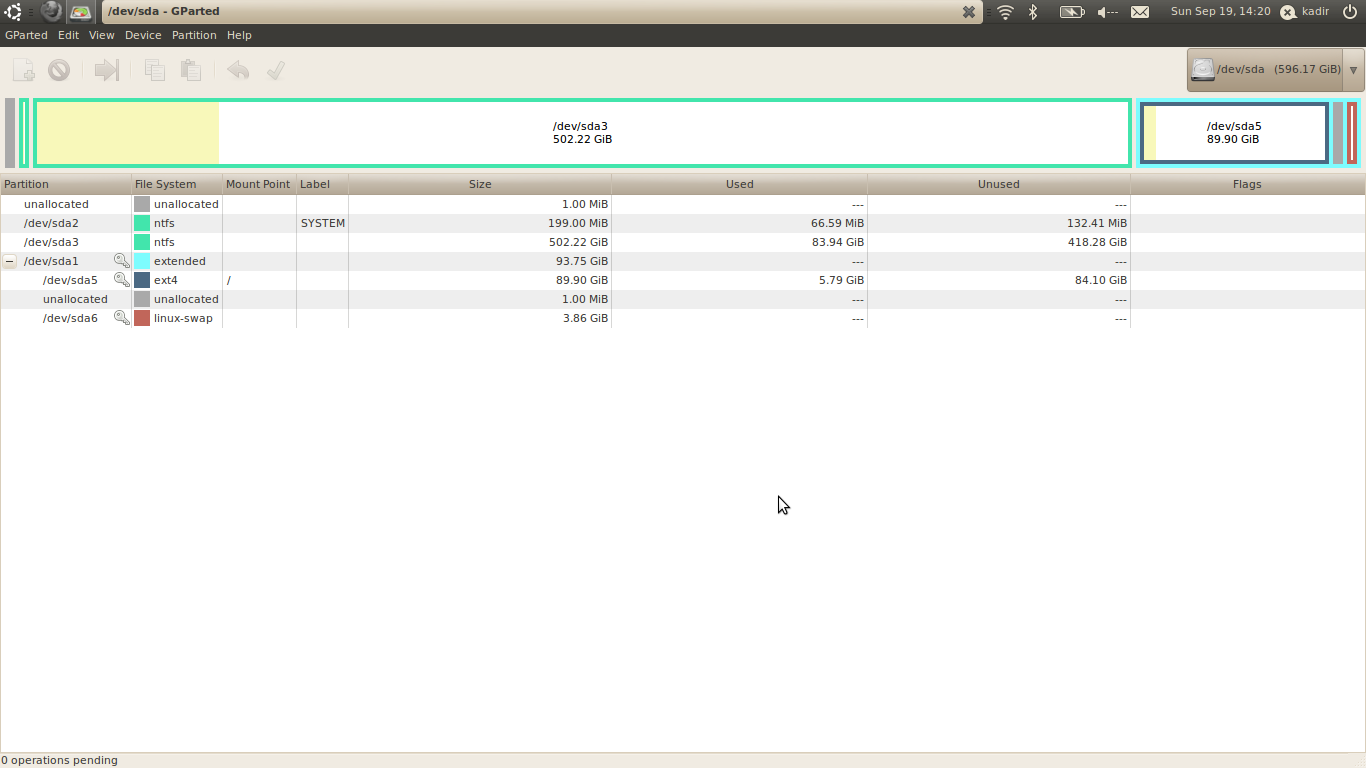
It all started like this..
I bought my HP-laptop 4 weeks ago. 2 days ago I decided to dual-boot the pre-installed Windows 7 with Ubuntu Netbook. Thought it was a good idea.
Well, I created a partition for Ubuntu on 100GB on my current HDD and the whole disk went from a Primary Disc to Basic Disc(because of having more than 4 partitions).
After that I decided to delete the partitions created by HP called HP_TOOLS and HP_RECOVERY. I did.
After that I went and booted up with my USB and installed Ubuntu Netbook without SWAP-partition through advanced partition, as it didn't come up with "Install Ubuntu beside Windows" or anything like that, that I've seen others do.
At the advanded partition windows I chose the 100GB partition and checked "Reformat to Ext4 journaled". The mountpoint was "/".
It went fine and I loaded up Ubuntu Netbook after that.
Everything worked fine - I could load Windows 7 and Ubuntu Netbook through the GRUB bootloader.
But then it came.. Ubuntu Netbook decided to update to the latest Kernel I guess? and it did, well.. after that I haven't been able to load up Windows 7.
When I try to load up Windows 7, it goes on to the screen with the dots making the logo - doesn't even finish the logo - and then it freezes for a second, comes up with a blue-screen of death with errors for 0,5 seconds(so I can't read what it says), and then reboots.
This is my problem - I just want to be able to boot up my Windows 7. Could it have anything to do with Ubuntu Netbook changing something in the BIOS by itself, so I can't boot up Windows 7 64-bit?
Bootscript:
Information about the partitions:
I bought my HP-laptop 4 weeks ago. 2 days ago I decided to dual-boot the pre-installed Windows 7 with Ubuntu Netbook. Thought it was a good idea.
Well, I created a partition for Ubuntu on 100GB on my current HDD and the whole disk went from a Primary Disc to Basic Disc(because of having more than 4 partitions).
After that I decided to delete the partitions created by HP called HP_TOOLS and HP_RECOVERY. I did.
After that I went and booted up with my USB and installed Ubuntu Netbook without SWAP-partition through advanced partition, as it didn't come up with "Install Ubuntu beside Windows" or anything like that, that I've seen others do.
At the advanded partition windows I chose the 100GB partition and checked "Reformat to Ext4 journaled". The mountpoint was "/".
It went fine and I loaded up Ubuntu Netbook after that.
Everything worked fine - I could load Windows 7 and Ubuntu Netbook through the GRUB bootloader.
But then it came.. Ubuntu Netbook decided to update to the latest Kernel I guess? and it did, well.. after that I haven't been able to load up Windows 7.
When I try to load up Windows 7, it goes on to the screen with the dots making the logo - doesn't even finish the logo - and then it freezes for a second, comes up with a blue-screen of death with errors for 0,5 seconds(so I can't read what it says), and then reboots.
This is my problem - I just want to be able to boot up my Windows 7. Could it have anything to do with Ubuntu Netbook changing something in the BIOS by itself, so I can't boot up Windows 7 64-bit?
Bootscript:
Code:
                Boot Info Script 0.55    dated February 15th, 2010

============================= Boot Info Summary: ==============================

 => Grub 2 is installed in the MBR of /dev/sda and looks on the same drive in
    partition #5 for /boot/grub.

sda1: _________________________________________________________________________

    File system:       Extended Partition
    Boot sector type:  -
    Boot sector info:

sda5: _________________________________________________________________________

    File system:       ext4
    Boot sector type:  -
    Boot sector info:
    Operating System:  Ubuntu 10.04.1 LTS
    Boot files/dirs:   /boot/grub/grub.cfg /etc/fstab /boot/grub/core.img

sda6: _________________________________________________________________________

    File system:       swap
    Boot sector type:  -
    Boot sector info:

sda2: _________________________________________________________________________

    File system:       ntfs
    Boot sector type:  Windows Vista/7
    Boot sector info:  No errors found in the Boot Parameter Block.
    Operating System:
    Boot files/dirs:   /bootmgr /Boot/BCD

sda3: _________________________________________________________________________

    File system:       ntfs
    Boot sector type:  Windows Vista/7
    Boot sector info:  No errors found in the Boot Parameter Block.
    Operating System:  Windows 7
    Boot files/dirs:   /bootmgr /boot/BCD /Windows/System32/winload.exe

=========================== Drive/Partition Info: =============================

Drive: sda ___________________ _____________________________________________________

Disk /dev/sda: 640.1 GB, 640135028736 bytes
255 heads, 63 sectors/track, 77825 cylinders, total 1250263728 sectors
Units = sectors of 1 * 512 = 512 bytes
Sector size (logical/physical): 512 bytes / 512 bytes

Partition  Boot         Start           End          Size  Id System

/dev/sda1    *  1,053,650,942 1,250,263,039   196,612,098   5 Extended
/dev/sda5       1,053,650,944 1,242,175,487   188,524,544  83 Linux
/dev/sda6       1,242,177,536 1,250,263,039     8,085,504  82 Linux swap / Solaris
/dev/sda2               2,048       409,599       407,552  42 SFS
/dev/sda3             409,600 1,053,648,895 1,053,239,296  42 SFS


blkid -c /dev/null: ____________________________________________________________

Device           UUID                                   TYPE       LABEL

/dev/sda1: PTTYPE="dos"
/dev/sda2        74DE4D6CDE4D2826                       ntfs       SYSTEM
/dev/sda3        E64ADC344ADBFEED                       ntfs
/dev/sda5        7ae67b97-e867-4932-b9a7-912cabd8dd1d   ext4
/dev/sda6        0803011f-b789-435a-9862-ab296c682e02   swap
/dev/sda: PTTYPE="dos"

============================ "mount | grep ^/dev  output: ===========================

Device           Mount_Point              Type       Options

/dev/sda5        /                        ext4       (rw,errors=remount-ro)


=========================== sda5/boot/grub/grub.cfg: ===========================

#
# DO NOT EDIT THIS FILE
#
# It is automatically generated by /usr/sbin/grub-mkconfig using templates
# from /etc/grub.d and settings from /etc/default/grub
#

### BEGIN /etc/grub.d/00_header ###
if [ -s $prefix/grubenv ]; then
  load_env
fi
set default="0"
if [ ${prev_saved_entry} ]; then
  set saved_entry=${prev_saved_entry}
  save_env saved_entry
  set prev_saved_entry=
  save_env prev_saved_entry
  set boot_once=true
fi

function savedefault {
  if [ -z ${boot_once} ]; then
    saved_entry=${chosen}
    save_env saved_entry
  fi
}

function recordfail {
  set recordfail=1
  if [ -n ${have_grubenv} ]; then if [ -z ${boot_once} ]; then save_env recordfail; fi; fi
}
insmod ext2
set root='(hd0,5)'
search --no-floppy --fs-uuid --set 7ae67b97-e867-4932-b9a7-912cabd8dd1d
if loadfont /usr/share/grub/unicode.pf2 ; then
  set gfxmode=640x480
  insmod gfxterm
  insmod vbe
  if terminal_output gfxterm ; then true ; else
    # For backward compatibility with versions of terminal.mod that don't
    # understand terminal_output
    terminal gfxterm
  fi
fi
insmod ext2
set root='(hd0,5)'
search --no-floppy --fs-uuid --set 7ae67b97-e867-4932-b9a7-912cabd8dd1d
set locale_dir=($root)/boot/grub/locale
set lang=en
insmod gettext
if [ ${recordfail} = 1 ]; then
  set timeout=-1
else
  set timeout=10
fi
### END /etc/grub.d/00_header ###

### BEGIN /etc/grub.d/05_debian_theme ###
set menu_color_normal=white/black
set menu_color_highlight=black/light-gray
### END /etc/grub.d/05_debian_theme ###

### BEGIN /etc/grub.d/10_linux ###
menuentry 'Ubuntu, with Linux 2.6.32-24-generic' --class ubuntu --class gnu-linux --class gnu --class os {
    recordfail
    insmod ext2
    set root='(hd0,5)'
    search --no-floppy --fs-uuid --set 7ae67b97-e867-4932-b9a7-912cabd8dd1d
    linux    /boot/vmlinuz-2.6.32-24-generic root=UUID=7ae67b97-e867-4932-b9a7-912cabd8dd1d ro   quiet splash
    initrd    /boot/initrd.img-2.6.32-24-generic
}
menuentry 'Ubuntu, with Linux 2.6.32-24-generic (recovery mode)' --class ubuntu --class gnu-linux --class gnu --class os {
    recordfail
    insmod ext2
    set root='(hd0,5)'
    search --no-floppy --fs-uuid --set 7ae67b97-e867-4932-b9a7-912cabd8dd1d
    echo    'Loading Linux 2.6.32-24-generic ...'
    linux    /boot/vmlinuz-2.6.32-24-generic root=UUID=7ae67b97-e867-4932-b9a7-912cabd8dd1d ro single
    echo    'Loading initial ramdisk ...'
    initrd    /boot/initrd.img-2.6.32-24-generic
}
menuentry 'Ubuntu, with Linux 2.6.32-21-generic' --class ubuntu --class gnu-linux --class gnu --class os {
    recordfail
    insmod ext2
    set root='(hd0,5)'
    search --no-floppy --fs-uuid --set 7ae67b97-e867-4932-b9a7-912cabd8dd1d
    linux    /boot/vmlinuz-2.6.32-21-generic root=UUID=7ae67b97-e867-4932-b9a7-912cabd8dd1d ro   quiet splash
    initrd    /boot/initrd.img-2.6.32-21-generic
}
menuentry 'Ubuntu, with Linux 2.6.32-21-generic (recovery mode)' --class ubuntu --class gnu-linux --class gnu --class os {
    recordfail
    insmod ext2
    set root='(hd0,5)'
    search --no-floppy --fs-uuid --set 7ae67b97-e867-4932-b9a7-912cabd8dd1d
    echo    'Loading Linux 2.6.32-21-generic ...'
    linux    /boot/vmlinuz-2.6.32-21-generic root=UUID=7ae67b97-e867-4932-b9a7-912cabd8dd1d ro single
    echo    'Loading initial ramdisk ...'
    initrd    /boot/initrd.img-2.6.32-21-generic
}
### END /etc/grub.d/10_linux ###

### BEGIN /etc/grub.d/20_memtest86+ ###
menuentry "Memory test (memtest86+)" {
    insmod ext2
    set root='(hd0,5)'
    search --no-floppy --fs-uuid --set 7ae67b97-e867-4932-b9a7-912cabd8dd1d
    linux16    /boot/memtest86+.bin
}
menuentry "Memory test (memtest86+, serial console 115200)" {
    insmod ext2
    set root='(hd0,5)'
    search --no-floppy --fs-uuid --set 7ae67b97-e867-4932-b9a7-912cabd8dd1d
    linux16    /boot/memtest86+.bin console=ttyS0,115200n8
}
### END /etc/grub.d/20_memtest86+ ###

### BEGIN /etc/grub.d/30_os-prober ###
menuentry "Windows 7 (loader) (on /dev/sda2)" {
    insmod ntfs
    set root='(hd0,2)'
    search --no-floppy --fs-uuid --set 74de4d6cde4d2826
    chainloader +1
}
menuentry "Windows Vista (loader) (on /dev/sda3)" {
    insmod ntfs
    set root='(hd0,3)'
    search --no-floppy --fs-uuid --set e64adc344adbfeed
    chainloader +1
}
### END /etc/grub.d/30_os-prober ###

### BEGIN /etc/grub.d/40_custom ###
# This file provides an easy way to add custom menu entries.  Simply type the
# menu entries you want to add after this comment.  Be careful not to change
# the 'exec tail' line above.
### END /etc/grub.d/40_custom ###

=============================== sda5/etc/fstab: ===============================

# /etc/fstab: static file system information.
#
# Use 'blkid -o value -s UUID' to print the universally unique identifier
# for a device; this may be used with UUID= as a more robust way to name
# devices that works even if disks are added and removed. See fstab(5).
#
# <file system> <mount point>   <type>  <options>       <dump>  <pass>
proc            /proc           proc    nodev,noexec,nosuid 0       0
# / was on /dev/sda5 during installation
UUID=7ae67b97-e867-4932-b9a7-912cabd8dd1d /               ext4    errors=remount-ro 0       1
# swap was on /dev/sda6 during installation
UUID=0803011f-b789-435a-9862-ab296c682e02 none            swap    sw              0       0

=================== sda5: Location of files loaded by Grub: ===================


 593.3GB: boot/grub/core.img
 593.3GB: boot/grub/grub.cfg
 593.3GB: boot/initrd.img-2.6.32-21-generic
 593.4GB: boot/initrd.img-2.6.32-24-generic
 593.2GB: boot/vmlinuz-2.6.32-21-generic
 593.2GB: boot/vmlinuz-2.6.32-24-generic
 593.4GB: initrd.img
 593.3GB: initrd.img.old
 593.2GB: vmlinuz
593.2GB: vmlinuz.oldDisk /dev/sda: 640.1 GB, 640135028736 bytes
255 heads, 63 sectors/track, 77825 cylinders
Units = cylinders of 16065 * 512 = 8225280 bytes
Sector size (logical/physical): 512 bytes / 512 bytes
I/O size (minimum/optimal): 512 bytes / 512 bytes
Disk identifier: 0xfdd42cde
Device Boot Start End Blocks Id System
/dev/sda1 65587 77826 98306049 5 Extended
/dev/sda2 1 26 203776 42 SFS
Partition 2 does not end on cylinder boundary.
/dev/sda3 26 65587 526619648 42 SFS
/dev/sda5 65587 77322 94262272 83 Linux
/dev/sda6 77322 77826 4042752 82 Linux swap / Solaris
Partition table entries are not in disk order
My Computer
At a glance
Windows 7 Home Premium x64 and Ubuntu Netbook...AMD Turion II Ultra Dual-Core Mobile M6206GB of RAMATI graphics card 1GB
- Computer Manufacturer/Model Number
- Hewlett Packard DV6
- OS
- Windows 7 Home Premium x64 and Ubuntu Netbook Remix
- CPU
- AMD Turion II Ultra Dual-Core Mobile M620
- Memory
- 6GB of RAM
- Graphics Card(s)
- ATI graphics card 1GB
- Hard Drives
- 500GB @ 5200RPM