
Windows 7 and Ubuntu 14.04 Dual boot problems

slashflash

New member
Local time
9:31 AM
Messages
2
Hello people of 7forums! I am new here and I have a very interesting question.
Okay, so when I boot Ubuntu 14.04.2 x64 from my USB stick, it doesn't detect Windows 7!
I have tried to convert my disk to basic, but I don't seem to have an option for it so I guess I already have a basic one! My computer is custom built so it is NOT UEFI based. When I open Disk Management in Windows 7, there's a green box around my C drive. People have told me that it's because it's a logical partition and I have more than 4 primary, which is wrong. I have 1 (System reserved) which is primary, 2 unallocated for Ubuntu 14.04.2 and my C drive which apparently is the "extended partition". Is this why Ubuntu is not recognizing my Windows 7 install? I would greatly appreciate any help!


Thanks, Jason.
 

Attachments
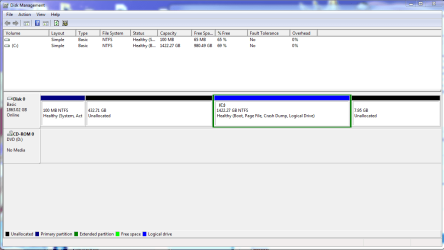
  • Screenshot_2.png
    Screenshot_2.png
    26.2 KB · Views: 3

My Computer My Computer

At a glance

Windows 7 Ultimate x648GIG
Computer type
PC/Desktop
Computer Manufacturer/Model Number
Custom
OS
Windows 7 Ultimate x64
Memory
8GIG
Antivirus
Malwarebytes
Browser
Firefox
Are you sure Ubuntu mount NTFS partitions automatically? I have seen some Linux distributions that doesn't do this.

(my Linux is basic) You can try in terminal window: (9 commands to check hard disk partitions and disk space on Linux)
Code:
fdisk -l

Then mount the proper partition (the command is an example, exchange sda2 with the correct device number, the bold part is the name under which the partition will be mounted, you can change it):
Code:
mount -t ntfs /dev/sda2 /mnt/[B]windows[/B] -o ro
The above will mount the partition in read-only mode.

To mount with read-write support:
Code:
ntfs-3g /dev/sdd1 /mnt/[B]backup[/B]
 

My Computer My Computer

At a glance

Windows 7 Ultimate x64 SP1AMD Phenom 2 1090T2x8GB Kingston HyperX Fury Black 1600Mhz Unga...MSI GTX 970 Gaming 4G
Computer type
PC/Desktop
Computer Manufacturer/Model Number
Custom Build
OS
Windows 7 Ultimate x64 SP1
CPU
AMD Phenom 2 1090T
Motherboard
Gigabyte GA-890FXA-UD5
Memory
2x8GB Kingston HyperX Fury Black 1600Mhz Unganged
Graphics Card(s)
MSI GTX 970 Gaming 4G
Sound Card
Realtek On-Board HD 7.1 Audio / Logitech G35
Monitor(s) Displays
3xAcer GD245HQ
Screen Resolution
1920x1080
Hard Drives
Samsung 850 Pro 512GB SSD - OS /
WD Caviar Black SATA 3 - 1 TBx2 - Dynamic RAID 0 /
WD Caviar Green SATA 2 - 640GBx2 - Dynamic RAID 0 /
WD Caviar Green SATA 2 - 640GB - Internal Backup /
Seagate Barracude SATA 3 - 3TB - External Backup/ Sync
PSU
HighPower 1000W
Case
Cooler Master HAF 932
Cooling
Noctua NH-D14
Keyboard
Logitech G19
Mouse
Logitech G500
Internet Speed
100/4 Mbit Cable (100GB quota)
Antivirus
ZoneAlarm Extreme Security / MBAM Pro / MBAE Free / SAS Free
Browser
IE 11 - Firefox - Chrome
Other Info
Logitech F710/ G27/ G940/ Z5500 // TrackIR 5 // Nvidia 3D Surround Vision
Will check this out!

Thanks for the reply! I will be sure to check this out!

EDIT: fdisk -l doesn't give me any output. Found the Windows Partiton using GPARTED.
Both commands return: directory non-existant; I create the dir with mkdir /mnt/windows
Seems like it did something, but a little HDD icon in the unity disappears when entering the command/s.
Asks if I want to unmount /dev/sda; Tried both yes and no; no difference.
Windows 7 is still not being detected.
 
Last edited:

My Computer My Computer

At a glance

Windows 7 Ultimate x648GIG
Computer type
PC/Desktop
Computer Manufacturer/Model Number
Custom
OS
Windows 7 Ultimate x64
Memory
8GIG
Antivirus
Malwarebytes
Browser
Firefox
Back
Top