
You are using an out of date browser. It may not display this or other websites correctly.
You should upgrade or use an alternative browser.
You should upgrade or use an alternative browser.
My Ie9 beta become slower than the first time
- Thread starter demank
- Start date

My Computer
At a glance
Windows 10 Pro x64, Arch LinuxIntel Core 2 Quad Q8200 OC'd 3.08GHz8GB DDR2 900MhzMSI GT730 2GB GDDR5 (Kepler)
- Computer type
- PC/Desktop
- Computer Manufacturer/Model Number
- Custom Build
- OS
- Windows 10 Pro x64, Arch Linux
- CPU
- Intel Core 2 Quad Q8200 OC'd 3.08GHz
- Motherboard
- Asus Rampage formula LGA775
- Memory
- 8GB DDR2 900Mhz
- Graphics Card(s)
- MSI GT730 2GB GDDR5 (Kepler)
- Sound Card
- Supreme FX2
- Monitor(s) Displays
- Samsung LS22F350 LED
- Screen Resolution
- 1080P
- Hard Drives
- Kingston SSDNow UV400 120GB, 500GB Hitachi, 2TB Samsung, 500GB Seagate FreeAgent, 640GB Samsung, 160GB Toshiba (Arch)
- PSU
- AeroCool 500W Bronze
- Cooling
- Cooler Master V6 + 3X fans
- Keyboard
- Prolink keyboard
- Mouse
- Logitech M705
- Internet Speed
- 1MiB/s
- Browser
- Chrome Beta

are you using addons also on ie9??
My Computer
At a glance
Windows 8 CP x64Intel(R) Core(TM) i7 CPU 920 @ 2.97GHzCorsair 6GB DDR3 (1333Mhz)Nvidia GeForce 9800GT (1GB)
- Computer Manufacturer/Model Number
- Custom Built (by me)
- OS
- Windows 8 CP x64
- CPU
- Intel(R) Core(TM) i7 CPU 920 @ 2.97GHz
- Motherboard
- DX58SO
- Memory
- Corsair 6GB DDR3 (1333Mhz)
- Graphics Card(s)
- Nvidia GeForce 9800GT (1GB)
- Sound Card
- Creative Sound Blaster Audigy Value (24bit internal)
- Monitor(s) Displays
- 22" Samsung SyncMaster B2230 (1920*1080)
- Screen Resolution
- 1920*1080
- Hard Drives
- Seagate Barracuda 500gb
- PSU
- i ball 450W
- Case
- i ball (Work Horse)
- Keyboard
- Microsoft Wireless Keyboard 700 v2.0
- Mouse
- Microsoft Wireless Mouse 700 v2.0
- Internet Speed
- 1MB

Welcome to the forum
I just added adblock and did not notice any slow down yet.
I just added adblock and did not notice any slow down yet.
My Computer
At a glance
Win7 x64 Ultimate SP1Intel i7-26008 GigGeforce gt 520
- Computer Manufacturer/Model Number
- Dell Optiplex 980
- OS
- Win7 x64 Ultimate SP1
- CPU
- Intel i7-2600
- Memory
- 8 Gig
- Graphics Card(s)
- Geforce gt 520
- Monitor(s) Displays
- LG & Acer
- Screen Resolution
- 1920x1080
- Internet Speed
- Fios 45/35
- Other Info
- Windows Home Server
Yes, I am using AdBlock Pro addon..
Is it the cause of the problem?
i also don't think that Adlock is a problem..
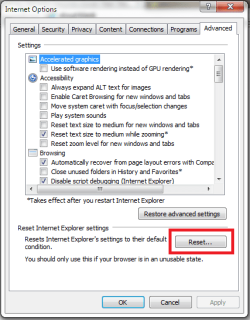
but try resetting ie..and then see...
all the best..!

My Computer
At a glance
Windows 8 CP x64Intel(R) Core(TM) i7 CPU 920 @ 2.97GHzCorsair 6GB DDR3 (1333Mhz)Nvidia GeForce 9800GT (1GB)
- Computer Manufacturer/Model Number
- Custom Built (by me)
- OS
- Windows 8 CP x64
- CPU
- Intel(R) Core(TM) i7 CPU 920 @ 2.97GHz
- Motherboard
- DX58SO
- Memory
- Corsair 6GB DDR3 (1333Mhz)
- Graphics Card(s)
- Nvidia GeForce 9800GT (1GB)
- Sound Card
- Creative Sound Blaster Audigy Value (24bit internal)
- Monitor(s) Displays
- 22" Samsung SyncMaster B2230 (1920*1080)
- Screen Resolution
- 1920*1080
- Hard Drives
- Seagate Barracuda 500gb
- PSU
- i ball 450W
- Case
- i ball (Work Horse)
- Keyboard
- Microsoft Wireless Keyboard 700 v2.0
- Mouse
- Microsoft Wireless Mouse 700 v2.0
- Internet Speed
- 1MB

- Local time
- 9:19 AM
- Messages
- 340
noticed my IE9 running slower as well - even had a pop-up window ask me if I wanted to disable add-ons to speed it up. I tried the reset and it's even slower to get to my homepage when it starts
looks like MS still missed the mark with this one
looks like MS still missed the mark with this one
My Computer
At a glance
Windows 7
- OS
- Windows 7
Yes, I am using AdBlock Pro addon..
Is it the cause of the problem?
i also don't think that Adlock is a problem..
but try resetting ie..and then see...
all the best..!
Yes, neeraj, as yowanvista said before,
I resetted my PC, It seem better..
But When I experienced the slower loading page again, I should reset again rite?
So, is it normal experiencing like this?
My Computer
At a glance
win7 home basic 32 bit
- OS
- win7 home basic 32 bit
yes i think it's normal..and remember it's still beta..so bugs will be corrected whenever it goes final...
sometimes mine also goes slower..but i didn't use IE much..
hope MS will correct this thing..!
sometimes mine also goes slower..but i didn't use IE much..
hope MS will correct this thing..!
Last edited:
My Computer
At a glance
Windows 8 CP x64Intel(R) Core(TM) i7 CPU 920 @ 2.97GHzCorsair 6GB DDR3 (1333Mhz)Nvidia GeForce 9800GT (1GB)
- Computer Manufacturer/Model Number
- Custom Built (by me)
- OS
- Windows 8 CP x64
- CPU
- Intel(R) Core(TM) i7 CPU 920 @ 2.97GHz
- Motherboard
- DX58SO
- Memory
- Corsair 6GB DDR3 (1333Mhz)
- Graphics Card(s)
- Nvidia GeForce 9800GT (1GB)
- Sound Card
- Creative Sound Blaster Audigy Value (24bit internal)
- Monitor(s) Displays
- 22" Samsung SyncMaster B2230 (1920*1080)
- Screen Resolution
- 1920*1080
- Hard Drives
- Seagate Barracuda 500gb
- PSU
- i ball 450W
- Case
- i ball (Work Horse)
- Keyboard
- Microsoft Wireless Keyboard 700 v2.0
- Mouse
- Microsoft Wireless Mouse 700 v2.0
- Internet Speed
- 1MB

Dirtnapper
New member
- Local time
- 9:19 AM
- Messages
- 16
Intersting...for me IE 8 64 was a dog...it was so slow, it would crash constantly. It just so happens that I took my chances today and put IE 9 64 on my Win 7 64...it flies! Under IE 8 I had disabled the addons, but nothing improved.
My Computer
At a glance
Win 7 Pro 64 bitIntel Core i7 4770K 3.5GhzCorsair Vengeance 2x8GB DDR3 1600MhzAMD Radeon 6670 DDR5 1Gig
- Computer type
- PC/Desktop
- Computer Manufacturer/Model Number
- Custom
- OS
- Win 7 Pro 64 bit
- CPU
- Intel Core i7 4770K 3.5Ghz
- Motherboard
- Gigabyte GA-Z87X-UD5H V1 BIOS F9
- Memory
- Corsair Vengeance 2x8GB DDR3 1600Mhz
- Graphics Card(s)
- AMD Radeon 6670 DDR5 1Gig
- Sound Card
- Realtek
- Monitor(s) Displays
- Viewsonic VP2770-LED
- Screen Resolution
- 2560 x 1440
- Hard Drives
- SATA: WD Raptor 500 gig (GSATAIII0) 2 WD Black FZEX 2TB(GSATAIII1,2)
- PSU
- Antec NEOHE 550 Watts
- Case
- Fractel Midi Arc 2
- Cooling
- Cryorig H5
- Keyboard
- Logitech MX3200
- Mouse
- Logitech
- Internet Speed
- Cable 25mb
- Antivirus
- ZASS
- Browser
- Chrome

this is not normal! It shouldn't be slow. Mine isn't, and I've got it on three computers I use daily. Something isn't right with your installation. Or maybe it has something to do with the hardware acceleration? I am not an expert, but I think you need more assistance before you "accept" that is normal.
My Computer
At a glance
Windows 7 Ultimate x64 Steve Ballmer EditionCore i7 920 @ 3.6GHz6Gb Kingston DDR3 1066MHzMSI GTX460 1GB Cyclone
- OS
- Windows 7 Ultimate x64 Steve Ballmer Edition
- CPU
- Core i7 920 @ 3.6GHz
- Motherboard
- EVGA X58 SLI Micro
- Memory
- 6Gb Kingston DDR3 1066MHz
- Graphics Card(s)
- MSI GTX460 1GB Cyclone
- Monitor(s) Displays
- LG W2361V
- Screen Resolution
- 1920 x 1080p
- Hard Drives
- 64GB Microcenter SSD (Adata S599)
1TB SeaGate Barracuda 7200
- PSU
- Corsair HX750
- Case
- Antec 1200
- Cooling
- Corsair H50
- Mouse
- Logitech M/X Revolution
- Internet Speed
- 2mb/s
- Other Info
- SSD Boot drive with MS Office
Similar threads

- Replies
- 3
- Views
- 3K

- Replies
- 8
- Views
- 637
- Replies
- 6
- Views
- 2K
- Replies
- 11
- Views
- 3K

- Replies
- 19
- Views
- 24K