Solved Sleep OK only the first time after a restart

glad

New member
Local time
3:57 PM
Messages
8
When I start the notebook, I can put my windows 7 to sleep the first time and it wakes up flawlessly; if I try to put it the second time to sleep, it starts the process but it soon gets stuck with a black screen. The only thing I can do is a forced shut down.

Exactly the same behavior with the hibernation.
 

My Computer My Computer

At a glance

Windows 7 Professional x64
Computer type
PC/Desktop
OS
Windows 7 Professional x64
Hi glad,

When did your issue start?

Your specs say PC/Desktop.
 

My Computer My Computer

At a glance

Win 10 x64, Linux Lite, Win 7 x64, BlackArch,...
Computer type
PC/Desktop
Computer Manufacturer/Model Number
HP Desktop & Compaq Laptop
OS
Win 10 x64, Linux Lite, Win 7 x64, BlackArch, & Kali
Hard Drives
Samsung 850 Pro 256Gb,
Hitachi HDD 1Tb,
Crucial MX SSD 250Gb
Segate 3Tb USB 3.0 Ext. Backup HDD
Internet Speed
150Mbps dn, 20Mbps up
Antivirus
Avast Free, Malwarebytes Anti-Exploit & Anti-Ransomware
Browser
Firefox, Chrome, Opera, & VPN
Two weeks ago but I don't know what has been the trigger
 

My Computer My Computer

At a glance

Windows 7 Professional x64
Computer type
PC/Desktop
OS
Windows 7 Professional x64
Did you install any updates, new hardware or devices?

Do you have a restore point or full disk image backup prior to your issue?
 

My Computer My Computer

At a glance

Win 10 x64, Linux Lite, Win 7 x64, BlackArch,...
Computer type
PC/Desktop
Computer Manufacturer/Model Number
HP Desktop & Compaq Laptop
OS
Win 10 x64, Linux Lite, Win 7 x64, BlackArch, & Kali
Hard Drives
Samsung 850 Pro 256Gb,
Hitachi HDD 1Tb,
Crucial MX SSD 250Gb
Segate 3Tb USB 3.0 Ext. Backup HDD
Internet Speed
150Mbps dn, 20Mbps up
Antivirus
Avast Free, Malwarebytes Anti-Exploit & Anti-Ransomware
Browser
Firefox, Chrome, Opera, & VPN
This isn't going to solve your issue, but I say this time and time again. Never EVER use low power modes like safe mode or hibernation. In all the years (some 14 now) I've helped people with computer issues on one tech forum after another, many people have created help topics on low power madness. It's best to start and fully shut down a computer. Low power modes may work for some, but not all and I personally won't use it. Especially since I FDE (Full Disk Encrypt) all of my computers. I'm a handsome looking, Charlie Sheen Bowling shirt wearing computer dork, so why not FDE? LOL!

At any rate, I may look at your issue closer tomorrow. In the mean time, what is the full make and model of the PC?
 

My Computer My Computer

At a glance

Windows 7 Ultimate x64
Computer type
PC/Desktop
OS
Windows 7 Ultimate x64
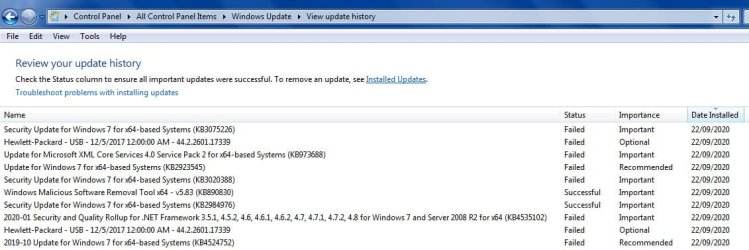
Snick and F22Simpilot (so far), thanks for answering to me. Snick: I installed an update (well, many updates) and the timing is compatible since when I started to experience my issue. As you can see in the list, the majority of updates failed and I haven't followed up. I have now rolled back the only two successful updates but nothing changes; could it be possible that one update, among the many failed, left something behind ? In this case I should start to fix every update one by one until I find the culprit. I attach the list of updates here after: any suggestion from where to start ? Thanks in advance !


F22Simpilot : it's not a PC, is a notebook: HP Probook 430 G2. Thanks for devoting your time trying to help me
 

Attachments

  • 2020-10-11_174444.jpg
    2020-10-11_174444.jpg
    66.7 KB · Views: 0

My Computer My Computer

At a glance

Windows 7 Professional x64
Computer type
PC/Desktop
OS
Windows 7 Professional x64
Again great reply F22 Simpilot!

Your posts are very educational & accurate!
:thumbsup:
 

My Computer My Computer

At a glance

Win 10 x64, Linux Lite, Win 7 x64, BlackArch,...
Computer type
PC/Desktop
Computer Manufacturer/Model Number
HP Desktop & Compaq Laptop
OS
Win 10 x64, Linux Lite, Win 7 x64, BlackArch, & Kali
Hard Drives
Samsung 850 Pro 256Gb,
Hitachi HDD 1Tb,
Crucial MX SSD 250Gb
Segate 3Tb USB 3.0 Ext. Backup HDD
Internet Speed
150Mbps dn, 20Mbps up
Antivirus
Avast Free, Malwarebytes Anti-Exploit & Anti-Ransomware
Browser
Firefox, Chrome, Opera, & VPN
Just to close the loop if someone else will ever have my same issue.


By chance I noticed that I have the sw driver for the SD card that is not working properly. If I don't put any SD card in the (physical) driver, everything related to the low power modes works ok.

This is adding value to what F22Simpilot calls low power "madness" !!!

PS I'll now probably open a TD for fixing the driver issue
 

My Computer My Computer

At a glance

Windows 7 Professional x64
Computer type
PC/Desktop
OS
Windows 7 Professional x64
The problem may lie in the ACPI.

Are you using the HP driver for the SD card reader?

If you go to device manager and right click the SD card and in properties, go to Power Management. Is the device allowed to power down?

You may want to try a sfc /scannow to make sure there are no file integrity issues.

Open an elevated command prompt by going to the start orb and in search enter, cmd. Right click cmd and open as administrator. In command prompt enter sfc /scannow.

Above all else, and as I mentioned, refrain from using low power modes. It can cause issues with the hard drive.
 

My Computer My Computer

At a glance

Windows 7 Ultimate x64
Computer type
PC/Desktop
OS
Windows 7 Ultimate x64
Back
Top