Solved How to make bullets work in Microsoft Word 2007

shortmantuff

New member
Power User
Local time
5:01 AM
Messages
171
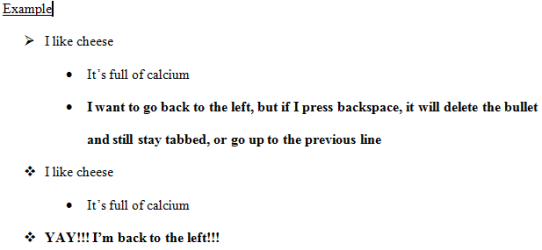
I know how to use bullets, but if you tab in the bullets, it will stay tabbed throughout the entire document unless you set up tabbed bullets again. When I try to backspace to go back to left alignment, it will delete the bullet and still stay tabbed. Basically what I am asking is after you do a tabbed bullet, how do you go back to aligning the bullets left again?
 

Attachments
  • Word example.PNG
    Word example.PNG
    4.5 KB · Views: 15

My Computer My Computer

At a glance

Windows 7 Home Premium x864096MB (2 x 2048) DDR2 667mhz CorsairATI Radeon® X1200 128MB-319MB dynamically all...
Computer Manufacturer/Model Number
Toshiba Satellite A215-S4757
OS
Windows 7 Home Premium x86
Motherboard
AMD Turion™ 64 X2 Dual-Core Mobile Technology TL56 1.8 GHz
Memory
4096MB (2 x 2048) DDR2 667mhz Corsair
Graphics Card(s)
ATI Radeon® X1200 128MB-319MB dynamically allocated shared g
Sound Card
Realtek
Monitor(s) Displays
15.4” diagonal widescreen TruBrite®TFT LCD display at 1280x8
Screen Resolution
1280x800
Hard Drives
Internal HD: 250GB (4200RPM); Serial ATA HDD
External HD: Western Digital 320GB My Passport Elite WDMLZ3200TN USB 2.0 Portable Hard Drive (Bronze)
Case
Targus
Mouse
Logitech G7
Internet Speed
6meg
Try shift-tab instead of Backspace to shift the tab to the left.
 

My Computer My Computer

At a glance

W10 Pro desktop, W11 laptop, W11 Pro tablet (...3.7Ghz 8700K i7, i7-11800H, i7-1065G716G desktop, 16G laptop, 4G tabletAMD Radeon RX580, RTX 3060, Intel Iris Plus
Computer type
PC/Desktop
Computer Manufacturer/Model Number
Home Built desktop, Dell G15 5511 Gaming laptop,MS Surface Pro 7 tablet
OS
W10 Pro desktop, W11 laptop, W11 Pro tablet (all 64-bit)
CPU
3.7Ghz 8700K i7, i7-11800H, i7-1065G7
Motherboard
ASUS TUF Z370-Pro Gaming in desktop
Memory
16G desktop, 16G laptop, 4G tablet
Graphics Card(s)
AMD Radeon RX580, RTX 3060, Intel Iris Plus
Sound Card
High Definition Audio (Built-in to mobo)
Monitor(s) Displays
Samsung U32J59 32" (2x), 15.6", 12"
Screen Resolution
3840x2160, 3840x2160, 1920x1080, 2160x1440
Hard Drives
500G SSD for OS; 2T, 10T & 15T HDDs for Data on Desktop, 1TB SSD laptop, 128G SSD tablet.
PSU
Corsair CX 750M
Case
Antec 100
Cooling
CM 212+
Keyboard
IBM Model M - used continuously since 1986
Mouse
Microsoft Pro IntelliMouse
Internet Speed
400M down 8M up
Antivirus
Windows Defender
Browser
FireFox
Other Info
Built my first computer (8Mhz 8088cpu, 640K RAM, 20MB HDD, 2 360K floppy drives) in 1985 and have been building them for myself, relatives and friends ever since.
If you just highlight the line in question then left-click the Bullet button on the ribbon (in the Paragraph pane), it will turn off bullets for that line and revert to normal left-justified text. Is that what you mean?
 

My Computer My Computer

At a glance

Windows 7 Enterprise x64Intel i7 9206 GBnVidia GTX260 + nVidia 3D
Computer Manufacturer/Model Number
Custom
OS
Windows 7 Enterprise x64
CPU
Intel i7 920
Motherboard
Asus P6T Deluxe v2
Memory
6 GB
Graphics Card(s)
nVidia GTX260 + nVidia 3D
Sound Card
Onboard
Monitor(s) Displays
Samsung SyncMaster 2233RZ
Screen Resolution
1680 x 1050
Hard Drives
1 x 64GB SSD primary
2 x 1 TB (mirrored)
PSU
700W
Other Info
Edimax 802.11n Wireless PCI Card
Netgear DG834G router
I figured it out. You just hit enter in the new line and it will push the tab back one. Now I am having trouble creating a tab within a tab. When I hit tab, it just tabs out and doesn't bring the bullet with it.
 

My Computer My Computer

At a glance

Windows 7 Home Premium x864096MB (2 x 2048) DDR2 667mhz CorsairATI Radeon® X1200 128MB-319MB dynamically all...
Computer Manufacturer/Model Number
Toshiba Satellite A215-S4757
OS
Windows 7 Home Premium x86
Motherboard
AMD Turion™ 64 X2 Dual-Core Mobile Technology TL56 1.8 GHz
Memory
4096MB (2 x 2048) DDR2 667mhz Corsair
Graphics Card(s)
ATI Radeon® X1200 128MB-319MB dynamically allocated shared g
Sound Card
Realtek
Monitor(s) Displays
15.4” diagonal widescreen TruBrite®TFT LCD display at 1280x8
Screen Resolution
1280x800
Hard Drives
Internal HD: 250GB (4200RPM); Serial ATA HDD
External HD: Western Digital 320GB My Passport Elite WDMLZ3200TN USB 2.0 Portable Hard Drive (Bronze)
Case
Targus
Mouse
Logitech G7
Internet Speed
6meg
It seems that you have your bullets set up in a strange way - hitting Enter should just give you a new bulleted line, with the bullet identical to the one above it. I think you may have some residual formatting in your document that is making the bullets behave atypically.

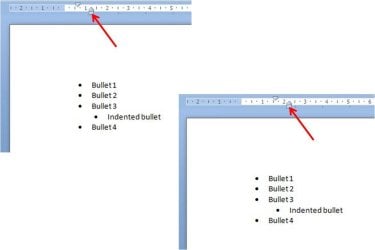
If you want to indent the bullet, the easiest way is to highlight the line in question then slide the tab stops on the ruler, by grabbing the little box below the tab stop and dragging it to where you want it to be (see screenshot).
 

Attachments

  • Picture1.jpg
    Picture1.jpg
    24.6 KB · Views: 6

My Computer My Computer

At a glance

Windows 7 Enterprise x64Intel i7 9206 GBnVidia GTX260 + nVidia 3D
Computer Manufacturer/Model Number
Custom
OS
Windows 7 Enterprise x64
CPU
Intel i7 920
Motherboard
Asus P6T Deluxe v2
Memory
6 GB
Graphics Card(s)
nVidia GTX260 + nVidia 3D
Sound Card
Onboard
Monitor(s) Displays
Samsung SyncMaster 2233RZ
Screen Resolution
1680 x 1050
Hard Drives
1 x 64GB SSD primary
2 x 1 TB (mirrored)
PSU
700W
Other Info
Edimax 802.11n Wireless PCI Card
Netgear DG834G router
Try shift-tab instead of Backspace to shift the tab to the left.
Okay, my Word is messed up. It doesn't do what tutorials say to do or anything. But I tried strollin's method in powerpoint and it worked, so thank you!
 

My Computer My Computer

At a glance

Windows 7 Home Premium x864096MB (2 x 2048) DDR2 667mhz CorsairATI Radeon® X1200 128MB-319MB dynamically all...
Computer Manufacturer/Model Number
Toshiba Satellite A215-S4757
OS
Windows 7 Home Premium x86
Motherboard
AMD Turion™ 64 X2 Dual-Core Mobile Technology TL56 1.8 GHz
Memory
4096MB (2 x 2048) DDR2 667mhz Corsair
Graphics Card(s)
ATI Radeon® X1200 128MB-319MB dynamically allocated shared g
Sound Card
Realtek
Monitor(s) Displays
15.4” diagonal widescreen TruBrite®TFT LCD display at 1280x8
Screen Resolution
1280x800
Hard Drives
Internal HD: 250GB (4200RPM); Serial ATA HDD
External HD: Western Digital 320GB My Passport Elite WDMLZ3200TN USB 2.0 Portable Hard Drive (Bronze)
Case
Targus
Mouse
Logitech G7
Internet Speed
6meg
Solution

Click on the office button->word options->proofing->auto correct options->auto format as you type --> and select the check box “set left and first indents with tabs and back spaces” under automatically as you type section at the bottom.
 

My Computer My Computer

At a glance

64bit XP Pro
OS
64bit XP Pro
Click on the office button->word options->proofing->auto correct options->auto format as you type --> and select the check box “set left and first indents with tabs and back spaces” under automatically as you type section at the bottom.
Thank you so much! Such a little problem caused me so much frustration.
 

My Computer My Computer

At a glance

Windows 7 Home Premium x864096MB (2 x 2048) DDR2 667mhz CorsairATI Radeon® X1200 128MB-319MB dynamically all...
Computer Manufacturer/Model Number
Toshiba Satellite A215-S4757
OS
Windows 7 Home Premium x86
Motherboard
AMD Turion™ 64 X2 Dual-Core Mobile Technology TL56 1.8 GHz
Memory
4096MB (2 x 2048) DDR2 667mhz Corsair
Graphics Card(s)
ATI Radeon® X1200 128MB-319MB dynamically allocated shared g
Sound Card
Realtek
Monitor(s) Displays
15.4” diagonal widescreen TruBrite®TFT LCD display at 1280x8
Screen Resolution
1280x800
Hard Drives
Internal HD: 250GB (4200RPM); Serial ATA HDD
External HD: Western Digital 320GB My Passport Elite WDMLZ3200TN USB 2.0 Portable Hard Drive (Bronze)
Case
Targus
Mouse
Logitech G7
Internet Speed
6meg
Back
Top