

corrytonapple
New member
Hello All,
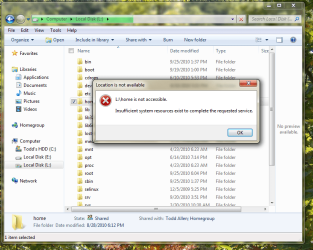
My problem today is I cannot get into my Ubuntu home folders, which in the Linux partion is stored under the folder fetchingly called "Home". I have tried double-clicking to open it, but it will not open without an error message. Please tell me how I am supposed to get past the error message and view my home folder. I am an admin, at the one who set the computer up. The purpose of accessing it is that I would like to have some pictures that are on the Ubuntu side.
Thank you for your time.
My problem today is I cannot get into my Ubuntu home folders, which in the Linux partion is stored under the folder fetchingly called "Home". I have tried double-clicking to open it, but it will not open without an error message. Please tell me how I am supposed to get past the error message and view my home folder. I am an admin, at the one who set the computer up. The purpose of accessing it is that I would like to have some pictures that are on the Ubuntu side.
Thank you for your time.
Attachments
My Computer
At a glance
Windows 7 64-bit Home Premium OEMIntel Pentium Dual-Core 2.2 GHz4 GB DDR3Intel Integrated
- Computer Manufacturer/Model Number
- Toshiba L455-S5008
- OS
- Windows 7 64-bit Home Premium OEM
- CPU
- Intel Pentium Dual-Core 2.2 GHz
- Motherboard
- Standard L455 Board
- Memory
- 4 GB DDR3
- Graphics Card(s)
- Intel Integrated
- Sound Card
- Realtek High-Defintion Audio
- Monitor(s) Displays
- One 15.6" Built In and one 17" External - Both LCDs
- Screen Resolution
- 1366 X 768 Laptop Screen
- Hard Drives
- One 250GB Internal and One 40GB External
- PSU
- Battery - Lion - Stock/2 Hours
- Case
- Standard Case, Getting Some Beating In
- Cooling
- Air - 60MM (I Think) Laptop Fan
- Keyboard
- Built In/Apple Pro Keyboard
- Mouse
- Trackpad - Getting Worn Out - Generic USB Mouse
- Internet Speed
- 178KB/S
- Other Info
- Main OS: Ubuntu 11.04
Other OSes: Windows 7 Home
Data Partition Shared with All OSes
Caps Lock Key Now Works as a Search Key
SD Card Reader
Sony Canal Phones
Logitech External $10 Mic


