"Sytem Repair Disk" Can't Load - Error 4001100200001012

terryoregon

New member
Local time
1:25 AM
Messages
7
Location
Portland, Oregon
Went into the W7 control panel to make a 'system repair disk' (boot disk), just in case I ever needed it. Making the disk went OK, with W7 telling me it had successfully finished, and to label the CD.

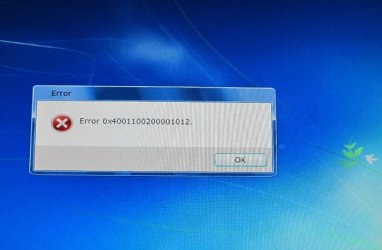
I then put the boot CD into my DVD drive to make sure it worked OK. Computer boots from the CD and W7 says it has started loading files. Then the pretty blue background screen started (just like the one in the F8 repair console), and then there was a long pause and then I get the error code shown on the photo below. Clicking OK reboots the computer, and no repair options ever load.

I made two separate boot disks to rule out a bad CD, but still get the same error #

This is a brand new Dell computer, both DVD drives work fine, and burn CDs without problems.
 

Attachments
  • Error.JPG
    Error.JPG
    38.5 KB · Views: 161

My Computer My Computer

At a glance

Windows 7 Home Premium 64-bit (pre-installed ...Intel i7-920 (quad) 2.66GHz12GB Tri-Channel DDR3nVidia GeForce GTS 240
Computer Manufacturer/Model Number
Dell XPS 9000 (purchased Oct 09)
OS
Windows 7 Home Premium 64-bit (pre-installed by Dell)
CPU
Intel i7-920 (quad) 2.66GHz
Memory
12GB Tri-Channel DDR3
Graphics Card(s)
nVidia GeForce GTS 240
Sound Card
Soundblaster X-Fi Xtreme Audio
Hard Drives
1TB 7200RPM SATA
Keyboard
Dell USB Consumer Multimedia
Mouse
Dell Studio Optical
Update:

In looking at what came with my computer, I do in fact have a "Reinstallation DVD" for W7. It boots OK into the repair console. So, the problem in making my own boot disk is a moot point for now - other then the desire to understand that error code.
 

My Computer My Computer

At a glance

Windows 7 Home Premium 64-bit (pre-installed ...Intel i7-920 (quad) 2.66GHz12GB Tri-Channel DDR3nVidia GeForce GTS 240
Computer Manufacturer/Model Number
Dell XPS 9000 (purchased Oct 09)
OS
Windows 7 Home Premium 64-bit (pre-installed by Dell)
CPU
Intel i7-920 (quad) 2.66GHz
Memory
12GB Tri-Channel DDR3
Graphics Card(s)
nVidia GeForce GTS 240
Sound Card
Soundblaster X-Fi Xtreme Audio
Hard Drives
1TB 7200RPM SATA
Keyboard
Dell USB Consumer Multimedia
Mouse
Dell Studio Optical

My Computer My Computer

At a glance

Windows 7 Ultimate 32bit SP1Intel(R) Core(TM)2 Quad CPU @ 2.40GHz, 2400 MHz4 GBATI Radeon HD 2600 Pro
Computer type
PC/Desktop
Computer Manufacturer/Model Number
Bruce ... somewhere in his 40's
OS
Windows 7 Ultimate 32bit SP1
CPU
Intel(R) Core(TM)2 Quad CPU @ 2.40GHz, 2400 MHz
Motherboard
INTEL/D975XBX2
Memory
4 GB
Graphics Card(s)
ATI Radeon HD 2600 Pro
Monitor(s) Displays
Samsung SyncMaster 914v
Screen Resolution
1280 x 1024
Hard Drives
2/500GB each ... ST3500630AS ATA Device.
One is not connected
PSU
Rocketfish 700 W
Case
G.Skill Gigabyte Chassis
Keyboard
Standard PS/2 Keyboard
Mouse
Microsoft PS/2 Mouse
Internet Speed
DSL
Antivirus
Avira Internet Security
Browser
IE 11
Other Info
ATI HDMI Audio
This is what I found... hope it makes sense to you:
Windows 7 repair disk error code 0x4001100200001012
Thanks, that's certainly identical to my problem. However, their possible solutions didn't resolve anything. I don't see an obvious way to slow down the burn process when W7 is controlling the DVD drive - there is no option to change that. The only way I know to change burn speed is with the third party software that works with the drive (like Roxio Media Creator that came preinstalled). I have a hard time believing this is an issue with the CD/DVD itself. I have dual drives and I've tried burning the boot CD with both using Verbatim CDs, which never give me problems. Both CDs show the files OK when viewing them in explorer. I also tried burning a Verbatim DVD+R, same issue.

I then tried running their recommended "sfc /scannow" command, and it said it repaired some files but couldn't repair other files. I checked the "CBS.log" it generated, but there's a LOT of info in there - not much that means anything to me.
Anyways, as long as I have the "Reinstallation DVD", I'm OK. Don't want to spend to much time on it.
 

My Computer My Computer

At a glance

Windows 7 Home Premium 64-bit (pre-installed ...Intel i7-920 (quad) 2.66GHz12GB Tri-Channel DDR3nVidia GeForce GTS 240
Computer Manufacturer/Model Number
Dell XPS 9000 (purchased Oct 09)
OS
Windows 7 Home Premium 64-bit (pre-installed by Dell)
CPU
Intel i7-920 (quad) 2.66GHz
Memory
12GB Tri-Channel DDR3
Graphics Card(s)
nVidia GeForce GTS 240
Sound Card
Soundblaster X-Fi Xtreme Audio
Hard Drives
1TB 7200RPM SATA
Keyboard
Dell USB Consumer Multimedia
Mouse
Dell Studio Optical
Upload the .log file and then use Imgburn to burn the disc at the lowest speed. Also, if you allowed the creation of the 100mb partition, it contains the info for system restore and bitlocker.

www.[B]imgburn[/B].com/
 

My Computer My Computer

At a glance

Windows 7 Ultimate x86-64[email protected] 1066MHz FSB6GB DDR3 1066MHz9300M GS 256MB Dedicated (Speed) + Intel4500M...
Computer Manufacturer/Model Number
Sony Vaio Z46GDU
OS
Windows 7 Ultimate x86-64
CPU
[email protected] 1066MHz FSB
Motherboard
Sony branded
Memory
6GB DDR3 1066MHz
Graphics Card(s)
9300M GS 256MB Dedicated (Speed) + Intel4500MHD (Stamina)
Sound Card
Realtek HD Audio
Monitor(s) Displays
13.1' WXGA
Screen Resolution
1600x900
Hard Drives
320GB 7200RPM w/ 16MB cache
Internet Speed
1MB/s
All this stuff about slowing down your Disc Burner in order to make a "Recovery Disc"
is a bunch of nonsense as are the various post on the internet that suggest you need to run SFC to find corrupt system files before burning your recovery disc. Where do people get this stuff ?????

THE PROBLEM IS the "System Recovery Partition" thats on your hard drive - Almost all Dell Computers have this partition - Alienware computers have it too now (wonder why - ha ha ??)

Well, the solution is simple - Just download an .ISO "image file" of the Windows 7 Repair Disk and burn it to a CD - it works just fine !!!!!!

You can download a 32 or 64 bit ISO image fom this site for free depending on which one you need.

Create a Windows 7 System Repair Disc — MAXIMUMpcguides – Windows 7 tips, tricks, help, and how-to guides

Cheers :):):)
TheHappyman
 

My Computer My Computer

At a glance

Win 7 Ultimate x64Core I7 980X O.C. to 4.0 Ghz12GB 1600 mhz triple channel DDR3 - KingstonATI Radeon HD 5970 2GB Video Card
Computer Manufacturer/Model Number
Alienware Aurora
OS
Win 7 Ultimate x64
CPU
Core I7 980X O.C. to 4.0 Ghz
Motherboard
Custom Intel mATX (Bios ver A10)
Memory
12GB 1600 mhz triple channel DDR3 - Kingston
Graphics Card(s)
ATI Radeon HD 5970 2GB Video Card
Sound Card
Creative Labs Titanium sound blaster
Monitor(s) Displays
30" Dell LCD
Screen Resolution
2560 x 1600
Hard Drives
240 GB OCZ Vertex 2 SSD
256 GB Samsung V2 SSD
2TB WD Black Caviar 7200 rpm SATA3
600GB WD Velociraptor 10,000 rpm SATA3
3TB WD MyBook Essential USB 3.0 7200 rpm External
PSU
850 Watt
Case
Alienware Aurora
Cooling
Water
Keyboard
Logitech G15 (original version)
Mouse
Logitech MX1000 Laser - Wireless
Internet Speed
Cable 22 Mb/sec download
Other Info
USB 3.0,
Blue Ray DVD Read/Writer
Bose Companion 3 Speakers
WRT54G Wireless Router
All this stuff about slowing down your Disc Burner in order to make a "Recovery Disc"
is a bunch of nonsense as are the various post on the internet that suggest you need to run SFC to find corrupt system files before burning your recovery disc. Where do people get this stuff ?????

THE PROBLEM IS the "System Recovery Partition" thats on your hard drive - Almost all Dell Computers have this partition - Alienware computers have it too now (wonder why - ha ha ??)

Well, the solution is simple - Just download an .ISO "image file" of the Windows 7 Repair Disk and burn it to a CD - it works just fine !!!!!!

Create a Windows 7 System Repair Disc — MAXIMUMpcguides – Windows 7 tips, tricks, help, and how-to guides

Cheers :):):)
TheHappyman


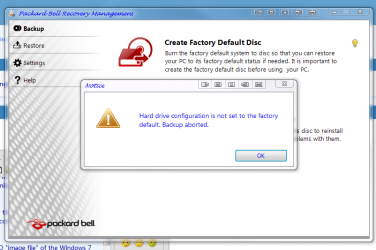
thats a great link thanks for sharing :D i cant make a packard bell recovery system disc when it went in for repair then came back the first thing i went to do was make the system disc using packard bells software but it just gave me the pop up here that i have posted.:cry:
 

Attachments

  • factory defult disc.PNG
    factory defult disc.PNG
    63 KB · Views: 48

My Computer My Computer

At a glance

Operating System : Windows 7 Home Premium Edi...Processor : Intel Core 2 Quad Q8300 @ 2500 MHzPhysical Memory :8GB Corsair4x 2GB 800MHz C5 ...Video Card : XFX 6700 AMD
Computer Manufacturer/Model Number
packard bell IXTREME M5722
OS
Operating System : Windows 7 Home Premium Edition 6.01.7600 SP1 (x64)
CPU
Processor : Intel Core 2 Quad Q8300 @ 2500 MHz
Motherboard
Mainboard : Packard Bell (Acer EG43M )
Memory
Physical Memory :8GB Corsair4x 2GB 800MHz C5 DDR2
Graphics Card(s)
Video Card : XFX 6700 AMD
Monitor(s) Displays
Maestro 234DL - BenQ V2220 - BenQ VW2420H
Screen Resolution
Current Display :1920x1080p pixels at 60 Hz in HD LED
Hard Drives
Hard Disks : WDC (1000 GB)
Drive C: (Hard Disk) : 428 GB available on 491 GB
Drive D: (Hard Disk) : 426 GB available on 492 GB
SAMSUNG spinpoint HD103SJ 1000.2 GB
(X 2) KINGSTON SSD NOW V 30GB
PSU
XFX ProSeries 550W PSU
Case
PACKARD BELL IXTREME
Cooling
System Blower Current: 150mA Air Flow16CFM ;Akasa 90mm rear
Keyboard
Gigabyte Aivia K8100
Mouse
TRUST-Wireless Laser Mouse - Carbon edition MI-7770C
Internet Speed
TP-LINK > TL-WN951N / AV500 Gigabit Powerline Adapters
Browser
chrome dev
Other Info
EXTRA COOLING>(FAN CONTROLLER) PC Bay Cooler 3 x 40mm fans; Akasa AK-HD-BL Blue hard drive cooler 2 x 40 mm fan 4500 rpm 29.7 dBA
Bios> American Megatrends Inc.
Version : P01-A1
Date : 08/31/2009
Many Thanks Happyman

All this stuff about slowing down your Disc Burner in order to make a "Recovery Disc"
is a bunch of nonsense as are the various post on the internet that suggest you need to run SFC to find corrupt system files before burning your recovery disc. Where do people get this stuff ?????

THE PROBLEM IS the "System Recovery Partition" thats on your hard drive - Almost all Dell Computers have this partition - Alienware computers have it too now (wonder why - ha ha ??)

Well, the solution is simple - Just download an .ISO "image file" of the Windows 7 Repair Disk and burn it to a CD - it works just fine !!!!!!

You can download a 32 or 64 bit ISO image fom this site for free depending on which one you need.

Create a Windows 7 System Repair Disc — MAXIMUMpcguides – Windows 7 tips, tricks, help, and how-to guides

Cheers :):):)
TheHappyman

Thanks Happyman I wasted several discs trying to create the recovery disc on my dell
computer Windows7 64bit. The answer to your quote "where do they get this stuff from" is the so called experts at Dell & Microsoft. Anyway your suggestion worked for me great support.:
 

My Computer My Computer

At a glance

windows7 home premium 64bit
OS
windows7 home premium 64bit
Back
Top