Minefield Nightly build crashes

bobtran

Never forget
Guru
VIP
Local time
8:18 AM
Messages
649
Location
NM - Way South
The nightly x64 "firefox-4.0b7pre" for 10-2-2010 appears to be unstable. After allowing the upgrade it now crashes with the following error:
--------------------------------
Faulting application name: firefox.exe, version: 2.0.0.3927, time stamp: 0x4ca6ffe2
Faulting module name: mozjs.dll, version: 0.0.0.0, time stamp: 0x4ca6f48b
Exception code: 0xc0000005
Fault offset: 0x00000000001ab60e
Faulting process id: 0x1068
Faulting application start time: 0x01cb6276befdf340
Faulting application path: C:\Program Files\Minefield\firefox.exe
Faulting module path: C:\Program Files\Minefield\mozjs.dll
Report Id: 0283e610-ce6a-11df-80fe-00044b040674
----------------------------------
This seems to me to be a lesson in "don't upgrade" go and download each nightly build so as to be able to revert.

To revert: http://ftp.mozilla.org/pub/mozilla.org/firefox/nightly/
Find the x64 build in the "2010-MM-DD-rr-mozilla-central" Directory
(where rr= daily release number I assume, ie: 02,03,etc)
 
Last edited:

My Computer My Computer

Computer Manufacturer/Model Number
Systemax N2000 Gaming PC
OS
Windows 7 Ultimate x64
CPU
Q6600 @2.4ghz (G0 stepping)
Motherboard
XFX nforce 680i LT
Memory
8 gb OCZ vista essential sli PC-6400
Graphics Card(s)
Dual 9800gt in SLI mode
Sound Card
Integrated 8.1 High Definition Audio
Monitor(s) Displays
Dual Sceptre x246w 24 inch monitors
Screen Resolution
1920 x 1200 each monitor
Hard Drives
500 GB SATA II / 7500 rpm
PSU
Cooler Master Real Power Pro 1250W
Case
N2000 server tower
Cooling
Thermaltake Bigwater 760 is
Keyboard
MS Intelitype 6000 v2.0
Mouse
MS Intelipoint 6000
Internet Speed
Wi-power 1.5GB up / 512k down
Other Info
Windows 7 Ultimate x64, Windows 7 Pro x64, Windows Home Premium X86, Windows XP pro, Windows Home Server x86, Ubuntu 10.4 x86 and x64, Ubuntu server 10.4, SQL Server 2005, MySQL 5.0
I uninstalled minefield the other day , i didnt open firefox before i uninstalled and as a result my firefox settings addons etc were deleted and i had to set it all up again.
lesson learnt there.
the reason i uninstalled was because every time i opened minefield after using firefox it verifyed my addons and the same would happen when i opened firefox after using minefield.
i got so fed up messing about jumping between the two that i settled to just having firefox. i like my addons
 

My Computer My Computer

Computer Manufacturer/Model Number
Hewlett packard/p6512uk
OS
Microsoft Windows 7 Home Premium 64-bit 7600
CPU
IIx4 amd athelon 635 processor
Motherboard
FOXCONN 2AA9
Memory
2x2gb
Graphics Card(s)
ati radeon HD 5450
Sound Card
(1) Realtek High Definition Audio (2) AMD High Definition
Monitor(s) Displays
samsung lcd tv 32"
Screen Resolution
1360x 768
Hard Drives
(1) WDC WD10 01FAES-60Z2A0 SATA Disk Device (2) Maxtor OneTouch USB Device (3) ST310003 33AS USB Device (4) WD My Book 1111 USB Device
PSU
?
Cooling
air!
Keyboard
wireless hp
Mouse
wireless Hp,optical
Internet Speed
1.10mb/s
Antivirus
MSE
Browser
Firefox
I just cant live without my addons so I ended up going back to Firefox
 

My Computer My Computer

Computer type
PC/Desktop
Computer Manufacturer/Model Number
Self Built Custom Computer.
OS
Windows 10 Pro x64
CPU
i7-4770K
Motherboard
Asus Z87 Sabertooth
Memory
16Gig DDR3-2400
Graphics Card(s)
Gigabyte GT740
Sound Card
Onboard
Monitor(s) Displays
Benq 27" - Dell 23' - Benq 22"
Screen Resolution
1680x1050
Hard Drives
Samsung 840 Pro 128g SSD
1xWestern Digital Caviar Green 1tb
2xWestern Digital Caviar Green 2 tb
PSU
Seasonic 760 watt Platinum
Case
Coolermaster Haf - X
Cooling
Noctua NH-C12P CPU Cooler
Keyboard
Logitech illuminated keyboard
Mouse
Logitech Perfomance MX
Internet Speed
Cable = speeds to 20Mbps downsteam and 512kbps upsteam
Antivirus
Avast Internet Security
Browser
Firefox
I uninstalled minefield the other day , i didnt open firefox before i uninstalled and as a result my firefox settings addons etc were deleted and i had to set it all up again.
lesson learnt there.
the reason i uninstalled was because every time i opened minefield after using firefox it verifyed my addons and the same would happen when i opened firefox after using minefield.
i got so fed up messing about jumping between the two that i settled to just having firefox. i like my addons

It only checks them if you are changing from x86 to x64 or visa-versa. You can just tell it to skip and it will be ok.

If uninstalling, delete with the default choice and don't choose "delete everything" otherwise you are correct, it will delete everything. I also made this mistake once.
 

My Computer My Computer

Computer Manufacturer/Model Number
Systemax N2000 Gaming PC
OS
Windows 7 Ultimate x64
CPU
Q6600 @2.4ghz (G0 stepping)
Motherboard
XFX nforce 680i LT
Memory
8 gb OCZ vista essential sli PC-6400
Graphics Card(s)
Dual 9800gt in SLI mode
Sound Card
Integrated 8.1 High Definition Audio
Monitor(s) Displays
Dual Sceptre x246w 24 inch monitors
Screen Resolution
1920 x 1200 each monitor
Hard Drives
500 GB SATA II / 7500 rpm
PSU
Cooler Master Real Power Pro 1250W
Case
N2000 server tower
Cooling
Thermaltake Bigwater 760 is
Keyboard
MS Intelitype 6000 v2.0
Mouse
MS Intelipoint 6000
Internet Speed
Wi-power 1.5GB up / 512k down
Other Info
Windows 7 Ultimate x64, Windows 7 Pro x64, Windows Home Premium X86, Windows XP pro, Windows Home Server x86, Ubuntu 10.4 x86 and x64, Ubuntu server 10.4, SQL Server 2005, MySQL 5.0
The nightly x64 "firefox-4.0b7pre" for 10-2-2010 appears to be unstable. After allowing the upgrade it now crashes with the following error:
--------------------------------
Faulting application name: firefox.exe, version: 2.0.0.3927, time stamp: 0x4ca6ffe2
Faulting module name: mozjs.dll, version: 0.0.0.0, time stamp: 0x4ca6f48b
Exception code: 0xc0000005
Fault offset: 0x00000000001ab60e
Faulting process id: 0x1068
Faulting application start time: 0x01cb6276befdf340
Faulting application path: C:\Program Files\Minefield\firefox.exe
Faulting module path: C:\Program Files\Minefield\mozjs.dll
Report Id: 0283e610-ce6a-11df-80fe-00044b040674
----------------------------------
This seems to me to be a lesson in "don't upgrade" go and download each nightly build so as to be able to revert.

To revert: Index of /pub/mozilla.org/firefox/nightly
Find the x64 build in the "2010-MM-DD-mozilla-central" Directory

I couldn't find x64 build there but 32 bit ?

dg
 

My Computer My Computer

OS
Windows 7 64bit Ultimate
CPU
Intel i5 2500K 3.30 ghz overclocked to 4.8 ghz
Motherboard
Asus P8T867 EXT bios 2103 rev 1.03
Memory
G.SKILL DDR3 12GB PC3 1600 at 800mhz 8-9-8-24-1t
Graphics Card(s)
Zotac GeForce GTX 560 1GB non ti driver 290.53 beta
Sound Card
on-board realtek
Monitor(s) Displays
Asusr 23" LED
Screen Resolution
1980x1080 max
PSU
BFG-1000 watts
This worked for me

The nightly x64 "firefox-4.0b7pre" for 10-2-2010 appears to be unstable. After allowing the upgrade it now crashes with the following error:
--------------------------------
Faulting application name: firefox.exe, version: 2.0.0.3927, time stamp: 0x4ca6ffe2
Faulting module name: mozjs.dll, version: 0.0.0.0, time stamp: 0x4ca6f48b
Exception code: 0xc0000005
Fault offset: 0x00000000001ab60e
Faulting process id: 0x1068
Faulting application start time: 0x01cb6276befdf340
Faulting application path: C:\Program Files\Minefield\firefox.exe
Faulting module path: C:\Program Files\Minefield\mozjs.dll
Report Id: 0283e610-ce6a-11df-80fe-00044b040674
----------------------------------
This seems to me to be a lesson in "don't upgrade" go and download each nightly build so as to be able to revert.

To revert: Index of /pub/mozilla.org/firefox/nightly
Find the x64 build in the "2010-MM-DD-mozilla-central" Directory

I was having the same problem, this is what worked for me.

go into about:config (start minefield in safe mode if necc.)

change these lines to false

javascript.options.methodjit.content
javascript.options.methodjit.chrome

Restart minefield in normal mode and all should be ok
 

My Computer My Computer

Computer Manufacturer/Model Number
HP Pavilion e9107c
OS
Windows 7 Home Premium 64 bit
CPU
Intel Core 2 Quad Q8200 @ 2.33 GHz
Memory
8 GB DDR3
Graphics Card(s)
ATI Radeon HD 4350
Monitor(s) Displays
HP 23 in. High Definition (w2338h)
Screen Resolution
1920 x 1080
Hard Drives
750 GB
Keyboard
Logitech Illuminated keyboard
Mouse
Logitech Laser mouse
The nightly x64 "firefox-4.0b7pre" for 10-2-2010 appears to be unstable. After allowing the upgrade it now crashes with the following error:
--------------------------------
Faulting application name: firefox.exe, version: 2.0.0.3927, time stamp: 0x4ca6ffe2
Faulting module name: mozjs.dll, version: 0.0.0.0, time stamp: 0x4ca6f48b
Exception code: 0xc0000005
Fault offset: 0x00000000001ab60e
Faulting process id: 0x1068
Faulting application start time: 0x01cb6276befdf340
Faulting application path: C:\Program Files\Minefield\firefox.exe
Faulting module path: C:\Program Files\Minefield\mozjs.dll
Report Id: 0283e610-ce6a-11df-80fe-00044b040674
----------------------------------
This seems to me to be a lesson in "don't upgrade" go and download each nightly build so as to be able to revert.

To revert: Index of /pub/mozilla.org/firefox/nightly
Find the x64 build in the "2010-MM-DD-mozilla-central" Directory

I was having the same problem, this is what worked for me.

go into about:config (start minefield in safe mode if necc.)

change these lines to false

javascript.options.methodjit.content
javascript.options.methodjit.chrome

Restart minefield in normal mode and all should be ok

Same happen to me... tried to roll back and crashed all browsers... even IE was done... Sure glad i had a full system backup... GL :)
 

My Computer My Computer

Computer Manufacturer/Model Number
Toshiba Satellite
OS
Windows 7 Home Premium 64-bit
CPU
Pentium(R) Dual-Core T4300 @ 2.10GHz
Motherboard
Toshiba Model KSWAA - Chipset Intel GL40 Rev 07
Memory
3 GB DDR2 PC2-6400 (400 MHz) Samsung M4 70T2864Q23-CF7
Graphics Card(s)
Mobile Intel GMA4500M 32bit OS (64bit OS) dynamically
Sound Card
Realtek ALC272-GR Software Sound
Monitor(s) Displays
16.0" HD TFT with TrueBrite Matrix colour LCD display
Screen Resolution
1366 x 768
Hard Drives
FUJITSU MJA2320BH G2-(S2) 320GB (5400RPM) Serial-ATA
Keyboard
Canadian Bilingual Keyboard 105 keys with 13 Function keys
Mouse
Touchpad Point device & Lexma USB Mouse
Internet Speed
Walking is Faster
Other Info
Wireless LAN Realtek RTL89191SE 802.11n PCI-E NIC + a
LAN Realek PCIe FE Family Controller and
TOSHIBA Software Modem
The nightly x64 "firefox-4.0b7pre" for 10-2-2010 appears to be unstable. After allowing the upgrade it now crashes with the following error:
--------------------------------
Faulting application name: firefox.exe, version: 2.0.0.3927, time stamp: 0x4ca6ffe2
Faulting module name: mozjs.dll, version: 0.0.0.0, time stamp: 0x4ca6f48b
Exception code: 0xc0000005
Fault offset: 0x00000000001ab60e
Faulting process id: 0x1068
Faulting application start time: 0x01cb6276befdf340
Faulting application path: C:\Program Files\Minefield\firefox.exe
Faulting module path: C:\Program Files\Minefield\mozjs.dll
Report Id: 0283e610-ce6a-11df-80fe-00044b040674
----------------------------------
This seems to me to be a lesson in "don't upgrade" go and download each nightly build so as to be able to revert.

To revert: Index of /pub/mozilla.org/firefox/nightly
Find the x64 build in the "2010-MM-DD-mozilla-central" Directory

I couldn't find x64 build there but 32 bit ?

dg

In the "2010-10-01-02-mozilla-central" directory (3rd one down inside directory):

Index of /pub/mozilla.org/firefox/nightly/2010-10-01-02-mozilla-central

Nightly build directory.PNG
 

My Computer My Computer

Computer Manufacturer/Model Number
Systemax N2000 Gaming PC
OS
Windows 7 Ultimate x64
CPU
Q6600 @2.4ghz (G0 stepping)
Motherboard
XFX nforce 680i LT
Memory
8 gb OCZ vista essential sli PC-6400
Graphics Card(s)
Dual 9800gt in SLI mode
Sound Card
Integrated 8.1 High Definition Audio
Monitor(s) Displays
Dual Sceptre x246w 24 inch monitors
Screen Resolution
1920 x 1200 each monitor
Hard Drives
500 GB SATA II / 7500 rpm
PSU
Cooler Master Real Power Pro 1250W
Case
N2000 server tower
Cooling
Thermaltake Bigwater 760 is
Keyboard
MS Intelitype 6000 v2.0
Mouse
MS Intelipoint 6000
Internet Speed
Wi-power 1.5GB up / 512k down
Other Info
Windows 7 Ultimate x64, Windows 7 Pro x64, Windows Home Premium X86, Windows XP pro, Windows Home Server x86, Ubuntu 10.4 x86 and x64, Ubuntu server 10.4, SQL Server 2005, MySQL 5.0
I was having the same problem, this is what worked for me.

go into about:config (start minefield in safe mode if necc.)

change these lines to false

javascript.options.methodjit.content
javascript.options.methodjit.chrome

Restart minefield in normal mode and all should be ok

I'm going to give that a try forthwith - I'll report back momentarily (I'll be using the 10-03 build).

In the "2010-10-01-02-mozilla-central" directory (3rd one down inside directory):

Index of /pub/mozilla.org/firefox/nightly/2010-10-01-02-mozilla-central

View attachment 102041

Bobtran, thanks, that's the same one I've been reverting to. I just do a re-install over the top of the build that crashes and I'm back and running. I'm going to give Blongs' method a shot with the new build.


EDIT: Blongs' method works. I changed the settings in about:config before installing the build update therefore negating the necessity of the interim safe mode start-up of Firefox.

I don't know what impacts the settings might have on the performance of Firefox but I'm heading over to Bugzilla and MozillaZine to see what I can find out.
 

My Computer My Computer

Computer Manufacturer/Model Number
Toshiba L355D
OS
Windows 7 Ultimate x64 SP1
CPU
Core2 Duo
Motherboard
Intel
Memory
4 GB
Graphics Card(s)
GM965 on-board
Sound Card
RealTek on-board
Monitor(s) Displays
19"+17"(laptop)
Screen Resolution
1440x900 (x 2)
Hard Drives
500GB Ext. 200GB Internal
PSU
N/A
Case
N/A
Cooling
N/A
The nightly x64 "firefox-4.0b7pre" for 10-2-2010 appears to be unstable. After allowing the upgrade it now crashes with the following error:
--------------------------------
Faulting application name: firefox.exe, version: 2.0.0.3927, time stamp: 0x4ca6ffe2
Faulting module name: mozjs.dll, version: 0.0.0.0, time stamp: 0x4ca6f48b
Exception code: 0xc0000005
Fault offset: 0x00000000001ab60e
Faulting process id: 0x1068
Faulting application start time: 0x01cb6276befdf340
Faulting application path: C:\Program Files\Minefield\firefox.exe
Faulting module path: C:\Program Files\Minefield\mozjs.dll
Report Id: 0283e610-ce6a-11df-80fe-00044b040674
----------------------------------
This seems to me to be a lesson in "don't upgrade" go and download each nightly build so as to be able to revert.

To revert: Index of /pub/mozilla.org/firefox/nightly
Find the x64 build in the "2010-MM-DD-mozilla-central" Directory

I was having the same problem, this is what worked for me.

go into about:config (start minefield in safe mode if necc.)

change these lines to false

javascript.options.methodjit.content
javascript.options.methodjit.chrome

Restart minefield in normal mode and all should be ok


I tried the oct03 build and only had to change the one line and this is from a clean install
javascript.options.methodjit.content to false...

Thanks Blongs
 

My Computer My Computer

Computer Manufacturer/Model Number
Toshiba Satellite
OS
Windows 7 Home Premium 64-bit
CPU
Pentium(R) Dual-Core T4300 @ 2.10GHz
Motherboard
Toshiba Model KSWAA - Chipset Intel GL40 Rev 07
Memory
3 GB DDR2 PC2-6400 (400 MHz) Samsung M4 70T2864Q23-CF7
Graphics Card(s)
Mobile Intel GMA4500M 32bit OS (64bit OS) dynamically
Sound Card
Realtek ALC272-GR Software Sound
Monitor(s) Displays
16.0" HD TFT with TrueBrite Matrix colour LCD display
Screen Resolution
1366 x 768
Hard Drives
FUJITSU MJA2320BH G2-(S2) 320GB (5400RPM) Serial-ATA
Keyboard
Canadian Bilingual Keyboard 105 keys with 13 Function keys
Mouse
Touchpad Point device & Lexma USB Mouse
Internet Speed
Walking is Faster
Other Info
Wireless LAN Realtek RTL89191SE 802.11n PCI-E NIC + a
LAN Realek PCIe FE Family Controller and
TOSHIBA Software Modem
The nightly x64 "firefox-4.0b7pre" for 10-2-2010 appears to be unstable. After allowing the upgrade it now crashes with the following error:
--------------------------------
Faulting application name: firefox.exe, version: 2.0.0.3927, time stamp: 0x4ca6ffe2
Faulting module name: mozjs.dll, version: 0.0.0.0, time stamp: 0x4ca6f48b
Exception code: 0xc0000005
Fault offset: 0x00000000001ab60e
Faulting process id: 0x1068
Faulting application start time: 0x01cb6276befdf340
Faulting application path: C:\Program Files\Minefield\firefox.exe
Faulting module path: C:\Program Files\Minefield\mozjs.dll
Report Id: 0283e610-ce6a-11df-80fe-00044b040674
----------------------------------
This seems to me to be a lesson in "don't upgrade" go and download each nightly build so as to be able to revert.

To revert: Index of /pub/mozilla.org/firefox/nightly
Find the x64 build in the "2010-MM-DD-mozilla-central" Directory

I was having the same problem, this is what worked for me.

go into about:config (start minefield in safe mode if necc.)

change these lines to false

javascript.options.methodjit.content
javascript.options.methodjit.chrome

Restart minefield in normal mode and all should be ok


I tried the oct03 build and only had to change the one line and this is from a clean install
javascript.options.methodjit.content to false...

Thanks Blongs

Thanks Blongs. This worked for me also.
 

My Computer My Computer

Computer Manufacturer/Model Number
Systemax N2000 Gaming PC
OS
Windows 7 Ultimate x64
CPU
Q6600 @2.4ghz (G0 stepping)
Motherboard
XFX nforce 680i LT
Memory
8 gb OCZ vista essential sli PC-6400
Graphics Card(s)
Dual 9800gt in SLI mode
Sound Card
Integrated 8.1 High Definition Audio
Monitor(s) Displays
Dual Sceptre x246w 24 inch monitors
Screen Resolution
1920 x 1200 each monitor
Hard Drives
500 GB SATA II / 7500 rpm
PSU
Cooler Master Real Power Pro 1250W
Case
N2000 server tower
Cooling
Thermaltake Bigwater 760 is
Keyboard
MS Intelitype 6000 v2.0
Mouse
MS Intelipoint 6000
Internet Speed
Wi-power 1.5GB up / 512k down
Other Info
Windows 7 Ultimate x64, Windows 7 Pro x64, Windows Home Premium X86, Windows XP pro, Windows Home Server x86, Ubuntu 10.4 x86 and x64, Ubuntu server 10.4, SQL Server 2005, MySQL 5.0
Ditto, bobtran. I just came back to post that it was necessary to disable only one of the about:config settings (the content one). Thanks Polarbear, you're a step ahead of me. One of the many things I like about this forum! :D

Apparently it has something to do with the JaegerMonkey method with the "javascript.options.methodjit.content" string to enable JaegerMonkey for web pages and the "javascript.options.methodjit.chrome" string to enable it within Firefox.
 

My Computer My Computer

Computer Manufacturer/Model Number
Toshiba L355D
OS
Windows 7 Ultimate x64 SP1
CPU
Core2 Duo
Motherboard
Intel
Memory
4 GB
Graphics Card(s)
GM965 on-board
Sound Card
RealTek on-board
Monitor(s) Displays
19"+17"(laptop)
Screen Resolution
1440x900 (x 2)
Hard Drives
500GB Ext. 200GB Internal
PSU
N/A
Case
N/A
Cooling
N/A
I was about to post on the same topic. Minefield loads for me, but when I attempt to load any web page it crashes. I'll try the Java option and see if that works. I'll uninstall and reinstall a new build to see if that fixes things.

May be a dumb question, but how does one get to the "about:config" of minefield?
 
Last edited:

My Computer My Computer

Computer Manufacturer/Model Number
N/A
OS
Windows 7 Professional x64 SP1
CPU
AMD Phenom II X4 940 Black Edition @ 3.0GHz OC to 3.5 GHz
Motherboard
MSi 785 GT-E63
Memory
8GB OCZ 1066MHz DDR2
Graphics Card(s)
Nvidia GeForce 9800 GTX+
Sound Card
Onboard 7.1 High Definition Audio
Monitor(s) Displays
17" Envision
Screen Resolution
1280 x 1024
Hard Drives
250GB Seagate Sata
PSU
550w
Case
Thermaltake
Cooling
4 120mm case fans
Keyboard
Logitech EX 110 Wireless
Mouse
Logitech EX 110 Wireless
Internet Speed
1-3MB/sec Download
I looked in the folder where minefield is located and still could not find a config file. I also checked the browser itself. I must be a huge n00b. :)

Can someone point me in the right direction?
 

My Computer My Computer

Computer Manufacturer/Model Number
N/A
OS
Windows 7 Professional x64 SP1
CPU
AMD Phenom II X4 940 Black Edition @ 3.0GHz OC to 3.5 GHz
Motherboard
MSi 785 GT-E63
Memory
8GB OCZ 1066MHz DDR2
Graphics Card(s)
Nvidia GeForce 9800 GTX+
Sound Card
Onboard 7.1 High Definition Audio
Monitor(s) Displays
17" Envision
Screen Resolution
1280 x 1024
Hard Drives
250GB Seagate Sata
PSU
550w
Case
Thermaltake
Cooling
4 120mm case fans
Keyboard
Logitech EX 110 Wireless
Mouse
Logitech EX 110 Wireless
Internet Speed
1-3MB/sec Download
I looked in the folder where minefield is located and still could not find a config file. I also checked the browser itself. I must be a huge n00b. :)

Can someone point me in the right direction?

Highlight the address bar then just type, about:config
Click the I'll be careful I promise button then find the item you wish to edit
 

My Computer My Computer

Computer type
PC/Desktop
Computer Manufacturer/Model Number
My own abomination, I call it the Money Pit
OS
Windows 10 Pro x 2/Windows 11 Home
CPU
Intel i7 2600K @ 3.40 GHz
Motherboard
ASUS Sabertooth P67
Memory
Corsair Vengeance 16GB DDR3 1600MHz CL8 Dual Channel Kit
Graphics Card(s)
EVGA GeForce RTX 3080 XC3 ULTRA GAMING 10GB GDDR6X
Sound Card
Onboard Realtek or Nvidia High Definition Audio (HDMI)
Monitor(s) Displays
Samsung JS7000 50" SUHD TV or Samsung 27" FHD 60Hz 8ms GTG V
Screen Resolution
1920 x 1080
Hard Drives
1 x Samsung 870 EVO 250 GB SSD (Windows 10 Pro), 1 x Samsung 850 EVO 250 GB SSD (Windows 10 Pro)
PSU
Corsair AX860 - 860W Modular Power Supply
Case
Phanteks Enthoo Luxe Full Tower Case - Black
Cooling
CORSAIR Hydro Series H150i PRO RGB 360mm Liquid CPU Cooler
Keyboard
Logitech K830 Illuminated Living-Room Keyboard
Mouse
Logitech MX Anywhere 2S Wireless Mouse
Internet Speed
100 Mbps
Antivirus
ESET Internet Security
Browser
Latest Version Of Firefox & Microsoft Edge Chromium Stable
Other Info
LG Super Multi Blue Internal Blu-ray Disk Rewriter - BH10LS30
6x2 HDMI Switcher (6 inputs, 2 outputs) so I can send the output of my Cable Box, Roku, or any my 4 computers to either my TV or Monitor separately or simultaneously.
I looked in the folder where minefield is located and still could not find a config file. I also checked the browser itself. I must be a huge n00b. :)

Can someone point me in the right direction?

Start minefield, type about:config in address bar, press enter
 

My Computer My Computer

Computer Manufacturer/Model Number
HP Pavilion e9107c
OS
Windows 7 Home Premium 64 bit
CPU
Intel Core 2 Quad Q8200 @ 2.33 GHz
Memory
8 GB DDR3
Graphics Card(s)
ATI Radeon HD 4350
Monitor(s) Displays
HP 23 in. High Definition (w2338h)
Screen Resolution
1920 x 1080
Hard Drives
750 GB
Keyboard
Logitech Illuminated keyboard
Mouse
Logitech Laser mouse

My Computer My Computer

Computer Manufacturer/Model Number
N/A
OS
Windows 7 Professional x64 SP1
CPU
AMD Phenom II X4 940 Black Edition @ 3.0GHz OC to 3.5 GHz
Motherboard
MSi 785 GT-E63
Memory
8GB OCZ 1066MHz DDR2
Graphics Card(s)
Nvidia GeForce 9800 GTX+
Sound Card
Onboard 7.1 High Definition Audio
Monitor(s) Displays
17" Envision
Screen Resolution
1280 x 1024
Hard Drives
250GB Seagate Sata
PSU
550w
Case
Thermaltake
Cooling
4 120mm case fans
Keyboard
Logitech EX 110 Wireless
Mouse
Logitech EX 110 Wireless
Internet Speed
1-3MB/sec Download
Doesn't seem I'm able to do much with it. I get a few menu options, but don't seem to be able to change the value to false. I feel like a huge n00b. :) When I double-click it (I searched and found how boolean values are changed) minefield will crash.

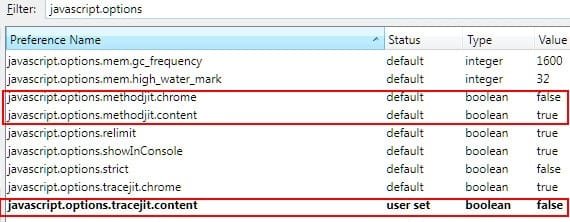
In order to change the values and not have Minefield crash one has to change the appropriate values. If the about:config entries presented thus far didn't work:

"javascript.options.methodjit.content" (my working configuration has this set to true - its default)
"javascript.options.methodjit.chrome" (my working configuration has this set to false - its default)

Change this value instead:

"javascript.options.tracejit.content" (my working configuration has this set to false - not its default)

If you cannot start Minefield normally due to the crashing issue, use one of these three methods for starting Minefield:

1. Go back to bobtran's earlier post which indicates where to find the October 1st build, download, install it over the current installation and start it up.

2. Start Minefield in safe mode from your Programs menu:
ScreenShot00032.jpg


3. Click on the Start button and type: "C:\Program Files\Minefield\firefox.exe" -safe-mode

Once Minefield is running, type "about:config" in the address bar then in the"Filter" box type "javascript.options" resulting in this view:
ScreenShot00035.jpg

Change any settings that don't match the above indicated entries. As you learned, the way to change a Boolean value is as easy as double-clicking the entry.

I apologize, 97ECLIPSE, if I have mentioned some steps of which you are already knowledgeable. I hope the above helps.
 

My Computer My Computer

Computer Manufacturer/Model Number
Toshiba L355D
OS
Windows 7 Ultimate x64 SP1
CPU
Core2 Duo
Motherboard
Intel
Memory
4 GB
Graphics Card(s)
GM965 on-board
Sound Card
RealTek on-board
Monitor(s) Displays
19"+17"(laptop)
Screen Resolution
1440x900 (x 2)
Hard Drives
500GB Ext. 200GB Internal
PSU
N/A
Case
N/A
Cooling
N/A

My Computer My Computer

Computer type
PC/Desktop
Computer Manufacturer/Model Number
Custom Build
OS
Windows 10 Pro x64, Arch Linux
CPU
Intel Core 2 Quad Q8200 OC'd 3.08GHz
Motherboard
Asus Rampage formula LGA775
Memory
8GB DDR2 900Mhz
Graphics Card(s)
MSI GT730 2GB GDDR5 (Kepler)
Sound Card
Supreme FX2
Monitor(s) Displays
Samsung LS22F350 LED
Screen Resolution
1080P
Hard Drives
Kingston SSDNow UV400 120GB, 500GB Hitachi, 2TB Samsung, 500GB Seagate FreeAgent, 640GB Samsung, 160GB Toshiba (Arch)
PSU
AeroCool 500W Bronze
Cooling
Cooler Master V6 + 3X fans
Keyboard
Prolink keyboard
Mouse
Logitech M705
Internet Speed
1MiB/s
Browser
Chrome Beta

My Computer My Computer

Computer Manufacturer/Model Number
Toshiba L355D
OS
Windows 7 Ultimate x64 SP1
CPU
Core2 Duo
Motherboard
Intel
Memory
4 GB
Graphics Card(s)
GM965 on-board
Sound Card
RealTek on-board
Monitor(s) Displays
19"+17"(laptop)
Screen Resolution
1440x900 (x 2)
Hard Drives
500GB Ext. 200GB Internal
PSU
N/A
Case
N/A
Cooling
N/A
Back
Top