Want to get Win 7 BUT..

spongebobWins

New member
Local time
11:03 PM
Messages
10
Location
Dorset
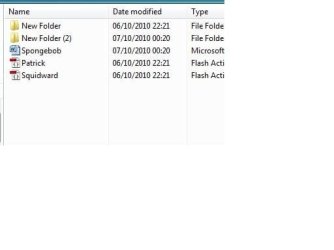
Sounds lame but.... can you reorder files and folders around(see pic). Use Win7 at school and it effing pisses me off that you can't. Maybe just a School restriction??


THANNKSSS:D Like so?
 

Attachments

  • Img.jpg
    Img.jpg
    21.1 KB · Views: 43

My Computer My Computer

OS
Windows7 / Ubuntu
CPU
Q6600
Motherboard
Asus P5Q
Mouse
Ha
Internet Speed
Slow
No, that doesn't result in lost of functionality.
 

My Computer My Computer

Computer type
PC/Desktop
Computer Manufacturer/Model Number
Alienware Aurora ALX R4
OS
Windows 10 Pro (x64)
CPU
Intel Core i7-3930K (3.2GHz - 4.5GHz)
Motherboard
Alienware Aurora-R4 x79
Memory
4x Samsung 4GB PC3-12800 DDR3 (16GB 1600MHz)
Graphics Card(s)
Nvidia Geforce GTX 690
Sound Card
SteelSeries Siberia Elite
Monitor(s) Displays
Dell UltraSharp U3011
Screen Resolution
2560x1600
Hard Drives
Samsung 850 Pro 256 GB, Seagate 1TB Desktop Hybrid HDD, 2x Western Digital 4TB Green HDD
PSU
875W Some Dell PSU <.<
Case
Alienware Aurora ALX
Cooling
Custom Liquid Cooling (EK CPU & GPU blocks) dual EK 480RAD
Keyboard
Logitech G710+ Mechanical
Mouse
Logitech G700s
Internet Speed
Verizon Fios (50 mbps average)
Other Info
Server: Intel NUC D54250WYK: i5-4250U, 16GB, 256 GB mSATA, Windows Server 2012 R2
Think you can only reorder by "name" or "file type" alphabetically, size or creation time.
 

My Computer My Computer

OS
win7
No, that doesn't result in lost of functionality.
I don't like always having my files in sequential order all the time. e.g. A-Z. So it isn't possible? :cry:
 
Last edited by a moderator:

My Computer My Computer

OS
Windows7 / Ubuntu
CPU
Q6600
Motherboard
Asus P5Q
Mouse
Ha
Internet Speed
Slow
No, that doesn't result in lost of functionality.

I don't like always having my files in sequential order all the time. e.g. A-Z. So it isn't possible? :cry:
Not sure what you are attempting to do. One can reorder files anyway they like as long as there is an appropriate column wherein one can initiate such ordering.

It's been that way since Windows 3.1 (even before, I'm sure).

Here are all of the different columns in Win 7 one can add to any explorer view and then have the ability to sort according to each column (you'll have to click on the pic and view it full size to see the myriad column options available):
ScreenShot00013.jpg

*I'll ignore the childish euphemism...
 
Last edited by a moderator:

My Computer My Computer

Computer Manufacturer/Model Number
Toshiba L355D
OS
Windows 7 Ultimate x64 SP1
CPU
Core2 Duo
Motherboard
Intel
Memory
4 GB
Graphics Card(s)
GM965 on-board
Sound Card
RealTek on-board
Monitor(s) Displays
19"+17"(laptop)
Screen Resolution
1440x900 (x 2)
Hard Drives
500GB Ext. 200GB Internal
PSU
N/A
Case
N/A
Cooling
N/A
I think the problem you have with the example is that they seem to be the same file created at the same time/date/size so rearrangement would be an issue anyway ;)
 

My Computer My Computer

Computer Manufacturer/Model Number
Compaq Desktop
OS
Windows 7 Ultimate x64
CPU
AMD Sempron Dual Core
Memory
3GB
Graphics Card(s)
NVIDIA GeForce 6150SE nForce 430
Screen Resolution
1024x768
Hard Drives
150GB Sata
I think the problem you have with the example is that they seem to be the same file created at the same time/date/size so rearrangement would be an issue anyway ;)
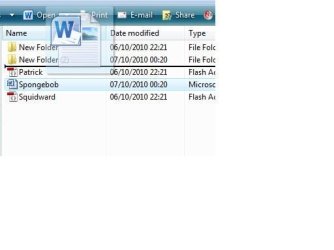
No, silly. That's an example (in Vista) of a file being moved up, which I'm assuming isn't possible in 7.

Not sure what you are attem....

That's why there's an e.g. Pic in first post. :confused:
 

My Computer My Computer

OS
Windows7 / Ubuntu
CPU
Q6600
Motherboard
Asus P5Q
Mouse
Ha
Internet Speed
Slow
I think you'll find I'm not silly...I'm just pointing out a fact about your example. I don't honestly think that it's an option in Windows 7 as the easiest way (in my opinion) to view files as you will no doubt know what they are called so will be able to find then if they are in alphabetical order...
 

My Computer My Computer

Computer Manufacturer/Model Number
Compaq Desktop
OS
Windows 7 Ultimate x64
CPU
AMD Sempron Dual Core
Memory
3GB
Graphics Card(s)
NVIDIA GeForce 6150SE nForce 430
Screen Resolution
1024x768
Hard Drives
150GB Sata

My Computer My Computer

Computer Manufacturer/Model Number
Toshiba L355D
OS
Windows 7 Ultimate x64 SP1
CPU
Core2 Duo
Motherboard
Intel
Memory
4 GB
Graphics Card(s)
GM965 on-board
Sound Card
RealTek on-board
Monitor(s) Displays
19"+17"(laptop)
Screen Resolution
1440x900 (x 2)
Hard Drives
500GB Ext. 200GB Internal
PSU
N/A
Case
N/A
Cooling
N/A
I think you'll find I'm not silly...I'm just pointing out a fact about your example. I don't honestly think that it's an option in Windows 7 as the easiest way (in my opinion) to view files as you will no doubt know what they are called so will be able to find then if they are in alphabetical order...

Didn't mean to offend you.


Your example pic was unclear as to your intent.Your description even less clear.
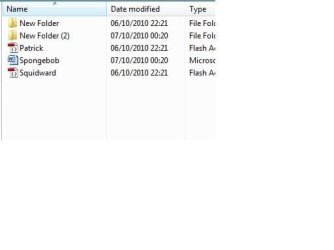
Below. But I think I have the answer :( . I guess I'll be getting 7 anyways. :)

>>>>>Before....Moving...and After<<<<<​
 

Attachments

  • 1.jpg
    1.jpg
    11.7 KB · Views: 10
  • 2.jpg
    2.jpg
    15.7 KB · Views: 10
  • 3.jpg
    3.jpg
    12.1 KB · Views: 8

My Computer My Computer

OS
Windows7 / Ubuntu
CPU
Q6600
Motherboard
Asus P5Q
Mouse
Ha
Internet Speed
Slow
That is much more clear. I never used Vista; skipped over it. I had no idea that it was ever an option to re-order files in such a manner within explorer. It certainly was not an option in any other version of Windows I have ever used without third party software.

BTW, you're going to love Win 7!
 

My Computer My Computer

Computer Manufacturer/Model Number
Toshiba L355D
OS
Windows 7 Ultimate x64 SP1
CPU
Core2 Duo
Motherboard
Intel
Memory
4 GB
Graphics Card(s)
GM965 on-board
Sound Card
RealTek on-board
Monitor(s) Displays
19"+17"(laptop)
Screen Resolution
1440x900 (x 2)
Hard Drives
500GB Ext. 200GB Internal
PSU
N/A
Case
N/A
Cooling
N/A
Sure hope so! In the mean time, I will write to Microsoft, asking them to sort out this oddity. It will drive me insane!!!!! lolz:D
 

My Computer My Computer

OS
Windows7 / Ubuntu
CPU
Q6600
Motherboard
Asus P5Q
Mouse
Ha
Internet Speed
Slow
the way to re-sort files while viewing a folder in windows 7 is by changing the folder view to "details", then left clicking on the category you wish to sort them by: once to sort in ascending order, twice to sort by descending order.

You can also add or remove the types of details you want to display by right clicking on one of the column headers. If you select "more" you get dozens to choose from
View attachment 102678
 
Last edited:
Sure hope so! In the mean time, I will write to Microsoft, asking them to sort out this oddity. It will drive me insane!!!!! lolz:D
And that will be different, how? :D J/K!

Trust me, you really will like Win 7 but don't hold your breath waiting for a response from MSFT regarding your issue. We need more youngins like you to help develop the next version of Windows. :)
 

My Computer My Computer

Computer Manufacturer/Model Number
Toshiba L355D
OS
Windows 7 Ultimate x64 SP1
CPU
Core2 Duo
Motherboard
Intel
Memory
4 GB
Graphics Card(s)
GM965 on-board
Sound Card
RealTek on-board
Monitor(s) Displays
19"+17"(laptop)
Screen Resolution
1440x900 (x 2)
Hard Drives
500GB Ext. 200GB Internal
PSU
N/A
Case
N/A
Cooling
N/A
OMG people. The OP does not want to "sort" his files. He wants to drag and drop them into a particular order of his choosing and have them stay. This is not possible in Windows 7 and has been discussed ad nauseum in other threads on this board.
 

My Computer My Computer

Computer Manufacturer/Model Number
Custom
OS
Windows 7 Ultimate RTM (Technet)
CPU
3.00 gigahertz Intel Core2 Duo E8400
Motherboard
ASUSTeK Computer INC. P5K/EPU Rev 1.xx
Memory
4GB
Graphics Card(s)
ATI Radeon X1950 Pro
Sound Card
Built in HD Audio
Monitor(s) Displays
22" Gateway LCD
Screen Resolution
1920 x 1200
Hard Drives
ST3160023A [Hard drive] (160.04 GB) -- drive 0, rev 8.01, ST3500630AS [Hard drive] (500.11 GB) -- drive 2, rev 3.AAK
ST3500630AS [Hard drive] (500.11 GB) -- drive 1, rev 3.AAK
Keyboard
Logitech G11
Mouse
Microsoft Wireless Laser Mouse 5000
Internet Speed
13.44 Mbps
OMG people. The OP does not want to "sort" his files. He wants to drag and drop them into a particular order of his choosing and have them stay. This is not possible in Windows 7 and has been discussed ad nauseum in other threads on this board.
Yeah, we get that. I never knew such was ever possible without third party software.
 

My Computer My Computer

Computer Manufacturer/Model Number
Toshiba L355D
OS
Windows 7 Ultimate x64 SP1
CPU
Core2 Duo
Motherboard
Intel
Memory
4 GB
Graphics Card(s)
GM965 on-board
Sound Card
RealTek on-board
Monitor(s) Displays
19"+17"(laptop)
Screen Resolution
1440x900 (x 2)
Hard Drives
500GB Ext. 200GB Internal
PSU
N/A
Case
N/A
Cooling
N/A
OMG people. The OP does not want to "sort" his files. He wants to drag and drop them into a particular order of his choosing and have them stay. This is not possible in Windows 7 and has been discussed ad nauseum in other threads on this board.

haha. I'm glad other people are concerned.

Thanks all for your replies.
 

My Computer My Computer

OS
Windows7 / Ubuntu
CPU
Q6600
Motherboard
Asus P5Q
Mouse
Ha
Internet Speed
Slow
It has never been possible to my knowledge in any version of windows. Things can only be sored by the columns that are available for display. In the OP's post where the issue is "solved" in their second image they have only soted by name alphabetically and in the third they have only sorted by file type.
 
Last edited by a moderator:

My Computer My Computer

OS
win7
Let's try to put the past behind, OK? :)

spongebob, have your queries been addressed to your satisfaction?

I'm still uncertain about the ability to rearrange a list in explorer by simply dragging the files into any random order one so chooses. However, as I mentioned previously, I never used Vista so I cannot assert with any certainty as to whether or not it is actually possible.

In the meantime, spongebob, I was glad to read your comment stating you will be going to Win 7. You'll find it is the best OS out of Redmond to date. :)
 

My Computer My Computer

Computer Manufacturer/Model Number
Toshiba L355D
OS
Windows 7 Ultimate x64 SP1
CPU
Core2 Duo
Motherboard
Intel
Memory
4 GB
Graphics Card(s)
GM965 on-board
Sound Card
RealTek on-board
Monitor(s) Displays
19"+17"(laptop)
Screen Resolution
1440x900 (x 2)
Hard Drives
500GB Ext. 200GB Internal
PSU
N/A
Case
N/A
Cooling
N/A
Let's try to put the past behind, OK? :)

spongebob, have your queries been addressed to your satisfaction?

I'm still uncertain about the ability to rearrange a list in explorer by simply dragging the files into any random order one so chooses. However, as I mentioned previously, I never used Vista so I cannot assert with any certainty as to whether or not it is actually possible.

In the meantime, spongebob, I was glad to read your comment stating you will be going to Win 7. You'll find it is the best OS out of Redmond to date. :)
Yes my queries have been addressed.

I'm seriously alright with it not being possible!!!! Thanks:devil:
 

My Computer My Computer

OS
Windows7 / Ubuntu
CPU
Q6600
Motherboard
Asus P5Q
Mouse
Ha
Internet Speed
Slow
Back
Top