
GPU usage rising when idle? Is this normal?

Valsako

New member
Member
Local time
10:59 PM
Messages
48
So today I was monitoring my GPU while it was idle just to check the temp of the card at that moment, only to find something unusual.

My GPU was rapidly spiking to 89% usage and then back to 0%, staying at 89% for no more than a second before going back down. I searched google for information on this, only to find people claiming this to be the result of a virus originating in Adobe via an svhost. I used malwarebytes to scan my computer for viruses, but it found nothing.

It has since stopped spiking to 89%, but now still spikes to 15% rapidly, sometimes the "spike" lasts for long periods of time versus only a split second, seemingly only when I run firefox.

I've never really monitored my GPU usage while running Firefox before, so I'm not sure if the 15% is normal or part of the weirdness I was encountering earlier. However, the spikes to 89% earlier were happening when absolutely nothing was open, not even firefox.

So is this normal, or should I be concerned?

EDIT: Scratch that, it's still randomly spiking to 15% at moments when Firefox isn't even open...

EDIT 2 (2/28/2014): It's at it again. Now it seems to like 68%. Again, while absolutely nothing else is running. Here's a screenshot for you:
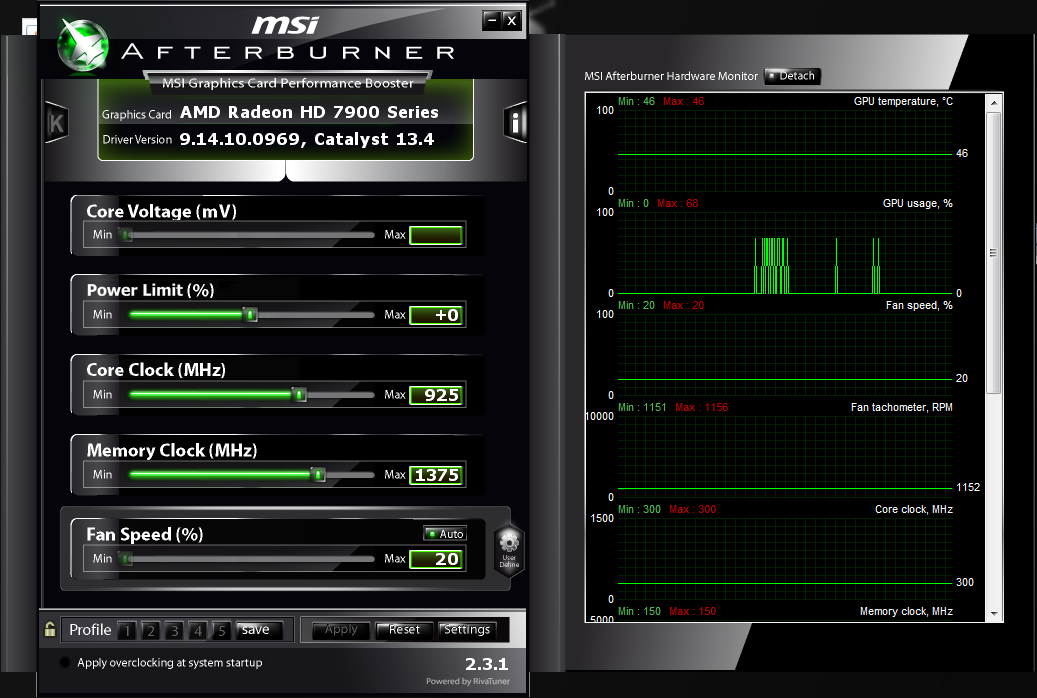
proof_10.png


As you can see, these spikes are fast, and rapid. It seems to only happen after going to this site: heromachine.com

I was using it for a few quick concept arts, closed the page and firefox, and then bam, GPU spikes, still going for about 30 minutes now.
 
Last edited:

My Computer

Computer type
PC/Desktop
Computer Manufacturer/Model Number
iBuyPower
OS
Windows 7 Home Premium 64 bit
CPU
AMD FX 8350 @ 4.52 GHz
Motherboard
Gigabyte GA-970A-UD3 -- AMD 970
Memory
16 GB DDR3 Corsair Vengeance
Graphics Card(s)
AMD Radeon HD 7970 3 GB
Sound Card
3D Premium Surround Sound Onboard
Screen Resolution
1920x1080
Hard Drives
Dual 1 TB Drives - RAID-0 High Performance
PSU
850 Watt - Corsair CMPSU-850AX
Case
NZXT Source 210 Gaming Case Blue
Cooling
Liquid CPU Cooling System [AMD]
Internet Speed
300 KBps download speed.
Antivirus
Microsoft Security Essentials
Browser
Firefox 20.0.1
I wouldnt worry about it too much. If it keeps spiking at 100%; then yea i would say there is a issue; but since its only doing 15%; then I dont think there should be a issue at this point.
 

My Computer

Computer type
PC/Desktop
Computer Manufacturer/Model Number
custom built
OS
Windows 7 ultimate 64-bit
CPU
Intel I7 2600K 3.4ghz
Motherboard
Asus Evo P8P67
Memory
Corsair 16gb ddr3 1600mhz
Graphics Card(s)
Nvidia Geforce gt 430
Sound Card
Sound Blaster Titanium x-fi pci express
Monitor(s) Displays
Dell E198WFP
Hard Drives
1 western digital 2TB drive.
PSU
Antec 1200 watt
Case
Inwin Dragon Rider
Cooling
6 case supplied cooling fans
Keyboard
logitech mk700
Mouse
logitech m705
Internet Speed
25-50mbps download; 10mbps upload(i think)
Antivirus
avg free 2014
Browser
mozilla firefox
Other Info
Also have a pretty bad speaker setup which is a klipsch promedia 5.1 surround speaker setup with huge subwoofer and lg blu ray player/writer. Also a hp officejet pro 8600 plus wireless all in one and a logitech s7500 webcam.
Good to know.

The spiking seems to have calmed down significantly, so I'm hoping I don't have anymore problems.
 

My Computer

Computer type
PC/Desktop
Computer Manufacturer/Model Number
iBuyPower
OS
Windows 7 Home Premium 64 bit
CPU
AMD FX 8350 @ 4.52 GHz
Motherboard
Gigabyte GA-970A-UD3 -- AMD 970
Memory
16 GB DDR3 Corsair Vengeance
Graphics Card(s)
AMD Radeon HD 7970 3 GB
Sound Card
3D Premium Surround Sound Onboard
Screen Resolution
1920x1080
Hard Drives
Dual 1 TB Drives - RAID-0 High Performance
PSU
850 Watt - Corsair CMPSU-850AX
Case
NZXT Source 210 Gaming Case Blue
Cooling
Liquid CPU Cooling System [AMD]
Internet Speed
300 KBps download speed.
Antivirus
Microsoft Security Essentials
Browser
Firefox 20.0.1
15% is normal, 80+% is not, what are the temps of the gpu?
 

My Computer

Computer type
PC/Desktop
Computer Manufacturer/Model Number
Custom, Dell and Lenono LT's
OS
Win8/8.1,Win7-U64, Vista U64, uncounted Linux distor's
CPU
AMD and Intell, 9590, 8350, i5 3570k
Motherboard
CFVFZ, GA990FXA, Z77e-itx
Memory
Corsair G Skill
Graphics Card(s)
Crossfired Sapphire HD 7950 Vapor-X, ASUS R9 280X TOP
Sound Card
Realtek ALC889
Monitor(s) Displays
ViewSonic VX2770SMH 27" / ViewSonic VX2433 LCD 24"
Screen Resolution
1080i HD
Hard Drives
Samsung SSD 840 Pro
OCZ Agility 3's
OCZ Vector's
WD's Blue, red, green, Velociraptors
Seagate USB3 & Hybrid's
ASUS Blu-Ray
ASUS DVD
PSU
Corsair AX1200i, Seasonice 850 Gold
Case
Cooler Master HAF 922 & HAF 932, Lian Li Train case.
Cooling
Air, Glacer 240L expanded, custom EK loop with duel D5's
Keyboard
Microsoft SideWinder X4 USB Keyboard / Logitech 250 PS2
Mouse
Logitech G500 / MS wireless 5000
Internet Speed
Best of 5ms / 75+ dn / 12+ up More or less.
Antivirus
MS esentials-MalwareBytes
Browser
Firefox Chromebook
As mentioned, ~%15 is normal as it's simply the hardware Acceleration of Firefox. As also mentioned as long as it's not spiking high and staying that way there's nothing to be alarmed about.
 

My Computer

Computer type
PC/Desktop
Computer Manufacturer/Model Number
Systems by SmartEyeball
OS
8 Pro x64
CPU
i7 3770K 4.6GHz
Motherboard
ASUS P8Z77 WS
Memory
16GB G.Skill Trident X 2666mhz
Graphics Card(s)
x2 EVGA 780 Ti Superclocked SLI
Sound Card
SB X-FI Surround 5.1 PRO USB / ATH-AD900 Headphones
Monitor(s) Displays
x3 Dell U2410 / 58" Samsung
Screen Resolution
5760*1200/ 1920*1200
Hard Drives
2x Intel 520 240GB (RAID 0) * 2x WD Caviar Blacks 2TB (RAID 0) * 2TB WD Caviar Black * Sony Optirac DVD
PSU
Silverstone Strider Evolution 1200W
Case
Thermaltake Level 10 GT Snow Edition
Cooling
Noctua NH-D14
Keyboard
Topre Realforce // Ducky Shine MX Black // Filco Ninja TKL
Mouse
Thermaltake Theron (Highly Recommended) + Razer Imperator
Antivirus
MSE
Browser
IE, FF, WaterFox
Other Info
GT Extreme V2 Sim Racing Cockpit + 40" LCD and K/B Mouse stand ▼
Fanatec CSR Elite Wheel + Clubsport V1 Pedals + CSR shifter/7G-H ▼Saitek X52 Pro ▼ TrackIR 5 Pro
Buttkicker v2 Seat Rumbler with Dedicated 5.1 and Sub Woofer attached to frame ▼
=
Bloody Big Grin
I have better luck not using any Hardware Acceleration with any browser.
 

My Computer

Computer type
PC/Desktop
Computer Manufacturer/Model Number
Home made Desktop
OS
Windows 10 Pro. 64/ version 1709 Windows 7 Pro/64
CPU
Intel i7-6800K @ 4.3
Motherboard
ASUS X-99 Deluxe II
Memory
Corsair Platinum 16 gig @2400
Graphics Card(s)
EVGA GTX 1070 OC
Monitor(s) Displays
Asus 27" LED LCD/VE278Q
Screen Resolution
1920-1080 or 1280-720 HDMI
Hard Drives
INTEL SSD 730-240 Gb Sata 3.0/
PSU
EVGA Platium 1200W
Case
Phanteks Luxe Tempered Glass 8 fans/ one radiator
Cooling
XSPC/ Water Cooled CPU
Keyboard
Das 4 Professional
Mouse
Logitech M705/MX Anywhere 2-S
Internet Speed
100 mbits
Antivirus
Microsoft Security Essentials/ Malwarebytes Premium 3.0/ SAS
Browser
I.E. 11 default/Firefox/ ISP Time Warner Cable/Spectrum
Other Info
LG BluRay Burner/
Sound system-KLipsch-THX/
Icy Dock ssd Hot Swap bays.
There have been quite a few nvidia drivers that have broken h/w accel in browsers. Saw plenty of complaints on the geforce forums about it. Especially 770 users.
 

My Computer

Computer type
PC/Desktop
Computer Manufacturer/Model Number
Systems by SmartEyeball
OS
8 Pro x64
CPU
i7 3770K 4.6GHz
Motherboard
ASUS P8Z77 WS
Memory
16GB G.Skill Trident X 2666mhz
Graphics Card(s)
x2 EVGA 780 Ti Superclocked SLI
Sound Card
SB X-FI Surround 5.1 PRO USB / ATH-AD900 Headphones
Monitor(s) Displays
x3 Dell U2410 / 58" Samsung
Screen Resolution
5760*1200/ 1920*1200
Hard Drives
2x Intel 520 240GB (RAID 0) * 2x WD Caviar Blacks 2TB (RAID 0) * 2TB WD Caviar Black * Sony Optirac DVD
PSU
Silverstone Strider Evolution 1200W
Case
Thermaltake Level 10 GT Snow Edition
Cooling
Noctua NH-D14
Keyboard
Topre Realforce // Ducky Shine MX Black // Filco Ninja TKL
Mouse
Thermaltake Theron (Highly Recommended) + Razer Imperator
Antivirus
MSE
Browser
IE, FF, WaterFox
Other Info
GT Extreme V2 Sim Racing Cockpit + 40" LCD and K/B Mouse stand ▼
Fanatec CSR Elite Wheel + Clubsport V1 Pedals + CSR shifter/7G-H ▼Saitek X52 Pro ▼ TrackIR 5 Pro
Buttkicker v2 Seat Rumbler with Dedicated 5.1 and Sub Woofer attached to frame ▼
=
Bloody Big Grin
It's at it again, check my original post for details.
 

My Computer

Computer type
PC/Desktop
Computer Manufacturer/Model Number
iBuyPower
OS
Windows 7 Home Premium 64 bit
CPU
AMD FX 8350 @ 4.52 GHz
Motherboard
Gigabyte GA-970A-UD3 -- AMD 970
Memory
16 GB DDR3 Corsair Vengeance
Graphics Card(s)
AMD Radeon HD 7970 3 GB
Sound Card
3D Premium Surround Sound Onboard
Screen Resolution
1920x1080
Hard Drives
Dual 1 TB Drives - RAID-0 High Performance
PSU
850 Watt - Corsair CMPSU-850AX
Case
NZXT Source 210 Gaming Case Blue
Cooling
Liquid CPU Cooling System [AMD]
Internet Speed
300 KBps download speed.
Antivirus
Microsoft Security Essentials
Browser
Firefox 20.0.1
Someone correct me if I'm wrong, but don't AMD drivers allow the CPU to offload work to the video card? I just checked my card and it's spiking between 10 and 15%. Other than being here on the forums, I'm not doing anything, so I assume it's my computer indexing in the background and using the GPU as an extra bit of processing power. There's also slight activity on four of my cores.

In my case, it might be background tasks. It might be that way for the OP as well, but 60+% seems pretty high...
 

My Computer

Computer type
PC/Desktop
Computer Manufacturer/Model Number
Mellon Labs (custom build)
OS
Win 7 Pro x64/Win 10 Pro x64 dual boot
CPU
AMD FX 8350 Vishera @ 4200
Motherboard
ASUS M5A97 R2.0
Memory
16 GB Mushkin Blackline DDR3-2400 @ 1866 (9-10-10-10-31)
Graphics Card(s)
XFX Radeon R9 280 Double D Black Edition
Sound Card
Realtek HD Audio on MB. Sounds great.
Monitor(s) Displays
Acer 24", Acer 22"
Screen Resolution
3840 x 1080
Hard Drives
1 x Mushkin Chronos 120 GB SSD (Win 10)
1 x Samsung 850 EVO 250 GB SSD (Win 7)
1 x WD 1TB SATA Blue
1 x WD 1TB SATA Green
PSU
Corsair TX-750
Case
CoolerMaster HAF 912+
Cooling
Coolermaster Seidon 240M Liquid AIO. 6 case fans
Keyboard
Logitech G710+
Mouse
Logitech G500s
Internet Speed
Much better since I got fiber, but still way overpriced.
Antivirus
MSE, Malware Bytes for scanning
Browser
Firefox
Other Info
Corsair VOID USB headphones.

A Mellon Labs X-1 - LCD Smartie driven system status display.

Brought to you by the letter E
Someone correct me if I'm wrong, but don't AMD drivers allow the CPU to offload work to the video card? I just checked my card and it's spiking between 10 and 15%. Other than being here on the forums, I'm not doing anything, so I assume it's my computer indexing in the background and using the GPU as an extra bit of processing power. There's also slight activity on four of my cores.

In my case, it might be background tasks. It might be that way for the OP as well, but 60+% seems pretty high...

As I said, it only seems to get like that after I go to that one website.

I've also noticed some games that didn't use to lag at all having framerate stutters since this.
 

My Computer

Computer type
PC/Desktop
Computer Manufacturer/Model Number
iBuyPower
OS
Windows 7 Home Premium 64 bit
CPU
AMD FX 8350 @ 4.52 GHz
Motherboard
Gigabyte GA-970A-UD3 -- AMD 970
Memory
16 GB DDR3 Corsair Vengeance
Graphics Card(s)
AMD Radeon HD 7970 3 GB
Sound Card
3D Premium Surround Sound Onboard
Screen Resolution
1920x1080
Hard Drives
Dual 1 TB Drives - RAID-0 High Performance
PSU
850 Watt - Corsair CMPSU-850AX
Case
NZXT Source 210 Gaming Case Blue
Cooling
Liquid CPU Cooling System [AMD]
Internet Speed
300 KBps download speed.
Antivirus
Microsoft Security Essentials
Browser
Firefox 20.0.1
You could have picked up some drive by malware from that site...
 

My Computer

Computer type
PC/Desktop
Computer Manufacturer/Model Number
Mellon Labs (custom build)
OS
Win 7 Pro x64/Win 10 Pro x64 dual boot
CPU
AMD FX 8350 Vishera @ 4200
Motherboard
ASUS M5A97 R2.0
Memory
16 GB Mushkin Blackline DDR3-2400 @ 1866 (9-10-10-10-31)
Graphics Card(s)
XFX Radeon R9 280 Double D Black Edition
Sound Card
Realtek HD Audio on MB. Sounds great.
Monitor(s) Displays
Acer 24", Acer 22"
Screen Resolution
3840 x 1080
Hard Drives
1 x Mushkin Chronos 120 GB SSD (Win 10)
1 x Samsung 850 EVO 250 GB SSD (Win 7)
1 x WD 1TB SATA Blue
1 x WD 1TB SATA Green
PSU
Corsair TX-750
Case
CoolerMaster HAF 912+
Cooling
Coolermaster Seidon 240M Liquid AIO. 6 case fans
Keyboard
Logitech G710+
Mouse
Logitech G500s
Internet Speed
Much better since I got fiber, but still way overpriced.
Antivirus
MSE, Malware Bytes for scanning
Browser
Firefox
Other Info
Corsair VOID USB headphones.

A Mellon Labs X-1 - LCD Smartie driven system status display.

Brought to you by the letter E
You could have picked up some drive by malware from that site...

Figured as much, but when it first started happening, I ran Malwarebytes, it detected nothing. Also used McAfee Site Adviser to scan the site, and that said there was nothing suspicious on it (not sure how reliable that is, though).

Also, my GPU isn't at high rates 24/7, right now it's running at a happy 0% usage, but after going to that site it goes to 60% - 80% for about an hour after completely leaving the site and closing firefox (as well as all other applications).

Not sure what to think of it. But even with my GPU usage being normal, the framerate stuttering is still occurring, and I didn't have that prior to this. Not sure if that's related, or just coincidental.
 

My Computer

Computer type
PC/Desktop
Computer Manufacturer/Model Number
iBuyPower
OS
Windows 7 Home Premium 64 bit
CPU
AMD FX 8350 @ 4.52 GHz
Motherboard
Gigabyte GA-970A-UD3 -- AMD 970
Memory
16 GB DDR3 Corsair Vengeance
Graphics Card(s)
AMD Radeon HD 7970 3 GB
Sound Card
3D Premium Surround Sound Onboard
Screen Resolution
1920x1080
Hard Drives
Dual 1 TB Drives - RAID-0 High Performance
PSU
850 Watt - Corsair CMPSU-850AX
Case
NZXT Source 210 Gaming Case Blue
Cooling
Liquid CPU Cooling System [AMD]
Internet Speed
300 KBps download speed.
Antivirus
Microsoft Security Essentials
Browser
Firefox 20.0.1
Back
Top