

PrestoBaggins
New member
- Local time
- 10:05 AM
- Messages
- 6
Hello guys,
I have two WD black 1 TB drives in a raid 0 array, this is what I have Win7 installed on, I also have a 1 TB Seagate drive that I was using to backup windows to, but now I'm backing up to a NAS, the Seagate drive is just setting in my system not doing much so I want to remove it and put it in to another system.
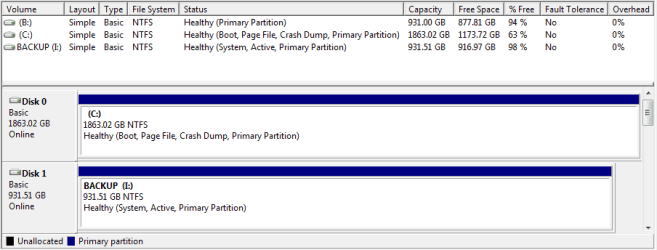
The problem is, if I remove the Seagate drive windows no longer boots I get the following error "Reboot and select a proper boot device or insert boot media in selected boot device and press any key", I have checked my boot priority in my bios and my CD drive is first then the raid array. I have also checked to make sure that the Seagate drive was not a part of the raid array, it was not just the two WD drives. If I reattach the Seagate drive windows boots without any problem, it does not appear that there is any data saved on the Seagate drive. If I go in to the windows disk manager the C: drive has 1863GB so two 1 TB drives and my I: drive the Seagate has 931GB and is showing 14GB used. The C: status is as follows (Healthy, Boot, Page File, Crash Dump, Primary Partition) my I: drive status is as follows (Healthy, System, Active, Primary Partition)
I'm not sure what to try next.
I have two WD black 1 TB drives in a raid 0 array, this is what I have Win7 installed on, I also have a 1 TB Seagate drive that I was using to backup windows to, but now I'm backing up to a NAS, the Seagate drive is just setting in my system not doing much so I want to remove it and put it in to another system.
The problem is, if I remove the Seagate drive windows no longer boots I get the following error "Reboot and select a proper boot device or insert boot media in selected boot device and press any key", I have checked my boot priority in my bios and my CD drive is first then the raid array. I have also checked to make sure that the Seagate drive was not a part of the raid array, it was not just the two WD drives. If I reattach the Seagate drive windows boots without any problem, it does not appear that there is any data saved on the Seagate drive. If I go in to the windows disk manager the C: drive has 1863GB so two 1 TB drives and my I: drive the Seagate has 931GB and is showing 14GB used. The C: status is as follows (Healthy, Boot, Page File, Crash Dump, Primary Partition) my I: drive status is as follows (Healthy, System, Active, Primary Partition)
I'm not sure what to try next.
Attachments
My Computer
At a glance
Windows 7 Home Premium 64-bitIntel i7 920 2.67 GHz Bloomfield9 GBGeForice GTX 260 1792 MB GDDR3
- Computer Manufacturer/Model Number
- Alienware Aurora ALX
- OS
- Windows 7 Home Premium 64-bit
- CPU
- Intel i7 920 2.67 GHz Bloomfield
- Memory
- 9 GB
- Graphics Card(s)
- GeForice GTX 260 1792 MB GDDR3
- Hard Drives
- 2x Western Digital Caviar Black 1TB 7200 RPM 64MB Cache SATA 6.0Gbs
- Cooling
- Alienware Liquid Cooling


