PC no longer boots to c: drive ??

trinaz

New member
Member
VIP
Local time
2:01 AM
Messages
477
Location
Phoenix
I have multiple HDDs in my box...the main Win 7 Pro installation is on c: drive - a Samsung SSD 840 128GB. Some how...the boot menu setup changed...did noting I'm aware of tto cause the change...but apparently one of the HHD's has a Win XP Pro cloned drive...thought is was simply a backup of my laptop (XP) ?

Anyway if I let my system bios start normally...it starts the XP version (never ever did this before)...I have a 'choose boot drive' option in the bios and if I select that...I can start the Win 7 Pro 64 bit with no issues...but rebooting and letting the bios start normally...I'm back to the XP drive

If I disconnect the XP drive...I get an error at boot saying something like insert or add boot drive...

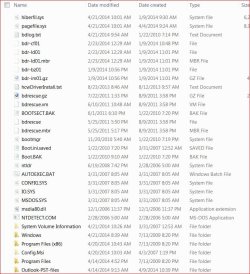
Attached is the current boot.ini.saved(.txt) file on my c: drive...referring to XP. There's no plain boot.ini drive that I can see. I have show system & hidden files on in Explorer

I have EasyBCD 2.1.2 installed...it just shows Win 7 drive....nothing referring to XP that I can find ?

Before I completely lose my Win 7 system...how can I remove the reference to XP at boot and restore the boot.ini file to load Win 7 Pro 64bit?

This was a clean install of Win 7 Pro...not an upgrade from XP or anything else...only connections to XP was on the extra HDD that I thought was only a Tib backup of my laptop XP system

Thanks...TiminAz
 

Attachments

  • easybcd.jpg
    easybcd.jpg
    54.9 KB · Views: 0
  • C Drive hidden files.jpg
    C Drive hidden files.jpg
    104.5 KB · Views: 0
  • Boot.ini.saved.txt
    Boot.ini.saved.txt
    354 bytes · Views: 34
Last edited:

My Computer My Computer

At a glance

Windows 7 Pro 64bit SP1AMD FX-6100 Six-Core Processor2ea Corsair-1333MHz-PC3-10666-240-pin-CMX4GX3...NVIDIA GeForce GT 630 - 1023MB (EVGA)
Computer type
PC/Desktop
Computer Manufacturer/Model Number
Self built
OS
Windows 7 Pro 64bit SP1
CPU
AMD FX-6100 Six-Core Processor
Motherboard
M5A78L-M LX PLUS
Memory
2ea Corsair-1333MHz-PC3-10666-240-pin-CMX4GX3M1A1333C9
Graphics Card(s)
NVIDIA GeForce GT 630 - 1023MB (EVGA)
Sound Card
OnBoard Via High Def Audio
Monitor(s) Displays
Samsung 204B main - ASUS VS228 secondary
Screen Resolution
1920x1080 main - 1920x1080 secondary
Hard Drives
Samsung SSD 840 128GB Win7 Pro 64bit - Western Digital WDC 465GB - Seagate 640GB Sata B/U - Maxtor 500GB Sata B/U - Maxtor 200GB Sata
PSU
Antec 650 watt
Cooling
Multiple case fans
Keyboard
MS USB dual Wireless Keyboard - IntelliType Pro
Mouse
MS USB dual Wireless Mouse - IntelliPoint
Internet Speed
Cox Cable
Antivirus
Bitdefender IS 2014
Browser
FireFox Primary - IE 11
Other Info
Hauppaguge Win TV HVR-1250 (Model 22xxx, Hybrid ATSC/QAM)
Samsung HD103SI USB 1TB Desktop Drive - Backup & Disk Image storage
Can you post a screen shot of disk management from Windows 7 ?
 

My Computer My Computer

At a glance

Windows 10 Pro x64Intel Core i7 6700KGSkill TridentZ RGB 16GB 3600 16-16-16-36EVGA GTX 980 Ti SC x2
Computer type
PC/Desktop
Computer Manufacturer/Model Number
Skylake Special #666
OS
Windows 10 Pro x64
CPU
Intel Core i7 6700K
Motherboard
Asus Sabertooth Z170 Mark 1
Memory
GSkill TridentZ RGB 16GB 3600 16-16-16-36
Graphics Card(s)
EVGA GTX 980 Ti SC x2
Sound Card
Realtek High Definition
Monitor(s) Displays
AOC G2460PG
Screen Resolution
1920 x 1080 144Hz
Hard Drives
Samsung 860 Pro 256GB, Seagate Barracuda 4TB x2
PSU
EVGA 1000 P2, EVGA White Custom Braided Cables
Case
Corsair Vengeance C70 Gunmetal Black
Cooling
Corsair H100i v2, Corsair ML120 x2, Thermal Grizzly Kryonaut
Keyboard
Logitech G910 Orion Spectrum
Mouse
Logitech G700s
Internet Speed
Verizon Fios Quantum Gateway 75/75
Antivirus
Windows Defender, Malwarebytes Free 3.8.3
Browser
Chrome
Other Info
Corsair SP120 x4, LG Blu-ray Drive, Durabrand HT-395 100 Watt Dolby Digital Amp, Corsair H2100 Wireless 7.1 Headset
Can you post a screen shot of disk management from Windows 7 ?

Thanks...attached is a screen shot...since my post I formatted the J: drive which was the XP Installation...since there's obviously no point to XP anymore.....

Now I am booting ok again to Windows 7 without issues....but...there's one weird issue now:

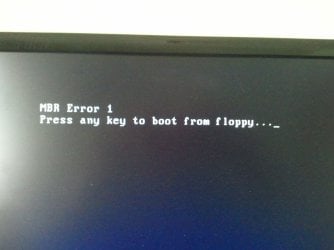
My C: drive is an SSD...and 'Samsung Magician' says AHCI is not enabled...if I go into the bios and enable AHCI (IDE now) and reboot I get the attached error message in mbr-error.jpg

I think if I can now get rid of the boot mbr error...I will be back to normal....would like to have AHCI enabled ?

Thanks again....TiminAz
 

Attachments

  • disk-man.jpg
    disk-man.jpg
    82.3 KB · Views: 2
  • mbr-error.jpg
    mbr-error.jpg
    254.2 KB · Views: 0

My Computer My Computer

At a glance

Windows 7 Pro 64bit SP1AMD FX-6100 Six-Core Processor2ea Corsair-1333MHz-PC3-10666-240-pin-CMX4GX3...NVIDIA GeForce GT 630 - 1023MB (EVGA)
Computer type
PC/Desktop
Computer Manufacturer/Model Number
Self built
OS
Windows 7 Pro 64bit SP1
CPU
AMD FX-6100 Six-Core Processor
Motherboard
M5A78L-M LX PLUS
Memory
2ea Corsair-1333MHz-PC3-10666-240-pin-CMX4GX3M1A1333C9
Graphics Card(s)
NVIDIA GeForce GT 630 - 1023MB (EVGA)
Sound Card
OnBoard Via High Def Audio
Monitor(s) Displays
Samsung 204B main - ASUS VS228 secondary
Screen Resolution
1920x1080 main - 1920x1080 secondary
Hard Drives
Samsung SSD 840 128GB Win7 Pro 64bit - Western Digital WDC 465GB - Seagate 640GB Sata B/U - Maxtor 500GB Sata B/U - Maxtor 200GB Sata
PSU
Antec 650 watt
Cooling
Multiple case fans
Keyboard
MS USB dual Wireless Keyboard - IntelliType Pro
Mouse
MS USB dual Wireless Mouse - IntelliPoint
Internet Speed
Cox Cable
Antivirus
Bitdefender IS 2014
Browser
FireFox Primary - IE 11
Other Info
Hauppaguge Win TV HVR-1250 (Model 22xxx, Hybrid ATSC/QAM)
Samsung HD103SI USB 1TB Desktop Drive - Backup & Disk Image storage

The issue is caused by the BIOS Boot priority menu being changed to the other HD. When you formatted XP its HD no longer had a bootable OS, so is going to the next bootable device which apparently is your floppy drive - until there is no response to the prompt to Press any Key so it finally defaults to the correct HD.

I'd boot into BIOS Setup to change it to boot from the HD you know for sure Win7 is on. When needed you can trigger DVD or flash stick boot using the one-time BIOS boot menu key.

Further I would either disable the ancient floppy drive in BIOS or physically uninstall it or pull its cables. These can begin to cause problems otherwise.

If you want Win7 in AHCI mode after it's already installed then follow these steps for AHCI : Enable in Windows 7 / Vista - Windows 7 Forums

More tips here in Troubleshooting Steps for Windows 7.
 
.........

I'd boot into BIOS Setup to change it to boot from the HD you know for sure Win7 is on. When needed you can trigger DVD or flash stick boot using the one-time BIOS boot menu key.

Further I would either disable the ancient floppy drive in BIOS or physically uninstall it or pull its cables. These can begin to cause problems otherwise.

If you want Win7 in AHCI mode after it's already installed then follow these steps for AHCI : Enable in Windows 7 / Vista - Windows 7 Forums

More tips here in Troubleshooting Steps for Windows 7.

Thanks...there is a floppy in the box but it has never been activated...I think it was in this box when I installed (clean install) Win 7 and I just never took it out. It has no power or ide cables attached and I don't believe it ever had under the Win 7 install...the booting up to XP never happened until a few days ago...this box was not setup as a dual boot...only dedicated Win 7 Pro 64bit ?

AHCI was activated and working fine prior to the XP issue starting up a couple days ago...so I think Win 7 does already have the drivers installed...did this when I 1st got the SSD.....the issue is if I leave in the bios setup my drives to IDE...everything is fine...but if I activate AHCI in sata configuration...then I get the boot to floppy error...but there's no floppy connected or installed ?

Is there a way to rebuild or re-initiate the mbr for the system now with only 1 OS in the box so to remove the boot to floppy error and/or activate the AHCI ? or...where is the mbr kept/stored...could I restore this (mbr) from an Acronis tib system backup prior to this issue starting ?
 
Last edited:

My Computer My Computer

At a glance

Windows 7 Pro 64bit SP1AMD FX-6100 Six-Core Processor2ea Corsair-1333MHz-PC3-10666-240-pin-CMX4GX3...NVIDIA GeForce GT 630 - 1023MB (EVGA)
Computer type
PC/Desktop
Computer Manufacturer/Model Number
Self built
OS
Windows 7 Pro 64bit SP1
CPU
AMD FX-6100 Six-Core Processor
Motherboard
M5A78L-M LX PLUS
Memory
2ea Corsair-1333MHz-PC3-10666-240-pin-CMX4GX3M1A1333C9
Graphics Card(s)
NVIDIA GeForce GT 630 - 1023MB (EVGA)
Sound Card
OnBoard Via High Def Audio
Monitor(s) Displays
Samsung 204B main - ASUS VS228 secondary
Screen Resolution
1920x1080 main - 1920x1080 secondary
Hard Drives
Samsung SSD 840 128GB Win7 Pro 64bit - Western Digital WDC 465GB - Seagate 640GB Sata B/U - Maxtor 500GB Sata B/U - Maxtor 200GB Sata
PSU
Antec 650 watt
Cooling
Multiple case fans
Keyboard
MS USB dual Wireless Keyboard - IntelliType Pro
Mouse
MS USB dual Wireless Mouse - IntelliPoint
Internet Speed
Cox Cable
Antivirus
Bitdefender IS 2014
Browser
FireFox Primary - IE 11
Other Info
Hauppaguge Win TV HVR-1250 (Model 22xxx, Hybrid ATSC/QAM)
Samsung HD103SI USB 1TB Desktop Drive - Backup & Disk Image storage
What about the boot order priority now?

Is there a newer BIOS update on the PC or Mobo's Support Downloads webpage? If not reset the BIOS to defaults.

There may be interference from one of your HD's.

Unplug all other HD's except Win7, set to AHCI in BIOS setup, boot into Win7 installation media or System Repair Disk to run Startup Repair - Run 3 Separate Times.
 
Ok...things working better now....however bios seems to be changing itself from boot to boot. Have never 'updated' the bios on this board. There are about 7 or so bios updates after my current one on the MB website (Asus)...if I update...can I just use the latest version...or do I have to go one by one to the most current ?

Will also disconnect all drives except the boot (SSD) and try reconnecting one by one to see if this corrects issues....thanks so much for your help...this stuff is way beyond my 'realm of expertise' !!
 

My Computer My Computer

At a glance

Windows 7 Pro 64bit SP1AMD FX-6100 Six-Core Processor2ea Corsair-1333MHz-PC3-10666-240-pin-CMX4GX3...NVIDIA GeForce GT 630 - 1023MB (EVGA)
Computer type
PC/Desktop
Computer Manufacturer/Model Number
Self built
OS
Windows 7 Pro 64bit SP1
CPU
AMD FX-6100 Six-Core Processor
Motherboard
M5A78L-M LX PLUS
Memory
2ea Corsair-1333MHz-PC3-10666-240-pin-CMX4GX3M1A1333C9
Graphics Card(s)
NVIDIA GeForce GT 630 - 1023MB (EVGA)
Sound Card
OnBoard Via High Def Audio
Monitor(s) Displays
Samsung 204B main - ASUS VS228 secondary
Screen Resolution
1920x1080 main - 1920x1080 secondary
Hard Drives
Samsung SSD 840 128GB Win7 Pro 64bit - Western Digital WDC 465GB - Seagate 640GB Sata B/U - Maxtor 500GB Sata B/U - Maxtor 200GB Sata
PSU
Antec 650 watt
Cooling
Multiple case fans
Keyboard
MS USB dual Wireless Keyboard - IntelliType Pro
Mouse
MS USB dual Wireless Mouse - IntelliPoint
Internet Speed
Cox Cable
Antivirus
Bitdefender IS 2014
Browser
FireFox Primary - IE 11
Other Info
Hauppaguge Win TV HVR-1250 (Model 22xxx, Hybrid ATSC/QAM)
Samsung HD103SI USB 1TB Desktop Drive - Backup & Disk Image storage
It would prompt you if you need to go incrementally on BIOS update. I doubt it. But be sure to follow the steps carefully, with no chance of losing AC power, since there is some risk. Ask back if you want help.

While you have only the Win7 drive plugged in, run a few Startup Repairs to see if it finds anything to correct.
 
............While you have only the Win7 drive plugged in, run a few Startup Repairs to see if it finds anything to correct.

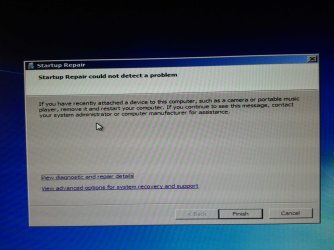
Have tried startup repair numerous times...always get the error in attached jpg ??
 

Attachments

  • repair.jpg
    repair.jpg
    252.7 KB · Views: 0
Last edited:

My Computer My Computer

At a glance

Windows 7 Pro 64bit SP1AMD FX-6100 Six-Core Processor2ea Corsair-1333MHz-PC3-10666-240-pin-CMX4GX3...NVIDIA GeForce GT 630 - 1023MB (EVGA)
Computer type
PC/Desktop
Computer Manufacturer/Model Number
Self built
OS
Windows 7 Pro 64bit SP1
CPU
AMD FX-6100 Six-Core Processor
Motherboard
M5A78L-M LX PLUS
Memory
2ea Corsair-1333MHz-PC3-10666-240-pin-CMX4GX3M1A1333C9
Graphics Card(s)
NVIDIA GeForce GT 630 - 1023MB (EVGA)
Sound Card
OnBoard Via High Def Audio
Monitor(s) Displays
Samsung 204B main - ASUS VS228 secondary
Screen Resolution
1920x1080 main - 1920x1080 secondary
Hard Drives
Samsung SSD 840 128GB Win7 Pro 64bit - Western Digital WDC 465GB - Seagate 640GB Sata B/U - Maxtor 500GB Sata B/U - Maxtor 200GB Sata
PSU
Antec 650 watt
Cooling
Multiple case fans
Keyboard
MS USB dual Wireless Keyboard - IntelliType Pro
Mouse
MS USB dual Wireless Mouse - IntelliPoint
Internet Speed
Cox Cable
Antivirus
Bitdefender IS 2014
Browser
FireFox Primary - IE 11
Other Info
Hauppaguge Win TV HVR-1250 (Model 22xxx, Hybrid ATSC/QAM)
Samsung HD103SI USB 1TB Desktop Drive - Backup & Disk Image storage
............While you have only the Win7 drive plugged in, run a few Startup Repairs to see if it finds anything to correct.

Have tried startup repair numerous times...always get the error in attached jpg ??

Ok guys...everything seems to be back in order...system booting properly with dvd drive as 1st choice or normal Win 7 Pro startup if nothing in dvd drive

one item only having to do with startup repair...as above...have ran Startup Repairs with both normal box set up and with everything (including usb drives) removed but always same notice as in jpg in my last post above..."remove something/anything new and try again"

Also have searched both C:\Windows\System32\Logfile\Srt\SrtTrail.txt and entire system for Srttrail.txt and can not find SrtTrail.txt anywhere in the box ? Is this an issue I should explore ??

Thanks again for all who helped get me back up and going....!!!

TiminAz
 

My Computer My Computer

At a glance

Windows 7 Pro 64bit SP1AMD FX-6100 Six-Core Processor2ea Corsair-1333MHz-PC3-10666-240-pin-CMX4GX3...NVIDIA GeForce GT 630 - 1023MB (EVGA)
Computer type
PC/Desktop
Computer Manufacturer/Model Number
Self built
OS
Windows 7 Pro 64bit SP1
CPU
AMD FX-6100 Six-Core Processor
Motherboard
M5A78L-M LX PLUS
Memory
2ea Corsair-1333MHz-PC3-10666-240-pin-CMX4GX3M1A1333C9
Graphics Card(s)
NVIDIA GeForce GT 630 - 1023MB (EVGA)
Sound Card
OnBoard Via High Def Audio
Monitor(s) Displays
Samsung 204B main - ASUS VS228 secondary
Screen Resolution
1920x1080 main - 1920x1080 secondary
Hard Drives
Samsung SSD 840 128GB Win7 Pro 64bit - Western Digital WDC 465GB - Seagate 640GB Sata B/U - Maxtor 500GB Sata B/U - Maxtor 200GB Sata
PSU
Antec 650 watt
Cooling
Multiple case fans
Keyboard
MS USB dual Wireless Keyboard - IntelliType Pro
Mouse
MS USB dual Wireless Mouse - IntelliPoint
Internet Speed
Cox Cable
Antivirus
Bitdefender IS 2014
Browser
FireFox Primary - IE 11
Other Info
Hauppaguge Win TV HVR-1250 (Model 22xxx, Hybrid ATSC/QAM)
Samsung HD103SI USB 1TB Desktop Drive - Backup & Disk Image storage
Startup Repair found nothing to repair, that's all.

What exactly did you do that caused it to boot?
 
Back
Top