Denied external drive permission after factory reset

Hey, apologies for the delayed reply.


Tried the command you posted and got the following message:
2yxhm35.jpg

The drive was the same as before (G)
 

My Computer My Computer

At a glance

Windows 7 Home Premium 64bit
OS
Windows 7 Home Premium 64bit
What happens when you right click on command prompt , then select run as admin ?


then try the commands ..
 

My Computer My Computer

At a glance

Windows 10 Pro - 64 bitIntel i7 2600K8 Gig ddr3 1600 mhz - viper extreme (Patriot)EVGA 980 TI
Computer type
PC/Desktop
Computer Manufacturer/Model Number
Custom Build
OS
Windows 10 Pro - 64 bit
CPU
Intel i7 2600K
Motherboard
Asus P8P67
Memory
8 Gig ddr3 1600 mhz - viper extreme (Patriot)
Graphics Card(s)
EVGA 980 TI
Monitor(s) Displays
2 - Lg 21" LED , sony 48 " bravia LED
Hard Drives
one - samsung 840 series 465.76 GB SSD
two - wd 2 tB black
one - wd 1.5 tb black
one - wb 1 tb black
PSU
1000 Watt Coolmaster : Silent Pro Gold
Case
antec 1200
Cooling
watercooled
Mouse
logitech wireless
Antivirus
Norton Security 2015
Other Info
powerware 3.1 KVA FERRUPS with 4 - 1000 Amp Deep cycle batteries ...
What happens when you right click on command prompt , then select run as admin ?


then try the commands ..

Is that wise? It comes up as running it with system32 as opposed to my own user:

14t6dzn.jpg


Pretty sure system32 is something I don't want to be messing around with if I don't know what im doing.
 

My Computer My Computer

At a glance

Windows 7 Home Premium 64bit
OS
Windows 7 Home Premium 64bit
Bump
 

My Computer My Computer

At a glance

Windows 7 Home Premium 64bit
OS
Windows 7 Home Premium 64bit
C:\Windows\system32 is where cmd.exe is located. Command Prompt opens to that location because that is where it is run from. You can switch directories if you want to. For example if you type in cd\ it will change to C:\. cd is change directory. Typing in cd/? will get you a list of options for the cd command. You can do that with any command. if you want to go to C:\Users\Chris type in cd\ and then cd C:\Users\Chris
 

My Computer My Computer

At a glance

Windows 10 Education 64 bitAMD Phenom II X4 980 Black Edition Deneb 3.7GHz8GB 4GBx2 Kingston PC10600 DDR3 1333 MemoryZotac NVIDIA Geforce GT640 2 Gig DDR3 PCIe
Computer type
PC/Desktop
Computer Manufacturer/Model Number
Home Built
OS
Windows 10 Education 64 bit
CPU
AMD Phenom II X4 980 Black Edition Deneb 3.7GHz
Motherboard
Asus M4N68T-M V2 µATX Motherboard
Memory
8GB 4GBx2 Kingston PC10600 DDR3 1333 Memory
Graphics Card(s)
Zotac NVIDIA Geforce GT640 2 Gig DDR3 PCIe
Sound Card
VIA VT1708s High Definition Audio 8-channel Onboard
Monitor(s) Displays
22" LG E2242 1080p and 2 19" I-INC AG191D
Screen Resolution
1280x1024 - 1920x1080 - 1280x1024
Hard Drives
Crucial M100 256 GB SSD and 500 GB WD Blue SATA
PSU
Thermaltake TR 620
Case
Power Up Black ATX Mid-Tower Case
Cooling
Stock heatsink and fan
Keyboard
Logitech Wireless K350 Wave
Mouse
Logitech Wireless M570 Trackman Wheel
Internet Speed
80 Mbps Down 30 Mbps Up
Antivirus
Windows Defender
Browser
Internet Explorer 11
Other Info
HP DVD1040e Lightscribe - External USB2
Sorry it's taken me so long to respond to this. Yes, you should run it as an admin. I can't believe I forgot to tell you to that. In fact, the previous (first) command I gave you might even work if you run it as an admin. For changing permission you absolutely have to have admin permissions, and unless you have UAC disabled like me (probably why I forgot to mention it) then command prompt always gets run without admin permissions. It's basically Microsoft's way of helping to prevent people from accidentally causing their computer harm, since most people have no idea what command prompt does. Without elevated permissions, you can't do much damage.

Sorry again for the delay. I hope you've gotten it all worked out.
 

My Computer My Computer

At a glance

MS Windows 7 Ultimate 64-bit SP1Intel Mobile Core 2 Duo T6400 @ 2.00GHz, Penr...4.00 GB Dual-Channel DDR2 @ 399MHz (6-6-6-18)Mobile Intel(R) 4 Series Express Chipset Fami...
Computer Manufacturer/Model Number
Dell Inspiron 1545
OS
MS Windows 7 Ultimate 64-bit SP1
CPU
Intel Mobile Core 2 Duo T6400 @ 2.00GHz, Penryn 45nm
Motherboard
Dell Inc. 0G848F (Microprocessor)
Memory
4.00 GB Dual-Channel DDR2 @ 399MHz (6-6-6-18)
Graphics Card(s)
Mobile Intel(R) 4 Series Express Chipset Family (Integrated)
Sound Card
IDT High Definition Audio CODEC
Monitor(s) Displays
Generic PnP Monitor (DPMS) (1366x768@60Hz)
Screen Resolution
1366x768 (16:9)
Hard Drives
2TB External, with ~1TB partition booting OS
PSU
Laptop
Case
Laptop
Cooling
Laptop vent
Keyboard
Laptop
Mouse
Touchpad, and Logitech wireless USB mouse.
Internet Speed
~150 kb/s
Other Info
I'm running Windows COMPLETELY off a 2TB portable hard drive (since my 300GB internal drive just isn't big enough). It works exactly the same as it would normally, only it has to be constantly connected to my USB port. Obviously. I'll show you how to do it, if you ask! It's pretty cool.

Specs via Speccy
Hey sorry for lack of activity, been unable to get back here till now. Anyway ran the same command as Administrator and got the following:

2zeypmq.jpg


Files still the same as before.
 

My Computer My Computer

At a glance

Windows 7 Home Premium 64bit
OS
Windows 7 Home Premium 64bit
Sheesh... Are you able to delete the $Recycle.bin folder on your drive? You might try to download and install Malwarebytes (if you haven't already) and use its FileAssasin tool to try to delete that folder, since it seems like that might be the only one that's causing problems.

It might also be possible to get that command to work by booting your computer into safe mode (with command prompt!) and then running the command. Only issue you may have is getting your computer to load the drivers for your drive, but with a little luck that method will work.

Just so I can get an idea of what's on your drive, can you post a screenshot of the folder system? This is really bizarre. I can't imaging how your computer is managing to deny access after using that command. It's like the ace in the hole of permission errors... So let's see how far these ideas get you!
 

My Computer My Computer

At a glance

MS Windows 7 Ultimate 64-bit SP1Intel Mobile Core 2 Duo T6400 @ 2.00GHz, Penr...4.00 GB Dual-Channel DDR2 @ 399MHz (6-6-6-18)Mobile Intel(R) 4 Series Express Chipset Fami...
Computer Manufacturer/Model Number
Dell Inspiron 1545
OS
MS Windows 7 Ultimate 64-bit SP1
CPU
Intel Mobile Core 2 Duo T6400 @ 2.00GHz, Penryn 45nm
Motherboard
Dell Inc. 0G848F (Microprocessor)
Memory
4.00 GB Dual-Channel DDR2 @ 399MHz (6-6-6-18)
Graphics Card(s)
Mobile Intel(R) 4 Series Express Chipset Family (Integrated)
Sound Card
IDT High Definition Audio CODEC
Monitor(s) Displays
Generic PnP Monitor (DPMS) (1366x768@60Hz)
Screen Resolution
1366x768 (16:9)
Hard Drives
2TB External, with ~1TB partition booting OS
PSU
Laptop
Case
Laptop
Cooling
Laptop vent
Keyboard
Laptop
Mouse
Touchpad, and Logitech wireless USB mouse.
Internet Speed
~150 kb/s
Other Info
I'm running Windows COMPLETELY off a 2TB portable hard drive (since my 300GB internal drive just isn't big enough). It works exactly the same as it would normally, only it has to be constantly connected to my USB port. Obviously. I'll show you how to do it, if you ask! It's pretty cool.

Specs via Speccy
After having followed the advice here yesterday tried downloading and installing a programme and I wouldn't allow me to run the install file. Got some sort of error message, this occured for any programme I downloaded as well as things such as trying to access system restore:

b5r8lk.jpg

^the system restore variation of the message.

Got advice from someone else that thought this was probably a corrupt user profile. Tried to create a new one but none of the options that require administrator access would do anything once selected.
qmyg5v.jpg


Not sure if this was related to the command run yesterday or simply was like this before and had just never checked anything like that.

Thinking it's wiser to try and resolve first before the external drive problem?

Thanks.
 

My Computer My Computer

At a glance

Windows 7 Home Premium 64bit
OS
Windows 7 Home Premium 64bit
As long as you only used that command on your external drive and not your normal hard drive letter (the one with your windows installation) that command shouldn't have caused this. If you did run it on your main drive letter by accident, however, that is very possible. I really hope you didn't accidentally that though, because I'm not sure how you would remedy that... hopefully you were careful and that didn't happen :)

In which case you likely either have some nasty malware on your computer, or maybe a corrupt hard drive or windows installation. Whatever is causing you to not be able to do admin tasks is probably responsible for your problems with your external hard drive, so we definitely want to look at this first like you said. I don't know if we already asked this, but are you able to access the files on your external HD on a different computer?

Finally, see if you can access any of these functions while in safe mode.
 

My Computer My Computer

At a glance

MS Windows 7 Ultimate 64-bit SP1Intel Mobile Core 2 Duo T6400 @ 2.00GHz, Penr...4.00 GB Dual-Channel DDR2 @ 399MHz (6-6-6-18)Mobile Intel(R) 4 Series Express Chipset Fami...
Computer Manufacturer/Model Number
Dell Inspiron 1545
OS
MS Windows 7 Ultimate 64-bit SP1
CPU
Intel Mobile Core 2 Duo T6400 @ 2.00GHz, Penryn 45nm
Motherboard
Dell Inc. 0G848F (Microprocessor)
Memory
4.00 GB Dual-Channel DDR2 @ 399MHz (6-6-6-18)
Graphics Card(s)
Mobile Intel(R) 4 Series Express Chipset Family (Integrated)
Sound Card
IDT High Definition Audio CODEC
Monitor(s) Displays
Generic PnP Monitor (DPMS) (1366x768@60Hz)
Screen Resolution
1366x768 (16:9)
Hard Drives
2TB External, with ~1TB partition booting OS
PSU
Laptop
Case
Laptop
Cooling
Laptop vent
Keyboard
Laptop
Mouse
Touchpad, and Logitech wireless USB mouse.
Internet Speed
~150 kb/s
Other Info
I'm running Windows COMPLETELY off a 2TB portable hard drive (since my 300GB internal drive just isn't big enough). It works exactly the same as it would normally, only it has to be constantly connected to my USB port. Obviously. I'll show you how to do it, if you ask! It's pretty cool.

Specs via Speccy
If it was me I think I would cut my looses and do a clean install. Things just seem to be going from bad to worse. Thats not meant as a criticism, just an observation. With a new install and a new user profile you'll be back to just the original problem. With some luck maybe that will fix itself too.
 

My Computer My Computer

At a glance

Windows 10 Education 64 bitAMD Phenom II X4 980 Black Edition Deneb 3.7GHz8GB 4GBx2 Kingston PC10600 DDR3 1333 MemoryZotac NVIDIA Geforce GT640 2 Gig DDR3 PCIe
Computer type
PC/Desktop
Computer Manufacturer/Model Number
Home Built
OS
Windows 10 Education 64 bit
CPU
AMD Phenom II X4 980 Black Edition Deneb 3.7GHz
Motherboard
Asus M4N68T-M V2 µATX Motherboard
Memory
8GB 4GBx2 Kingston PC10600 DDR3 1333 Memory
Graphics Card(s)
Zotac NVIDIA Geforce GT640 2 Gig DDR3 PCIe
Sound Card
VIA VT1708s High Definition Audio 8-channel Onboard
Monitor(s) Displays
22" LG E2242 1080p and 2 19" I-INC AG191D
Screen Resolution
1280x1024 - 1920x1080 - 1280x1024
Hard Drives
Crucial M100 256 GB SSD and 500 GB WD Blue SATA
PSU
Thermaltake TR 620
Case
Power Up Black ATX Mid-Tower Case
Cooling
Stock heatsink and fan
Keyboard
Logitech Wireless K350 Wave
Mouse
Logitech Wireless M570 Trackman Wheel
Internet Speed
80 Mbps Down 30 Mbps Up
Antivirus
Windows Defender
Browser
Internet Explorer 11
Other Info
HP DVD1040e Lightscribe - External USB2
As long as you only used that command on your external drive and not your normal hard drive letter (the one with your windows installation) that command shouldn't have caused this. If you did run it on your main drive letter by accident, however, that is very possible. I really hope you didn't accidentally that though, because I'm not sure how you would remedy that... hopefully you were careful and that didn't happen :)

In which case you likely either have some nasty malware on your computer, or maybe a corrupt hard drive or windows installation. Whatever is causing you to not be able to do admin tasks is probably responsible for your problems with your external hard drive, so we definitely want to look at this first like you said. I don't know if we already asked this, but are you able to access the files on your external HD on a different computer?

Finally, see if you can access any of these functions while in safe mode.

Suspected it might have been that, but I copy and pasted the one posted here so doubtful. Thing is I was able to do admin tasks before so I don't know. I'll try and borrow a laptop later on tonight and see if the external works on there. Yeah tried safe mode too and same issues occur. Will report back later.

If it was me I think I would cut my looses and do a clean install. Things just seem to be going from bad to worse. Thats not meant as a criticism, just an observation. With a new install and a new user profile you'll be back to just the original problem. With some luck maybe that will fix itself too.

My thoughts as well, haven't had access to my recovery disk through out the week though, will get them tomorrow.

Thanks for all the help and patience here from both of you, really appreciate it.
 

My Computer My Computer

At a glance

Windows 7 Home Premium 64bit
OS
Windows 7 Home Premium 64bit
If it was me I think I would cut my looses and do a clean install. Things just seem to be going from bad to worse. Thats not meant as a criticism, just an observation. With a new install and a new user profile you'll be back to just the original problem. With some luck maybe that will fix itself too.

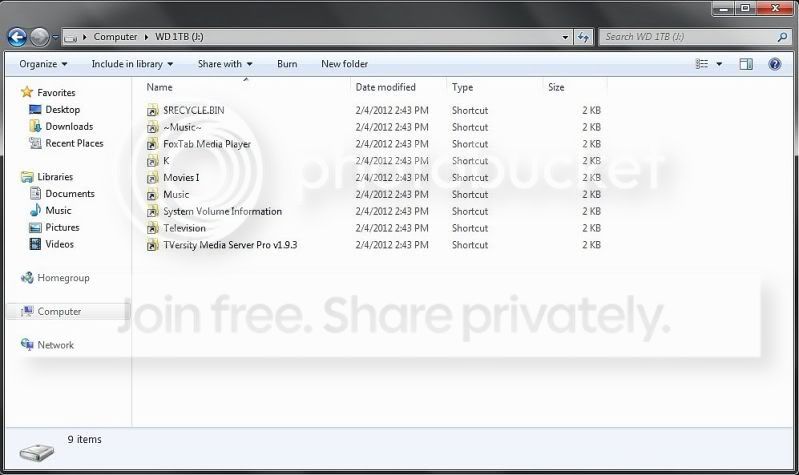
I've been following this thread for the past couple days because I'm having the same problem. I have four external drives I've been using regularly that store and serve my movies and music files. The fact is that everything was fine until I just did a clean install of a DELL Windows 7 OS, and upon first run all of the external drives have denied access and all folders are merely "shortcuts". I have since redone clean installs several times, and the same occurs. I've completed the installs in exactly the same way, with the same user account settings as I always have, so there's no reason for it to have changed unless it's something in the OS software. I have gone in and taken ownership of every external drive, and set full control permissions for every account, but nothing changes.

Bottom line is that I've tried recommendations from here and other forums, but none actually seem to have any effect. Oddly enough, if I copy a new file/folder to one of these drives, I get full access to it, but still none of the existing files/folders on the drive. They still display the same "shortcuts" which lead nowhere, and deny access. Lastly, I have switched to the hidden Admin account, and only some of the permissions to access the external drives were restored.

For those who have inaccessible files on their drives they want to recover, try using Hiren's BootCD and run the portable WinXP on that. You should be able to access all of those files to copy elsewhere so you don't lose everything.

This is just too weird that doing a clean install results in this. This has happened to me twice recently on a desktop and a laptop. Only on the laptop it only effected every flash drive I've plugged into it. I'm starting to suspect the USB ports as the cause since it only affects drives plugged into them.

 

My Computer My Computer

At a glance

Windows 7 Ultimate 64-bit
Computer Manufacturer/Model Number
Dell
OS
Windows 7 Ultimate 64-bit
If it was me I think I would cut my looses and do a clean install. Things just seem to be going from bad to worse. Thats not meant as a criticism, just an observation. With a new install and a new user profile you'll be back to just the original problem. With some luck maybe that will fix itself too.

I've been following this thread for the past couple days because I'm having the same problem. I have four external drives I've been using regularly that store and serve my movies and music files. The fact is that everything was fine until I just did a clean install of a DELL Windows 7 OS, and upon first run all of the external drives have denied access and all folders are merely "shortcuts". I have since redone clean installs several times, and the same occurs. I've completed the installs in exactly the same way, with the same user account settings as I always have, so there's no reason for it to have changed unless it's something in the OS software. I have gone in and taken ownership of every external drive, and set full control permissions for every account, but nothing changes.

Bottom line is that I've tried recommendations from here and other forums, but none actually seem to have any effect. Oddly enough, if I copy a new file/folder to one of these drives, I get full access to it, but still none of the existing files/folders on the drive. They still display the same "shortcuts" which lead nowhere, and deny access. Lastly, I have switched to the hidden Admin account, and only some of the permissions to access the external drives were restored.

For those who have inaccessible files on their drives they want to recover, try using Hiren's BootCD and run the portable WinXP on that. You should be able to access all of those files to copy elsewhere so you don't lose everything.

This is just too weird that doing a clean install results in this. This has happened to me twice recently on a desktop and a laptop. Only on the laptop it only effected every flash drive I've plugged into it. I'm starting to suspect the USB ports as the cause since it only affects drives plugged into them.

How big are these files and what file extension do they have. Maybe they really are only shortcuts to the original files that aren't there any more because they were nuked by the factory restore?
 

My Computer My Computer

At a glance

Windows 10 Education 64 bitAMD Phenom II X4 980 Black Edition Deneb 3.7GHz8GB 4GBx2 Kingston PC10600 DDR3 1333 MemoryZotac NVIDIA Geforce GT640 2 Gig DDR3 PCIe
Computer type
PC/Desktop
Computer Manufacturer/Model Number
Home Built
OS
Windows 10 Education 64 bit
CPU
AMD Phenom II X4 980 Black Edition Deneb 3.7GHz
Motherboard
Asus M4N68T-M V2 µATX Motherboard
Memory
8GB 4GBx2 Kingston PC10600 DDR3 1333 Memory
Graphics Card(s)
Zotac NVIDIA Geforce GT640 2 Gig DDR3 PCIe
Sound Card
VIA VT1708s High Definition Audio 8-channel Onboard
Monitor(s) Displays
22" LG E2242 1080p and 2 19" I-INC AG191D
Screen Resolution
1280x1024 - 1920x1080 - 1280x1024
Hard Drives
Crucial M100 256 GB SSD and 500 GB WD Blue SATA
PSU
Thermaltake TR 620
Case
Power Up Black ATX Mid-Tower Case
Cooling
Stock heatsink and fan
Keyboard
Logitech Wireless K350 Wave
Mouse
Logitech Wireless M570 Trackman Wheel
Internet Speed
80 Mbps Down 30 Mbps Up
Antivirus
Windows Defender
Browser
Internet Explorer 11
Other Info
HP DVD1040e Lightscribe - External USB2
I never did a factory restore. The drives (containing avi's, mp4's, mp3's, and other assorted file types) were all complete right up to the time I did a clean install and ran the new install the first time and then connected the externals. The externals were off during install, and the original files are still there because I can see them and access them using Hiren's BootCD, but not from within the OS. The shortcuts lead to nowhere in the Windows>System32 directory.

I'll post a screenshot in a little bit...
 

My Computer My Computer

At a glance

Windows 7 Ultimate 64-bit
Computer Manufacturer/Model Number
Dell
OS
Windows 7 Ultimate 64-bit
This is what the external drive looks like from within the OS. The files are hidden because they show up running Mini XP in the Hiren BootCD Disc. The shortcuts shown here point directly to cmd.exe in the Windows>System32 directory. The same thing happens on every external and flash drive. Every user has full control, I've changed ownership to each user with no difference. If I copy a new folder to any of the drives it gives me direct access to that folder, while the other display the same shortcut, and as soon as I disconnect the external drive or reboot and come back to that drive, the folder I just transferred displays only the shortcut.

">
ExternalDrive.jpg
 

My Computer My Computer

At a glance

Windows 7 Ultimate 64-bit
Computer Manufacturer/Model Number
Dell
OS
Windows 7 Ultimate 64-bit
What does disk management or My Computer show for space used on those drives? Are you sure you are copying the folder and not just creating shortcuts to them? They all show up as 2 KB files in your screen shot so I have to ask. I really would like to see a screen shot of those disks in disk management. If you use the snipping tool you don't have to show the whole screen.
 

My Computer My Computer

At a glance

Windows 10 Education 64 bitAMD Phenom II X4 980 Black Edition Deneb 3.7GHz8GB 4GBx2 Kingston PC10600 DDR3 1333 MemoryZotac NVIDIA Geforce GT640 2 Gig DDR3 PCIe
Computer type
PC/Desktop
Computer Manufacturer/Model Number
Home Built
OS
Windows 10 Education 64 bit
CPU
AMD Phenom II X4 980 Black Edition Deneb 3.7GHz
Motherboard
Asus M4N68T-M V2 µATX Motherboard
Memory
8GB 4GBx2 Kingston PC10600 DDR3 1333 Memory
Graphics Card(s)
Zotac NVIDIA Geforce GT640 2 Gig DDR3 PCIe
Sound Card
VIA VT1708s High Definition Audio 8-channel Onboard
Monitor(s) Displays
22" LG E2242 1080p and 2 19" I-INC AG191D
Screen Resolution
1280x1024 - 1920x1080 - 1280x1024
Hard Drives
Crucial M100 256 GB SSD and 500 GB WD Blue SATA
PSU
Thermaltake TR 620
Case
Power Up Black ATX Mid-Tower Case
Cooling
Stock heatsink and fan
Keyboard
Logitech Wireless K350 Wave
Mouse
Logitech Wireless M570 Trackman Wheel
Internet Speed
80 Mbps Down 30 Mbps Up
Antivirus
Windows Defender
Browser
Internet Explorer 11
Other Info
HP DVD1040e Lightscribe - External USB2
I can provide a screenshot later in the day, but I should say that I have a BS Computer Science and have been working with hardware/software for 20 years now, so I'm sure I'm not copying shortcuts.

Each of the external drives are 1 TB, and currently have approximately 500 GB free on each. Like I said, I've been using two of the drives for well over a year, and one I just bought last week, so something is going on with the OS, or possibly the BIOS. All 3 drives show a healthy status in Disk Management. All were being used on Windows 7 machines (laptops and desktops), and served as the host drives for serving media throughout the house until just recently when I did one of my routine refreshes (clean installs) of the OS's, and got this on each. Taking ownership of each makes no difference at all. The fact that I can access the files thru a 3rd party software is of little use because if I can't get the OS to recognize more than a shortcut, I can't use any of them for their hosting duties since I can't scan them to build the library.

I used to think a clean install solved most all problems, but that's obviously not the case. If I could get MS to respond I might get somewhere, but I'm not holding my breath waiting.

I've seen a lot of posts asking about the same problem, but none have led to a conclusion and/or a fix. All I keep seeing is take ownership, or even using the hidden Admin account, but neither work.
 

My Computer My Computer

At a glance

Windows 7 Ultimate 64-bit
Computer Manufacturer/Model Number
Dell
OS
Windows 7 Ultimate 64-bit
What do you see if you set explorer to display hidden and system files?
 

My Computer My Computer

At a glance

Windows 10 Education 64 bitAMD Phenom II X4 980 Black Edition Deneb 3.7GHz8GB 4GBx2 Kingston PC10600 DDR3 1333 MemoryZotac NVIDIA Geforce GT640 2 Gig DDR3 PCIe
Computer type
PC/Desktop
Computer Manufacturer/Model Number
Home Built
OS
Windows 10 Education 64 bit
CPU
AMD Phenom II X4 980 Black Edition Deneb 3.7GHz
Motherboard
Asus M4N68T-M V2 µATX Motherboard
Memory
8GB 4GBx2 Kingston PC10600 DDR3 1333 Memory
Graphics Card(s)
Zotac NVIDIA Geforce GT640 2 Gig DDR3 PCIe
Sound Card
VIA VT1708s High Definition Audio 8-channel Onboard
Monitor(s) Displays
22" LG E2242 1080p and 2 19" I-INC AG191D
Screen Resolution
1280x1024 - 1920x1080 - 1280x1024
Hard Drives
Crucial M100 256 GB SSD and 500 GB WD Blue SATA
PSU
Thermaltake TR 620
Case
Power Up Black ATX Mid-Tower Case
Cooling
Stock heatsink and fan
Keyboard
Logitech Wireless K350 Wave
Mouse
Logitech Wireless M570 Trackman Wheel
Internet Speed
80 Mbps Down 30 Mbps Up
Antivirus
Windows Defender
Browser
Internet Explorer 11
Other Info
HP DVD1040e Lightscribe - External USB2
That (and the rest of the folder options) is one of the settings I immediately enable when I do a new installation. Or should I say disable because they're hidden by default?

BTW How is the weather up there?
 
Last edited:

My Computer My Computer

At a glance

Windows 7 Ultimate 64-bit
Computer Manufacturer/Model Number
Dell
OS
Windows 7 Ultimate 64-bit
Back
Top