Solved Folder lock,I:/ is not accessible,access is denied.

Ok, go to this link and review how to access the security of a folder, file, or drive.

http://www.sevenforums.com/tutorials/122666-permissions-allow-deny-users-groups.html

Then open the properties of the external drive and screenshot the security tab like so:
212153d1337229175-permissions-allow-deny-users-groups-folder-1.jpg


Then also screenshot the advanced section also:

212154d1337229175-permissions-allow-deny-users-groups-folder-2.jpg
 

My Computer My Computer

Computer Manufacturer/Model Number
Custom
OS
Windows 7 Pro 64-Bit
CPU
i7
Motherboard
Gigabyte
Memory
16GB
Graphics Card(s)
Nvidia
Sound Card
Onboard
Monitor(s) Displays
Asus
Hard Drives
Seagate
PSU
Antec
Case
Fractial Design
Cooling
Stock
Note: Depending on how many users or objects are shown on the seucirty tab I may have you make a few screenshots.
 

My Computer My Computer

Computer Manufacturer/Model Number
Custom
OS
Windows 7 Pro 64-Bit
CPU
i7
Motherboard
Gigabyte
Memory
16GB
Graphics Card(s)
Nvidia
Sound Card
Onboard
Monitor(s) Displays
Asus
Hard Drives
Seagate
PSU
Antec
Case
Fractial Design
Cooling
Stock
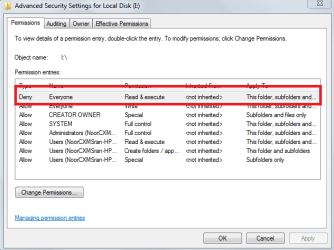
There is the problem.
 

Attachments

  • ChtLOJgIDHZFRWSA-Region.png
    ChtLOJgIDHZFRWSA-Region.png
    14.3 KB · Views: 22

My Computer My Computer

Computer Manufacturer/Model Number
Custom
OS
Windows 7 Pro 64-Bit
CPU
i7
Motherboard
Gigabyte
Memory
16GB
Graphics Card(s)
Nvidia
Sound Card
Onboard
Monitor(s) Displays
Asus
Hard Drives
Seagate
PSU
Antec
Case
Fractial Design
Cooling
Stock
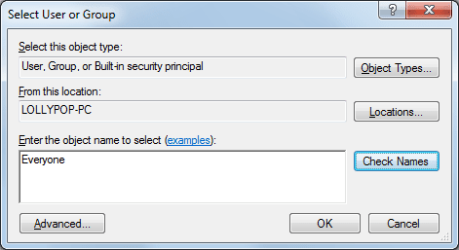
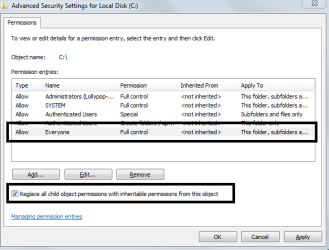
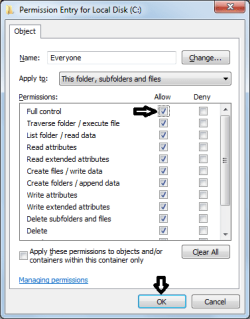
Click change permission Remove both Everyones. Then click Add... Type everyone like in the attachment(Capture 2.png). Then click check names. Once it is confirmed found with an underline under Everyone. Like Everyone click ok. Now set its permissions to full. Then click "Replace all child object permissions with inheritable permissions from this object." like in Capture.png

 

Attachments

  • Capture 2.png
    Capture 2.png
    8.8 KB · Views: 10
  • Capture.PNG
    Capture.PNG
    13 KB · Views: 12
  • Capture 3.png
    Capture 3.png
    12.2 KB · Views: 9

My Computer My Computer

Computer Manufacturer/Model Number
Custom
OS
Windows 7 Pro 64-Bit
CPU
i7
Motherboard
Gigabyte
Memory
16GB
Graphics Card(s)
Nvidia
Sound Card
Onboard
Monitor(s) Displays
Asus
Hard Drives
Seagate
PSU
Antec
Case
Fractial Design
Cooling
Stock
LOL lolipop PC :D Thank you very much sir very very very much,but I got 2 unusual things that I want you to know about first I got this when applying,Is it changing anything
Screenshot

and Second i got these .tmp folder What should I Do with them?

Screenshot
 

My Computer My Computer

OS
Windows 7
Those are temp folders, more or less junk.

On the same screen as before you now can choose Owner. It seems some files are still locked from you. Granted I think they are all junk files are can be ignored. But below is a screenshot of the Owner tab in the secuirty advanced area.
118d1202368968-take-ownership-file-owner.jpg


Click Edit, Then choose your username and click apply. That will change ownership of all files to you so you can do with as you want. Granted some of them might be locked by Windows and you will not be allowed to modify them.

... And yes, my PC name is Lollypop, but in its defense the network workgroup is Candyland and my other computers are also candy names like gumdrop. :p
 

My Computer My Computer

Computer Manufacturer/Model Number
Custom
OS
Windows 7 Pro 64-Bit
CPU
i7
Motherboard
Gigabyte
Memory
16GB
Graphics Card(s)
Nvidia
Sound Card
Onboard
Monitor(s) Displays
Asus
Hard Drives
Seagate
PSU
Antec
Case
Fractial Design
Cooling
Stock
  • Like
Reactions: Arc
Thanks for your help bro,I am gonna mark this as solved now :]
 

My Computer My Computer

OS
Windows 7
Back
Top