
Problem with usb drives/ports showing in explorer

Xeno Morph

New member
Member
Local time
6:40 AM
Messages
58
Location
Earth
I've been having a random problem with my usb drives or ports for at least six months now. Sometimes when I plug one in, I can hear the system sound that it makes, but the little auto play window that usually appears, allowing me to choose how to open it, such as with explorer, does not appear, and there is no icon when I open up My Computer, nor does it show up in device manager. When it does show, the usb drive can sometimes take over a minute (I'm assuming to read the drive) before the icon will show up in explorer. It doesn't seem to matter which usb port that I plug it into, and I tried gently wiggling the drive a bit to see if it might be a bad connection, but no luck with that. What's really frustrating is that it doesn't happen all the time. One minute it will work and the next time I go to use it, I plug it in, and nothing but the little system sound, no auto play window and no icon in explorer.:banghead: Out of seven usb drives that I have, most of the time it happens to the same 2 drives, plus my external HD, that is not to say that it never happens to the other usb drives, for whatever reason, it rarely is a problem with the others. Could it be corrupt drivers? To eliminate the possibility of the usb drives being faulty, I tried them in my other desktop computer and my laptop and they all work fine. I have had an external HD that I was using for data storage and backup with the same problem when plugging in to the usb port. It has been two months since it has shown up in explorer and as I am writing this, I tried plugging it in and wouldn't you know, "PING", it shows up with no delay. Just like that! AARRRR!:mad2: If anyone has some thoughts on this, please share your insight. Thanks.
 

My Computer My Computer

Computer type
PC/Desktop
Computer Manufacturer/Model Number
CUSTOM BUILD
OS
Windows 7 Pro x64
CPU
AMD FX-8350 8-Core Black Edition, 4gHz, 125W
Motherboard
ASUS M5A99X EVO, AMD 990X/SB950 Chipset, UEFI BIOS, USB 3.0
Memory
CORSAIR: Vengence (2X8 GB) 16GB DDR3 1866mHz
Graphics Card(s)
NVIDIA: GeForce GTX 750 Ti, 1GB DDR5
Sound Card
Creative: Sound Blaster X-Fi Titanium
Monitor(s) Displays
NIXEUS 27"
Screen Resolution
2560 X 1440
Hard Drives
Seagate: SATA 2TB (internal)
Seagate: SATA 4TB (external)
PSU
NZXT HALE82 750W semi-modular
Case
NZXT PHANTOM, FANS 3x 200mm, 4x 120mm
Cooling
CORSAIR Hydro Series H80i High Performance Liquid CPU Cooler
Keyboard
AZIO (backlit keyboard)
Mouse
SENTEY Luminata Pro
Internet Speed
CABLE 100Mbps
Antivirus
ESET Smart Security
Browser
Firefox
Other Info
NZXT: APERTURE Card Reader w 2x USB 3,
NZXT: Custom Premium Cables
In the Device Manager look under Storage controllers and USB Serial bus controllers to note any yellow marked items. You can even delete any composite item under USB and restart the system to see Windows refresh the usb controller driver set to allow for better detection at times.

Under Storage controllers like the external HD you would want to check for updates to insure the controller for the external drive is installed fully to see that prompted detected when plugged in. A run of the System File Checker sfc /scannow at the Start>Run command line to run the system tool wouldn't hurt any either.

As far as flash drives some brands simply will not be detected or work swiftly on some systems while they seem to work well on others. After trying out numerous brands and sizes I generally tend to stay with the one or two that seem to always work no matter what machine or usb hub in fact they are plugged into. HP and PNY flash drives for example are good ones to avoid since they tend to problematic! San Disk works on most old cases and is more commonly sold in retail chains. Other better brands include Kingston, OCZ, Crucial, etc going by the better memory manufacturers as a reference.
 

My Computers My Computers

System One System Two

  • Computer type
    PC/Desktop
    Computer Manufacturer/Model Number
    Custom builds = 2
    OS
    W7 Ultimate x64/W10 Pro x64/W11 Pro Triple Boot - Main PC W7 Remote PC Micro ATX W7 Pro x64/W11 Pro
    CPU
    AMD Phenom II X4 975 Deneb 3.6ghz - 965 2nd remote pc
    Motherboard
    Gigabyte GA-790XTA-UD4-Gigabyte GA-880GM-D2H remote pc
    Memory
    Kingston Hyper X DDR3 1600 1.5v 16gb - Hyper X Fury 8gb 2nd
    Graphics Card(s)
    MSI HD Radeon 5750 1gb - MSI HD Radeon 6450 on mini tower
    Sound Card
    Creative Labs X-Fi Xtreme Audio P - Realtek onooard 2nd case
    Monitor(s) Displays
    ASUS VW199T-P 19" HP 2082a Main-HP 2082a 20" remote pc
    Screen Resolution
    Asus 1440x900 - HP 1600x900
    Hard Drives
    WD Black 1TB HD per OS W7, W10, and pending W11 presently on 500gb OS Drive - Pending Triple 1TB HDs for Spanned Storage/backup volume
    Single 2TB external USB enclosure, single 1TB System 7 Host/Boot drive, Pending 8TB external HD for system image b
    PSU
    Corsair 750TX - primary / Corsair CX600 - second
    Case
    Antec 900-2 - SSD compatible / NZXT Vulcan mini tower
    Cooling
    Zalman CNPS9900A
    Keyboard
    AZIO L70 Backlit Letters Gaming - ONN Cordless/USB
    Mouse
    MSI DS200 Programmable, Logitech Cordless
    Internet Speed
    30mbps upgrade - primary hard wired - mini tower usb WiFi
    Antivirus
    GFI VIPRE Internet Security 2014 on W7 2016 beta on W10,
    Browser
    Cyberfox, WaterFox 64bit FF variants, FireFox x64, Pale Moon
    Other Info
    Accomdata fan cooled usb 2.0 PIDE/Sata II, III external enclosure.
    Sambient usb/eSata PATA/Sata II, III external enclosure.
  • Computer type
    PC/Desktop
    System Manufacturer/Model Number
    CUSTOM ASSEMBLY
    OS
    W7 Pro x64/W11 Pro
    CPU
    AMD Deneb 3.6ghz - 965
    Motherboard
    Gigabyte GA-880GM-D2H remote pc
    Memory
    Kingston Hyper X Fury 8gb
    Graphics Card(s)
    MSI HD Radeon 6450 DVI Output
    Sound Card
    Realtek onooard Creative or Other separate PENDING
    Monitor(s) Displays
    VIZIO 32" LCD TV Separate LCD Pending
    Screen Resolution
    1600x1080
    Hard Drives
    WD 500GB OS Host/Boot WD Green 1TB Storage/Backup
    PSU
    Corsair 600W - THERMALTAKE 600W spare case
    Case
    NZXT Vulcan mini tower
    Cooling
    Twin 120mm Top Fans - 240mm Side Cover
    Keyboard
    ONN Cordless/USB Logitech Cordless
    Mouse
    ONN USB/Cordless - Logitech Cordless
    Internet Speed
    DSL 5G
    Browser
    MS Edge, FireFox, WaterFox x64, FireFox Nightly
    Other Info
    OS Testing-Remote Access to Main TeamViewer
Hi Xeno Morph,

Try this:

From the Windows FileRepository- as in the screenshot - locate and open the the USBStor folder with the latest date.

USBSTOR.jpg

Copy the usbstor.inf and usbstor.PNF files to C > Windows > inf and the USBSTOR.SYS to C > Windows > System32 > drivers.

Reboot your PC.

Now plug in your USB devices and check whether the problem is resolved.
 

My Computer My Computer

OS
Windows 7 Home Premium 32 bit
@Night Hawk
Thank you for your input. That must have been why those PNY's were on sale when I bought them.:huh: I bought 3 of those. I had problems with them from the get go, no matter what computer I plugged them into, they just wouldn't get recognized by the computer,:confused: but in that case I'm convinced that the drives were the problem. Fortunately, I did eventually get them to work. For each of my computers, I had to unplug all of my usb ports and plug in the PNY by itself and it came right up and installed the drivers, plugged everything else back in, and haven't had a problem since then, but they still don't work in my car stereo where all the others do.(most of my music I listen to in my truck are on usb drives)

@jumanji,
Thanks for the help.:thumbsup: I will try that, and post back the results.:D

Baron
 

My Computer My Computer

Computer type
PC/Desktop
Computer Manufacturer/Model Number
CUSTOM BUILD
OS
Windows 7 Pro x64
CPU
AMD FX-8350 8-Core Black Edition, 4gHz, 125W
Motherboard
ASUS M5A99X EVO, AMD 990X/SB950 Chipset, UEFI BIOS, USB 3.0
Memory
CORSAIR: Vengence (2X8 GB) 16GB DDR3 1866mHz
Graphics Card(s)
NVIDIA: GeForce GTX 750 Ti, 1GB DDR5
Sound Card
Creative: Sound Blaster X-Fi Titanium
Monitor(s) Displays
NIXEUS 27"
Screen Resolution
2560 X 1440
Hard Drives
Seagate: SATA 2TB (internal)
Seagate: SATA 4TB (external)
PSU
NZXT HALE82 750W semi-modular
Case
NZXT PHANTOM, FANS 3x 200mm, 4x 120mm
Cooling
CORSAIR Hydro Series H80i High Performance Liquid CPU Cooler
Keyboard
AZIO (backlit keyboard)
Mouse
SENTEY Luminata Pro
Internet Speed
CABLE 100Mbps
Antivirus
ESET Smart Security
Browser
Firefox
Other Info
NZXT: APERTURE Card Reader w 2x USB 3,
NZXT: Custom Premium Cables
You're welcome! I bought a 16gb PNY and regretted it soon after since even on the main case it proved to be a hassle. That reminded me of years back when buying old PNY simms for a few old 9x cases and later going with Corsair or Kingston to see far better working results.

The 4gb HP was another good when grabbing one fast at an office supply store onsale. That will hardly even work on anything!

I have run into a few Kingston 2gb drives that were hanging on a rack for $6 in a Walmart one day and suddenly you could no longer see them made bootable while the better Data Traveler models 8gb and 32gb are used for everything including a USB Install Keys for both Vista and 7 as well as live Linux data recovery sticks. But it goes to show you can run into some duds even with the better brands at times.

The San Disks while sometimes slower then other brands still seem to be reliable. Note those are all USB 2.0 sticks since the prices are still up for 3.0 models. One of that brand's drives a 2gb model I use for setting up laptops and even a few portables running Android lately to connect them through the router here.
 

My Computers My Computers

System One System Two

  • Computer type
    PC/Desktop
    Computer Manufacturer/Model Number
    Custom builds = 2
    OS
    W7 Ultimate x64/W10 Pro x64/W11 Pro Triple Boot - Main PC W7 Remote PC Micro ATX W7 Pro x64/W11 Pro
    CPU
    AMD Phenom II X4 975 Deneb 3.6ghz - 965 2nd remote pc
    Motherboard
    Gigabyte GA-790XTA-UD4-Gigabyte GA-880GM-D2H remote pc
    Memory
    Kingston Hyper X DDR3 1600 1.5v 16gb - Hyper X Fury 8gb 2nd
    Graphics Card(s)
    MSI HD Radeon 5750 1gb - MSI HD Radeon 6450 on mini tower
    Sound Card
    Creative Labs X-Fi Xtreme Audio P - Realtek onooard 2nd case
    Monitor(s) Displays
    ASUS VW199T-P 19" HP 2082a Main-HP 2082a 20" remote pc
    Screen Resolution
    Asus 1440x900 - HP 1600x900
    Hard Drives
    WD Black 1TB HD per OS W7, W10, and pending W11 presently on 500gb OS Drive - Pending Triple 1TB HDs for Spanned Storage/backup volume
    Single 2TB external USB enclosure, single 1TB System 7 Host/Boot drive, Pending 8TB external HD for system image b
    PSU
    Corsair 750TX - primary / Corsair CX600 - second
    Case
    Antec 900-2 - SSD compatible / NZXT Vulcan mini tower
    Cooling
    Zalman CNPS9900A
    Keyboard
    AZIO L70 Backlit Letters Gaming - ONN Cordless/USB
    Mouse
    MSI DS200 Programmable, Logitech Cordless
    Internet Speed
    30mbps upgrade - primary hard wired - mini tower usb WiFi
    Antivirus
    GFI VIPRE Internet Security 2014 on W7 2016 beta on W10,
    Browser
    Cyberfox, WaterFox 64bit FF variants, FireFox x64, Pale Moon
    Other Info
    Accomdata fan cooled usb 2.0 PIDE/Sata II, III external enclosure.
    Sambient usb/eSata PATA/Sata II, III external enclosure.
  • Computer type
    PC/Desktop
    System Manufacturer/Model Number
    CUSTOM ASSEMBLY
    OS
    W7 Pro x64/W11 Pro
    CPU
    AMD Deneb 3.6ghz - 965
    Motherboard
    Gigabyte GA-880GM-D2H remote pc
    Memory
    Kingston Hyper X Fury 8gb
    Graphics Card(s)
    MSI HD Radeon 6450 DVI Output
    Sound Card
    Realtek onooard Creative or Other separate PENDING
    Monitor(s) Displays
    VIZIO 32" LCD TV Separate LCD Pending
    Screen Resolution
    1600x1080
    Hard Drives
    WD 500GB OS Host/Boot WD Green 1TB Storage/Backup
    PSU
    Corsair 600W - THERMALTAKE 600W spare case
    Case
    NZXT Vulcan mini tower
    Cooling
    Twin 120mm Top Fans - 240mm Side Cover
    Keyboard
    ONN Cordless/USB Logitech Cordless
    Mouse
    ONN USB/Cordless - Logitech Cordless
    Internet Speed
    DSL 5G
    Browser
    MS Edge, FireFox, WaterFox x64, FireFox Nightly
    Other Info
    OS Testing-Remote Access to Main TeamViewer
@jumanji,
Mine has only one folder. usbfilter.inf_amd64_neutral_8131f866ded003e6 Should there be more than one?

Just so I am clear on your instructions...Copy the usbstor.inf and the usbstor.PNF files to the C:\Windows\inf folder, then copy the USBSTOR.SYS to the C:\Windows\System32\drivers folder, and leave the originals in their parent folder usbfilter.inf_amd64_neutral_8131f866ded003e6. Correct?
 
Last edited:

My Computer My Computer

Computer type
PC/Desktop
Computer Manufacturer/Model Number
CUSTOM BUILD
OS
Windows 7 Pro x64
CPU
AMD FX-8350 8-Core Black Edition, 4gHz, 125W
Motherboard
ASUS M5A99X EVO, AMD 990X/SB950 Chipset, UEFI BIOS, USB 3.0
Memory
CORSAIR: Vengence (2X8 GB) 16GB DDR3 1866mHz
Graphics Card(s)
NVIDIA: GeForce GTX 750 Ti, 1GB DDR5
Sound Card
Creative: Sound Blaster X-Fi Titanium
Monitor(s) Displays
NIXEUS 27"
Screen Resolution
2560 X 1440
Hard Drives
Seagate: SATA 2TB (internal)
Seagate: SATA 4TB (external)
PSU
NZXT HALE82 750W semi-modular
Case
NZXT PHANTOM, FANS 3x 200mm, 4x 120mm
Cooling
CORSAIR Hydro Series H80i High Performance Liquid CPU Cooler
Keyboard
AZIO (backlit keyboard)
Mouse
SENTEY Luminata Pro
Internet Speed
CABLE 100Mbps
Antivirus
ESET Smart Security
Browser
Firefox
Other Info
NZXT: APERTURE Card Reader w 2x USB 3,
NZXT: Custom Premium Cables
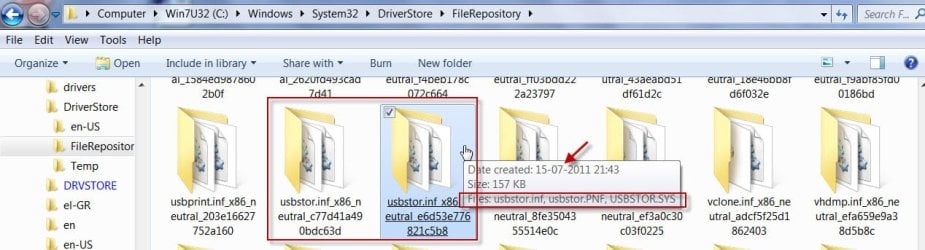
Yep. If more than one select the latest. Otherwise the one and only one. ( I am not sure why some have more than one. ( I have two.) Requires some research.:))

Yes. copy these as specified. Originals will stay in the Repository.
 

My Computer My Computer

OS
Windows 7 Home Premium 32 bit
@jumanji,
Sorry, been preoccupied this past week. Unfortunately, it didn't work. Thanks for your help though. If you have any other thoughts, I'll check back in a few days.
 

My Computer My Computer

Computer type
PC/Desktop
Computer Manufacturer/Model Number
CUSTOM BUILD
OS
Windows 7 Pro x64
CPU
AMD FX-8350 8-Core Black Edition, 4gHz, 125W
Motherboard
ASUS M5A99X EVO, AMD 990X/SB950 Chipset, UEFI BIOS, USB 3.0
Memory
CORSAIR: Vengence (2X8 GB) 16GB DDR3 1866mHz
Graphics Card(s)
NVIDIA: GeForce GTX 750 Ti, 1GB DDR5
Sound Card
Creative: Sound Blaster X-Fi Titanium
Monitor(s) Displays
NIXEUS 27"
Screen Resolution
2560 X 1440
Hard Drives
Seagate: SATA 2TB (internal)
Seagate: SATA 4TB (external)
PSU
NZXT HALE82 750W semi-modular
Case
NZXT PHANTOM, FANS 3x 200mm, 4x 120mm
Cooling
CORSAIR Hydro Series H80i High Performance Liquid CPU Cooler
Keyboard
AZIO (backlit keyboard)
Mouse
SENTEY Luminata Pro
Internet Speed
CABLE 100Mbps
Antivirus
ESET Smart Security
Browser
Firefox
Other Info
NZXT: APERTURE Card Reader w 2x USB 3,
NZXT: Custom Premium Cables
jamunji,
Been away this past week.(family gathering:rolleyes:) Thank you very much for the links to the software tools. I'll check them out and see if that solves the issue. I really appreciate how helpful you have been. :D

Baron
 

My Computer My Computer

Computer type
PC/Desktop
Computer Manufacturer/Model Number
CUSTOM BUILD
OS
Windows 7 Pro x64
CPU
AMD FX-8350 8-Core Black Edition, 4gHz, 125W
Motherboard
ASUS M5A99X EVO, AMD 990X/SB950 Chipset, UEFI BIOS, USB 3.0
Memory
CORSAIR: Vengence (2X8 GB) 16GB DDR3 1866mHz
Graphics Card(s)
NVIDIA: GeForce GTX 750 Ti, 1GB DDR5
Sound Card
Creative: Sound Blaster X-Fi Titanium
Monitor(s) Displays
NIXEUS 27"
Screen Resolution
2560 X 1440
Hard Drives
Seagate: SATA 2TB (internal)
Seagate: SATA 4TB (external)
PSU
NZXT HALE82 750W semi-modular
Case
NZXT PHANTOM, FANS 3x 200mm, 4x 120mm
Cooling
CORSAIR Hydro Series H80i High Performance Liquid CPU Cooler
Keyboard
AZIO (backlit keyboard)
Mouse
SENTEY Luminata Pro
Internet Speed
CABLE 100Mbps
Antivirus
ESET Smart Security
Browser
Firefox
Other Info
NZXT: APERTURE Card Reader w 2x USB 3,
NZXT: Custom Premium Cables
Hopefully the solution will be found fast there for this. With the old Vista case I just saw a new board and supply go in the main drive wasn't replaced but now seems it will be due to suddenly a freezing and then no longer loading Vista install that was just put on back in June.

The live boot from the Vista dvd there to the command revealed boot sector unwritable and time to say bye bye to that drive now almost 7yrs. old! It served well for testing the beta and RC builds along with being the Vista host drive during all that time however. No complaints here! :D We already have a solution for that however.

One thought about the problem you are seeing might not involve usb drivers at all but some other system file(s) or some type of registry error. The System File Checker would be one fast file check option while having the 7 dvd in the drive. That will verify and replace any problem files.

The problem with explorer windows not appearing seems to point that way as well as give the Disk Check tool a good run. Right click on the command icon in Start>All Programs>Accessories to run as admin and then type in the "chkdsk /r" command to see that scheduled once you press enter and see the confimation message appear.

By booting upto the repair tools>command prompt you can also run that live with "chkdsk c: /f". This might clear up any errors found on the C volume and improve the overall performance if not even solving the problem for you.
 

My Computers My Computers

System One System Two

  • Computer type
    PC/Desktop
    Computer Manufacturer/Model Number
    Custom builds = 2
    OS
    W7 Ultimate x64/W10 Pro x64/W11 Pro Triple Boot - Main PC W7 Remote PC Micro ATX W7 Pro x64/W11 Pro
    CPU
    AMD Phenom II X4 975 Deneb 3.6ghz - 965 2nd remote pc
    Motherboard
    Gigabyte GA-790XTA-UD4-Gigabyte GA-880GM-D2H remote pc
    Memory
    Kingston Hyper X DDR3 1600 1.5v 16gb - Hyper X Fury 8gb 2nd
    Graphics Card(s)
    MSI HD Radeon 5750 1gb - MSI HD Radeon 6450 on mini tower
    Sound Card
    Creative Labs X-Fi Xtreme Audio P - Realtek onooard 2nd case
    Monitor(s) Displays
    ASUS VW199T-P 19" HP 2082a Main-HP 2082a 20" remote pc
    Screen Resolution
    Asus 1440x900 - HP 1600x900
    Hard Drives
    WD Black 1TB HD per OS W7, W10, and pending W11 presently on 500gb OS Drive - Pending Triple 1TB HDs for Spanned Storage/backup volume
    Single 2TB external USB enclosure, single 1TB System 7 Host/Boot drive, Pending 8TB external HD for system image b
    PSU
    Corsair 750TX - primary / Corsair CX600 - second
    Case
    Antec 900-2 - SSD compatible / NZXT Vulcan mini tower
    Cooling
    Zalman CNPS9900A
    Keyboard
    AZIO L70 Backlit Letters Gaming - ONN Cordless/USB
    Mouse
    MSI DS200 Programmable, Logitech Cordless
    Internet Speed
    30mbps upgrade - primary hard wired - mini tower usb WiFi
    Antivirus
    GFI VIPRE Internet Security 2014 on W7 2016 beta on W10,
    Browser
    Cyberfox, WaterFox 64bit FF variants, FireFox x64, Pale Moon
    Other Info
    Accomdata fan cooled usb 2.0 PIDE/Sata II, III external enclosure.
    Sambient usb/eSata PATA/Sata II, III external enclosure.
  • Computer type
    PC/Desktop
    System Manufacturer/Model Number
    CUSTOM ASSEMBLY
    OS
    W7 Pro x64/W11 Pro
    CPU
    AMD Deneb 3.6ghz - 965
    Motherboard
    Gigabyte GA-880GM-D2H remote pc
    Memory
    Kingston Hyper X Fury 8gb
    Graphics Card(s)
    MSI HD Radeon 6450 DVI Output
    Sound Card
    Realtek onooard Creative or Other separate PENDING
    Monitor(s) Displays
    VIZIO 32" LCD TV Separate LCD Pending
    Screen Resolution
    1600x1080
    Hard Drives
    WD 500GB OS Host/Boot WD Green 1TB Storage/Backup
    PSU
    Corsair 600W - THERMALTAKE 600W spare case
    Case
    NZXT Vulcan mini tower
    Cooling
    Twin 120mm Top Fans - 240mm Side Cover
    Keyboard
    ONN Cordless/USB Logitech Cordless
    Mouse
    ONN USB/Cordless - Logitech Cordless
    Internet Speed
    DSL 5G
    Browser
    MS Edge, FireFox, WaterFox x64, FireFox Nightly
    Other Info
    OS Testing-Remote Access to Main TeamViewer
Back
Top