hard disk failure in sony vio laptop VPCSB38GA

sunset72

New member
Member
Local time
1:06 PM
Messages
35
hi friends ,

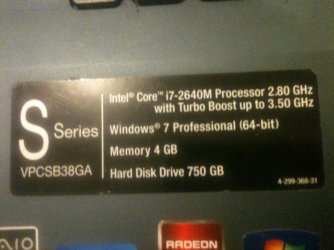
My brother have this laptop:-

attachment.php


he try to re-install win 7 on his laptop , but he eventually delete a 13gb system reserved partition , then when trying to install windows , no hard disk found ....

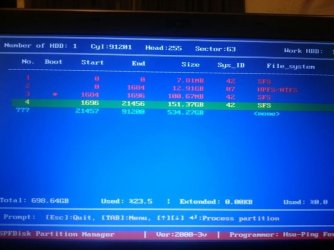
we try to use super fdisk partition manager only to see what happend ,

attachment.php


note .. originally , windows was installed on 155 gb partition ..

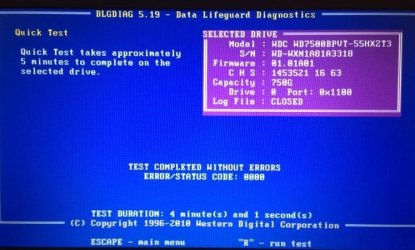
We use W.D. Lifeguard diagnostic ,

attachment.php


so ,, any idea how to solve this problem & getting back the ability to install windows on this hard ????


Attachments

  • IMG_0727.jpg
    IMG_0727.jpg
    324.8 KB · Views: 31
  • IMG_0734.JPG
    IMG_0734.JPG
    56.2 KB · Views: 31
  • IMG_0736.JPG
    IMG_0736.JPG
    56.2 KB · Views: 30

My Computer My Computer

At a glance

win7 ultimate
OS
win7 ultimate
Sunset just wipe the drive mate you will need a working machine that you can hook this drive to and use DISKPART clean all or wipe disk with Best Free Partition Manager Freeware and free partition magic for Windows 7, Windows 8, Windows Vista and Windows XP 32 bit & 64 bit. MiniTool Free Partition Manager Software Home Edition. click on drive and click wipe drive then Apply at the top.

http://www.sevenforums.com/tutorials/52129-disk-clean-clean-all-diskpart-command.html

both will take quite a while to clean the drive and then you will need to format it for use.
http://www.sevenforums.com/tutorials/2674-partition-volume-create-new.html
 

My Computer My Computer

At a glance

Desk1 7 Home Prem / Desk2 10 Pro / Main lap A...Desk1 i5 3750K / Laptop i7 GTX 860M / Desk2 i...Desk1 8GB (1866) / Desk2 16GB (1333) / Laptop...Desk 1& 2NVidia GTX 650 & Laptops on board Intel
Computer type
PC/Desktop
Computer Manufacturer/Model Number
Own build (new) Desk1 / Asus ROG Win 7 / Desk2 1st build
OS
Desk1 7 Home Prem / Desk2 10 Pro / Main lap Asus ROG 10 Pro 2 laptop Toshiba 7 Pro Asus P2520 7 & 10
CPU
Desk1 i5 3750K / Laptop i7 GTX 860M / Desk2 i5 2500
Motherboard
Desk1 Asus P877-V / Desk2 Gigabyte H67 UD3H / Laptop ?
Memory
Desk1 8GB (1866) / Desk2 16GB (1333) / Laptop 8Gb DDR3
Graphics Card(s)
Desk 1& 2NVidia GTX 650 & Laptops on board Intel
Sound Card
Desk 1 & 2 -XONAR DG Realtek High Def audio Laptop
Monitor(s) Displays
Desk 1 Benq HD 2450 / Desk2 Philips 24" / Laptop 17.5"
Screen Resolution
1920x1080 D1 & D2 & Laptop 1
Hard Drives
Desk1 Samsung 120GB 830 SSD
Asus ROG 256GB 850 Pro SSD
Desk2 Samsung 840 256 SSD
Toshiba 120GB EVO
PSU
Desk 1 Corsair HX 1050/ Laptop ? / Desk 2 Corsair HX 650
Case
Desk 1 Cooler HAF XM ? Toshiba laptop / Desk2 Coolermaster
Cooling
Fans on all Desk1 -2 Desk2 - all Coolermasters 5 Laptop ?
Keyboard
Desk 1 MS Sidewinder X6 Desk 2 MS Sidewinder X 4
Mouse
Desk 1&2 - Gigabyte MS 900 gamer - laptop - Logitec wireless
Internet Speed
ADSL2+
Other Info
One other Desktop (tester) and spare Toshba laptop both with SSD's
Running Kaspersky 2016 ISS on all machines config'd identically
Logitec audio stereo systems on each machine (x3)
Canon MG5250MFC
Router/modem TP-Link running WPA2SK

Hi sunset72,

Hold on. No need to take your drive out. (IClol may please excuse. LOL. :))

I see that you have run WD Data Lifeguard Diagnostic for DOS version 5.19.(the current version is 5.20 which you can get from the WD site WD Support / Downloads / SATA & SAS / WD Black but that is not important now)

What is important now is that from the diagnostic tool, you can select the option to "WRITE ZEROS TO DRIVE" and it will wipe the drive clean.

Next you can format your drive with the bootable CD version of Partition Wizard Free download Magic Partition Manager Software, partition magic alternative, free partition magic, partition magic Windows 7 and server partition software - Partition Wizard Online

(You may either burn the bootable ISO to a CD or create a bootable pen drive with that ISO using Rufus Rufus - Create bootable USB drives the easy way . )

EDIT:When you create a bootable PW pen drive, after you have selected "ISO Image" in the dropdown arrow, navigate to the location of pwhe8.iso and select it, Rufus will prompt to download a new vesamenu.32. Say "Yes" and it will download it to the same folder where Rufus is placed. Once the download is completed, click on "Start" and the Bootable pendrive will be ready in minutes. Close Rufus. Boot from the pendrive and run Partition Wizard.

replace vesamenu.jpg

You may create three primary partitions and the rest extended partition with as many logical drives as you may want and then clean install Windows 7 on one primary partition. (That is how I do or did.:) Others may have different ideas.)

Have you noted the COA key on the laptop? You will require it to activate the installed Windows 7 Professional 64 bit. ( applies if you do a clean install as opposed to a reinstall with HP recovery discs for that system)

EDIT: I am just curious to know how you ran Data Lifeguard Diagnostic for DOS. Was it from a bootable DOS CD or bootable DOS pen drive? I ask this question because people usually expect an ISO. They turn away when they find it is not an ISO because they do not know how to handle it and use it. You seem to have done a good job. :)
 
Last edited:

My Computer My Computer

At a glance

Windows 7 Home Premium 32 bit
OS
Windows 7 Home Premium 32 bit
Sorry Jumnaji I didn't know that about the WD stuff so have learnt some thing new:D
 

My Computer My Computer

At a glance

Desk1 7 Home Prem / Desk2 10 Pro / Main lap A...Desk1 i5 3750K / Laptop i7 GTX 860M / Desk2 i...Desk1 8GB (1866) / Desk2 16GB (1333) / Laptop...Desk 1& 2NVidia GTX 650 & Laptops on board Intel
Computer type
PC/Desktop
Computer Manufacturer/Model Number
Own build (new) Desk1 / Asus ROG Win 7 / Desk2 1st build
OS
Desk1 7 Home Prem / Desk2 10 Pro / Main lap Asus ROG 10 Pro 2 laptop Toshiba 7 Pro Asus P2520 7 & 10
CPU
Desk1 i5 3750K / Laptop i7 GTX 860M / Desk2 i5 2500
Motherboard
Desk1 Asus P877-V / Desk2 Gigabyte H67 UD3H / Laptop ?
Memory
Desk1 8GB (1866) / Desk2 16GB (1333) / Laptop 8Gb DDR3
Graphics Card(s)
Desk 1& 2NVidia GTX 650 & Laptops on board Intel
Sound Card
Desk 1 & 2 -XONAR DG Realtek High Def audio Laptop
Monitor(s) Displays
Desk 1 Benq HD 2450 / Desk2 Philips 24" / Laptop 17.5"
Screen Resolution
1920x1080 D1 & D2 & Laptop 1
Hard Drives
Desk1 Samsung 120GB 830 SSD
Asus ROG 256GB 850 Pro SSD
Desk2 Samsung 840 256 SSD
Toshiba 120GB EVO
PSU
Desk 1 Corsair HX 1050/ Laptop ? / Desk 2 Corsair HX 650
Case
Desk 1 Cooler HAF XM ? Toshiba laptop / Desk2 Coolermaster
Cooling
Fans on all Desk1 -2 Desk2 - all Coolermasters 5 Laptop ?
Keyboard
Desk 1 MS Sidewinder X6 Desk 2 MS Sidewinder X 4
Mouse
Desk 1&2 - Gigabyte MS 900 gamer - laptop - Logitec wireless
Internet Speed
ADSL2+
Other Info
One other Desktop (tester) and spare Toshba laptop both with SSD's
Running Kaspersky 2016 ISS on all machines config'd identically
Logitec audio stereo systems on each machine (x3)
Canon MG5250MFC
Router/modem TP-Link running WPA2SK
We all continue to learn bits and pieces here and there and there is nothing to be ashamed of or feel sorry for, it. :)

Most HDD manufactrurer's diagnostic/repair tools provide for zeroing the drives - certain of Seagate SeaTools and WD DLDg
 

My Computer My Computer

At a glance

Windows 7 Home Premium 32 bit
OS
Windows 7 Home Premium 32 bit
Back
Top