Solved Printer Not Showing Up in Devices and Printers

BlueDog888

New member
Local time
4:09 PM
Messages
25
Hi Guys,

Have noticed others have had this issue but haven't found the answer yet - hence trying with my own thread.

PC has Core i7 950 3.1 Ghz X58A-UD3R mobo, Win 7 home premium 64 bit. Printer is Brother HL-2240D mono laser, connected to PC through USB. The printer software loaded normally and messaged 'device ready for use' or words to that effect. Drivers are up to date. OK....the printer works normally for most stuff: emails, word docs, Adobe etc, but will not print webpages. I have to copy text from the webpage and dump it into Word or notepad to copy it.

I thought I might need to do something in Control Panel/devices and Printers to sort out the problem; however when I select D & P all I get is a blank pane. Also, no printer shows up in Device Manager.

I tried a different Brother HL-2240 with the same result. Also, tried my printer on a friend's computer running Win 7 Professional and the printer appears in D & P and will print pages directly from the web.

Have contacted Brother support, but they ran out of ideas saying it's probably a Win 7 problem. So now I'm hoping you guys can suggest a solution. The two issues (unable to print from web and no-show in D & P) may or may not be related but hey, it's worth a try to get the device to at least show up in the right place.
 

My Computer My Computer

Computer type
PC/Desktop
Computer Manufacturer/Model Number
Intel(R) Core(TM) i7 CPU 950 @ 3.07GHz
OS
Windows 7 Home Premium x64
CPU
i7
Motherboard
Gigabyte Technology Co., Ltd. X58A-UD3R
Memory
6.00 GB
Graphics Card(s)
Nvidia 5800GTX
Sound Card
(1) NVIDIA High Definition Audio (2) NVIDIA High Definitio
Hard Drives
(1) Corsair CSSD-F120GB2 ATA Device (2) SAMSUNG HD103SJ ATA Device
Antivirus
Microsoft security Essentials
Browser
Firefox
Welcome to our forum BlueDog888.
I'm not sure what a D&P is.
Can you print this page we are posting on at this time by just going to top of page and select File/Print?
 

My Computer My Computer

Computer type
PC/Desktop
Computer Manufacturer/Model Number
Home made Desktop
OS
Windows 10 Pro. 64/ version 1709 Windows 7 Pro/64
CPU
Intel i7-6800K @ 4.3
Motherboard
ASUS X-99 Deluxe II
Memory
Corsair Platinum 16 gig @2400
Graphics Card(s)
EVGA GTX 1070 OC
Monitor(s) Displays
Asus 27" LED LCD/VE278Q
Screen Resolution
1920-1080 or 1280-720 HDMI
Hard Drives
INTEL SSD 730-240 Gb Sata 3.0/
PSU
EVGA Platium 1200W
Case
Phanteks Luxe Tempered Glass 8 fans/ one radiator
Cooling
XSPC/ Water Cooled CPU
Keyboard
Das 4 Professional
Mouse
Logitech M705/MX Anywhere 2-S
Internet Speed
100 mbits
Antivirus
Microsoft Security Essentials/ Malwarebytes Premium 3.0/ SAS
Browser
I.E. 11 default/Firefox/ ISP Time Warner Cable/Spectrum
Other Info
LG BluRay Burner/
Sound system-KLipsch-THX/
Icy Dock ssd Hot Swap bays.
Hi Layback Bear, thanks for your help.

My apologies; D&P = devices and printers (I was a bit lazy there).

I assume you are referring to File/Print on the Firefox menu toolbar? Doing so just places it as a cued document in the printer status pane. However if I copy by highlighting the text and paste the text in Word it will print OK from there.
 

My Computer My Computer

Computer type
PC/Desktop
Computer Manufacturer/Model Number
Intel(R) Core(TM) i7 CPU 950 @ 3.07GHz
OS
Windows 7 Home Premium x64
CPU
i7
Motherboard
Gigabyte Technology Co., Ltd. X58A-UD3R
Memory
6.00 GB
Graphics Card(s)
Nvidia 5800GTX
Sound Card
(1) NVIDIA High Definition Audio (2) NVIDIA High Definitio
Hard Drives
(1) Corsair CSSD-F120GB2 ATA Device (2) SAMSUNG HD103SJ ATA Device
Antivirus
Microsoft security Essentials
Browser
Firefox
Nothing at all shows up in Devices and Printers or just not the printer?
My printer doesn't show up in Device Manager for what ever reason.

You could do this tutorial by Brink. It might help and can't hurt.

http://www.sevenforums.com/tutorials/1538-sfc-scannow-command-system-file-checker.html

Edit:

Look under Imaging devices in Device Manager.
Make sure the printer is hooked up and turned on.
If it is there right click on it and select Update Driver.
You will find a choice to go online looking for new driver and looking in computer for new driver.
Also use a usb 2.0 port not a usb 3.0
 
Last edited:

My Computer My Computer

Computer type
PC/Desktop
Computer Manufacturer/Model Number
Home made Desktop
OS
Windows 10 Pro. 64/ version 1709 Windows 7 Pro/64
CPU
Intel i7-6800K @ 4.3
Motherboard
ASUS X-99 Deluxe II
Memory
Corsair Platinum 16 gig @2400
Graphics Card(s)
EVGA GTX 1070 OC
Monitor(s) Displays
Asus 27" LED LCD/VE278Q
Screen Resolution
1920-1080 or 1280-720 HDMI
Hard Drives
INTEL SSD 730-240 Gb Sata 3.0/
PSU
EVGA Platium 1200W
Case
Phanteks Luxe Tempered Glass 8 fans/ one radiator
Cooling
XSPC/ Water Cooled CPU
Keyboard
Das 4 Professional
Mouse
Logitech M705/MX Anywhere 2-S
Internet Speed
100 mbits
Antivirus
Microsoft Security Essentials/ Malwarebytes Premium 3.0/ SAS
Browser
I.E. 11 default/Firefox/ ISP Time Warner Cable/Spectrum
Other Info
LG BluRay Burner/
Sound system-KLipsch-THX/
Icy Dock ssd Hot Swap bays.
Thanks Layback Bear,

Have installed a Canoscan Lide 600F scanner, but that doesn't show up in Devices and Printers either.

Carried out Brink's tutorial. Result: "Windows resource protection found corrupt files but was unable to fix some of them CBS.Log windir\Logs\CBS\CBS.log". Unfortunately I am not sufficiently computer-savvy to understand what this means or implies.

Re Device Manager not showing the printer; I checked another Win 7/Brother HL-2240 combo and found it doesn't list it either. My system doesn't show Imaging devices so I couldn't follow your last procedure.
 

My Computer My Computer

Computer type
PC/Desktop
Computer Manufacturer/Model Number
Intel(R) Core(TM) i7 CPU 950 @ 3.07GHz
OS
Windows 7 Home Premium x64
CPU
i7
Motherboard
Gigabyte Technology Co., Ltd. X58A-UD3R
Memory
6.00 GB
Graphics Card(s)
Nvidia 5800GTX
Sound Card
(1) NVIDIA High Definition Audio (2) NVIDIA High Definitio
Hard Drives
(1) Corsair CSSD-F120GB2 ATA Device (2) SAMSUNG HD103SJ ATA Device
Antivirus
Microsoft security Essentials
Browser
Firefox
Could you post the logs of sfc /scannow as per tutorial.
This problems needs to be taken care of first. We must have Windows 7 System Files to be correct.
You post the logs and I will request the proper members to take a look at them.
 

My Computer My Computer

Computer type
PC/Desktop
Computer Manufacturer/Model Number
Home made Desktop
OS
Windows 10 Pro. 64/ version 1709 Windows 7 Pro/64
CPU
Intel i7-6800K @ 4.3
Motherboard
ASUS X-99 Deluxe II
Memory
Corsair Platinum 16 gig @2400
Graphics Card(s)
EVGA GTX 1070 OC
Monitor(s) Displays
Asus 27" LED LCD/VE278Q
Screen Resolution
1920-1080 or 1280-720 HDMI
Hard Drives
INTEL SSD 730-240 Gb Sata 3.0/
PSU
EVGA Platium 1200W
Case
Phanteks Luxe Tempered Glass 8 fans/ one radiator
Cooling
XSPC/ Water Cooled CPU
Keyboard
Das 4 Professional
Mouse
Logitech M705/MX Anywhere 2-S
Internet Speed
100 mbits
Antivirus
Microsoft Security Essentials/ Malwarebytes Premium 3.0/ SAS
Browser
I.E. 11 default/Firefox/ ISP Time Warner Cable/Spectrum
Other Info
LG BluRay Burner/
Sound system-KLipsch-THX/
Icy Dock ssd Hot Swap bays.
My apologies Layback Bear, I missed the tutorial step requiring repeat of the scan. Have done so and now the system is clear with no integrity violations.
 

My Computer My Computer

Computer type
PC/Desktop
Computer Manufacturer/Model Number
Intel(R) Core(TM) i7 CPU 950 @ 3.07GHz
OS
Windows 7 Home Premium x64
CPU
i7
Motherboard
Gigabyte Technology Co., Ltd. X58A-UD3R
Memory
6.00 GB
Graphics Card(s)
Nvidia 5800GTX
Sound Card
(1) NVIDIA High Definition Audio (2) NVIDIA High Definitio
Hard Drives
(1) Corsair CSSD-F120GB2 ATA Device (2) SAMSUNG HD103SJ ATA Device
Antivirus
Microsoft security Essentials
Browser
Firefox
Make sure you reboot again.
Are you still having printer problems?
Can you see the printer in Devices and Printers?
Can you see the printer in Device Manager?
 

My Computer My Computer

Computer type
PC/Desktop
Computer Manufacturer/Model Number
Home made Desktop
OS
Windows 10 Pro. 64/ version 1709 Windows 7 Pro/64
CPU
Intel i7-6800K @ 4.3
Motherboard
ASUS X-99 Deluxe II
Memory
Corsair Platinum 16 gig @2400
Graphics Card(s)
EVGA GTX 1070 OC
Monitor(s) Displays
Asus 27" LED LCD/VE278Q
Screen Resolution
1920-1080 or 1280-720 HDMI
Hard Drives
INTEL SSD 730-240 Gb Sata 3.0/
PSU
EVGA Platium 1200W
Case
Phanteks Luxe Tempered Glass 8 fans/ one radiator
Cooling
XSPC/ Water Cooled CPU
Keyboard
Das 4 Professional
Mouse
Logitech M705/MX Anywhere 2-S
Internet Speed
100 mbits
Antivirus
Microsoft Security Essentials/ Malwarebytes Premium 3.0/ SAS
Browser
I.E. 11 default/Firefox/ ISP Time Warner Cable/Spectrum
Other Info
LG BluRay Burner/
Sound system-KLipsch-THX/
Icy Dock ssd Hot Swap bays.
Clear or complete any pending print jobs from all printers

Disconnect all USB printers

edit: Enter the following in a Windows Explorer address bar
:note: %WINDIR% is an environment variable that resolves to C:\Windows... the Percent signs are important.

%WINDIR%\system32\spool\printers

Delete all files in the printer spool folder

Download and unzip DriveTools: v 0.8.1
You'll want to launch DriveCleanup from the x64 folder after extracting all files (unzipping)
This is a handy utility that cleans up ghost USB entries in Device Manager (devices not present)
:note: Since you disconnected the USB printers, these will also be considered ghost entries and will reinstall the when re-connected

Then, in the Start menu search box, type:

Services.msc

Press enter to launch Services

Scroll down to and select / highlight Print Spooler
Make sure that the Status is started and the Startup Type is Automatic (set it to Automatic if it is another type)

In the upper left area of the Services window, click Stop the Service
Restart your machine.

Connect one printer, power on the printer, wait for the Device Ready window, and check Devices and Printers.

.
 
Last edited:

My Computer My Computer

Computer type
Laptop
Computer Manufacturer/Model Number
HP Pavilion dv6-6c10us
OS
x64 (6.3.9600) Win8.1 Pro & soon dual boot x64 (6.1.7601) Win7_SP1 HomePrem
CPU
AMD A6-3420M APU with Radeon(tm) HD Graphics
Motherboard
Hewlett-Packard 1805
Memory
6.00 GB
Graphics Card(s)
AMD Radeon(TM) HD 6520G
Sound Card
(1) AMD High Definition Audio Device (2) IDT High Definiti
Monitor(s) Displays
HP W2072a 20" LCD (1600 x 900) @ 60 Hz
Screen Resolution
1366 x 768 x 32 bits (4294967296 colors) @ 60 Hz
Hard Drives
ST640LM0 00 HM641JI SATA Disk Device
Keyboard
Logitech k520 wireless KB
Mouse
Logitech m320 wireless mouse (bundled with KB)
Internet Speed
15/5 | 54 MB Wireless 'n'
Antivirus
Realtime: Defender or Avast | On-demand: Malwarebytes, ESET
Browser
IE 11 on Win8, IE 10 on win 7
Other Info
Media: [Gimp, Audacity, VLC] || Comm: [WEmail 2012, Skype] || Productivity: [OpenOffice,| Textpad] || Utils: [Sysinternals, cCleaner, Speccy, Defraggler]
Hi Guys,

Layback Bear: still no joy. Neither printer nor scanner shows up in Devices and Printers.

Slartybart: thanks for your detailed input. Followed the procedure to the letter but nothing shows up.

Have also followed other leads for similar threads shown at the bottom of this page, but to no avail.

Perhaps it's time for me to accept the fact that they simply won't show no matter what I do, and be grateful that they work all the same.

Still, it would be nice to be able to print webpages.
 

My Computer My Computer

Computer type
PC/Desktop
Computer Manufacturer/Model Number
Intel(R) Core(TM) i7 CPU 950 @ 3.07GHz
OS
Windows 7 Home Premium x64
CPU
i7
Motherboard
Gigabyte Technology Co., Ltd. X58A-UD3R
Memory
6.00 GB
Graphics Card(s)
Nvidia 5800GTX
Sound Card
(1) NVIDIA High Definition Audio (2) NVIDIA High Definitio
Hard Drives
(1) Corsair CSSD-F120GB2 ATA Device (2) SAMSUNG HD103SJ ATA Device
Antivirus
Microsoft security Essentials
Browser
Firefox
Open Device Manager,
press alt to expose the menu bar (if not already present)
Click the View menu
Click Show Hidden Devices

Is / are your printer(s) displayed?

Yes - please post a screen shot of the tabs
See: http://www.sevenforums.com/tutorials/9733-screenshots-files-upload-post-seven-forums.html

Also try printing a web page in IE to an the XMS Document writer


edit begin

Please also post a screen shot of Devices and Printers

Did you happen to run a registry cleaner or system "tune up" utility? - these are known to corrupt systems.

Do you have Citrix on your system?

Can you stop and restart Start the Bluetooth service.
1) Open Services
2) Scroll down to and select / highlight Bluetooth Support Service
3) Double click and check if startup type = Automatic (change if other type and click Apply)
4) Click Stop the service in the upper left area of the window
5) Restart your machine

Try: MS Printer Trouble shooter (immediate download)

Look in Event Viewer for Error and Warning events.
edit end
 
Last edited:

My Computer My Computer

Computer type
Laptop
Computer Manufacturer/Model Number
HP Pavilion dv6-6c10us
OS
x64 (6.3.9600) Win8.1 Pro & soon dual boot x64 (6.1.7601) Win7_SP1 HomePrem
CPU
AMD A6-3420M APU with Radeon(tm) HD Graphics
Motherboard
Hewlett-Packard 1805
Memory
6.00 GB
Graphics Card(s)
AMD Radeon(TM) HD 6520G
Sound Card
(1) AMD High Definition Audio Device (2) IDT High Definiti
Monitor(s) Displays
HP W2072a 20" LCD (1600 x 900) @ 60 Hz
Screen Resolution
1366 x 768 x 32 bits (4294967296 colors) @ 60 Hz
Hard Drives
ST640LM0 00 HM641JI SATA Disk Device
Keyboard
Logitech k520 wireless KB
Mouse
Logitech m320 wireless mouse (bundled with KB)
Internet Speed
15/5 | 54 MB Wireless 'n'
Antivirus
Realtime: Defender or Avast | On-demand: Malwarebytes, ESET
Browser
IE 11 on Win8, IE 10 on win 7
Other Info
Media: [Gimp, Audacity, VLC] || Comm: [WEmail 2012, Skype] || Productivity: [OpenOffice,| Textpad] || Utils: [Sysinternals, cCleaner, Speccy, Defraggler]
I can report some success! At last I can print web pages; however, still nothing showing up in Devices and Printers. That's OK, I'm happy with that.

I believe the partial correction is simply due to uninstalling and reinstalling the printer drivers. But yes, I had done that at least twice before without result.

Slartybart, I'll follow up with your suggestion over the next few days but it will take me a bit of time to get the screen-prints organized (got a bit on my plate right now).

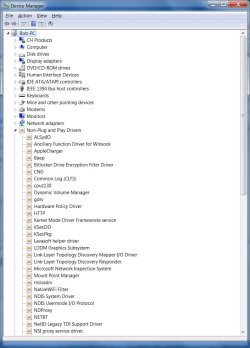
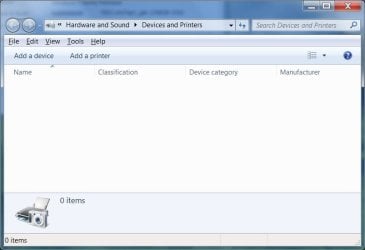
For info, the printer is not displayed in Device Manager (Hidden Devices shown) and the 'Devices and Printers' is a blank page with "0 items" shown on the bottom left of the window.

I have in the past used CC Cleaner but not recently - discontinued sing it following advice from friends. I do not have Citrix on my PC. Also, I have tried the "Bluetooth" thing to no avail.

MS Troubleshooter does not identify any problem.
 

My Computer My Computer

Computer type
PC/Desktop
Computer Manufacturer/Model Number
Intel(R) Core(TM) i7 CPU 950 @ 3.07GHz
OS
Windows 7 Home Premium x64
CPU
i7
Motherboard
Gigabyte Technology Co., Ltd. X58A-UD3R
Memory
6.00 GB
Graphics Card(s)
Nvidia 5800GTX
Sound Card
(1) NVIDIA High Definition Audio (2) NVIDIA High Definitio
Hard Drives
(1) Corsair CSSD-F120GB2 ATA Device (2) SAMSUNG HD103SJ ATA Device
Antivirus
Microsoft security Essentials
Browser
Firefox
Thanks for the good news and great feedback.

I noticed on the Brother pages that Win8 had references to Devices and Printers, but Win7 only had references to Device Manager. Doesn't make much sense, but who knows what Brother coded specific to an OS.

This is indeed a sticky wicket. I think your solution of uninstalling and reinstalling was heading in the correct direction. You've taken some action in this thread that probably changed the outcome of your previous uninstall / reinstall.

I was going to regroup and suggest that all printers be uninstalled, followed by some cleanup and then connect (not install) the printers, one-by-one - checking the Devices and Printers as well as Device Manager.

I'll wait until I see what you see (screenshots)

cCleaner is generally a safe tool, it is not very aggressive in cleaning the registry (errs on the side of caution). Still, any operation on the registry can negatively affect a system.

Thanks for trying the suggestions, sorry that you still can't see printers in Devices and Printers.

Do you know which step allowed you to print Web pages? That might help other members - they won't have to use the shotgun approach :)

Bill
.
 

My Computer My Computer

Computer type
Laptop
Computer Manufacturer/Model Number
HP Pavilion dv6-6c10us
OS
x64 (6.3.9600) Win8.1 Pro & soon dual boot x64 (6.1.7601) Win7_SP1 HomePrem
CPU
AMD A6-3420M APU with Radeon(tm) HD Graphics
Motherboard
Hewlett-Packard 1805
Memory
6.00 GB
Graphics Card(s)
AMD Radeon(TM) HD 6520G
Sound Card
(1) AMD High Definition Audio Device (2) IDT High Definiti
Monitor(s) Displays
HP W2072a 20" LCD (1600 x 900) @ 60 Hz
Screen Resolution
1366 x 768 x 32 bits (4294967296 colors) @ 60 Hz
Hard Drives
ST640LM0 00 HM641JI SATA Disk Device
Keyboard
Logitech k520 wireless KB
Mouse
Logitech m320 wireless mouse (bundled with KB)
Internet Speed
15/5 | 54 MB Wireless 'n'
Antivirus
Realtime: Defender or Avast | On-demand: Malwarebytes, ESET
Browser
IE 11 on Win8, IE 10 on win 7
Other Info
Media: [Gimp, Audacity, VLC] || Comm: [WEmail 2012, Skype] || Productivity: [OpenOffice,| Textpad] || Utils: [Sysinternals, cCleaner, Speccy, Defraggler]

My Computer My Computer

Computer type
PC/Desktop
Computer Manufacturer/Model Number
Home made Desktop
OS
Windows 10 Pro. 64/ version 1709 Windows 7 Pro/64
CPU
Intel i7-6800K @ 4.3
Motherboard
ASUS X-99 Deluxe II
Memory
Corsair Platinum 16 gig @2400
Graphics Card(s)
EVGA GTX 1070 OC
Monitor(s) Displays
Asus 27" LED LCD/VE278Q
Screen Resolution
1920-1080 or 1280-720 HDMI
Hard Drives
INTEL SSD 730-240 Gb Sata 3.0/
PSU
EVGA Platium 1200W
Case
Phanteks Luxe Tempered Glass 8 fans/ one radiator
Cooling
XSPC/ Water Cooled CPU
Keyboard
Das 4 Professional
Mouse
Logitech M705/MX Anywhere 2-S
Internet Speed
100 mbits
Antivirus
Microsoft Security Essentials/ Malwarebytes Premium 3.0/ SAS
Browser
I.E. 11 default/Firefox/ ISP Time Warner Cable/Spectrum
Other Info
LG BluRay Burner/
Sound system-KLipsch-THX/
Icy Dock ssd Hot Swap bays.
Hi Guys,

Delving into the unknown (for me), attempting to upload the screenshots you requested. Hope it works!

DM1.jpg

DM2.jpg

D&P.jpg

Code:
Diagnostic Report (1.9.0027.0):
-----------------------------------------
Windows Validation Data-->
 
Validation Code: 0
Cached Online Validation Code: 0x0
Windows Product Key: *****-*****-G92TK-H9977-VJVG3
Windows Product Key Hash: S4TICxcrxNXb54J/Q7kFEnZawCE=
Windows Product ID: 00359-OEM-8703262-20515
Windows Product ID Type: 3
Windows License Type: OEM System Builder
Windows OS version: 6.1.7601.2.00010300.1.0.003
ID: {A28406AC-772B-4955-A2E1-682BAA62FDAB}(3)
Is Admin: Yes
TestCab: 0x0
LegitcheckControl ActiveX: N/A, hr = 0x80070002
Signed By: N/A, hr = 0x80070002
Product Name: Windows 7 Home Premium
Architecture: 0x00000009
Build lab: 7601.win7sp1_gdr.130828-1532
TTS Error: 
Validation Diagnostic: 
Resolution Status: N/A
 
Vista WgaER Data-->
ThreatID(s): N/A, hr = 0x80070002
Version: N/A, hr = 0x80070002
 
Windows XP Notifications Data-->
Cached Result: N/A, hr = 0x80070002
File Exists: No
Version: N/A, hr = 0x80070002
WgaTray.exe Signed By: N/A, hr = 0x80070002
WgaLogon.dll Signed By: N/A, hr = 0x80070002
 
OGA Notifications Data-->
Cached Result: N/A, hr = 0x80070002
Version: N/A, hr = 0x80070002
OGAExec.exe Signed By: N/A, hr = 0x80070002
OGAAddin.dll Signed By: N/A, hr = 0x80070002
 
OGA Data-->
Office Status: 100 Genuine
Microsoft Office Home and Student 2007 - 100 Genuine
OGA Version: N/A, 0x80070002
Signed By: N/A, hr = 0x80070002
Office Diagnostics: 025D1FF3-364-80041010_025D1FF3-229-80041010_025D1FF3-230-1_025D1FF3-517-80040154_025D1FF3-237-80040154_025D1FF3-238-2_025D1FF3-244-80070002_025D1FF3-258-3_E2AD56EA-765-d003_E2AD56EA-766-0_E2AD56EA-134-80004005_E2AD56EA-765-b01a_E2AD56EA-766-0_E2AD56EA-148-80004005_16E0B333-89-80004005_B4D0AA8B-1029-80004005
 
Browser Data-->
Proxy settings: N/A
User Agent: Mozilla/4.0 (compatible; MSIE 8.0; Win32)
Default Browser: C:\Program Files (x86)\Mozilla Firefox\firefox.exe
Download signed ActiveX controls: Prompt
Download unsigned ActiveX controls: Disabled
Run ActiveX controls and plug-ins: Allowed
Initialize and script ActiveX controls not marked as safe: Disabled
Allow scripting of Internet Explorer Webbrowser control: Disabled
Active scripting: Allowed
Script ActiveX controls marked as safe for scripting: Allowed
 
File Scan Data-->
 
Other data-->
Office Details: <GenuineResults><MachineData><UGUID>{A28406AC-772B-4955-A2E1-682BAA62FDAB}</UGUID><Version>1.9.0027.0</Version><OS>6.1.7601.2.00010300.1.0.003</OS><Architecture>x64</Architecture><PKey>*****-*****-*****-*****-VJVG3</PKey><PID>00359-OEM-8703262-20515</PID><PIDType>3</PIDType><SID>S-1-5-21-759514354-3991410152-1130044811</SID><SYSTEM><Manufacturer>Gigabyte Technology Co., Ltd.</Manufacturer><Model>X58A-UD3R</Model></SYSTEM><BIOS><Manufacturer>Award Software International, Inc.</Manufacturer><Version>FB</Version><SMBIOSVersion major="2" minor="4"/><Date>20100824000000.000000+000</Date></BIOS><HWID>81BF3007018400FE</HWID><UserLCID>0C09</UserLCID><SystemLCID>0409</SystemLCID><TimeZone>AUS Eastern Standard Time(GMT+10:00)</TimeZone><iJoin>0</iJoin><SBID><stat>3</stat><msppid></msppid><name></name><model></model></SBID><OEM/><GANotification/></MachineData><Software><Office><Result>100</Result><Products><Product GUID="{91120000-002F-0000-0000-0000000FF1CE}"><LegitResult>100</LegitResult><Name>Microsoft Office Home and Student 2007</Name><Ver>12</Ver><Val>327A3C59C0C3F34</Val><Hash>iFbCR8AeTzYwq4uxC47+ozPMUC0=</Hash><Pid>81602-922-8347661-68165</Pid><PidType>1</PidType></Product></Products><Applications><App Id="16" Version="12" Result="100"/><App Id="18" Version="12" Result="100"/><App Id="1B" Version="12" Result="100"/><App Id="A1" Version="12" Result="100"/></Applications></Office></Software></GenuineResults> 
 
Spsys.log Content: 0x80070002
 
Licensing Data-->
Software licensing service version: 6.1.7601.17514
 
Name: Windows(R) 7, HomePremium edition
Description: Windows Operating System - Windows(R) 7, OEM_COA_NSLP channel
Activation ID: 586bc076-c93d-429a-afe5-a69fbc644e88
Application ID: 55c92734-d682-4d71-983e-d6ec3f16059f
Extended PID: 00359-00174-032-620515-02-3081-7600.0000-3402010
Installation ID: 003565332956252321876642257341175171278623893610027891
Processor Certificate URL: [URL]http://go.microsoft.com/fwlink/?LinkID=88338[/URL]
Machine Certificate URL: [URL]http://go.microsoft.com/fwlink/?LinkID=88339[/URL]
Use License URL: [URL]http://go.microsoft.com/fwlink/?LinkID=88341[/URL]
Product Key Certificate URL: [URL]http://go.microsoft.com/fwlink/?LinkID=88340[/URL]
Partial Product Key: VJVG3
License Status: Licensed
Remaining Windows rearm count: 4
Trusted time: 6/03/2014 8:00:28 PM
 
Windows Activation Technologies-->
HrOffline: 0x00000000
HrOnline: 0x00000000
HealthStatus: 0x0000000000000000
Event Time Stamp: 2:19:2014 13:01
ActiveX: Registered, Version: 7.1.7600.16395
Admin Service: Registered, Version: 7.1.7600.16395
HealthStatus Bitmask Output:
 
 
HWID Data-->
HWID Hash Current: OgAAAAEABgABAAEAAgABAAAAAgABAAEAonb0sVvHwtKqf/oBGr0IhcKPZHDC6nyHwo+Q4WrY/l7qgg==
 
OEM Activation 1.0 Data-->
N/A
 
OEM Activation 2.0 Data-->
BIOS valid for OA 2.0: yes, but no SLIC table
Windows marker version: N/A
OEMID and OEMTableID Consistent: N/A
BIOS Information: 
ACPI Table Name OEMID Value OEMTableID Value
APIC GBT GBTUACPI
FACP GBT GBTUACPI
HPET GBT GBTUACPI
MCFG GBT GBTUACPI
EUDS GBT 
MATS GBT 
TAMG GBT GBT B0
SSDT INTEL PPM RCM
 
Last edited by a moderator:

My Computer My Computer

Computer type
PC/Desktop
Computer Manufacturer/Model Number
Intel(R) Core(TM) i7 CPU 950 @ 3.07GHz
OS
Windows 7 Home Premium x64
CPU
i7
Motherboard
Gigabyte Technology Co., Ltd. X58A-UD3R
Memory
6.00 GB
Graphics Card(s)
Nvidia 5800GTX
Sound Card
(1) NVIDIA High Definition Audio (2) NVIDIA High Definitio
Hard Drives
(1) Corsair CSSD-F120GB2 ATA Device (2) SAMSUNG HD103SJ ATA Device
Antivirus
Microsoft security Essentials
Browser
Firefox
Knowing more about your system would be helpful also.
Use these two tutorials.
Look at my specs they should give you a idea.

I have requested some friends to take a look at your log.
They live in different parts of the world so it might take just a little while. Hang in there.

By Brink:

http://www.sevenforums.com/tutorials/180324-system-info-see-your-system-specs.html

By Kari:

http://www.sevenforums.com/tutorials/311593-speccy-publish-snapshot-your-system-specs.html

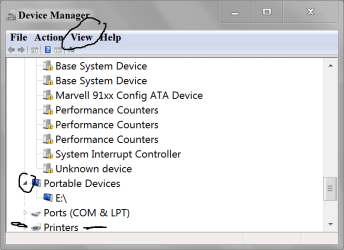
Are you sure when you are in Device Manager you go to View and select
Show Hidden Devices?
Example:

Device manger TODAY.PNG
 
Last edited:

My Computer My Computer

Computer type
PC/Desktop
Computer Manufacturer/Model Number
Home made Desktop
OS
Windows 10 Pro. 64/ version 1709 Windows 7 Pro/64
CPU
Intel i7-6800K @ 4.3
Motherboard
ASUS X-99 Deluxe II
Memory
Corsair Platinum 16 gig @2400
Graphics Card(s)
EVGA GTX 1070 OC
Monitor(s) Displays
Asus 27" LED LCD/VE278Q
Screen Resolution
1920-1080 or 1280-720 HDMI
Hard Drives
INTEL SSD 730-240 Gb Sata 3.0/
PSU
EVGA Platium 1200W
Case
Phanteks Luxe Tempered Glass 8 fans/ one radiator
Cooling
XSPC/ Water Cooled CPU
Keyboard
Das 4 Professional
Mouse
Logitech M705/MX Anywhere 2-S
Internet Speed
100 mbits
Antivirus
Microsoft Security Essentials/ Malwarebytes Premium 3.0/ SAS
Browser
I.E. 11 default/Firefox/ ISP Time Warner Cable/Spectrum
Other Info
LG BluRay Burner/
Sound system-KLipsch-THX/
Icy Dock ssd Hot Swap bays.
My friend looked at your Dia log and it looks fine.
I have been doing some more research and found a couple of things.

***In Services

Print Spooler is set to auto.

start Bluetooth services (and set it to automatic
) (All of them)

Then reboot and check setting again.
 

My Computer My Computer

Computer type
PC/Desktop
Computer Manufacturer/Model Number
Home made Desktop
OS
Windows 10 Pro. 64/ version 1709 Windows 7 Pro/64
CPU
Intel i7-6800K @ 4.3
Motherboard
ASUS X-99 Deluxe II
Memory
Corsair Platinum 16 gig @2400
Graphics Card(s)
EVGA GTX 1070 OC
Monitor(s) Displays
Asus 27" LED LCD/VE278Q
Screen Resolution
1920-1080 or 1280-720 HDMI
Hard Drives
INTEL SSD 730-240 Gb Sata 3.0/
PSU
EVGA Platium 1200W
Case
Phanteks Luxe Tempered Glass 8 fans/ one radiator
Cooling
XSPC/ Water Cooled CPU
Keyboard
Das 4 Professional
Mouse
Logitech M705/MX Anywhere 2-S
Internet Speed
100 mbits
Antivirus
Microsoft Security Essentials/ Malwarebytes Premium 3.0/ SAS
Browser
I.E. 11 default/Firefox/ ISP Time Warner Cable/Spectrum
Other Info
LG BluRay Burner/
Sound system-KLipsch-THX/
Icy Dock ssd Hot Swap bays.
Agree with Layback Bear. Setting the "Bluetooth Support Service" to automatic in Services solved this issue for other people in the Forum.
 

My Computer My Computer

Computer type
PC/Desktop
Computer Manufacturer/Model Number
Home Built - Jan 2013
OS
Windows 7 64 Bit Home Premium SP1
CPU
i7-3820
Motherboard
Asus P9X79-PRO - Bios 4608
Memory
GSkill F3-14900CL9Q - 16GB
Graphics Card(s)
EVGA GeForce GTX660 - Driver 352.86
Sound Card
On board Realtek ALC898
Monitor(s) Displays
Acer S271HL
Screen Resolution
1920 x 1080
Hard Drives
#1- Samsung 840 Pro Series
#2- Western Digital WD1002FAEX Sata3 Black
#3- Western Digital WD1002FAEX Sata3 Black
PSU
Corsair CMPSU-850TX-V2 - 850 watt (by Seasonic)
Case
Corsair Obsidian 550D
Cooling
Standard 3 120mm case fans, Cooler Master Hyper 212 EVO
Keyboard
MS KC-0405
Mouse
Intellimouse 5-button
Internet Speed
56 Mbits/Sec (on a good day)
Antivirus
Avast & Malwarebytes
Browser
Firefox
Other Info
Asus DVD - DRW-24B1ST 24X
Thanks All for your continued help. This is an education for me.

OK. My screenshot of Device Manager is shown in "Show Hidden Devices" mode. Although not shown in the screenshot I have previously expanded all device lists and can find no reference to 'Printer' in any sub-list.

Bluetooth services is set to start/auto and Print Spooler the same. I have stopped and restarted both and ensured set to auto and rebooted but this has no effect.

I'll post details of my system later today.
 

My Computer My Computer

Computer type
PC/Desktop
Computer Manufacturer/Model Number
Intel(R) Core(TM) i7 CPU 950 @ 3.07GHz
OS
Windows 7 Home Premium x64
CPU
i7
Motherboard
Gigabyte Technology Co., Ltd. X58A-UD3R
Memory
6.00 GB
Graphics Card(s)
Nvidia 5800GTX
Sound Card
(1) NVIDIA High Definition Audio (2) NVIDIA High Definitio
Hard Drives
(1) Corsair CSSD-F120GB2 ATA Device (2) SAMSUNG HD103SJ ATA Device
Antivirus
Microsoft security Essentials
Browser
Firefox
Not only set to auto but also check to see if they are started after a restart.
 

My Computer My Computer

Computer type
PC/Desktop
Computer Manufacturer/Model Number
Home made Desktop
OS
Windows 10 Pro. 64/ version 1709 Windows 7 Pro/64
CPU
Intel i7-6800K @ 4.3
Motherboard
ASUS X-99 Deluxe II
Memory
Corsair Platinum 16 gig @2400
Graphics Card(s)
EVGA GTX 1070 OC
Monitor(s) Displays
Asus 27" LED LCD/VE278Q
Screen Resolution
1920-1080 or 1280-720 HDMI
Hard Drives
INTEL SSD 730-240 Gb Sata 3.0/
PSU
EVGA Platium 1200W
Case
Phanteks Luxe Tempered Glass 8 fans/ one radiator
Cooling
XSPC/ Water Cooled CPU
Keyboard
Das 4 Professional
Mouse
Logitech M705/MX Anywhere 2-S
Internet Speed
100 mbits
Antivirus
Microsoft Security Essentials/ Malwarebytes Premium 3.0/ SAS
Browser
I.E. 11 default/Firefox/ ISP Time Warner Cable/Spectrum
Other Info
LG BluRay Burner/
Sound system-KLipsch-THX/
Icy Dock ssd Hot Swap bays.
Back
Top