3TB Hard disc became "unallocated", how to recover?

clkdiv

New member
Local time
6:42 AM
Messages
7
Hello! I recently bought a 3TB external USB hard disk, which suddenly did not want to start. When switching on, I could here the disk try to start to rotate, but it didn't, as if the provided power was too weak or so.

I unscrewed the disk from its housing and put the housing with its S-ATA-to-USB controller aside and plugged the disk - a "ST3000DM001-1CH166, Seagate Barracuda" - to a PC cases S-ATA Port, now it really started. Then, as soon as I started the disk manager, I was asked to "activate" the disk, which I did (maybe this was a fault?)

Now I have activated the disk, but in disk manager there are two partitions showing up now:

  • 2048 GB unallocated,
  • 746,54 GB unallocated

I installed EaseUS Data recovery wizard (to my systems hard disk of course) and started a recovery search, which took about 48 hours. I got a complete list of all files that where/are on the disk and obviously I can recover all, actually I started the recovery to another disk. But the complete folder structure would be lost, if recovering the files this way, all would be saved in one huge folder "NTFS lost files", or so. This makes this kind of recovery 99% useless for me.

Now EaseUS is able to save a once done search result and load it later, so one only once has to run that time consuming search. So I saved the result and interrupted the even much more time consuming recovery.

At least I know now that the files are all on the disk, and also is the folder structure, as I was able to see it in EaseUS too.

Now here is my question:

1.: Is there any way to recover the former "3TB-one-partition-state" without destroying the data on the disk? And 2.: Just for my understanding: Why do I see two partitions now? Is Windows 7 unable to deal with 3TB partitions at all?

This is my setup: Normal home desktop (self built) with 8GB RAM, Quad-Core @2,4 Ghz, no Raid or special stuff, Windows 7 Ultimate.

Thank you very, very much for your help, I really appreciate it!
 

My Computer My Computer

At a glance

Windows 7 Ultimate
Computer type
PC/Desktop
Computer Manufacturer/Model Number
self built
OS
Windows 7 Ultimate
Wait for more comments, but I think your better move would have been to attempt to recover the original partition, rather than immediately try to recover the files.

If that disk originally had a single 3 TB partition, it was initialized as "GPT", not the more commonly found MBR. MBR partitions are limited to 2.2 TB.

That EaseUS tool you have may or may not have partition recovery capability. The standard recommendation on this forum for partition recovery is to use Partition Wizard:

Free download Magic Partition Manager Software, partition magic alternative, free partition magic, partition magic Windows 7 and server partition software - Partition Wizard Online

You might download that tool, but I'd wait for more comments before using it or EaseUS.
 

My Computer My Computer

At a glance

Windows 7 Home Premium SP1, 64-bitIntel Skylake i5-6600K, not overclocked8 GB HyperX DDR4-2666 (2 x 4 GB)none; graphics are integrated on CPU
Computer type
PC/Desktop
Computer Manufacturer/Model Number
Ignatz Special; 4 speed manual gearbox; factory air conditioning; one of one
OS
Windows 7 Home Premium SP1, 64-bit
CPU
Intel Skylake i5-6600K, not overclocked
Motherboard
AsRock Z170M Extreme 4, micro ATX
Memory
8 GB HyperX DDR4-2666 (2 x 4 GB)
Graphics Card(s)
none; graphics are integrated on CPU
Sound Card
onboard: Realtek ALC1150; external: USB Behringer UF0-202
Monitor(s) Displays
Dell S2340M 23 inch IPS
Screen Resolution
1600 x 900
Hard Drives
System: Crucial MX100 series SSD, 128 GB;
Data: Samsung Spinpoint 103SJ, 1 TB;
Backup: WD Caviar Green WD30EZRX-00D8PB0, 3 TB
PSU
Rosewill SilentNight 500 watt fanless, semi-modular
Case
Antec Solo II
Cooling
Noctua NH-U12S; Noctua F12 intake, Noctua S12A exhaust
Keyboard
Microsoft 200 6JH-00001 USB
Mouse
Dell or Microsoft optical wired; USB
Antivirus
Microsoft Security Essentials and Malwarebytes Premium
Browser
Pale Moon
Other Info
All fans PWM; speeds at idle: CPU circa 500 rpm; intake circa 600 rpm; exhaust circa 600 rpm; CPU temps 27 idle and 47 C load in a warm room (27 C/81 F) when running Intel Extreme Tuning Utility stress test.
Yes, ignatzatsonic is right.

Run Partition Recovery Wizard in Partition Wizard Home Edition 8.1.1 ( As a matter of fact, you could have done that even without taking it out of the enclosure. Anyway ....)

Please follow the steps as shown in my post #3 in this thread. http://www.sevenforums.com/hardware...-not-initialized-unallocated.html#post2386144

When after the quick scan the screen shows all your partitions, post a screenshot of the same and do not proceed without further instructions from this end. ( Do not worry and do things yourself if such instructions do not come immediately. It will all depend when I log on next and see your screenshot. If need be you can close Partition Wizard (cancel) and rerun it after you get instructions.Cancelling will not alter anything.)

When you initialised it you perhaps initialised it as an MBR disk which can only see 2TB. That is why the remaining space is shown unallocated.

We have to see the partitions shown and choose the right ones to restore the GPT structure.
 

My Computer My Computer

At a glance

Windows 7 Home Premium 32 bit
OS
Windows 7 Home Premium 32 bit
Jumanji:

I just spent at least an hour reading through that link you provided above.

Can you clarify a couple of points:

Regarding Partition Wizard usage for partition recovery: When is "full scan" recommended? I notice in that thread that you recommended "quick scan". It showed "bad disk" and the thread then veered toward data recovery rather than partition recovery, with no attempt at "full scan".

For data recovery per se, is PhotoRec still the best free alternative and are its results as good as the $79 Ontrack EasyRecovery Professional? Or MiniTool Power Data Recovery?
 

My Computer My Computer

At a glance

Windows 7 Home Premium SP1, 64-bitIntel Skylake i5-6600K, not overclocked8 GB HyperX DDR4-2666 (2 x 4 GB)none; graphics are integrated on CPU
Computer type
PC/Desktop
Computer Manufacturer/Model Number
Ignatz Special; 4 speed manual gearbox; factory air conditioning; one of one
OS
Windows 7 Home Premium SP1, 64-bit
CPU
Intel Skylake i5-6600K, not overclocked
Motherboard
AsRock Z170M Extreme 4, micro ATX
Memory
8 GB HyperX DDR4-2666 (2 x 4 GB)
Graphics Card(s)
none; graphics are integrated on CPU
Sound Card
onboard: Realtek ALC1150; external: USB Behringer UF0-202
Monitor(s) Displays
Dell S2340M 23 inch IPS
Screen Resolution
1600 x 900
Hard Drives
System: Crucial MX100 series SSD, 128 GB;
Data: Samsung Spinpoint 103SJ, 1 TB;
Backup: WD Caviar Green WD30EZRX-00D8PB0, 3 TB
PSU
Rosewill SilentNight 500 watt fanless, semi-modular
Case
Antec Solo II
Cooling
Noctua NH-U12S; Noctua F12 intake, Noctua S12A exhaust
Keyboard
Microsoft 200 6JH-00001 USB
Mouse
Dell or Microsoft optical wired; USB
Antivirus
Microsoft Security Essentials and Malwarebytes Premium
Browser
Pale Moon
Other Info
All fans PWM; speeds at idle: CPU circa 500 rpm; intake circa 600 rpm; exhaust circa 600 rpm; CPU temps 27 idle and 47 C load in a warm room (27 C/81 F) when running Intel Extreme Tuning Utility stress test.
I referred to only my post in that thread on how to use Partition Wizard which the OP can use. The rest of the thread and what happened is specific to that thread which is of no consequence to the OP here. The OP here need not look into any other posts in that thread.( I hardly remember any of it now :))

OK, regarding the Quick Scan and Full Scan the general recommendation is that if a Quick Scan fails to show the partitions, run a Full Scan. One is a Fast Sweep and the other is a sector by sector read to ascertain the beginning of a partition if a fast Sweep somehow fails to identify the beginning of the partition. So far I have not come across a case where a Quick Scan failed that would have necessitated a Full Scan.

If Partiton Wizard shows a disk as Bad Disk even a Quick Scan will not run. May be that is the reason why I cut it and recommended Data Recovery after seeing that PW shows the disk as Bad Disk.

From all the user reports I have seen here, I have come to the conclusion that if PW shows a disk as Bad Disk no data recovery also works.

I would still recommend a Data Recovery procedure after pointing out the above, just to complete the process to satisfy oneself that he has done everything that he could possibly do.

I have no brush with OnTrack paid version of the Data Recovery Software and so cannot comment on it. PhotoRec is free and has recovered data even where other paid software has failed.

Stiverrom will vouch for it.:)

http://www.sevenforums.com/software/271545-best-recovery-software-windows-7-a-2.html#post2263441
 

My Computer My Computer

At a glance

Windows 7 Home Premium 32 bit
OS
Windows 7 Home Premium 32 bit
OK; thanks for additional detail.
 

My Computer My Computer

At a glance

Windows 7 Home Premium SP1, 64-bitIntel Skylake i5-6600K, not overclocked8 GB HyperX DDR4-2666 (2 x 4 GB)none; graphics are integrated on CPU
Computer type
PC/Desktop
Computer Manufacturer/Model Number
Ignatz Special; 4 speed manual gearbox; factory air conditioning; one of one
OS
Windows 7 Home Premium SP1, 64-bit
CPU
Intel Skylake i5-6600K, not overclocked
Motherboard
AsRock Z170M Extreme 4, micro ATX
Memory
8 GB HyperX DDR4-2666 (2 x 4 GB)
Graphics Card(s)
none; graphics are integrated on CPU
Sound Card
onboard: Realtek ALC1150; external: USB Behringer UF0-202
Monitor(s) Displays
Dell S2340M 23 inch IPS
Screen Resolution
1600 x 900
Hard Drives
System: Crucial MX100 series SSD, 128 GB;
Data: Samsung Spinpoint 103SJ, 1 TB;
Backup: WD Caviar Green WD30EZRX-00D8PB0, 3 TB
PSU
Rosewill SilentNight 500 watt fanless, semi-modular
Case
Antec Solo II
Cooling
Noctua NH-U12S; Noctua F12 intake, Noctua S12A exhaust
Keyboard
Microsoft 200 6JH-00001 USB
Mouse
Dell or Microsoft optical wired; USB
Antivirus
Microsoft Security Essentials and Malwarebytes Premium
Browser
Pale Moon
Other Info
All fans PWM; speeds at idle: CPU circa 500 rpm; intake circa 600 rpm; exhaust circa 600 rpm; CPU temps 27 idle and 47 C load in a warm room (27 C/81 F) when running Intel Extreme Tuning Utility stress test.
Hello and thanks a lot for your answers and sorry for being off so long.

I followed your suggestions, downloaded PW and started a recovery quick scan now. First thing I noticed is that PW does NOT see the disc divided into two partitions but as a 3TB unallocated one. From my guess this could be a good sign, no?

As soon as the quick scan is done I'll post the screen shot here. Thanks a lot! Martin
 

My Computer My Computer

At a glance

Windows 7 Ultimate
Computer type
PC/Desktop
Computer Manufacturer/Model Number
self built
OS
Windows 7 Ultimate
Yes, till it can find the partition/s the preview diskmap will show the 3TB as unallocated.

When the partition/s are shown and you select the partition/s the preview should show you the disk as it existed before .

Post the screenshot with the preview disk map after you select the partition/s by putting a check mark against them.
 

My Computer My Computer

At a glance

Windows 7 Home Premium 32 bit
OS
Windows 7 Home Premium 32 bit
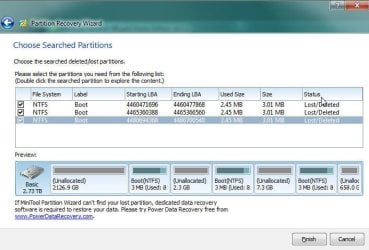
Hello! The scan is done now, but unfortunately it does not look that good!?

First image shows PW without any partrition selected, second image with all selected.

Do you think there is a chance to reactivate the lost 3GB partition?

Thank you very much! Martin
 

Attachments

  • lost_partitions.jpg
    lost_partitions.jpg
    43.6 KB · Views: 10
  • lost_partitions2.jpg
    lost_partitions2.jpg
    49.2 KB · Views: 11

My Computer My Computer

At a glance

Windows 7 Ultimate
Computer type
PC/Desktop
Computer Manufacturer/Model Number
self built
OS
Windows 7 Ultimate
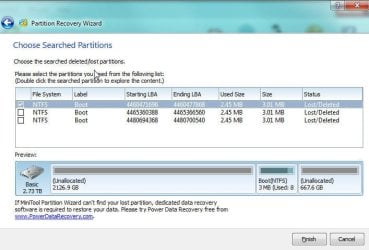
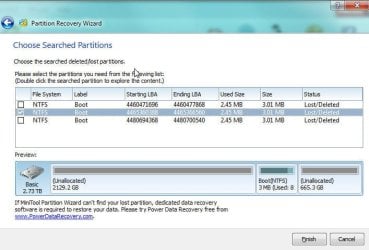
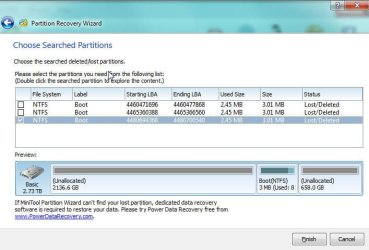
Yes, it doesn't look good. It appears that the disk had undergone three format attempts giving rise to three boots. Only one of them may represent your last known state.(And you must be knowing better how your HDD looked like in its last working state.)

Now do not select all. Select one at a time and look at the disk map.

Does any one show your full disk without any unallocated space? That should be the right one.

I would suggest you post the three screenshots with only one boot selected in the order shown. Let me see all the three pictures before deciding what should be done.

It is already time for me to retire and I shall see it only after another six hours - that is if I wake up early.:D
 

My Computer My Computer

At a glance

Windows 7 Home Premium 32 bit
OS
Windows 7 Home Premium 32 bit
Hello and thanks. The three partitions found all span only a small part of the disk. Here are the three screens:
 

Attachments

  • 3.jpg
    3.jpg
    45.2 KB · Views: 5
  • 4.jpg
    4.jpg
    45.6 KB · Views: 4
  • 5.jpg
    5.jpg
    45.5 KB · Views: 4

My Computer My Computer

At a glance

Windows 7 Ultimate
Computer type
PC/Desktop
Computer Manufacturer/Model Number
self built
OS
Windows 7 Ultimate
OK, Partition Recovery Wizard is not going to work here and rewrite the correct partition table.

You may try to recover data either using PhotoRec or TestDisk.

If you are going to use Testdisk, exercise caution not to give any write command. You will use it only to copy the found files to another external drive of sufficient capacity which should be plugged in before you run TestDisk.

PhotoRec is much safer in that you can't give any write command at all :).

( It still beats me why the Boot partition and another small partition shows up at the end.I have always been advocating for quite sometime, given that we don't yet know how well the conventional partitioning/formatting software can deal with GPT drives, anyone having a GPT drive should save the first few sectors where the Protective MBR, the GPT header and the GPT Table resides. Then when any mishap like this occurs merely by restoring the saved sectors one could easily resurrect the drive without going through the timeconsuming data recovery procedures like this..)
 

My Computer My Computer

At a glance

Windows 7 Home Premium 32 bit
OS
Windows 7 Home Premium 32 bit
I reread your first post again since I had lost track of it in two days.:)

If your intention is to keep the folder structure in-tact as is evident from it, then I have to alter my previous recommendation. In such a case you should go in for TestDisk. But exercise caution. If Test Disk finds the partition, just view the folders/files and copy them. ( Do not perform any write operation with Test Disk, until you have recovered all and find all the copied files are OK.)

And to answer your question, whether it would be possible now to resurrect the HDD without performing a data recovery operation:

If only you hadn't tried Easus Data Recovery, it could have been possible but after that it is a question mark - for we do not know how it had manipulated the drive during the data recovery process.

You can still try just by replacing the first sector which you had initialised as an MBR disk with the Protective MBR of a GPT drive which is the same for all GPT drives.
 

My Computer My Computer

At a glance

Windows 7 Home Premium 32 bit
OS
Windows 7 Home Premium 32 bit
Here is how I did it using Bootice.

http://www.sevenforums.com/installa...ng-using-diskpart-clear-help.html#post2729718

In your case I shall write all zeroes to the first sector and save it. That will take away the normal MBR which you had written by initialising it as an MBR disk.

Then I will populate it with relevant data that applies to a GPT disk Protective MBR as shown in the first screenshot in the above reference and save it.

Provided nothing else has changed in your HDD that should bring it back - your HDD - to the original state.

Hmmm...... if only you had come here with your problem in the first instance without doing anything on it or even immediately after initialising it with MBR, this would have most definitely worked, barring some unforeseen or perceived cause.
 
Last edited:

My Computer My Computer

At a glance

Windows 7 Home Premium 32 bit
OS
Windows 7 Home Premium 32 bit

My Computers My Computers

  • At a glance

    7 X64i5 84002x8gb 3200mhz
    Computer type
    PC/Desktop
    OS
    7 X64
    CPU
    i5 8400
    Motherboard
    gigabyte b365m ds3h
    Memory
    2x8gb 3200mhz
    Hard Drives
    various
    PSU
    pure power 11 400w cm
    Case
    Coolermaster
    Cooling
    cryorig m9i
  • At a glance

    7x64g54008gb ddr4 2400
    Computer type
    PC/Desktop
    OS
    7x64
    CPU
    g5400
    Motherboard
    ga b365m ds3h
    Memory
    8gb ddr4 2400
    PSU
    xfx pro 450w
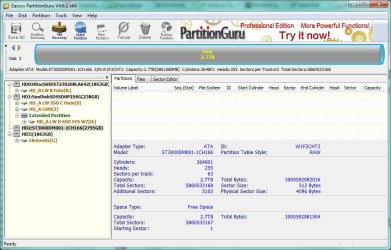
Thanks a lot for your replies. At the moment I am running PartitionGuru to see what this program finds. Attached is the screen shot of the disks as they are seen by it.

I had tried with testdisk before, but ran it in "user-mode", instead of starting it with admin rights. Therefore it only showed one disk at all, one that is not involved into the disaster here at all.

Now I started the scan with PartitionGuru, which takes some hours too, and afterwards had the idea to start testdisk with admin rights. Now it sees the lost harddisk. Now I did not want to break PartitionGuru, but as soon as I have the results of that I will post it here to you again to hear what you say to this.

Attached is the screen shot of partition image how it sees the disk.

Thank you very much again for your help, I really appreciate it. Thanks!
 

Attachments

  • 7.jpg
    7.jpg
    93.4 KB · Views: 2

My Computer My Computer

At a glance

Windows 7 Ultimate
Computer type
PC/Desktop
Computer Manufacturer/Model Number
self built
OS
Windows 7 Ultimate
External 3TB drives are usually NTFS formatted and recognized at~2.7TB through special driver even by older OS's this suggests MBR.To make it work as internal for the os you have to have it as GPT. So best to ask manufacturer first about methods to recover. Perhaps one of the wizards converting MBR to GPT but i have no experience.

Where Guru shows partition table raw it should be MBR
and both Sector size and Physical sector size 4K. I'm not 100%sure though.

P.
 
Last edited:

My Computer My Computer

At a glance

win8.1x64
Computer type
PC/Desktop
OS
win8.1x64
I have been trying with testdisk and photorec now, testdisk does not find more partition than the orther programs, and photorec will restore all files into a single directory too. This is what I am doing at the moment. On the other hand I am seriously considering buying MiniTool Power Data Recovery, because this program obviously would restore at least a big bunch of files to the former directory structure.

Though it is expensive... Still thinking about it...
 

My Computer My Computer

At a glance

Windows 7 Ultimate
Computer type
PC/Desktop
Computer Manufacturer/Model Number
self built
OS
Windows 7 Ultimate
As told in my post #14, In testdisk your intention should only be to copy the files shown in the partition of your interest and not rewrite the partition table.

So did it show the partition of your interest?

Were you able to see the files in it?
 

My Computer My Computer

At a glance

Windows 7 Home Premium 32 bit
OS
Windows 7 Home Premium 32 bit
Hello and thanks for your reply.

Testdisk did not see any partitions that might have been the one to restore. There were some with 3MB size, some with 300 MB or so.

At the moment I am restoring the files an the structure with Minitool PowerData Recovery, which does it´s job very well. It promises to restore 2TB to it´s original folder structure, that might be the complete content of the disk.

But nevertheless: Since until now nothing has been written to the disk at all I would like to try to restore the complete disk after having restored whatever files I could. I would like to try your "replacing the first sector"-advice for that. If you don't mind I would like to get some more help when trying.

Thanks a lot! Martin.
 

My Computer My Computer

At a glance

Windows 7 Ultimate
Computer type
PC/Desktop
Computer Manufacturer/Model Number
self built
OS
Windows 7 Ultimate
Back
Top