External Hard Drive: detected but does not show up in folder

chelsi001

New member
Local time
5:17 PM
Messages
5
My external hard drive (WD Passport 0748) can be detected, but doesn't show up in My Computer.
I tried everything I saw on the internet but to no avail. I need these files so badly! Help :(

It shows up in my Device Manager. Right clicked it and uninstalled it, plugged it back. It gets detected (again) but still, it doesnt show up in My Computer.

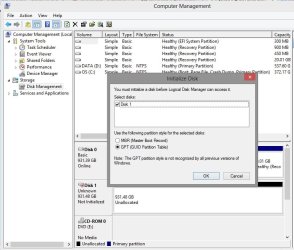
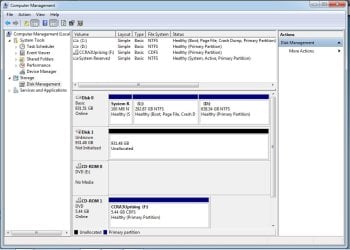
I went to Disk Management. It's unknown, not initialized and unallocated with black line on top. What does that mean? (See jpg 1)

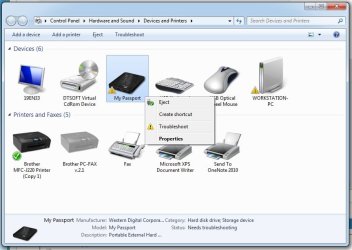
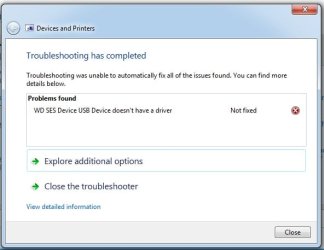
It shows up in Devices and Printers but it has a yellow triangle mark on it with "!". (See jpg 2) So I click troubleshoot. It says "The driver for WD SES Device USB Device is not installed. Install the latest driver for the device." Then I click "Apply this fix." Then it says "WD SES Device USB Device doesn't have a driver. Not fixed" (See jpg 3).

I plugged my external hard drive to my other computer. I did the same thing, but still it didn't work. It gets detected but won't show up in My Computer.
 

Attachments
  • 1.jpg
    1.jpg
    77.6 KB · Views: 2
  • 2.jpg
    2.jpg
    55.9 KB · Views: 2
  • 3.jpg
    3.jpg
    24.8 KB · Views: 71
Last edited:

My Computer My Computer

At a glance

Windows 8
Computer type
Laptop
OS
Windows 8
I have no clue but just curious.

Did it happen after you installed Daemon Tools?
 

My Computer My Computer

At a glance

Windows 7 Home Premium 32 bit
OS
Windows 7 Home Premium 32 bit
1.Do you have any other Virtual CDROM drive showing up in My Computer (Other than the one from Daemon Tools)?

2. What is the exact model Number of your Passport drive? If you can show it to me in the WD website all the more better.

3. Did your drive come with Smartware backup software and did you ever install it and played around with it, today, yesterday, the day before or anytime?

4. Have you installed the SES driver anytime before? Especially when you plugged it in for the first time after you purchased?

5. How old is the drive?

6. From when did this problem arise?

7. Do you remember anything you did - even anything which you may think is remotely connected with this - after which this problem has cropped up?

Answer to all these questions may perhaps bring someone else having the same drive as yours if they can help. You may not expect anything off-the-cuff on this problem and I shall come in only if I can get something flashing in my mind as I sleep over it. :)

EDIT: Before I go to sleep I can't but throw some cold water - however much I don't like to say that, I have to pull myself up - if your drive did not come with a Virtual CD, if your drive did not come with smartware, if you hadn't installed an SES driver anytime before, and it has been functional till this day , this happened all of a sudden, it wouldn't show up on any other computer too, it is quite likely that it is dead. Try to initialise it but do not initialise. If it throws up any error message like I/O error - confirmed.
 
Last edited:

My Computer My Computer

At a glance

Windows 7 Home Premium 32 bit
OS
Windows 7 Home Premium 32 bit
1.I'm sorry, I'm not really a techie person. What is a Virtual CDROM drive? I dont think I have other than Daemon Tools.

2. WD Support / Installation / My Passport / My Passport WDBBEP0010BSL-01

3. Yes it did come with a smartware but I never played with it cause I know nothing about it so I didnt do anything.

4. I dont remember if I did. But I just downloaded WD_SES_Driver_Setup_x64 for my hard drive and after I installed it, the yellow triangle with "!" in my hard drive's gone (when I went to Devices and Printers). I clicked troubleshoot and it says its fine.

5. I guess I got this a year ago maybe

6. This problem occurred yesterday. Last time I used my hard drive was last week and it was perfectly fine.

7. Nope, I dont think I did anything :(
 

My Computer My Computer

At a glance

Windows 8
Computer type
Laptop
OS
Windows 8
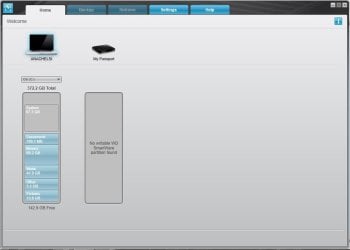
So I opened my WD Smartware and this came up. What does "No writable WD SmartWare partition found"?
 

Attachments

  • 1.jpg
    1.jpg
    30.8 KB · Views: 1

My Computer My Computer

At a glance

Windows 8
Computer type
Laptop
OS
Windows 8
When I go to Disk Management, this pops up. What should I do? "You must initialize the disk before logical disk manager can access it." What will happen if I initialize it? Will my files be deleted?
 

Attachments

  • 1.jpg
    1.jpg
    70.2 KB · Views: 1

My Computer My Computer

At a glance

Windows 8
Computer type
Laptop
OS
Windows 8
OK, It came with Smartware and you did install Smartware but never got into it. Am I right?

Now you installed the SES driver and apparently that requirement has been satisfied,

Are you able to access your drive now? If not describe what happens when you try to access the drive.

If your drive is visible now, please post a screenshot of how it appears in Windows Disk Management

http://www.sevenforums.com/tutorials/274797-disk-management-post-screen-capture-image.html

( Do not do anything with Smartware. There is a manual in WD website about Smartware and long back I had read it but remember nothing now.)
 

My Computer My Computer

At a glance

Windows 7 Home Premium 32 bit
OS
Windows 7 Home Premium 32 bit
OK our posts crossed.

Don't initialise now. Just cancel.

Let me think and come back after a while.

EDIT: Please post a full screenshot doing away the Console Tree and Action Pane by clicking on the Show/Hide buttons in the toolbar
 

My Computer My Computer

At a glance

Windows 7 Home Premium 32 bit
OS
Windows 7 Home Premium 32 bit
Me too!

I have the exactly the same probleme.
But the different is the situation.
in the evening, i try to download some file in my DDE. In the mind time i fell to sleep.
When i wake up i found my computer is on sleep mode.
And my DDE ......
like the you. I try to initialize but there a some error.
What can i do? i have important documents ....
 

My Computer My Computer

At a glance

Windows 7 Ultimate x64
Computer type
PC/Desktop
OS
Windows 7 Ultimate x64
Hi,
I do have a similar problem with my USB Flash Drive. I got my Flash Drive as part of my course and the contents are secured i cannot copy them. Somehow I broke my drive yesterday, but the UDP chip inside it is still fine. When I am trying to put all pieces together and insert it in the USB Port in computer, the USB flash drive is detected as CD-Drive. I dont know how to make it work again.

Also the drive is from the company called TrusCont publisher.

If you guys know how to fix this, it would be great.
 

My Computer My Computer

At a glance

Windows 7
Computer type
Laptop
Computer Manufacturer/Model Number
HP
OS
Windows 7
Last edited:

My Computer My Computer

At a glance

Windows 8.1 Professional x64Core 2 Duo 2GHz6GB
Computer type
Laptop
Computer Manufacturer/Model Number
Lenovo U330
OS
Windows 8.1 Professional x64
CPU
Core 2 Duo 2GHz
Memory
6GB
Found the fix, it's actually iTunes messed up WD Virtual CD 0748 USB Device Driver.
Uninstall iTunes, uninstall Virtual CD driver, rescan to reinstall works!

More infos here:
Code 19: Windows cannot start this hardware device because its configuration information (in the registry) is incomplete or damaged

That's a good catch. Those having WD HDDs that has the Smartware ( whether they are using it or not) and the Virtual CD ROM drive/driver may please note.

Thank you ctn for sharing this info on the forum.
 
Last edited:

My Computer My Computer

At a glance

Windows 7 Home Premium 32 bit
OS
Windows 7 Home Premium 32 bit
Back
Top