WD External HD - CHKDSK throwing "The drive detected a controller err"

hiteshjain5

New member
Local time
9:49 AM
Messages
4
WD External HD - CHKDSK throwing "The drive detected a controller err"

Hi,

This is my first post on the forum.

I'm having a very difficult time accessing my WD 1 TB Mypassport external drive. PLEASE HELP WITH DATA RECOVERY

I connected the drive using USB. Windows assigns it a drive letter but does NOT display the volume name. Neither does it displays the "free space and space used" information. When I try to click the drive for browsing folders, Windows Explorer just hangs.

I tried opening DiskManagement but that too does NOT display anything. When I disconnect the external drive, it shows up the internal HDD.

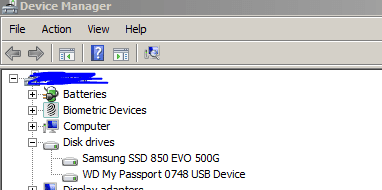
Under Device Manager, I can see that the drive is recognized as WD My Passport 0748 USB Device. Checked the drivers and its up-to-date.

I also tried to run minitools Partition Magic Wizard to see if it scans and displays the data but after 50% completion, I cancelled and tried to browse/view for any file. NO LUCK.

Finally, I started CHKDSK /R /F /X command, which has been running for 27 hours now and showing 10% complete. CHKDSK seems to be correcting error in indexes on stage 2 but that has been going on for over 20 hours. I see the light on the drive blinking and hear some light spinning sound.

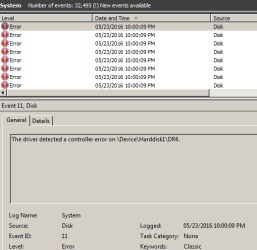
While CHKDSK is running, I check the Event Logs and see this message "The driver detected a controller error on \Device\Harddisk1\DR4." almost 50,000 times.

Can someone please help me recover/salvage the data? I have been thinking about using few other tools but don't want to interrupt CHKDSK command which surely is testing my patience.

Here are the tools I have been looking at:

The Recover4all data recovery software.
https://www.runtime.org/data-recovery-software.htm


Thanks a lot!
 

Attachments
  • DeviceManager.PNG
    DeviceManager.PNG
    5.2 KB · Views: 20
  • CHKDSK.PNG
    CHKDSK.PNG
    4.9 KB · Views: 20
  • EventLog.PNG
    EventLog.PNG
    7.3 KB · Views: 20

My Computer My Computer

At a glance

Windows 7 Ultimate 64 biti512 GB
Computer type
Laptop
Computer Manufacturer/Model Number
HP
OS
Windows 7 Ultimate 64 bit
CPU
i5
Memory
12 GB
Hard Drives
Samsung SSD
For whatever reason, do not interrupt Checkdisk even if it takes one week. If you interrupt Checkdisk in the middle while it is correcting, it will leave all your data disorganised making any data recovery impossible. If it aborts on its own, it is OK ( You have no control over it :D). In such an event please post a screenshot of the error message you got.

Report the condition of the drive after checkdisk completes.

Hope someone else will be able to offer you help. ( I can look into this thread only after my return from Spain around 12th June.)

( My own presumption at this stage is that your external drive is riddled with too many bad sectors already and most data in those sectors is already lost. Anyway nothing can be done at this stage other than waiting for checkdisk to complete or abort by itself.)
 

My Computer My Computer

At a glance

Windows 7 Home Premium 32 bit
OS
Windows 7 Home Premium 32 bit
Unfortunately, I stopped CHKDSK command and then I tried to use GetDataBack software which did not help either. Finally, I tried Photorec which was able to retrieve 4 image files but the estimated time for completion was about 11,000 hours. So I cancelled that too...

I'm assuming that its a physical damage to the disk which caused it to go bad. In Partition Magic Wizard, it showed me the partition but was showing as "Bad Disk". In WD diagnostic tool, it would show me the disk but would not let me select it to run any test against it. :(

At this point, I'm scared of spinning the drive too much which might cause more data damage.

I'm thinking of going to professional data recovery services (in US or maybe in India), if it won't cost me a fortune.

I have ordered 2 more external hard drive (Toshiba Canvio II of 1T and 2T) hoping to create an image either myself or asking the data recovery services to do that before working on actual disk.

Thanks for your help!
 

My Computer My Computer

At a glance

Windows 7 Ultimate 64 biti512 GB
Computer type
Laptop
Computer Manufacturer/Model Number
HP
OS
Windows 7 Ultimate 64 bit
CPU
i5
Memory
12 GB
Hard Drives
Samsung SSD
I don't think you are going to get anything worthwhile even with professional data recovery. More than spinning the drive, stopping the checkdisk midway was a cardinal mistake that would have corrupted even whatever data was left in good sectors and which it was trying to rearrange. By stopping it midway, you had thrown even the good data into disarray. Your first post gave me the impression that you were aware of it and unlikely to interrupt. All the same, I sounded a warning that looks like it came a little too late.

As for Professional data recovery, none other than the WD data recovery partners can recover any data since your Passport drive is hardware encrypted and only they have the right decrypt key to decrypt any recovered data.. WD data recovery partners in North America Data Recovery | WD Support You can get an immediate quote by email or talking to them over the toll free phone. ( I am sure you are going to forget about it when you get a quote. But don't believe my words and get your quote all the same.)

Edit: No conventional imaging software can image your bad drive. Only sector to sector cloning with ddrescue or some other equivalent is the way. But even ddrescue in your case may take days, weeks or even months to clone your drive. So do not waste your time. Get in touch with Professional Data recovery agencies. They will know what to do but at a price and that only WD data recovery partners.
 
Last edited:

My Computer My Computer

At a glance

Windows 7 Home Premium 32 bit
OS
Windows 7 Home Premium 32 bit
Even if I can recover 70-80% of the data, I'm ok with it. I called 3-4 professional data recovery places in USA and their prices range from $500 to $1000.

I'm debating whether to have the drive evaluated by one of the professional recovery places in Mumbai, India or stick with some service in USA.

Now, I'm seriously concerned and losing any hope that I had salvaging data from the drive.

I have been reviewing these professional services in Mumbai and if you or someone can please review and provide their input, I'd really appreciate that:

Data Recovery Mumbai - Crashed Hard Disk Recovery, Recover Deleted Files
Data Recovery Mumbai|Hard Drive Data Recovery Services|Disk Recovery services| India
https://www.stellarinfo.co.in
NetTech India Services
Data Recovery By CBL - Hard Drive Recovery Expert
Data Software Recovery Mumbai, Recovery Deleted Data Files

Thanks!
 

My Computer My Computer

At a glance

Windows 7 Ultimate 64 biti512 GB
Computer type
Laptop
Computer Manufacturer/Model Number
HP
OS
Windows 7 Ultimate 64 bit
CPU
i5
Memory
12 GB
Hard Drives
Samsung SSD
Whatever data may be recovered will very likely resemble the contents being pulled out of a burned-down house; very likely such will not resemble what you are used to seeing in your day-to-day explorer.exe :(
Run what quotes you get past Jumanji -- he can tell you if I'm full of beans, or not.
 

My Computer My Computer

At a glance

Windows 7 Professional 64-bitDesktop i5; Acers i5 & i7desktop 16GB; 1 Acer 8GB & 1 Acer 16GB
Computer type
PC/Desktop
Computer Manufacturer/Model Number
Antec desktop; Acer Aspire laptops
OS
Windows 7 Professional 64-bit
CPU
Desktop i5; Acers i5 & i7
Memory
desktop 16GB; 1 Acer 8GB & 1 Acer 16GB
Hard Drives
1TB split into 2 equal partitions [OS and data] usable by RJS
Internet Speed
AT&T DSL
Browser
FF, GChrome, msIE
Other Info
Windows 7 Firewall, Emsisoft AM/AV, MSE [scan-only], SpywareBlaster, Ruiware/BillP combine
Happy to inform you guys that one of the professional data services was able to recover 100% of data for $375. Counting my lucky stars.

Thanks for all your support.
 

My Computer My Computer

At a glance

Windows 7 Ultimate 64 biti512 GB
Computer type
Laptop
Computer Manufacturer/Model Number
HP
OS
Windows 7 Ultimate 64 bit
CPU
i5
Memory
12 GB
Hard Drives
Samsung SSD
Back
Top