I'm having problems with my new 3 TB HDD.
XP can't cope with >2 TB HDDs (BSOD).
I downloaded a utility (3TB+ Unlocker) from ASRock, which was suppposed to allow XP to use HDDs >2 TB HDD in capacity.
There were no instructions on how to use the utility.
The only information I could find said install it and it will appear in the Device Manager as a driver.
I did that and it did appear in the drivers list.
However XP would still BSOD during the boot up.
I deleted XP and rebuilt my entire PC.
I deleted the entire drive and then rebuilt it using GParted (set it to GPT and formatted the entire drive as a single NTFS partiton).
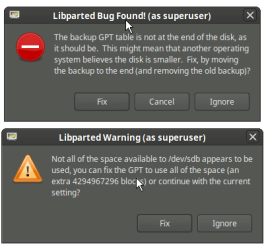
However Windows and Linux Mint disagreed about how big the HDD was, due to the GPT backup being in the wrong location.
If I let LM fix it, I could copy files to it, however when I booted into Windows, it actively deleted all of the copied files.
I just spent all night copying my data off of the drive and tried using "diskpart clean all" on it.
It gives contradictory size info.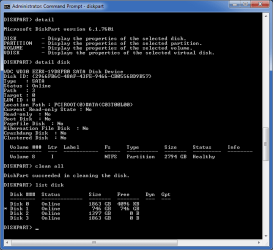
I knew that my first attempt at using GPT was going to end in disaster.
Does anyone know how to fix this issue?
XP can't cope with >2 TB HDDs (BSOD).
I downloaded a utility (3TB+ Unlocker) from ASRock, which was suppposed to allow XP to use HDDs >2 TB HDD in capacity.
There were no instructions on how to use the utility.
The only information I could find said install it and it will appear in the Device Manager as a driver.
I did that and it did appear in the drivers list.
However XP would still BSOD during the boot up.
I deleted XP and rebuilt my entire PC.
I deleted the entire drive and then rebuilt it using GParted (set it to GPT and formatted the entire drive as a single NTFS partiton).
However Windows and Linux Mint disagreed about how big the HDD was, due to the GPT backup being in the wrong location.
If I let LM fix it, I could copy files to it, however when I booted into Windows, it actively deleted all of the copied files.
I just spent all night copying my data off of the drive and tried using "diskpart clean all" on it.
It gives contradictory size info.
Does anyone know how to fix this issue?
Last edited:
My Computer
- Computer type
- PC/Desktop
- Computer Manufacturer/Model Number
- n/a
- OS
- W7 Ultimate SP1, LM19.2 MATE, W10 Home 1703, W10 Pro 1703 VM, #All 64 bit
- CPU
- AMD Phenom II x6 1100T, 3.3 GHz
- Motherboard
- ASUS M4A88T-M/USB3 (AM3)
- Memory
- 12GB DDR3 1333 G-Skill (4GB x 2), G-Skill (2GB x 2)
- Graphics Card(s)
- NVIDIA GeForce GTX 660
- Sound Card
- Realtek?
- Monitor(s) Displays
- Samsung S23B350
- Screen Resolution
- 1920x1080
- Hard Drives
- WD Green 2TB (SATA), WD Green 3TB (SATA), WD Blue 4TB (SATA), WD Blue 6TB (SATA)
- PSU
- Cooler Master
- Case
- Antec GX300 Tower
- Cooling
- 3x Antec TRICOOL 120mm Fans
- Mouse
- Wired Optical
- Internet Speed
- DSL
- Antivirus
- Avast
- Browser
- Pale Moon (64 bit)
- Other Info
- 2018-12-27 Upgraded HDDs
2015-12-10 Upgraded case, graphics card, storage
2015-08-15 Upgraded motherboard & RAM
2015-07-15 Upgraded LM17.1 to LM17.2