Device error code 12. How do I free up resources

Hazardsneon

New member
Local time
8:43 AM
Messages
7
My original post was in the audio section because I am having issues getting the HD audio working on my "new to me" Nvidia GT-430 HDMI port. That post is here:http://www.sevenforums.com/sound-audio/360626-cant-get-audio-work-hdmi.html

However, I believe it is a resources problem so I thought I would try my luck here.

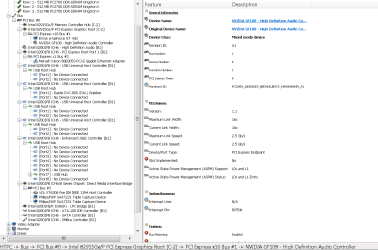
I have an HP z556 home theater PC. It is running Windows 7 Ultimate x86. The video card, again, is an Nvidia GT-430. I can't get windows to recognize the Nvidia audio device in the sound manager. I was just looking in the Device manager and there happens to be a "High Definition audio controller" that is in error. It has a code 12, meaning that it doesn't have enough resources to work. I think this is for my video card because it is the same location as the video card.

So, there were a total of 2 High Definition Audio Controllers, one that works the on-board audio and this one that is in error. I disabled the on-board, rebooted and the error didn't go away. How can I free up resources so that I can get rid of the code 12 error?

Let me know if you need anymore information so that I can help you to help me. Thanks!!!
 

My Computer

Computer type
PC/Desktop
Computer Manufacturer/Model Number
HP z556
OS
Windows 7 Ultimate x64
CPU
Intel® Core™2Duo Processor E6420 (4M Cache, 2.13 GHz, 1066)
Motherboard
Intel MicroATXD G33BU Desktop Socket 775 Motherboard
Graphics Card(s)
EVGA Nvidia GT-430
Monitor(s) Displays
Vizio M370 TV
Screen Resolution
1920 x 1080
Hard Drives
250GB SATA
PSU
250W
Antivirus
Avira
Browser
Firefox
Well without going into any great depth Hazards mate you haven't got a lot in RAM installed on that board I think you would if you can get at least 3GB and preferably 4GB installed for starters. I know it is hard to get hold of and is getting expensive but the RAM is a bottleneck when it comes to running the machine, and especially as you are running Ultimate it as a general rule needs at least 4GB RAM.
The hard drive is also a tad small and I am guessing fairly old? Plus this is telling me he minimum power requirement too http://www.geforce.com/hardware/desktop-gpus/geforce-gt-430/specifications - 300watts now that is a fair slug of power and I would suggest you look at my little ditty and see what the PSU is doing and also run the power calculator to see what all the components all up are needing in power http://www.extreme.outervision.com/psucalculator.jsp < use the light version. Post back what it tells you.
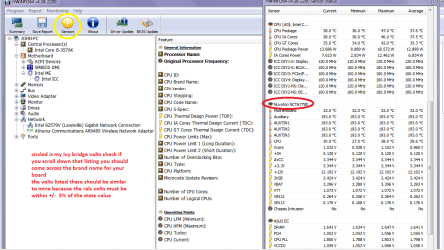
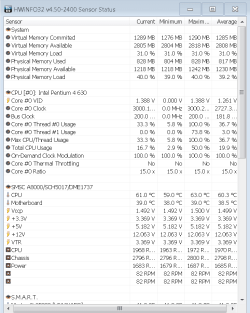
If possible please send a pic of the readout as in my pic for the volts on that PSU.
Using HW Info
You can test the volts on the PSU with HW Info HWiNFO, HWiNFO32/64 - Download < download the right bit version and close the right hand window select Sensors and scroll down to the power section where you will see what the volts are doing see my pic.
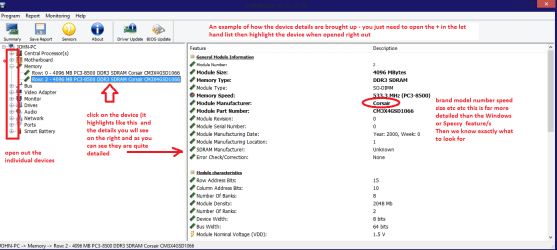
The original right hand window shows the machine running and is handy for that but for looking at the components in some detail close it and use the main left hand side panel
FOR OTHER COMPONENTS
Open each small square with + in it on the section the components are in and then click on the individual component/s (it will highlight in blue) - in the right hand side will appear all sorts of details including brands speeds and other essential info that particular device. See pic for example.
 

Attachments

  • HW Info PSU VOLTS DSEKTOP.PNG
    HW Info PSU VOLTS DSEKTOP.PNG
    51.7 KB · Views: 3
  • HW DEVICES INFO  RAM.PNG
    HW DEVICES INFO RAM.PNG
    34.2 KB · Views: 2

My Computer

Computer type
PC/Desktop
Computer Manufacturer/Model Number
Own build (new) Desk1 / Asus ROG Win 7 / Desk2 1st build
OS
Desk1 7 Home Prem / Desk2 10 Pro / Main lap Asus ROG 10 Pro 2 laptop Toshiba 7 Pro Asus P2520 7 & 10
CPU
Desk1 i5 3750K / Laptop i7 GTX 860M / Desk2 i5 2500
Motherboard
Desk1 Asus P877-V / Desk2 Gigabyte H67 UD3H / Laptop ?
Memory
Desk1 8GB (1866) / Desk2 16GB (1333) / Laptop 8Gb DDR3
Graphics Card(s)
Desk 1& 2NVidia GTX 650 & Laptops on board Intel
Sound Card
Desk 1 & 2 -XONAR DG Realtek High Def audio Laptop
Monitor(s) Displays
Desk 1 Benq HD 2450 / Desk2 Philips 24" / Laptop 17.5"
Screen Resolution
1920x1080 D1 & D2 & Laptop 1
Hard Drives
Desk1 Samsung 120GB 830 SSD
Asus ROG 256GB 850 Pro SSD
Desk2 Samsung 840 256 SSD
Toshiba 120GB EVO
PSU
Desk 1 Corsair HX 1050/ Laptop ? / Desk 2 Corsair HX 650
Case
Desk 1 Cooler HAF XM ? Toshiba laptop / Desk2 Coolermaster
Cooling
Fans on all Desk1 -2 Desk2 - all Coolermasters 5 Laptop ?
Keyboard
Desk 1 MS Sidewinder X6 Desk 2 MS Sidewinder X 4
Mouse
Desk 1&2 - Gigabyte MS 900 gamer - laptop - Logitec wireless
Internet Speed
ADSL2+
Other Info
One other Desktop (tester) and spare Toshba laptop both with SSD's
Running Kaspersky 2016 ISS on all machines config'd identically
Logitec audio stereo systems on each machine (x3)
Canon MG5250MFC
Router/modem TP-Link running WPA2SK
That HW info is a pretty sweet program.

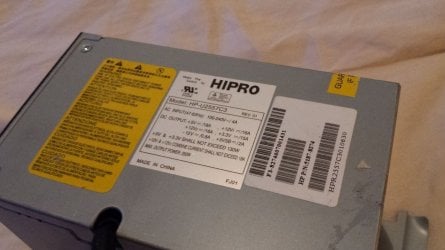
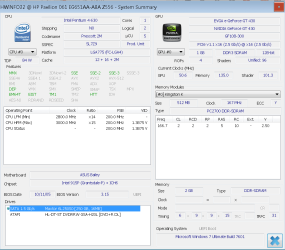
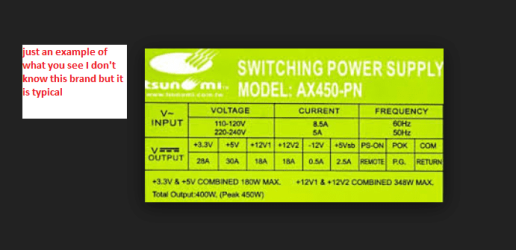
So, eXtreme Power supply calculator says I need at a minimum of 283 Watts. This is higher than the 250W power supply that comes in the z556 HTPC. I don't have a chance right now to pull the case apart but I found a picture online of a power supply exactly like mine. I have attached the picture. I also attached a picture of the sensors.

The hard drive is small compared to hard drives these days but I'm still way under 50% usage.

With regards to the RAM, 2GB is all that is allowed on this MOBO and watching the task manager, it doesn't look like I'm taxing those 4 sticks either. Otherwise since I'm running win7 can I do more?

With regards to the other pictures I attached, I am hoping that they will say a lot more than me typing. Thanks!
 

Attachments

  • hpz556_PS.JPG
    hpz556_PS.JPG
    145.4 KB · Views: 0
  • PCI_Bus_0.PNG
    PCI_Bus_0.PNG
    33.4 KB · Views: 1
  • sensors.PNG
    sensors.PNG
    20.6 KB · Views: 0
  • system_summary.PNG
    system_summary.PNG
    28.2 KB · Views: 0

My Computer

Computer type
PC/Desktop
Computer Manufacturer/Model Number
HP z556
OS
Windows 7 Ultimate x64
CPU
Intel® Core™2Duo Processor E6420 (4M Cache, 2.13 GHz, 1066)
Motherboard
Intel MicroATXD G33BU Desktop Socket 775 Motherboard
Graphics Card(s)
EVGA Nvidia GT-430
Monitor(s) Displays
Vizio M370 TV
Screen Resolution
1920 x 1080
Hard Drives
250GB SATA
PSU
250W
Antivirus
Avira
Browser
Firefox
Ok well done Hazard and yes it is a good program to keep for fiuture use.
Now the PSU issue mate I hate to say it but you really have to buy a good brand named one those ones are ok but really the cheaper ones do not have the capabilities or inner circuitry to do justice to your system. The volts on that one are fine but the amps are out mate you can work that out using Ohms law - that is watts = volts x amps So if you have a 12 volt rail at 25 amps then you will get 300 watts of power available and it is the 12 volts rail that is important as it supplies a lot of different high use components.

On the side of the PSU you can see the different voltage rails and you only have to multiply the volts by the amps to get the watts see pic

Now I would aim for at least one of 350 watts capacity and preferably 400-450 watts as that gives you plenty of leeway. NOw I am a great fan of Corsair PSU's but there are others that are good lie Seasonic for example. see this one and you can see for a little price you are getting stacks of power and a good PSU brand CORSAIR CX series CX430 430W ATX12V v2.3 80 PLUS BRONZE Certified Active PFC Power Supply - Newegg.com

Now it is a pity about the RAM and well if that board only supports 2GB then that is that because the Ultimate is a RAM hungry OS.

PS I meant to say if you are going to get this or another one look at what are known as modular PSU's they come with attachable cables and so you don't have "extras" hanging around. Mind that M one is $12 more:rolleyes:
 

Attachments

  • PSU LABEL.PNG
    PSU LABEL.PNG
    45 KB · Views: 8

My Computer

Computer type
PC/Desktop
Computer Manufacturer/Model Number
Own build (new) Desk1 / Asus ROG Win 7 / Desk2 1st build
OS
Desk1 7 Home Prem / Desk2 10 Pro / Main lap Asus ROG 10 Pro 2 laptop Toshiba 7 Pro Asus P2520 7 & 10
CPU
Desk1 i5 3750K / Laptop i7 GTX 860M / Desk2 i5 2500
Motherboard
Desk1 Asus P877-V / Desk2 Gigabyte H67 UD3H / Laptop ?
Memory
Desk1 8GB (1866) / Desk2 16GB (1333) / Laptop 8Gb DDR3
Graphics Card(s)
Desk 1& 2NVidia GTX 650 & Laptops on board Intel
Sound Card
Desk 1 & 2 -XONAR DG Realtek High Def audio Laptop
Monitor(s) Displays
Desk 1 Benq HD 2450 / Desk2 Philips 24" / Laptop 17.5"
Screen Resolution
1920x1080 D1 & D2 & Laptop 1
Hard Drives
Desk1 Samsung 120GB 830 SSD
Asus ROG 256GB 850 Pro SSD
Desk2 Samsung 840 256 SSD
Toshiba 120GB EVO
PSU
Desk 1 Corsair HX 1050/ Laptop ? / Desk 2 Corsair HX 650
Case
Desk 1 Cooler HAF XM ? Toshiba laptop / Desk2 Coolermaster
Cooling
Fans on all Desk1 -2 Desk2 - all Coolermasters 5 Laptop ?
Keyboard
Desk 1 MS Sidewinder X6 Desk 2 MS Sidewinder X 4
Mouse
Desk 1&2 - Gigabyte MS 900 gamer - laptop - Logitec wireless
Internet Speed
ADSL2+
Other Info
One other Desktop (tester) and spare Toshba laptop both with SSD's
Running Kaspersky 2016 ISS on all machines config'd identically
Logitec audio stereo systems on each machine (x3)
Canon MG5250MFC
Router/modem TP-Link running WPA2SK
Back
Top